

Roads and highways can be unpredictable—and yes, sometimes genuinely dangerous. Collisions, sudden lane changes, debris, hit-and-runs, and near-misses can happen even when you’re doing everything right. Just as importantly, not every stressful situation on the road is caused by a “bad driver.” Some incidents are driven by misunderstandings, biased assumptions at the scene, unnecessary traffic stops, theft attempts, staged crashes, or insurance fraud strategies designed to manipulate blame. In that environment, a dash cam becomes more than a gadget—it becomes a reliable, objective witness that remembers what people forget and records what people dispute.
Choosing the best dash cam for safety, security, or simply capturing unusual events can feel overwhelming. The market is packed with models that look identical on the surface, while specifications are often inflated, misunderstood, or buried behind marketing language. Many options also come from unfamiliar brands, which makes it harder to judge long-term reliability, firmware support, and real-world video clarity. In this guide, we’ll break down dash cams from an expert’s perspective—what they are, why they matter, and how to choose the right one without wasting money or missing crucial features.
SEE ALSO: Can we trust electric cars that drive themselves?
What Is a Dash Cam?
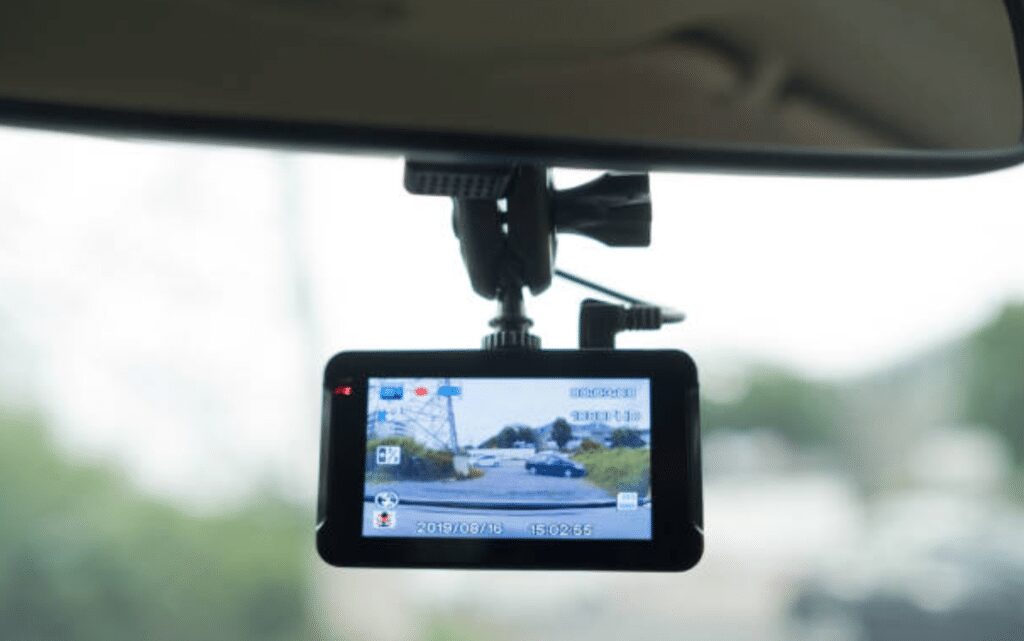
A dash cam (short for “dashboard camera”) is a compact video recorder designed to document what happens while you drive. In practical terms, it’s a purpose-built camera system that automatically starts recording when the vehicle is powered on, continuously saves footage in short segments, and overwrites older clips when storage fills—unless an event is detected or the driver manually locks a clip.
Most dash cams mount on the windshield (typically behind or near the rear-view mirror) to capture a wide, stable view of the road ahead. Depending on the model, a dash cam may also record the cabin (useful for rideshare drivers), the rear view (valuable for tailgating, rear-end collisions, and parking incidents), or even side angles via additional cameras.
So, what makes dash cams different from simply using a phone camera? Three things: automation, reliability, and event protection. A proper dash cam is designed for heat, vibration, and long recording sessions. It can run every time you drive without you touching a button. And when something happens—hard braking, a bump while parked, or a collision—the dash cam can automatically protect the relevant segment so it isn’t overwritten. That “hands-off documentation” is why dash cams are so valuable in real-world incidents.
If you’ve ever been in a crash, you already understand how quickly stories diverge after impact. People misremember the color of a light, the speed of traffic, or who drifted first. Even honest witnesses can disagree because they saw different angles. A dash cam reduces the argument to evidence.
With a dash cam, drivers can create video documentation of events outside the vehicle (the roadway, lanes, signals, traffic behavior) and sometimes inside the vehicle (driver behavior, passenger behavior, interactions during a stop). There are dozens of options and configurations available—front-only, front-and-rear, or front-rear-cabin. The key is choosing the layout that matches how and where you drive.
While selecting the appropriate dash cam may seem challenging, it becomes much easier if the owner knows what they need and has a clear picture of their budget. If your goal is basic crash documentation, you can shop differently than someone who needs parking mode protection, night driving clarity, or fleet-grade GPS records. When you define your use-case first, the right dash cam becomes obvious—and you’re far less likely to overspend or underbuy.
What are the Benefits of Dash Cams?
Dash cams provide value in ways many people don’t anticipate until they need them. Beyond documenting accidents, they can help resolve disputes, discourage bad behavior, support insurance claims, and provide peace of mind when you’re parked. Below are three of the most practical benefits, expanded with real-world context so you understand how the footage actually helps.
1. Full proof of incidents or mishaps
On modern roads, incidents are not limited to major collisions. They include sideswipes, sudden cut-ins, brake-checking, debris strikes, pedestrians stepping out unexpectedly, cyclists appearing in blind spots, and chain-reaction fender benders where fault becomes complicated. When something happens quickly, the human brain fills gaps with assumptions—especially under stress. That’s where a dash cam becomes indispensable: it records the timeline and preserves the details.
In many disputes, the key questions are simple but difficult to prove without video: Who changed lanes first? Was the turn signal used? Did the other driver run a red light? Was there already damage on the other vehicle? Did a vehicle reverse into you? Dash cam footage answers these questions with far less ambiguity than memory or opinion.
There’s also a social reality on the road: larger vehicles are often blamed first. If you drive a truck, SUV, van, or commercial vehicle, you may find that bystanders assume you were at fault simply because you look “more capable of causing damage.” A dash cam helps protect you from that bias by showing the event from start to finish.
Even when you are not involved directly, dash cam footage can be valuable if you witness an accident. Your recording can support another driver’s claim, provide a plate number in a hit-and-run, or help authorities understand what happened. In serious cases, a good witness clip can change outcomes.
From a professional perspective, the real power of dash cam footage is that it captures context: traffic density, lane markings, weather, road conditions, timing of brake lights, and the behavior leading up to the incident. That context can matter as much as the impact itself.
2. Protection against harassment by the police
Most law enforcement officers do their job professionally and are focused on safety. That said, drivers sometimes experience unfair stops, misunderstandings, or interactions where the facts are disputed afterward. A dash cam can provide a clear record of what occurred, which can be useful for clarifying events, protecting a driver from false claims, or supporting a complaint if a situation crosses the line.
Examples of disputes that video can help address include: whether you actually crossed a line, whether your brake lights were functioning, whether you used your seat belt, whether you were on your phone, or whether an officer’s description of the interaction matches reality. When it comes to proving your innocence, recordings can be far more effective than arguing on the roadside.
Dash cams can also help in another common scenario: encountering reckless drivers. Aggressive tailgating, dangerous overtakes, lane weaving, and high-speed driving create risks for everyone. Capturing this behavior—especially when it includes clear shots of the vehicle and license plate—gives you options. Depending on the situation, you may decide to submit a report, share footage with authorities, or provide evidence if the reckless driver causes a crash down the road.
Expert tip: if you plan to rely on dash cam footage for any official purpose, ensure the camera’s date and time are correct and that the video is stable and readable. A blurry plate or wrong timestamp reduces credibility.
3. Calming aggressive drivers
Road rage can escalate quickly—sometimes over something as minor as a misunderstood merge or a slow left-lane driver. In the moment, aggressive individuals may behave irrationally, and the risk isn’t only verbal. Some drivers follow others, block lanes, threaten, or attempt physical confrontation at stoplights or parking lots.
A visible dash cam can reduce that risk in two ways. First, it acts as a deterrent: when people realize they are being recorded, they are more likely to back down. Second, it provides documentation if the situation becomes serious. If someone threatens you, attempts to damage your vehicle, or tries to force you off the road, a dash cam can capture the behavior and establish intent—details that may matter in legal or insurance scenarios.
That said, safety comes first. Don’t escalate a confrontation just because you have a camera. The best practice is to avoid engaging, keep distance, and move toward a populated or well-lit area if you feel threatened. Your dash cam should support a calm, defensive strategy—not replace it.
In legal proceedings or insurance disputes, video can be a powerful tool because it is harder to argue with a continuous record than with a written statement. The stronger and clearer the footage, the more it can reduce disputes and speed up resolutions.
How to Choose the Best Dash Cam?
Choosing the best dash cam is easier when you treat it like a tool rather than a toy. The “best” model is the one that captures the evidence you need, in the conditions you drive in, with the least friction. A dash cam that looks great on paper but is annoying to use often ends up unplugged. And a dash cam with impressive resolution but poor low-light performance can fail when you need it most—at night, in rain, or under harsh glare.
Below are the core selection factors, explained in practical terms. Think of these as the foundation. After that, I’ll also cover additional considerations—like parking mode, power options, and memory cards—that are often overlooked but can be just as important as the headline specs.
1. Video resolution
Video resolution is one of the first specs people notice, and it matters—but not in the way marketing sometimes suggests. Resolution determines how many pixels make up the image. More pixels can mean more detail, which can help with reading license plates, identifying street signs, and capturing distant vehicles.
Today, many dash cams advertise 4K, and a good 4K dash cam can produce excellent clarity. However, resolution alone doesn’t guarantee usable footage. If the camera uses an average sensor, weak processing, or overly aggressive compression, the final video can still look soft—especially in motion. For most drivers, a high-quality 1080p (Full HD) or 1440p (2K) dash cam with strong bitrate and good low-light performance can outperform a cheap “4K” model in real-world driving.
As a baseline, if you don’t want to spend heavily, aim for at least 1080p. If you drive on highways, commute at night, or want better plate clarity at distance, consider 1440p or a reputable 4K unit—especially if it’s known for strong sensors and balanced exposure.
Expert checklist for resolution-related quality:
- Bitrate: Higher bitrate usually preserves detail during motion.
- HDR/WDR: Helps handle glare and high-contrast scenes (bright sky + dark road).
- Frame rate: 30fps is common; 60fps can help with fast-moving scenes but increases storage use.
In other words, don’t buy resolution in isolation—buy overall video quality.
2. GPS tracking
GPS is one of the most underrated dash cam features because it doesn’t “look” exciting—until you need it. A dash cam with GPS can embed location and speed data into your recordings (or store it alongside the video). This can help reconstruct what happened during an incident: where the vehicle was, what route it took, and how fast it was moving.
When analyzing footage after a collision, GPS data can add credibility. It can show that you were not speeding, confirm the exact intersection or highway exit, and establish time-and-location alignment with other evidence. This becomes particularly useful when multiple vehicles are involved or when a dispute hinges on where each vehicle was positioned.
Another benefit: GPS can be useful for fleet drivers and long-distance commuters who want a clear record of routes, travel times, and driving patterns. And if you ever need to find where a specific clip was recorded, location metadata makes the search far easier than scanning files manually.
High-end dash cams often include GPS internally. Some mid-range models offer GPS through an external module or mount. Either approach can be effective as long as the GPS signal is stable and the time synchronization is accurate.
DON’T MISS: The Best Hands-Free Car Kits of 2026: Best Bluetooth Hands-Free Car Kits
Practical GPS advice: Make sure your dash cam’s overlay settings match your needs. Some drivers prefer to display speed on the video; others prefer to keep it off the visible overlay but still store it in metadata. Choose what best supports your use-case and local norms.
3. Field-of-view (FOV)
Field of view is how wide the camera can “see.” Dash cams typically use wide-angle lenses so they can capture multiple lanes and the broader environment. A wider FOV can help record vehicles approaching from the sides, capture the full width of an intersection, and document lane positioning—details that are often critical in merges, turns, and side-impact collisions.
However, there’s a trade-off: extremely wide lenses can introduce distortion (the “fish-eye” look). Distortion can make vehicles at the edge of the frame look farther away than they were. The best dash cams balance width with realism, using good optics and software correction.
As an expert rule of thumb, you want a wide enough FOV to capture adjacent lanes without making the entire scene look stretched. Many drivers find the sweet spot in the ~130° to ~170° range depending on camera placement and sensor size. If you drive in dense urban traffic with frequent side interactions, lean toward wider coverage. If you drive mostly highways and want long-distance clarity, slightly narrower FOV can preserve detail.
Also consider the vertical FOV. A camera that captures too much sky and too little road can miss crucial lane and bumper details. Positioning matters: mount placement can improve what the camera captures more than small differences in advertised FOV.
4. Wireless connectivity
Wireless connectivity—typically Wi-Fi and sometimes Bluetooth—makes a dash cam far easier to use. With a companion app, you can view clips on your phone, download important footage quickly, and adjust settings without removing the camera or pulling out the memory card. In high-stress moments, like after a collision, being able to save and share a clip immediately can be extremely helpful.
Wi-Fi is especially valuable because it allows fast transfer of video files. Bluetooth is sometimes used for quick pairing, basic commands, or low-bandwidth data. Some systems use both: Bluetooth for connection setup and Wi-Fi for file transfer.
That said, not all dash cam apps are equal. From a professional standpoint, app quality is a serious consideration. A great camera paired with a poorly designed app can be frustrating. Look for models known for stable connectivity, consistent firmware updates, and simple clip management.
SEE ALSO: 4 Must-Play Car Racing Games Every Car Lover And Gamers Must Play
Security note: wireless features are convenient, but you should still set strong passwords where possible, update firmware when recommended, and avoid leaving a dash cam in “open network” mode permanently.
5. Storage capacity
Dash cams generate large amounts of video—especially at higher resolutions, higher frame rates, or when recording multiple channels (front + rear + cabin). Storage capacity determines how far back your footage goes before it is overwritten by loop recording.
As a minimum, look for a dash cam with a MicroSD card slot that supports at least 32 GB. Many drivers will benefit from 64 GB or 128 GB, depending on resolution and driving hours. If you drive for work, take long trips, or use parking mode, larger capacity becomes more important because the camera will record more events.
Just as important as size is card quality. Dash cams write continuously, which is harsh on memory cards. Cheap cards fail. When they fail, the dash cam may stop recording silently or corrupt clips—exactly what you don’t want. Use a high-endurance MicroSD designed for continuous recording, and replace it periodically based on your usage.
Expert storage practices that reduce headaches:
- Format in-camera: Format the MicroSD card using the dash cam’s menu, not your computer, to reduce file system issues.
- Check clips monthly: Confirm the camera is recording and saving properly.
- Use protected clips wisely: If the card fills with locked files, loop recording can fail—learn how your camera handles locked footage.
Storage isn’t glamorous, but it is foundational. The best dash cam in the world is useless if it can’t reliably save video.
6. Audio features
Audio recording can add valuable context—especially in disputes where spoken words matter, such as aggressive encounters, passenger incidents, or certain interactions during stops. Audio can capture horns, sirens, and verbal exchanges that help explain what was happening at the time.
However, audio also introduces legal and privacy considerations. Some jurisdictions restrict recording voices without consent, particularly if the camera captures conversations inside the cabin. For that reason, it’s important to choose a dash cam that allows you to toggle audio recording on or off, and ideally one that makes the setting easy to access.
From an expert viewpoint, the best approach is to understand your local laws and your personal privacy preferences. If you drive rideshare, taxis, or carry passengers regularly, you may want signage and a clear policy. If your dash cam records inside the vehicle, ensure you’re compliant and transparent where required.
Audio quality also varies. Some dash cams pick up too much wind or cabin noise, while others compress audio aggressively. Don’t expect studio-quality sound—but do expect clarity sufficient to capture the essentials.
Expert add-ons that separate a good dash cam from a great one
The six factors above are core decision points, but seasoned drivers and security-minded owners typically evaluate a few additional features. These extras are where many “average” dash cams fall behind—and where a thoughtfully chosen model can feel like a true safety upgrade.
Parking mode and incident detection
Parking mode records while your vehicle is off, which is crucial if you park on the street, in shared lots, or anywhere door dings and bumper taps are common. There are several types of parking mode, and understanding the difference helps you buy smarter:
- G-sensor (impact) recording: The camera wakes up when it detects a bump and records a clip.
- Motion detection: The camera records when movement is detected in front of the lens.
- Time-lapse parking mode: The camera records at a lower frame rate to save storage while still capturing the full timeline.
- Buffered parking mode: The camera captures a few seconds before the trigger event, which is ideal because many incidents happen suddenly.
If you care about parking protection, buffered recording is a major advantage. Without buffering, the camera may only start recording after the impact—missing the approach vehicle and plate.
Power options: battery vs. capacitor
Dash cams need power, and the internal power design influences reliability—especially in heat. Many experienced installers prefer dash cams that use capacitors rather than small lithium batteries. Capacitors tend to tolerate heat better and are less prone to swelling or degradation over time. The capacitor’s job is not to run the camera for hours; it’s to safely save the last file when power is cut and allow graceful shutdown.
If you live in a hot climate or park in direct sun, prioritizing a capacitor-based dash cam can improve long-term durability. Batteries can work, but they are more sensitive to temperature extremes.
Front, rear, or cabin: which setup is right?
Dash cam configuration should match your risk profile:
- Front-only: Good for basic crash documentation and budget builds.
- Front + rear: Strongly recommended for most drivers—rear-end incidents are common, and rear footage helps with tailgaters and hit-and-runs.
- Front + cabin: Ideal for rideshare drivers and fleets—records passenger behavior and interior events.
- Front + rear + cabin: Maximum coverage for professional drivers, taxi/rideshare, or high-risk environments.
As an expert recommendation, if your budget allows, front-and-rear is the sweet spot for everyday drivers. It addresses the most common collision directions and provides more context when blame is contested.
Night vision, HDR, and glare management
Low-light performance is where many dash cams separate into two categories: “records something” and “records something usable.” Night driving introduces headlight glare, reflective signs, wet roads, and rapid exposure changes under street lamps. A dash cam that handles dynamic range well (often labeled HDR or WDR) can preserve details in both bright and dark areas.
If you frequently drive at night, in rain, or in poorly lit areas, prioritize:
- Quality sensor + processing: Better than relying on “night vision” marketing alone.
- HDR/WDR: Helps balance headlights and shadows.
- Proper exposure tuning: Some cameras allow exposure compensation, which can improve plate capture.
Remember: reading license plates at night is one of the hardest tasks for any camera because of reflective plate materials and motion blur. Your goal is to maximize your odds, not chase perfection.
Loop recording and file protection
Loop recording is what allows a dash cam to record continuously without requiring endless storage. The camera records in segments (often 1, 3, or 5 minutes). When the card fills, it overwrites the oldest unlocked clip.
Equally important is file protection: the camera should automatically lock “event” footage when it detects a collision or major impact via the G-sensor, and it should allow you to manually lock clips with a button. This reduces the chance that the most important footage gets overwritten during the drive home or during routine recording afterward.
Expert advice: set your clip length to 1–3 minutes. Shorter clips are easier to share and reduce the chance of losing a large segment if corruption occurs.
Mounting and installation quality
A dash cam can only perform as well as its mount allows. A shaky mount creates motion blur and makes plates harder to read. A poorly placed camera can record too much dashboard and too little road. And messy wiring can tempt you to unplug the camera—defeating the purpose.
For best results:
- Mount the camera high, near the rear-view mirror, to maximize road view and minimize distraction.
- Route the cable along the headliner and A-pillar trim for a clean install.
- Keep the lens area clear of tint strips that can affect exposure.
- Clean the glass thoroughly before attaching adhesive mounts.
If you want true parking mode, consider a hardwire kit with a low-voltage cutoff so your camera doesn’t drain your battery. Professional installation is worth considering if you are uncomfortable working near trim, airbags, or fuse boxes.
A practical buying roadmap: choose your dash cam in 3 steps
To make the selection process simple, here’s a practical three-step method professionals often use when advising drivers:
- Define your main risk: daily commute collisions, parking lot damage, rideshare passenger protection, or long-haul highway driving.
- Pick your camera layout: front-only (basic), front+rear (most drivers), or front+rear+cabin (maximum coverage).
- Prioritize the “must-haves” over hype: reliable recording, good low-light performance, stable mount, endurance microSD support, and easy clip retrieval.
This approach prevents a common mistake: buying the camera with the flashiest spec list while ignoring the features that actually matter in an incident—clarity, reliability, and ease of saving evidence.
Legal and privacy notes every driver should know
Dash cams are widely legal in many places, but the rules that surround them vary. The two most common legal issues involve windshield obstruction and audio recording consent. Some jurisdictions restrict where you can mount devices on the windshield. Others require consent for recording audio, particularly inside the vehicle.
To stay on the safe side:
- Mount your dash cam in a location that minimizes obstruction (often behind the mirror).
- Use a dash cam that allows audio recording to be disabled if needed.
- If you record inside the cabin for rideshare or work, consider clear notification where required.
- Be mindful when sharing footage publicly—faces, plates, and locations may have privacy implications.
This article provides general guidance, not legal advice. If you drive professionally or across borders, it’s worth checking the local rules so your footage remains usable and you remain compliant.
Maintenance and best practices for long-term reliability
Dash cams are “set and forget” devices—until they aren’t. In the real world, the most common dash cam failure is not the camera; it’s the memory card, the mount adhesive, or the owner forgetting to confirm that the device is still recording. A small routine can prevent major disappointment later.
Here’s a simple expert routine that takes only minutes per month:
- Confirm recording: Check a recent clip to ensure audio/video are working.
- Inspect the lens area: Clean fingerprints, haze, or dust that can reduce clarity at night.
- Review the date/time: Power interruptions can sometimes reset clocks on certain models.
- Format the card periodically: Many manufacturers recommend monthly formatting to reduce file errors.
- Check mount stability: Heat can loosen adhesives; replace mounts as needed.
These steps are not about being obsessive—they’re about ensuring your camera still works on the one day it truly matters.
In conclusion, a dash cam is a crucial addition to any vehicle. It can save drivers a great deal of trouble in unfavorable situations by providing objective video evidence. This evidence not only helps drivers avoid sticky disputes but can also speed up and strengthen auto insurance claims by clarifying fault, documenting damage, and preserving timelines. With the level of risk and unpredictability on today’s roads, a dash cam is not just a “nice to have”—it’s a practical investment in your security, your finances, and your peace of mind.