
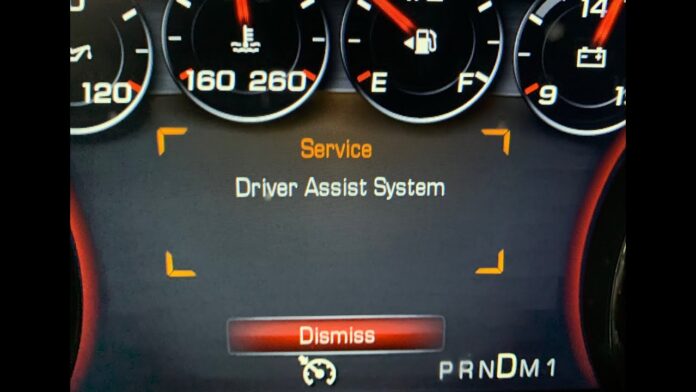

That “Service Driver Assist System” warning just lit up your dashboard. Adaptive cruise control won’t engage, lane-keeping is gone, and suddenly your vehicle feels a lot less “smart” than it did yesterday. The first question most drivers ask is the right one: “Is it safe to drive?”
Don’t panic. This warning is common across many brands and models, and in most cases it’s fixable. What’s happening is not always a catastrophic failure; often it’s your vehicle’s safety logic doing exactly what it’s designed to do: disable driver-assist features when the system can’t trust its sensor inputs. That can be triggered by something as simple as road salt on the grille, a fogged windshield camera, a module that needs a reboot, or a sensor that needs recalibration after a windshield replacement.
In this guide, you’ll get an expert-level breakdown of what the warning means, what systems typically shut down, what you can safely try at home, and when it’s time to stop troubleshooting and schedule professional diagnostics. We’ll also cover what repairs and calibrations realistically cost, why they cost what they cost, and how to avoid paying twice for the same problem.
Understanding Your Driver Assist System
Your vehicle’s driver-assist system isn’t one “thing.” It’s a layered network of sensors, wiring, and control modules that constantly exchange data. In modern cars, ADAS (Advanced Driver Assistance Systems) work like a distributed computer: multiple devices interpret the environment, then your car’s control modules decide how to warn you; or whether to intervene.
These systems create a 360-degree view around your car using:
Front-facing cameras mounted near your rearview mirror that watch lane markings and detect pedestrians. Radar sensors hidden behind your front grille that measure distance to vehicles ahead. Ultrasonic sensors in your bumpers for parking assistance.
This technology operates through a sophisticated human-machine interface that typically provides two layers of support:
- Passive warnings that notify you of risk (lane departure alerts, blind-spot indicators, forward collision alerts).
- Active interventions that can apply brakes, reduce engine torque, or add steering input (automatic emergency braking, lane-keeping assist, adaptive cruise braking).
Here’s the critical part: even with these features active, you’re fully responsible for driving. According to NHTSA, these systems are driver assistance; not self-driving. That means when the system goes offline, your vehicle is not “unsafe,” but you must immediately shift back to full manual driving behavior without relying on electronic corrections.
Expert context: Many drivers gradually develop “automation habits.” For example, they might check blind-spot lights more than mirrors, or trust adaptive cruise to manage following distance. When ADAS shuts down, the danger isn’t mechanical; it’s human factors. The vehicle still drives normally, but your workflow must change instantly.
What the Warning Actually Tells You
The “Service Driver Assist System” message is a catch-all fault indicator. Your car’s control modules detected a condition that makes driver-assist behavior unreliable: a blocked camera, radar that can’t see, a sensor that’s out of alignment, a wiring problem, a module communication error, or conflicting data between two sources.
When this fault triggers, your vehicle takes the conservative approach: it disables affected systems rather than risk unpredictable behavior such as phantom braking, incorrect steering corrections, or inaccurate distance control. That’s why the warning can feel dramatic; the car is not “half working,” it often chooses to shut down the feature entirely until it can validate proper operation.
Professional interpretation: Treat this warning like your vehicle saying: “I can’t guarantee correct perception.” ADAS is only as good as the sensors feeding it. If perception quality falls below threshold, disabling is a safety choice.
Features That Stop Working
Once that warning appears, expect some or all of these systems to go offline (depending on your vehicle’s feature package):
- Adaptive cruise control won’t maintain distance from cars ahead
- Lane-keeping assist stops providing steering corrections
- Blind spot monitoring indicators won’t illuminate
- Forward collision alerts and automatic emergency braking may be disabled
- Parking sensors and 360-degree cameras often fail
- Heated steering wheels sometimes stop working (yes, really)
Some failures cascade in ways that feel absurd. GM vehicles have experienced complete driver-assist shutdowns from a broken wire in the driver’s seat vibration motor; a component that seems completely unrelated at first glance. But once you understand ADAS as a network (not a single part), it makes more sense: the system can disable the entire feature stack when one required subsystem fails validation.
Why the heated steering wheel can be affected: In some architectures, convenience features share modules, power distribution, or communication pathways with the driver-assist stack. If the vehicle enters a certain fault mode, it can disable non-essential features to reduce network complexity and prevent unpredictable behavior. It’s not “logical” from the driver’s perspective, but it is a known behavior pattern on some platforms.
Can You Still Drive Safely?
In most cases, your car is mechanically safe to drive. The engine runs normally, steering works manually, and your braking system functions like a traditional vehicle. You can generally drive to a service center or home without towing.
However, the practical risk changes depending on two things:
- What failed (simple sensor blockage vs. unstable sensor output or misalignment)
- When it failed (some systems behave unpredictably before they fully shut down)
The most dangerous scenario can occur before the system fully disables itself. Drivers report alarming phantom braking incidents where the collision system “sees” a nonexistent obstacle and applies heavy braking. Others experience sudden adaptive cruise disengagement in dense traffic, which can create a rear-end risk if drivers behind you aren’t expecting speed changes.
Safe driving guidance: You can usually drive, but drive as if you are in a base-model vehicle with no driver aids. Increase following distance, use mirrors deliberately (not blind-spot lights), and avoid relying on lane-centering or emergency braking to correct mistakes. If the vehicle is actively phantom braking, disengage all assist functions immediately and consider pulling over to reset and reassess conditions.
When you should not keep driving normally: If you notice repeated sudden braking, steering tugging, or unpredictable warning chimes, treat that as a stability issue. Get to a safe location, power cycle the vehicle, clean sensors, and if behavior persists, schedule service and consider limiting use until repaired.
Why This Warning Appears
In the field, “Service Driver Assist System” warnings tend to fall into four major categories; ranging from simple maintenance problems to expensive component failures. Understanding these categories helps you respond intelligently instead of guessing or replacing parts blindly.
Dirty or Blocked Sensors (Easy Fix)
This is the most common cause, and it’s also the one you want to check first because it can often be fixed in minutes. ADAS sensors require clear optical/radar “line of sight.” When that’s compromised, the system disables itself.
Dirt and grime on the windshield or front grille can block camera and radar signals. Honda owners frequently resolve similar warnings by cleaning camera areas and radar surfaces.
Winter weather is a repeat offender. Snow and ice accumulation on the grille, bumpers, or windshield will trigger the warning. Road salt is equally problematic; dried salt spray can create a thin film that looks harmless but destroys contrast for cameras and reduces radar performance.
Heavy rain or fog can temporarily disable camera-based systems. Subaru’s EyeSight is well known for being sensitive to visual obstructions because it relies heavily on cameras behind the windshield.
Expert note: It’s not just “blocked vs unblocked.” Many systems use confidence thresholds. A partially obscured lens might still allow operation under some conditions, but as lighting changes (glare, dusk) or road markings become weak, the system can drop below threshold and shut down. That’s why warnings can feel intermittent and “random” even when the root cause is consistent.
Software Glitches (Frustrating)
Software and module state glitches are the category that frustrates owners most because they can appear and disappear without a clear physical trigger. In these cases, you may clean sensors perfectly, yet the warning persists until the vehicle is restarted or updated.
A control module can “lock up” the same way a computer freezes. Owners report success by shutting the vehicle off, waiting 5–10 minutes, and restarting; forcing modules to reboot and reinitialize.
Software bugs can be especially common on newer vehicle platforms and new feature rollouts. GM Super Cruise owners have reported dealers acknowledging it as a “common problem” and pointing to software updates that may not yet be available or may require staged deployment.
OnStar-equipped vehicles sometimes include a “watchdog” function that attempts automatic module recovery. If the underlying cause persists, you may see the warning flash on and off as the system repeatedly tries to reset itself.
Expert reality check: “Software issue” does not mean “the fix is free.” It may require dealership programming time, and it may be tied to a service bulletin or recall campaign. But it often means you should avoid replacing hardware prematurely, because no new sensor will fix a firmware defect.
Sensor Misalignment (Technical)
ADAS sensors require precision. A radar unit or camera bracket can be off by millimeters and still look perfectly fine from the outside. But that tiny alignment error can shift the system’s perceived “world model,” causing false detections, missed detections, or incorrect lane interpretation.
Minor fender benders that leave almost no visible damage can still nudge a radar bracket or camera angle enough to trigger a fault. A parking lot tap is sometimes all it takes.
Windshield replacement often requires camera recalibration. If the shop installs glass and skips calibration (or performs it improperly), you can get service warnings and degraded performance. This is particularly common when the camera is mounted to the windshield or when glass thickness and optical properties differ.
Mechanical issues like pothole impacts, suspension sag, or alignment problems can affect sensor pointing relative to the vehicle’s centerline. That doesn’t mean every pothole “breaks” ADAS, but it can contribute; especially if the vehicle already has borderline alignment or existing bracket stress.
Expert takeaway: Misalignment is one of the most important reasons to take persistent warnings seriously. A fully disabled system is safer than a partially wrong system. If misalignment allows the system to run but interpret objects incorrectly, you may experience phantom braking or poor lane centering without clear warnings.
Component Failure (Expensive)
Sometimes hardware fails outright. Cameras can fail due to heat stress, moisture intrusion, or manufacturing defects. Radar units can fail from impact, corrosion, or internal electronics faults. Wiring can be damaged by rodents, corrosion, vibration, or poor connector sealing.
And then there are the “you can’t make this up” failures. GM Technical Service Bulletin PIT5445B addresses 2014–2018 Silverados, Tahoes, and Sierras where the fault isn’t a camera or radar; it’s the driver’s seat haptic motor. A broken wire in the seat’s vibration system can trigger driver assist shutdown.
Why a seat motor can shut down ADAS: In some GM architectures, the haptic seat motor is part of the driver alert interface for lane departure and collision warnings. When the system detects a failure in that alert pathway, it may disable related assistance features to prevent incomplete or unreliable warnings. That’s why unrelated-seeming components can cause “system-level” shutdowns.
Brand-Specific Issues You Should Know
Although ADAS concepts are similar across the industry, implementations differ. Different manufacturers use different sensor mixes (camera-heavy vs radar-heavy), different fault thresholds, and different ways of presenting warnings. Knowing the common patterns for your brand can shorten diagnosis dramatically.
General Motors Problems
GM owners report “Service Driver Assist System” frequently across models like Silverados, Sierras, Tahoes, and some newer EVs. The reasons vary: sensor contamination, software glitches, communication faults, and known harness issues.
Super Cruise failures are often the most aggravating because they can be intermittent and hard for dealerships to reproduce. Owners report technicians finding no codes, replacing cameras without improvement, or acknowledging that parts are backordered and software fixes are pending.
On 2014–2018 models, the haptic seat motor wiring issue referenced in the TSB is a notable diagnostic shortcut. If you have those vehicles and the warning persists, it’s worth understanding this known failure point before replacing major ADAS components.
Ford Co-Pilot360
Ford’s Co-Pilot360 suite typically includes Pre-Collision Assist, BLIS (Blind Spot Information System), and Lane-Keeping. Advanced packages add Adaptive Cruise Control with Stop & Go. Faults in the forward radar sensor (often behind the grille) or the windshield camera can trigger service messages, and the system may disable multiple features at once.
Expert note: On Ford platforms, the radar location behind the grille makes it vulnerable to winter salt film and snow packing. Cleaning isn’t just about the windshield; grille and emblem surfaces matter too.
Toyota and Honda
Toyota Safety Sense generally includes Pre-Collision System, Dynamic Radar Cruise Control, and Lane Departure Alert. Honda Sensing often displays more specific messages such as “Some driver-assist systems cannot operate,” and these messages frequently correlate with environmental conditions.
For many Toyota and Honda vehicles, this warning is most commonly linked to dirt, snow, or ice on either the windshield camera area or the front radar area. The fix is often simple: clean the sensors and drive under clear conditions until the system regains confidence.
Expert nuance: Honda and Toyota systems can be conservative in bad weather. If the warning appears only during heavy rain, fog, or snow and clears afterward, it is often normal behavior rather than a failure.
Subaru EyeSight
Subaru’s EyeSight relies heavily on dual cameras behind the windshield. This design can be highly effective for certain scenarios, but it also makes the system uniquely sensitive to visual conditions. Heavy fog, high humidity, glare, or a dirty windshield can quickly trigger warnings like “EyeSight Off.”
Expert tip for EyeSight owners: Clean the windshield inside and out, especially the area in front of the camera housing. Interior haze and off-gassing film can reduce camera clarity even when the exterior glass looks clean.
What You Can Try First
Before booking a service appointment, start with the two highest-success, lowest-risk steps. These solve a large share of “Service Driver Assist System” warnings; especially those triggered by environment and minor module glitches.
Clean every sensor thoroughly. Use a soft cloth and appropriate cleaners on:
- Your windshield, especially the area in front of the rearview mirror (inside and out)
- The brand emblem on your front grille (radar hides behind it)
- Small circular sensors on your bumpers
- Camera lenses under side mirrors
Restart your vehicle completely. If this is a software glitch or module lockup, turning the car off, waiting 5–10 minutes, and restarting can clear the error by forcing modules to reboot.
Expert add-on that many people skip: After cleaning and restarting, drive for 10–15 minutes on well-marked roads in stable weather. Some systems won’t re-enable instantly; they need to revalidate sensor data and rebuild confidence. If you only restart and sit still, you may not see the system recover until you drive.
Step-by-Step Diagnostic Checklist (More Thorough, Still DIY-Friendly)
If the warning doesn’t clear after cleaning and a restart, you can still do meaningful diagnostics without special equipment. The goal is to identify whether you’re dealing with a temporary condition, a calibration requirement, or a likely component failure.
- Recreate the conditions: Does the warning appear only at night, only in rain, only in fog, or only after a car wash? Pattern matters.
- Check the obvious sensor areas again: salt film can dry quickly and be hard to see; glare can make “clean” glass act dirty.
- Inspect for physical damage: cracks near the camera housing, grille damage near radar, bumper impact marks near parking sensors.
- Look for recent changes: windshield replacement, front-end body work, suspension work, wheel alignment, tire size change.
- Check battery health symptoms: low voltage can trigger module faults; if you see multiple unrelated warnings, test the 12V system.
- Scan for codes if possible: even an aftermarket scanner that reads ADAS/ABS codes can narrow the fault domain.
- Document the message: take a photo of the exact warning text; wording differences are diagnostic clues.
Professional tip: Many owners clear warnings accidentally by disconnecting the battery or power cycling the vehicle, then lose the stored “evidence” technicians could have used to locate the issue quickly. If you’re going to a shop soon, consider documenting the warning and any conditions when it happens before performing aggressive resets.
Professional Repair Costs (The Hard Truth)
If the warning persists, you’ll likely need professional help. ADAS has fundamentally changed repair economics, because many parts are no longer “bolt on and go.” They often require calibration using manufacturer-approved procedures and tooling.
A technician will typically scan for diagnostic trouble codes (DTCs) to identify which module or sensor is complaining. The repair path usually falls into one of two categories:
- Recalibration (sensor is fine but needs to be aligned/re-learned after repair or disturbance)
- Replacement + calibration (sensor or related wiring/module is faulty, then calibration confirms correct operation)
The Recalibration Process
This is not a simple “computer reset.” Calibration is a controlled process where the vehicle re-learns sensor orientation and validates that its perception model matches real-world geometry. It requires specialized equipment and trained technicians, and it generally uses two methods:
Static calibration happens in the shop using specific targets placed at precise distances and angles from your vehicle. Dynamic calibration requires driving on well-marked roads for a set period so the system can revalidate itself in real traffic and lane conditions.
Depending on the number of systems involved, calibration can take 15 minutes to several hours. If multiple sensors were disturbed (windshield camera, radar, blind-spot sensors), time and cost can stack quickly.
Expert note: Calibration cost is not just “dealer greed.” It reflects labor time, equipment cost, technician training, and liability. If a shop calibrates ADAS incorrectly and a collision occurs, the liability exposure is enormous. That’s why reputable shops follow strict processes.
What You’ll Actually Pay
Here’s the financial reality based on AAA’s research and industry data:
| Repair Type | Calibration Only | Part + Labor + Calibration |
|---|---|---|
| Windshield Camera | $250 – $700 | $1,150 – $2,600 |
| Front Radar | $300 – $400 | $800 – $1,959+ |
| Blind Spot Monitor | $300 – $400 | $1,040 – $2,000 per sensor |
| 360-Degree Camera | $350 – $450 | Varies widely by camera |
| Parking Sensor | Usually not required | $300 – $1,000 per sensor |
Here’s something that surprises many owners: AAA found that a front radar sensor for a 2023 Nissan Rogue costs $928.82 if assembled in the United States. The identical part costs $1,559.95 if the car was assembled in Japan; a 68% price difference based solely on where your specific vehicle was built.
That kind of variability is why “ADAS repair cost” is hard to predict until the vehicle is decoded by VIN and the exact part number is confirmed.
A minor bumper scrape or windshield chip can now produce hundreds or thousands in electronic repair costs beyond traditional bodywork. In many cases, the “invisible” ADAS work costs more than the visible cosmetic repair.
How to Avoid Paying Twice (What to Ask the Shop)
If you’re sending the car to a dealer, collision shop, or calibration specialist, a few questions can save you significant time and money. These questions aren’t confrontational; they’re simply how you ensure proper scope.
- Will you scan all relevant modules or only the engine ECU? (ADAS faults often live in ABS, camera, radar, and body modules.)
- Is calibration required after this repair? Ask which sensors must be calibrated and whether calibration is static, dynamic, or both.
- Will you provide a calibration report? Many professional calibration systems generate before/after or completion documentation.
- Is the windshield OEM or aftermarket? (This matters especially for camera-based systems.)
- Are there any open TSBs or software updates? This can change the fix from “replace a sensor” to “update a module.”
Expert warning: If a shop replaces a windshield camera or radar sensor and does not calibrate it (or says calibration isn’t necessary), be cautious. Some vehicles will allow the system to “operate” in a degraded state, which can be worse than a full shutdown. If your car supports calibration, it should be performed when required.
The Bigger Picture
The “Service Driver Assist System” warning exposes a fundamental tension in modern vehicles. These technologies demonstrably reduce crash severity and help prevent certain types of accidents; yet they can be surprisingly sensitive to everyday conditions like dirt, weather, and minor impacts.
While NHTSA promotes ADAS as a key tool for reducing traffic fatalities, real-world testing shows limitations. Studies have documented systems that “ping-pong” within lanes, misinterpret stationary objects, or disengage unexpectedly when lane markings degrade. Those limitations don’t make ADAS useless; they simply confirm it must be treated as assistance, not autonomy.
The known failures; where the system recognizes a fault and shuts down; are often safer than unknown failures. A misaligned radar or camera that continues operating with incorrect data can produce phantom braking or improper lane-keeping without giving you a clear warning that its “world view” is inaccurate.
The technology’s vulnerability to dirt, weather, and minor impacts can feel incompatible with the robustness we expect from safety systems. That’s why manufacturers continuously revise software thresholds, improve obstruction detection, and refine calibration procedures. But there’s another real issue: the service ecosystem must keep up.
Most concerning for owners is the “diagnostic gap.” System complexity is sometimes outpacing dealership and independent shop capabilities. It’s not rare for brand-new vehicle owners to be told the fix isn’t available yet, that parts are backordered, or that a persistent fault is a “common problem” across that model line.
As ADAS transitions from luxury option to standard equipment, manufacturers and service networks must invest as heavily in diagnostic transparency and serviceability as they do in feature development. Until then, the most practical owner strategy is simple: keep sensors clean, avoid over-reliance on automation, document warnings carefully, and budget for the reality that some repairs now include expensive electronic calibration.
Clean those sensors regularly, drive attentively without outsourcing judgment to automation, and expect that modern vehicle repairs may include specialized recalibration. That’s the tradeoff; convenience and safety improvements, paired with higher complexity and higher service costs.
Conclusion
The “Service Driver Assist System” message is a common problem across modern vehicles. As discussed, the warning is often triggered by sensor obstruction, temporary software lockups, misalignment after repairs, or component failures.
We’ve also learned that a broken or shorted wire in haptic seat motors is one of the most notorious causes in certain GM vehicles, and correcting it typically requires replacing the motor or repairing the affected wiring per the relevant service guidance. In other cases, a malfunctioned steering wheel or software issue can trigger the message as well.
Use the sensible approach: clean sensors first, reboot if needed, then pursue code-based diagnosis and calibration if the warning persists. With that strategy, most owners can resolve the problem quickly or at least walk into a service appointment with clearer evidence and fewer surprises. Hopefully, you’ll get your driver assist features back to excellent working order without unnecessary cost or downtime.