
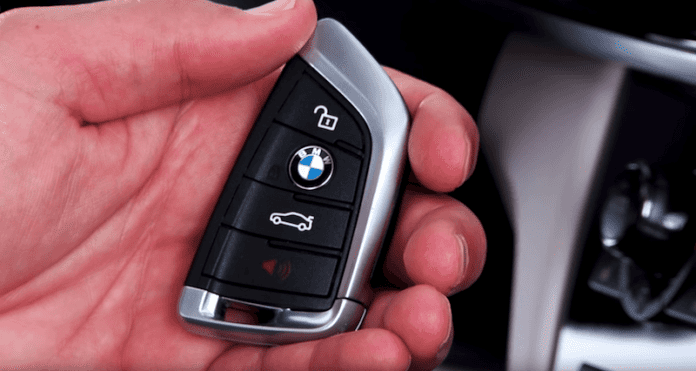

You enter into the driver’s seat of your ultimate driving machine, ready to hit the road. You press your foot firmly against the brake pedal, hit the Start/Stop engine button, and instead of the familiar, exhilarating roar of your BMW’s engine coming to life, you are met with an unexpected, silent, and deeply frustrating message glowing on your iDrive display and instrument cluster: “BMW remote key not detected.”
If you are currently experiencing this exact scenario, take a deep breath. You are certainly not alone. This specific warning is one of the most common electronic notifications modern BMW owners face today. In its simplest, most fundamental terms, this message means that your BMW’s sophisticated immobilizer and access systems are not receiving the highly encrypted security signal from your key fob. As an unyielding protective measure designed to prevent theft, the vehicle’s engine control unit will absolutely not authorize an engine start.
Modern BMWs are essentially high-performance rolling computers, and their Keyless Operation Systems (KOS) are absolute marvels of automotive engineering and cryptographic security. However, when the digital, cryptographic handshake between your key fob and the vehicle’s internal network fails, you are left stranded. A multitude of variables can cause this intricate communication failure—ranging from something as benign and simple as a dead CR2032 lithium coin battery, to something as incredibly complex as a catastrophic hardware failure within the vehicle’s central computer, known as the Body Domain Control Unit (BDC).
As an automotive diagnostics expert with years of experience navigating the labyrinth of German automotive engineering, I have meticulously compiled this masterclass guide to help you understand, diagnose, and definitively fix this error. We are going to explore the hidden anatomy of your BMW’s keyless system, break down the root causes of signal failure in granular detail, provide emergency starting procedures to get you off the side of the road safely, and delve deep into manufacturer technical service bulletins (TSBs) involving intensive BDC replacements and ISTA software updates.
Understanding the BMW “Remote Key Not Detected” Warning
To truly fix a complex automotive problem, you must first understand the underlying mechanics and software logic behind it. The “remote key not detected” warning is not just a generic, catch-all error; it is a highly specific communication fault. It is your vehicle’s advanced computer network explicitly stating that the low-frequency (LF) antennas situated inside the cabin cannot triangulate the physical position of an authorized, recognized key fob.
When you enter your BMW, the vehicle automatically emits a low-frequency ping, actively searching for the key. If the key is present in your pocket or purse, it “wakes up” from its low-power sleep state and immediately responds with a high-frequency (HF) or ultra-high-frequency (UHF) radio transmission. This transmission contains a dynamic, rolling cryptographic code. If the vehicle’s Body Domain Controller (BDC) or Front Electronic Module (FEM) recognizes and successfully authenticates this unique code, it instantly unlocks the electronic steering column lock (ELV), primes the high-pressure fuel pump, and signals the Digital Motor Electronics (DME) to authorize spark and fuel for ignition.
When you see the dreaded “Remote Key Not Detected” warning, this vital chain of authentication has broken down at some point in the sequence. It could be that the key never heard the car’s initial ping. It could be that the key heard the ping but lacked the battery power to transmit a strong enough reply. It could be that the car’s interior antennas are deaf to the reply due to a short circuit, or perhaps the central computer (BDC) has suffered a logic failure and is actively ignoring perfectly valid data.
In some of the worst-case scenarios, the issue may be traced to a damaged or corrupted BDC network. This means that a physical hardware replacement or a high-level, dealer-grade firmware update of the module may be completely necessary. Either way, the error message clearly illustrates that the vehicle’s Keyless Operation System (KOS) is functionally compromised and requires your immediate attention.
The Evolution of BMW Immobilizer and Key Systems
To fully grasp why your specific key is failing, it is incredibly helpful to know exactly which generation of BMW electronic architecture you are dealing with. BMW has continuously evolved its theft-prevention and keyless entry systems over the decades, moving from simple physical chips to ultra-secure, networked domain controllers:
- EWS (Elektronische Wegfahrsperre) I, II, III, & IV: Used prominently in the E36, E46, and early E39 eras. This was a relatively simple, passive RFID transponder system. The key had a physical, cut metal blade and a tiny carbon chip embedded inside the plastic head that the ignition barrel read inductively via an antenna ring.
- CAS (Car Access System) 1 through 4: Introduced with the revolutionary (and controversial) E65 7-Series and made incredibly famous by the E90 3-Series generation. This system introduced the dashboard “slot” where you inserted the plastic, rectangular key fob, and it also birthed the early, pioneering versions of Comfort Access (where the key could stay in your pocket).
- FEM (Front Electronic Module): Found extensively in the F-Chassis vehicles (such as the highly popular F30 3-Series). The FEM was a major architectural shift. It combined the CAS module, the junction box, and the central gateway into one massive, highly complex computer. Keys became entirely slot-less; there was no place to insert them on the dashboard anymore.
- BDC (Body Domain Controller): The absolute current pinnacle of BMW’s electronic architecture, found in the newer F-chassis (like the F15 X5) and all modern G-chassis and U-chassis vehicles. The BDC is the central nervous system of the car, handling key authentication, exterior and interior lighting, power windows, wipers, and internal network gateways. Because the BDC does so much heavy lifting, a fault within its intricate circuitry can easily trigger a key detection error alongside other bizarre electrical gremlins.
Comprehensive Causes of the Remote Key Not Detected Error
You may be receiving this panic-inducing error message on your information cluster for a wide variety of reasons. In professional automotive diagnostics, we always adhere to a strict diagnostic philosophy: start from the simplest, most statistically probable, and least expensive cause, and slowly work our way up to the complex, highly expensive computer failures.
These detailed, logically ordered causes will help you diagnose this error properly and potentially save you vast amounts of time and money before heading to the dealership.
1. You Have a Dead, Weak, or Poor-Quality Key Fob Battery
As we have touched upon earlier, your car may not be able to detect any signal simply because the key fob battery is dead or, more commonly, dropping voltage severely under operational load. Modern BMW key fobs typically use a CR2032 or CR2450 lithium coin cell battery. These batteries have a nominal resting voltage of exactly 3.0 volts.
When the voltage drops below approximately 2.8 volts, a deceptive phenomenon occurs. The key fob may still have enough residual power to light up its tiny red or white LED indicator, and it may even have enough power to manually unlock the doors when you physically press the unlock button. However, it completely lacks the necessary, sustained amperage to broadcast the strong, continuous proximity signal required for passive Comfort Access and push-to-start functions. Furthermore, cold winter weather severely impacts the chemical reactions inside lithium coin cells, causing temporary voltage drops. This is precisely why this specific error frequently pops up on freezing cold winter mornings. A simple, inexpensive fix is to replace the battery with a fresh, high-quality, brand-name replacement.
2. Severe Radio Frequency Interference (RFI)
Sometimes the key is transmitting its signal perfectly, and the car’s antennas are listening perfectly, but there is an overwhelming amount of electronic “noise” drowning out the conversation. This phenomenon is known in the engineering world as Radio Frequency Interference (RFI) or Electromagnetic Interference (EMI).
If you have a habit of keeping your BMW key fob in the exact same pocket as your modern, highly powerful smartphone, the intense cellular, Wi-Fi, and Bluetooth transceivers in the phone can completely block or scramble the key’s relatively weak signal. Similarly, aftermarket electronic devices plugged into the vehicle’s interior—such as cheap, poorly shielded USB cigarette lighter chargers, hardwired radar detectors, malfunctioning toll transponders, or cheap dashcams—can emit a localized electromagnetic field that essentially blinds the interior KOS antennas. Always remove other electronics from your pocket, separate your keys from your phone, and unplug all aftermarket accessories when initially diagnosing this issue.
3. Cryptographic De-Synchronization After a Battery Change
Many exasperated BMW owners have complained on forums that they get this exact error immediately *after* they proactively change their key fob batteries to prevent this very issue. Why does this happen? BMW keys utilize advanced “rolling codes” to prevent tech-savvy thieves from cloning the signal using relay attacks. Every single time you press a button, or every time the car pings the key, the mathematical security code changes according to a complex algorithm.
If you take too long to swap the battery out (leaving the fob completely without power for several minutes), or if you accidentally press the fob buttons dozens of times while far out of range of the car, the rolling codes between the key fob and the vehicle’s BDC can fall out of synchronization. The key has rolled forward to code #500, but the car is still expecting code #450. When this happens, the car clearly hears the key, but its security protocol aggressively rejects the code as invalid. You may need to perform a physical resynchronization procedure to force your car and key fob to recognize, realign, and accept their signals once again.
4. Your Key Fob is Physically or Internally Damaged
Water intrusion has been identified time and time again as the absolute major enemy of the delicate BMW key fob. Because we carry these devices everywhere—in our pockets, to the gym, in the rain—they are frequently subjected to accidental trips through the washing machine, drops in puddles, and severe ambient humidity. It is highly possible that moisture may have bypassed the rubber seals, gotten into the fob, and caused microscopic corrosion on the Printed Circuit Board (PCB).
Even if the key eventually dries out, the microscopic minerals left behind by evaporated water can bridge tiny solder connections on the microchip, causing a permanent short circuit that completely prevents the immobilizer chip from broadcasting. Furthermore, dropping your keys onto hard concrete can shatter or dislodge the delicate internal crystal oscillator—a fragile component that dictates the precise radio frequency of the fob. If the internal PCB is physically damaged, replacing the battery will be an exercise in futility; you will need to order a costly, brand-new replacement key fob mapped directly to your vehicle’s VIN from an authorized BMW dealership.
5. Damaged Comfort Access LF Antennas
The Keyless Operation System is responsible for receiving the signal sent from your key fob, and it achieves this spatial awareness through a network of strategically placed Low-Frequency (LF) antennas. To accurately determine if the key is inside the cabin or outside the car (a crucial feature so you don’t accidentally lock your keys in the trunk), BMW places these antennas in very specific locations: usually inside the center console, beneath the rear passenger seats, hidden in the trunk space, and integrated behind the exterior door handles.
If a sugary beverage or coffee is accidentally spilled directly on the center console (a notoriously common issue in many BMW series like the X3 and 5-Series), the liquid can seep down and short out the primary interior center console antenna. If this specific antenna goes offline, the car cannot detect the key sitting right there in the cupholder or in the driver’s pocket. To test this theory, move the key to drastically different areas of the cabin (like throwing it into the back seat or holding it near the roof) and try starting the car to see if a secondary, undamaged antenna manages to pick it up.
6. Body Domain Control Unit (BDC) Hardware or Software Failure
The Body Domain Control Unit is the ultimate, omnipotent central control unit for most electrical components in your modern BMW. It acts as the final, unyielding gatekeeper for vehicle security and immobilization. A damaged BDC hardware module, a corrupted software sector within its flash memory, or a localized electrical short inside the BDC will effectively blind the entire vehicle to all incoming key signals, regardless of how healthy your key fobs are.
This is undeniably the most severe, complex, and expensive cause of the “no key detected” error. BMW has exhaustively documented instances where specific integration levels of BDC firmware cause an infinite software loop or a silent system crash, preventing Comfort Access from functioning entirely. We will discuss the highly intricate fixes and Technical Service Bulletins for the BDC in our dedicated troubleshooting section below.
Emergency Procedure: How to Start Your BMW When the Key is Not Detected
Before we dive deeply into long-term repairs, intricate software updates, and expensive hardware replacements, we must address the immediate crisis: you likely need to start your car right now so you can get safely home, out of the weather, or to a trusted repair facility. BMW engineers wisely anticipated that batteries would inevitably die and severe RF interference would occasionally occur. To combat this, they built a brilliant, fail-safe mechanical and passive RFID bypass system into every single modern vehicle.
Inside your remote key fob, completely separate from the battery-powered circuitry, is a tiny passive RFID transponder coil. This chip requires absolutely zero battery power from the fob to function. It operates on the exact same scientific principle as the chip in a modern, contactless credit card. Inside your BMW’s steering column, hidden behind the plastic trim, is a specialized component called the Ring Aerial.
When you hold the key fob directly against the Ring Aerial, the car emits a strong, localized electromagnetic field. This magnetic field briefly induces an electrical current inside the dead key fob’s coil, powering up the transponder chip just long enough for the car to read the embedded security code and authorize the engine to start. Here is the exact, step-by-step procedure to execute an emergency start:
- Locate the Sweet Spot: Look closely at the right side of your steering column. In the exact spot where a traditional, old-school ignition keyhole would normally be located, you will see a subtly engraved icon. It depicts a key with radio waves emitting from it.
- Position the Key Fob: Take your seemingly dead BMW key fob and hold the back, flat side of the fob completely flush against this engraved icon. Ensure it is making direct physical contact with the plastic of the steering column to maximize the electromagnetic transfer.
- Prepare for Ignition: While firmly holding the key against the icon with one hand, step down firmly on the brake pedal with your foot (or the clutch pedal, if you are lucky enough to have a manual transmission).
- Start the Engine: Press the Start/Stop Engine button on your dashboard.
If your underlying issue was simply a dead battery, overwhelming localized RF interference, or a mildly de-synced key, the car will instantly read the passive chip and fire up immediately. If you perform this procedure perfectly and the car still stubbornly refuses to start—displaying the exact same error message—you are sadly likely dealing with a physically damaged key fob PCB, a failed Ring Aerial module in the steering column, or a critically corrupted BDC module.
How Do You Fix the BMW Remote Key Not Detected Permanently?
Now that you have executed the emergency start and driven safely home, it is time to meticulously diagnose and permanently fix the issue so you are not forced to hold the key to the steering column every time you run an errand. We will start with the easiest, cheapest DIY fixes and progressively move up to professional-level, dealership-grade software programming.
Step 1: Replace the Key Fob Battery (The Right Way)
Do not make the amateur mistake of assuming your battery is perfectly fine just because the buttons still lock the doors from ten feet away. Proximity detection and Comfort Access require significantly more sustained voltage than a momentary button press. Purchase a fresh, high-quality, name-brand lithium battery (such as Energizer, Panasonic, Sony, or Duracell). Avoid buying cheap, generic, unbranded batteries in bulk from online marketplaces; these often sit on warehouse shelves in unregulated temperatures for years and arrive with sub-optimal, degraded voltage right out of the package.
- Release the Valet Key: Press the small release tab on the side or bottom of the fob and pull out the integrated metal valet key.
- Open the Fob: Use the sturdy tip of the metal key (or a very small flathead screwdriver) to gently pry open the back cover of the plastic fob. Most BMW keys have a small notch inside the valet key channel specifically designed for prying.
- Drain the Capacitors: Remove the old battery. Crucially, wait at least 60 seconds before putting the new one in. This allows the tiny electrical capacitors inside the fob’s circuit board to completely drain, forcing the microcontroller to perform a hard reboot when power is reintroduced.
- Insert the New Battery Cleanly: Insert the new CR2032 or CR2450 battery with the positive (+) side facing up toward you. Warning: Do not touch the flat, metallic faces of the new battery with your bare fingers! The natural oils and moisture from your skin can cause microscopic electrical shorts across the rim, or create a barrier that drains the battery prematurely. Hold it by the textured edges, or wipe the battery thoroughly with a clean microfiber cloth if you accidentally touch the face.
- Reassemble and Test: Snap the plastic cover back on securely, reinsert the valet key, and test the vehicle’s push-to-start functionality without holding it to the steering column.
Step 2: Resyncing the Key Fob to the Car’s Network
If you have replaced the battery flawlessly and the key is still stubbornly not detected, you likely need to force the car and the key to realign their rolling security codes. This is a simple but vital procedure.
Unlock the car using the physical metal key in the driver’s door lock cylinder if necessary. Sit in the driver’s seat and ensure all doors and windows are completely closed to isolate the cabin environment. Hold the key fob flat against the steering column Ring Aerial icon precisely as described in the emergency start procedure above. Now, press and hold the Start/Stop button for 10 to 15 continuous seconds while keeping the key firmly against the column (do not press the brake pedal; you just want to turn the ignition on, not start the engine). This prolonged proximity forces the BDC to deeply read the transponder, recognize the authorized key, and refresh the active key profile, re-synchronizing the rolling codes.
Advanced Solutions: Deep Diagnostics, The BDC, and Official TSBs
Failure of the Keyless Operation System to detect keys is an undeniably common problem in newer generation BMWs, particularly those built on the highly advanced CLAR (Cluster Architecture) platform. BMW engineering in Munich is well aware of this architectural quirk. To combat it, they have released a couple of highly critical Technical Service Bulletins (TSBs) to help dealership technicians and advanced DIYers definitively diagnose and fix the problem.
We will now examine some of the intensive, professional-grade methods recommended by BMW to resolve the persistent no key detection issue, specifically focusing on the infamous Body Domain Control Unit (BDC) failure.
The G05 X5, G06 X6, and G07 X7 Hardware Fault
BMW identified a severe issue where the remote key might sometimes not be detected at all in the G05 model (the current generation X5), as well as related G06 (X6) and G07 (X7) heavy SAV platforms.
BMW identified the condition as a catastrophic lockout: accessing the vehicle via pressing a key fob button fails entirely, and crucially, even attempting an emergency engine start using the steering column ring aerial may not be possible. In addition, all luxurious proximity features—such as Comfort Access (touching the ridged lines on the door handle to lock/unlock) and Comfort Go (push to start)—are completely inaccessible. The vehicle essentially becomes a heavy, luxurious, unmovable brick.
The engineering root cause of this terrifying error is identified as a critical hardware defect deep within the Body Domain Control Unit (BDC). The internal transceivers on the printed circuit board that are supposed to process the key signals physically burn out or fail.
The Ultimate Fix: Replacing the BDC
To fix this specific hardware error, there is absolutely no software patch in the world that will magically bridge a physically broken electrical circuit. You must replace the physical BDC module and rigorously reprogram the new hardware to match the vehicle’s exact VIN, mileage, and cryptographic security encryption.
Because the BDC handles the immobilizer and is the primary defense against vehicle theft, this is a highly secured, theft-relevant part (TRP). You cannot simply buy a used one on eBay and plug it in. You or your certified independent BMW mechanic must submit a technical case (known as a PuMA measure) for a replacement BDC to an authorized BMW dealership, accompanied by proof of vehicle ownership.
Once the replacement is authorized and the new, virgin BDC arrives from the factory in Germany, the installation process requires strict adherence to BMW’s digital protocol.
First, before physically swapping the hardware, you must digitally sever ties with previous access methods to prevent conflicts. Delete all digital keys from the vehicle using the central iDrive application.
You can effortlessly access this deletion menu via the central display screen: Navigate to Car => Settings => Doors/Access => BMW Digital Key => Remove all digital keys.
Furthermore, because the cryptographic keys within the new module are changing, a brand new NFC (Near Field Communication) Key Card will need to be ordered directly from the authorized BMW dealership along with the BDC hardware. Your old physical plastic key fobs can usually be learned and reprogrammed to the new BDC, but the digital wallet cards must be entirely reissued for security purposes.
Once you physically install the new BDC hardware into your BMW (typically located deep in the passenger side footwell area behind the kick panel), the vehicle will be in a state of electronic shock. It will not start. It requires extensive coding. The system should prompt you to connect the vehicle to ISTA (Integrated Service Technical Application—BMW’s proprietary diagnostic software) and update your vehicle’s software to the latest integration level to marry the new module to the rest of the car. Go ahead and proceed with the multi-hour update.
Crucial Technical Warning: Always, without exception, hook your car’s battery up to an approved, high-amperage battery charger/maintainer (capable of sustaining 70 to 100 amps of clean power) before beginning any programming. Flashing a BDC takes a significant amount of time and draws massive amounts of electrical power as modules wake up and write data to their flash memory. A voltage drop during the installation and coding of the new BDC can permanently “brick” the module, instantly destroying thousands of dollars in parts and leaving you in a far worse situation than when you started.
The BDC Software Update Fix (ISTA Programming)
In many fortunate instances, the BDC hardware itself is perfectly healthy, but the software code running it has developed a severe bug. It is highly possible that a BDC’s outdated firmware (known strictly in the BMW diagnostic world as the I-Level, or Integration Level) may be causing the system to enter an infinite loop or logic crash, triggering the error message. In such cases, updating the BDC hardware with the absolute latest software package will overwrite the bug and permanently restore key functionality.
If you or your skilled technician have access to BMW’s ISTA+ diagnostic software and an ICOM (Integrated Communication Optical Module) interface cable, follow these exact, systematic steps to diagnose and update the BDC’s software:
- Module Reset: Perform a soft BDC reset using the ISTA interface. This safely clears the volatile RAM memory and reboots the module’s internal operating system without erasing long-term data.
- Key Reset: Perform a manual battery reset for the physical key fob (remove the CR2032 battery for a full 60 seconds, then reinsert to force a cold, hard boot of the fob’s microcontroller chip).
- Test the Comfort Access Network: Navigate to the test plan section within ISTA and proceed to perform a diagnostic test on the Comfort Access Aerials module. (Specifically, execute test module:
AT6100_BD2ANFUA. This specific protocol is utilized in the case of a general key complaint or a total lack of proximity detection). This test individually checks the electrical resistance and feedback of every single interior and exterior antenna to pinpoint a dead sensor. - Test the Steering Column Coil: Test the Ring Aerial Module located on the steering column. (Specifically, execute test module:
AT6100_TSFUA. This is utilized in the case of the specific complaint “Engine start via ring aerial not possible”). If this particular test fails, the steering column transponder reader is dead and must be physically replaced. - Verify Fob Recognition: Observe the live data stream parameters in ISTA and ensure all key fobs are actively recognized during the reset phase. If they are not, perform further diagnosis with the ISTA test plans focusing specifically on the remote control receiver module.
- Check the Integration Level: Look at the VCM (Vehicle Configuration Management) tree in ISTA. Confirm the vehicle’s current integration level (the master software version). Check meticulously if it is updated to
S18A-20-07-510/S15A-20-07-500or higher. - Evaluate Next Steps: If the vehicle’s I-Level is already at or above the versions listed above, the software bug is already patched on your car. If yes, no further programming is required, and you must accept that your issue lies in a physical hardware failure (dead keys, broken antennas, or a fried BDC board).
- Flash the Vehicle: If the integration level is older (for example, software dating back to 2019 or early 2020), this outdated code is highly likely your culprit. Program and encode the entire vehicle using ISTA version 4.24.1 or higher. This process will rewrite the complex operating parameters of the BDC and restore the seamless cryptographic communication with the keys.
The Future of Access: Understanding Digital Keys and NFC Cards
Modern BMWs have rapidly moved beyond traditional, clunky radio-frequency fobs. If your vehicle is equipped with the highly coveted BMW Digital Key feature, you can actually use your Apple iPhone, Apple Watch, or compatible Android device as a fully functional, highly secure vehicle key. This advanced system uses Near Field Communication (NFC) and Ultra-Wideband (UWB) technology to communicate directly with the car’s door handles and interior sensors.
If your physical plastic fob is dead, water-damaged, or completely failing, utilizing your Digital Key on your smartphone is the absolute ultimate backup plan. Simply tap the top edge of your phone to the driver’s exterior door handle to instantly unlock the car. Once inside, place the phone completely flat in the center console’s wireless charging tray (which discreetly houses the NFC reader required for engine authorization), depress the brake, and press the start button.
If your car is giving you a “Remote Key Not Detected” error while you are trying to use a smartphone, troubleshooting is slightly different. Ensure that your phone’s battery is not completely dead (though it is worth noting that modern iPhones reserve a tiny bit of emergency power specifically for NFC transit/car keys even when the screen won’t turn on). Ensure that your phone case is not blocking the NFC signal—thick metal cases, or wallet cases holding credit cards, are notorious for blocking RFID signals. Finally, verify that the BMW Digital Key is actively selected and not paused in your Apple Wallet or Google Wallet app.
Preventive Maintenance for Your BMW Key System
Dealing with sudden electronic lockouts is incredibly stressful and frustrating, but a little bit of mindful, preventive maintenance can go a tremendously long way in ensuring you never have to see the “Remote Key Not Detected” warning pop up on your dashboard ever again.
- Proactive Battery Replacement: Do not wait for the iDrive screen to warn you that your key battery is critically low. Treat it like an oil change. Change your CR2032 batteries annually on a set schedule. It is a $3 maintenance item that can easily save you hours of anxiety in a dark parking lot.
- Avoid Extreme Temperatures: Never leave your key fob sitting in a freezing cold car overnight, and absolutely do not leave it baking in the direct sun on a hot dashboard. Extreme temperatures severely degrade the chemical integrity of lithium batteries and can literally warp the plastic housing and internal PCB.
- Protect Against Moisture and Drops: If you are prone to dropping your keys, or if you lead a highly active outdoor lifestyle, strongly consider purchasing a high-quality silicone, carbon fiber, or leather protective key fob cover. While they are not fully waterproof diving cases, they provide a much-needed shock-absorbing buffer against devastating drops and minor liquid spills.
- Keep Your Vehicle’s Software Updated: Whenever you bring your BMW to the dealership for routine maintenance (like oil changes, brake fluids, or microfilters), kindly ask your service advisor to check your vehicle’s Integration Level. Keeping the car’s central software updated patches invisible bugs in the BDC before they can spontaneously manifest into complete, catastrophic key lockouts.
Frequently Asked Questions (FAQ)
Can I program a brand new BMW key fob myself to save money?
For modern F, G, and U chassis BMWs equipped with FEM or BDC modules, the answer is a definitive no. Keys come pre-programmed specifically to your exact VIN directly from BMW’s highly secure headquarters. Once they arrive at the parts department, they must be securely initialized to the car using specific procedures. Blank, cheap aftermarket keys bought online cannot be programmed to modern BDC modules without utilizing highly specialized, illicit hacking tools, and attempting to do so risks permanently locking the BDC and bricking the car.
Will storing my keys in a Faraday pouch cause the “Key Not Detected” error?
Absolutely, yes. Faraday bags and boxes are specifically designed with metallic mesh to block 100% of RFID and radio signals in order to prevent high-tech relay theft from your driveway. If you get into the car and leave the key sitting inside the sealed pouch, the car’s interior antennas physically cannot see the key, and you will instantly trigger the error message. You must remove the key from the pouch to drive.
How much does it typically cost to replace a Body Domain Controller (BDC)?
If your vehicle is out of warranty and the BDC has suffered an unrecoverable hardware failure, the repair bill is significant. The module itself ranges from $800 to $1,300 depending on the vehicle’s specific options and chassis. Factoring in dealership labor for tearing apart the footwell for installation, digitally deleting old keys, and hours of ISTA programming time, the total repair bill frequently ranges between $1,500 and $2,800.
Why does my key work perfectly to unlock the doors from far away, but won’t start the engine when I get inside?
This is the most common point of confusion. Unlocking the doors (via physically pressing the button on the remote) utilizes a high-frequency (HF) broadcast that has an excellent, long range and requires very little sustained battery power. Conversely, Comfort Access and the push-to-start authorization require continuous, high-drain, low-frequency (LF) triangulation between multiple antennas inside the cabin to definitively prove the key is physically inside the vehicle, not just nearby outside the window. If the battery is weak and suffering voltage sag, or if a single interior antenna has failed, the doors will unlock via button press, but the engine will vehemently refuse to start.
Final Thoughts!
The “BMW Remote Key Not Detected” error is undeniably a stressful message to see when you are trying to get on with your day, but it is ultimately the vehicle’s computer doing exactly what it was brilliantly engineered to do: protecting the car from unauthorized access when it absolutely cannot verify the cryptographic signature of the key.
As we have thoroughly explored, there are many interconnected reasons why your car does not detect your remote key. While some solutions are incredibly easy to perform right in your driveway—like correctly changing the CR2032 key fob battery, removing RF interference from your pockets, or holding the key firmly against the steering column ring aerial for an emergency bypass—others are highly technical. Navigating authorized BDC hardware replacements, running intricate ISTA test modules like AT6100_BD2ANFUA, and executing full-vehicle software flashes requires a deep, professional understanding of BMW network architecture.
We highly recommend that you always start with the easy, inexpensive fixes first. Change the battery, clean the battery contacts inside the fob, and try the mechanical override on the steering column. However, if the error persists despite your best efforts, do not shy away from getting help from a professional, certified BMW master mechanic or your local dealership when you face complex software or hardware challenges.
Thank you for reading this comprehensive, expert-level guide. I hope you found our incredibly deep dive into the inner workings of the BMW Keyless Operation System helpful, informative, and most importantly, I hope it successfully helps you get your ultimate driving machine out of the driveway and safely back on the open road!