
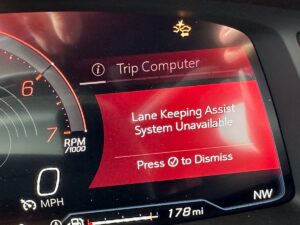

Seeing a “Lane Keep Assist System Unavailable” message right when you try to activate the feature can be unsettling; especially if you’ve come to rely on lane assistance during long highway drives. From an engineering standpoint, this notification is essentially the vehicle telling you: “I’m not confident I can steer responsibly right now, so I’m taking myself offline.” That’s important, because lane-keeping is not a convenience gadget; it’s an advanced driver assistance function (ADAS) that must meet strict safety rules. When the system detects anything that could compromise accuracy or steering control, it disables itself and shows the warning.
The good news is that this warning does not automatically mean you’re facing an expensive repair. In real-world diagnostics, this alert is commonly triggered by practical issues such as a blown fuse, a temporary software glitch, or a problem with the forward camera that reads lane markings. It can also appear after installing the wrong tire size, when the vehicle has a weak charging system, or when drivers attempt to use lane keep assist in situations it was never designed to handle (like low speeds, poorly marked roads, or gravel lots). In this article, I’ll walk you through how the system works, what the warning truly means, and how to troubleshoot it logically; starting with the fastest, cheapest checks first.
Lane Keep Assist System and Lane Keeping Assist System Unavailable Warning
The lane-keeping assist system is a modern safety feature designed to reduce unintentional lane departures. Depending on the automaker and trim level, the feature may be called Lane Keep Assist (LKA), Lane Keeping Assist System (LKAS), Lane Centering Assist, Lane Tracing Assist, or Lane Departure Prevention. While the names vary, the core idea is the same: the vehicle watches the lane lines and helps keep you positioned correctly if you begin drifting.
Most systems combine a front-facing camera (typically mounted behind the windshield near the rear-view mirror) with other sensors and vehicle data. The camera “reads” lane markings, road edges, and contrast changes. Meanwhile, the vehicle also references supporting information such as steering angle, yaw rate, wheel speed, and sometimes map or radar context depending on the platform. When the system sees you moving toward a line without a turn signal activated, it can warn you, gently nudge the steering, or actively help center the vehicle within the lane; again, depending on the manufacturer’s design.
Because lane keep assist is a coordinated system, it needs all critical inputs and outputs to be healthy. If a required component is missing, unreliable, or delivering data that doesn’t make sense, the control module will shut the feature down. When that happens, you’ll see alerts like “Lane Keep Assist System Unavailable” or “Lane Centering Assist Not Available” on the Driver Information Center (DIC) when you attempt to activate the system.
From a technician’s perspective, “unavailable” typically means one of three things:
- Temporary inhibition: The system is healthy but won’t engage due to conditions (speed too low, lane markings missing, camera blocked by rain/snow, etc.).
- Protection mode: The system detects voltage instability, communication errors, or inconsistent wheel-speed data and disables itself to prevent incorrect steering corrections.
- Hard fault: A fuse, camera, module, or calibration has failed, and the system stores a diagnostic trouble code (DTC) that must be addressed.
In practice, the quickest path to a solution is to treat the warning like a structured troubleshooting problem. Start with power and basic enabling conditions, then move to camera visibility and tire integrity, then software and charging checks. This approach prevents wasted money on parts that aren’t actually defective.
Causes and Possible Fixes of ‘Lane Keeping Assist System Unavailable’
When lane keep assist becomes unavailable, the root cause almost always falls into one of two categories: the system cannot “see” the lane reliably, or the system cannot “trust” the vehicle data or power supply. Below are the most common causes and the most reliable fixes, explained the way a diagnostic specialist would approach them in the shop.
Bad fuse
Every electrical feature in your vehicle; including lane keep assist; is protected by one or more fuses. A fuse is not just a “weak link” that burns; it’s a deliberate safety device designed to prevent wiring damage, module failures, and even fire. If the lane keep assist system (or its related camera module) loses power due to a blown fuse, the vehicle will disable the feature instantly and may display the “unavailable” warning the moment you try to engage it.
The corresponding fuse for the lane keep assist system is one of the first places I check when the feature suddenly stops working without warning; especially if the system failed abruptly rather than becoming unreliable over time. A classic clue is when another ADAS function fails at the same time, such as a front collision warning or automatic emergency braking feature. These systems often share a camera module, a power feed, a communication bus, or a related fuse. If both the lane assist and collision warning fail together and there’s no obvious camera damage, a power issue jumps to the top of the suspect list.
This fuse-related behavior is frequently discussed among owners of late-model trucks and SUVs, particularly some recent-generation GM platforms. In fact, many drivers have reported that the lane keep assist fails in a way that looks dramatic; but ends up being something as mundane as a fuse reset. GM has even issued a TSB acknowledging a scenario where lane keep assist can stall and the recommended remedy is a brief fuse removal to force a hard reset. That’s a strong indicator that the issue can be related to power state logic or a module “hang,” not necessarily a physically broken camera.
Replacing a blown fuse is usually straightforward, but precision matters. First, you must identify the correct fuse location and circuit. Your owner’s manual usually lists fuse box diagrams (often both underhood and passenger-side dash). If you don’t have the manual, a quick search for your model year + “lane keep assist fuse location” can help, but treat online diagrams as guidance; not absolute truth; because trim levels and options can change fuse assignments.
For owners of GM vehicles where the TSB-style reset applies, removing the fuse for about ten seconds and reinstalling it can restore normal operation. This is a “hard reset” technique: it fully power-cycles the camera or lane assist module, allowing it to reboot and reinitialize communication with other control units.
But if that doesn’t work, you’ll have to replace the fuse. In many cases this is a 10 amp fuse located in the passenger-side dash fuse box. If you replace it and it blows again quickly, that’s not “bad luck”; that’s a sign of an underlying short or module fault, and at that point proper electrical diagnosis (not repeated fuse swapping) is the correct next step.
Expert tip: If the fuse looks intact, don’t assume it’s good. Some fuses develop hairline fractures that only open under vibration or heat. If you have a test light or multimeter, confirm power on both sides of the fuse with the system enabled. This is how professionals avoid guesswork.
Issues with the camera
The “eyes” of most lane keep assist systems are housed in a camera module mounted behind the windshield. This location is chosen for a reason: it provides a wide, stable view of lane lines while keeping the camera protected from road debris. However, “protected” doesn’t mean “immune.” A camera that cannot see clearly cannot make safe steering decisions, and the vehicle knows it.
A dirty windshield, residue from interior cleaners, road film, or a poorly installed windshield tint can significantly reduce camera visibility. Even if your eyes can still see the road, the camera may be dealing with glare, haze, or distorted contrast that makes lane detection unreliable. Inclement weather; snow, rain, fog, heavy spray, or low sun angle; also reduces camera performance. These systems depend on high-contrast lane markings; when visibility drops, the system may disengage to avoid false corrections.
Obstruction of the camera’s view impacts its ability to detect lane markings with consistent confidence. In that case, the vehicle will often temporarily disengage the lane keep assist system until the obstruction clears. This is why many drivers see the warning come and go depending on weather, lighting, or cleanliness.
If the issue is dirt or film, cleaning can restore the feature immediately. Clean the exterior windshield area directly in front of the camera and also check the inside surface for haze. If you have windshield tint, confirm that it is compatible with ADAS cameras and that it does not cover the camera’s view. Some tints are installed with cutouts; others are installed across the glass and can create distortion near the camera bracket area. If you suspect tint is involved, removing or redoing it with an ADAS-safe approach may be necessary.
If you are dealing with inclement weather, you may simply need to wait until visibility improves. Some systems will come back online once lane markings are consistently detected for a short period. On certain vehicles, driving for a few minutes on a well-marked road helps the module “lock in” detection.
However, if the camera is physically broken, misaligned, or its internal heater (if equipped) fails, you’ll need repair or replacement. A camera replacement is often followed by calibration. Calibration is not optional; it’s how the vehicle ensures the camera’s virtual “horizon” and aim match the vehicle’s geometry. Without calibration, the system may remain unavailable or perform incorrectly.
Expert tip: If your windshield was recently replaced, and the warning began afterward, suspect camera calibration first. Windshield replacement is one of the most common “hidden causes” of lane assist warnings because even slight positional changes at the mounting bracket can affect detection accuracy. Many vehicles require static calibration targets or dynamic road calibration after windshield work.
Installing incorrectly sized tires
It surprises many drivers, but tire size can absolutely trigger a “lane keep assist system unavailable” warning. Here’s why: lane keep assist doesn’t just look at the camera. It also references vehicle motion data; especially wheel speed. Wheel speed is used not only to estimate vehicle speed, but also to assess stability and predict where the vehicle is heading relative to the lane.
Driving with the wrong tire size creates a wheel-speed discrepancy when cruising. Even if the mismatch is small, modern stability systems are extremely sensitive to differences in rolling circumference. If one tire spins slightly faster or slower than the others at the same actual road speed, the control modules can interpret that as a traction issue, an ABS sensor irregularity, or a mismatch that makes steering correction calculations less reliable.
Since lane keep assist relies on wheel speed data (directly or indirectly through stability control integration), the system can disengage anytime there is a discrepancy. And it usually won’t be the only feature affected. Other driver-assist systems that rely on wheel speed; such as adaptive cruise control behaviors, stability control, traction control, and sometimes automated braking logic; may also reduce functionality or throw related alerts.
If you recently replaced one tire (or two), confirm that the replacement matches OEM size and specification and that it’s the same size as the others. “Close enough” is often not close enough for ADAS. Installing anything outside the manufacturer’s recommendation can introduce rolling-diameter differences that trigger faults; especially if the other tires are significantly worn and the new tire has deeper tread. Even when the labeled size matches, a brand-new tire next to three worn tires can create enough circumference difference to confuse the system.
Expert tip: If you had a puncture and replaced only one tire on an AWD vehicle, you may need to replace tires as a set or shave a new tire to match the remaining tread depth. This isn’t just about protecting the drivetrain; it can also prevent wheel-speed disparity that disrupts driver-assist features.
Software issues
Software is the invisible layer behind every modern driver-assistance system. The camera may be healthy, the lane markings may be clear, and the tires may match perfectly; yet the system can still report “unavailable” if the control module encounters a bug, corrupted data state, or a calibration memory issue. In real ownership forums and shop reports, software-related lane assist failures are especially common after updates, recalls, battery disconnects, or module replacements.
A software issue can disable the system and prompt a “lane keep assist system unavailable” warning. Reports of software glitches are particularly widespread among GM owners, with some drivers noting that lane keep assist was lost after completing recall work. In these scenarios, the feature may not be “broken” in a hardware sense; it may simply require a reset, recalibration, or relearn procedure to restore normal operation.
A software update or system reset is a common solution when the root cause is firmware logic or a temporary corrupted state. For GM vehicles that lose the lane keep assist feature after software recalls, putting the front camera into learn mode can help recalibrate the system. This relearn process allows the camera module to re-establish reference points for lane detection, heading, and steering relationship; essentially teaching the system to “trust” itself again.
During the relearn process, you typically need to drive on a well-marked road at speeds above 36 mph. This speed threshold is not arbitrary: at higher speeds, lane markings pass through the camera’s field of view more consistently, and steering inputs are smoother and more predictive, allowing the system to build an accurate model.
Expert tip: If the warning appeared after the battery was disconnected or replaced, it’s worth completing a short, controlled drive cycle on a clearly marked highway. Many vehicles need a brief period of stable driving to reinitialize camera-based functions. If it never returns after a proper drive cycle, that’s when scanning for stored codes becomes the next logical step.
Also be aware that some software issues are not “DIY solvable” without the manufacturer’s scan tools. If the module requires reflashing, configuration, or specific calibration routines, a dealership or a qualified independent shop with OEM-level tooling may be required.
Faulty charging system
A weak or failing charging system is a highly underestimated cause of ADAS features going offline. Lane keep assist requires stable voltage because it relies on multiple modules communicating rapidly. When voltage drops or fluctuates, modules may reboot, fall off the communication network, or intentionally shut down non-essential functions to preserve core vehicle operation.
The charging system; primarily the alternator (or an equivalent charging strategy on hybrids/EVs) plus wiring and voltage regulation; provides the electrical charge that powers vehicle electrical systems once the engine is running. If the charging system fails, the battery becomes the sole power source. The battery can only sustain systems for so long before voltage begins to sag. And since lane keep assist needs consistent power, the feature may stall when the power supply becomes unstable.
Besides a failed lane keep assist feature, dim headlights, flickering interior lighting, slow power windows, random warning lights, or intermittent infotainment resets can indicate charging issues. To resolve the problem correctly, you must identify the source. Start with the battery: confirm it’s healthy and holding charge. Then check the alternator output. A healthy charging system typically maintains roughly the mid-13V to mid-14V range while running (exact specs vary), and it should remain stable under electrical load (headlights, blower motor, rear defroster, etc.).
Expert tip: A battery can test “good” but still cause problems if the charging system is underperforming or if there is high resistance in a battery cable or ground. In diagnosis, we look not only at voltage but also at voltage drop across cables under load. If you’re not comfortable performing these tests, this is one of the scenarios where professional diagnosis saves time and prevents part swapping.
Once charging stability is restored, lane keep assist often returns without any additional repair because the system is no longer protecting itself from undervoltage conditions.
Engaging the system in unintended situations
Lane keep assist systems are designed with a strict operational envelope. They are not autonomous driving systems; they are driver-support systems built primarily for highway-style conditions. When drivers try to use them outside their intended environment, the system frequently refuses to activate; and that refusal can appear as an “unavailable” message even though nothing is actually wrong.
Most lane keep assist systems are designed for use on highways when driving above about 36 mph and when both lane markings are visible. That means the system expects:
- Consistent lane lines on both sides (or at least strong markings the camera can lock onto)
- A road surface and lighting conditions that allow sufficient contrast
- Predictable steering behavior (not tight turns, stop-and-go, or parking maneuvers)
- Vehicle speed at or above the system threshold (commonly 36 mph or higher)
The system won’t engage if you attempt to activate it while driving under these speed levels. Additionally, if the lane markings are faded, covered by snow, washed out by glare, or broken by construction zones, the system may have difficulty detecting them consistently. Many systems; especially those tuned conservatively for safety, including several GM implementations; will not function in parking lots, on gravel roads, or on poorly marked rural roads.
Expert tip: If the warning appears only in certain areas (like your neighborhood roads) but disappears on a well-marked highway, the “problem” is likely not a failure. It’s the system correctly refusing to operate where it cannot guarantee reliable lane detection.
In other words, “unavailable” can be a sign of a healthy system making a safe decision; not just a broken one.
A Practical Expert Workflow: What to Check First (Fast, Cheap, and Logical)
When diagnosing “Lane Keep Assist System Unavailable,” a disciplined order of operations matters. If you jump straight to replacing a camera or a steering component without confirming the basics, you can waste hundreds (or thousands) of dollars. Here’s the same quick workflow I recommend in a professional setting, adapted so a typical owner can follow it without specialized equipment.
1) Confirm the system is being used correctly
Before you open a fuse box, confirm you’re meeting the enabling conditions. Are you above 36 mph? Are lane markings clear? Are you on a paved road with consistent lines? Are you trying to engage lane centering in a parking lot or on gravel? This step sounds obvious, but it eliminates a huge number of false alarms; especially after someone first tries the feature and expects it to work everywhere.
2) Inspect the windshield and camera viewing area
Clean the windshield outside and inside, focusing on the camera area. Look for stickers, toll tags, haze, condensation, and tint film edges. If the warning is weather-related, note whether it disappears after driving for a while or after the windshield defroster clears moisture.
3) Check for companion failures
If front collision warning, automatic braking, or adaptive cruise also fail at the same time, you are likely dealing with a shared root cause; commonly fuse/power, camera availability, or software state. Multiple simultaneous ADAS failures are often more consistent with power or network problems than with random component breakage.
4) Verify tire sizes and tread consistency
Confirm the tire size on all four corners matches manufacturer specification and matches across the axle and vehicle. If one tire was recently replaced, consider tread depth mismatch. If your vehicle is AWD, take this step even more seriously.
5) Perform the fuse reset / fuse inspection
If your model is known to respond to a fuse reset, remove the appropriate fuse for about ten seconds and reinstall it. If the fuse is blown, replace it with the correct amperage. If it blows again, stop; there’s likely a short or failing module that needs proper diagnosis.
6) Evaluate battery and charging stability
Even if the car starts normally, unstable voltage can disable ADAS features. If you notice dim or flickering lights, repeated warnings, or random electronic behavior, test the charging system. A healthy electrical foundation is a prerequisite for reliable lane keep assist operation.
Understanding “Unavailable” vs. “Failed”: Why the System Disables Itself
Drivers often interpret “unavailable” as “broken.” In many cases, it’s more accurate to interpret it as “not allowed right now.” Lane keep assist is permitted to operate only when the control module has adequate confidence in lane detection and stable control authority. If any key input becomes questionable; camera visibility, voltage, wheel speed coherence, or software integrity; the system disables itself to prevent an unintended steering correction.
This is why your troubleshooting mindset matters. If the warning comes and goes with weather, it often points to camera visibility. If it appears immediately at startup and persists regardless of conditions, it leans more toward power, fuse, calibration, or a stored fault. If it appeared right after a recall update or windshield replacement, think software state or calibration. And if it started after tires were changed, suspect rolling circumference mismatch.
In other words: the message is not a diagnosis; it’s a symptom. Your job is to determine what condition the vehicle is objecting to.
When a Quick Reset Helps (and When It Doesn’t)
Owners often ask whether they can “reset” lane keep assist. The answer is: sometimes; but a reset only helps when the underlying issue is a temporary state, not a real defect. A fuse pull or battery disconnect may reboot a module and clear a temporary logic hang, but it won’t fix a camera that can’t see through heavy tint, an alternator that can’t maintain voltage, or a mismatched tire causing wheel-speed inconsistency.
As a rule of thumb:
- Reset can help: after a software update, after a module communication glitch, after a momentary voltage dip, or when the module is stuck in a failed state despite no active fault.
- Reset won’t help: when there is a persistent power feed issue, a blown fuse that keeps blowing, a physically obstructed or damaged camera, incorrect tire sizing, or a charging system problem.
Use reset strategies strategically; after you check the obvious issues; rather than relying on them as a substitute for diagnosis.
Final Thoughts
The lane keep assist system is only as dependable as its weakest supporting component. If any critical part of the system; power supply, camera visibility, wheel-speed consistency, or software integrity; falls outside acceptable limits, the system will protect you (and itself) by disengaging. That’s why the vehicle displays a “lane keep assist system unavailable” message whenever you attempt to activate the feature while it’s offline.
The failure can come from several sources: a blown fuse, low camera visibility caused by dirt, tint, or weather, a software glitch, a faulty charging system, or installing the wrong tire size. In everyday diagnostics, blown fuses and camera visibility issues are among the most common triggers; especially when the warning appears suddenly or only under certain environmental conditions.
And if you lose the front collision warning feature at the same time the lane keep assist system stalls, treat that as a strong indicator of a power-related issue such as a faulty fuse or a related power feed problem. Start with the simplest, most cost-effective checks first; correct usage conditions, camera visibility, tire sizing, fuse inspection/reset, and charging stability. If those don’t restore operation, the next step is professional scanning and calibration verification, especially if the issue began after windshield replacement, recall work, or module servicing.