
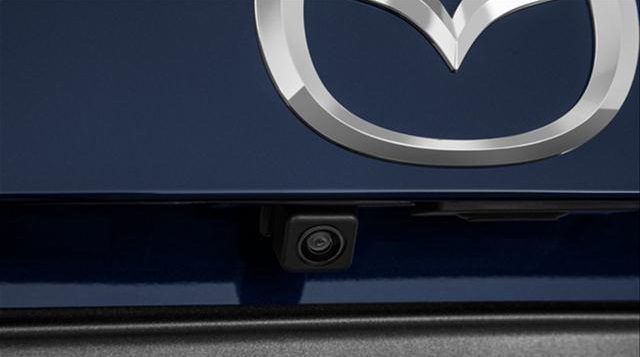

A working backup camera makes parking easier, reversing safer, and tight spaces a lot less stressful. So when your Mazda 3’s camera suddenly shows a blank screen, cuts in and out, or stops working altogether, it’s more than just annoying—it’s something you’ll want to fix quickly.
The good news is that many backup camera issues come down to a few common causes. Sometimes it’s a simple fuse. Sometimes it’s a software glitch. And sometimes the problem is buried in the wiring. Once you know where to look, troubleshooting gets much easier.
Common Mazda 3 Backup Camera Problems and How to Fix Them
Your Mazda 3’s backup camera is one of those features you don’t fully appreciate until it stops working. If the display goes black right as you shift into reverse, or the image comes and goes randomly, it can make everyday driving feel a lot less predictable.
Here are the most common issues and the steps you can take to troubleshoot them.
Start With the Fuses Before You Assume the Worst
One of the first things to check is the fuse tied to the backup camera system. A blown fuse can interrupt the electrical circuit and cause the camera—or the screen it depends on—to stop working.
This is a smart place to start because it’s quick, inexpensive, and often overlooked. If the camera died suddenly with no warning, a fuse is one of the more likely culprits.
Here’s how to check it:
- Locate the fuse box, which is usually under the dashboard, near the steering wheel, or beneath the glove compartment.
- Check your owner’s manual to find the exact fuse connected to the backup camera system.
- Use a fuse puller or needle-nose pliers to carefully remove the fuse.
- Inspect it for damage or a broken filament. If it’s blown, replace it with a fuse of the same amperage.
If the new fuse blows again soon after replacement, that usually points to a deeper electrical problem. At that point, it’s worth having the system checked professionally.
Blank Screen or “No Signal”? Try Resetting the System First
If you shift into reverse and get a blank screen or a “no signal” message, don’t assume the camera itself has failed. Sometimes the issue is with the Mazda Connect system rather than the camera hardware.
A simple restart can clear temporary glitches. Think of it like rebooting a frozen phone or laptop—the software may just need a fresh start.
To try this fix:
- Turn off the car
- Wait a few moments
- Restart the engine and check the camera again
This can reset and reboot the infotainment system, which may restore the backup camera if the problem is software-related.
If the Camera Works Sometimes, Look for Intermittent Problems
Intermittent issues are some of the most frustrating. One day the camera works perfectly. The next day, it flashes black or doesn’t come on at all.
When that happens, the problem may not be a total failure. It could be something inconsistent, like debris on the lens, a loose connection, or a software bug that only shows up occasionally.
Try these basic checks:
- Make sure the car is actually in reverse when testing the camera
- Inspect the camera lens and clean off dirt or debris that may be blocking the view
- Look for available infotainment software updates that may fix camera-related glitches
In the real world, something as simple as road grime after a rainy week can affect visibility. It won’t always kill the image completely, but it can make the system seem unreliable.
Check the Wiring and Harness if the Problem Keeps Coming Back
If you’ve already checked the fuse, restarted the system, and cleaned the camera, the next place to look is the wiring. A loose connector, damaged harness, or corroded contact can easily cause the backup camera to malfunction.
This is especially common in systems that work on and off. A connection may be just loose enough to fail sometimes and work other times, which makes the issue harder to pin down.
Here’s what to inspect:
- Use your vehicle manual to locate the camera wiring, or ask a professional to help
- Check the wiring and connection points for damage, wear, or corrosion
- Make sure all harness connections are seated securely
Be careful when working around electrical components. If you’re not comfortable tracing wiring or unplugging connectors, this is a good time to hand it off to a Mazda technician or a trusted mechanic.
Once you understand the usual failure points, diagnosing a Mazda 3 backup camera issue becomes much less of a guessing game.
How to Reboot and Update the Mazda 3 Infotainment System
If the issue seems tied to the screen, software, or Mazda Connect system, a forced reboot or firmware update may solve it. These fixes are especially useful when the hardware seems fine but the camera display still won’t behave.
Use a Forced Reboot to Clear Software Glitches
If your Mazda 3 backup camera isn’t working, a forced reboot is one of the easiest things to try. It can help when the problem is caused by a frozen program or a temporary software crash.
To perform the reboot:
- Turn off your Mazda 3’s engine
- Press and hold the Mute, Nav, and Back buttons at the same time
- Keep holding them until the infotainment system restarts
If the camera starts working again after the reboot, the issue was likely software-related. If not, the next step is updating the firmware.
Update the Firmware to Fix Bugs and Improve Stability
Outdated firmware can cause all kinds of odd behavior in an infotainment system, including backup camera problems. If your system has a known bug, a firmware update may be the fix.
Here’s how to update it:
- Visit the Mazda official website and download the latest firmware package for your vehicle’s infotainment system
- Extract the downloaded files onto an empty USB drive formatted to FAT32
- With your Mazda 3 engine turned off, insert the USB drive into the vehicle’s USB port
- Turn on the engine and wait for the infotainment system to initialize
- Go to Settings, then System, then Update in the infotainment menu
- Select the update file from the USB drive and begin the update process
The update may take several minutes, so don’t rush it. Keep the engine running during the entire process so the installation completes properly and the system doesn’t get interrupted midway through.
Keeping the firmware current helps the infotainment system run more smoothly and can improve how the backup camera performs. It’s one of those maintenance steps that doesn’t seem urgent until something starts acting up.
If your Mazda 3 backup camera still isn’t working after checking the fuse, rebooting the system, cleaning the lens, and inspecting the wiring, it’s time for a proper diagnosis. Don’t keep guessing—get the issue confirmed before it turns a simple parking aid into a bigger electrical repair.