
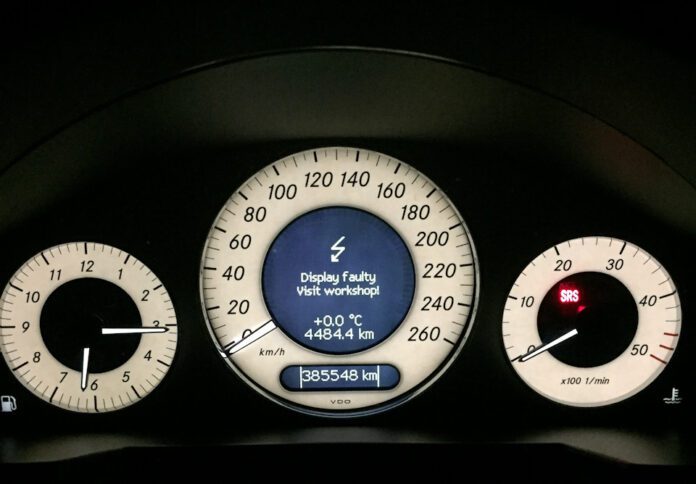

When your Mercedes-Benz displays a ‘display malfunction visit workshop’ notification on the instrument cluster, it’s essentially your vehicle’s way of communicating that something isn’t quite right with the information being presented on your dashboard. This warning serves as a crucial alert, signaling that the data you’re seeing may not be accurate or reliable. Several underlying issues can trigger this warning, including a blown fuse, a malfunctioning Signal Acquisition Module (SAM), or complications related to your vehicle’s battery system.
Before you rush to replace the SAM module; which can put a significant dent in your wallet; it’s essential to systematically explore all other potential causes. The SAM module represents a considerable investment, and jumping to conclusions without proper diagnosis could lead to unnecessary expenses. The wisest approach involves conducting a comprehensive system scan to definitively determine whether a defective SAM module is indeed the culprit behind the malfunction. This methodical approach not only saves money but also ensures that the root cause is properly addressed, preventing future recurrences of the same problem.
In this comprehensive guide, we’ll delve deep into the intricacies of the Mercedes-Benz instrument cluster, explore the various triggers that can cause the ‘display malfunction visit workshop’ warning, and provide detailed solutions for addressing each potential cause. Whether you’re a seasoned Mercedes owner or new to the brand, this article will equip you with the knowledge needed to understand and tackle this common yet concerning warning message.
Understanding the Mercedes Instrument Cluster and the “Display Malfunction Visit Workshop” Warning
The instrument cluster stands as one of the most critical components in your Mercedes-Benz, serving as the primary communication interface between your vehicle and you, the driver. This sophisticated assembly houses an array of gauges, indicators, and warning lights that work in harmony to keep you informed about the real-time status of various vehicle systems. From your current speed and fuel level to engine temperature and warning indicators, the instrument cluster consolidates all essential driving information in one convenient location.
Mercedes-Benz engineers have strategically positioned the instrument cluster directly behind the steering wheel, placing it squarely within the driver’s natural line of sight. This thoughtful placement ensures that you can monitor vital vehicle information without taking your eyes off the road for extended periods. The unobstructed view provided by this positioning is crucial for safe driving, allowing for quick glances that keep you informed while maintaining focus on the road ahead.
The instrument cluster doesn’t operate in isolation; it’s part of a complex network of sensors, modules, and electronic control units that constantly communicate with one another. These sensors are strategically placed throughout your vehicle, monitoring everything from wheel speed and engine performance to fuel levels and exterior temperature. The data collected by these sensors is transmitted to the instrument cluster, where it’s processed and displayed in a format that’s easy for drivers to understand.
When any of these sensors experience a failure or malfunction, the consequences can be significant. The instrument cluster may begin displaying inaccurate information, which could range from incorrect speed readings to faulty fuel level indicators. Recognizing the potential danger this poses to drivers, Mercedes-Benz engineers implemented a sophisticated warning system. When the Electronic Control Unit (ECU) detects a discrepancy or failure in the sensor network, it triggers a ‘display malfunction visit workshop’ warning to alert the driver that the information being displayed may not be trustworthy.
This warning message is your vehicle’s way of practicing transparency. Rather than allowing you to drive with potentially misleading information, Mercedes-Benz prioritizes your safety by immediately notifying you of any issues that could compromise the accuracy of your instrument cluster readings. This proactive approach exemplifies the brand’s commitment to driver safety and vehicle reliability.
The ramifications of this warning extend beyond just the instrument cluster display. When the ‘display malfunction visit workshop’ message appears on the Driver Information Center (DIC), you may notice that other systems begin to malfunction as well. The speedometer might stop registering your actual speed, the fuel gauge could freeze or display incorrect levels, and the turn indicators might cease to function properly. These secondary symptoms can make driving not only inconvenient but potentially hazardous.
Beyond the instrument cluster itself, you might observe that the central locking system becomes unresponsive to remote commands, only functioning when you’re in extremely close proximity to the vehicle. This can be particularly frustrating when trying to lock or unlock your car from a distance. Additionally, the headlights and other electrically controlled systems may stop working altogether, creating safety concerns during nighttime driving or adverse weather conditions.
Understanding the interconnected nature of your Mercedes-Benz’s electrical systems helps explain why a single malfunction can cascade into multiple symptoms. The vehicle’s electronic architecture is designed for efficiency and integration, which means that a failure in one component can affect the performance of several related systems. This interconnectedness underscores the importance of promptly addressing the ‘display malfunction visit workshop’ warning rather than dismissing it as a minor inconvenience.
Comprehensive Analysis of Possible Triggers for the “Display Malfunction Visit Workshop” Message
Understanding what causes the ‘display malfunction visit workshop’ warning is the first step toward resolving it. Multiple factors can contribute to this message appearing on your instrument cluster, and identifying the correct cause is essential for implementing an effective solution. Let’s explore each potential trigger in detail, examining the mechanisms behind each cause and how they interact with your vehicle’s electronic systems.
Checking for a Blown Fuse: The First Line of Defense
When troubleshooting any electrical issue in your Mercedes-Benz, the fuses should always be your first point of investigation. These small but mighty components play a crucial role in protecting your vehicle’s electrical systems from damage caused by power surges, short circuits, and overcurrent situations. A malfunctioning or blown fuse can easily trigger a display malfunction, making it essential to check these components before moving on to more complex diagnostics.
Every electrical component in your Mercedes-Benz is connected to a corresponding fuse that acts as a sacrificial protective device. When an electrical surge occurs; whether from a short circuit, a malfunctioning component, or an external electrical event; the fuse is designed to blow before the excess current can damage more expensive and critical components. This protective mechanism is elegant in its simplicity: the fuse contains a metal strip that melts when exposed to excessive current, breaking the circuit and preventing further electrical flow.
The display system and its associated sensors are no exception to this rule. They’re connected to specific fuses that protect them from electrical damage. When one of these fuses blows, it interrupts the electrical supply to the affected components, which can result in the display system losing its ability to communicate with sensors or display accurate information. The vehicle’s ECU recognizes this communication breakdown and responds by triggering the ‘display malfunction visit workshop’ warning.
Before investing time and resources into investigating more complex causes, a thorough inspection of all fuses is warranted. This relatively simple check can potentially save you significant diagnostic time and expense. The process of checking fuses is straightforward enough that most Mercedes owners can perform it themselves with basic tools and a little patience.
Your Mercedes-Benz typically contains multiple fuse boxes located in different areas of the vehicle. Common locations include under the hood in the engine bay, inside the passenger compartment (often beneath the dashboard or in the footwell area), and in the trunk. Each fuse box contains multiple fuses of varying amperages, each responsible for protecting different electrical circuits within the vehicle.
When examining your fuses, you’ll want to look for visual signs of failure. A blown fuse typically exhibits one of two telltale signs: a visible gap in the metal wire running through the center of the fuse, or a dark, smoky smear inside the transparent portion of the fuse casing. Either of these indicators suggests that the fuse has done its job by sacrificing itself to protect the circuit, but now needs to be replaced to restore normal function.
It’s worth noting that not all fuse failures are immediately visible to the naked eye. In some cases, a fuse may have a hairline break in its element that’s difficult to detect through visual inspection alone. For this reason, using a multimeter or a dedicated fuse tester can provide a more definitive assessment of each fuse’s condition. These tools can detect whether electrical current is flowing through the fuse properly, identifying failures that might otherwise go unnoticed.
Faulty SAM Module: The Brain Behind the Operation
A defective SAM module represents another significant potential cause of the ‘display malfunction visit workshop’ message. Understanding what the SAM module does and why it’s so critical to your vehicle’s operation helps explain why its failure can have such far-reaching consequences.
SAM stands for Signal Acquisition Module, and these sophisticated electronic components have been an integral part of Mercedes-Benz vehicles since the mid-1990s. The introduction of SAM modules represented a significant advancement in automotive electrical architecture, allowing for more efficient management of the vehicle’s increasingly complex electronic systems. These modules serve as central hubs for electrical signals, coordinating communication between various sensors, switches, and controllers throughout the vehicle.
The SAM module’s primary function is to send and receive data from an extensive network of sensors, switches, and electronic controllers. It acts as a sophisticated traffic controller for electrical signals, ensuring that information flows correctly between different vehicle systems. Additionally, the SAM module continuously monitors these systems, watching for anomalies or failures that could indicate problems requiring attention.
When the SAM module fails, the consequences are immediately apparent. Data transmission from the sensors to the instrument cluster becomes interrupted or completely halted. Without this vital flow of information, the instrument cluster loses its ability to communicate effectively with the vehicle’s sensor network. The gauges and displays that rely on sensor data can no longer provide accurate readings, and the vehicle’s ECU recognizes this communication breakdown.
In response to this failure, the vehicle triggers the ‘display malfunction visit workshop’ warning. This notification serves as an alert to the driver that the information displayed on the dashboard may not reflect the actual status of the vehicle’s systems. It’s a safety mechanism designed to prevent drivers from making decisions based on inaccurate information; such as continuing to drive when the fuel tank is actually empty, despite the gauge showing otherwise.
Most Mercedes-Benz vehicles are equipped with more than one SAM module, with different modules responsible for different areas of the vehicle. Typically, there’s a front SAM module located in the engine compartment and a rear SAM module located in the trunk area. When a ‘display malfunction visit workshop’ warning appears, the rear SAM module is often the culprit, though this isn’t always the case.
Under normal circumstances, SAM modules are designed to last the entire lifetime of the vehicle. They’re built with durability in mind, using high-quality components and robust construction to withstand the rigors of automotive use. However, certain conditions can cause even these reliable modules to fail prematurely.
Water intrusion stands as the most common cause of SAM module failure. The electronic components within the module are sensitive to moisture, and exposure to water can cause short circuits, corrosion, or complete component failure. This is particularly problematic for the rear SAM module, which is often located in areas of the vehicle that may be susceptible to water entry from various sources.
Broken wire connections represent another potential cause of SAM module malfunction. The module relies on secure electrical connections to communicate with other vehicle systems, and a break in any of these connections can disrupt its function. Unlike a completely failed module, a broken wire connection can often be repaired relatively inexpensively, making it worth investigating before assuming the module itself has failed.
Excessive current draw can also damage the SAM module over time. When other electrical components in the vehicle develop faults that cause them to draw more current than designed, this additional load can stress the SAM module and eventually cause it to fail. Identifying and addressing the source of excessive current draw is essential to prevent damage to a replacement module.
Battery Issues: The Foundation of Electrical Function
The battery serves as the lifeblood of your Mercedes-Benz’s electrical systems. It provides the electrical energy necessary to power everything from the starter motor to the sophisticated electronic modules that control various vehicle functions. When the battery or its associated control systems experience problems, the effects can ripple throughout the entire vehicle, potentially triggering the ‘display malfunction visit workshop’ warning.
A low battery is one of the most straightforward causes of display malfunctions. When the battery’s charge drops below optimal levels, it may not provide sufficient power to all of the vehicle’s electrical systems simultaneously. This can result in intermittent operation of sensors, modules, and other electronic components. The inconsistent power supply can cause communication errors between systems, leading the ECU to detect a malfunction and trigger the warning message.
Modern Mercedes-Benz vehicles utilize sophisticated battery management systems, including the battery control module. This module is responsible for regulating battery voltage and managing the charging process to ensure optimal battery health and performance. It monitors the battery’s state of charge, controls the alternator’s output, and manages electrical load distribution to prevent excessive drain on the battery.
When the battery control module fails, the consequences extend far beyond simple charging issues. The module’s failure can affect electricity distribution throughout the vehicle, causing sensors and other electronic components to receive inconsistent or insufficient power. This can stall the operation of critical sensors, resulting in the display of inaccurate data on the Driver Information Center. The vehicle’s ECU, detecting these anomalies, responds by activating the ‘display malfunction visit workshop’ warning to alert the driver.
The battery control module itself can fail for several reasons. Jump-starting the vehicle, while sometimes necessary, can stress the module if not performed correctly. Similarly, trickle-charging the battery with an incompatible or improperly set charger can damage the module. Even something as seemingly minor as a poor ground connection can cause the battery control module to malfunction, underscoring the importance of maintaining proper electrical connections throughout the vehicle.
It’s worth noting that battery issues can sometimes masquerade as other problems. A failing battery might cause symptoms that appear to point toward a faulty SAM module or other components, leading to misdiagnosis and unnecessary repairs. This is why a thorough diagnostic approach, starting with the simplest potential causes, is so important when addressing the ‘display malfunction visit workshop’ warning.
Step-by-Step Guide: How to Fix a ‘Display Malfunction Visit Workshop’ Warning
Armed with an understanding of what causes the ‘display malfunction visit workshop’ warning, you’re now ready to tackle the problem head-on. The following sections provide detailed guidance on addressing each potential cause, starting with the simplest solutions and progressing to more complex repairs. This systematic approach ensures that you address the most likely and easiest-to-fix causes first, potentially saving significant time and money.
Step One: Comprehensive Fuse Inspection
Your first course of action should be a thorough inspection of all fuse boxes in your Mercedes-Benz. This step is crucial because a blown fuse represents the simplest and least expensive potential fix. Taking the time to properly check each fuse can save you from pursuing more complex and costly repairs unnecessarily.
Begin by locating all the fuse boxes in your vehicle. As mentioned earlier, Mercedes-Benz vehicles typically have fuse boxes in multiple locations: under the hood in the engine bay, in the trunk or cargo area, and inside the passenger compartment. Your owner’s manual should provide specific information about fuse box locations and the circuits each fuse protects.
For the fuse box in the engine bay, you’ll typically need to unlatch and remove a protective cover to access the fuses. Be sure the engine is off and the key is removed from the ignition before working in this area. The trunk fuse box is usually located on one side of the trunk, often behind a removable panel or cover. The interior fuse box may be located beneath the dashboard on the driver’s or passenger’s side, or in other locations depending on your specific model.
Once you’ve accessed each fuse box, systematically inspect every fuse. Identifying a blown fuse is generally straightforward once you know what to look for. Examine the transparent portion of each fuse for signs of failure. A visible gap in the metal wire that runs through the center of the fuse indicates that the fuse has blown. Alternatively, a dark smear or blackened area inside the glass or plastic housing suggests that the fuse element has burned out.
If you identify a blown fuse, replacing it is typically simple. Fuse pullers are often included in the fuse box or can be purchased inexpensively from auto parts stores. Remove the blown fuse carefully and replace it with a new fuse of the same amperage rating. Using a fuse with the wrong amperage can lead to additional problems; a fuse with too low a rating will blow repeatedly, while one with too high a rating may fail to protect the circuit from damage.
After replacing any blown fuses, start the vehicle and check whether the ‘display malfunction visit workshop’ warning has cleared. If the warning persists, or if the replacement fuse blows again immediately, there may be an underlying electrical problem causing the fuse to fail. In this case, professional diagnosis may be necessary to identify and address the root cause.
It’s also wise to keep a selection of spare fuses in your vehicle for situations where a fuse blows while you’re away from home. Many Mercedes-Benz models include a small supply of spare fuses in one of the fuse boxes, but having additional spares on hand is always a good idea.
Step Two: Tackling a Defective SAM Module
Only after you’ve exhausted other potential causes should you consider the possibility of a failed rear SAM module. This approach is recommended for two important reasons: first, SAM module failures are relatively rare under normal operating conditions; and second, replacing a SAM module is an expensive undertaking that you want to avoid unless absolutely necessary.
As previously discussed, the SAM module typically fails due to water intrusion, broken wire connections, or excessive current draw. Understanding the cause of failure is essential not only for fixing the immediate problem but also for preventing the same issue from affecting a replacement module.
Water intrusion represents the most common cause of SAM module failure. When moisture enters the module housing, it can cause short circuits between components, leading to immediate malfunction. Even if the initial exposure doesn’t cause immediate failure, water can lead to corrosion of the circuit board and electronic components, eventually resulting in module failure.
If water intrusion is suspected, it’s crucial to identify how the water entered the module area. Common sources include faulty door seals, damaged trunk seals, clogged sunroof drains, and; notably for certain Mercedes-Benz models; defective tail lamp seals. Some second-generation ML-Class vehicles (W164) were particularly susceptible to rear SAM module failures caused by faulty tail lamp seals that allowed water to enter the trunk area where the module is located.
If you drive a second-generation ML or any other model known to have seal issues, inspect the condition of all relevant seals when addressing a SAM module problem. Replacing a failed SAM module without fixing the source of water intrusion will likely result in the same failure occurring again, wasting both time and money.
A broken wire connection represents the most economical repair when dealing with SAM module issues. Before assuming the module itself has failed, carefully inspect all wire connections leading to and from the module. Look for obvious breaks, loose connections, or signs of corrosion at connection points. Often, all that’s required to restore proper function is repairing or replacing a damaged wire or connection.
To properly inspect wire connections, you may need to access the SAM module location, which typically requires removing interior trim panels in the trunk area for the rear SAM module. Consult your vehicle’s service manual or online resources for specific instructions for your model. When examining connections, look for wires that appear stretched, chafed, or disconnected. Also check for corrosion at connector terminals, which can impede electrical flow even when connections appear secure.
When the SAM module has failed due to water damage or excessive current draw, replacement is typically necessary. Replacing a SAM module is not a simple plug-and-play operation in most cases. The new module often needs to be programmed to your specific vehicle, which requires specialized diagnostic equipment and software. This programming process configures the module with the correct settings for your vehicle’s equipment and features.
Given the complexity and cost involved, many Mercedes-Benz owners choose to have SAM module replacements performed by qualified professionals. However, if you’re mechanically inclined and have access to the necessary diagnostic tools, it’s possible to tackle this repair yourself. Just be sure to follow proper procedures and, most importantly, address the underlying cause of failure before installing the new module.
When dealing with excessive current draw as the cause of SAM module failure, identifying the source of the draw is essential. This typically requires a parasitic draw test, which measures the amount of current flowing from the battery when the vehicle is off. Normal parasitic draw for most vehicles is typically between 20 and 50 milliamps, though this can vary. Readings significantly higher than this indicate an abnormal current draw that needs to be traced and corrected.
Tracking down a parasitic draw can be time-consuming, as it involves systematically testing different circuits to identify which one is drawing excessive current. Once identified, the specific component causing the draw can be repaired or replaced. Completing this diagnosis before installing a new SAM module protects your investment and prevents recurring failures.
Step Three: Resolving Battery-Related Issues
When addressing battery-related causes of the ‘display malfunction visit workshop’ warning, you’ll need to consider two primary factors: the condition of the battery itself and the health of the battery control module. Both can contribute to the symptoms you’re experiencing, and both require proper diagnosis and treatment.
Let’s start with the battery control module. As mentioned earlier, this module can fail due to improper jump-starting procedures, incompatible trickle chargers, or simply a poor ground connection. Before assuming the module has failed, check that it has a stable, secure ground connection. A loose or corroded ground connection can cause the module to behave erratically, mimicking the symptoms of a complete failure.
Locate the battery control module (its position varies by model; consult your service manual) and inspect the ground wire connection. The connection point should be clean, tight, and free of corrosion. If you notice any corrosion, clean it thoroughly using a wire brush or specialized electrical contact cleaner. Ensure the connection is secure before testing whether the warning has cleared.
If the ground connection is good but the battery control module has still failed, replacement may be necessary. Like the SAM module, the battery control module typically needs to be programmed to your specific vehicle. This process configures the module with information about your battery’s specifications and sets appropriate charging parameters. Again, specialized diagnostic equipment is required for this programming.
Moving on to the battery itself, a low or failing battery can definitely trigger the display malfunction warning. Modern Mercedes-Benz vehicles have numerous electronic systems that require adequate power to function correctly. When the battery’s charge drops below optimal levels, these systems may begin to malfunction, potentially triggering warning messages.
If you suspect the battery may be the issue, start by checking its charge level using a multimeter. With the vehicle off and rested for several hours (or overnight), the battery should maintain a voltage between 12.2 and 12.6 volts. Readings below this range indicate a low or discharged battery that needs attention.
If the battery is low on charge, recharging it is the obvious first step. Use an appropriate battery charger that’s compatible with your vehicle’s electrical system. Many modern chargers have settings specifically designed for AGM (Absorbent Glass Mat) batteries, which are commonly used in Mercedes-Benz vehicles. Using the wrong charger settings can damage these batteries, so be sure to select the correct mode.
After recharging, monitor the battery to ensure it’s holding its charge. A battery that quickly discharges after being charged may have internal damage that prevents it from maintaining adequate power. In this case, replacement is typically the best solution. When selecting a replacement battery, choose one that meets or exceeds the specifications for your vehicle. Mercedes-Benz vehicles often require batteries with specific characteristics, and using an inappropriate battery can lead to charging problems and premature failure.
Once you’ve addressed the battery issue; whether by recharging, replacing the battery, or repairing the battery control module; you’ll want to clear any stored error codes and reset the warning message. A common method for accomplishing this is to disconnect the negative terminal of the battery for approximately 20 minutes. This allows the vehicle’s electronic systems to reset and should clear the ‘display malfunction visit workshop’ warning if the underlying problem has been resolved.
When reconnecting the battery, connect the negative terminal securely and ensure there’s no corrosion at the terminal connection. After reconnecting, you may notice that some vehicle settings have been reset; this is normal and simply requires reconfiguring things like radio presets, seat positions, and similar personalized settings.
Advanced Diagnostic Techniques for Persistent Problems
In some cases, the ‘display malfunction visit workshop’ warning may persist despite addressing the common causes outlined above. When this happens, more advanced diagnostic techniques may be necessary to identify the root cause of the problem. This section explores additional steps you can take when standard troubleshooting doesn’t resolve the issue.
Professional diagnostic scanning represents one of the most effective tools for identifying electrical problems in modern vehicles. While basic OBD-II scanners can read engine codes, Mercedes-Benz vehicles require more sophisticated diagnostic equipment to access the full range of system codes and live data. Devices like the Mercedes-Benz Star Diagnostic System (SDS) or compatible third-party alternatives can communicate with all of the vehicle’s electronic modules, retrieving stored fault codes and providing detailed information about system status.
When scanning your vehicle, pay attention to codes related to the instrument cluster, SAM modules, and communication buses (such as the CAN bus). These codes can provide valuable clues about what’s causing the display malfunction warning. Be sure to document all codes retrieved, as this information will be helpful if you need to seek professional assistance.
Wiring harness inspection is another important diagnostic step. Your vehicle’s wiring harnesses carry electrical signals between components, and damage to these harnesses can cause a variety of electrical problems. Look for signs of wear, chafing, or damage, particularly in areas where harnesses pass through bulkheads, around moving parts, or near heat sources. Damaged wiring can cause intermittent problems that are difficult to diagnose but can trigger warning messages like the one you’re experiencing.
Connector inspection should also be part of your diagnostic process. Over time, electrical connectors can become loose, corroded, or contaminated, leading to poor electrical contact and communication errors. Inspect connectors throughout the electrical system, looking for signs of corrosion, damage, or contamination. Cleaning connectors with electrical contact cleaner and applying dielectric grease can help restore good contact and prevent future problems.
If you’ve exhausted all other diagnostic options, the instrument cluster itself may be at fault. While rare, instrument cluster failures do occur and can trigger the display malfunction warning. Symptoms of a failing instrument cluster may include intermittent gauge operation, flickering displays, or completely inoperative gauges. In some cases, the cluster can be repaired by specialized electronics repair services, which is often less expensive than purchasing a new or refurbished unit.
Preventive Measures to Avoid Future Display Malfunctions
Prevention is always preferable to repair. While not all causes of the ‘display malfunction visit workshop’ warning can be prevented, there are several steps you can take to minimize the risk of encountering this issue and protect your vehicle’s electrical systems.
Regular battery maintenance is essential for preventing electrical problems. Check your battery’s condition periodically, including its charge level, terminal connections, and physical condition. Clean any corrosion from terminals promptly and ensure connections are tight and secure. If your vehicle will be parked for extended periods, consider using a battery maintainer to keep the battery at an optimal charge level and prevent the deep discharge that can damage both the battery and connected electronic systems.
Proper jump-starting procedures protect both your battery and electronic modules from damage. If you need to jump-start your Mercedes-Benz, follow the manufacturer’s recommended procedure carefully. Many modern Mercedes-Benz vehicles have specific jump-start connection points that should be used instead of connecting directly to the battery terminals. Using these designated points protects sensitive electronic components from voltage spikes that can occur during jump-starting.
Protecting your vehicle from water intrusion helps prevent SAM module and other electrical failures. Regularly inspect door seals, trunk seals, and other weather-sealing components for damage or deterioration. If you notice water in areas where it shouldn’t be; such as in the trunk, under carpets, or in footwells; investigate and repair the source of the leak promptly. Keep sunroof and air conditioning drains clear to prevent water backup into the cabin or electrical compartments.
For vehicles known to have issues with specific seals (such as the tail lamp seals on certain ML-Class models), proactive replacement of these seals can prevent water damage before it occurs. This preventive maintenance is particularly worthwhile for vehicles in humid climates or areas with heavy rainfall.
Addressing electrical problems promptly prevents cascading failures. When you notice any electrical anomalies; such as flickering lights, intermittent gauge operation, or unusual warning messages; investigate and repair the cause as soon as possible. Ignoring minor electrical problems can lead to more serious issues as the underlying cause affects additional components.
Regular maintenance according to the manufacturer’s schedule helps maintain the overall health of your vehicle’s electrical systems. During routine service visits, qualified technicians can identify potential problems before they cause serious issues. Software updates, when available, can also address known issues and improve system reliability.
When to Seek Professional Help
While many causes of the ‘display malfunction visit workshop’ warning can be diagnosed and repaired by knowledgeable vehicle owners, there are situations where professional assistance is warranted. Recognizing when to seek help can save you time, prevent further damage, and ensure that repairs are performed correctly.
If you’re not comfortable working with electrical systems, it’s best to consult a professional from the start. Electrical problems can be complex, and improper diagnosis or repair attempts can potentially cause additional damage or safety hazards. There’s no shame in acknowledging the limits of your knowledge and experience.
When standard troubleshooting doesn’t resolve the issue, professional diagnosis is recommended. Qualified technicians have access to specialized diagnostic equipment that can provide insights not available through consumer-level tools. They can perform comprehensive system scans, analyze live data streams, and apply their experience to identify problems that might not be apparent to less experienced individuals.
SAM module programming and replacement typically require professional involvement. The programming process requires specialized software and equipment, and improper programming can result in a non-functional module. Professional technicians have the tools and training to perform these procedures correctly, ensuring that the new module is properly configured for your specific vehicle.
Complex electrical problems involving multiple systems often benefit from professional diagnosis. When the ‘display malfunction visit workshop’ warning is accompanied by multiple other symptoms or warning messages, there may be a more complex underlying issue that requires expert analysis to identify and resolve.
Finally, if you’ve attempted repairs but the warning message keeps returning, professional evaluation is warranted. Recurring problems often indicate that the root cause hasn’t been fully addressed, and a fresh perspective from an experienced technician may identify what’s being missed.
Final Thoughts on the Display Malfunction Visit Workshop Warning
The instrument cluster in your Mercedes-Benz is a sophisticated piece of engineering that serves as your primary interface with the vehicle’s systems. While its failure is relatively rare, when it occurs, the vehicle’s ECU is designed to alert you through the ‘display malfunction visit workshop’ warning. This proactive notification system reflects Mercedes-Benz’s commitment to driver safety and vehicle reliability, ensuring that you’re never misled by inaccurate instrument readings.
Understanding that this warning is most commonly triggered by issues with the rear SAM module, battery problems, or blown fuses provides a roadmap for diagnosis and repair. The SAM module, while designed to last the lifetime of the vehicle, can fail prematurely when exposed to water, broken wire connections, or excessive current draw. Battery issues, whether involving the battery itself or the battery control module, can also trigger this warning by disrupting the electrical supply to critical systems. And something as simple as a blown fuse can interrupt communication between the instrument cluster and its associated sensors.
By approaching diagnosis systematically; starting with the simplest potential causes and progressing to more complex possibilities; you can often identify and resolve the problem without unnecessary expense. Checking fuses first makes sense because it’s quick, inexpensive, and addresses one of the most common causes of electrical issues. Moving on to battery evaluation and then to SAM module inspection follows a logical progression that minimizes wasted effort and expense.
When repairs are needed, addressing the root cause is essential to prevent recurring problems. Whether that means fixing a water leak before replacing a water-damaged SAM module, correcting a parasitic current draw, or replacing a battery that can no longer hold a charge, complete repair involves more than just addressing the immediate symptom.
Prevention, through regular maintenance and prompt attention to electrical anomalies, can help you avoid encountering this warning in the first place. Your Mercedes-Benz’s electrical systems are designed for reliability, and with proper care, they’ll continue to serve you well for many years.
Whether you choose to tackle this issue yourself or seek professional assistance, the information in this guide should help you understand what the ‘display malfunction visit workshop’ warning means, what causes it, and how it can be resolved. Armed with this knowledge, you’re well-equipped to address this common but concerning warning message and restore your Mercedes-Benz to full functionality.