
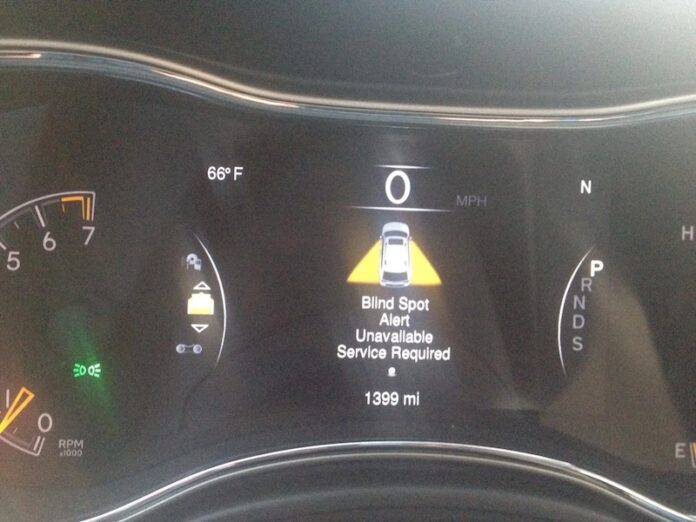

Seeing “Blind Spot Alert Unavailable — Service Required” (or a very similar message) on your dash can be confusing for one simple reason: the feature usually works quietly in the background—until it suddenly doesn’t. You might not notice anything wrong with the way the car drives, but the warning makes it sound like a serious failure. In reality, this message can range from a temporary “system paused” condition (snow on the sensor) to a genuine fault that needs diagnosis (a misaligned module, damaged wiring, or a communication problem on the vehicle network).
This guide breaks the message down in plain language, but with the depth an experienced technician would use: what the Blind Spot Monitor (BSM) actually is, how it decides when to warn you, why it sometimes disables itself, how to interpret common symptoms and DTCs, and what you can do to fix it—starting with no-cost checks before moving into scan-tool diagnostics and calibration.
The “Blind Spot Alert Unavailable” message shows up in many vehicles equipped with BSM/BSD features, including Toyota, Chrysler, Jeep, Dodge, Ram, Hyundai, and others. While the hardware design differs by brand, the troubleshooting logic is remarkably similar because all systems must solve the same problem: detect vehicles approaching from behind in the blind-zone with enough reliability to warn you without spamming false alerts.
For clarity, we’ll take a general approach that applies to most brands, and we’ll call out brand-specific notes where they matter (for example, certain Toyota heat-related behavior and Hyundai code patterns). Let’s dive in.
What is the Blind Spot Monitor?
The Blind Spot Monitor (BSM)—sometimes called Blind Spot Detection (BSD), Blind Spot Alert, Side Assist, or Lane Change Assist—is a driver-assistance system designed to help you detect vehicles in the areas your mirrors and peripheral vision can miss.
In practical terms, BSM watches the “blind zone” to your left and right, usually from the rear quarter area. When a vehicle is detected in that zone, you’ll typically see a warning indicator illuminate in the side mirror (or on the A‑pillar). If you activate your turn signal while something is detected, the system may flash the indicator and (on many vehicles) emit an audible alert or a vibration/haptic warning.
BSM is not meant to replace mirrors, shoulder checks, or safe following distance. It’s meant to reduce the chance you merge into a vehicle you didn’t notice—especially motorcycles and fast-approaching cars.
Most systems use sensors mounted behind or near the rear bumper cover, one on each side. Depending on brand and generation, those sensors may be:
- Short-range radar modules (most common on modern vehicles)
- Ultrasonic sensors (more common for parking, sometimes used in older/limited implementations)
- Camera-based systems (less common for blind spot detection alone; more common as part of a broader ADAS suite)
Because many BSM systems rely on radar, they should not be confused with parking sensors. Parking sensors are typically ultrasonic, operate at very short range, and focus on objects close to the bumper during low-speed maneuvers. BSM radar monitors are usually positioned and tuned for moving-traffic detection at higher speeds and longer distances.
Most BSM designs work like this:
- Detection: The sensor measures an object’s presence, speed, and approach angle in a defined zone.
- Filtering: Software filters out stationary objects and “non-threat” objects based on speed and relative motion (though false alerts can still happen).
- Warning decision: If an object is in the blind zone, the mirror indicator illuminates. If you signal toward the object, the warning escalates (flash + sound/haptic).
- Self-checking: The system continuously monitors its own health (communication, voltage, sensor alignment, and internal diagnostics). If it can’t guarantee accuracy, it disables itself and shows “Unavailable/Service Required.”
That last point is crucial: in most vehicles, the system would rather shut down than provide unreliable warnings. A blind spot alert that triggers at the wrong time—or fails when needed—creates liability and risk. “Unavailable” is often the system choosing safety over uncertainty.
What Does “Blind Spot Alert Unavailable — Service Required” Really Mean?
Manufacturers phrase the message differently, but it generally means one of two things:
- Temporary inhibition: the BSM system has paused itself because conditions are not suitable (heavy snow buildup, mud, ice, extreme heat effects, heavy rain/spray, or the bumper area is obstructed). In many of these cases, the message may clear on its own once conditions improve.
- Detected fault: the system has found a problem it considers persistent or safety-critical (sensor misalignment, internal sensor fault, wiring problem, module communication loss, CAN bus issues, or LED indicator circuit problems). This type usually stores a diagnostic trouble code (DTC) and will often return until repaired.
So the message isn’t “your blind spot monitor is broken” in every case. It’s “the system can’t certify itself as reliable right now.” Your job is to figure out whether it’s a temporary external condition or a true system fault.
What is the Blind Spot Monitor Designed to Do (and Not Do)?
Drivers sometimes misinterpret BSM as a guarantee—like a force field that prevents lane-change accidents. That’s not how it’s designed. Understanding the system’s limitations will make you safer and help you interpret false alerts and “unavailable” messages correctly.
BSM is designed to:
- Detect vehicles approaching from behind in adjacent lanes (especially at highway speeds).
- Warn you when a vehicle is in a defined blind-zone beside/behind your car.
- Escalate warnings when you signal toward an occupied lane.
BSM is not designed to:
- Detect stationary objects with perfect consistency (walls, guard rails, parked cars).
- Work reliably when sensors are blocked by snow, mud, ice, stickers, thick paint, or bumper damage.
- Replace proper mirror adjustment and shoulder checks.
- Perform accurately after body repairs unless the system has been calibrated as required.
This becomes important when diagnosing a warning message: the system is engineered to shut down if the conditions exceed what it can responsibly handle.
Causes of the Blind Spot Alert Unavailable Service Required Message
Many conditions can trigger BSM faults or temporary unavailability. The root cause depends on sensor design, vehicle model, road environment, and even recent repairs. Below are the most common causes—organized in the order that experienced technicians typically check them (fastest, most common, and least expensive first).
1) Sensor obstruction: snow, mud, ice, road salt, and bumper contamination
This is the most common cause in winter climates and muddy environments. Radar sensors need a reasonably “clean” bumper surface area to transmit and receive signals properly. Heavy contamination can scatter or absorb signals enough that the system loses confidence.
If the message appears after a snowstorm, off-road driving, or a long highway drive with slush spray, clean the rear bumper corners thoroughly and retest.
In many cases, cleaning alone resolves the problem because the system returns to normal once signal quality is restored.
2) Environmental interference: heavy rain, dense spray, extreme heat
Weather can influence radar performance. Heavy rain and road spray introduce noise into radar reflections. Some systems will continue to operate with reduced performance; others will declare themselves unavailable to prevent false confidence.
Toyota has noted cases where extremely hot environments can cause the blind spot indicator to behave abnormally. Some owners report indicator lights staying on when temperatures are extremely high (in the ~170–180°F range). In those cases, the system returns to normal as temperature drops below around 170°F.
Additionally, heat from exhaust routing or a damaged heat shield has been reported to contribute to sensor distortion or damage. If a sensor is heat-soaked or the bumper area is exposed to excessive exhaust heat, you may see repeated unavailability warnings.
3) Physical impact or misalignment: even minor bumps matter
BSM radar modules are alignment-sensitive. A strong impact (or even a moderate bump that shifts a bracket behind the bumper) can change the sensor’s horizontal axis alignment. Many systems will store alignment DTCs and disable the feature until alignment is corrected and calibration performed.
This includes impacts you may not think about:
- Backing into a snowbank
- Light bumper contact in parking lots
- Trailer hitch taps
- Minor rear-end collisions with “no visible damage”
Because the sensor sits behind plastic, the bumper cover may look fine even if the bracket or sensor mount shifted.
4) Wiring faults: corrosion, pin fitment, broken insulation, or short circuits
Rear bumper wiring is exposed to water, road salt, and vibration—three things that can eventually create connector corrosion or insulation damage. Wiring issues can cause communication loss, sensor power loss, or indicator circuit faults.
If the system is frequently “unavailable” in wet weather or after a car wash, suspect moisture intrusion at connectors or damaged wiring insulation.
You can often spot these issues by inspecting sensor connectors for green corrosion, water tracks, bent pins, loose pin tension, or damaged harness clips that allow the wire to rub through.
5) Module communication faults: CAN bus and network issues
BSM modules talk to other vehicle modules via CAN (Controller Area Network). If the system loses communication with a master or slave module (or with the vehicle network), it will set communication DTCs and disable the feature.
Network faults can be caused by wiring damage, module failure, water intrusion, or even rodent damage. In some vehicles, a single damaged CAN line can trigger a chain of unrelated warnings because multiple systems share the same bus.
6) Accessories and modifications near the sensor
Bike racks, hitch-mounted carriers, bumper stickers/film, aftermarket bumpers, or even certain tow-hitch configurations can block or reflect radar signals. This can cause false alerts or unavailability warnings.
If the warning began after installing an accessory, remove it temporarily and retest. This is one of the fastest “rule-out” steps you can do at home.
Symptoms of the Blind Spot Alert Unavailable Service Required
The first symptom is obvious: the warning message appears on the instrument cluster or infotainment screen. But there are other symptoms that can help you narrow the cause.
Some symptoms depend on brand and system design. Examples reported by manufacturers include the following DTCs (Diagnostic Trouble Codes):
Toyota has reported that you may see:
- DTC C1AC1 — Master Module Horizontal Axis Misalignment
- DTC C1AC2 — Slave Module Horizontal Axis Misalignment
Hyundai has reported related DTCs such as:
- C120D15 — Left LED Circuit Short To B
- C120B15 — Right LED Circuit Short To B Or Open
- C160A88 — BSD Local CAN bus off
Other common DTCs that can appear across multiple brands (reordered by diagnostic priority) include:
- U0232 – Lost Communication with Blind Spot Monitor Slave Module
- U0233 – Lost Communication with Blind Spot Monitor Master Module
- C1AB6 – Blind Spot Monitor Master Module
- C1AB7 – Blind Spot Monitor Slave Module
Additional practical symptoms drivers commonly notice include:
- Mirror indicators no longer illuminate even when another vehicle is clearly beside you
- Mirror indicators stuck on or stuck flashing (rare but usually indicates a fault or misalignment)
- System works intermittently (often heat, moisture, or wiring related)
- System disables immediately after start-up (often stored DTCs or communication problems)
From an expert diagnostic standpoint, the difference between “intermittent” and “constant” matters. Intermittent faults often point toward moisture, heat, or harness movement. Constant faults often point toward a misalignment, a failed sensor/module, or a persistent communication/power issue.
Instances where the BSM functions Unnecessarily
It’s also important to understand when the BSM can behave “unnecessarily” (false positives). Many drivers assume false alerts mean the system is broken. Often, it’s the system doing what it’s designed to do—reacting to reflections or objects near its detection boundary.
Conditions that can cause unnecessary or unexpected BSM alerts include (reordered from most common to least):
- Where accessories such as bicycle carriers or hitch-mounted cargo racks are installed close to the sensor
- Where there is a short distance between a wall/guardrail and your vehicle (radar reflections can look like a vehicle)
- Where an object or vehicle is extremely close to the detection area (lane-splitting bikes, very close merges)
- Misalignment of the sensor due to strong-impact accidents (or shifted bumper brackets)
False alerts matter because they teach drivers to ignore the warning lights, which defeats the point of the system. If you’re getting frequent false alerts, you should inspect for accessories, bumper damage, and sensor mounting integrity—and consider professional calibration if body repairs were recently performed.
How to Fix the Blind Spot Alert Unavailable Service Required Error Message
Depending on what you want to achieve and what’s causing the malfunction, there are multiple repair paths. The smartest approach is to start with the simplest likely causes and work toward deeper diagnostics only if needed.
Below are practical methods, expanded with the kinds of checks professionals recommend. Use common sense: if you’re uncomfortable removing panels or working near electrical connectors, skip to the scan-tool step or consult a technician.
Method 1: Clean the sensor area and inspect for physical damage
Start with the most common and cheapest fix: remove contamination from the sensor zone. If the error message results from dirt, mud, snow, ice, or heavy road salt buildup around the sensor, cleaning can restore operation quickly.
Recommended steps:
- Wash the rear bumper corners thoroughly (both sides), especially where radar modules are mounted behind the bumper.
- Remove any heavy wax buildup or thick protective films that may block radar signals.
- Dry the area and take a short drive to allow the system to re-check itself (some vehicles require movement to re-enable).
If the message persists, you may need to inspect the sensor behind the bumper. In some models, that requires gently removing parts of the rear bumper cover. If you choose to do this:
While you are at it, inspect the condition of the sensor for cracks, dents, or any physical damage. Check the mounting bracket for looseness or shift. A radar module that’s rotated by even a few degrees can trigger misalignment DTCs.
Also inspect the sensor plug and harness for cuts, pin corrosion, or wiring issues. Repair or replace damaged wiring and connectors. Many rear harness issues are caused by:
- Water intrusion at connector seals
- Corrosion from salt exposure
- Harness abrasion from missing clips
- Impact damage behind the bumper cover
If you find obvious damage to the sensor housing or mount, a scan tool and calibration check is usually required after replacement.
Method 2: Disable the feature (if you no longer want it)
If you’ve decided you don’t want the feature active (for example, you use a hitch rack permanently, or you’re waiting on a repair appointment), most vehicles allow you to disable BSM through the settings menu. This does not “repair” the system; it simply turns the warnings off so you aren’t constantly notified.
General steps (menus vary by brand):
- Put your car in start mode, and on the display screen, select settings.
- Select safety and driving assistance
- Scroll down the option and select blind spot alert
- Turn the blind spot alert off (You should notice the blind spot warning light go off).
Safety reminder: if you disable BSM, you must rely fully on mirrors and shoulder checks. Disabling the feature does not remove the blind spot; it removes the assist.
Method 3: Scan for codes, clear faults, and follow the diagnostic path
If cleaning and inspection don’t solve the problem, the next step is diagnosis with an OBD II scan tool that can read body/ADAS modules (not just engine codes). On many vehicles, basic code readers only see powertrain codes and will miss BSM-related DTCs entirely.
Only do this after trying Method 1. If the issue is contamination, there’s no reason to chase codes first.
Here’s the professional diagnostic sequence:
- Run a complete vehicle scan (not only engine).
- Confirm the existence of any BSM/BSD-related DTCs (like U0232, U0233, C1AC1, C1AC2, etc.).
- Save or write down the codes and freeze-frame/environment data if available.
- Clear codes only after documenting them (clearing too early can erase clues).
- Perform a short test drive to see which codes return.
The stored code will give you a hint as to what the underlying problem may be.
For instance, U0232 and U0233 indicate a loss of communication with the blind spot slave/master module. That typically points toward:
- Power/ground loss to the module
- Connector damage/corrosion
- CAN bus wiring faults
- Module internal failure
In that case, the “fix” may involve repairing wiring, reseating connectors, replacing a module, or performing module programming/calibration depending on the brand.
Advanced Fix: Calibration and Alignment (When Cleaning Isn’t Enough)
One of the most misunderstood aspects of BSM repair is calibration. Many radar-based systems require calibration when:
- A sensor is replaced
- The rear bumper cover is removed and reinstalled
- The sensor bracket is replaced or bent
- The vehicle is involved in a collision, even minor
- After certain body repairs or repainting (paint thickness can matter for some radar systems)
Calibration is not “optional dealer magic.” It is the process of telling the car, “This sensor’s reference angle and position are correct,” using targets, alignment procedures, or scan-tool guided routines. Without calibration, you can install a brand-new sensor and still get “unavailable” messages because the system cannot validate alignment.
If you have codes like horizontal axis misalignment (Toyota C1AC1/C1AC2), calibration and bracket alignment become likely requirements. This is usually beyond a simple DIY repair unless you have ADAS calibration equipment and the correct service data.
Preventive Maintenance: How to Keep BSM Working Reliably
BSM systems don’t need frequent “maintenance,” but they do benefit from a few practical habits that reduce false alerts and unavailability events:
- Keep rear bumper corners clean in winter and after muddy driving.
- Avoid thick stickers, reflective tape, or heavy film over sensor zones unless the product is radar-compatible.
- Be careful with hitch accessories; test BSM after installing bike racks or carriers.
- After any collision repair, confirm whether ADAS calibration was performed and documented.
- Inspect wiring clips and harness routing after bumper removal or exhaust work.
These steps reduce the most common “unavailable” causes before they become a diagnostic appointment.
When You Should Stop DIY and Visit a Technician
Cleaning and basic inspection solve many cases. But you should seek professional help if:
- The warning returns immediately after clearing and cleaning
- You have communication DTCs (U0232/U0233) that persist
- You recently had body/bumper repairs and suspect calibration is required
- The system behaves erratically (stuck on lights, constant false alerts)
- There are signs of water intrusion or harness damage
A technician with a proper scan tool can access manufacturer-specific BSM data, run actuator checks, and perform calibrations when needed. In many cases, that’s faster and cheaper than repeated guesswork—especially when the solution is a bracket alignment or software routine rather than a part replacement.
Final Thought
“Blind Spot Alert Unavailable — Service Required” is common across vehicles equipped with BSM/BSD systems. The message usually means the system has either detected conditions that reduce detection accuracy (snow, mud, heavy spray) or has logged a real fault (misalignment, wiring, communication loss, indicator circuit problems).
Start with the simple fixes: clean the bumper corners, remove obstructions, inspect connectors and wiring, and then scan for codes if the warning persists. If you’ve tried the methods above and the issue remains, a technician or ADAS-capable shop can confirm whether calibration, module repair, or harness work is needed.
And one last reminder: even when BSM is working, it’s an assist, not a substitute. Keep your mirrors adjusted correctly, keep scanning, and use the warning system as an extra layer—especially on high-speed roads.
Thank you for reading!