
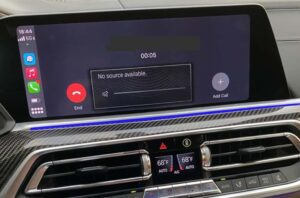

Whether your BMW is brand new or already five-plus years into ownership, it can still surprise you with the occasional mechanical or electronic hiccup. One particularly annoying issue that has become notorious in certain BMW communities is the “No Source Available” message, which typically shows up when you’re trying to use the radio, Bluetooth audio, Apple CarPlay, or another sound source. It’s upsetting for a simple reason: you expect premium infotainment to “just work,” and when it doesn’t, the silence can make the whole car feel broken.
The frustrating part is that there isn’t one universally accepted, official “single root cause” that explains every case. Owners report slightly different triggers, slightly different symptoms, and different success rates with resets. Some dealerships can resolve it with programming updates, while others may not be able to reproduce it consistently. In other words, the experience can feel like a moving target.
Table of Contents
But don’t panic. Many BMW owners have successfully fixed the problem temporarily; and in some cases for good; using a straightforward reboot procedure and a few additional troubleshooting steps. The goal of this guide is to help you approach the “No Source Available” problem like an expert: understand what the message actually means, reboot the system correctly, identify the most likely causes, rule out common related issues, and know when it’s time to involve a dealer or consider an upgrade.
By the end, you’ll have a clear playbook for restoring your audio and reducing the chance of the issue returning; without guesswork and without immediately spending money on parts you may not need.
What Does the BMW “No Source Available” Mean?
The BMW “No Source Available” error message generally means the infotainment/audio system is not receiving (or not processing) a usable audio signal from any of the available sources. In simple terms, your head unit (iDrive) is awake, your screen may still respond, you may even see volume graphics; but the system acts as if no audio input exists, so it can’t output sound.
Owners often assume this is a speaker problem, but in many cases it’s not. A “No Source Available” message most commonly points to one of the following categories:
- Software/firmware hang inside iDrive or an audio-related module (the system is “stuck” in a bad state).
- Module communication issue on the vehicle’s data network (one module isn’t responding, so the system can’t complete the audio pathway).
- Source handshake failure with CarPlay/Android/Bluetooth/USB (the phone connects but the audio channel doesn’t negotiate properly).
- Amplifier/output stage not waking up (in some systems, the amplifier is its own module, and if it fails to wake, you can lose audio output).
It’s also why the issue can be confusing at a dealership. If the fault is intermittent and clears with a reboot, a technician may not see it during a brief appointment unless you can reproduce it. And while BMW service networks are constantly updating software and issuing internal bulletins, there isn’t always a single public-facing explanation that applies to every model and iDrive generation.
As mentioned, you don’t need to worry if the notification has popped up on your BMW display. Many BMW owners have fixed it, and the first fix is usually the easiest: rebooting iDrive properly.
Before You Try Fixes: Quick Safety and “Do This First” Notes
Because the most common fix involves rebooting iDrive while the vehicle is on, we need to add a professional safety note. Rebooting the infotainment system is generally safe, but your attention should always remain on driving conditions.
Here’s the safest approach:
- If possible, do the reset in a low-risk environment (quiet road, parking lot, or while stopped in a safe place).
- If you must be in motion for the reset to succeed, keep speed low and avoid complex traffic situations.
- Do not stare at the screen waiting for it to go black; focus on the road and let the screen do its thing.
- If your car has driver-assistance features, do not rely on them as a substitute for attention during troubleshooting.
Also, if your BMW is producing no sound at all, consider whether you’ve lost important audio alerts (parking sensors, navigation prompts, warning chimes). Drive with added caution until audio returns.
How To Fix the “No Source Available” Issue
To fix the BMW No Source Available message in the most common scenario, you’ll want to reboot (reprogram in the “soft reset” sense) the audio/iDrive system. The reset procedure is simple and often succeeds because many “No Source Available” events behave like a software stall: the module is on, but it’s frozen in a state where it won’t accept or output audio.
Here’s the method many owners use successfully: press and hold the volume button for at least 30 seconds and allow the system to reset automatically. On many BMWs, holding the volume knob/rocker forces iDrive to restart.
Let’s elaborate on what this does and why it works.
Your BMW audio system can develop a software error or a communication hiccup that prevents it from receiving or outputting a signal. When that happens, the system behaves like it has no sources: radio, Bluetooth, CarPlay, and other inputs may show as unavailable or “greyed out.” A reboot clears temporary memory states, restarts the head unit logic, and forces modules to reconnect and renegotiate audio sources.
Think of it like rebooting a phone that’s acting weird. The hardware usually isn’t “broken”; the system just needs a clean restart so everything loads correctly.
Step One: Drive Your Car
Start the engine and drive the car. Many owners report the reboot is more successful when the vehicle is in motion. If you’ve tried to reset the system while the vehicle is stopped and it didn’t work, this is why the “drive while rebooting” advice persists in the community.
Therefore, ensure you’re driving; but keep speed low and conditions safe. You could carry out this task while traveling to the office or anywhere that doesn’t require intense focus. If you can’t move for whatever reason, put the vehicle in a “ready state” (place your foot on the brake and press start) so the electronics are fully awake and stable.
Expert note: The idea here isn’t that motion itself “fixes” the system. More likely, certain BMWs keep modules in a different power state when the car is fully active versus when it’s parked. Driving can keep the power management system from putting modules into partial sleep states during the reset window.
Step Two: Press and Hold the Volume Button
While you drive, locate the volume control dial/rocker (commonly in the center console). Press and hold this control for 30 to 45 seconds until the screen turns off (goes black). Once the screen goes off, release the button and allow the system a moment to finish the reset process.
Be patient. The reboot process can take up to two minutes depending on iDrive version and how many modules need to reinitialize. During that time, you may see the BMW startup logo or a black screen. That is normal. The system is essentially doing a controlled restart.
Expert note: If you only hold the volume button for 5–10 seconds, you may just be muting/unmuting or turning the system off without forcing a reboot. The long hold is what triggers the restart routine.
Step Three: Turn On the System
Once the reboot is complete, press the volume button again to switch the audio system back on. That should clear the “No Source Available” message and restore normal audio operation. In many cases, the entire reset procedure takes about 3–4 minutes from start to finish.
If you were connected to CarPlay or Bluetooth before the reset, you may need to give it a moment to reconnect. Some BMWs reconnect automatically; others require you to reselect the audio source after reboot.
Pro tip: After the restart, test more than one source: try FM/AM, Bluetooth audio, and CarPlay (if you use it). If only one source works, you may be dealing with a source-specific handshake issue rather than a full audio-module hang.
Does Rebooting Really Resolve BMW No Audio Source?
As mentioned, holding the volume rocker dial for 30–45 seconds has worked for many BMW owners. In a lot of cases, it’s the only step you’ll ever need. However, it does not work for everyone; and even when it works, some owners report the issue returns later.
When rebooting is only a temporary fix, the problem may reappear alongside symptoms such as:
- The CarPlay connection doesn’t work
- Anything to do with the audio system doesn’t work
- When you adjust the volume, the volume bar appears on the screen, grayed out with the “No Audio Source” notification.
- The system can’t reset.
If this is what you’re going through, your situation may fall into a “deeper than a simple reboot” category. That could mean persistent software corruption, a failing amplifier or audio module, a communication issue on the vehicle network, or a recurring conflict with a connected phone.
In that case, one option some owners choose is swapping the stock audio system for a more reliable aftermarket model. That would fix the problem once and for all. It’s true that buying an aftermarket system may not appeal to everyone; especially on a premium vehicle where factory integration is part of the appeal. However, for owners who experience the error frequently, an aftermarket solution can feel like a clean break from repeated frustration.
And it’s also true that BMW has not publicly provided a single universal explanation that accounts for every “No Source Available” case across all models and iDrive variants. Many issues of this type are intermittent and depend on specific combinations of software version, hardware configuration, and connected devices. That’s why your personal troubleshooting steps; and clear documentation for your dealer; can make the difference.
Before you jump to replacement hardware, though, it’s worth working through more structured troubleshooting. In many cases, you can reduce recurrences by resetting connections, cleaning up device pairings, and ensuring the system is not being pushed into an unstable state by repeated device switching or alert interruptions.
What Are the Possible Causes of the No Audio Source Error?
Many owners speculate that the problem is triggered when the BMW alert system plays a warning sound; such as a pedestrian alert, parking sensor chime, or another notification. The theory is that the system attempts to “interrupt” audio for an alert and fails to return to normal playback afterward, leaving the audio pipeline stuck.
Others suspect corrupt software or a software conflict between iDrive and phone integration features. Unfortunately, there’s typically no DIY way to reinstall or flash iDrive software safely without proper tools. Some vehicles can receive updates over-the-air (OTA) depending on model and region, but a full programming session is usually dealer-level work.
In the meantime, a practical approach is to treat the error as a “system state” problem: clear the state, reset the module, and reduce triggers that may cause the system to get stuck again.
Try resetting the iDrive system if you can do it. Ensure you do it while driving to increase the chance of success. Also, if you have connected iPhone or Android, delete it too and see whether that resolves the issue.
Let’s expand those ideas into a clearer troubleshooting strategy. “Possible causes” often break down into these practical buckets:
- Audio source negotiation failure: Bluetooth/CarPlay/USB audio connection establishes partially but fails to complete a stable audio channel.
- Alert interruption bug: a chime or warning steals audio focus and the system fails to hand control back to the selected source.
- Module wake/sleep conflict: the car’s power management puts a module to sleep or delays wake-up, causing the head unit to see “no source.”
- Amplifier or audio gateway glitch: in systems with separate amplifiers or digital buses, the head unit may be fine but cannot route sound to speakers.
- Software instability: a bug in iDrive version, requiring update/reflash for permanent correction in some cases.
Because multiple factors can create the same symptom (“No Source Available”), you’ll get the best results by identifying what else is happening at the same time. For example:
- Does it happen only after CarPlay connects?
- Does it happen only after you receive a navigation prompt?
- Does it happen after reversing (parking sensor/chime involvement)?
- Does it happen after the vehicle sits overnight (wake-up timing issue)?
Those patterns can guide whether you focus on phone pairing cleanup, iDrive reset habits, or dealer-level module checks.
Advanced Troubleshooting: What to Do If the Reset Works Only Sometimes
If you can temporarily fix the issue with a reboot but it keeps returning, you’re dealing with a recurring trigger rather than a one-time random glitch. Here are expert-level steps that many owners overlook; because they feel “too simple” to matter, yet they often make a big difference in stability.
1) Delete and Re-Pair Your Phone (CarPlay/Bluetooth Reset)
Phone integration is one of the most common variables in modern infotainment issues. If the system gets stuck after connecting to a phone, you want to reset both sides of the handshake:
- On your BMW, delete the phone from the paired device list.
- On your phone, remove/forget the BMW Bluetooth connection (and CarPlay pairing if applicable).
- Restart your phone.
- Restart iDrive (volume button hold).
- Pair again from scratch.
This clears old device profiles, cached negotiation settings, and “stuck” connections that can cause the head unit to believe no valid audio source is available.
2) Change Your Default Audio Source
Some BMWs behave better when the last-used audio source is not a phone integration source (like CarPlay). If your vehicle tends to trigger the error on startup when it tries to reconnect to CarPlay instantly, temporarily switching your default to FM/AM and then manually selecting CarPlay can reduce recurrence in some cases. This is not a “final fix,” but it can help you determine whether the problem is source-specific.
3) Perform a Full Vehicle Sleep Cycle
Sometimes a soft reboot is not enough because a connected module remains in a confused state. In those cases, letting the car go into full sleep mode can reset more modules than an iDrive reboot alone.
A typical sleep-cycle approach looks like this:
- Turn off the car completely.
- Exit and lock the vehicle.
- Wait 10–20 minutes (varies by model) to allow modules to power down.
- Return, unlock, and restart.
If the audio returns after a sleep cycle, it suggests a module power-state problem rather than purely a head unit interface issue.
4) Check for Software Updates (Owner-Level and Dealer-Level)
Depending on your model, BMW may provide over-the-air updates or dealer programming updates that can stabilize iDrive behavior. If your vehicle supports OTA updates, check your settings to see if an update is available. If it does not, ask the dealer to check your iDrive software version and whether a newer integration level is available.
Even if BMW hasn’t labeled the update as “fixes No Source Available,” infotainment updates often include bug fixes in audio routing, module wake behavior, and CarPlay integration. In intermittent problems, these small fixes can be the difference between daily stability and recurring annoyance.
Professional tip: document when the issue happens and what source you were using. A dealer is more likely to take the complaint seriously if you can provide conditions and frequency, not just “it happens sometimes.”
When “No Source Available” Might Be Hardware-Related
Most cases are software or communication state issues. But if resets stop working and you lose audio consistently; especially if the system refuses to reset or the volume indicator stays greyed out permanently; hardware becomes more likely.
Hardware-related possibilities can include:
- Amplifier not powering up (or failing intermittently)
- Loose/failed connection in the audio signal pathway
- Head unit fault (less common, but possible)
- Network fault causing audio modules to drop offline
If you suspect hardware, the best next step is professional diagnostics. BMW diagnostic tools can read module communication status and stored fault codes, which helps determine whether the amplifier is offline or if the head unit is throwing internal faults. This is also where a dealer can confirm whether your car has related service bulletins or updated part numbers for known issues.
As an expert guideline: if the problem becomes frequent (weekly or daily), or if it affects warning chimes and safety-related audio cues, schedule diagnosis sooner rather than later.
Aftermarket Replacement: When It Makes Sense (and When It Doesn’t)
Swapping a factory BMW audio/infotainment system for an aftermarket alternative is a big step. It can be a permanent fix if your issue is rooted in a persistent factory module failure or design conflict. However, it can also introduce challenges: integration with vehicle settings, steering wheel controls, OEM microphones, backup camera, and factory amplifiers.
If you’re considering aftermarket replacement because “No Source Available” keeps returning, weigh these points:
- How often does the problem happen? If it’s once every few months and a reboot fixes it, replacement may be overkill.
- Is it under warranty? If you still have warranty coverage, push for dealer diagnosis and updates first.
- Do you rely on factory integration? Some BMW settings and features are tightly integrated with iDrive.
- Can a specialist upgrade the OEM system instead? In some cases, OEM-compatible upgrades can improve reliability without full replacement.
For owners who are truly fed up and out of warranty, an aftermarket system can feel like freedom. But it’s not the first move I recommend until you’ve tried resets, phone pairing cleanup, and software update checks; because those are low-cost and often effective.
Frequently Asked Questions
Will Unplugging Battery Fix No Source Available Error?
Unplugging the battery may fix the No Source Available error but has solved several electrical-related issues, such as the check engine light. Disconnecting the negative terminal of the battery may help to reset the car’s electronic control unit. Once the ECU refreshes, error codes will probably disappear, and the check engine light will go off.
Expert caution: battery disconnect is a “hard reset” and can be helpful, but it can also create side effects; loss of presets, window initialization, clock resets, and potential fault memory changes. If you choose this method, do it carefully. Ideally, consult your manual for battery disconnect procedures, and consider using professional assistance if your BMW has sensitive electronics or you’re unsure about access to the battery location.
Also, if the error returns after battery reconnection, it suggests the issue is not just a temporary state problem; it may be a recurring trigger (like CarPlay negotiation) or a module-level fault that needs diagnostics.
Can I Upgrade My BMW Audio System?
You can upgrade your BMW audio system for a better sound experience. High-end sound systems are available in the market and are easy to install. You can have an expert perform the BMW audio upgrade if you’re uncomfortable doing it yourself.
From an expert standpoint, “upgrade” can mean two different things: upgrading speakers/amplifier for sound quality, or upgrading the head unit/infotainment interface for reliability and modern features. If your main goal is fixing “No Source Available,” make sure the upgrade addresses the control side of the problem (head unit/module reliability), not just speaker quality.
If you’re upgrading, an experienced BMW audio specialist can help preserve factory features while improving reliability. This is often the best compromise for owners who want better sound and fewer glitches without losing the OEM experience.
What Causes BMW Radio To Stop Working Suddenly?
Many issues, including a blown fuse, could cause a BMW radio to stop working suddenly. Damage to the speakers can also suddenly stop the audio system. Other notorious causes are wiring faults and faulty tuners or antennae; allow a professional to diagnose, repair or replace the system for you.
To add expert context: sudden radio failure can also be caused by an amplifier failure, a module not waking up, or a network communication issue. If the radio display works but there is no sound, suspect the output stage/amplifier or a “source unavailable” software state. If the entire system is dead (no display, no response), suspect power supply, fuse, or head unit issues.
If you see “No Source Available,” that’s a more specific symptom than “radio dead,” and it often responds better to reboot and pairing cleanup before you start replacing hardware.
Is it safe to keep driving with “No Source Available”?
Generally, yes; you can still drive. But drive cautiously if you rely on audible alerts (parking sensors, warnings, navigation prompts). If those alerts are also silent, you’ve lost part of your situational awareness. Treat it as a convenience and safety annoyance rather than an engine-threatening fault, but still address it, especially if it becomes frequent.
Final Thought
The “No Source Available” message is one of the more common infotainment frustrations affecting many modern BMW models. The good news is that you often can fix it in minutes using the three-step reboot process: drive (or at least enter ready state), hold the volume control for 30–45 seconds until the screen goes black, and let iDrive restart before turning audio back on.
If the error message keeps reappearing, you have a decision to make. You can continue using the reset as a quick workaround, or you can move into deeper troubleshooting: delete and re-pair your phone, check for iDrive updates, perform a full sleep cycle, and document the conditions so a dealer can properly diagnose the issue. If the system becomes unstable and refuses to reset; or if multiple audio-related functions stop working consistently; hardware diagnostics become more relevant.
In some cases, replacing the system with a more solid aftermarket one can resolve audio issues for good, but it’s typically a last step after you’ve exhausted the simpler solutions. Although it may cost more, it can end repeated frustration; especially out of warranty.
Hopefully, it won’t get there for you. In most cases, the above steps restore audio and keep your BMW enjoyable to drive. Meanwhile, BMW continues to update iDrive software and improve system stability across model years. If a future update addresses your exact trigger, a permanent fix may arrive without you needing hardware changes. Until then, use the expert playbook in this guide and you’ll be prepared the next time the message appears.