
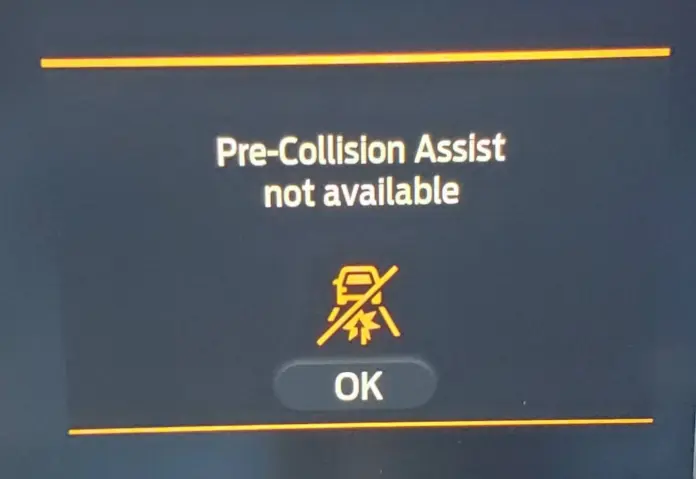

Ford’s Pre-Collision Assist is one of those features you barely think about until it stops working. When it’s doing its job, it quietly monitors the road ahead, scanning for vehicles, pedestrians, and obstacles using cameras and radar. It’s a background layer of protection that gives you a fraction of extra reaction time when something unexpected happens on the road.
But then one morning, you start the car and see a message on the dashboard: “Pre-Collision Assist Not Available.” Maybe it’s accompanied by a note about a blocked sensor. Maybe it just shows up without explanation. Either way, it’s unsettling. You’re suddenly aware that a safety system you’ve been relying on has gone quiet.
The good news? In most cases, this warning doesn’t mean your car is broken. It usually comes down to something blocking the sensor, a misalignment, or an electrical hiccup. Once you understand what triggers it, fixing the problem—or at least knowing when to get professional help—becomes a lot more straightforward.
This guide covers everything you need to know about the Pre-Collision Assist warning: what the system actually does, why it sometimes goes offline, how the common causes break down, and what steps you should take to get it working again. We’ll also look at how this system connects to Adaptive Cruise Control, what Ford’s recall and TSB history looks like, and when warranty coverage might apply.
What Ford Pre-Collision Assist Actually Does
Before troubleshooting the warning, it helps to understand what the system is and how it works. Ford Pre-Collision Assist is a driver-assist technology designed to help prevent or reduce the severity of front-end collisions. It doesn’t replace your job as a driver—but it adds a layer of electronic awareness that can catch things you might miss.
How the Camera and Radar Work Together
The system relies on two primary sensing components that work in tandem:
- A forward-facing camera mounted on the inside of the windshield, typically near the rearview mirror. This camera monitors the road ahead and helps identify vehicles, pedestrians, and cyclists.
- A radar sensor located in the front grille area of the vehicle. This radar measures the distance and relative speed of objects ahead, giving the system a way to judge how quickly a potential collision could happen.
Together, these two sensors feed data to the vehicle’s computer in real time. The computer constantly evaluates what’s ahead and determines whether there’s a risk of collision based on your speed, the distance to the object, and the closing rate between your vehicle and whatever is in front of you.
What Happens When the System Detects a Threat
If the system decides you’re on a collision course and haven’t reacted yet, it works through a quick escalation sequence:
- Visual alert: A warning icon or message appears on the instrument cluster or head-up display.
- Audible alert: A chime or tone sounds to get your attention.
- Brake support: In some scenarios, the system pre-charges the brakes, which means it prepares the braking system to deliver maximum stopping power the moment you press the pedal.
- Automatic Emergency Braking (AEB): If you still don’t respond, the system can automatically apply the brakes on its own to help avoid or reduce the severity of the collision.
That final step—AEB—is what makes this system more than just a warning light. It’s an active safety feature that can physically slow or stop the car without any input from the driver.
Day and Night Performance
One of the strengths of Ford’s Pre-Collision Assist is that it functions during both daytime and nighttime driving. The radar sensor doesn’t depend on visible light, so it operates just as effectively in the dark. The camera, while more limited in total darkness, can still detect pedestrians at night with the help of your vehicle’s headlights.
That said, the system has limits. Heavy rain, dense fog, blinding sun glare, and other extreme conditions can reduce the system’s ability to see clearly. And that’s often where the “Not Available” warning enters the picture.
Important Limitation: It’s Supplemental, Not a Substitute
This point gets repeated in every Ford manual, and it’s worth repeating here: Pre-Collision Assist is a supplemental system. It doesn’t replace attentive driving. It won’t catch every scenario. And it won’t always activate in time to prevent a crash entirely.
Think of it as a safety net, not a replacement for watching the road. When it works, it’s excellent. But your hands, eyes, and judgment are still the first line of defense.
Why the “Pre-Collision Assist Not Available” Warning Appears
When you see this message on your dashboard, it means the system has determined that one or both of its sensors can’t operate reliably right now. The vehicle isn’t broken—it’s telling you that the safety feature has temporarily taken itself offline because it can’t trust the data it’s receiving.
That’s actually a smart design choice. A system that gives false readings is more dangerous than one that tells you it’s unavailable. But you still need to figure out why it went offline, because some causes are trivial and some point to a real problem.
Here are the most common reasons this warning appears, along with what to do about each one.
Common Causes of the Warning and How to Fix Them
1. Snow, Dirt, Mud, or Ice Blocking the Sensors
This is the most frequent cause of the warning—and fortunately, the easiest to fix.
The camera mounted near the rearview mirror depends on a clear windshield to see. If the windshield is covered in grime, road salt residue, frost, or snow, the camera’s view becomes compromised. Likewise, the radar sensor in the front grille can be blocked by caked-on mud, snow buildup, ice, or even road debris.
When either sensor is obstructed, the system can’t get a clean read on what’s ahead. So it disables itself and sends you the warning.
How to fix it:
- Clean the front grille area thoroughly. Pay special attention to the center section where the radar sensor sits.
- Clean the windshield, especially the area around the rearview mirror where the camera is positioned.
- In winter, make sure to clear ice and snow from the grille before driving—not just the windshield.
- After driving through mud, slush, or heavy rain, check the grille for buildup.
In most cases, once the sensors are clean and the vehicle has been running for a few minutes, the warning will clear on its own. If it doesn’t, there may be another issue at play.
This is especially relevant for drivers in northern climates and colder regions. If you live somewhere that gets heavy snowfall, road salt, and freezing temperatures for several months out of the year, you’ll likely encounter this warning more often than someone in a milder climate. That doesn’t mean the system is faulty—it’s just sensitive to obstruction, which is actually a good thing from a safety standpoint.
Think about it this way: you’d rather the system tell you it can’t see than have it operate on bad data and either fail to warn you or, worse, trigger a false emergency braking event on an open highway.
2. Misaligned Radar Sensor or Camera
The radar and camera are precision instruments, and they need to be aligned within very tight tolerances to function correctly. If something knocks them out of position—even slightly—the system may lose its ability to accurately judge distances, angles, or speeds.
Common causes of misalignment include:
- Minor fender benders or parking lot bumps that shift the grille or bumper area.
- Windshield replacement that doesn’t perfectly re-seat the camera in its factory-calibrated position.
- Road vibrations over time, particularly on vehicles that regularly drive on rough or unpaved roads.
- Aftermarket modifications to the front fascia, grille, or bumper cover that move or obstruct the sensor’s field of view.
How to fix it:
Sensor realignment isn’t a DIY job. It requires specialized diagnostic equipment to recalibrate the radar and camera to the exact specifications Ford’s system needs. A qualified Ford technician or a shop with ADAS (Advanced Driver Assistance Systems) calibration equipment can handle this.
If you recently had your windshield replaced and the warning started appearing afterward, that’s a strong clue. Many general glass shops replace windshields without recalibrating the forward-facing camera. If you drive a Ford with Pre-Collision Assist, always confirm that camera recalibration is part of the windshield replacement service.
This is one of those situations where spending a bit more for proper calibration saves you from dealing with a non-functional safety system down the road. A misaligned camera can also affect lane-keeping assist and other ADAS features, so it’s not just about the collision warning.
3. Wiring Problems or Electrical Signal Issues
The Pre-Collision Assist system depends on clean, uninterrupted electrical signals between the sensors and the vehicle’s central computer. If there’s a break, corrosion, or fault anywhere in that wiring chain, the system can’t get the data it needs to function.
Wiring issues can stem from:
- Corroded connectors, especially in regions where road salt is common.
- Rodent damage to wiring harnesses. This is more common than people realize, particularly in rural areas or when a vehicle sits unused for extended periods.
- Water intrusion into the radar module or camera housing.
- A weak or failing vehicle battery that can’t provide consistent voltage to the ADAS modules.
- Blown fuses related to the sensor circuits.
How to fix it:
Electrical problems usually require a professional diagnostic scan. A technician can pull fault codes from the vehicle’s ADAS module and trace the issue to a specific connector, wiring run, or component. In some cases, a wiring repair or connector cleaning solves the problem. In others, a module replacement may be necessary.
If the warning comes and goes intermittently—appearing on some drives but not others—that’s a classic sign of a loose connection or a wiring issue that’s sensitive to temperature or vibration. Don’t ignore intermittent warnings. They tend to get worse over time, not better.
4. Extreme Weather and Environmental Conditions
Even with clean sensors and perfect alignment, certain environmental conditions can temporarily disable the system. Heavy rain, dense fog, blowing snow, and intense sunlight (especially when the sun is low on the horizon) can overwhelm the camera or confuse the radar.
Radar sensors can also be affected by large amounts of road spray kicked up by vehicles ahead of you. If you’re driving on a wet highway behind a truck throwing up a wall of mist, the radar may temporarily lose its ability to track vehicles at distance.
What to do:
In most weather-related situations, there isn’t much to “fix.” The warning will typically clear once conditions improve. But if you see the warning on a clear, dry day with clean sensors, weather isn’t the cause—and you should look at the other possibilities above.
Geography and terrain can play a role here too. If you regularly drive through mountain passes where fog settles in valleys, or through desert regions where blowing sand and dust are common, you may encounter this warning more frequently than someone driving in moderate, flat terrain with predictable weather. The system isn’t broken—it’s reacting to real environmental challenges.
5. Software Glitches and Module Errors
Like any computer-controlled system, Pre-Collision Assist can occasionally experience software hiccups. A temporary bug in the ADAS module, a failed software update, or a communication error between modules can trigger the warning even when the hardware is functioning normally.
What to try first:
- Restart the vehicle. Turn the engine off, wait about 30 seconds, and restart. In some cases, this clears a temporary software fault.
- Disconnect the battery. If a simple restart doesn’t work, disconnecting the battery for 10–15 minutes can reset the vehicle’s electronic modules. Reconnect and see if the warning clears after a short drive.
- Check for software updates. Ford periodically releases software updates for ADAS systems. A visit to the dealer can determine whether your vehicle needs an update that addresses known bugs.
If the warning persists after a restart and a battery reset, and the sensors are clean and undamaged, then you’re looking at a diagnostic appointment. The dealer can read the specific fault codes stored in the ADAS control module and determine whether the issue is software or hardware related.
6. Aftermarket Windshield Tinting or Accessories
This one catches some owners off guard. If you’ve had the windshield tinted—especially with a metallic or ceramic tint applied across the entire windshield including the camera area—it can interfere with the camera’s ability to see clearly.
Aftermarket accessories mounted near the rearview mirror, such as dashcams, phone mounts, or radar detectors, can also partially obstruct the camera’s field of view.
How to fix it:
- If you’ve recently had tinting applied and the warning started afterward, ask the tint shop whether they left a clear window around the camera sensor area. Most reputable shops know to do this for ADAS-equipped vehicles, but not all do.
- Move any accessories that might be blocking or partially obscuring the camera’s view.
It’s a small detail, but it matters. The camera needs a clear, unobstructed view through the windshield. Anything that distorts, blocks, or changes the light reaching the lens can affect performance.
How Adaptive Cruise Control and Pre-Collision Assist Work Together
If your Ford has both Adaptive Cruise Control (ACC) and Pre-Collision Assist, it’s worth understanding how these two systems are connected—because a problem with one often affects the other.
What Adaptive Cruise Control Does
Adaptive Cruise Control maintains a set speed, like regular cruise control, but it also adjusts your speed automatically to keep a safe following distance from the vehicle ahead. If the car in front of you slows down, ACC slows your vehicle to match. When the road clears, it accelerates back to your set speed.
This is especially helpful on long highway drives and in stop-and-go traffic, where constantly adjusting your speed becomes tiring.
The Shared Radar Connection
Here’s the key connection: Adaptive Cruise Control and Pre-Collision Assist share the same radar module. The radar sensor in the front grille feeds data to both systems simultaneously.
That means if the radar sensor is blocked, misaligned, or malfunctioning, both systems will typically go offline at the same time. You might see the Pre-Collision Assist warning alongside a message that Adaptive Cruise Control is also unavailable.
This shared dependency is actually useful from a diagnostic standpoint. If both systems fail together, you can be fairly confident the issue is radar-related rather than camera-related. If only one system fails, it may point to a camera issue or a software problem specific to that module.
Keeping Both Systems Running Smoothly
The maintenance routine is the same for both: keep the sensors clean, keep the windshield clear, and address any warning messages promptly. If you see a Pre-Collision Assist warning, check whether your Adaptive Cruise Control is also affected. If both are down, start by cleaning the front grille and the windshield area around the camera.
Even though these systems are sophisticated, they’re still dependent on basic physical conditions—clean glass, clear sightlines, and properly positioned hardware. Take care of those fundamentals and both systems will perform reliably the vast majority of the time.
And just like Pre-Collision Assist, Adaptive Cruise Control is a supplement to attentive driving. It doesn’t replace the need to watch the road, manage your speed, and keep a safe following distance on your own. If conditions get severe enough that the system disables itself, that’s your signal to pay even closer attention—not less.
What to Do If the Warning Won’t Clear
If you’ve cleaned the sensors, restarted the vehicle, checked for obvious obstructions, and the warning is still showing up, it’s time for a more structured approach.
Step 1: Confirm the Sensors Are Actually Clean
This sounds obvious, but it’s worth doing carefully. Get out of the car and physically inspect the front grille. Look for any film, residue, or small debris that might not be obvious from the driver’s seat. Also check the windshield around the camera area—look for water spots, smudges, or any discoloration on the glass.
Step 2: Try a Full Vehicle Restart
Turn the vehicle off completely. Wait at least 30 seconds. Start it back up and drive for 5–10 minutes at moderate speed. In many cases, the system needs a few minutes of driving to recalibrate and clear the fault once the obstruction is gone.
Step 3: Check for Related Warnings
Is the Adaptive Cruise Control also offline? Are there any other warning lights on the dashboard? If multiple systems are affected, the issue is more likely hardware or electrical. If only the Pre-Collision Assist is down, it could be camera-specific.
Step 4: Schedule a Professional Diagnostic
If the warning persists after all the basic checks, take the vehicle to a Ford dealer or a shop equipped with ADAS diagnostic tools. They can read the specific fault codes, check sensor alignment, test the wiring, and determine whether a software update, recalibration, or part replacement is needed.
Don’t put this off for months. While the car is still drivable without Pre-Collision Assist, you’re operating without a safety system that could make a difference in an emergency. The sooner you get it resolved, the sooner that extra layer of protection is back in place.
How Weather, Climate, and Geography Affect These Systems
From a geographic and environmental perspective, your location has a real impact on how often you’ll deal with sensor-related warnings.
Drivers in northern states and Canada deal with snow, ice, and road salt for months each year. That combination creates constant sensor-obstruction conditions. Road salt residue, in particular, can coat the front grille in a white film that’s easy to miss during a quick visual check but enough to block the radar.
In coastal areas, salt spray from the ocean can have a similar effect. If you live near the coast and park outside, periodic sensor cleaning becomes more important.
In desert and arid climates, dust storms and blowing sand can obscure sensors quickly. The fine particles can also work their way into seams around the radar module housing, which may require more thorough cleaning.
In tropical and subtropical regions, heavy rain and high humidity can create issues with water intrusion and condensation inside sensor housings. High humidity can also cause the camera’s windshield view to fog up on the inside, which can temporarily disable the system.
In mountainous terrain, fog that settles in valleys, sudden weather changes at elevation, and low sun angles through mountain passes can all affect camera and radar performance.
None of this means the system is poorly designed. It just means that real-world driving conditions across different environments create challenges that a sensor-based system has to navigate. Being aware of how your local geography and climate affect the system helps you respond appropriately when the warning appears—and helps you maintain the sensors proactively rather than reactively.
Preventive Maintenance to Keep Pre-Collision Assist Working
Most Pre-Collision Assist problems are preventable with basic upkeep. Here’s a maintenance routine that will keep the system running reliably:
- Clean the front grille regularly. Make it part of your car wash routine. Pay attention to the center section where the radar sits.
- Keep the windshield clean—inside and out. The camera can be affected by interior film, condensation, or exterior grime.
- Replace windshield wipers when they start leaving streaks. Poor wiper performance can leave a haze on the glass that affects the camera.
- After any front-end work or windshield replacement, confirm ADAS calibration. Don’t assume it was done—ask the shop directly.
- Check for rodent damage if the vehicle sits unused. Pop the hood and look for chewed wires, especially near the front of the engine bay.
- Monitor for warning messages after any front-end impact, even minor ones. Parking lot bumps can shift sensor positions.
These are small habits that take very little time but can prevent the frustration of dealing with a disabled safety system at the worst possible moment.
Recalls, Technical Service Bulletins, and Warranty Coverage
If you’ve tried the basic fixes and the warning still won’t clear, it’s worth checking whether Ford has issued any recalls or Technical Service Bulletins (TSBs) related to your specific vehicle.
Checking for Recalls
Ford has issued recalls affecting Pre-Collision Assist systems in the past. In one notable case, a recall covered approximately 25,000 vehicles where the Pre-Collision Assist feature was not properly enabled from the factory.
To check whether your vehicle is affected by any active recalls:
- Use Ford’s official Recall and Field Service Action search tool with your Vehicle Identification Number (VIN).
- Contact your local Ford dealer and ask them to run a recall check.
- Check the NHTSA website for any open safety investigations or recalls tied to your model year.
If a recall applies to your vehicle, the repair is typically done at no cost. But you won’t know unless you check—Ford doesn’t always send physical mail for every recall, and notices can get lost or overlooked.
Technical Service Bulletins (TSBs)
TSBs are a bit different from recalls. They aren’t mandatory fixes, but they’re official notices from Ford to dealers about known issues and recommended repair procedures. Think of them as Ford’s way of saying, “We’ve seen this problem before, and here’s how to handle it.”
There have been reports of TSBs covering situations where Ford models display a “Service AdvanceTrac” message alongside a “Pre-Collision Assist Not Available” warning. These bulletins often outline specific diagnostic steps and software updates that address the root cause.
Your dealer can look up any applicable TSBs for your vehicle by VIN. If a TSB exists for your exact issue, it often speeds up the diagnostic process significantly—because the dealer already has a documented fix instead of troubleshooting from scratch.
Warranty Coverage for ADAS Components
Ford’s manufacturer-backed warranty typically covers ADAS components, including the Pre-Collision Assist system, for a specific period. The exact coverage depends on your model year and whether you’re still within the bumper-to-bumper or powertrain warranty period.
If you’re dealing with a sensor failure, module malfunction, or software issue that requires dealer repair, check whether the work falls under warranty before paying out of pocket. Keep all service records and documentation organized—this makes future warranty claims smoother if additional issues arise.
If your vehicle is just outside the warranty window, it’s still worth asking the dealer. In some cases, Ford has offered goodwill repairs or extended coverage for known ADAS issues, especially if there’s an active TSB for the problem.
Ford Models Commonly Affected
While the “Pre-Collision Assist Not Available” warning can appear on any Ford equipped with the system, some models tend to generate more owner reports than others. This doesn’t necessarily mean those models are more prone to failure—it may simply reflect higher sales volumes or more owner engagement with forums and complaint databases.
Models that frequently come up in discussions about this warning include:
- Ford F-150
- Ford Explorer
- Ford Escape
- Ford Edge
- Ford Fusion
- Ford Bronco Sport
- Ford Maverick
If you own one of these models and you’re seeing the warning, you’re not alone. Many of the same causes and solutions apply across the lineup, since the underlying ADAS technology is largely shared across Ford’s platform architecture.
The Difference Between a Temporary Glitch and a Real Problem
Not every “Pre-Collision Assist Not Available” warning means something is wrong with your car. Many of these are temporary conditions caused by weather, sensor obstruction, or a one-time software hiccup.
Here’s a rough guide to help you distinguish between the two:
Probably temporary:
- Warning appears during or right after heavy rain, snow, fog, or a car wash.
- Warning clears after cleaning the grille and windshield.
- Warning disappears after a vehicle restart.
- It shows up once and doesn’t come back for weeks or months.
Likely a real problem:
- Warning appears on a clear day with clean sensors.
- Warning comes back repeatedly after cleaning and restarting.
- Multiple ADAS systems are affected simultaneously.
- Warning started after a windshield replacement, front-end repair, or collision.
- You notice other symptoms like the Adaptive Cruise Control also going offline.
If your situation fits the “probably temporary” category, clean the sensors, restart, and monitor. If it fits the “likely a real problem” category, schedule a diagnostic appointment and don’t wait on it.
Driving Without Pre-Collision Assist: What Changes
When the Pre-Collision Assist system is offline, the vehicle is still perfectly drivable. The engine, brakes, steering, and all other mechanical systems continue to work normally. You’re not going to lose control of the car just because a safety feature is temporarily disabled.
But here’s what you lose:
- No forward collision warning alerts
- No automatic emergency braking
- No brake pre-charging for faster stops
- Possibly no Adaptive Cruise Control (if the radar is the issue)
That means you need to compensate by being more attentive. Increase your following distance. Reduce your speed in conditions where visibility is already compromised. Don’t rely on a system that’s told you it’s not working.
It’s not a reason to panic. Drivers managed without these systems for decades. But if you’ve gotten used to having that safety net in place, drive accordingly when it’s not there.
How to Avoid False Alarms From Pre-Collision Assist
While we’ve been focused on the “Not Available” warning, some owners also deal with the opposite problem: the system activating when there’s no actual threat. This can happen when the system misinterprets a road sign, bridge shadow, or metal guardrail as a collision risk.
False activations are less common but can be startling—especially if the system applies the brakes unexpectedly.
If you’re experiencing frequent false alerts:
- Make sure the radar and camera are clean and properly calibrated.
- Check whether a software update is available that improves the system’s object-recognition logic.
- Note the specific conditions when false alarms occur (location, speed, weather, road features) and share that information with your dealer.
Ford has refined the software over multiple model years to reduce false activations, so an update may resolve the issue if your vehicle is running older firmware.
Is It Safe to Turn Off Pre-Collision Assist?
Ford does allow you to disable Pre-Collision Assist through the vehicle settings menu. Some drivers choose to turn it off if they’re experiencing frequent false alarms or if the warning keeps appearing and they want to clear the dashboard message.
However, disabling the system means giving up the collision-warning alerts and automatic emergency braking entirely. That’s a real trade-off. Unless the system is actively malfunctioning in a way that creates a safety hazard—such as false braking events at highway speed—it’s generally better to leave it on and address the underlying issue.
If you do turn it off temporarily, remember to turn it back on once the problem is resolved. The system defaults back to “on” in most Ford models after a vehicle restart, but it’s worth double-checking in your settings to be sure.
What to Remember About the “Not Available” Warning
The “Pre-Collision Assist Not Available” message isn’t there to annoy you. It’s there because the system is being honest about its limitations in that moment. That’s actually a feature, not a flaw.
Most of the time, the fix is simple: clean the sensors, clear any obstructions, restart the vehicle, and move on. When the problem is deeper—misalignment, wiring faults, software bugs—a professional diagnostic will get to the root of it.
The worst thing you can do is ignore the warning indefinitely. Even if the car drives fine without the system active, you’re leaving a genuine safety feature on the table. Take a few minutes to investigate, address the cause, and get it back online. That’s time well spent every single time.