
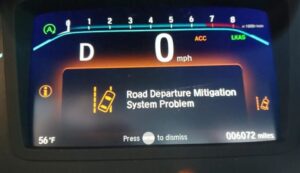

You’ve invested in a Honda with advanced safety features, but now you’re seeing that dreaded “Road Departure Mitigation System Problem” message flashing on your dashboard. It’s frustrating when the technology designed to keep you safe becomes a source of stress instead. The good news is that this warning is usually diagnosable, and many of the most common triggers are either low-cost fixes or simple maintenance issues. The bad news is that because Honda Sensing features are interconnected, one fault can “cascade” and make multiple systems appear to fail at the same time; creating the impression that the entire vehicle is falling apart when the true root cause may be one sensor, one calibration, or one fuse.
In this guide, we’ll dive into what’s causing these issues, how widespread they are, and what you can do to fix them without spending a fortune. I’ll also show you how to separate “temporary unavailability” (which can happen during bad weather or poor lane markings) from a true fault that needs diagnosis, as well as how to talk to your dealer or independent shop in a way that speeds up repairs and reduces unnecessary parts replacement.
Table of Contents
Safety reminder before we begin: Road Departure Mitigation (RDM) is a driver-assistance feature; not an autonomous system. Even when it works perfectly, you are still fully responsible for steering. When it’s malfunctioning or disabled, your Honda is still safe to drive in the basic sense, but you lose a layer of support that can help in moments of distraction, fatigue, or sudden lane drift. Treat recurring warnings seriously; especially if they happen during highway driving or appear alongside other Honda Sensing alerts.
What Is the Honda Road Departure Mitigation System?
The Road Departure Mitigation (RDM) system is part of Honda’s suite of safety technologies designed to prevent your vehicle from unintentionally leaving the roadway. It works at speeds between 45-90 mph, using a camera behind your rearview mirror and radar sensors to detect lane markings and road edges.
In plain English, RDM is designed to notice when your car is drifting toward the edge of the road and help you avoid departing the lane. It does this by watching lane lines and road boundaries (where detectable), then comparing what it sees to your steering input and vehicle path. If the system believes you’re drifting unintentionally; especially without a turn signal; it alerts you and may apply corrective assistance.
When functioning properly, the system will:
- Alert you with visual and audible warnings if you’re drifting
- Apply subtle steering force to keep you in your lane
- Apply braking if necessary to prevent road departure
But for many Honda owners, this system isn’t working as advertised.
Expert context: Honda Sensing features are designed with conservative “confidence logic.” If the camera or sensors can’t reliably identify lane boundaries; or if electrical voltage is unstable; the system may disable rather than provide assistance based on uncertain data. That’s why you may see an RDM warning even when the car is driving normally: the vehicle is telling you the system has reduced confidence in its own ability to intervene correctly.
Also important: Some drivers assume RDM should operate everywhere. It won’t. RDM is typically intended for highways and well-marked roads in the specified speed band. It may not engage on tight curves, during aggressive steering inputs, in construction zones with confusing markings, or when the windshield camera’s view is compromised by glare, fogging, or debris.
Where RDM sits in the Honda Sensing ecosystem: RDM often overlaps with systems like LKAS (Lane Keeping Assist System) and CMBS (Collision Mitigation Braking System). They may share hardware (camera, radar) and software dependencies. That’s why one warning can lead to several more.
How the RDM System Makes Decisions (Why It Disables So Easily)
Understanding why RDM disables itself makes the warning far less mysterious; and helps you avoid spending money on “repairs” that are actually normal limitations. RDM depends on a chain of conditions:
Clear lane boundary detection: the camera must see meaningful lane markings or road edges.
Stable vehicle dynamics input: steering angle, yaw rate, and speed must make sense together.
Stable electrical power: voltage must stay within tolerance for driver-assist modules.
No critical faults: if certain related systems are faulted, Honda may disable RDM as a precaution.
Any weak link; camera obstruction, low battery voltage, calibration drift after windshield replacement; can cause the system to flag a problem. Honda engineers intentionally design ADAS systems to “fail safe.” In this context, “fail safe” usually means “disable the feature and inform the driver,” rather than risking incorrect intervention.
Why that matters to you: If the warning appears only under specific conditions (heavy rain, direct sun glare, snow buildup), it may not indicate broken hardware. But if it appears in ideal conditions (clear day, clean windshield, well-marked highway) and repeats, then you likely have a genuine fault or calibration issue that needs attention.
Common RDM System Problems Honda Owners Are Reporting
Owners tend to describe RDM problems in three major categories: warning messages that appear unexpectedly, inconsistent performance, and cascading failures that disable multiple Honda Sensing features. Let’s examine each category and what it usually implies from a diagnostic standpoint.
Dashboard Warning Messages
The most frequent complaint is the “Road Departure Mitigation System Problem” warning appearing unexpectedly on the dashboard. This isn’t an isolated issue; it’s often accompanied by alerts for other Honda Sensing features like:
- Collision Mitigation Braking System (CMBS) errors
- Adaptive Cruise Control (ACC) malfunctions
- Lane Keeping Assist System (LKAS) failures
- General “Brake System” warnings
Many drivers report on Reddit threads that these warnings appear randomly, even on clear days with perfect visibility.
Expert interpretation: When RDM warnings appear “randomly” in clear conditions, the strongest suspects are typically:
- Intermittent camera/radar input errors (sometimes caused by mounting vibration or minor alignment changes)
- Electrical voltage instability (battery aging, terminal corrosion, weak charging behavior)
- Calibration drift after windshield replacement or bumper repair
- Software bugs addressed by dealer updates (less common, but real)
Why “Brake System” warnings can appear with RDM: Some Honda Sensing features coordinate with braking modules (ABS/VSA) for intervention or safety logic. If the system cannot guarantee coordinated behavior, the car may throw related warnings. This doesn’t always mean your brakes are mechanically failing; it can indicate a control/communication issue.
Inconsistent System Performance
The unpredictability makes this issue particularly frustrating. You might experience:
- Error messages that appear and disappear during the same drive
- Systems that work fine for weeks, then suddenly fail
- All Honda Sensing features shutting down simultaneously
- Problems that seem to worsen in certain weather conditions
As one owner described in a Ridgeline forum, “The system will work perfectly for days, then suddenly throw warnings for no apparent reason; even on perfectly marked highways.”
Expert interpretation: Intermittent behavior is often the signature of:
- Moisture intrusion into connectors or sensor housings
- Terminal pin tension issues (connector looks “plugged in” but contact is unstable)
- Battery voltage that dips under load (especially at startup, or when accessories activate)
- Environmental factors (sun glare, rain, fog, snow, road spray) that temporarily defeat lane detection
In other words, intermittent warnings are not always “random.” They’re often repeatable once you identify the trigger: temperature, humidity, time of day, specific road surfaces, or electrical load changes. If you want faster diagnosis, start logging when it happens. The pattern is often the clue that leads to the fix.
Multiple System Failures
When one Honda Sensing system fails, others often follow. According to complaints documented online, it’s common to see cascading failures across multiple safety systems, suggesting they share critical components or dependencies.
Expert explanation of cascading failures: Honda Sensing features are modular, but they share hardware and networks. A forward camera issue can disable RDM and LKAS. A radar unit problem can disable ACC and CMBS. Electrical instability can disable many modules at once. When multiple systems fail together, don’t assume multiple parts broke simultaneously. In many cases, one input (camera visibility, radar alignment, voltage) is causing the cascade.
What “shared dependencies” usually means in practice:
- Shared camera module behind rearview mirror
- Shared radar unit behind grille emblem or bumper cover (on many models)
- Shared wiring harness sections and grounds
- Shared control logic requiring stable voltage and clean communication between modules
If you see multiple Honda Sensing messages at once, your diagnostic strategy should shift: instead of replacing a single sensor, you should first verify visibility (clean camera/radar zones), check battery health, check for accident damage or misalignment, and then scan for codes to identify which module is the source of the fault.
What’s Causing Your Honda RDM System Problems?
Honda RDM problems typically trace back to one of four categories: (1) blocked/dirty sensors, (2) environmental limitations, (3) electrical/voltage issues, or (4) hardware mounting/alignment/calibration faults. The correct fix depends on which category you’re dealing with.
Sensor Obstructions
The most common (and fortunately most fixable) cause is simply dirty or obstructed sensors. Your RDM system relies on two key components:
- Forward-facing camera behind your rearview mirror
- Radar sensors typically located in the front grille area
These can become blocked by:
- Snow, ice, or road salt in winter months
- Mud or dirt from off-road driving
- Bugs or debris accumulated during highway driving
- Water spots after rain or car washes
Even partial obstruction can trigger system warnings.
Expert detail that matters: The camera doesn’t see through a dirty windshield. If the windshield area in front of the camera has haze, wax residue, interior fog film, or wiper smearing, the camera’s contrast detection drops. Similarly, if the radar area is covered by packed snow or thick mud, the radar signal can’t propagate correctly. The system may disable rather than risk false intervention.
When obstructions “look clean” but still cause faults: Thin ice glaze, road salt film, and micro-scratches from worn wipers can distort the camera image. Some owners notice issues only at night because glare and headlight reflections amplify these distortions.
Environmental Triggers
Your RDM system might automatically disable during:
- Direct, harsh sunlight that interferes with the camera
- Heavy rainfall that reduces visibility
- Dense fog or snow conditions
- Extreme temperatures (both hot and cold)
These environmental shutdowns are actually a safety feature; Honda programs the systems to disable when they can’t function reliably rather than provide potentially faulty assistance.
Expert clarification: Many drivers interpret this as “system failure,” but it can be normal behavior. The key question is: does it recover once conditions improve? If the warning disappears when the rain stops, after the windshield clears, or after you remove snow from the radar area, it’s likely environmental. If the warning remains for days in perfect weather, it’s more likely a genuine fault.
Road conditions can mimic environmental triggers: Fresh asphalt with faint lines, construction zones with temporary tape markings, wet pavement that reflects overhead lights, or roads with multiple overlapping paint lines can confuse camera interpretation. In those cases, RDM might disable even on a sunny day.
Electrical System Issues
Low voltage from your 12-volt battery can trigger RDM and other Honda Sensing error messages. The advanced driver assistance systems require stable electrical power to function correctly. As demonstrated in tutorials, voltage below 12.4V can cause intermittent system failures.
Expert explanation: Honda Sensing modules are sensitive to voltage dips because they process camera/radar data in real time. If voltage drops during startup, during heavy accessory use, or due to a weak battery/charging system, modules can reset or produce unreliable signals. The vehicle then disables driver-assist features because the system cannot guarantee correct operation.
Battery issues that often look like “random electronics”:
- Warnings appear at first startup of the day, then disappear later
- Warnings appear after the car sits for a few days
- Multiple systems fail simultaneously
- Infotainment reboots or acts oddly
Don’t ignore terminal condition: Battery voltage may test “okay,” but corroded terminals or weak grounds can create voltage drop under load. That drop is what modules react to. If you’re chasing intermittent Honda Sensing errors, checking battery health without checking terminals and grounds is incomplete.
Hardware and Mounting Problems
Physical issues that can trigger RDM failures include:
- Misaligned radar sensors after minor collisions
- Bent sensor mounting brackets
- Damaged wiring harnesses
- Failing camera or radar units
These hardware problems typically require professional diagnosis but understanding them can help you communicate more effectively with your mechanic.
Expert expansion: calibration is the “hidden hardware problem.” A windshield replacement or front bumper repair can shift camera/radar alignment enough that the system fails self-checks. This is why recalibration is so often the real fix. Many Honda models require calibration any time the windshield is replaced (camera alignment) or any time the front radar area is disturbed (radar aiming). If calibration is skipped, the system may disable even though the sensors are not “broken.”
Aftermarket modifications can contribute too: Non-OEM windshields, incorrect tint placement, grille inserts, bumper guards, or even certain vinyl wraps can interfere with camera/radar performance. It’s not that Honda “doesn’t like modifications”; it’s that these sensors are tuned to specific materials and optical/radar transparency characteristics.
Honda Models Most Affected by RDM Problems
While RDM issues can affect any Honda with the Sensing package, these models have reported the highest frequency of problems:
| Model | Years Affected | Common Issues |
|---|---|---|
| CR-V | 2017-2022 | Frequent false alerts, system shutdowns |
| Accord | 2018-2022 | Multiple system failures, radar errors |
| Civic | 2016-2022 | Camera calibration issues, intermittent warnings |
| Pilot | 2016-2022 | Radar sensor malfunctions in cold weather |
| Odyssey | 2018-2022 | System failures during highway driving |
The CR-V and Accord models are currently under NHTSA investigation, with nearly 3 million vehicles affected and over 1,290 documented complaints.
Expert perspective on “most affected” lists: Higher complaint frequency doesn’t always mean a design flaw unique to that model; it can also reflect how many vehicles are on the road, how widely Honda Sensing was adopted in those years, and how aggressively the systems are tuned. A high-volume model like the CR‑V will naturally generate more reports than a low-volume model, even if the failure rate is similar. Still, the volume of complaints is important because it influences investigations, service bulletins, and software updates.
Why year ranges matter: ADAS systems evolve quickly. A 2016 Civic camera module and a 2022 Accord camera module may share the same concept but differ in hardware, software logic, and calibration requirements. That’s why “it worked on my friend’s Honda” is not a reliable diagnostic reference; always match guidance to the correct model year.
DIY Fixes for Road Departure Mitigation System Problems
Before heading to the dealer, try these solutions that have worked for many Honda owners. The key is to work in a structured order: start with cleaning and visibility, then address electrical fundamentals like battery voltage, then attempt resets. This prevents you from wasting money on parts when the system is simply unable to see lane markings or is being disabled due to voltage instability.
1. Clean Your Sensors
The simplest fix is often the most effective:
For the camera:
- Locate the small camera housing behind your rearview mirror
- Use a clean, soft microfiber cloth to gently wipe the windshield in front of it
- Avoid using chemical cleaners directly on the camera housing
Expert cleaning tip: Clean both sides of the glass. Interior haze from plastic outgassing, interior cleaners, or cigarette/vape residue can reduce image contrast. If the outside looks clean but the warning persists, wipe the inside glass in the camera area too.
For the radar sensors:
- Identify your radar location (varies by model)
- Gently clean the front grille or bumper area where the radar is mounted
- Remove any built-up dirt, snow, or debris
According to tutorial videos, regular cleaning of these sensors should be part of your routine maintenance, especially during winter months.
Expert caution about pressure washers: Avoid blasting the radar area at close range with high-pressure water. While the outer surfaces are designed for weather, aggressive pressure can force water into seams, loosen trim, or damage sensor covers over time.
How to tell if cleaning helped: If the warning clears quickly after cleaning and doesn’t return in clear weather, contamination was likely the cause. If the warning comes back immediately, you likely have a deeper issue (battery, calibration, hardware fault).
2. Check Your Battery
A weak 12-volt battery is a common culprit behind Honda Sensing failures:
- Test your battery voltage (should be above 12.4V)
- Check for corrosion on battery terminals
- Consider replacing batteries older than 3-4 years
Many owners report that simply replacing an aging battery resolved their persistent RDM problems.
Expert testing perspective: Voltage alone is not the full story. A battery can show decent resting voltage but have poor capacity under load. If the vehicle is showing intermittent warnings at startup, request a load test (often free at parts stores). Also inspect terminals and grounds. Corrosion increases resistance, and resistance creates voltage drop; exactly what ADAS modules dislike.
Driving pattern matters: Short trips, long periods of sitting, and heavy accessory usage (heated seats, defrost, audio) can leave the battery in a chronically low state of charge. That doesn’t always set an explicit battery light, but it can disable Honda Sensing features.
3. Perform a System Reset
You can try resetting the RDM system:
- Navigate to “Settings” on your infotainment screen
- Select “Vehicle” or “Driver Assist Setup”
- Find “Road Departure Mitigation Setting”
- Turn the system OFF, restart the vehicle, then turn it back ON
Some drivers on Drive Accord forums report that this simple reset cleared persistent error messages.
Expert note: A reset can clear temporary logic issues, but it won’t fix a failing sensor, weak battery, or calibration problem. If the warning returns quickly after resetting, treat the reset as a diagnostic clue: you likely have an underlying fault.
Best practice: If you can, scan for codes before repeatedly resetting. Resetting without recording codes can erase useful diagnostic information.
4. Temporary System Disable
If you’re experiencing false alerts during a particular drive:
- Locate the RDM button (typically on the left side of the steering wheel or dashboard)
- Press and hold until you hear a beep and see confirmation on the display
- This will disable the system until you restart the vehicle
Remember this is a temporary measure; not a fix; but it can help when you’re receiving annoying false alerts.
Expert caution: If false alerts are frequent, don’t rely on disabling as a long-term solution. Repeated false alerts can indicate sensor alignment or calibration issues; especially after windshield replacement or bumper repair. Correcting the cause is safer than permanently driving with features disabled.
A Practical Diagnosis Checklist (What to Observe Before You Spend Money)
Before paying for parts or dealer diagnostics, gather evidence. ADAS problems are often faster to diagnose when you can describe the “when” and “how.” Use this checklist like a technician would:
- Weather and lighting: Did the warning appear during heavy rain, fog, snow, or direct sun glare?
- Road type: Did it happen in construction zones, on freshly paved roads, or on highways with faded markings?
- Windshield status: Has the windshield been replaced recently? Any cracks or chips in the camera view area?
- Front bumper/grille history: Any minor impacts, parking lot bumps, or grille replacement that could affect radar alignment?
- Battery history: How old is the battery? Any slow cranking? Any electrical oddities?
- Persistence: Does the warning clear on its own after a restart, or does it stay for days?
With this information, you can often predict whether you’re dealing with a simple visibility problem, a power issue, or a calibration/hardware issue.
When Professional Help Is Needed
If DIY solutions don’t work, these professional repairs may be necessary:
Sensor Recalibration
After windshield replacement or even minor bumper damage, your sensors may need professional recalibration. This delicate procedure requires specialized equipment at Honda dealerships or certified repair shops. Proper calibration typically costs $250-500.
Expert clarity: Calibration is not a sales gimmick; it’s how the vehicle ensures the camera and radar “agree” with the vehicle’s geometry. If the calibration is wrong, the system may disable or behave unpredictably. A proper calibration procedure uses targets and measurement setups that most DIYers do not have access to.
Common triggers that require calibration:
- Windshield replacement (camera calibration)
- Front bumper/grille repair (radar alignment)
- Collision repair or bodywork near sensor mounting points
- Some suspension changes that alter ride height significantly (vehicle-dependent)
Software Updates
Honda has released several software updates to address RDM system issues. These updates can only be installed by authorized dealers using their diagnostic tools. Ask specifically if any software updates are available for your model’s Honda Sensing systems.
Expert note: Software updates are often overlooked because drivers assume “no check engine light” means “no update needed.” But Honda Sensing lives in separate modules that may receive updates addressing false positives, improved object/lane detection logic, or stability improvements. If you’re experiencing repeat warnings with no obvious sensor obstruction and battery health is good, asking about updates is a smart move.
Component Replacement
If diagnostic tests confirm a faulty component, replacement parts may include:
- Millimeter wave radar unit ($600-900)
- Camera module ($300-500)
- Control unit ($400-700)
- Wiring harnesses ($150-300)
Labor costs typically add another $200-400 to these repairs.
Expert warning: Don’t replace components based on assumptions. Many RDM complaints result from calibration or power issues rather than a “bad camera.” A good shop will confirm failure using codes, live data, and module communication tests before replacing expensive components.
What a competent diagnostic session typically includes:
- Full scan of Honda Sensing-related modules (not just engine codes)
- Review of freeze frame and fault history
- Battery/charging system check (voltage stability)
- Visual inspection of camera/radar mounting and wiring
- Calibration verification when repair history suggests it
Understanding the NHTSA Investigation
The National Highway Traffic Safety Administration has escalated its investigation into Honda Sensing systems, specifically targeting issues with the Collision Mitigation Braking System and related features like RDM.
The investigation now covers:
- Nearly 3 million vehicles
- 2017-2022 CR-V models
- 2018-2022 Accord models
- Over 1,294 consumer complaints
- 47 crashes potentially linked to system malfunctions
- 93 reported injuries
Expert perspective: An investigation doesn’t automatically mean your specific vehicle is defective, but it does mean enough data exists to justify deeper review. For owners, the practical takeaway is: document your symptoms, ask your dealer about technical service bulletins (TSBs) or software updates, and monitor recall and investigation developments through official channels. If you experience safety-critical behavior (such as unwanted braking), address it immediately.
Warranty and Lemon Law Considerations
If you’re experiencing persistent RDM problems, understand your rights:
- Honda’s basic warranty covers most electronic systems for 3 years/36,000 miles
- The powertrain warranty (5 years/60,000 miles) typically doesn’t cover these systems
- Document all dealer visits and repair attempts
- Keep copies of all repair orders and descriptions of the problems
- After multiple unsuccessful repair attempts (usually 3-4 depending on state), you may have a lemon law claim
Several class-action lawsuits regarding Honda Sensing issues are already in progress, so it’s worth keeping documentation of all your repair attempts.
Important note: This is general information, not legal advice. Lemon law rules vary by state, and outcomes depend heavily on documentation and repair history. If you believe your vehicle qualifies, consult a qualified attorney or consumer protection expert in your jurisdiction.
Preventative Maintenance Tips
To minimize RDM system problems:
- Regular sensor cleaning: Add this to your monthly maintenance routine
- Protect your battery: Have it tested during oil changes and replace it preemptively after 3-4 years
- Use Honda-approved windshield replacements: Aftermarket glass can cause camera calibration issues
- Stay updated on recalls: Check Honda’s recall portal periodically
- Address warning lights promptly: Don’t ignore intermittent warnings hoping they’ll resolve themselves
Expert additions for long-term reliability:
- Replace worn wiper blades: wiper smearing across the camera area is a common visibility killer.
- Avoid placing stickers or mounts near the camera housing: even a small obstruction can reduce detection confidence.
- Be cautious with windshield tint: some tint bands can intrude into the camera’s viewing zone and trigger errors.
- Be careful during ice removal: scraping aggressively near the camera area can scratch the glass and create permanent distortion for the camera.
These small habits can dramatically reduce false alerts and keep the system functioning reliably, especially in regions with winter road salt or frequent rain.
The Future of Honda’s Safety Systems
Honda continues to refine their safety technology with each model year. Newer vehicles (2023+) incorporate updated hardware and software that address many of the problems plaguing earlier models. If you’re shopping for a new Honda, ask specifically about improvements to the Sensing suite.
The Road Departure Mitigation system, when working properly, is a valuable safety feature that has prevented countless accidents. Understanding its limitations and maintenance needs helps ensure it’s there when you need it most.
For the latest information about Honda RDM system updates or to check if your vehicle is affected by any service bulletins, visit Honda’s owner portal or contact your local dealership’s service department.
Expert closing thought: Most RDM problems are solvable, but the fastest solution depends on identifying which “bucket” your issue belongs to: visibility/obstruction, environment, electrical power stability, or calibration/hardware alignment. Start with the free fixes (cleaning and checking battery basics), then escalate to calibration and dealer-level diagnosis only when the evidence points there. When you take that structured approach, you’re far more likely to fix the system without overspending.