
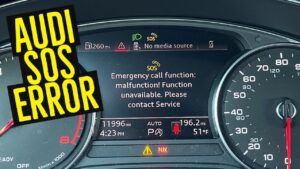

Seeing “Emergency call function: malfunction!” pop up on your Audi’s dashboard is one of those moments that makes your stomach drop. Is it serious? Is it going to cost a fortune? Can you fix it yourself? Here’s what you need to know: most Audi SOS malfunctions come down to three fixable problems. A dying backup battery, water sneaking into your antenna, or outdated cellular tech that can’t find a network anymore. Let’s walk through what’s really going on and how to solve it without blowing your budget.
What Your Audi’s Emergency Call System Actually Does
Your Audi’s SOS system isn’t just a decorative button on the roof console. It’s a legally required safety feature designed to automatically contact emergency services if you’re in a serious accident. When triggered, it broadcasts your GPS coordinates, your car’s VIN, and opens a live voice channel to first responders. And it does all of this independently from your main car battery.
Table of Contents
The brain behind the whole operation is the J949 Telematics Control Unit. Think of it as a dedicated cell phone that’s permanently built into your car. It’s got its own backup battery, its own antenna, and it handles microphone routing for your hands-free system. When any of these components go sideways, that warning light shows up.
Here’s the part that catches people off guard: the J949 doesn’t just handle emergencies. It also routes your Bluetooth hands-free microphone audio. That’s why a lot of drivers notice their phone calls suddenly have no outgoing sound right around the time the SOS malfunction warning appears. The two problems are connected.
The Three Most Common Reasons Your SOS Warning Appeared
A Dead Backup Battery (This Is the #1 Cause)
If your Audi is somewhere in the 4 to 6 year old range, the backup battery inside your J949 module is probably toast. This isn’t your main 12V car battery. It’s a small Lithium Iron Phosphate cell whose entire job is keeping the emergency system alive even if your main battery gets destroyed in a crash.
The module constantly tests this little battery. When its internal resistance climbs too high or the voltage drops below 2.8V under load, it throws fault code B191604 and lights up your dashboard.
Why does it fail?
- Extreme temperature swings inside your cabin gradually cook the battery chemistry
- The J949’s constant self-testing slowly wears the cell down over time
- It’s simply a wear item that nobody at the dealership ever mentions during routine service
The battery itself runs $60 to $120. But dealers charge $600 to $900 for the job because the module is buried under seats or inside trunk panels, and accessing it takes 2 to 4 hours of labor. If you’re comfortable with basic wrenching, though, this is a very doable DIY job that’ll save you hundreds.
Water Leaking Through the Shark Fin Antenna
This one’s sneaky and potentially dangerous, especially on Q5 and Q7 models. That roof-mounted “shark fin” antenna has a rubber seal around its base. Over time, UV rays and thermal expansion slowly destroy that seal. Once it’s compromised, rainwater drips down the antenna cables and lands right on your electronics.
The early warning signs are subtle. Your GPS might start showing you in the middle of the ocean, or place you miles away from where you actually are. Then the SOS warning kicks in as water shorts out the cellular antenna connections.
But here’s the real concern: In 2021 Audi Q5 and SQ5 models, water can drip all the way down onto the Gateway Control Module tucked under the rear seat. If that module fails, you can lose engine power, steering assist, and brakes while you’re driving. Audi issued Recall 90S9 to install protective covers over the Gateway module, but the antenna leak itself still needs to be addressed separately.
Your Car’s 3G Modem Can’t Find a Network Anymore
If you’re driving a 2012 to 2018 Audi A3, A4, A5, Q5, or Q7, your SOS malfunction might not actually be a “failure” in the traditional sense. AT&T shut down its entire 3G network in February 2022, and your car’s modem simply can’t connect to anything newer.
What happens is the J949 enters an endless search loop, hunting for a network that no longer exists. After enough failed connection attempts, the module assumes something is broken and triggers the warning.
Audi’s official fix is Service Action 91CD, which is a software update that essentially tells your car to stop searching. It kills the warning light, but you permanently lose emergency call capability and remote services through the myAudi app.
How to Properly Diagnose the Problem Before Spending Money
Guessing wastes money. Before you replace a single part, plug in a diagnostic scanner. You’ll need either VCDS (made by Ross-Tech) or the dealer-level ODIS system to read the telematics module.
Here’s the diagnostic process:
- Run an auto-scan across all modules in the car
- Navigate specifically to Address 75, which is the Telematics Control Unit
- Pull up the stored fault codes and read what the module is actually complaining about
The fault codes tell you exactly where to focus your effort:
| Fault Code | What It Means | Your Next Step |
|---|---|---|
| B191604 | Backup battery internal resistance too high | Replace the backup battery |
| U153E00 | Unable to connect to mobile network | Determine if it’s a 3G sunset issue or antenna damage |
| B105113 | GSM antenna circuit is open | Inspect antenna connections for water damage or corrosion |
| U142100 | No communication with the module at all | Try the hard reset procedure before buying anything |
| B200000 | Control unit has an internal fault | Module replacement is likely needed |
If you pull U142100 (no communication), don’t rush out to buy a new module. There’s a reset trick that works more often than you’d expect.
The Hard Reset Trick That Dealers Don’t Always Try First
Sometimes the J949 module just locks up. It freezes, kind of like your computer seizing up and needing a hard reboot. The tricky part? Disconnecting your car’s main 12V battery won’t reset it, because the module immediately switches over to its internal backup battery to stay powered.
You have to cut both power sources. Here’s the proper procedure:
- Locate and remove the specific fuse for the telematics unit (your owner’s manual will tell you which one)
- Physically access the J949 module (the location varies depending on your model)
- Unplug the main wiring harness connector from the module
- Unplug the smaller backup battery connector
- Wait a full 20 minutes so the internal capacitors fully discharge
- Reconnect the backup battery first, then the main harness
- Scan the module again to check if communication has been restored
This clears the module’s volatile memory and forces a clean boot from scratch. Plenty of seemingly dead modules come back to life after this procedure, saving owners a $2,000 replacement bill.
DIY Backup Battery Replacement: Where to Find It in Your Specific Model
Swapping the backup battery is mechanically straightforward. The real challenge is just getting to the module without snapping plastic clips or damaging trim pieces. Here’s where to look based on your model.
Audi A4, S4, A5, S5 (2017 to 2023 B9 Platform)
Module location: Trunk area, tucked behind the side trim panels or underneath the rear deck.
How to get to it:
- Disconnect the negative terminal of your main battery in the trunk
- Remove the cargo floor panel and any side storage bins
- Pull back the trunk liner near the wheel well arch
- On some models, you may also need to lift the rear seat bottom cushion
Battery part number: 4K0915989A
Audi Q5, SQ5 (2018 to 2023 FY Platform)
Module location: Under the rear bench seat on the driver’s side.
How to get to it:
- Pull sharply upward on the front edge of the rear seat bottom to release the retaining clips
- Important: Immediately check the floor for any signs of water or dampness
- Unbolt the module bracket and flip it over to access the battery compartment
- While you’re in there, verify that the Gateway module has its protective cover installed (that’s the Recall 90S9 fix)
A word of caution: If you find water under that seat, fix the leak source first. Otherwise you’ll be doing this exact same repair again in six months.
Audi Q7, Q8 (2017 and Newer, 4M Platform)
Module location: Front passenger footwell or near the A-pillar. This is the most labor-intensive one to access.
How to get to it:
- Unbolt the front passenger seat (you’ll need triple-square bits for this)
- Carefully disconnect the seat wiring connectors
- Pull back the heavy carpeting underneath
- The module sits in a recessed box in the floor
Dealers typically quote 4 to 6 hours of labor for this one. Some experienced techs can reach the module by removing the door sill trim instead of pulling the entire seat, but it’s tight and awkward work.
Audi A3, S3, RS3 (2015 to 2020)
Module location: Under the front passenger seat.
How to get to it:
- Unbolt the seat using triple-square bits
- Tilt the seat back carefully without disconnecting the wires
- Lift the carpet flap to access the floor recess where the module lives
One thing to keep in mind with the A3: the connector on this module sometimes gets kicked by rear passengers, which can cause intermittent faults that come and go seemingly at random.
What to Do After You Swap the Battery
You can’t just slap in a new battery and call it done. The module needs to know it’s got a fresh cell. Grab your VCDS scanner and follow these steps:
- Select Module 75 (Telematics)
- Navigate to the Adaptation menu
- Look for “Battery Adaptation” or “Reset Battery Values”
- If the system asks for a serial number, changing just one digit of the old serial number usually does the trick
Some owners report that simply clearing the B191604 fault code works fine on its own. The module runs its internal test, sees healthy voltage from the new battery, and moves on without complaint. That said, doing the proper adaptation ensures the module accurately tracks the new battery’s lifespan going forward.
How to Fix a Leaking Shark Fin Antenna Without Dropping the Headliner
The “proper” way to replace a shark fin antenna means dropping the entire headliner. At a dealer, that’s a $1,500 or more job requiring 6 to 8 hours of labor. But there’s a workaround that independent shops and savvy DIYers use all the time.
The top-down resealing method:
- Clean the roof area around the antenna base thoroughly with isopropyl alcohol
- Mask off the surrounding paint with painter’s tape, leaving about a 2mm gap around the antenna base
- Apply neutral cure silicone or automotive windshield urethane around the base
- Good options include Dow Corning 795 or 3M Window-Weld
- Never use bathroom silicone. The acetic acid in it will eat through your clear coat
- Smooth the bead with a gloved finger for a clean finish
- Remove the tape immediately and let it cure for a full 24 hours before getting the car wet
This creates a waterproof barrier right over the failed factory seal. It’s not a factory-approved repair, but it reliably stops the leak and protects your expensive electronics underneath.
If water already made it inside: You’ll probably need to replace the antenna cables (the Fakra connectors) because corrosion at those connections causes permanent signal degradation. The antenna unit itself runs around $300.
Dealing With the 3G Network Shutdown
If your Audi rolled off the assembly line before 2019, its cellular modem is almost certainly 3G-only. AT&T’s network shutdown left these cars searching for a signal that simply doesn’t exist anymore.
You’ve got three options:
Option 1: Get Service Action 91CD applied at a dealer. It’s a free software update that disables the SOS system and turns off the warning light. Quick and painless.
Option 2: Install an aftermarket 4G dongle in your OBD-II port to restore some of the remote connectivity features you’ve lost.
Option 3: Just ignore it entirely if you don’t use Audi Connect services anyway.
The honest take? If you don’t care about remote locking or vehicle tracking through the myAudi app, get the software update and move on with your life. Cars worked perfectly fine before emergency call systems existed. You’ll be okay without it.
What You’ll Actually Spend: A Realistic Cost Breakdown
| Repair Type | Parts Cost | DIY Time | Dealer Cost |
|---|---|---|---|
| Software reset (frozen module) | $0 | About 30 minutes | $180 to $350 (diagnostic fee) |
| Backup battery replacement | $60 to $120 | 1 to 2 hours | $600 to $900 |
| Antenna seal (DIY reseal) | $20 | About 1 hour | Not offered as a standalone service |
| Full antenna replacement | $300 | 6 to 8 hours | $1,500 to $2,500 |
| Complete J949 module replacement | $600 to $1,000 | Requires ODIS coding (dealer or specialist) | $1,800 to $3,000 |
That gap between DIY and dealer pricing on the backup battery replacement is exactly why this repair generates so much frustration in Audi forums. You’re essentially paying $700 in labor to access an $80 part.
How Urgent Is It Really? A Priority Guide
Not every SOS malfunction demands an immediate trip to the shop. Here’s how to think about priority.
Fix it right away if:
- You notice water staining on your headliner or carpet
- You drive a 2018 to 2022 Q5 or SQ5 (because of the Gateway module water damage risk)
- Your GPS is showing wildly incorrect locations
- You’ve lost outgoing audio on Bluetooth phone calls
Schedule it when it’s convenient if:
- The warning appeared gradually over several days
- Every other system in the car is working normally
- Your car is 4 or more years old (almost certainly just the backup battery aging out)
You might reasonably ignore it if:
- You’ve confirmed the 3G network sunset is the cause on a 2012 to 2018 model
- You don’t use any Audi Connect services
- You’re comfortable driving without automatic crash notification
Expensive Mistakes to Avoid
Mistake 1: Replacing the entire J949 module when only the $80 battery is dead.
Some dealers follow diagnostic flowcharts that lead straight to full module replacement. If they spot communication errors alongside the battery fault code, they may condemn the whole unit. Always ask them to try the battery swap first. It solves the problem the vast majority of the time.
Mistake 2: Ignoring water leaks in Q5 and Q7 models.
An SOS malfunction in these vehicles deserves an immediate peek under the rear seat. A Gateway module failure caused by water intrusion can leave you stranded in traffic with no engine power, no power steering, and no brake assist. That’s a genuinely dangerous situation.
Mistake 3: Paying multiple shops for “diagnostics.”
The fault codes are standardized. One VCDS scan tells you everything you need to know. Don’t pay three different shops $150 each just to read the same B191604 code off the same module.
What It All Comes Down To
For most owners with Audis in the 4 to 6 year old range, this warning boils down to a backup battery replacement. It’s a predictable maintenance item that Audi never advertises or mentions during routine service visits. Budget about $100 for the part, then decide whether your mechanical skills and a free afternoon justify saving $500 to $800 in dealer labor.
If you own a Q5 or Q7, treat any SOS warning as a water leak investigation first. The system malfunction itself might be the least of your worries if your Gateway module is sitting in a puddle.
And if you’re driving an older model with 3G hardware? The cellular network moved on without your car. Get the free software update, kill the warning light, and remember that people drove safely for decades before any of this technology existed.
The Audi SOS malfunction is annoying, sometimes pricey, but rarely mysterious once you understand the three things that typically cause it. Diagnose first, fix smart, and you won’t end up throwing $2,000 at a problem that needed an $80 battery.