
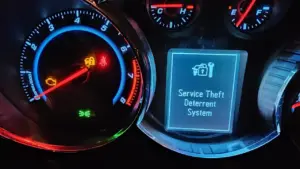

If your Chevy Cruze is acting up with a Service Theft Deterrent System message, you’re in familiar company. A surprisingly large number of Cruze owners run into situations where the factory anti-theft/immobilizer logic interrupts normal starting, sometimes at the worst possible moment (like when you’re late, the weather is bad, or you’re far from home). The good news is that most causes are predictable, and many fixes are straightforward once you understand what the system is “looking for.” In this guide, I’ll break down the most common triggers, explain what the vehicle is doing behind the scenes, and walk you through practical troubleshooting and reset options so you can reduce downtime, avoid unnecessary parts swapping, and get back on the road with confidence and safety.
Understanding the Theft Deterrent System in Your Chevy Cruze
Your Chevy Cruze includes a theft deterrent system designed to prevent unauthorized vehicle operation, not just to “make noise,” but to actively stop the engine from running if the vehicle doesn’t detect the correct, learned key. While this is a great security feature, it can also become a source of frustration when normal wear, weak battery voltage, wiring faults, or module communication issues cause the car to misinterpret what’s happening. To troubleshoot intelligently, you need a clear picture of the major components, how they communicate, and how this system differs from other anti-theft technologies that may be installed on the vehicle.
Table of Contents
Think of the theft deterrent system as a digital handshake. When everything is healthy, the handshake happens in a fraction of a second and you never notice it. When something interrupts the handshake, low voltage, a key recognition hiccup, a communication dropout, or corrupted learned data, the system errs on the side of security and blocks starting. That “security-first” mindset is exactly why the warning can appear even when nobody is trying to steal the car.
Components of the Theft Deterrent System
In your Chevy Cruze, the key components of the theft deterrent system include the Immobilizer, Body Control Module (BCM), and the Engine Control Module (ECM). The immobilizer helps prevent unauthorized engine start-up by confirming that the correct, programmed key (or key fob, depending on year/trim) is present and recognized.
The BCM acts as a decision making hub. It receives data from the key/immobilizer circuitry, monitors vehicle states (door/lock status, ignition position, voltage conditions), and then determines whether the starting sequence should be permitted. In many GM architectures, the BCM is also a network traffic manager: meaning if it has power/ground issues or internal faults, other modules can misbehave too.
The ECM (sometimes referred to in certain contexts as the engine computer) is the module that ultimately controls fuel delivery and ignition strategy. Even if the starter motor turns the engine over, the ECM will not allow the engine to run unless it receives the correct authorization signal(s) from the BCM/immobilizer logic. In other words: cranking and starting are related, but not always the same problem, and the theft deterrent system can influence both.
This coordinated effort between the components makes it difficult for anyone to start the vehicle without the right key. It also means that a fault in any one area, key recognition hardware, BCM power/ground, network communication, or ECM authorization, can cause the same outward symptom: a warning message and a no-start condition.
Additional supporting pieces can also matter in real-world troubleshooting, even if they aren’t always highlighted in basic explanations. Depending on model year and configuration, your Cruze may rely on:
- Key transponder / chip (embedded in the key head or fob)
- Ignition switch / ignition cylinder sensing (especially if wear causes intermittent position readings)
- Antenna or receiver modules used to read key data
- Wiring harness connectors and chassis grounds that maintain stable voltage and clean signals
- CAN bus communication between modules (a single poor connection can cause “ghost” security issues)
How the System Works
The theft deterrent system in the Chevy Cruze functions like an electronic authentication check. When you insert your key (or, for certain configurations, when the vehicle detects the correct fob), the immobilizer logic verifies that the key is properly paired. If the key is authentic and the vehicle’s voltage and communications are stable, the system sends authorization through the BCM, which then communicates with the ECM to allow the engine to start and continue running.
If the system detects the wrong key or it thinks it detects the wrong key because of a glitch, the vehicle may disable starting in multiple ways. Commonly, this includes preventing fuel delivery and/or inhibiting ignition, and in some scenarios it may affect starter enable logic as well. From the driver’s seat, it can feel like “the car is dead,” even when the battery and starter are capable. That is why recognizing the theft deterrent message as a logic-based lockout (not always a mechanical failure) is so important.
Because the system depends on clean electrical power and clear communication, small issues can create big symptoms. A weak 12V battery, corroded terminals, a loose ground, or a failing key transponder can all cause the authentication step to fail. Ensuring your key is in good physical condition and that the key fob battery (where applicable) is healthy can reduce false alerts, especially in colder climates where battery performance naturally drops.
One practical way to think about it: the theft deterrent system is less like a simple “alarm” and more like a gatekeeper that must be satisfied before the engine is allowed to run. When it isn’t satisfied, it does exactly what it was designed to do, stop the car from operating regardless of whether the cause is malicious or accidental.
Difference Between Theft Deterrent and Anti-Theft Deterrent System
Although the terms are often used interchangeably, it helps to separate the concepts. The theft deterrent system in your Cruze typically refers to the immobilizer-style strategy: verifying a learned key and preventing engine operation if authorization fails. This is the “you can’t drive it away without the correct credential” layer.
An anti-theft deterrent system, depending on how someone uses the term, may include additional features such as intrusion sensors, hood/door monitoring, audible alarms, horn honks, and light flashing. Those features are meant to deter theft by drawing attention to tampering or forced entry attempts. In many vehicles, these alarm behaviors can trigger even if the immobilizer is satisfied (for example, if a door is opened in an unexpected way).
In short: the theft deterrent/immobilizer strategy is about authorization to run, while broader anti-theft alarm features are about deterring interference. Both work toward keeping your vehicle secure, but they fail differently, and that distinction can guide your troubleshooting.
For owners trying to solve a no-start, this difference matters: a blaring alarm is annoying, but an immobilizer lockout is disabling. If your Cruze won’t start and you see a theft deterrent warning, your focus should be on authorization signals, module power/grounds, and key recognition, not just silencing an alarm.
Common Issues With the Chevy Cruze Theft Deterrent System
When dealing with a Chevy Cruze, it helps to know the patterns behind the Service Theft Deterrent System warning. In practice, the most common triggers fall into a few buckets: unstable electrical supply, wiring or connector faults, module communication hiccups, software/initialization issues, and key recognition failures. The challenge is that many of these can produce the same dashboard message, so the goal is to narrow the cause logically instead of guessing.
Before diving into individual causes, pay attention to your exact symptom set. For example:
- No crank (turn key, nothing happens): may suggest starter enable inhibition, ignition switch issues, or power/ground faults affecting BCM logic.
- Crank but no start (starter turns engine but it won’t fire): often aligns with fuel/ignition authorization being blocked.
- Intermittent starts (works sometimes): commonly tied to voltage drops, loose connections, or failing components that react to temperature or vibration.
- Warning appears after battery service: frequently linked to low voltage events, relearn needs, or terminals not fully tightened.
Also note what happened right before the issue appeared: a dead battery, a jump start, battery replacement, key damage, water intrusion, recent aftermarket electronics installation, or even a simple interior cleaning that disturbed a connector. Context is often the fastest diagnostic tool you have.
Electrical Issues
Your Chevy Cruze can develop electrical issues that disrupt theft deterrent system operation. Because authorization relies on stable voltage and clean data signals, anything from a weak ground to a damaged harness can cause the system to misread conditions and flag a problem. A classic example is a wiring fault that intermittently interrupts communication between modules, triggering the “service theft deterrent system” alert unexpectedly.
Common electrical culprits include:
- Loose battery terminals (may look connected but still move by hand)
- Corroded terminals that create voltage drop under load
- Chassis ground issues (oxidation, loose bolts, paint under a ground lug)
- Damaged wiring near the steering column, battery tray, or firewall pass-through
- Connector pin fit problems at BCM or related junctions (pins spread, moisture intrusion)
To address these electrical issues, start with a careful visual inspection of the wiring harness and major connection points you can access safely. Loose or corroded connections can interrupt system performance even when the vehicle “mostly” works. If you’re not comfortable performing electrical checks or if you don’t have the tools to test voltage drop under load it’s wise to consult a professional technician who can inspect the electrical system methodically. Solving electrical problems early helps prevent cascading symptoms that mimic module failures.
One expert tip: do not underestimate minor corrosion. A terminal that looks “a little dirty” can still create enough resistance during cranking to pull module voltage below threshold, causing the BCM/immobilizer handshake to fail even though the starter turns.
Dead Battery Impact
A dead or severely discharged battery can significantly impact the Cruze’s theft deterrent system. When battery voltage drops too low, modules can behave unpredictably: the BCM may reboot, learned data may not be read correctly, and communication across the network can become unstable. Because the system relies on consistent electrical power, low voltage events are one of the most common real-world reasons drivers see the warning message and suddenly can’t start the vehicle.
If you notice the “service theft deterrent system” message right after your battery dies, after a jump start, or after the vehicle has been sitting for a long time, the warning is very likely related to voltage instability rather than an actual theft attempt. The immediate solution is to ensure the battery is fully charged and in good health, and to verify that the charging system is operating correctly so the problem does not repeat.
If the battery is old, frequently discharged, or struggles in cold temperatures, replacement is often the most reliable fix. Regular battery maintenance, clean terminals, secure connections, and periodic testing, helps prevent these issues and keeps the theft deterrent system operating smoothly when you need it most.
Also consider what happens after a battery event: some owners inadvertently leave terminals slightly loose after installation. The car may start once, then fail later as vibration loosens the connection further. That situation can look like a “mysterious security malfunction,” but it’s really a simple electrical integrity problem.
Theft Deterrent System Error
The Chevy Cruze’s theft deterrent strategy can also experience internal errors, sometimes because of software glitches, sometimes due to incomplete initialization after low voltage, and sometimes because stored fault data has pushed the system into a protective mode. When a theft deterrent system error occurs, you may notice a no-start, a persistent warning light, or a message that returns repeatedly even after the vehicle starts.
In these cases, a reset or relearn procedure may restore normal operation. A common first step is turning the ignition to the “On” position and waiting for the system to time out and clear the alert. If the issue persists, a dealership or an experienced independent shop may be needed to perform deeper diagnostics, update software, or confirm whether a module is failing.
Regular diagnostic checks can minimize frustration here. Even if you don’t own a scan tool, many parts stores can check battery/charging health, and many repair facilities can pull BCM/ECM-related codes that generic OBD readers might miss. Those codes can be the difference between a quick fix and replacing parts unnecessarily.
From an expert standpoint, the key is to treat the warning as a symptom, not a verdict. The system is telling you it couldn’t complete authorization. Your job is to determine whether that failure came from power, communication, key recognition, or module logic.
Unauthorized Key Problems
Another frequent trigger is an “unauthorized key” condition, when the system does not recognize the key that is being used. This can occur if the transponder chip is not programmed correctly, if the key was replaced without proper learning, if a locksmith-programmed key wasn’t fully compatible, or if the key itself is physically damaged. Even normal wear can matter: a cracked key head or moisture intrusion can affect the transponder’s reliability.
To correct this, first confirm you are using the correct, programmed key. If you have a spare key, test it. If the spare works consistently while the primary key does not, you’ve essentially performed a powerful diagnostic step without tools: you’ve isolated the issue to the key rather than the vehicle. If reprogramming is needed, follow the specific procedure for your Cruze or seek assistance from a dealership or qualified automotive locksmith with GM-compatible programming equipment.
Keeping a spare, properly programmed key is more than convenience, it’s a troubleshooting shortcut and a safety net. If the vehicle ever flags the primary key as unauthorized, the spare can get you moving while you address the underlying cause.
Be cautious with aftermarket modifications in this area. Some remote start or alarm systems interface with immobilizer circuits. If installed incorrectly, they can create intermittent “unauthorized key” events that only show up in specific temperatures, after certain drive cycles, or when the battery is marginal.
Troubleshooting and Servicing Your Theft Deterrent System
When your Chevy Cruze displays a Service Theft Deterrent alert, the root cause often traces back to three practical areas: battery/voltage integrity, key/immobilizer recognition, or BCM-related power/communication issues. The steps below guide you through checking the battery and terminals, inspecting key components, and performing common reset procedures. Taken in order, these actions help you solve the most frequent problems while minimizing guesswork.
Important safety note: if you are stranded in an unsafe location, prioritize personal safety and call roadside assistance. Also, if you suspect theft or tampering, contact local authorities. The guidance below is intended for legitimate owners addressing normal malfunctions or post-repair lockouts, not to defeat security features for improper purposes.
Before you begin, gather a few basics if available:
- Work gloves and eye protection
- A flashlight
- A wire brush or battery terminal cleaning tool
- A multimeter (helpful for confirming voltage)
- Basic hand tools to tighten battery clamps
- Your spare key (if you have one)
Even if you don’t have all of these items, you can still perform several high-value checks, especially those involving visual inspection, trying a spare key, and performing safe reset attempts.
Checking the Battery and Battery Terminals
Start with the battery and its terminals because low voltage and poor connections are among the top causes of theft deterrent warnings. First, inspect the battery clamps. They should be fully seated and tight enough that you cannot rotate them by hand. Next, look for corrosion (white/green buildup) on the terminals. Corrosion increases resistance and can cause voltage to drop precisely when the vehicle needs stable power, during the authorization check and especially during cranking.
Clean any corrosion from the battery terminals using a wire brush, and confirm the cable ends are intact (no broken strands, no swollen insulation, no signs of overheating). Ensure the battery cables are tightly connected and in good condition. If you see heavy corrosion, clean both the terminal posts and the inside of the cable clamps; cleaning just one surface may not restore a solid connection.
If the battery is old, repeatedly goes dead, or fails a load test, replacing it is often more cost-effective than chasing intermittent electrical symptoms. After replacement, confirm the vehicle’s charging system is functioning properly; a weak alternator or charging circuit can leave a new battery undercharged, allowing the same theft deterrent issue to return days later.
A fully charged battery should read approximately 12.6 volts with the engine off (after the vehicle has been sitting and the surface charge has stabilized). Anything lower may indicate a weak state of charge, aging battery, or an electrical draw issue. If you have a multimeter, measure voltage at the battery posts (not just the cable ends) for the most accurate baseline reading. If voltage drops dramatically during cranking, that’s a clue the modules may be browning out and misbehaving.
For a deeper check, consider a simple voltage drop test across the terminals while cranking (if you’re comfortable and safe doing so). High voltage drop points toward connection resistance, a classic cause of intermittent anti-theft authorization failures that look “random” but are actually electrical.
Regular battery checks are preventive maintenance with real security-system benefits: when the electrical foundation is stable, the immobilizer handshake is far less likely to fail.
Inspection of the Immobilizer and BCM
The immobilizer and Body Control Module (BCM) are central to your vehicle’s authorization process. If the battery and terminals check out, the next logical step is to evaluate whether the system is recognizing the key and whether the BCM is communicating reliably with other modules. If you have access to a scan tool capable of reading BCM/immobilizer data (not just generic engine codes), you can often see relevant security or communication fault codes that point you in the right direction.
Start with the simple, high-impact checks:
- Try a spare key if available. If the spare works, the issue likely lives in the original key or its programming.
- Observe the security indicator behavior on the instrument cluster. Does it flash, stay on, or clear after a delay?
- Note whether the problem is temperature-dependent. Some failing electronics worsen when cold or hot.
Next, look for wiring issues you can safely inspect. Check visible harness routing near areas that commonly experience movement or moisture exposure, and look for loose connections. A faulty immobilizer circuit can prevent starting and trigger the theft deterrent alert even if the key is correct, because the vehicle cannot reliably read or validate the key data.
If you suspect BCM problems, especially if multiple unrelated electrical functions are acting strange (power locks, interior lights, warning messages, intermittent accessories), professional diagnosis is often the fastest path. Technicians can verify BCM power, ground integrity, network communication quality, and stored diagnostic trouble codes using factory-level or high-end aftermarket tools. This approach avoids the costly mistake of replacing a module when the real fault is a corroded connector or poor ground.
Also be mindful of recent changes. Battery replacement, jump starting, stereo installations, dash cam hardwiring, and remote start installations can all introduce new electrical variables. If the message started immediately after such work, re-check that no connectors were left loose and that no fuses are partially seated.
Finally, consider the ignition switch itself. On some vehicles, an ignition switch with worn contacts can produce unstable “key on” signals, confusing module logic. While this is not always the cause, it’s worth keeping on the list if the symptoms include flickering dash power, inconsistent accessory behavior, or a feeling that the key position is not being read consistently.
Resetting the Theft Deterrent System
If the underlying issue is minor, such as a temporary communication glitch or a low-voltage event, resetting the system may restore normal operation. One common method is to turn the ignition to the “On” position without starting the engine, then leave it in that position for about 10 minutes until the theft deterrent light turns off. This waiting period allows the modules to complete a timeout/relearn-style cycle and can clear certain transient lockouts.
In practice, this works best when the battery is adequately charged. If the battery is weak, the vehicle may not successfully complete the procedure. If you’re attempting a reset, connect a charger (or ensure the battery is healthy) so module voltage remains stable for the full duration.
Another approach is the “door trick,” which involves opening the driver’s side door with the ignition off. Click here to learn more about this and other methods like the fuse box trick, which you can temporarily or permanently deactivate the system. If these steps don’t work, a hard reset can be attempted by disconnecting the battery for a few minutes. Make sure all settings, such as the radio presets, are noted down as they might reset, too.
As an expert recommendation, use the least invasive method first. A timed ignition-on reset is generally safer than pulling fuses or disconnecting the battery because it avoids sudden power interruption while modules may be writing memory. If you do disconnect the battery, always follow safe practices: turn everything off, remove the negative terminal first, and avoid allowing the wrench to contact both terminal and body metal.
If a reset works but the problem returns, treat that as a clue rather than a victory lap. Repeated lockouts often point to one of these underlying causes:
- A battery that is marginal (voltage dips under load)
- Terminal corrosion or a loose connection that worsens with vibration
- A failing key transponder or weak fob battery (where applicable)
- BCM connector or ground issues
- Aftermarket electronics interfering with immobilizer signals
In other words, a reset may restore starting, but it doesn’t necessarily eliminate the fault that triggered the lockout. If the message repeats, invest your effort in voltage integrity checks and code scanning rather than repeating resets indefinitely.
A Practical Diagnostic Strategy (So You Don’t Chase the Wrong Fix)
The most efficient way to solve a Service Theft Deterrent System concern is to approach it like a technician would: confirm the basics, gather observations, and then test the most likely causes first. Below is a clear, owner-friendly workflow that preserves that professional logic without requiring you to own dealership tools.
Step 1: Document the Symptom Pattern
Start by writing down exactly what the car does and when. This sounds simple, but it’s one of the most powerful troubleshooting moves you can make, especially if you later need professional help. Note whether the vehicle cranks, whether dash lights dim, whether the security light flashes, and whether the issue is worse after rain, cold nights, or long parking periods.
Also note what changed recently: battery replacement, jump start, key drop/damage, remote start installation, or even a blown fuse. Security-related faults often follow a “before-and-after” story, and that story can save hours of guesswork.
Step 2: Validate Power and Grounds (The Foundation of Everything)
Because the BCM and immobilizer circuitry are extremely sensitive to voltage stability, confirm battery health and connection integrity before anything else. Clean/tight terminals and a battery reading near 12.6 volts at rest are your baseline. If the car starts after a jump but fails again later, treat that as strong evidence of a battery/connection/charging problem rather than a “mystery security failure.”
If you have repeated dead-battery incidents, consider having the charging system tested and checking for parasitic draw. A security warning is sometimes the result of low voltage, not the root cause.
Step 3: Isolate the Key Variable
If you have more than one programmed key, test them back to back. If one key consistently triggers a problem and the other does not, you’ve narrowed the fault dramatically. If both keys behave the same, the issue is likely on the vehicle side (antenna/receiver, BCM, wiring, voltage, or communication).
For push button start vehicles, a weak fob battery can create intermittent recognition issues. For keyed ignitions, physical wear or transponder damage can cause similar behavior. Either way, this step is quick and frequently decisive.
Step 4: Scan for Codes (If You Can)
A generic OBD-II scanner may not capture body/security codes, but it can still reveal related voltage or communication faults. If you can access a scan tool that reads BCM codes, even better. The goal is to look for patterns: lost communication codes, low voltage history, immobilizer/key authentication faults, or module internal errors. This data turns a vague warning into targeted action.
If you don’t have scanning capability, an independent shop that specializes in diagnostics can often pull these codes quickly. That small diagnostic fee can be cheaper than trial-and-error parts replacement.
Step 5: Apply Reset/Relearn Methods Strategically
Resets are best used after you’ve stabilized voltage and confirmed basic electrical health. If you perform a reset with a weak battery, you risk repeating the same failure condition that caused the lockout in the first place. When done correctly, the 10-minute ignition-on method can clear temporary issues. If it doesn’t, repeated attempts usually won’t help until the underlying cause is corrected.
As mentioned earlier, the “door trick” and fuse box-related methods are sometimes discussed as additional options. If you explore these, do so carefully and legally, and understand that bypassing or permanently disabling theft deterrent functionality may reduce vehicle security and may create other drivability or electrical issues. In many cases, the smarter fix is restoring proper voltage, repairing a connection, or reprogramming a key.
Prevention: How to Reduce the Odds of Seeing the Message Again
Once you’ve cleared a theft deterrent warning, prevention is what keeps it from returning. Fortunately, the best preventive steps are not complicated, they’re mostly about protecting electrical integrity and ensuring the key/authentication path remains reliable.
Here are owner-friendly habits that make a real difference:
- Test your battery annually, especially before winter. Replace it proactively if it’s weak.
- Keep terminals clean and tight. A “looks fine” connection can still fail under load.
- Fix slow cranking early. Slow crank often precedes module voltage drop issues.
- Protect keys from impact and moisture. Transponder failures are less common than battery issues, but they do happen.
- Be cautious with aftermarket electronics. Use reputable installers who understand GM security systems.
- Address water leaks quickly. Moisture in connectors can create intermittent electrical faults.
Prevention matters because immobilizer systems are designed to fail “secure.” That’s great for theft prevention, but it’s unforgiving when the vehicle’s electrical foundation is neglected. A healthy battery and clean connections are the simplest, most powerful way to keep the system satisfied.
When to Seek Professional Help (and What to Ask For)
There’s no shame in escalating the issue, especially if the vehicle is immobilized, the warning returns frequently, or you’re seeing multiple electrical symptoms. A professional shop can perform module-level diagnostics, verify network communication, and confirm power/ground integrity under real load. These are tests that are difficult to replicate with basic tools.
If you bring your Cruze to a technician, you’ll get better results faster if you explain the problem in a structured way. Share:
- Whether the vehicle cranks or not
- When the message appears (immediately on key-on, after a failed start, randomly while driving)
- Battery age and any recent jump starts or replacements
- Whether a spare key behaves differently
- Any recent electrical work or aftermarket installations
You can also request specific checks that align with the most common causes: battery/charging system testing, voltage drop testing at the battery and major grounds, BCM/immobilizer code scan, and inspection of BCM connectors for corrosion or pin fit concerns. This positions the appointment as a diagnostic job rather than a guessing game.
FAQ: Quick Clarity on Common Owner Questions
Can a weak battery really trigger a theft deterrent warning?
Yes. The theft deterrent/immobilizer process depends on stable module voltage and consistent communication. When voltage dips, especially during cranking, modules can reset or misread signals, leading to false unauthorized-key or system-error conditions.
If the car starts sometimes, does that rule out the theft deterrent system?
No. Intermittent behavior is common with voltage drops, loose terminals, corroded grounds, or marginal key recognition. In fact, “starts sometimes” is often the signature of an electrical integrity problem rather than a hard mechanical failure.
Is resetting a permanent fix?
Sometimes, but not always. A reset can clear a temporary lockout after a low-voltage event or communication glitch. If the underlying issue remains (weak battery, corrosion, failing key, BCM connection problem), the message may return. Treat repeated resets as a sign to diagnose deeper.
Do I need a dealership to solve this?
Not necessarily. Many experienced independent shops can diagnose GM security/BCM issues, especially those with advanced scan tools. A dealership may be helpful if module programming, software updates, or specific OEM procedures are required.
Key Takeaway
The Service Theft Deterrent System message on a Chevy Cruze is often less about “theft” and more about the vehicle failing an electronic authorization check. The most common real causes are low battery voltage, corroded or loose connections, intermittent wiring/ground faults, and key recognition issues. If you stabilize the electrical system first, then test keys, scan for codes, and apply reset methods strategically, you’ll solve the problem faster and with fewer unnecessary repairs.