
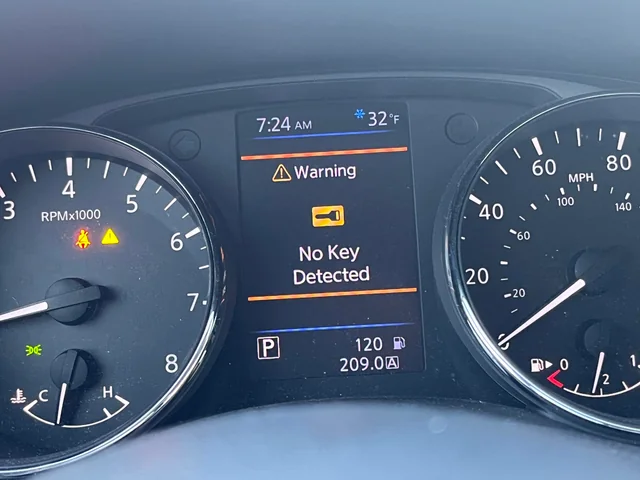

Picture this: It is late at night, rain is drumming against the roof of your car, and you are exhausted after a long shift. You slide into the driver’s seat of your Nissan, foot on the brake, finger pressing the Start button, anticipating the familiar hum of the engine. Instead, you are met with silence and a glowing amber warning on the dashboard: “No Key Detected.” Panic sets in. You dig the key out of your pocket, wave it around, press the button again; nothing. It is a modern driver’s nightmare, a moment where technology seemingly turns against convenience.
If you are currently stranded or simply frustrated by this recurring glitch, take a deep breath. You have arrived at the definitive resource. As automotive experts, we understand the intricate “handshake” between your Nissan Intelligent Key and the vehicle’s Body Control Module (BCM). This guide goes beyond basic advice; we will dissect the radio frequency dynamics, electrical nuances, and mechanical fail-safes of your vehicle to get you back on the road. Often, the solution requires no tools and zero dollars; just a bit of know-how.
The Science Behind the Error: What Causes Nissan’s “No Key Detected” Message?
To fix the problem, one must understand the system. Your Nissan doesn’t just “see” the key; it communicates with it via a sophisticated encrypted dialogue. When you attempt to start the car, the vehicle sends out a Low-Frequency (LF) “wake up” signal from internal antennas. The key fob receives this, wakes up, and blasts back a Radio Frequency (RF) code (usually at 315 MHz or 433 MHz) containing a unique digital signature. If the car’s immobilizer system doesn’t receive this specific return signal, it assumes a theft attempt and disables the ignition. The “No Key Detected” error is simply a breakdown in this invisible conversation.
1. Critical Voltage Drop: The Dead or Weak Key Fob Battery
By a significant margin, the most common disruptor of this digital conversation is power failure at the source. Your Nissan Intelligent Key is powered by a lithium coin cell battery (typically a CR2032 or CR2025). These batteries generally have a service life of 24 to 36 months. However, “dead” is a relative term in electronics. A battery might still have enough voltage to lock the doors from a distance but lack the amperage required to transmit the complex encryption string needed for engine authorization.
Expert Insight: When the battery voltage dips below 2.7 volts (down from a nominal 3.0 volts), the signal strength degrades exponentially. The car might hear a “whisper” of the key but cannot verify the security packet, resulting in the error.
Subtle Symptoms of a Dying Battery:
- Range Anxiety: The unlock/lock buttons require multiple rapid presses or you must stand within a few feet of the vehicle.
- Signal Lag: A noticeable delay between pressing the button and the lights flashing.
- Intermittent Failure: The key works in the morning but fails in the cold evening (cold temperatures drop battery voltage further).
The Replacement Procedure:
- Flip the fob over and slide the latch to release the mechanical emergency key.
- Locate the small pry slots on the seam of the plastic casing.
- Using a plastic trim tool or a small flathead screwdriver wrapped in tape (to prevent scratching), gently twist to separate the two halves.
- Note the orientation of the old battery (usually the text faces down into the housing) and gently pry it out.
- Install a high-quality (Energizer, Duracell, or Panasonic) replacement. Avoid generic “dollar store” batteries, as their internal resistance is often too high for automotive fobs.
- Snap the casing back together until you hear a solid click.
In our experience, a fresh power source resolves approximately 75% of these authentication failures instantly.
2. Circuit Trauma: Physical Damage to the Key Fob
We treat our keys poorly. They are tossed onto counters, dropped on pavement, and jangled in bags. Over time, this physical abuse can cause microscopic damage to the Printed Circuit Board (PCB) inside the fob. Reddit communities and mechanic forums are filled with reports of keys that light up but fail to start the car. This is often due to a “cold solder joint” cracking on the transponder chip or the battery contact terminals bending away from the cell.
Common forms of “Invisible” Damage:
- Liquid Intrusion: Even a splash of coffee or high humidity can cause corrosion on the PCB, creating short circuits.
- Micro-Fractures: Repeated drops can crack the ceramic antenna component on the board.
- Button Fatigue: The micro-switches wear out, causing stuck signals that drain the battery rapidly.
If a battery swap fails and the key rattles or shows signs of water damage, the hardware itself is likely compromised, necessitating a replacement from a certified locksmith or dealer.
3. The Noise Floor: Signal Interference
Radio Frequency Interference (RFI) is the silent killer of key fob performance. We live in a soup of invisible signals. Your Nissan key competes for bandwidth with thousands of other devices. If the “noise” in your environment is louder than the “voice” of your key, the car will remain immobilized.
The Usual Suspects of Interference:
- Smartphones: Keeping your fob in the same pocket as a smartphone is the most common issue. The phone’s constant cellular and Wi-Fi polling can “drown out” the fob’s weak signal.
- RFID Blockers: Wallets designed to prevent credit card skimming will also effectively kill your car key’s signal.
- Aftermarket Accessories: Cheap USB chargers, dash cams, or radar detectors plugged into the 12V outlet can emit “dirty” electromagnetic noise that confuses the car’s interior antennas.
- Environmental Factors: Parking directly under high-tension power lines or near radio transmission towers can create dead zones.
The solution here is spatial awareness. Separate your key from your phone, unplug aftermarket chargers, and try holding the fob in a different position relative to the dashboard.
Stranded? Try These Emergency “Hacks” to Start Your Nissan
When you are stranded in a parking lot, you don’t need a soldering iron; you need to get home. Nissan engineers designed fail-safes for exactly this scenario. Here is how to bypass the wireless system.
Method A: The “Direct Contact” Induction Start
Most modern Nissans equipped with push-button start utilize a passive induction coil located directly behind the Start/Stop button. This works similarly to wireless phone charging or NFC payment technology; it transmits a small amount of power to the key, energizing the chip even if the key’s battery is totally dead.
- Ensure the vehicle is in Park (P).
- Take the Nissan key fob; logo side usually facing you, or the back of the fob touching the button (check your manual, but usually, the Nissan logo touches the button).
- Press the brake pedal firmly.
- Physically push the Start button using the key fob itself. Do not use your finger. Use the nose of the fob to push the button in.
You may hear a chime, and the “Key Detected” light may flash green. This confirms the passive chip has been read.
Method B: The “Key Port” (Legacy Models)
If you drive an older Altima, Maxima, or Murano (typically mid-2000s to early 2010s), there is often a dedicated physical slot designed to read the key.
- Inspect the dashboard to the left of the steering wheel or inside the center console armrest.
- Look for a rectangular slot sized perfectly for the fob.
- Insert the entire key fob into this “Intelligent Key Port.” It should lock into place.
- Press the brake and the Start button. The port reads the transponder directly, bypassing the need for battery power.
Method C: The Logic Reset
Sometimes the Body Control Module (BCM) software simply glitches. A “soft reset” can sometimes re-establish the handshake.
- Step out of the vehicle and close the door.
- Lock the car using the mechanical key (slide it out of the fob) in the driver’s door handle.
- Wait 30 seconds.
- Unlock the door with the mechanical key.
- Hold the fob close to the Start button and attempt to start again. This sometimes forces the security system to re-poll for the key.
It’s Not the Key, It’s the Car: Vehicle-Side Diagnostics
If you have tried a new battery and the emergency start method, and the car still refuses to acknowledge the key, the issue likely resides within the Nissan itself. This moves us from simple maintenance to actual repair.
1. The Main Vehicle Battery: A Voltage Trap
This is the most deceptive cause. Your car’s main 12-volt battery might have enough power to turn on the dome lights or the radio, leading you to believe it is “fine.” However, the computers that manage the security system (BCM) are incredibly sensitive to voltage stability. Automotive technical data indicates that if the system voltage drops below 11.5 or 12.0 volts during the “handshake” attempt, the BCM may abort the process to prevent data corruption.
Diagnosis: Use a multimeter to check your car battery terminals. If the resting voltage is below 12.4V, recharge or replace the battery. Often, a “No Key Detected” error is actually the first warning sign of a dying car battery, appearing weeks before the car actually fails to crank.
2. Triangulation Failure: Bad Antennas
Your Nissan determines if the key is inside or outside the car using triangulation via multiple antennas. There are typically antennas located in the front console, the rear seat area, the trunk, and the exterior door handles. If an interior antenna fails or becomes disconnected, the car might “see” the key but calculate its position as “outside,” preventing the engine from starting for safety reasons.
This is common in vehicles that have had recent interior work (stereo installation, detailing) where a technician may have forgotten to reconnect a harness. Diagnostic videos often highlight loose connectors behind the center console panels.
3. The Brain Freeze: BCM Corruption
The Body Control Module is the gatekeeper. It verifies the key code against the list of authorized keys stored in its memory. Like any computer, it can suffer from memory corruption or hardware failure. If the BCM “forgets” your key’s ID, no amount of battery changing will help.
The Hard Reset (The “IT Crowd” Fix):
- Pop the hood and locate the negative (black) battery terminal.
- Disconnect the negative terminal completely.
- Wait for 15 to 30 minutes. This allows all capacitors in the vehicle’s modules to discharge, clearing volatile memory and temporary error flags.
- Reconnect the battery firmly.
- Attempt to start the vehicle. This reboot can clear logic locks in the BCM.
Model-Specific Quirks: Is Your Nissan Prone to This?
Not all Nissans are created equal. Over the years, specific models have developed reputations for unique failures within the Intelligent Key system.
Nissan Altima (2013-2018)
The Altima is notorious for “Key ID Incorrect” or detection errors related to the trunk antenna harness. Because the trunk opens and closes repeatedly, the wires leading to the rear antenna can fatigue and break. If the system detects a fault in the rear loop, it often disables the entire system as a security precaution. If you own an Altima, check the wiring loom near the trunk hinge for signs of fraying.
Nissan Rogue (2014-2020)
Rogue owners frequently report issues stemming from the driver’s side floor antenna. This component is located under the carpet beneath the driver’s seat. In snowy or rainy climates, water from boots can soak through the carpet, corroding the antenna or its connector. If you have a Rogue and the error persists, check for dampness under your floor mats.
Nissan Sentra (2016-Present)
Newer Sentras have been subject to Technical Service Bulletins regarding software logic. In some cases, the key is fine, the car is fine, but the software simply gets confused by rapid Start/Stop button presses. A dealership firmware update is often the only permanent fix for these software-level bugs.
Future-Proofing: Preventative Maintenance Strategies
The best way to fix a “No Key Detected” error is to ensure it never happens in the first place. Treat your Intelligent Key system as a maintenance item, just like your oil or tires.
Proactive Battery Rotation
Don’t wait for the warning light. Adopt a 2-year replacement schedule for all your key fobs. If you replace the battery in your primary key, replace it in the spare key sitting in your drawer, too. Lithium batteries degrade even when not in use. Keeping a high-quality spare CR2032 in your glove box is cheap insurance against being stranded.
Signal Hygiene
Where you leave your keys at home matters. Do not hang them on a hook right next to your Wi-Fi router or microwave. Constant exposure to high-energy RF fields can drain the battery faster as the key constantly “wakes up” to interpret the noise. Furthermore, protect your key with a silicone cover to absorb shocks from drops, preserving the delicate soldering inside.
The Financial Breakdown: DIY vs. The Dealership
Knowing when to fold ‘em is part of being a savvy car owner. Some fixes are easy; others require thousands of dollars in proprietary diagnostic computers.
| Problem Source | DIY Difficulty Level | Estimated DIY Cost | Estimated Dealer Cost | Expert Recommendation |
|---|---|---|---|---|
| Dead Fob Battery | 1/10 (Very Easy) | $5 – $8 | $45 – $75 | Always DIY. Paying a dealer for this is throwing money away. |
| Broken Fob Case/Buttons | 3/10 (Easy) | $15 (for shell case) | $250+ (new key) | DIY (Shell Swap). Move internals to a new plastic shell yourself. |
| Damaged Fob Electronics | 10/10 (Impossible) | N/A | $300 – $500 | Dealer/Locksmith. Requires programming new chips. |
| Signal Interference | 1/10 (Very Easy) | $0 | $150 (Diagnostic Fee) | DIY. Just move devices around. |
| Vehicle Antenna Failure | 8/10 (Hard) | $80 (Part) | $400 – $600 | Mechanic/Dealer. Requires tearing apart interiors. |
| BCM Failure/Programming | 10/10 (Impossible) | N/A | $800 – $1,200 | Dealer Only. Requires proprietary Consult-III+ software. |
Deep Dive: Advanced Diagnostics
For the technically inclined who have an OBD-II scanner capable of reading Body Control codes, you can peer into the mind of your Nissan. If basic fixes fail, scan your car. You are looking for “B-Codes” (Body codes), not “P-Codes” (Powertrain codes).
Code Decoder:
- B2621 / B2622: Interior Antenna Fault. This points to a specific broken wire or disconnected antenna in the cabin.
- P1610 – P1615: NATS (Nissan Anti-Theft System) Malfunction. This indicates a “Lock Mode” where the BCM and ECU have stopped talking. This often requires a dealer to clear the “Lock Mode” status.
- U1000: CAN Comm Circuit. A massive communication failure, likely due to low car battery voltage or a loose ground strap.
Your Troubleshooting Roadmap
To summarize, do not panic. Follow this logical path to save time and money:
- Battery First: Replace the CR2032 in the fob.
- Emergency Start: Use the fob to press the Start button. If this works, your key works, but the battery or signal was the issue.
- Check the Environment: Remove phone chargers and RFID wallets.
- Check the Car: Test the main 12V vehicle battery voltage.
- The Reset: Disconnect the car battery for 20 minutes to reboot the BCM.
- The Spare: Try your secondary key. If the spare works, the primary key is broken. If neither works, the car is broken.
- The Pro: If all else fails, consult a specialized automotive locksmith or the dealership.
Final Thoughts: Ensuring Reliable Starts
The “No Key Detected” error is a nuisance, but it is rarely a catastrophe. It serves as a reminder that our vehicles are complex ecosystems of radio waves and electricity. By paying attention to the early warning signs; like a sluggish response to the unlock button; you can avoid being stranded in the rain. Remember, maintenance isn’t just about oil changes; it’s about keeping your digital keys sharp, too. If you follow this guide, you will likely solve the issue yourself, keeping your hard-earned money in your pocket and your Nissan on the road where it belongs. Stay safe, and happy driving.