

You are driving down the highway, minding your own business, and suddenly your Hyundai slams the brakes for absolutely no reason. No car in front of you. No obstacle in the road. Just your forward collision avoidance assist system deciding that a shadow, a bridge overpass, or maybe a metal sign is about to kill you.
Or maybe it is the opposite problem. You are approaching a stopped vehicle at an intersection and the system does absolutely nothing. No warning chime. No flashing light. No automatic braking. It just sits there like it is on a coffee break.
Table of Contents
Either scenario is frustrating. And both are more common than Hyundai owners might expect. The forward collision avoidance assist system (FCA for short) is one of those features that works beautifully most of the time, but when it goes wrong, it really goes wrong. The system can malfunction mid-drive, activate when it should not, or completely fail to detect a vehicle right in front of you.
If any of this sounds familiar, you are not alone. Let us break down why the FCA system misbehaves, what those dashboard warnings actually mean, how to check the system yourself, and what it costs to get things fixed.
What Exactly Is the Forward Collision Avoidance Assist System?
Before we get into what goes wrong, it helps to understand what this system is supposed to do when everything is working properly.
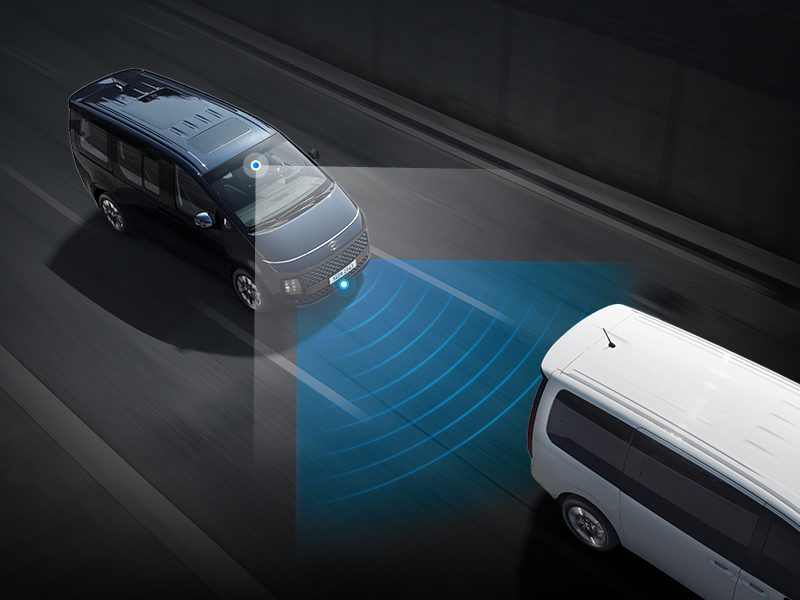
Hyundai’s FCA system uses a combination of front-facing cameras and radar sensors (depending on the model and trim level) to monitor the road ahead. It is constantly scanning for vehicles, pedestrians, and cyclists in your path. If the system detects that a collision is likely and you have not started braking, it steps in.
The intervention happens in stages. First, you get a visual warning on your instrument cluster or head-up display. Then you hear an audible chime. If you still have not reacted, the system applies the brakes automatically to either reduce the severity of the impact or avoid the collision altogether.
On paper, it is a brilliant safety net. And in real-world driving, it has likely prevented thousands of accidents. But the system relies on cameras and sensors that have to interpret the world in real time, and that interpretation is not always perfect.
Think of it like this. The FCA system is essentially a computer trying to “see” the road the same way your eyes do. But computers do not have depth perception, intuition, or the ability to tell the difference between a shadow on the road and a stopped vehicle. When the system misreads the situation, you get false activations, missed detections, or outright malfunctions.
The Three Most Common FCA Problems in Hyundai Vehicles
While there are many potential issues that can affect the FCA system, the vast majority of complaints fall into three categories. Understanding these will help you figure out what is happening with your specific vehicle and what to do about it.
- System malfunctions while driving, where the FCA throws error codes and warning lights while you are on the road.
- Unintentional activation, where the system applies brakes or issues warnings when there is no actual threat ahead.
- Front-view camera recognition failure, where the camera simply cannot detect a vehicle in front of you, leaving you without the safety net you are counting on.
Each of these problems has different causes, different warning signs, and different solutions. Let us go through them one at a time.
When the FCA System Malfunctions While You Are Driving
This is the one that rattles people the most. You are cruising along, everything seems normal, and then your dashboard lights up like a Christmas tree. Something has gone wrong with the FCA system, and your car wants you to know about it.
Here is the typical sequence of events when this happens:
- The FCA warning light appears on your instrument cluster. This is usually an amber or yellow icon that looks like two cars with lines between them, or it may simply say “FCA” depending on your model year.
- Within a few seconds, you will see an FCA warning message on the display. In some cases, the electronic stability control (ESC) light will also illuminate. The ESC light showing up alongside the FCA warning is significant because it suggests the problem may extend beyond just the collision avoidance system.
- After those initial warnings clear, the master warning light takes their place. This is the catch-all indicator that tells you something in the vehicle needs attention.
If you see this sequence play out on your dashboard, do not ignore it. The system is telling you that it has detected a fault and has likely deactivated itself. That means your collision avoidance safety net is no longer active, and you are driving without it.
This type of malfunction is most commonly associated with the auto-deactivation of the FCA system. In other words, the system runs a self-check, detects a problem it cannot resolve on its own, and shuts itself down as a precaution. It is actually a safety feature in itself. The system would rather turn off than give you false information or react incorrectly.
But here is what worries people: the system does not always tell you why it shut down. You just get the warning lights and a vague message. Was it a sensor glitch? A wiring issue? A software bug? You will not know until someone plugs a diagnostic scanner into the vehicle and reads the fault codes.
What Causes Mid-Drive FCA Malfunctions?
Several things can trigger this kind of failure. Some are minor and temporary. Others require professional repair.
Dirty or obstructed sensors. The front-facing camera and radar sensor need a clear view of the road. If the windshield is dirty, covered in ice, or has a crack running through the camera’s field of vision, the system may not be able to process images correctly. Similarly, if the radar sensor (usually located behind the front bumper or grille) is blocked by mud, snow, ice, or even a front license plate bracket that shifted slightly, the system can throw an error.
Extreme weather conditions. Heavy rain, thick fog, blizzards, and even intense direct sunlight can overwhelm the camera’s ability to interpret the scene ahead. The system knows it cannot see properly, so it shuts down rather than risk a false reaction. This is frustrating because severe weather is exactly when you would want an extra safety system working.
Software glitches. Like any computer, the FCA system runs on software that can occasionally develop bugs. A software glitch might cause the system to misinterpret sensor data, fail to initialize properly when you start the car, or crash mid-operation. Software issues are sometimes resolved by a simple system reset, but they can also require a software update from the dealership.
Electrical problems. A weak battery, a failing alternator, or corroded wiring connections can cause intermittent power supply issues to the FCA sensors and control module. When the system does not get consistent power, it cannot function reliably and may trigger warning lights.
Physical damage to sensors or cameras. Even a minor fender bender or a hard hit from a piece of road debris can knock a sensor out of alignment or damage the camera housing. The system might still power on, but if the sensor is pointing slightly off-angle, the data it sends to the computer will be inaccurate, triggering a malfunction warning.
What Should You Do When This Happens?
First, stay calm. The FCA shutting down does not mean your brakes stopped working or your car is about to break down. It means one specific safety feature is offline. Your regular brakes, your steering, and your engine are all still functioning normally.
That said, you should take the vehicle to a Hyundai dealership or a qualified mechanic as soon as reasonably possible. Do not put it off for weeks. The FCA system exists because it can prevent accidents in situations where your reaction time might not be fast enough, and driving without it for an extended period defeats the purpose of having it.
Before heading to the shop, check a few things yourself. Is your windshield clean? Is there anything blocking the front bumper area where the radar sensor sits? Has the car been in any recent minor collision, even a parking lot bump? Answering these questions can save your mechanic time and potentially save you money on diagnostics.
When the FCA System Brakes for No Reason (Phantom Braking)
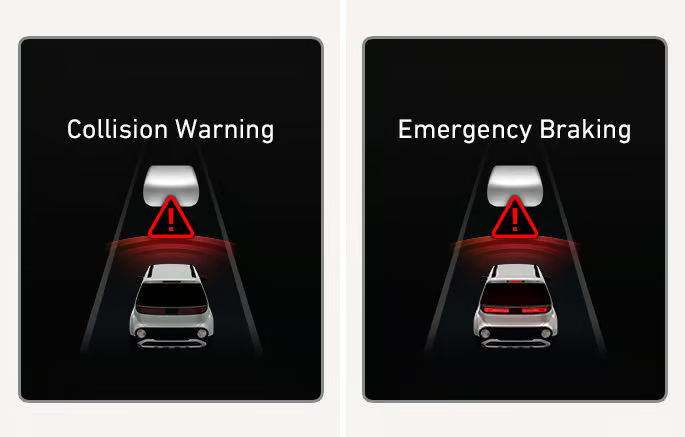
This is arguably the most unsettling FCA problem because it directly affects your driving. You are going down the road, the path ahead is completely clear, and suddenly your car hits the brakes. Or you get a loud collision warning chime screaming at you when there is literally nothing in front of you.
This is commonly called “phantom braking” or unintentional FCA activation, and it happens more often than you might think. It is not unique to Hyundai either. Nearly every automaker that offers forward collision warning or automatic emergency braking has dealt with reports of phantom braking. But that does not make it any less alarming when it happens to you at 60 miles per hour on a busy highway.
Why Does Phantom Braking Happen?
The root cause is almost always a misinterpretation of sensor data. The camera or radar detects something it interprets as a collision threat, even though no real threat exists. Here are the most common triggers:
Overhead structures. Bridges, overpasses, highway signs, and even large overhead banners can confuse the radar sensor. The radar bounces a signal off the structure and interprets the return signal as a large object directly in your path. From the system’s perspective, you are about to drive into a wall.
Metal guardrails and barriers. On curved roads, metal guardrails running alongside or ahead of you can create radar reflections that look like a vehicle. The system sees a large metallic object and assumes it is a stopped car in your lane.
Shadows and changes in road surface. The camera component of the FCA system can sometimes misinterpret a strong shadow across the road as an obstacle. This is especially common when driving from bright sunlight into a shadowed area, like passing under a bridge or through a tree-lined stretch of road. The sudden contrast change confuses the image processing.
Weather conditions. Rain, fog, and snow can scatter radar signals and distort camera images. Heavy rain on the road surface can also create reflections that the system interprets as objects. Spray from other vehicles can have the same effect.
Adjacent lane traffic. Sometimes the system picks up a vehicle in an adjacent lane and mistakenly calculates that it is in your lane. This happens most often on curves where the geometry of the road temporarily aligns the adjacent vehicle with your forward path from the sensor’s perspective.
Parked vehicles along the road edge. On narrow streets with cars parked along both sides, the FCA system can sometimes interpret parked vehicles as obstacles in your lane, especially if you are driving close to them or if the system has difficulty judging lateral distance.
What the Dashboard Shows During Phantom Braking
Unlike a system malfunction, phantom braking does not always trigger a persistent warning light. In many cases, the system acts exactly as it would during a real collision threat: you see a collision warning on the LCD display, you hear a loud warning chime, and you may feel the brakes engage momentarily.
The difference is that the warning disappears quickly once the system recalculates and realizes there is no actual threat. But by that point, your car has already slowed down, you have had a shot of adrenaline, and the driver behind you is probably very confused about why you just brake-checked them on the highway.
How to Reduce Phantom Braking Incidents
You cannot completely eliminate phantom braking because it is a limitation of the technology itself. But you can reduce how often it happens:
- Keep your windshield clean. A dirty windshield degrades the camera’s image quality, making misinterpretations more likely. Clean both the inside and outside of the glass in the area around the camera housing, which is typically located near the rearview mirror.
- Keep the front bumper area clean. If your vehicle uses a radar sensor behind the front bumper or grille, make sure that area is free of mud, ice, snow, and debris. Even a thin layer of road grime can affect radar accuracy.
- Adjust your FCA sensitivity setting. We will cover this in detail in the next section, but switching from “Early” warning to “Normal” or “Late” can reduce the frequency of false activations, especially if most of your driving is in the city at lower speeds.
- Update your vehicle software. Hyundai periodically releases software updates that improve the FCA system’s algorithm. These updates help the system better distinguish between real threats and false triggers. Check with your dealership to see if there are any available updates for your model.
- Be aware of your environment. If you know you are about to drive under an overpass or through a construction zone with a lot of metal structures, mentally prepare for a possible false warning. Knowing it might happen makes it less startling when it does.
When the Camera Cannot See What Is Right in Front of You
This is the scariest scenario of the three. The FCA system is designed to detect vehicles ahead of you and warn you if a collision is imminent. But in certain situations, the front-view camera recognition system simply cannot detect a vehicle that is right there in your path.
And here is what makes this particularly dangerous: the system does not warn you that it cannot see. There is no message on the LCD screen saying “Hey, I am blind right now, you are on your own.” The system just silently fails to do its job. You have no idea it is not working until the moment you need it and nothing happens.
Situations Where the Camera Fails to Detect Vehicles
The front-view camera is an optical device. It works by processing visual images, just like your eyes. And just like your eyes, it has limitations. Here are common situations where the camera may fail to detect a vehicle ahead:
Direct sun glare. When the sun is low on the horizon and shining directly into the camera lens, the image can be completely washed out. The camera sees nothing but blinding white light. A vehicle directly ahead of you becomes invisible to the system.
Driving into tunnels or dark areas. The sudden transition from bright daylight to a dark tunnel can temporarily overwhelm the camera’s ability to adjust its exposure. For a few critical seconds, the camera may not be able to distinguish a vehicle from the darkness around it.
Following vehicles that blend into the background. A gray car on a gray road under an overcast sky can be difficult for the camera to distinguish. The system relies on contrast and shape recognition, and when a vehicle has very little contrast against its background, detection becomes unreliable.
Unusual vehicle shapes. The camera is trained to recognize standard vehicle profiles: cars, trucks, SUVs, motorcycles. But if you are approaching something with an unusual shape, like a flatbed trailer loaded with irregularly shaped cargo, a vehicle with an extremely modified body kit, or a piece of farm equipment, the system may not recognize it as a vehicle at all.
Vehicles approaching from extreme angles. If a car pulls out from a side street directly into your path, the camera may not have enough time to detect, classify, and respond to the threat. The system is optimized for vehicles that are already in your lane and traveling in the same direction. Cross-traffic and vehicles entering your lane at sharp angles are much harder for it to handle.
Very close following distances. When you are tailgating another vehicle (which you should not be doing anyway), the camera may lose its ability to accurately measure the distance and closing speed. The vehicle ahead fills too much of the camera’s field of view, making it difficult for the system to calculate the geometry of the situation.
Why This Matters More Than You Think
The biggest risk with this type of failure is overreliance on the system. If you have been driving for months or years with the FCA system catching close calls and warning you about potential collisions, you may subconsciously start relying on it as a backup. You might follow a little closer than you should, or you might let your attention wander because you trust the system to alert you.
But the FCA system is not a substitute for paying attention. It is a supplement. Hyundai’s own manual makes this very clear, and it is printed right on the display when you first enable the system. The moment you start treating it as a replacement for your own eyes and judgment, you are putting yourself at serious risk in the exact situations where the system is most likely to fail.
Always drive as if the system might not work. Maintain a safe following distance, keep your eyes on the road, and be ready to brake on your own. The FCA system is your backup, not your primary defense.
How to Check Your FCA System Before You Hit the Road
One of the things Hyundai does right is giving you the ability to check and configure the FCA system from behind the wheel. You do not need any special tools or diagnostic equipment. It is all accessible through the instrument cluster menus.
Here is how to do it, step by step:
- Access your user settings. From the instrument display (the screen behind your steering wheel), navigate to your user settings menu. Look for a category called “Driver Assistance” or something similar. The exact wording varies slightly depending on your model year and trim level.
- Select Forward Collision Avoidance. Within the Driver Assistance menu, you should see an option for Forward Collision Avoidance. Select it to open the FCA settings.
- Verify the system is enabled. Make sure the Forward Collision-Avoidance checkbox is checked or toggled on. If it is turned off, the system will not monitor for collisions, and you will not receive any warnings or automatic braking intervention.
- Set your warning sensitivity. Navigate to the Forward Collision Warning option. You will see three choices: Late, Normal, and Early. This setting determines how aggressively the system alerts you to potential collisions.
Which Warning Sensitivity Should You Choose?
This is where a lot of Hyundai owners get confused, so let us clear it up.
“Early” gives you the most advance warning. The system alerts you at a greater distance from the vehicle ahead, giving you more time to react. This is the best setting for highway driving where speeds are high and stopping distances are longer. If most of your driving is on highways and interstates, Early is the smart choice.
“Normal” is the middle ground. It provides a balanced warning timing that works reasonably well in both city and highway driving. If you split your time between different types of roads, this is a solid default.
“Late” gives you the least advance warning. The system waits until you are much closer to the vehicle ahead before alerting you. This setting is intended for experienced drivers who want fewer interruptions and are confident in their own reaction time. But be honest with yourself. If you tend to get distracted or if your reaction time is not what it used to be, Late is probably not the right choice for you.
Here is a quick reference for choosing the right setting:
| Setting | Warning Distance | Best For | Trade-Off |
|---|---|---|---|
| Early | Greatest | Highway driving, high-speed roads | More frequent warnings, potential for false alarms |
| Normal | Moderate | Mixed driving conditions | Balanced between sensitivity and annoyance |
| Late | Shortest | Low-speed city driving, experienced drivers | Less reaction time if the system activates |
One important thing to know: once you select a setting, it stays in place until you manually change it or until the FCA system is deactivated from the menu. The car remembers your preference between ignition cycles. So you do not need to set it every time you start the car.
That said, it is worth adjusting the setting if your driving conditions change significantly. If you normally drive in the city with “Normal” selected but you are about to take a long highway road trip, consider switching to “Early” for the extra margin of safety at higher speeds. Then switch it back when you return to city driving.
How to Fix Forward Collision Avoidance Assist Problems
The fix depends entirely on what is causing the problem. Some issues you can handle yourself in your driveway. Others require a trip to the dealership. Let us go through the options from simplest to most involved.
The DIY Reset: Disconnecting the Battery
For minor glitches and software hiccups, a battery disconnect can sometimes reset the FCA system and clear temporary fault codes. Think of it as the automotive equivalent of turning your computer off and back on again.
Here is how to do it safely:
- Turn off the vehicle and remove the key from the ignition (or make sure the push-button start is fully off).
- Open the hood and locate the battery.
- Disconnect the negative (black) battery terminal first. Use a wrench to loosen the clamp and pull it off the terminal post.
- Wait at least 10 to 15 minutes. This gives the vehicle’s electronic systems time to fully power down and clear any temporary data stored in memory.
- Reconnect the negative terminal and tighten the clamp.
- Start the vehicle and check whether the FCA warning lights have cleared.
If the warning lights are gone and the system appears to be working normally, you may have fixed the problem. Drive carefully for the next few days and pay attention to whether the issue returns. If it does, a battery reset is not going to cut it. You need professional help.
A word of caution: disconnecting the battery will also reset your clock, your radio presets, your seat memory positions, and any other settings stored in volatile memory. It may also temporarily affect your idle quality until the engine control module relearns its idle parameters, which usually takes a few driving cycles. None of this is harmful, but it is worth knowing ahead of time so you do not panic when your car idles a little rough for the first day or two after the reset.
Cleaning the Sensors and Camera
If your FCA problems seem to come and go, especially in bad weather or after driving on dirty roads, the issue might be as simple as dirty sensors.
The front-facing camera is usually mounted inside the windshield, near the rearview mirror. You cannot clean the camera lens itself because it is sealed inside the housing. But you can clean the windshield glass in front of it. Use a quality glass cleaner and a microfiber cloth, and make sure the area directly in front of the camera housing is spotless, both inside and out.
The radar sensor, if your model has one, is typically located behind the front bumper cover or integrated into the grille. Check this area for mud, ice, road salt buildup, or any other debris that might be blocking the sensor. A gentle rinse with water and a wipe with a soft cloth is usually enough to clear it.
If you have a front license plate bracket, make sure it has not shifted to a position where it partially blocks the radar sensor. This is more common than you might think, especially if the bracket was not installed by the dealership or if it has been bumped in a parking lot.
Taking It to the Dealership
If a battery reset and sensor cleaning do not solve the problem, it is time for professional diagnostics. This is especially true if you are experiencing system malfunctions while driving (the warning light sequence we described earlier) or if the problem keeps coming back after resets.
At the dealership, a technician will connect a diagnostic scanner to the vehicle’s OBD-II port and read the specific fault codes stored in the FCA control module. These codes will point to the exact component or subsystem that is failing, whether it is the camera, the radar, the wiring harness, or the control module itself.
Based on the diagnostic results, the fix might involve:
- A software update to the FCA control module. Hyundai has released several updates over the years to improve FCA performance and reduce false activations. If your vehicle has not been updated, this alone might resolve the issue.
- Sensor recalibration. If the camera or radar sensor has been bumped, shifted, or replaced, it may need to be recalibrated so it is pointing in exactly the right direction. This is a precision procedure that requires specialized equipment.
- Sensor or camera replacement. If a sensor or the camera itself is physically damaged or has failed electronically, it will need to be replaced.
- Wiring repair. Corroded connectors, chafed wires, or loose connections can cause intermittent faults that are hard to reproduce but easy to fix once you find them.
- Control module replacement. In rare cases, the FCA control module itself may have failed. This is the most expensive repair, but it is uncommon.
What Will This Cost You?
This is the question every car owner dreads asking. The answer depends on what is wrong and where you take the vehicle for repair.
Here is a general breakdown of what you can expect to pay:
| Repair Type | Estimated Cost Range | Notes |
|---|---|---|
| System reset (battery disconnect) | Free (DIY) | Only fixes temporary software glitches |
| Professional system reset and diagnostic scan | $80 to $180 | Most shops charge a diagnostic fee |
| Software update | $0 to $150 | May be free if covered by warranty or recall |
| Sensor recalibration | $150 to $400 | Requires specialized equipment |
| Front-facing camera replacement | $500 to $1,100 | Includes parts and labor; recalibration usually included |
| Radar sensor replacement | $400 to $900 | Varies by model and location |
| Wiring repair | $100 to $500 | Depends on location and extent of damage |
| Control module replacement | $800 to $1,500+ | Rare, but expensive when needed |
If your Hyundai is still under the factory warranty (typically 5 years or 60,000 miles for the basic warranty), FCA system repairs should be covered at no cost to you. Some FCA issues have also been addressed by technical service bulletins (TSBs) or recalls, which Hyundai will fix for free regardless of warranty status. It is always worth asking the dealership whether a TSB or recall applies to your vehicle before you agree to pay for the repair out of pocket.
If you are out of warranty, shop around. Dealerships tend to charge higher labor rates than independent repair shops. However, FCA system repairs often require Hyundai-specific diagnostic software and calibration equipment that independent shops may not have. For sensor replacements and recalibrations, the dealership is usually your best (and sometimes only) option.
Can You Just Turn Off the FCA System Entirely?
Technically, yes. You can disable the FCA system through the Driver Assistance menu on your instrument cluster. Uncheck the Forward Collision-Avoidance box and the system will stop monitoring for collisions, stop issuing warnings, and stop applying automatic braking.
Should you do this? That is a personal decision, but think carefully before you flip that switch.
If the system is causing frequent phantom braking events that are genuinely dangerous (like slamming the brakes on a busy highway for no reason), temporarily disabling it while you wait for a repair appointment is reasonable. Driving with a malfunctioning safety system can be more dangerous than driving without one.
But disabling a working FCA system just because the warnings occasionally annoy you is not a smart move. Studies have consistently shown that forward collision warning and automatic emergency braking systems significantly reduce rear-end collision rates. The Insurance Institute for Highway Safety (IIHS) has found that vehicles equipped with these systems are involved in substantially fewer rear-end crashes than identical vehicles without the technology.
The system is not perfect. It will give you false warnings from time to time. But over the thousands of miles you drive each year, there will almost certainly be a moment when it detects a hazard before you do and gives you the split-second warning that prevents an accident. That one moment makes all the false alarms worth tolerating.
Preventing FCA Problems Before They Start
Like most vehicle systems, a little preventive care goes a long way with the FCA system. Here are practical steps you can take to keep it functioning reliably:
- Keep your windshield clean. Both inside and out. Smudges, film, and haze on the inside of the windshield are just as problematic for the camera as dirt on the outside.
- Replace worn wiper blades. Streaky wipers leave residue on the glass that can interfere with camera image quality, especially in rain.
- Do not put stickers or aftermarket tint near the camera housing. Anything that obstructs or distorts the camera’s view can cause detection problems.
- Repair windshield damage promptly. A crack or chip in the glass near the camera can refract light in ways that confuse the image processing system.
- Wash the front bumper area regularly. Keep the radar sensor zone clear of mud, salt, and debris.
- Stay current on software updates. Ask about FCA-related updates every time you visit the dealership for routine maintenance. Many software updates are applied during regular service visits at no additional charge.
- Address minor front-end damage immediately. Even a small parking lot bump can shift a sensor out of alignment. If your front bumper has been hit, have the sensor checked even if the cosmetic damage seems insignificant.
The Bigger Picture: Understanding Your Car’s Limits
The forward collision avoidance assist system in your Hyundai is an impressive piece of technology. It monitors the road ahead dozens of times per second, processes complex visual and radar data in real time, and can apply your brakes faster than any human could react. On a good day, it is a lifesaver.
But it is not infallible. It has blind spots. It gets confused by weather, lighting, and unusual road geometry. It can trigger when it should not and stay silent when it should scream. These are not design flaws in the traditional sense. They are limitations of a technology that is still evolving.
Every year, the systems get better. The algorithms improve. The cameras get sharper. The radar gets more precise. But we are not at the point where any collision avoidance system can replace an attentive driver. Not yet.
So here is the most important takeaway from everything we have covered: treat your FCA system as a safety net, not a substitute for paying attention. Know how to check it, know what the warning lights mean, and know when to take it in for service. But never, ever let it lull you into a false sense of security behind the wheel.
When was the last time you actually checked whether your FCA system is turned on and set to the right sensitivity for how you drive?