
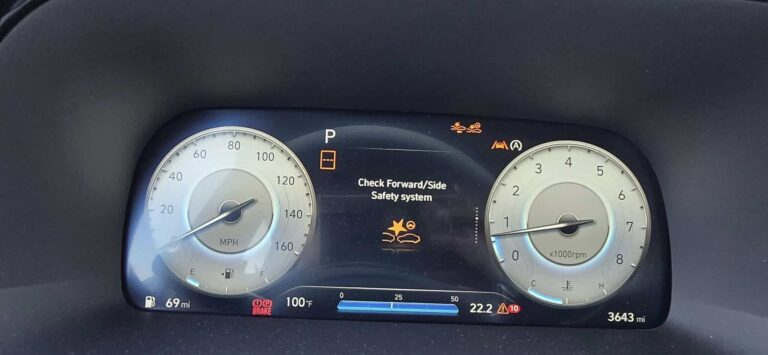
You are driving along, minding your own business, and suddenly a warning message pops up on your dashboard: “Check Forward Safety System.” Your first instinct might be to panic, but before you do, take a breath. This message does not mean your car is about to fall apart. What it does mean is that something has disrupted one of your Hyundai’s most important collision prevention features, and that deserves your attention sooner rather than later.
This guide breaks down exactly what the forward safety system is, why it triggers that warning, how to fix the most common causes yourself, and when it is time to hand the problem over to a professional.
What the Hyundai Forward Safety System Actually Does
Before getting into what goes wrong, it helps to understand what this system is supposed to do when everything is working correctly.
The Hyundai forward safety system is a collision avoidance technology, similar in function to what other manufacturers call Autonomous Emergency Braking or AEB. Its entire job is to watch the road ahead of you and step in before a collision happens or, at minimum, reduce the severity of one.
Here is how it works in real time:
- A forward-facing camera, typically mounted near the rearview mirror on the inside of the windshield, continuously scans the road ahead
- The system processes that camera feed and looks for potential collision threats, including other vehicles, pedestrians, and cyclists
- When a threat is detected, the system first alerts the driver through warning lights, audible beeps, and in some Hyundai models, a vibration in the driver’s seat
- If the driver does not respond in time, the system can automatically apply the brakes to slow the vehicle down
One important thing to know: the automatic braking function has limitations at high speeds. At highway speeds, the system may not be able to stop the car completely, but it can still reduce speed enough to lessen the impact of a collision. Think of it as a backup system, not a replacement for paying attention.
When the dashboard shows “Check Forward Safety System,” it means something has gone wrong with one or more of these components, and the system can no longer guarantee it will catch a threat before you do.
Why the “Check Forward Safety System” Warning Appears: The Real Causes
There is a common misconception that this warning only appears when the camera or a sensor is physically broken. In reality, that message can be triggered by several everyday factors, some of which are completely harmless and easy to fix.
1. A Dirty Camera Lens
This is, without question, the single most common cause of this warning. The forward-facing camera sits behind the windshield, usually right near the base of the rearview mirror. Because it faces forward through the glass, anything that obstructs its view will disrupt the system.
Think about how quickly a windshield gets dirty. Dust, bug splatter, road film, condensation, and water streaks can all build up. After a rainstorm, if your wipers have not been doing a great job, that camera lens can get coated in a film that blurs its view entirely.
Snow and ice are even more problematic. A thin layer of frost on the windshield directly in front of the camera can block it completely, triggering the warning before you have even pulled out of the driveway.
The fix here is simple. Clean the windshield, especially the area directly in front of the camera. If your wipers are leaving streaks, replace the blades. If you are in a cold climate, make sure to clear frost and ice from the entire windshield before driving, not just the area you can see through from the driver’s seat.
2. Extreme Temperatures Affecting the Camera
Temperature extremes are harder to control but worth understanding. When it is extremely hot outside, particularly in direct sunlight with the car parked for hours, the interior of the vehicle can reach temperatures well above what electronics are designed to handle comfortably. The camera and its associated processing hardware can overheat, causing the system to fault and display the warning.
On the cold end, extremely low temperatures can slow down the camera’s processing speed and affect image quality, leading the system’s computer to record errors in the data it receives. When the error rate crosses a threshold, the system flags the problem and puts up the warning.
In many cases, this kind of temperature-related warning will clear on its own once the vehicle reaches a normal operating temperature. If you see the warning on a freezing cold morning and it disappears after driving for ten or fifteen minutes, that is likely what happened.
3. Camera Sensing Limitations in Challenging Conditions
No camera-based system is perfect, and Hyundai’s forward safety system is honest about its limitations. There are driving conditions where the system simply cannot process what it sees clearly enough to function reliably. These include:
- Driving at night with poor lighting where the camera struggles to pick up contrast
- Heavy rain, fog, or blowing snow that reduces visibility for both the driver and the camera
- Direct sunlight shining into the camera, essentially blinding it
- Certain road markings or surface conditions that confuse the system
- Approaching vehicles or obstacles at angles that fall outside the camera’s effective detection zone
When the system detects that it cannot process images accurately, it may throw the warning rather than operate with unreliable data. This is actually a designed safeguard. The system is telling you: “I cannot see well enough right now to guarantee I will catch a collision, so do not rely on me.” That is useful information, even if the warning itself is alarming.
4. Camera Overheating
This overlaps with the temperature issue, but it is worth separating out because it tends to happen in specific situations. If your car is parked in direct sunlight for several hours on a hot day, the interior temperature can rise dramatically. The camera’s housing contains plastic and electronic components that are not built for sustained exposure to extreme heat.
When the camera overheats, it can fail temporarily or sustain permanent damage if the exposure is severe enough. If you park in hot climates regularly, using a windshield sunshade is one of the simplest ways to protect this camera and several other electronics that live near the top of the dashboard.
5. A Recall-Related Defect
Hyundai has issued recalls on certain models related to safety system components. If your vehicle falls under a recall and the issue involves the forward collision avoidance system, the warning message may persist regardless of what you clean or reset. In this case, no amount of DIY troubleshooting will fully resolve the problem because the root cause is a manufacturing or software defect that requires a dealer fix.
You can check whether your vehicle has any open recalls by visiting the National Highway Traffic Safety Administration website at nhtsa.gov and entering your vehicle identification number. This should honestly be one of your first steps if the warning message is persistent and you cannot identify an obvious cause.
6. Damaged or Corroded Wiring
Less commonly, the warning can be triggered by damaged wiring connecting the camera to the vehicle’s main computer. Wires can be pinched, chafed, or corroded, particularly in older vehicles or those exposed to significant moisture. When the signal between the camera and the control module is interrupted, the system cannot confirm that the camera is functioning, and the warning light comes on.
This is harder to diagnose without equipment, but if you have already ruled out all the simpler causes, damaged wiring should be on the list when you take the car to a technician.
How to Fix the Hyundai Check Forward Safety System Warning
Now for the part most people are really here for. Here is how to work through this problem systematically, starting with the simplest fixes and working toward the more involved ones.
Step 1: Restart the Vehicle
Before doing anything else, turn the car off completely, wait about thirty seconds, and start it again. Sometimes the warning is a one-time system glitch, similar to when your phone acts up and a quick restart fixes it. If the message disappears and does not come back, it was likely a temporary fault in the system’s self-diagnostic routine.
If the message comes back, move to the next step.
Step 2: Clean the Windshield and Camera Area Thoroughly
Locate the forward camera. On most Hyundai models, it sits just behind the windshield near the top center, close to the base of the rearview mirror. You will see a small lens or a rectangular sensor housing pointing forward through the glass.
Clean the outside of the windshield in front of the camera using a quality glass cleaner and a microfiber cloth. Avoid using anything abrasive. If the inside of the windshield has a film or haze, clean that too, since interior windshield grime can affect the camera’s image quality just as much as exterior dirt.
After cleaning, restart the car and check whether the warning has cleared. In a surprising number of cases, this is all it takes.
Step 3: Let the Car Warm Up or Cool Down
If you triggered the warning on an extremely hot or cold day, give the car a few minutes to reach a more moderate interior temperature before concluding there is a real problem. In cold weather, run the defroster to clear any frost from the windshield and the area directly in front of the camera. In hot weather, run the air conditioning for a few minutes before driving.
If the warning clears once the temperature normalizes, you have your answer. Going forward, take steps to protect the car from temperature extremes, park in shade or use a sunshade in summer, and clear frost fully before winter driving.
Step 4: Check the Forward Safety System Wiring
If you are comfortable doing a visual inspection, take a look at the wiring that runs from the camera housing down toward the dashboard. Look for:
- Any visible fraying or damage to the wire insulation
- Loose connectors or plugs that may have worked themselves free
- Signs of moisture damage or corrosion around connectors
Do not attempt to repair wiring yourself unless you have experience with automotive electrical work. A wrong connection in this system can cause more problems than it solves. If you see visible damage, note what you found and take it to a technician.
Step 5: Use a Scan Tool to Check for Fault Codes
A diagnostic scan tool can pull specific fault codes from the vehicle’s computer that point directly to which component in the forward safety system has triggered the warning. This takes the guesswork out of the diagnosis entirely.
If you own a mid-range OBD2 scanner that supports advanced driver assistance system diagnostics, you can do this yourself. If your scanner only reads basic engine codes, it may not be able to access the safety system module. In that case, a shop or dealer with the right equipment will need to pull the codes.
Common fault codes related to this system include camera communication errors, signal faults, and module power supply issues. Each code points to a specific component, which makes the repair much more targeted.
Step 6: Replace a Damaged Camera
If the scan tool confirms that the camera itself has failed, it will need to be replaced. This is not a simple plug-and-play part swap. The forward safety system camera on most modern Hyundai vehicles requires calibration after replacement. That calibration process uses specialized equipment and must be done correctly, otherwise the system will not aim the camera at the right area of the road and the collision detection will be unreliable.
Camera replacement and calibration should be handled by a Hyundai dealer or a shop that has the necessary calibration equipment and software. Trying to shortcut this step is not worth the risk.
Step 7: Check for Open Recalls
Run your VIN through nhtsa.gov and look for any open recalls related to the forward collision warning system or the camera. If a recall exists for your vehicle, contact your Hyundai dealer. Recall repairs are done at no cost to you, and the dealer will have the specific fix that addresses the root cause.
Step 8: Take It to a Professional
If you have worked through all of the above steps and the warning is still showing, it is time to let a qualified technician take over. At this point, the issue is likely something that requires dealer-level diagnostic tools or a repair that goes beyond what most owners can address at home. Catching the problem early is always better than driving for weeks with a safety system that may not function when you actually need it.
How to Activate the Hyundai Forward Safety System If It Is Turned Off
Sometimes the forward safety system gets accidentally turned off through the vehicle settings, and owners mistake this for a malfunction. If you want to confirm the system is enabled or turn it back on, here is how to do it on most Hyundai models with a touchscreen infotainment system:
- Start the vehicle and let the infotainment screen load
- Navigate to Settings from the home screen
- Select Driver Assistance from the settings menu
- Look for Forward Collision Avoidance Assist and make sure it is toggled on
- Within that menu, you may also find a Forward Collision Warning sensitivity setting with options labeled Late, Normal, and Early. For city driving or highway driving at higher speeds, Early is generally the most protective setting
The exact menu names can vary slightly depending on your model year and trim level, but the general navigation path is the same across most Hyundai vehicles built in the last several years.
Note that simply turning the system on through the settings does not clear a “Check Forward Safety System” warning. That warning indicates a fault in the system itself, not just that it is toggled off. If the warning is showing, the system needs to be diagnosed and repaired, not just switched on.
What Happens If You Keep Driving With the Warning On?
This is a question a lot of owners have, and the honest answer is: it depends on why the warning is showing.
The “Check Forward Safety System” warning does not affect your car’s ability to drive. The engine, transmission, steering, and brakes all work independently of the forward safety system. Your car will still move, stop, and steer normally.
But here is the thing. When that warning is active, the collision avoidance system is effectively offline. That means:
- You will not receive automatic collision warnings
- The automatic emergency braking will not activate if you are about to hit something
- Any other features that depend on the forward camera, such as lane keeping assist or adaptive cruise control, may also stop working
If the warning clears on its own after a few minutes, particularly in extreme weather, you are likely fine. But if the warning is persistent, driving without the system for extended periods removes a safety layer you paid for and should be using. It is not an emergency, but it should be treated as something to address within days, not weeks.
How Much Does It Cost to Fix a Check Forward Safety System Warning?
The cost depends heavily on the root cause. Here is a general breakdown to give you an idea of what to expect:
| Cause of Warning | DIY Cost | Professional Repair Cost |
|---|---|---|
| Dirty windshield or camera | $0 – $10 (cleaning supplies) | N/A |
| Temperature-related temporary fault | $0 | N/A |
| Blown fuse related to safety system | $1 – $5 | $20 – $50 with labor |
| Damaged wiring or connectors | Not recommended for DIY | $100 – $400 depending on scope |
| Failed forward camera replacement and calibration | Not recommended for DIY | $400 – $1,200 depending on model |
| Recall-related defect | $0 (covered by recall) | $0 (covered by recall) |
| Diagnostic scan at a shop | $0 if you own a scanner | $100 – $150 at most shops |
As you can see, the range is wide. A dirty windshield costs you nothing to fix. A camera replacement with calibration can be a significant expense. This is exactly why working through the simple causes first makes so much sense before assuming the worst.
Does the Hyundai Warranty Cover Forward Safety System Repairs?
If your Hyundai is still within its 5-year/60,000-mile bumper-to-bumper warranty period, a forward safety system camera or sensor that has failed due to a manufacturing defect should be covered at no cost to you. Bring it to your Hyundai dealer, describe the warning, and let them run the diagnostic.
The key word, as always with warranty coverage, is “defect.” Normal wear, physical damage from an accident, or damage caused by owner neglect will not be covered. But if a camera fails prematurely without any obvious physical cause, that is a reasonable warranty claim.
If the issue is related to a recall, the repair is covered regardless of your warranty status, whether the car is two years old or twelve years old. Recall repairs are always free.
Hyundai Models Most Commonly Affected by Forward Safety System Warnings
While any Hyundai equipped with the forward collision avoidance system can trigger this warning, certain models and years have seen this complaint come up more frequently in owner forums and service records.
| Hyundai Model | Years Commonly Affected | Most Reported Trigger |
|---|---|---|
| Hyundai Elantra | 2017-2021 | Dirty camera, temperature faults |
| Hyundai Sonata | 2018-2022 | Camera calibration drift, wiring issues |
| Hyundai Tucson | 2019-2022 | Windshield contamination, cold weather faults |
| Hyundai Santa Fe | 2019-2023 | Camera overheating in direct sun |
| Hyundai Palisade | 2020-2023 | Sensing limitations, software faults |
| Hyundai Kona | 2018-2021 | Dirty lens, recall-related issues |
If your model and year appear here, it is worth being especially thorough in your diagnosis. Known patterns in how these vehicles trigger the warning can help narrow down the cause faster.
Tips to Prevent the Check Forward Safety System Warning From Coming Back
Once you have fixed the problem, a few simple habits will go a long way toward keeping the system running reliably.
- Keep your windshield clean. Make this part of your regular car washing routine. Pay special attention to the interior of the windshield in the area directly in front of the camera, which tends to develop a hazy film from outgassing plastics in the cabin.
- Replace windshield wipers when they start to streak. Wiper streaks leave residue directly across the camera’s field of view, which can trigger sensing errors.
- Use a windshield sunshade in hot weather. Parking in extreme heat without protection is one of the fastest ways to stress your camera and other dashboard electronics.
- Clear ice and frost completely before driving. Do not just scrape a porthole to see through. Clear the entire windshield, including the area directly in front of the camera.
- Avoid aftermarket windshield tinting near the camera. Dark tint film applied over or near the camera mount can interfere with its image processing.
- If you replace your windshield, use an authorized shop. Windshield replacement requires recalibration of the forward camera. Not every auto glass shop does this correctly. Always confirm that the shop will recalibrate the camera as part of the replacement service.
One Thing That Catches Many Owners Off Guard: Windshield Replacement
This deserves its own section because it catches so many Hyundai owners by surprise. If you have recently had your windshield replaced and the “Check Forward Safety System” warning appeared shortly afterward, there is a very good chance the camera was not recalibrated properly after the glass swap.
When a new windshield is installed, the camera’s mounting position can shift ever so slightly. Even a few millimeters of misalignment is enough to throw off the camera’s field of view, causing the system to fault. The calibration process adjusts the camera’s reference point so it knows exactly where to look on the road ahead.
This is a common and entirely avoidable problem. Always confirm before windshield work begins that the shop will include a forward camera calibration as part of the job. If they say it is not necessary or they do not have the equipment, find a different shop. Skipping this step can result in a forward safety system that shows no warning but is actually pointed at the wrong part of the road.
A safety system that is miscalibrated but shows no warning is arguably more dangerous than one that correctly flags a problem.
If the warning is persistent, do not treat it as background noise. Run through the steps in this guide, check for recalls on your VIN, and get a proper diagnostic done. A safety feature that is not working is not just an inconvenience; it is a gap in the protection your Hyundai was built to provide.