
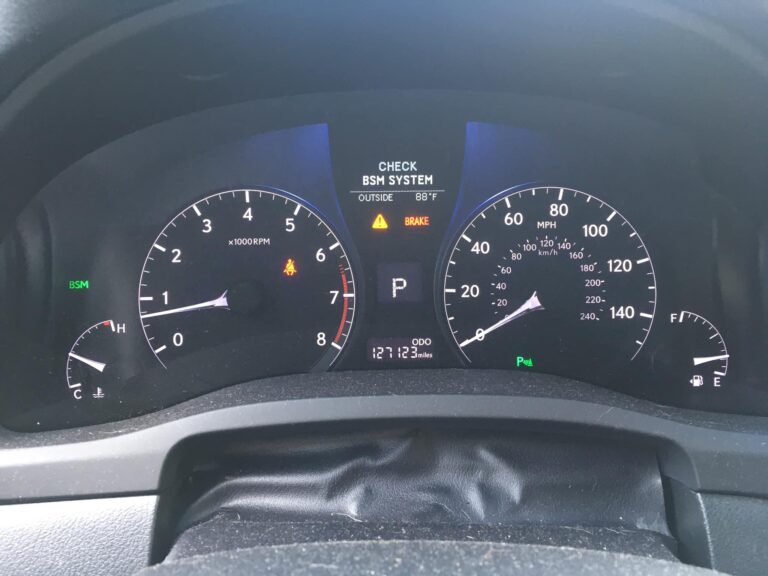
You glance down at your dashboard and see “Check BSM System” glowing at you. If you rely on that blind spot warning every time you change lanes on the highway, that message is enough to make your stomach drop. Take a breath. In most cases, this is not your radar system staging a catastrophic failure. It is more often a thin film of road salt, a dusting of mud, or an accidental button press that took the system offline. The fix can be as simple as running a wet cloth across the back bumper.
That said, there are situations where the warning points to something real and worth understanding. This guide walks through everything you need to know about your Lexus Blind Spot Monitor from how it actually works to why it fails and exactly what to do when it does. By the end, you will know whether your problem costs you five minutes or a dealer visit, and why the difference between those two outcomes almost always comes down to knowing where to look first.
How the Lexus Blind Spot Monitor Actually Works
BSM stands for Blind Spot Monitor. The system watches the zones alongside your vehicle that your mirrors cannot adequately cover, roughly the area from your rear doors back through the rear quarter panels, extending a few meters out into the adjacent lanes. When a vehicle moves into that zone, the system alerts you before you make a costly lane change.
Lexus uses millimeter-wave radar rather than cameras to power this system. The radar sensors sit behind the rear bumper fascia on each side. They emit electromagnetic waves, and when those waves bounce back off a nearby vehicle, the system measures the time of flight, signal strength, and frequency shift to calculate where that vehicle is, how fast it is moving, and whether it is closing in on your position. Radar has a meaningful advantage over cameras in this role. It keeps working in rain, fog, and darkness where cameras lose their reliability. The trade-off is that radar can be disrupted by physical contamination on the bumper surface, a limitation that explains the majority of BSM warnings you will encounter in real ownership.
When a vehicle enters the monitored zone, the indicator light inside or near the corresponding side mirror illuminates in amber or yellow. That is the passive alert, there to catch your eye without demanding immediate action. The system gets more insistent when you activate your turn signal toward an occupied blind spot. Depending on your specific Lexus model and trim level, that escalation can include a brighter or flashing mirror indicator, an audible tone inside the cabin, gentle steering resistance that discourages you from committing to the lane change, or haptic vibration through the steering wheel. Not all models have all of these features, so it is worth knowing which warnings your specific vehicle produces.
The BSM control lives in different locations depending on the model year. Look for a button to the left of the steering column in the dashboard switch cluster, a button on the upper center console, or a toggle buried in the vehicle settings menu on newer models that have moved more controls into the touchscreen. Once activated, the instrument cluster confirms the system is running with a BSM icon, sometimes accompanied by brief text confirmation.
One thing worth saying clearly: the BSM system is a supplement to safe driving habits, not a replacement for them. Properly adjusted mirrors, deliberate shoulder checks before every lane change, and situational awareness are your primary tools. The BSM is an additional layer that catches what you might miss. When it is working, it is valuable. When it is not working, you should not feel suddenly unsafe, because you were driving safely long before radar sensors existed.
The system does have genuine detection limits worth knowing. Motorcycles present a smaller radar signature and may not trigger warnings as reliably as passenger cars. Vehicles approaching at very high differential speeds may enter and exit the zone faster than the warning system can register. Guardrails, signs, and bridge structures alongside the road are typically filtered out by the system’s algorithms, but complex road environments can occasionally challenge that filtering. These are not faults. They are operating characteristics built into the design.
Why the ‘Check BSM System’ Warning Appears and What to Do About It
When that warning appears, the vehicle’s self-diagnostics have determined that reliable blind spot detection cannot be guaranteed right now. Rather than silently providing potentially wrong information, the system alerts you so you can take over with manual checks. That is actually thoughtful engineering. But it does not tell you what specifically triggered it, which is where the real work begins.
BSM warnings fall into three practical categories. The first is environmental interference with the sensors. The second is an electrical problem somewhere in the system. The third is a software, calibration, or communication fault. In that order, they represent decreasing likelihood and increasing complexity. Start with the first category every time, because it resolves the majority of cases and costs nothing.
Sensor Contamination Is the Most Common Cause by Far
Road contamination is responsible for somewhere between 60 and 70 percent of BSM warnings based on real-world diagnostic experience. That percentage is high enough that you should always clean the rear bumper before doing anything else, regardless of how clean the car looks. A film of residue that is completely invisible from ten feet away can degrade radar performance enough to trigger a warning.
The sensors sit behind the bumper plastic near the rear corners. Everything that road spray, winter salt, mud, and runoff deposits on your rear bumper lands in their vicinity. Winter driving is particularly rough on these systems. Road salt leaves a conductive residue that scatters radar signals. Ice buildup creates a physical barrier. Sand mixed with slush packs into surface crevices and stays there. Even a dry summer road can coat a bumper in a fine layer of dust and rubber residue that accumulates invisibly over weeks of driving.
Beyond road contamination, watch for these specific obstruction causes:
- Frost and ice forming directly on the bumper surface over the sensor locations on cold mornings
- Mud from unpaved roads, construction zones, or agricultural areas that dries hard and stays put
- Heavy sustained rain or road spray in storms that can create enough atmospheric moisture to scatter the radar beam temporarily
- Bumper stickers, vinyl wraps, or paint protection film applied over sensor zones without accounting for radar transparency
- Aftermarket accessories mounted near the rear corners such as bumper guards or hitch covers that block or reflect the radar signal
The fix is straightforward. Clean the rear bumper thoroughly with warm water, car wash soap, and soft cloths or sponges. Focus specifically on the corner sections about twelve to eighteen inches in from each rear corner. In winter, clear ice completely, either with a scraper or by warming the car in a heated space. If contamination is stubborn, a moderate-pressure rinse works well, keeping at least twelve inches of standoff distance to avoid damaging the plastic or sensor mounting points. Dry the area, then take the car for a test drive. If the warning clears and stays gone in normal driving conditions, contamination was the entire problem. No further investigation is needed.
If you live in a salt-belt state or drive in frequent rain, make cleaning the rear bumper sensor zones a regular part of your wash routine. A few minutes every week in winter prevents the accumulation from ever getting thick enough to trip the warning.
Electrical Problems That Cut Power or Signal to the System
When the bumper is clean and the warning persists, the electrical system is the next place to look. The BSM sensors need stable power and a clean signal path to function. Problems anywhere from the battery to the sensor connectors can produce a system warning even when the radar hardware itself is perfectly healthy.
Common electrical fault points include:
- Corroded connectors at the sensor modules. These connectors live in the rear bumper cavity where moisture, road spray, and temperature cycling attack the pins over time. A corroded connection creates enough resistance to degrade the signal or interrupt power delivery. Coastal salt air and heavy road salt use make this particularly common.
- Wiring harness damage from collision or bumper work. Even a low-speed impact can pinch a wire inside the bumper structure without leaving visible exterior damage. Any time the bumper has been removed for repair or service, there is a chance a wire was pinched, rerouted incorrectly, or a connector was not fully reseated.
- Weak battery or charging system. BSM modules need voltage within a specific range to initialize properly. A battery that is dropping below 12 volts at rest, corroded battery terminals, or a failing alternator can cause voltage fluctuations that prevent the system from completing its startup check. If you see multiple warning lights from different systems appearing at the same time, a common electrical supply issue is a likely explanation.
- Blown fuse protecting the BSM circuit. A single blown fuse will take the entire system offline and produce the warning message. The fuse diagram in your owner’s manual or on the fuse box cover identifies which fuse protects the BSM or radar modules. Pull and inspect the relevant fuse. A broken element inside or cloudy discoloration confirms the fuse is blown. Replace it with exactly the same amperage rating, no substitutions with higher-rated fuses.
- Degraded ground connections. A corroded or loose ground strap introduces electrical noise into sensor signals and can prevent modules from initializing correctly. Ground faults are intermittent by nature and can be difficult to catch without proper test equipment.
For a basic DIY check, start with the battery. Measure voltage with the engine off. A healthy battery reads 12.4 to 12.7 volts. Start the engine and measure again. A properly charging system reads 13.8 to 14.4 volts. Anything consistently outside those ranges points to a battery or charging problem. Check the terminals while you are there. Even light corrosion creates enough resistance to cause erratic module behavior. Clean them, tighten the connections, and retest.
If multiple systems are warning simultaneously, that pattern strongly suggests a shared electrical supply issue rather than individual sensor failures. Do not start buying radar sensors when the real problem might be a ten-dollar battery terminal cleaning job.
Beyond those basic checks, electrical diagnosis becomes complex enough that professional help is the right call. Diagnosing corroded sensor connectors, pinched wiring, or ground circuit faults requires access to the wiring harness and diagnostic equipment capable of monitoring live voltage and signal data at the sensor level. Getting that wrong can damage sensitive electronics that cost far more than the initial diagnosis fee.
Software Faults, Calibration Loss, and Communication Errors
After ruling out contamination and electrical problems, the remaining fault category involves the digital systems that run the BSM: embedded software, sensor calibration data, and the communication network that links modules throughout the vehicle. These faults are less common but require professional diagnostic equipment to identify and correct properly.
The most likely scenarios that produce software or calibration-related BSM warnings are:
- Radar sensor displacement after collision repair. The sensors are aimed with precision during factory assembly. Even a cosmetically perfect repair can shift the sensor mounting geometry enough to put the detection zones out of specification. Modern repair protocols require radar recalibration after any rear structure work, but not every shop has the equipment to perform it or the awareness that it is necessary. If the warning appeared after a rear-end incident or bumper repair, calibration is almost certainly required.
- Battery disconnection or replacement causing calibration data loss. Some Lexus models store BSM calibration parameters in memory that depends on continuous power. A long battery disconnection can cause that data to disappear, requiring reprogramming to restore proper function.
- Software glitches that developed without an obvious triggering event. These appear suddenly, may be intermittent, and often produce diagnostic trouble codes that reference module communication errors or internal processing faults rather than physical hardware failures.
- Available software updates not yet applied to the vehicle. Lexus releases software revisions that address known system behavior issues. A vehicle that has not received these updates may experience faults that were corrected in a later software version.
- Aftermarket parts with dimensional variations used during bumper replacement. Non-OEM bumper components may position the sensors slightly differently than factory specifications require, producing persistent calibration errors even when everything appears to be installed correctly.
The simplest intervention in this category is a full system reset. Turn off the BSM system using the button or menu, then shut the vehicle completely off and remove yourself from the key’s detection range for about ten minutes. This gives every module time to fully power down and clear any temporary error states. Restart the vehicle, reactivate BSM, and watch the cluster. If the warning does not return and system performance during your test drive is normal, the reset resolved a temporary software hiccup.
If the warning comes back, professional diagnosis is the next step. A Lexus-compatible scan tool provides fault codes specific enough to direct the repair accurately. Instead of a vague system fault message, the scan data might read “Left Rear Radar Sensor No Communication” or “BSM Module Calibration Required,” information that tells a technician exactly where to focus. Generic code readers from parts stores cannot retrieve this level of detail from Lexus safety system modules. The right diagnostic tool makes this process significantly faster and less expensive than trial-and-error component replacement.
Calibration after any sensor-disturbing repair is not optional. The process uses reference targets positioned at precise distances around the vehicle while the diagnostic system commands the sensors through a learning sequence. It verifies that detection zones align correctly with the vehicle’s geometry and that thresholds are properly set. Skipping this step after bumper work is one of the most common reasons BSM warnings persist after an otherwise completed repair.
A Step-by-Step Diagnostic Sequence You Can Follow Before Calling a Shop
Follow this sequence in order. Working from simplest to most complex prevents you from spending money on complex repairs when the answer was sitting right there on the bumper.
- Clean the entire rear bumper thoroughly, focusing on the corner zones. Do not skip this even if the car looks clean. Dry it completely afterward and check whether the warning clears.
- Find the BSM control for your model year and confirm the system is actually turned on. Consult the owner’s manual if the control location is unfamiliar to you. Accidental deactivation by another driver or during a menu exploration session is more common than people admit.
- Cycle the system off, wait fifteen seconds, and turn it back on. Watch the instrument cluster during reactivation. Note whether the warning appears immediately or after a delay.
- Walk around the vehicle and inspect the rear bumper for damage, misalignment, or evidence of previous repair work. Paint color mismatches, texture differences, or misaligned panel gaps all tell a story. Note what you find.
- Check the battery voltage with a multimeter at rest and with the engine running. Inspect both terminals for corrosion and confirm they are tight. Clean anything that looks questionable.
- Locate and inspect the fuses associated with the BSM circuit using the diagram in the owner’s manual. Pull each relevant fuse and verify it is intact. Replace any blown fuse with an identical amperage rating.
- Take the vehicle for a controlled road test on a multi-lane road with moderate traffic. Note whether the mirror indicator activates correctly when vehicles enter your blind spot from each side. Check whether performance differs between the left and right sides. Asymmetric behavior, where one side works and the other does not, strongly suggests a fault with one specific sensor module.
- Note the conditions under which the warning appears. Does it happen only in wet conditions? Only in cold weather? Only after driving for a certain distance? Correlation with specific conditions helps narrow the cause significantly.
- If the warning persists through all of the above, contact a dealership or qualified independent shop with Lexus-compatible diagnostic capabilities. Bring your notes from the steps above. That information will save diagnostic time and potentially reduce the bill.
Things Worth Knowing for Long-Term BSM Reliability
Keeping the rear bumper sensor zones clean on a regular schedule is the single most effective maintenance step available to you. In winter, make clearing those bumper corners part of your pre-drive routine alongside scraping the windshield. During the rest of the year, include the rear bumper corners in your regular wash routine. A few minutes of attention prevents the warning from appearing in the first place.
If you have any service work performed that involves removing the rear bumper, specifically ask the technician to confirm sensor reconnection and run a brief functional test before you take delivery of the vehicle. This takes minutes at the shop and can save a diagnostic visit later when you notice the warning and cannot figure out why it appeared.
The BSM system on your Lexus does not operate in isolation. On models with comprehensive safety packages, it integrates with rear cross-traffic alert, lane departure warning, and active lane-keeping assistance. These systems may share sensor hardware and control modules. A fault affecting one often shows up in others simultaneously. That is useful diagnostic information rather than a reason for additional alarm. Multiple warnings at once typically point to a common source rather than multiple simultaneous independent failures.
If your vehicle is still within factory warranty coverage, BSM repairs are generally covered unless the fault resulted from collision damage, unauthorized modification, or neglect. Get the warning on record at the dealership before the warranty expires if you notice it appearing regularly. For vehicles outside warranty, get a clear estimate before authorizing any work, and confirm what specific components and labor are included. BSM component prices vary considerably, and a misdiagnosis can lead to replacing expensive hardware that was never the actual problem.
One final thought on BSM system limitations worth keeping front of mind: heavy sustained rain, blowing snow, and dense fog can degrade radar performance just as these conditions degrade human vision. The system is not malfunctioning when it struggles in genuinely extreme weather. It is simply reaching the limits of what its physical operating environment allows. Adjust your driving accordingly when conditions are severe, and do not rely on any electronic system to compensate for conditions that challenge everyone on the road.
When the “Check BSM System” message appears on your dashboard, the next move is almost always simpler than the warning makes it feel. Clean the bumper, check the settings, reset the system. Most of the time, that is where the story ends. When it does not, the structured approach above points you in exactly the right direction without wasting money on guesswork. Keep your mirrors adjusted, keep looking over your shoulder before every lane change, and let the BSM do its job when it can. If you take nothing else from this guide, take that. The habits matter more than the technology.