
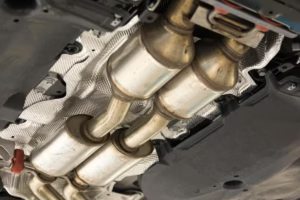

The catalytic converter sits in your exhaust system, but it’s “managed” by your vehicle’s engine computer (ECU/PCM) through a network of sensors and self-tests. Its job is straightforward but extremely important: it helps reduce harmful exhaust emissions by converting toxic gases—like hydrocarbons (HC), carbon monoxide (CO), and nitrogen oxides (NOx)—into far less harmful compounds before they leave the tailpipe.
Because the catalytic converter is so central to emissions control, your vehicle continuously checks whether it’s working efficiently. When those self-tests (called OBD readiness monitors) can’t finish properly, the scan tool may show messages such as “Catalyst Monitor: Not Ready” or “Catalyst Monitor: Incomplete.” This often confuses drivers, especially when there is no check engine light. The reality is that “not ready” does not always mean the converter is bad—it can also mean the test conditions simply haven’t been met yet.
Table of Contents
So what does it really mean when the catalytic converter monitor isn’t ready? Why does it happen? And what can you do—safely and correctly—to complete the monitor without wasting time or causing new problems? Let’s break it all down from a technician’s perspective.
Catalytic Converter not Ready: What it means and why?
Inside your vehicle’s On-Board Diagnostics system (OBD-II) are a set of “readiness monitors.” Think of them as automated inspections the ECU runs to confirm that key emissions systems are functioning within acceptable limits. The catalytic converter is evaluated by the catalyst monitor (also called the converter monitor). The ECU runs this test under specific conditions and then reports one of several states, most commonly Ready or Not Ready.
When the catalyst monitor successfully completes its test routine—often after a complete drive cycle—the status typically changes to Ready. If the monitor can’t run to completion, the ECU reports Not Ready (or “Incomplete”). In simple terms:
- Ready = the ECU has completed the catalytic converter efficiency test.
- Not Ready / Incomplete = the ECU has not been able to complete that test yet.
A drive cycle (sometimes called a drive pattern) is the minimum set of operating conditions—cold start, idling, steady cruising, deceleration, and sometimes stop-and-go—that the ECU needs in order to run its monitors. Many vehicles require a cold start where coolant temperature is below a threshold, then a specific sequence of speeds and throttle behaviors. Each vehicle manufacturer (and often each engine family) has its own criteria.
You can usually find drive cycle guidance in the owner’s manual, service manual, or manufacturer technical information resources. If your scan tool shows “Catalyst Monitor: Not Ready,” the first practical step is to determine whether your vehicle has actually had the chance to meet the required conditions—or whether something is preventing the test from running.
And that brings us to the key point: “Not Ready” is a status, not a diagnosis. It tells you the monitor hasn’t completed, but it doesn’t automatically confirm the converter is faulty. A variety of issues can prevent the catalyst monitor from running, ranging from recent battery disconnects to sensor problems to active/pending trouble codes.
Catalyst Monitor Incomplete: Why and What to Do?
The catalytic converter monitor evaluates whether the converter can still store oxygen and reduce emissions effectively. It does this by comparing signals from upstream and downstream oxygen sensors (or air-fuel ratio sensors, depending on the vehicle). If the converter is doing its job, the downstream sensor signal is typically steadier and less “switchy” than the upstream sensor. If the converter is worn out, contaminated, or physically damaged, the downstream signal begins to mimic the upstream signal more closely—indicating poor catalyst efficiency.
However, even a perfectly healthy converter can remain “Not Ready” if the ECU doesn’t see the exact conditions it needs. Many drivers assume that “not ready” means “broken,” but in practice it often means “not tested yet.” Here are the most common real-world reasons the catalyst monitor stays incomplete:
- Recent battery disconnect or ECU reset: If the battery was disconnected, the ECU can lose readiness history and must rerun monitors from scratch.
- Recently cleared diagnostic trouble codes (DTCs): Clearing codes resets monitors to “Not Ready.” This is one of the most common reasons people fail an emissions inspection right after “fixing” a check engine light.
- Drive conditions don’t match the required pattern: Short trips, inconsistent speeds, heavy traffic, or constant braking can prevent completion.
- Other monitors must pass first: On many vehicles, the catalyst monitor won’t run if related monitors (misfire, fuel system, oxygen sensor, EGR, etc.) are not ready or if certain DTCs are pending.
- Mechanical or sensor issues: Exhaust leaks, failing O2 sensors, ignition misfires, improper fuel trims, or a clogged converter can block the monitor or cause it to fail.
- Aftermarket tuning or ECU programming changes: Performance tunes can alter monitor behavior and readiness logic, sometimes preventing completion.
So what should you do when you see a catalyst monitor incomplete status?
First, confirm whether any trouble codes exist—including pending codes. A vehicle can have no active check engine light and still carry pending faults that stop monitors from running. Next, confirm whether you recently cleared codes, replaced a battery, or had the vehicle serviced. If the ECU was reset, the monitors may simply need a proper drive cycle to relearn.
If you did not reset anything and the catalyst monitor refuses to complete after multiple correct drive cycles, then it’s time to treat it as a diagnostic problem—not just a “driving problem.” That’s when you start looking at oxygen sensor performance, exhaust integrity, misfire data, thermostat operation, and converter efficiency.
Understanding OBD Readiness: “Ready” vs “Not Ready” vs “Not Supported”
To avoid confusion, it helps to understand what your scan tool is actually reporting. Different tools use slightly different wording, but the concepts are consistent.
| Status | What it typically means | What you should do |
|---|---|---|
| Ready / Complete | The ECU successfully ran the monitor test. | Nothing—this is what you want before emissions testing. |
| Not Ready / Incomplete | The monitor hasn’t finished running since the last reset. | Perform the correct drive cycle; check for pending codes or conditions that block the test. |
| Not Supported / N/A | Your vehicle doesn’t use that monitor (or it’s not applicable). | Nothing—this is normal for some models and engine configurations. |
In emissions inspection regions, “Not Ready” is often the problem—not because your car is failing emissions, but because the system hasn’t proven it can pass. Many inspection programs allow one monitor to be not ready (varies by region and model year), but the catalyst monitor is frequently one of the monitors inspectors care about most.
What Can Prevent the Catalyst Monitor From Running?
Before you attempt any drive cycle procedure, it’s smart to understand what conditions can stop the catalyst monitor from running in the first place. In professional diagnostics, this is called checking the enabling criteria or entry conditions. If these aren’t met, the ECU simply won’t run the test, no matter how long you drive.
While criteria vary by manufacturer, the most common blockers include:
- Coolant temperature not in the required range: A stuck-open thermostat can keep the engine too cool, blocking readiness.
- Fuel level outside the acceptable window: Some monitors require fuel level between roughly 1/4 and 3/4 tank.
- Battery voltage issues: Weak charging or low voltage can interrupt monitor execution.
- Active or pending DTCs: Even “pending” misfire or O2 sensor codes can inhibit catalyst testing.
- Misfires or unstable fuel trims: The ECU won’t validate catalyst efficiency if combustion is unstable.
- Exhaust leaks: Leaks upstream of the downstream O2 sensor can distort readings and prevent completion.
- Aftermarket tuning: Some tunes unintentionally alter readiness logic or set monitors to permanent incomplete states.
That’s why an expert approach begins with a quick scan and basic checks before attempting repeated drive cycles.
How to Fix Catalyst Converter Monitor Incomplete
In many cases, fixing “Catalyst Monitor: Incomplete” is less about replacing parts and more about allowing the monitor to run under the correct conditions. The first step is to find your car’s recommended drive cycle procedure. Some vehicles need steady cruising at around 50–60 mph for a specific duration. Others require controlled deceleration without braking, repeated multiple times. A few models require specific gear selection behavior (for example, holding a particular gear range).
As a general example, some vehicles may require something like this: drive at about 50 mph with steady throttle for around 10 minutes. Others require accelerating to highway speed, then decelerating to a lower speed without touching the brake pedal, repeated multiple times. These patterns allow the ECU to evaluate oxygen storage capacity in the catalyst and compare upstream/downstream sensor behavior during specific airflow and fuel-control conditions.
The bottom line is simple: if you drive exactly as your drive pattern suggests, the monitor should eventually run. If it still doesn’t, you move from “drive cycle completion” into “diagnosis and repair.” Below is a structured, technician-style method that combines readiness best practices with a commonly effective drive cycle approach.
Important safety note: perform drive cycle testing only where it’s legal and safe—ideally on a lightly traveled highway during off-peak hours. Do not attempt aggressive deceleration patterns in heavy traffic.
A More Reliable Readiness Strategy (Pre-checks + Drive Cycle)
The original step sequence is useful, but in practice, professionals add a few quick pre-checks that prevent wasted trips. To make this easier to follow, here is a rearranged, more complete workflow. The main “Step 1–6” drive pattern remains, but we insert the checks that determine whether the steps will work.
- Pre-check A: Scan for active and pending DTCs; do not proceed if faults exist.
- Pre-check B: Verify coolant temperature behavior (thermostat) and fuel level (mid-range is safest).
- Step 1–6: Perform the cold-start-based drive cycle sequence.
- Post-check: Re-scan readiness; if still incomplete after several correct cycles, diagnose O2 sensors, exhaust leaks, and catalyst efficiency.
Now let’s walk through the step-by-step process in a clear, practical way.
Step 1: Put the engine light in ‘Off’ mode
Start with the basics: check whether the check engine light (MIL) is on. Ideally, the MIL should be off, and a scan tool should show no active or pending DTCs. If the engine light is on, or if there are pending codes (especially related to misfires, fuel trims, or oxygen sensors), the catalyst monitor may be blocked from completing.
If you recently cleared codes to turn the light off, be aware that you likely reset readiness monitors—meaning “Not Ready” may simply reflect that reset. In that case, the fix is typically completing the appropriate drive cycle (assuming the underlying fault is truly corrected).
Step 2: Allow the engine off for 24 hours
The catalyst monitor commonly requires a cold start. That means the engine coolant temperature must be close to ambient temperature when you begin. Letting the vehicle sit overnight is usually enough. Many procedures reference coolant temperature being within a small range of ambient air temperature (for example, within about 6°C), or below a threshold. The point is to ensure the ECU can observe warm-up behavior from a true cold start.
Expert tip: if your coolant never cools down enough because the engine is frequently run or the vehicle is stored indoors, you may struggle to meet cold-start conditions. Likewise, if your thermostat is stuck open and the engine never reaches normal operating temperature, readiness may not complete—even with a cold start.
Step 3: Start the engine and drive the car
Start the engine from cold. Many drive cycles call for turning on electrical loads (such as the rear defroster and A/C) briefly to stabilize idle conditions and encourage specific ECU strategies. Let the engine idle for at least 2 minutes. After that initial period, switch off the A/C and rear defroster if the procedure calls for it.
Now begin driving and bring the vehicle to around 55 mph (about 90 km/h) and maintain that speed for roughly 3.5 minutes, depending on the pattern. During this time, the ECU may run diagnostics for fuel control, purge operation, and other baseline checks that must pass before the catalyst test can run.
Practical driving advice: choose a road where you can maintain speed steadily without frequent lane changes. Sudden throttle changes often interrupt the stable conditions the ECU needs.
Step 4: Decelerate but don’t apply brake or clutch
Next, lift your foot off the accelerator and allow the vehicle to decelerate gradually to about 20 mph (32 km/h). The key instruction here is do not press the brake and (for manuals) do not press the clutch during the deceleration phase.
This “coast-down” segment is not a random requirement—it’s a controlled condition used by many ECUs to observe oxygen sensor response and catalyst oxygen storage behavior during a fuel-cut or near-fuel-cut event. Braking or clutching can change engine load and rpm behavior enough to interfere with the monitor conditions.
Step 5: Speed up again
Accelerate again to approximately 55 mph (90 km/h). Then drive at roughly three-quarter throttle for about 5.5 minutes (or as specified by your vehicle’s drive cycle). During this stage, many ECUs attempt to run the catalytic converter efficiency diagnostics. Depending on your vehicle, you may find the catalyst monitor still shows “Not Ready” after the first pass. That’s normal on some models.
If the monitor does not complete immediately, repeat the drive cycle pattern several times—often up to five cycles. Many owners see readiness switch to “Ready” after the ECU collects enough stable data over multiple cycles.
Expert tip: use a scan tool that displays monitor status in real time. Some tools update readiness immediately when a monitor completes; others update only after key-off. If you’re checking readiness, follow your tool’s update behavior so you don’t misinterpret results.
Step 6: Slow down and stop the vehicle
After completing the driving segments, lift off the gas and bring the vehicle to a safe stop. Allow it to idle for at least 2.5 minutes before switching off the ignition. This idle period can help stabilize final readings and allow certain monitors to finalize their results.
Once you shut the vehicle off, wait a moment and recheck readiness with your scan tool. If the catalyst monitor has moved to “Ready,” you’ve successfully completed the cycle. If not, repeat the sequence (when safe) and then evaluate whether something else is preventing completion.
If the Catalyst Monitor Still Won’t Complete (After Correct Driving)
If you’ve followed the drive cycle carefully—multiple times—and the catalyst monitor remains incomplete, the odds shift toward a condition that is blocking the monitor or causing it to fail internally. At this stage, continuing to “just drive more” can waste time. A structured diagnostic approach is more effective.
Here’s what I recommend checking, in the order that usually produces answers fastest.
1) Check for pending codes (not just active codes)
A common trap is relying on the absence of a check engine light. The MIL typically illuminates only when a fault is confirmed. Meanwhile, the ECU can store pending codes that haven’t matured yet. Pending faults related to misfires, oxygen sensors, or fuel trim can stop catalyst monitoring from running because the ECU can’t trust the data it needs for evaluation.
2) Verify engine reaches and holds proper operating temperature
If the thermostat is stuck open, the engine may run cooler than intended. Many ECUs require a stable temperature window before running catalyst tests. A cold-running engine also alters fuel strategy, which can keep the ECU from entering the stable closed-loop operation needed for catalyst monitoring.
What to look for:
- Coolant temperature rises slowly and never reaches normal (often around ~88–105°C depending on vehicle).
- Heater output is weak even after driving.
- Fuel economy is worse than usual.
A thermostat issue can be subtle but readiness-killing.
3) Inspect for exhaust leaks (especially near O2 sensors)
Exhaust leaks upstream of the downstream oxygen sensor can draw in outside oxygen and distort readings. The ECU may interpret this as unstable catalyst behavior or may refuse to complete the monitor due to inconsistent sensor patterns. Leaks can occur at gaskets, flex pipes, cracked manifolds, or corroded joints.
Clues include ticking noises on cold start, soot marks near flanges, or a sulfur/“exhaust” smell under the vehicle. A smoke test is one of the quickest professional methods to confirm leaks.
4) Evaluate oxygen sensor performance (upstream and downstream)
The catalyst monitor relies heavily on oxygen sensor data. A sluggish upstream sensor can delay closed-loop control and prevent stable fuel corrections. A lazy downstream sensor can fail to reflect true catalyst performance. Either problem can keep readiness from completing.
On many vehicles:
- Upstream sensor should switch rapidly (or provide accurate AFR data) as the ECU controls fuel.
- Downstream sensor should be smoother and less reactive if the catalyst is functioning well.
A scan tool with live data graphing is extremely helpful here. If you don’t have one, a reputable shop can perform this test quickly.
5) Consider catalyst health (clogging, contamination, efficiency loss)
If the converter is clogged, partially melted, oil-soaked, or chemically contaminated (for example, by long-term misfires, coolant burning, or excessive oil consumption), the monitor may not complete or may eventually fail with a catalyst efficiency code (like P0420/P0430 on many vehicles). A failing converter is often the end-result of another problem—so it’s critical to identify the cause before replacing the converter, otherwise the replacement can fail prematurely.
Common root causes that damage converters include:
- Misfires (raw fuel overheats and melts the catalyst substrate)
- Oil burning (ash contaminates catalyst washcoat)
- Coolant burning (silicates and additives degrade catalyst performance)
- Long-term rich running (excess HC/CO overloads conversion capacity)
If you suspect converter clogging, backpressure testing or infrared temperature comparisons can provide meaningful evidence.
6) Review any ECU tuning or aftermarket modifications
Aftermarket performance tunes and certain “spare tuner” devices can unintentionally interfere with readiness logic. Even if the car runs “fine,” altered fuel tables, disabled monitors, or changed thresholds can keep the catalyst monitor from completing as intended. If the issue began after tuning, returning to stock calibration (even temporarily) is often the fastest diagnostic step.
Also note: tampering with emissions equipment is illegal in many jurisdictions. Beyond legal concerns, it complicates diagnostics because the ECU no longer behaves predictably.
Practical Tips to Complete the Catalyst Monitor Faster (Without Guessing)
If you’re trying to complete readiness efficiently—often for inspection—these expert tips reduce trial-and-error:
- Start with a full scan: verify no pending codes, and confirm which monitors are not ready (not just catalyst).
- Drive when traffic is light: steady conditions are essential; stop-and-go is the enemy of readiness.
- Keep fuel level mid-range: around half a tank is a safe default for many vehicles.
- Avoid aggressive throttle: smooth acceleration helps the ECU remain in stable control modes.
- Include controlled coasting: many catalyst tests require deceleration without brakes.
- Don’t repeatedly clear codes: every reset sets you back to “Not Ready.”
Remember: different vehicles behave differently. Some complete the catalyst monitor after 15–30 minutes of correct driving; others may require several days of mixed driving. If you’re under time pressure, a shop with OEM-level scan tools can sometimes identify exactly what condition is preventing the monitor from running.
Frequently Asked Questions (FAQ)
Does “Catalyst Not Ready” mean my catalytic converter is bad?
Not automatically. It means the ECU hasn’t completed the catalyst test since the last reset. The converter can be fine, but the drive conditions may not have matched the required pattern. However, if the monitor refuses to complete after repeated correct drive cycles, then yes—converter efficiency, O2 sensors, exhaust leaks, or fueling issues become more likely.
How long does it take to get the catalyst monitor ready?
It varies. Some vehicles complete it in one properly executed drive cycle. Others need multiple cycles across multiple trips. Cold start, steady cruising, and controlled deceleration segments are often required. If you reset the ECU, expect to drive enough for all monitors—not just catalyst—to complete.
Can I pass emissions inspection with catalyst monitor not ready?
It depends on your local regulations and your vehicle’s model year. Some areas allow one monitor to be not ready; others are stricter. The catalyst monitor is commonly scrutinized. The safest plan is to complete readiness before inspection.
Why did my monitor become “Not Ready” after repairs?
If the battery was disconnected or codes were cleared during the repair process, the ECU likely reset its readiness status. That’s normal. Once the underlying issue is corrected, completing the drive cycle should restore readiness.
Final Thoughts
You don’t have to panic when your scan tool or inspection report shows the catalytic converter monitor is not ready. Most of the time, it simply means the ECU hasn’t completed its catalyst efficiency test since the last reset—or the vehicle hasn’t been driven in the specific way needed to trigger that test. This guide explained what the message means, the most common reasons it appears, and a structured method to complete the monitor through an appropriate cold-start drive cycle.
That said, don’t ignore the possibility of underlying problems. If the monitor refuses to complete after multiple correct cycles, or if you see related symptoms (fuel economy changes, misfires, exhaust smells, rattling from the converter, sluggish acceleration), you may need professional diagnosis. A DIY approach done carelessly—especially repeated hard driving attempts or unnecessary parts replacement—can cause more harm than good. When in doubt, consulting an expert can save both time and money.
I hope you found this explanation helpful and practical.