
A little over a decade ago, the average vehicle cabin was a much quieter place in technological terms. Drivers still had radios, CD players, and perhaps a basic phone connection if they were lucky, but most in-car systems were fragmented, slow, and heavily manual. If you wanted to switch between music, navigation, calls, and climate-related convenience tools, you often had to do it one awkward button press at a time. Even when Bluetooth began appearing in more vehicles, it was usually limited in function and rarely felt seamless. Then the automotive industry entered a new phase — one in which the car was no longer treated as a machine with a few entertainment add-ons, but as a connected digital environment.
Ford was one of the manufacturers that moved aggressively into this connected-car space. Back in 2007, the company introduced the original SYNC platform, signaling a clear break from the old approach to in-car technology. It was not perfect. In fact, early systems often felt ambitious but rough around the edges. Yet the core idea was powerful: the vehicle should be able to communicate with the driver’s digital world instead of sitting apart from it. Bluetooth pairing, voice-initiated features, and mobile-phone integration were no longer futuristic extras. They were becoming expectations.
That vision matured significantly with Ford SYNC 3. This version of the SYNC platform brought much-needed improvements in speed, interface design, voice responsiveness, smartphone integration, and overall usability. Where earlier systems could sometimes feel slow, clumsy, or too dependent on exact phrasing, SYNC 3 pushed the experience toward something far more natural. Suddenly, drivers could do much more without feeling as though they were fighting the software. The system became easier to understand, faster to respond, and far better suited to real driving conditions — whether creeping through urban traffic or eating up long highway miles.
From an expert point of view, that is what makes SYNC 3 so important in Ford’s technology history. It was not just an upgrade in screen quality or software speed. It represented a shift in how the driver interacted with the car. Instead of forcing the user to learn the system’s rigid logic, SYNC 3 moved closer to learning the user’s intent. Voice commands became more flexible. Touchscreen responses became more intuitive. Pinch-to-zoom navigation became natural rather than gimmicky. AppLink, Apple CarPlay, and Android Auto helped connect the phone ecosystem to the car in a way that felt practical rather than experimental.
If you have heard people talk about Ford SYNC 3 but have never been completely sure what it actually is, this guide will clear that up. We are going to look at SYNC 3 not just as a list of features, but as a complete in-car operating environment. I’ll explain how the system works, what makes it different from earlier Ford systems, why voice control became such a major part of the experience, how AppLink expanded the system’s usefulness, how Apple CarPlay and Android Auto fit into the picture, and why integrations like Alexa and Waze made SYNC 3 feel more connected to daily life than previous infotainment platforms.
I will also address an important reality: no automotive infotainment system is perfect. SYNC 3 has received praise for its speed, clarity, and usability, but users have also reported issues from time to time. The good news is that many of those issues are resolved through software updates and system maintenance rather than expensive hardware changes. That is a meaningful advantage in a world where car technology evolves almost as quickly as smartphones do.
So whether you are researching a Ford vehicle, trying to understand the system already in your car, or simply curious about how Ford transformed its infotainment approach, this article will walk you through the subject in a creative, clear, and practical way. By the end, you should have a strong understanding of what SYNC 3 is, how it functions, why it mattered when it arrived, and why it still stands as a major step in Ford’s connected-vehicle evolution.
How Ford Moved From Basic In-Car Controls to a Connected Driving Ecosystem
To appreciate what Ford SYNC 3 really represents, it helps to step back and remember what in-car technology looked like before platforms like SYNC became common. In the earlier era of automotive electronics, the car dashboard was largely a collection of separated functions. The radio lived in one world. Climate controls lived in another. Phone calls, if supported at all, were handled through a separate Bluetooth module or aftermarket device. Navigation, when available, was often expensive, awkward, and dependent on dedicated hardware with maps that aged quickly. The driver had to adapt to each separate system rather than expecting them to work together.
That separation created two major problems. First, convenience suffered. Drivers had to move through too many menus, buttons, and interfaces just to perform ordinary tasks. Second, distraction increased. A system that is technically functional but difficult to use in motion is not really serving the driver well. It may add features, but it also adds cognitive load. This is a serious issue because any technology inside a moving vehicle must ultimately justify itself through safety, simplicity, and usefulness, not just novelty.
When Ford introduced SYNC in 2007, the company was responding to this shift in user expectations. Drivers were already becoming deeply attached to smartphones, wireless connectivity, voice assistants, and app-based convenience in daily life. Naturally, they began expecting a similar level of responsiveness inside the car. The original SYNC system was Ford’s answer to that expectation. It brought Bluetooth connectivity, hands-free calling, and basic voice command support into the mainstream conversation.
Still, early connected-car systems across the industry often struggled with the same challenge: ambition outpaced refinement. The idea was right, but the execution was not always smooth. Menus could be clunky. Touchscreens were sometimes slow. Voice systems demanded overly precise commands. In practice, users often found themselves wondering whether the technology was helping them or just making simple tasks feel more complicated.
SYNC 3 mattered because it moved beyond that awkward early phase. It did not simply add more functions. It improved the relationship between the driver and the system. That is a crucial distinction. The success of an infotainment platform is not measured only by how many features it includes, but by how naturally those features fit into the rhythm of driving.
Viewed from an expert perspective, Ford’s development of SYNC 3 reflects a larger trend in automotive design: the transition from “feature accumulation” to “experience integration.” In other words, the question stopped being, “What can this system technically do?” and became, “How easily can the driver make it do what they want?”
That shift explains why SYNC 3 was so widely noticed. It improved interface speed. It presented graphics more clearly. It leaned into voice control in a way that felt more natural. It allowed common smartphone ecosystems to work alongside the car’s own software. It made navigation more tactile and intuitive. These are not minor improvements. They directly affect how a person experiences their vehicle every day.
You could say that SYNC 3 is the moment Ford’s in-car technology stopped feeling like a tech experiment and started feeling like a tool built for real drivers.
What Ford SYNC 3 Actually Is
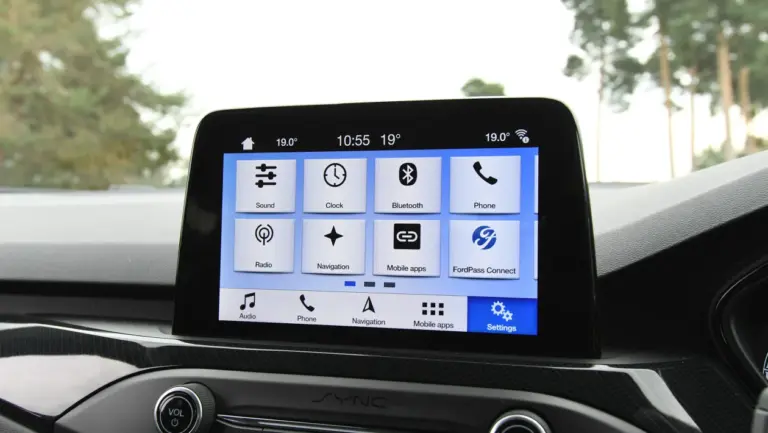
Ford SYNC 3 is an infotainment and connectivity platform designed to help drivers control entertainment, communication, navigation, and certain vehicle-related functions through a touchscreen, steering-wheel buttons, and voice commands. At its core, it is a user interface that sits between the driver and a range of digital systems in the car.
That simple definition, however, only captures the surface. In real-world use, SYNC 3 acts as a command center. It allows the driver to pair a phone via Bluetooth, place and receive calls, stream music, access smartphone-based apps, use navigation, and control a wide range of in-car functions without relying entirely on physical buttons. Instead of treating the dashboard as a collection of isolated controls, SYNC 3 pulls them together into a more coherent digital environment.
One of the defining hardware features of the SYNC 3 system is its eight-inch touchscreen. That display is large enough to support clear navigation maps, readable menus, and touch gestures such as pinching and zooming. These may sound like ordinary smartphone behaviors now, but within the automotive environment they represented an important step toward making the in-car interface feel familiar. The more familiar the gesture language, the lower the learning curve for the driver.
What made SYNC 3 stand out was not merely that it had a touchscreen. Many systems had screens. The difference was that the interface was substantially improved in clarity, responsiveness, and layout compared with earlier Ford SYNC versions. Users often found SYNC 1 and SYNC 2 slower, more cluttered, and more awkward in structure. SYNC 3 offered a cleaner, more modern, and more logical operating experience.
Another major strength of SYNC 3 is that it expands the concept of control beyond physical interaction. The system supports more than 60 voice-command-based functions in addition to steering-wheel button inputs. That means the driver can often keep hands on the wheel and eyes closer to the road while still accessing useful functions such as calling, navigation lookup, app control, and media selection.
From a systems perspective, SYNC 3 can be understood through three layers:
- Display Layer: the screen, menu layout, graphics, and touch interactions the driver sees.
- Control Layer: voice commands, steering-wheel inputs, and touchscreen taps that allow interaction.
- Integration Layer: Bluetooth, smartphone ecosystems, AppLink, navigation, and connected digital services that extend the system’s usefulness beyond the car alone.
What this means in practice is that SYNC 3 is not just “a better radio screen.” It is a much broader operating platform inside the vehicle. It organizes and interprets information from your phone, apps, and car systems, then lets you access that information in a way that is more manageable while driving.
When people praise SYNC 3, they are usually praising that balance: more capability without as much interface friction.
How SYNC 3 Works in Everyday Driving
The easiest way to understand SYNC 3 is to imagine a normal driving day rather than a technical lab test. You get into the car, start the engine, and your phone pairs automatically through Bluetooth. The system remembers recent devices and connections. Music resumes. A map can appear if navigation is active. If you receive a call, the screen and steering-wheel controls allow you to answer it without reaching for the phone. If traffic builds ahead, navigation data can help you reroute. If you want a restaurant, a gas station, or a nearby point of interest, voice commands can bring those results up with minimal distraction.
That is the value of a system like SYNC 3: it does not merely exist as technology; it changes the workload of driving. In heavy city traffic, fewer manual steps matter. On long highway journeys, stable navigation and voice-driven access to entertainment matter. Even on short daily commutes, the convenience of calling, navigating, or switching media without fumbling through multiple devices becomes part of the car’s everyday usefulness.
From a usability standpoint, SYNC 3 improved dramatically over the earlier Ford systems because it became faster in responding to touch inputs and better at presenting functions in a way that made sense under pressure. Driving is already a cognitively loaded activity. A good in-car system must reduce decision time, not increase it. That means:
- menus should be easy to understand at a glance,
- touch targets should be large enough to use quickly,
- voice commands should not require robotic precision,
- and transitions between screens should feel immediate rather than delayed.
SYNC 3 made meaningful gains in exactly those areas. If earlier systems felt like software you had to “tolerate,” SYNC 3 moved closer to software you could actually trust in motion.
Another reason the system works well in daily life is that it supports multiple modes of control. That may sound like a small design detail, but it is actually one of the smartest aspects of the platform. Drivers are not all the same, and driving contexts are not all the same. Sometimes touch is easiest. Sometimes a steering-wheel button is safer. Sometimes voice is the best option. SYNC 3 allows those inputs to overlap rather than forcing the driver into only one mode.
This multi-input strategy is what gives the system its flexibility. If your hands are busy steering, voice control becomes the natural tool. If your passengers want to search through media while parked, the touchscreen is more convenient. If you are answering a call while driving through traffic, a steering-wheel button may be the cleanest and least distracting option.
In expert terms, SYNC 3 works not because it invents entirely new in-car tasks, but because it makes ordinary driving tasks less awkward.
Why the Interface and Touchscreen of SYNC 3 Felt Like a Major Leap
One of the most immediate differences people noticed when using SYNC 3 was the interface itself. Earlier Ford systems were often criticized for feeling too “window-based,” cluttered, or laggy. SYNC 3 changed that tone. The interface became cleaner, flatter, faster, and more smartphone-like in its logic.
This matters because infotainment systems are judged less by their feature list than by how quickly a driver can make sense of them. A beautiful screen is useless if the menus are hard to understand. A feature-rich platform becomes frustrating if every tap feels delayed. Ford understood this, and SYNC 3 reflects that understanding.
The eight-inch touchscreen gave the system enough real estate to display maps, media controls, and phone functions without feeling cramped. More importantly, the screen supported familiar gestures such as pinch-to-zoom and map panning. Those gestures reduced friction because most users already knew them from smartphones and tablets. When technology behaves in familiar ways, the user spends less mental energy translating intent into action.
The system also improved in speed. Menu loading, screen transitions, and touch responsiveness became noticeably better than in SYNC 1 and 2. That may not sound dramatic on paper, but in the driving environment, speed changes everything. A system that responds quickly helps the driver feel in control. A system that hesitates or freezes creates distrust.
Experts in interface design often say that the best user interface is the one you stop thinking about. That idea applies perfectly to SYNC 3. The less attention the system demands, the better it is doing its job.
Another strength of SYNC 3 is its visual hierarchy. Important functions are surfaced clearly. The driver is not buried beneath unnecessary complexity. Navigation, media, and phone tasks are easier to reach. That kind of design matters because it lowers distraction and shortens interaction time — both of which are vital inside a moving vehicle.
So when people say the SYNC 3 interface “feels better,” they are usually responding to several things at once:
- faster software response,
- cleaner graphics,
- easier gesture support,
- clearer menu logic,
- and less dependence on awkward on-screen pathways.
That combination is what made SYNC 3 feel less like a clunky embedded system and more like a modern digital interface built for actual use.
Bluetooth, Phone Pairing, and the Foundation of SYNC Convenience
Long before voice assistants and smartphone projection became normal in cars, Bluetooth connectivity was the bridge between the vehicle and the driver’s digital life. Ford’s earlier SYNC systems already recognized that this bridge mattered, and SYNC 3 continued to build on it in a more polished way.
At a basic level, Bluetooth pairing in SYNC 3 allows a smartphone to connect wirelessly with the car. Once paired, the system can support:
- hands-free phone calls,
- contact syncing,
- audio streaming,
- call notifications,
- and in some cases message-related interactions depending on the phone and app environment.
That may sound ordinary now, but it remains one of the most foundational parts of in-car digital convenience. If Bluetooth fails or feels unreliable, the entire idea of a connected driving environment weakens. SYNC 3 improved this experience by making phone integration more stable and more coherent alongside the rest of the system.
From a practical driving standpoint, Bluetooth is important because it reduces device handling. A driver who can answer, reject, or place calls through steering-wheel controls and voice prompts is much less likely to pick up the phone physically while in motion. That is not just convenience; it is safety.
SYNC 3 also benefits from its broader integration logic. Bluetooth is not treated as a disconnected bolt-on feature. It feeds into the larger infotainment structure. That means the user experience feels less fragmented. Media, calls, and phone interaction happen within a consistent environment rather than through separate awkward systems.
For many users, this layer of convenience is the part they notice first. Before they explore navigation depth or AppLink capabilities, they experience the simple comfort of the car and phone working together smoothly. That ease is one of the reasons SYNC 3 earned so much goodwill compared with earlier iterations.
AppLink, Apple CarPlay, and Android Auto: Why SYNC 3 Feels More Connected to Modern Life
One of the biggest reasons SYNC 3 felt more modern than previous Ford systems is that it did not try to pretend the car should replace the smartphone. Instead, it recognized something more realistic: the best in-car experience often comes from integrating the phone intelligently rather than competing with it.
That is where AppLink, Apple CarPlay, and Android Auto come into the picture.
AppLink is Ford’s way of letting selected mobile applications communicate with the vehicle interface. Rather than forcing the user to operate everything directly from the phone, AppLink allows compatible apps to be accessed and controlled through the car’s system. That is a powerful concept because it brings smartphone usefulness into the safer, larger, easier-to-see environment of the vehicle display and controls.
SYNC 3 also comes with Android Auto and Apple CarPlay as standard on supported models and software versions, which dramatically expands its flexibility. These two ecosystems matter because they are already familiar to millions of users. Instead of learning an entirely separate in-car software language, drivers can project key parts of their phone environment into the car in a way that feels familiar and intuitive.
If you use an Android phone, Android Auto integrates your device’s navigation, voice assistant, messaging, and media tools into the in-car interface. Google Assistant handles many of the command functions, which means users benefit from the natural-language experience they may already know from their phones.
If you use an Apple device, Apple CarPlay allows iPhone users to connect with the system and access Siri, supported apps, phone functions, maps, and media in a way that aligns closely with Apple’s own user experience philosophy.
From an expert point of view, this is one of SYNC 3’s smartest strengths: it does not force users into a single digital worldview. It leaves room for Ford’s own native features while also respecting the reality that most drivers already live inside either Google’s or Apple’s ecosystem.
The practical outcome is enormous. Through these integrations, drivers can:
- launch navigation through their preferred platform,
- make and receive calls more naturally,
- access messages and assistant features,
- play music and podcasts from mobile services,
- and reduce the need to reach for the phone itself.
In other words, AppLink, CarPlay, and Android Auto make SYNC 3 feel less like a closed automotive system and more like a practical extension of the driver’s digital life.
Voice Commands: The Feature That Defines SYNC 3 More Than Any Other
If I had to reduce SYNC 3 to one defining idea, it would not be the touchscreen, Bluetooth, or AppLink. It would be voice command. That is the feature that best captures what Ford was trying to accomplish: less friction, less distraction, and a more natural way to interact with the vehicle while driving.
The original article makes this point emphatically, and rightly so. SYNC 3 allows users to control more than 60 functions through voice and steering-wheel controls. That matters because driving is a physical and cognitive task already. The more functions you can perform without taking your hands off the wheel or your eyes off the road, the more useful the technology becomes.
But the real leap in SYNC 3’s voice experience is not only the number of commands. It is the quality of interpretation. Earlier voice-command systems in cars were notoriously rigid. You had to memorize exact phrases, sometimes down to the specific order of words. If the machine wanted “Call John Smith mobile,” saying “Call John on his mobile” could be enough to confuse it.
SYNC 3 moved away from that frustrating phrase sensitivity. It became much more capable of interpreting intent. In effect, it moved closer to the conversational logic people had already begun expecting from digital assistants like Siri, Alexa, and later Google Assistant.
This change matters far more than it may seem. A voice assistant inside a car should not require the driver to memorize robotic syntax. It should respond to understandable intent. SYNC 3 improved exactly there.
For example, the difference between older command systems and SYNC 3 can be explained like this:
- Older systems: “Say the exact phrase I know, or I may fail.”
- SYNC 3 approach: “Say something that clearly expresses your intent, and I will try to interpret it.”
This is where the article’s examples about saying “I’m hungry,” “I need to eat,” or asking for a refill become useful. The point is not the specific phrase itself. The point is that the system is attempting to understand meaning rather than react only to one rigid command template.
In practical use, that allows the driver to say things in a more human way. Need food? Search becomes easier. Need fuel? Nearby stations can be suggested. Need to call someone, change music, or ask for a destination? The command structure feels less mechanical and more assistive.
One especially important detail in the original source is that SYNC 3 not only interprets requests more intelligently, but also asks for confirmation before taking certain navigation actions. That is a strong design choice. It means the system is not just “smart” — it remains answerable to the driver. In other words, the intelligence is helpful, but the authority remains with the human using it.
That is exactly how good in-car AI should behave. It should anticipate, interpret, and assist — but not overtake driver intent or make major route assumptions silently.
From an expert’s point of view, SYNC 3’s voice-command philosophy matters because it aligns with the broader evolution of human-machine interfaces. Good systems today are not just responsive; they are context-sensitive, flexible, and forgiving. SYNC 3 helped bring that philosophy into the Ford cabin in a practical way.
How SYNC 3 Became More Intelligent and Less Phrase-Sensitive
To understand why SYNC 3 feels more intelligent than older systems, it helps to understand what “phrase-sensitive” actually means. In early voice-command systems, the software often depended on rigid command trees. It did not really “understand” your request in a flexible sense. It matched your speech to a predefined phrase structure. If you deviated from that structure, the result was often confusion or failure.
That created a strange user experience. Drivers had to train themselves to speak like the machine instead of expecting the machine to interpret them. It was one of the main reasons many early in-car voice systems felt more irritating than helpful.
SYNC 3 improved this by moving toward a more natural language approach. That means the system was better able to infer what the driver meant, even if the exact sentence changed. Saying “I’m hungry,” “Find food,” or “I need a place to eat” could all point toward the same broader intent. Saying “Car needs gas,” “Find a gas station,” or “I need fuel” could trigger a similar logic path.
This may sound simple today, but it is a major shift in usability. Once a system can work with intent rather than exact script memorization, the driver no longer feels as though they are using a machine language. They begin interacting more naturally.
Another strength here is that SYNC 3 supports this intelligence within the context of driving. The system is not trying to be a general-purpose desktop AI. It is trying to solve common driving-related needs:
- calling contacts,
- finding destinations,
- navigating to gas stations or restaurants,
- controlling music,
- answering incoming calls,
- and surfacing useful nearby options.
That domain-focused intelligence is what makes the system feel effective rather than overly broad. It knows its environment. It knows it is in a car. It knows the tasks most likely to matter while driving.
As an expert, I would argue that this is where SYNC 3 becomes more than infotainment. It becomes a practical driving assistant.
Navigation in SYNC 3: Touch, Voice, and Real-World Usability
Navigation is one of the areas where SYNC 3’s improvements become especially visible. Older in-car navigation systems often suffered from slow redraw speeds, awkward destination entry, and interfaces that felt detached from how people actually search for places. SYNC 3 improved this not just by looking better, but by making navigation feel easier to manipulate.
The eight-inch touchscreen supports familiar gestures such as pinching and zooming. That matters because drivers and passengers already understand those interactions from phones and tablets. Ford’s move in this direction helped reduce the learning barrier and made map interaction feel more natural.
Navigation in SYNC 3 also benefits strongly from voice integration. Entering destinations through speech is often safer and quicker than typing them by hand, especially if the system is interpreting intent well. Asking for nearby places, fuel stations, or food options can turn the navigation experience from a static map tool into a responsive travel assistant.
The article’s point about the system asking permission before adding a destination is particularly valuable. That is a subtle but important sign of good design. The assistant is helping you, but it is not taking control away from you. In practical driving terms, that means the system supports decision-making without becoming intrusive.
When systems like Waze and smartphone projection are added to the picture, the navigation experience becomes even more dynamic. But even within Ford’s own SYNC environment, the combination of touch gestures, steering-wheel shortcuts, and intelligent voice commands makes navigation one of the platform’s strongest everyday tools.
AppLink: Why It Matters More Than a Simple App Shortcut
AppLink is sometimes described too casually, as if it were simply a way to launch apps through the car. In reality, it matters because it helps bridge the gap between the smartphone ecosystem and the automotive environment in a more controlled way.
When drivers use their phones directly while driving, the result is distraction. Small screens, frequent hand movement, changing visual focus, and touch-based interactions all increase risk. AppLink works against that by making selected mobile functions available through the vehicle’s more driver-appropriate interfaces: the larger display, steering-wheel controls, and voice interaction.
In other words, AppLink is not only about convenience. It is also about translating mobile usefulness into a format more suitable for driving.
The stronger the AppLink ecosystem becomes, the more valuable SYNC 3 becomes as a hub. It no longer exists only as Ford’s own software shell. It becomes a meeting point between the car and the broader app-driven world.
That broader integration is part of why SYNC 3 felt like a genuinely modern system rather than a proprietary island.
Alexa and SYNC 3: Why Voice Ecosystems Expanded the Experience
One of Ford’s more interesting moves was working with Amazon to bring Alexa into the AppLink environment. From a technical strategy standpoint, this was smart for two reasons. First, it recognized that drivers were already becoming familiar with digital assistants outside the car. Second, it acknowledged that infotainment systems gain value when they connect with larger ecosystems rather than trying to replace them.
With Alexa integration, SYNC 3 users could tap into a broader range of information and media-related assistance. This included useful tasks such as:
- checking weather conditions,
- reviewing traffic patterns,
- following sports results,
- accessing music,
- and interacting with audiobook or Amazon-based media content.
This matters because it shows SYNC 3 growing beyond “car features” into “digital lifestyle features.” Drivers increasingly wanted one environment where media, information, voice assistance, and mobility converged. Alexa helped extend that.
From an expert lens, this kind of integration also reflects an important lesson in automotive software design: users already live in established digital ecosystems. The smartest in-car platforms are the ones that know how to cooperate with those ecosystems rather than pretending they can replace them.
Waze Integration: Why Real-Time Navigation Changed the Practical Value of SYNC 3
Navigation is not only about maps. It is also about context. That is where Waze changed the game for many drivers, and why its presence through AppLink was such a meaningful addition to SYNC 3.
Waze is valuable because it turns navigation into a more social and real-time experience. Instead of just showing roads and routes, it also surfaces crowd-informed events such as:
- traffic slowdowns,
- accidents nearby,
- police presence,
- road hazards,
- and useful route alternatives.
That kind of real-time awareness is especially useful in cities, on unfamiliar roads, and during longer trips where time efficiency matters. Waze also helps drivers locate fuel stations and other points of interest, adding another practical layer to the SYNC 3 experience.
The original article notes that some of these features require SYNC 3 version 3.0 or later. That is an important reminder that software version matters in infotainment. A system’s hardware may be unchanged, but its capabilities can expand significantly through updates.
From an expert perspective, Waze integration strengthened SYNC 3 because it made the system more dynamic and less static. Traditional built-in navigation can be useful, but real-time user-fed traffic intelligence brings a different kind of practical value — especially for daily commuters and urban drivers who care about changing conditions, not just fixed routes.
Google, Future Integration, and What SYNC 3 Helped Set in Motion
The source article mentions Ford’s growing collaboration with Google and the direction toward deeper integration of services such as Google Maps, Google Assistant, and Google Play. Whether viewed historically or strategically, the key takeaway is clear: SYNC 3 helped prepare Ford drivers for a future in which the vehicle software environment would be more deeply connected to major digital ecosystems.
That future-facing importance should not be underestimated. SYNC 3 was not the final destination of in-car software. It was part of a broader transition in which vehicles moved from isolated infotainment devices to fully networked digital platforms. Its embrace of smartphone projection, app support, voice intelligence, and software updates paved the way for more ambitious integrations later.
In expert terms, SYNC 3 mattered not only because of what it included, but because of what it normalized. It taught users to expect:
- touch-first interfaces,
- natural voice assistance,
- connected app support,
- continuous software evolution,
- and cloud-linked services inside the vehicle.
Once drivers experience those things, they rarely want to return to disconnected, button-heavy, rigid older systems.
Over-the-Air Updates and Why They Matter for SYNC 3 Owners
One of the more important long-term strengths of SYNC 3 is its ability, on supported versions, to receive updates over Wi-Fi or cellular-linked pathways. This is not just a convenience. It is one of the defining traits of modern software-centered vehicles.
In older cars, infotainment problems often stayed with the vehicle unless the owner went to the dealer for manual updates or expensive hardware changes. That model is slow, inconvenient, and outdated by today’s standards. SYNC 3’s update capability reflects a different mindset: software should improve over time.
That matters because many infotainment complaints are not caused by broken hardware. They are caused by:
- software bugs,
- compatibility issues,
- lagging app support,
- connectivity instability,
- or interface glitches that can be patched through software.
When a system supports over-the-air or Wi-Fi-based updates, those issues become easier to manage. The platform can evolve without requiring a hardware redesign each time a software fix is needed.
The source article notes that this feature was initially available only on limited versions of SYNC 3. That is a realistic reminder that not every car on the road receives the exact same digital treatment at the same time. Infotainment capabilities often vary by model year, trim, market, and hardware generation.
Still, the principle matters. Once the car becomes updateable like a modern digital device, ownership changes. The system is no longer frozen in the moment it leaves the factory. It can grow, improve, and become more stable over time.
As an expert, I consider updateability one of the strongest long-term arguments in favor of SYNC 3. Even if users experience bugs or rough edges, many of those are not permanent. The software path gives Ford room to correct and improve.
Where SYNC 3 Performs Best in Real Life
Technology is often marketed in ideal conditions, but what matters most is how it performs in ordinary use. SYNC 3 shines most clearly in the kinds of situations drivers actually face every day.
Heavy Traffic
In stop-and-go traffic, distraction is a serious concern. A system that lets you answer calls, search destinations, or change media through steering controls and voice commands reduces the temptation to handle the phone directly. That is one of SYNC 3’s most practical strengths.
Highway Driving
On long drives, stable media control, voice-based navigation, and easy call handling become especially valuable. Highway miles are less mentally exhausting when the system supports your routines instead of fighting them.
Urban Navigation
In cities, route changes, points-of-interest searches, and real-time traffic awareness matter more than static map display alone. This is where AppLink, Waze, CarPlay, Android Auto, and improved natural-language voice search make SYNC 3 much more useful than older closed systems.
Daily Commuting
Even if you are not using every feature every day, the cumulative effect of easier pairing, faster interface response, and better voice recognition improves the daily ownership experience. Good car technology often works this way — not by constantly impressing you, but by quietly removing friction from repeated tasks.
Common Issues People Report With SYNC 3 — and Why Many Are Fixable
No infotainment platform earns a perfect reputation, and SYNC 3 is no exception. The original article mentions that some users have reported issues with functionality and related features. That is true, but it is important to frame those complaints correctly.
In many cases, the issues people report with SYNC 3 are not catastrophic failures. They are more often things like:
- sluggish app pairing,
- Bluetooth connection instability,
- occasional voice-command confusion,
- navigation glitches,
- screen freezing,
- or feature inconsistency after phone or software changes.
These are frustrating, but the encouraging part is that many of them are resolved by simply updating the system. That is a meaningful advantage. When an infotainment problem can be corrected through software rather than hardware replacement, the long-term user experience becomes much easier to manage.
From an expert viewpoint, this is one of the reasons SYNC 3 still receives respect. It may not be flawless, but it is serviceable and adaptable. Many of the rough edges do not represent permanent design failure. They represent the reality of a software-driven automotive system living in a fast-moving digital ecosystem.
If your phone operating system changes, if app behavior evolves, or if connectivity standards shift, a good infotainment system needs software flexibility. SYNC 3 was a meaningful step in that direction.
Expert Tips for Getting the Best Out of Ford SYNC 3
If you already own a Ford vehicle with SYNC 3, there are a few practical habits that will make the experience much smoother:
- Keep the system updated: Many strange bugs are software-related and disappear after updates.
- Use voice for common tasks: The system is strongest when voice commands reduce manual interaction.
- Pair devices cleanly: Avoid clutter from too many old paired phones if connection stability starts slipping.
- Learn the steering-wheel controls: They often provide the fastest and safest interaction path.
- Use smartphone projection wisely: CarPlay and Android Auto are excellent, but the best choice depends on the apps you rely on most.
- Set up presets and favorite destinations while parked: Preparation reduces distraction later.
- Do not ignore small issues: A minor software quirk today may be an update issue you can fix before it becomes a bigger annoyance.
The biggest mistake owners make with systems like SYNC 3 is underusing them. If the system is treated like a basic radio screen, much of its real value is lost. The real advantage comes when the touchscreen, voice functions, phone integration, and app ecosystem work together.
Why SYNC 3 Still Matters in the Bigger Story of Car Technology
In the fast-moving world of vehicle software, newer systems always arrive. Screens get larger. Processors get faster. Integrations deepen. Yet some systems remain important because of the role they played in changing user expectations. Ford SYNC 3 is one of those systems.
It matters because it pushed Ford’s connected-car strategy beyond the awkwardness of earlier infotainment generations and into something genuinely useful. It helped normalize:
- natural-feeling voice control,
- touchscreen navigation that behaved more like consumer electronics,
- smartphone ecosystem integration,
- app-based expansion of in-car functions,
- and a software-first approach to improving the user experience.
That influence goes beyond Ford. It is part of the wider shift that has shaped what drivers now expect from a car: not just movement, but communication, assistance, media, navigation, updates, and digital continuity with the rest of life.
If earlier cars taught drivers how to operate machines, systems like SYNC 3 helped teach cars how to adapt to drivers.
Bottom Line
Ford SYNC 3 is much more than a touchscreen in the center of the dashboard. It is a connected driving platform that transformed how Ford drivers interact with entertainment, navigation, communication, and smartphone-based digital tools while on the road. Compared with earlier SYNC versions, it brought major improvements in speed, interface clarity, voice-command intelligence, app integration, and day-to-day usability.
The system’s strengths are easy to see: a responsive eight-inch touchscreen, more than 60 voice-controlled functions, support for Apple CarPlay and Android Auto, AppLink integration, navigation that feels more intuitive, and compatibility with services like Alexa and Waze that make the car feel connected to the driver’s broader digital life.
Yes, some users have reported occasional issues over time. But many of those concerns are software-related and often resolved through updates rather than major repairs. That is part of what makes SYNC 3 so significant: it is a platform that can improve, adapt, and stay relevant rather than remaining frozen at the moment of purchase.
From an expert perspective, the real value of SYNC 3 lies in how it reduces friction. It helps drivers stay connected without making the drive itself more complicated. It makes navigation easier, communication safer, and digital interaction more natural. It is not simply a collection of features — it is a smarter way of organizing the in-car experience.
So if you have wondered whether Ford SYNC 3 was just another infotainment name or a truly meaningful step forward, the answer is clear: it was a major leap in usability, connectivity, and voice-based control, and it helped define what many drivers now expect from modern cars.