
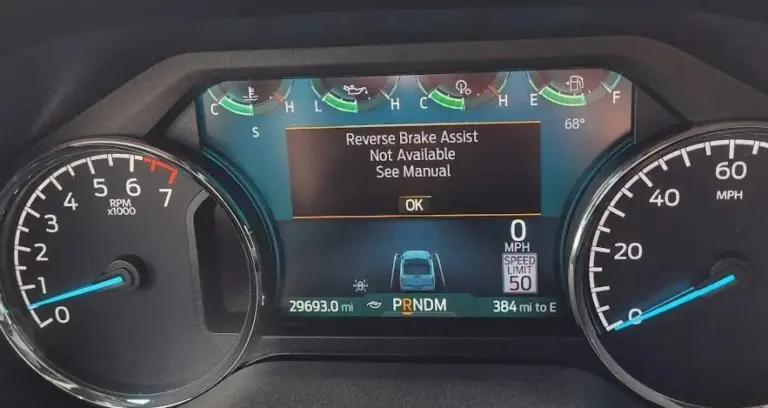
You throw your Ford F-150 into reverse and a message pops up on the dash: “Reverse Brake Assist Not Available.” If you rely on that system when backing out of tight spots or navigating crowded parking lots, seeing it suddenly go offline is more than a little unsettling.
The good news is that this warning does not always mean something is broken. Sometimes it is as simple as a dirty sensor or a steering calibration the system needs to relearn. Other times it points to a wiring issue or a software glitch that needs attention. Either way, understanding what is happening and working through the likely causes will get you to a resolution faster than guessing.
What Reverse Brake Assist Actually Does on the F-150
Before getting into the causes and fixes, it is worth understanding what this system is doing for you while it is working properly, because it does quite a lot.
Reverse Brake Assist uses radar sensors mounted on the rear bumper to monitor what is directly behind your truck as you back up. The system activates when your F-150 is moving in reverse between 1 mph and 7 mph. Within that speed window, if the radar detects an obstacle that you are approaching too quickly and you do not brake in time, the system steps in and applies the brakes automatically. It will bring the truck to a complete stop if necessary.
You also get audible and visual warnings before the system intervenes, giving you every opportunity to react yourself. Think of it as a backup to your own reaction time, not a replacement for paying attention, but a safety net that can genuinely prevent collisions in situations where your field of view is limited.
The system ties into the rear parking aid and the cross traffic alert system, so all of those components work together as a coordinated safety package. When the Reverse Brake Assist goes offline, you are losing that entire layer of rear collision protection.
Why the “Reverse Brake Assist Not Available” Message Appears
Dirty or Blocked Radar Sensors
This is the most common cause, and it is also the easiest to fix. The radar sensors on your rear bumper are exposed to everything the road throws at your truck. Mud, road grime, snow, ice, and even thick layers of dust can accumulate on or around the sensor and interfere with its ability to read accurately. When the sensor cannot get a clear read, the system disables itself rather than operate on compromised data.
This is particularly common after driving on dirt roads, through mud, or in winter conditions where salt and slush build up quickly on the rear of the vehicle. If the warning appeared after driving in those kinds of conditions, start here before doing anything else.
Cleaning the sensors takes about two minutes. Use a soft cloth or a gentle stream of water to remove any buildup from the sensor areas on the rear bumper. Do not use a high-pressure washer directly on the sensors, as that can force water into areas it should not go. After cleaning, give the system a few minutes and try reversing again to see if the message clears.
Steering Center Calibration Needed
This one surprises a lot of F-150 owners. The Reverse Brake Assist system relies on knowing the precise center position of the steering wheel to function correctly. If the steering center has not been established, whether because of a recent battery disconnect, a wheel alignment, or the truck simply not having driven in a straight line at highway speed recently, the system may flag itself as unavailable.
Ford’s guidance for relearning the steering center is straightforward. Drive your F-150 on a flat, straight road at a speed above 18 mph (30 km/h) for approximately five minutes. During this time, briefly hold the wheel steady with no steering inputs for a few seconds while driving straight. When the system finds the steering center, the error message should clear on its own.
This fix costs nothing and takes only a short drive to complete. Try it before assuming a hardware or software problem is causing the warning.
Software Glitches or Outdated Firmware
Ford’s driver assistance systems run on software that is updated periodically. A bug in the current software version, an incomplete update, or a conflict between modules can trigger the Reverse Brake Assist warning without any physical hardware issue being present.
Software-related issues often present in specific ways. The warning may appear and disappear without any consistent pattern. It may show up after a specific software update was applied. Or it may clear after restarting the truck and return again after a few drives. If the warning is intermittent rather than constant, and if physical inspection of the sensors and wiring does not reveal a problem, software is a strong candidate.
Ford dealers can check whether your truck’s software is current and apply any available updates. In some cases, a module reflash resolves persistent Reverse Brake Assist warnings that have no identifiable hardware cause. If your truck is under warranty, this is covered. If it is out of warranty, the diagnostic fee is still worthwhile to confirm the cause before paying for unnecessary hardware repairs.
Wiring Problems or Loose Connections
The radar sensors communicate with the vehicle’s control modules through wiring that runs through the rear of the truck. Damage to that wiring, corrosion at connector points, or a loose connection can interrupt the signal and cause the system to flag a malfunction.
Wiring issues are more likely in trucks with higher mileage, trucks that have had rear-end work done (even minor repairs), or trucks that have been modified in any way that involved running new wires or removing trim panels near the rear bumper. It is also worth checking whether the tailgate has sustained any damage, since some wiring for the rear systems runs through or near the tailgate assembly.
Inspect the wiring and connectors around the rear bumper sensors visually for anything obviously wrong. Look for chafed insulation, corroded pins in connectors, or any wiring that appears pinched or pulled. If you find anything, have it properly repaired by a qualified technician. Electrical repairs on safety systems are not the place for temporary fixes.
Physical Sensor Damage
The radar sensors on the rear bumper sit in a vulnerable position on a full-size truck. A backing-up incident, even a minor tap against a parking barrier or curb, can crack, shift, or misalign a sensor enough to knock it out of proper operation. Even damage that is not immediately visible on the surface can affect sensor alignment or internal function.
If the warning appeared directly after a contact event, or if you can see any cracking, deformation, or obvious displacement of the rear bumper or sensor housings, physical damage to the sensor is the likely cause. A damaged sensor will need to be replaced, and in most cases the replacement will also need to be calibrated to the vehicle.
Extreme Weather Conditions
Radar sensors can be temporarily affected by extreme cold, heavy snow, or ice accumulation. In very cold weather, the sensors may struggle to operate correctly until the truck warms up. If ice has formed over the sensor areas, the system will almost certainly disable itself until the sensors are clear.
If the warning shows up primarily in cold weather or after the truck has been parked outside overnight, this is likely a weather-related temporary condition rather than a fault. Allow the truck to warm up, clear any ice from the rear bumper area, and the message should clear. If it does not, something more persistent is the cause.
How to Fix the Reverse Brake Assist Not Available Warning
Work through these steps in order. Most cases resolve somewhere in the first three steps.
- Clean the rear bumper sensors. Use a soft cloth or gentle water rinse to remove any mud, grime, snow, or ice from the sensor areas on the rear bumper. Give it a few minutes and test the system again.
- Relearn the steering center. Drive on a flat, straight road above 18 mph for about five minutes, holding the wheel straight without steering inputs for a few seconds during the drive. The system should recalibrate and the message should clear.
- Restart the truck. A simple power cycle can clear a temporary software state that is triggering the warning. Turn the truck completely off, wait a minute, and restart. Drive briefly and check whether the message has cleared.
- Visually inspect the sensors and rear bumper. Look for any obvious damage, cracking, or physical displacement of the sensor housings. Also check the wiring and connectors near the rear bumper for corrosion or loose connections.
- Check for a software update. If the warning persists after the above steps and no physical damage is found, have the truck scanned at a Ford dealer. They can check software versions across all relevant modules and apply updates or reflash modules as needed.
- Have the sensors professionally tested. If software is confirmed current and all physical inspection is clean, have a technician test the sensors directly with Ford’s diagnostic tools. This will confirm whether a sensor has failed internally and needs replacement.
Quick Diagnosis Reference
| Situation | Most Likely Cause | Start Here |
|---|---|---|
| Warning appeared after off-road or muddy driving | Dirty or blocked sensors | Clean the rear bumper sensor areas |
| Warning appeared after a battery disconnect or alignment | Steering center not calibrated | Drive straight above 18 mph for five minutes |
| Warning appeared after a software update | Software glitch or incomplete update | Restart the truck; visit Ford dealer for software check |
| Warning appeared after a minor backing incident | Physical sensor damage | Inspect rear bumper and sensors; professional evaluation |
| Warning appears only in cold weather or snow | Ice or extreme temperature affecting sensors | Allow truck to warm up; clear ice from rear bumper area |
| Warning is intermittent with no obvious trigger | Wiring fault or software issue | Inspect wiring and connectors; have dealer scan for codes |
| Warning is constant despite all checks being fine | Failed sensor or module fault | Professional diagnostic scan; sensor replacement if confirmed |
Getting the Most Out of Reverse Brake Assist When It Is Working
Once you have the system back online, a few habits will help keep it working reliably:
- Keep the rear bumper area clean. Make sensor cleaning part of your regular wash routine, particularly during winter months or after driving on unpaved roads.
- Pay attention to dashboard warnings promptly. A warning that appears and gets ignored tends to turn into a bigger problem. Addressing it early usually means a simpler fix.
- Do not treat the system as a substitute for awareness. Reverse Brake Assist is a safety net, not a replacement for checking your mirrors, using the backup camera, and being aware of your surroundings when backing up. Use it as one layer of protection, not the only one.
- Be mindful when towing. The system may behave differently or disable itself when a trailer is attached, depending on the truck’s configuration and trailer wiring. This is normal behavior and is noted in the owner’s manual.
A “Reverse Brake Assist Not Available” warning on your F-150 is the truck telling you something in that safety chain has been interrupted. In many cases, it is a dirty sensor or a quick recalibration drive that gets everything back to normal in under ten minutes. In others, it requires a professional scan and a targeted repair. Either way, the worst thing you can do is ignore it and keep backing up without that protection in place.
Start with the simple checks. You will often find the answer faster than you expect.