

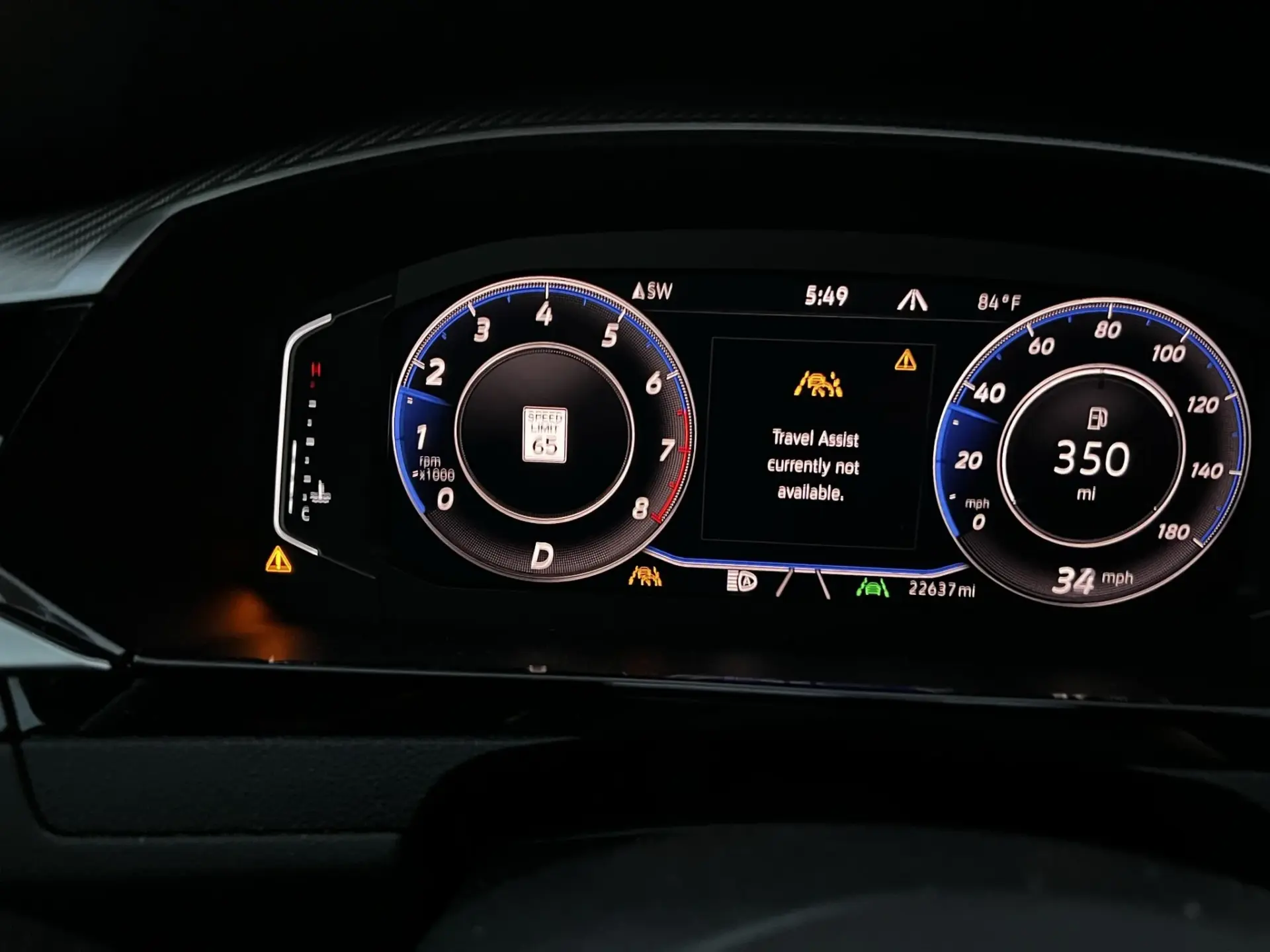
You are cruising down the highway, ready to let your Volkswagen’s Travel Assist take some of the strain out of a long drive, and then a message pops up on the dashboard: “Travel Assist Not Available.” No adaptive cruise control, no lane assist, just you and the road with none of the helpful technology you were counting on.
It is not a dangerous situation, but it is an annoying one. And if it keeps happening, it is worth understanding why. This guide covers what Travel Assist actually does, what causes it to go offline, how to fix the most common issues, and what you should know about this feature before relying on it.
What Volkswagen Travel Assist Actually Does
Travel Assist is Volkswagen’s driver assistance technology that combines two systems into one integrated package: Adaptive Cruise Control and Lane Assist. Together, these systems allow the vehicle to partially manage its own speed and steering position within certain conditions.
Here is what each component does:
- Adaptive Cruise Control (ACC): Rather than simply holding a fixed speed like traditional cruise control, ACC uses radar sensors to monitor the vehicle ahead and automatically adjusts your speed to maintain a safe following distance. You can set a target speed between 20 mph and 95 mph, and the system will slow down or speed up as traffic conditions change without any input from you.
- Lane Assist: This system uses the front camera to read lane markings on the road and applies subtle steering corrections to keep the vehicle centered within the lane. If the car begins to drift toward a lane boundary without a turn signal being used, the system nudges the steering wheel back toward the center and alerts the driver.
When both systems work together under Travel Assist, the vehicle can maintain its speed, keep its distance from traffic ahead, and stay centered in its lane simultaneously. For long motorway journeys, this significantly reduces driver fatigue.
One thing that is important to understand from the start: Travel Assist is not autonomous driving. The system is a driver assistance tool, not a replacement for an attentive driver. You must keep your hands on the steering wheel and remain ready to take full control at any time. The system monitors for driver engagement, and if it detects that the driver has become inattentive or inactive, it first displays a warning, then sounds an audible alert, and eventually activates Emergency Assist to safely bring the vehicle to a stop. This is a designed safety measure, not a malfunction.
Why “Travel Assist Not Available” Appears: The Real Causes
Travel Assist depends on a chain of sensors, cameras, and software working together correctly. When any link in that chain breaks down, the system goes offline entirely and displays the unavailability message. Here is what most commonly causes it.
1. A Problem With the Front Camera
The front-facing camera, mounted inside the windshield near the rearview mirror, is one of the most critical components of the Travel Assist system. It is what allows Lane Assist to read road markings and what helps the system understand the geometry of the road ahead. Without a clear and accurate image from this camera, the lane assist portion of the system cannot function, and Travel Assist as a whole goes offline.
Several things can impair the front camera:
- A dirty windshield directly in front of the camera, including road film, bug splatter, condensation, or a smear from a poor wiper blade, can obstruct the camera’s view enough to trigger the unavailability message
- Ice or frost on the windshield in cold weather can completely block the camera until the defroster clears the glass
- Direct sunlight shining at a low angle directly into the camera can temporarily blind it, which is why the message sometimes appears during early morning or late afternoon drives when the sun is low on the horizon
- Overheating of the camera module, particularly in very high ambient temperatures with the sun beating directly on the windshield for an extended period, can cause the camera to temporarily shut down to protect itself
- Physical damage to the camera or its mounting from a minor impact or from a windshield replacement that did not include camera recalibration
A camera-related issue is often the simplest to resolve. Clean the windshield thoroughly, especially the interior glass directly in front of the camera, and check whether the warning clears after a short drive.
2. Dirty or Faulty Radar and Ultrasonic Sensors
The Adaptive Cruise Control portion of Travel Assist relies on radar sensors, typically located behind the front grille or front bumper, to measure the distance and relative speed of vehicles ahead. These sensors work by emitting radio waves that bounce off objects and return to the sensor, allowing the system to calculate distance and closing speed in real time.
When anything obstructs these sensors, the system cannot gather the data it needs to regulate following distance safely. Common obstructions and causes of sensor failure include:
- Dirt, mud, or road grime packed into the front grille area covering the radar sensor housing
- Ice or compacted snow covering the front bumper, which is a particularly common trigger in winter driving conditions
- A front-end collision or even a minor low-speed impact that physically misaligned the radar sensor from its calibrated position
- Heat damage to sensor electronics from prolonged exposure to extreme temperatures
- General sensor wear or internal failure after high mileage
Ultrasonic sensors, which assist with close-range detection at parking speeds, can also develop faults. While these are less central to highway Travel Assist functionality, a fault code from any sensor in the ADAS network can sometimes cause the system to flag an unavailability condition.
3. Faulty Steering Wheel Sensors
For Lane Assist to apply steering corrections, it needs to work through the vehicle’s electric power steering system. Integrated within the steering column are sensors that monitor steering angle, torque applied by the driver, and the current position of the wheels. When Travel Assist wants to make a lane-keeping adjustment, it sends a signal through these sensors to apply a precise amount of steering input.
If the steering angle sensor or the torque sensor develops a fault, the system loses its ability to safely and accurately control the steering. Rather than attempt to operate with incomplete data, Travel Assist shuts itself down. This is actually a designed safety response. A lane keeping system that does not know where the wheels are pointing cannot make reliable corrections.
Steering sensor faults can arise from:
- Normal wear over high mileage
- An impact that disturbed the steering column or suspension geometry
- Previous steering or suspension work that did not include a steering angle sensor reset or recalibration
- Electrical faults in the steering column wiring
4. Adverse Weather and Driving Conditions
This is worth its own section because it accounts for a large number of “Travel Assist Not Available” messages that have nothing to do with a component failure. The system is designed to recognize when conditions are not suitable for it to operate safely and to disable itself proactively rather than attempt to function unreliably.
Conditions that commonly trigger this behavior include:
- Heavy rain or fog that reduces camera and radar effectiveness below usable thresholds
- Faded or missing lane markings on older roads where the camera cannot detect a clear lane boundary
- Sharp curves or complex road geometries that exceed the system’s processing capability
- Construction zones where lane markings are inconsistent or temporarily marked differently
- Very low speeds below the system’s minimum operating threshold, typically below 20 mph
- Road surfaces with unusual reflectivity or lighting conditions that confuse the camera
If the warning appears only in specific conditions and clears once those conditions pass, the system is working exactly as designed. You do not have a fault. You have a safety feature doing its job.
5. Software Faults or Outdated System Software
Modern Volkswagen vehicles run complex software across multiple control modules that manage everything from the engine to the infotainment system to the ADAS functions. Like any software, these can develop bugs, experience data corruption, or fall behind in terms of updates that Volkswagen has released to address known issues.
A software glitch can cause the Travel Assist module to flag an error condition even when all the hardware is physically intact and functioning. In these cases, the unavailability message appears without any obvious physical cause, sensors are clean, the camera appears clear, and the steering is operating normally.
A software update or a module reset is often the fix in this scenario.
How to Fix Volkswagen Travel Assist Not Available
Here is a step-by-step approach to resolving this message, starting with the simplest fixes and working toward the more involved ones.
Fix 1: Clean the Windshield and Front Camera Area
This should always be the first thing you do. Use a quality glass cleaner and a clean microfiber cloth to thoroughly clean both the outside and inside of the windshield, paying particular attention to the area directly in front of the forward camera near the rearview mirror. Interior windshield film builds up gradually and is easy to overlook, but it can significantly degrade camera performance.
While you are at it, replace wiper blades if they are leaving streaks. A streaking wiper blade deposits a film directly across the camera’s field of view with every wipe cycle.
After cleaning, take the car for a short drive. The system should run its self-check and, if the camera issue was the only problem, the warning should clear.
Fix 2: Clean the Radar Sensors and Front Bumper Area
Locate the radar sensor housing, which on most Volkswagen models is behind a section of the front grille or within the lower front bumper. Use a soft brush and warm soapy water to gently clear any mud, dirt, or debris from around the sensor housing. Do not use a high-pressure washer pointed directly at the sensor.
In winter conditions, clear any ice or compacted snow from the entire front bumper area before expecting Travel Assist to function. Even a thin layer of ice over the radar sensor housing can block the signal enough to disable the system.
Fix 3: Restart the Vehicle
A basic restart clears temporary software faults and forces the system to reinitialize. Turn the engine completely off, wait a minute, and start it again. If the warning was caused by a brief communication glitch or a temporary sensor dropout, the restart often resolves it.
If the warning disappears after a restart and does not come back, make a note of when it happened. If it starts recurring regularly, there is an underlying issue developing that needs attention even if a restart keeps temporarily clearing it.
Fix 4: Check for a Software Update
Visit your Volkswagen dealer and ask them to check whether any software updates are available for the Travel Assist module or the broader ADAS control system on your vehicle. Volkswagen regularly releases updates to address known software faults, improve system behavior, and correct issues that cause false unavailability messages.
On newer Volkswagen models equipped with the over-the-air update capability, some updates may be delivered directly to the vehicle without a dealer visit. Check your Volkswagen app or the infotainment system’s update menu to see if any pending updates are available.
Fix 5: Pull Diagnostic Fault Codes
If the basic fixes above have not resolved the warning, a diagnostic scan is the next step. Connect a scan tool that supports Volkswagen’s ADAS systems and pull any stored fault codes. Standard basic OBD2 scanners often cannot access the driver assistance control modules, so you need either a professional-grade scanner with Volkswagen coverage or a trip to the dealership or an independent Volkswagen specialist.
The fault codes will identify specifically which component or circuit triggered the unavailability. Common codes associated with Travel Assist issues include:
- Front camera communication errors or calibration faults
- Radar sensor signal faults
- Steering angle sensor out of range or uncalibrated
- Lane assist module internal faults
- ACC module communication errors
Each code narrows down which component needs attention, turning a broad diagnostic challenge into a targeted repair.
Fix 6: Replace Faulty Sensors
If the diagnostic scan confirms that a specific sensor has failed, it will need to be replaced. Radar sensor replacement on a Volkswagen typically requires recalibration after installation to ensure the sensor is aimed correctly and integrated properly with the vehicle’s ADAS system. This calibration requires specialized equipment and cannot be skipped.
When sourcing replacement sensors, use OEM Volkswagen parts or parts from a reputable OEM-equivalent supplier. ADAS sensors are precision components where fit and specification tolerances matter significantly. A cheap off-brand radar sensor may physically fit but fail to produce the correct signal characteristics, leaving the system non-functional even after replacement.
Fix 7: Address Steering Sensor or Steering Column Issues
If fault codes point to the steering angle sensor or a related steering column component, this is a job for a qualified technician. The steering column contains tightly integrated electrical components that are not straightforward to access or replace without the right training and tools. A steering angle sensor replacement also requires recalibration after installation, a process that requires dealer-level or professional-grade diagnostic software.
Do not attempt to replace steering column sensors as a DIY project unless you have specific experience with Volkswagen steering systems. An incorrectly installed or uncalibrated steering sensor can cause unpredictable behavior in the power steering system, which is a safety risk.
Fix 8: Recalibrate the Front Camera After Windshield Replacement
This one catches a significant number of Volkswagen owners off guard. If you have recently had your windshield replaced and the Travel Assist unavailability message appeared shortly afterward, the camera was almost certainly not recalibrated after the glass was installed.
Windshield replacement changes the exact position of the camera mount by fractions of a millimeter. For a standard camera, this would not matter. For a precisely calibrated ADAS camera that needs to know exactly where to look on the road, even tiny positional changes produce significant errors in how the system interprets what it sees. After any windshield replacement, camera recalibration is mandatory, not optional.
Always confirm before any windshield work begins that the shop is equipped to perform the ADAS camera recalibration and that it is included in the service. If they say it is not necessary or they do not have the equipment, find a different shop.
What Happens When Travel Assist Goes Offline While You Are Driving?
The system is designed to hand control back to the driver smoothly and safely when it detects that it can no longer operate reliably. When Travel Assist goes offline while the vehicle is in motion, the following happens:
- The system displays the “Travel Assist Not Available” message on the dashboard or instrument cluster
- Speed regulation from adaptive cruise control stops, and the vehicle maintains its current speed momentarily before the driver must take over throttle and braking inputs
- Steering assistance from lane assist stops, and the steering wheel returns to full manual control
- The driver retains complete control of all vehicle functions
There is no sudden jerk of the wheel or unexpected braking. The transition is intentionally smooth. You simply resume driving normally. The only meaningful change is that the assistance features are no longer active.
If you are relying heavily on Travel Assist during a long motorway journey, an unexpected offline event requires you to shift mental focus back to active driving immediately. This is worth being aware of if you tend to reduce your attention level when the system is engaged.
How Much Does It Cost to Fix Volkswagen Travel Assist Issues?
| Cause | DIY Cost | Professional Repair Cost |
|---|---|---|
| Dirty windshield or camera area | $0 – $10 (cleaning supplies) | N/A |
| Dirty radar sensor | $0 | N/A |
| Software update | $0 (if over-the-air) | $0 – $150 at a dealer |
| Diagnostic fault code scan | $0 with compatible scanner | $100 – $150 at a shop |
| Camera recalibration after windshield swap | Not recommended for DIY | $150 – $400 |
| Radar sensor replacement and calibration | Not recommended for DIY | $400 – $900 |
| Steering angle sensor replacement and calibration | Not recommended for DIY | $200 – $500 |
| Front camera replacement and calibration | Not recommended for DIY | $400 – $1,000 |
As with most ADAS-related repairs, the cost range is wide because the gap between a dirty sensor that needs a wipe-down and a failed radar module that needs replacement and recalibration is enormous. Always start with the free checks before assuming the worst.
Volkswagen Models Commonly Affected by Travel Assist Unavailability
| Volkswagen Model | Years With Travel Assist | Most Common Reported Trigger |
|---|---|---|
| Volkswagen Golf (MK8) | 2020-present | Camera calibration after windshield work, software faults |
| Volkswagen Tiguan | 2018-present | Dirty radar sensor, software updates needed |
| Volkswagen Passat | 2019-present | Front camera issues, lane marking detection failures |
| Volkswagen Arteon | 2017-present | Sensor contamination, camera faults |
| Volkswagen ID.4 / ID.3 | 2020-present | Software glitches, over-the-air update needed |
| Volkswagen Touareg | 2019-present | Radar sensor issues, steering sensor faults |
Tips to Prevent Travel Assist from Going Offline Unnecessarily
- Keep the windshield clean at all times. This is the single most effective preventive measure. A clean windshield ensures the camera always has a clear view. Make cleaning the inside of the windshield a regular part of your car care routine, not just the outside.
- Clear snow and ice from the entire front of the vehicle before driving in winter. Do not just clear the windshield and go. The radar sensors behind the grille and bumper need a clear path as well.
- Replace wiper blades when they start to smear or streak. A degraded wiper blade leaves a persistent film across the camera’s field of view and accelerates the buildup of road grime on the windshield.
- Always have the camera recalibrated after a windshield replacement. Confirm this is being done before the glass shop starts work.
- Keep software up to date. Volkswagen releases regular updates for ADAS systems that address known issues. Check for pending updates at your dealer or through the Volkswagen app if your vehicle supports over-the-air updates.
- Avoid using Travel Assist in conditions it is not suited for. Heavy rain, dense fog, faded lane markings, and complex road geometries are all situations where the system is likely to go offline. Understanding its limitations helps you use it more effectively in conditions where it performs reliably.
Travel Assist is a genuinely useful feature that makes long drives less tiring and motorway cruising more relaxed. But it is only as reliable as the components that support it. A clean windshield, properly functioning sensors, and up-to-date software are what keep it available when you actually want to use it. If the warning is persistent despite clean sensors and a clear camera, pull the fault codes and let the data tell you exactly where the fault lies before spending any money on parts.