
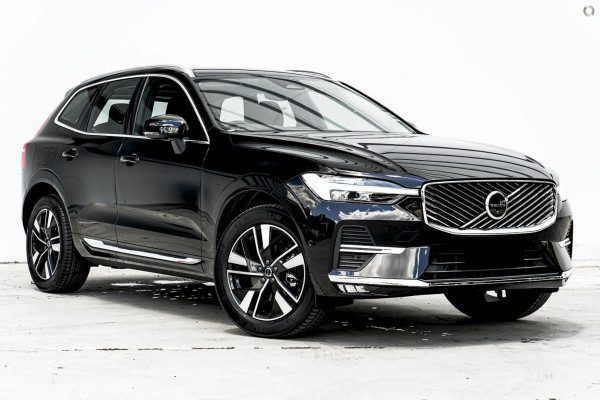
It is seven in the morning, the temperature outside is well below freezing, and you press the remote start button expecting your Volvo to be warm and ready when you get to it. Nothing happens. No engine sound, no lights, no confirmation from the app. Just silence and a cold car waiting for you.
Remote start failures on Volvo vehicles are more common than most owners expect, and they have a range of causes, some simple and some more involved. This guide walks through every likely reason your Volvo remote start is not working, how to troubleshoot each one, and how to get the most out of the feature once it is back in action.
Why Your Volvo Remote Start Stopped Working: The Most Common Causes
1. A Dead or Weak Key Fob Battery
This is where you should start every time before assuming anything more serious is wrong. The key fob uses a small battery, typically a CR2032, to transmit the signal that tells the car to start. When that battery weakens, the signal range drops significantly. You might need to stand right next to the car for it to work, or it may stop responding entirely.
A good sign that the fob battery is the issue: other fob functions like door lock and unlock still work at close range, but the remote start button requires multiple presses or does not respond at all. Remote start typically requires holding the button for two to three seconds, which demands more sustained signal strength than a quick lock press.
Replacing the key fob battery takes about two minutes. Open the fob with a small flat tool, swap the old battery for a fresh CR2032 with the positive side facing correctly, and snap it back together. Test the remote start afterward before going any further in the diagnosis.
2. A Damaged or Worn Key Fob
The fob itself can develop problems beyond a dead battery. If the fob has been dropped repeatedly, exposed to moisture, or the button contacts have worn down over years of use, the internal circuit board or the button itself may be the issue. A sticky or unresponsive remote start button that does not produce a clean click when pressed suggests physical wear on the button membrane.
If a fresh battery does not resolve the problem and other buttons on the fob are also inconsistent, the fob likely needs to be replaced. Replacement fobs for Volvo vehicles are available through dealerships and must be programmed to your specific vehicle. An independent locksmith with Volvo programming capability can also do this at a lower cost than the dealership in most cases.
3. The Vehicle’s Main Battery Is Weak or Low
Remote start systems require the main vehicle battery to be at an adequate charge level to initiate the startup sequence. If your Volvo’s battery is weak, the remote start module may determine there is not enough reserve power to safely crank and run the engine, and it will simply refuse to activate as a protective measure.
Signs of a weak main battery alongside a remote start failure:
- The engine cranks slowly or hesitates when started with the key
- Electrical accessories behave erratically or dim when the engine is cranking
- The battery warning light appears on the dashboard
- The vehicle sat unused for an extended period
Have the battery tested at any auto parts store or workshop. Most will do this for free. A battery that tests below the minimum voltage under load should be replaced. If the battery is fine but the alternator is not adequately charging it, that is a separate issue that also needs attention.
4. The Vehicle Is Not in Park
This is a built-in safety interlock, not a malfunction. Volvo’s remote start system, like virtually every remote start system on the market, will refuse to activate unless the transmission is in the Park position. This prevents the vehicle from moving if the engine starts while someone is near it or if a fault caused a gear other than Park to be engaged.
If you exited the vehicle while it was in a position other than Park, or if there is a fault with the Park detection system that is incorrectly registering as a non-Park gear, the remote start will not function. Confirm the gear selector was fully engaged in Park the last time you shut the vehicle off, and check the dashboard when you restart normally to see whether any transmission-related messages appear.
5. The Hood Is Open or the Hood Switch Has Failed
Remote start systems are wired to prevent activation if the hood is open. This safety feature exists to protect anyone who might be working in the engine bay. If the hood is not fully closed, the system will not start the engine remotely.
But here is a less obvious version of this problem: the hood ajar switch itself can fail in a way that tells the car the hood is open even when it is fully closed. If you have confirmed the hood is properly latched but the remote start still refuses to work, a fault in the hood switch circuit is worth investigating. A diagnostic scan will typically reveal this as a fault code or a status flag in the remote start module data.
6. Active Fault Codes or Warning Lights on the Dashboard
This is one of the more frequently overlooked causes. Volvo’s remote start system is programmed to shut itself down when there are active critical fault codes stored in the vehicle’s control modules. The system’s logic is straightforward: if something is wrong with the engine, transmission, or emissions system, the car should not be started remotely without the driver being present to monitor the situation.
Common fault codes that disable remote start include:
- Engine fault codes including misfire detection or sensor failures
- Emissions-related codes such as evaporative emission system faults, which are sometimes triggered by a loose or damaged fuel cap
- Low oil pressure warnings
- Cooling system faults
- Brake system warnings
Check your dashboard for any illuminated warning lights when you start the car normally. If any are present, address them before expecting the remote start to function. In some cases, something as simple as tightening the fuel cap, starting the engine normally, and driving a few miles will allow the system to verify the issue is resolved and clear the code, restoring remote start functionality.
7. Low Fuel Level
Some Volvo remote start systems will not activate if the fuel level is critically low. This is another protective feature designed to prevent the engine from starting remotely and potentially running out of fuel before the driver reaches the vehicle. If your fuel gauge is near or below the low fuel warning threshold, fill the tank and test the remote start again.
8. Connectivity Issues With the Volvo Cars App
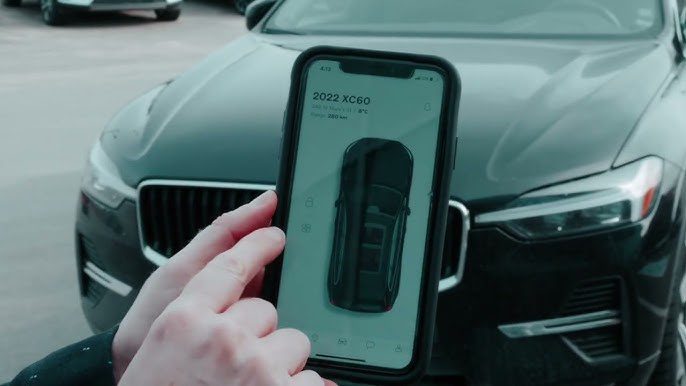
Many Volvo owners use the Volvo Cars app to initiate remote start rather than the physical key fob button. The app works through the vehicle’s cellular connection and Volvo’s connected services platform. When remote start through the app fails but the key fob works, the issue is almost certainly connectivity-related rather than a vehicle fault.
Common app-related causes include:
- Poor cellular signal at the vehicle’s location preventing communication between the car and Volvo’s servers
- An outdated version of the Volvo Cars app that has known connectivity bugs fixed in later updates
- An expired Volvo on Call subscription. Remote start through the app requires an active subscription
- Temporary service outages on Volvo’s connected services platform
- Incorrect app permissions on your phone, such as location or background activity being restricted
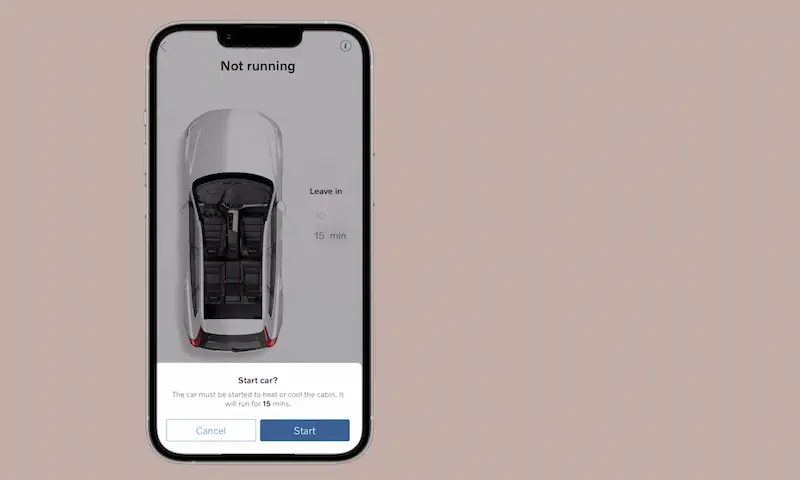
If the app shows a “Climate could not be started” error or similar message, wait a few minutes and try again. These errors are often temporary and resolve on their own. If the problem persists, check whether your Volvo on Call subscription is active, update the app to the latest version, and verify that your phone has granted all necessary permissions to the app.
9. Local Environmental Regulations
This is a less common cause but worth knowing about, particularly if you have recently moved or are visiting a different area. Some jurisdictions have laws that restrict or prohibit remote engine idling due to emissions concerns. In these areas, the remote start feature may be disabled by law, and Volvo’s system may be configured to comply with these restrictions in the vehicle’s region settings.
If you believe this may be a factor, check the regional settings in the Volvo Cars app and consult Volvo customer support for guidance on how this is handled in your area.
Step by Step Troubleshooting Guide for Volvo Remote Start
Work through these steps in order before assuming a complex repair is needed.
Step 1: Replace the Key Fob Battery
Start here. It is free if you already have a CR2032 battery, or costs a few dollars at any pharmacy or convenience store. This resolves the problem in a significant number of cases and takes two minutes to try.
Step 2: Check the Dashboard for Warning Lights
Start the vehicle normally with the key and observe the dashboard. Any warning lights that remain on after startup represent active fault codes. Note every warning present and address them before returning to the remote start diagnosis.
Step 3: Verify the Vehicle Is in Park and Hood Is Closed
Confirm the gear selector is fully in Park and that the hood is completely latched. Press down on the hood after closing it to make sure both latches have engaged. These are simple checks that eliminate two of the most common safety-based lockout conditions.
Step 4: Check the Fuel Level
If the fuel gauge is low, fill the tank before testing remote start again. This eliminates the low fuel lockout as a factor.
Step 5: Check the Main Battery
If the key fob battery is fresh and the remote start still does not work, have the main vehicle battery tested. A weak or failing battery is a legitimate trigger for remote start system shutdowns and may not produce obvious symptoms during normal key-started operation until the battery has degraded further.
Step 6: Update the App and Check Your Subscription
If you use the Volvo Cars app, check for app updates, verify your Volvo on Call subscription is active and current, and confirm your phone has granted the app all necessary permissions. Log out of the app completely, restart your phone, and log back in to force a fresh connection before testing again.
Step 7: Run a Diagnostic Scan
If the above steps have not resolved the issue, connecting a diagnostic scanner is the next step. A Volvo-compatible scan tool can read fault codes from the remote start module, the body control module, and other systems that interact with the remote start function. This will identify whether a specific fault code is actively blocking the system and direct the repair accordingly.
Many Volvo dealerships will perform this diagnostic as a paid service. Some independent shops that specialize in Volvo or European vehicles will also have the appropriate scan tools.
Using the Volvo Cars App for Remote Start: Getting It Right
For owners who prefer using the app over the physical fob, understanding how the app-based remote start works helps avoid common mistakes.
Authentication Requirements
The Volvo Cars app requires identity verification before activating remote start. This is handled through your phone’s existing unlock method, whether that is a PIN, password, pattern, fingerprint, or face recognition. If your phone’s biometric authentication is not working correctly or your PIN has changed recently, the app may fail at the authentication step before the start command is even sent to the vehicle.
If authentication keeps failing, verify your phone’s unlock settings are functioning correctly in other apps and update your app security settings if needed.
Setting the Remote Start Duration
When you initiate remote start through the app, you can specify how long the vehicle should run before shutting itself off automatically. This is useful for pre-warming or pre-cooling the interior without having the car idling indefinitely. Set the duration based on how long you need to get from where you are to the vehicle. Most owners find ten to fifteen minutes is more than adequate in most climates.
Climate Start and Comfort Presetting
One of the most useful aspects of Volvo’s remote start system is climate integration. When you activate remote start, the car uses your previously set temperature preferences to begin conditioning the interior before you get in. To get the most out of this:
- Navigate to Settings in your Volvo’s infotainment system
- Select Climate
- Set your preferred interior temperature for remote start sessions
- Enable seat heating or ventilation if desired through the same menu
- Enable the heated rear window if you want it to activate during remote start for improved rear visibility
Once these settings are configured in the vehicle, the remote start system will apply them automatically every time it activates, giving you a pre-conditioned cabin without any additional steps through the app.
Quick Reference: Volvo Remote Start Not Working
| Symptom or Situation | Most Likely Cause | First Fix to Try |
|---|---|---|
| Fob button does not trigger remote start | Dead key fob battery | Replace the CR2032 battery in the fob |
| Fob buttons all unresponsive or inconsistent | Damaged fob | Replace the key fob |
| App shows error message, fob works fine | App connectivity or subscription issue | Update app, verify Volvo on Call subscription |
| App and fob both fail to start the car | Vehicle-side fault or safety interlock | Check dashboard warnings, fault codes, battery |
| Remote start worked recently, now does not | New fault code or warning light | Check dashboard, address any active warning lights |
| Remote start stops working in cold weather | Weak main battery or fob battery | Test and replace main battery, replace fob battery |
| Engine starts normally but remote start does not | Safety interlock: hood, gear, fuel level | Confirm Park, close hood fully, check fuel level |
Volvo Models and Remote Start: What to Know by Generation
| Volvo Model | Remote Start Method | Common Issue Reported |
|---|---|---|
| XC90 (2016-present) | Key fob and Volvo Cars app | App connectivity issues, fault code lockouts |
| XC60 (2018-present) | Key fob and Volvo Cars app | App remote start not working despite fob working |
| XC40 (2018-present) | Key fob and Volvo Cars app | Hood switch faults, fob battery issues |
| S90 / V90 (2017-present) | Key fob and Volvo Cars app | Subscription expiry causing app remote start failure |
| S60 / V60 (2019-present) | Key fob and Volvo Cars app | Low fuel lockout, warning light lockouts |

Preventing Remote Start Problems Going Forward
- Replace the key fob battery annually. Do not wait for the battery to die completely. Replacing it once a year before winter is a small cost that prevents the most common remote start failure.
- Keep the Volvo Cars app updated. Volvo regularly releases updates that address connectivity issues and bugs affecting remote features. Enable automatic app updates so you are always on the latest version.
- Monitor your Volvo on Call subscription renewal date. Remote start through the app requires an active subscription. Set a calendar reminder for the renewal date so it does not lapse unexpectedly.
- Address warning lights promptly. Every active fault code is a potential remote start blocker. Staying on top of warning lights keeps the system’s interlocks clear and the remote start available when you need it.
- Test your main battery before each winter. Cold weather dramatically reduces battery performance, and a battery that works fine in summer may fail to support remote start during cold weather. Having it load-tested in the autumn gives you time to replace it before the season when remote start is most useful.
Remote start is one of those features that becomes part of your daily routine so quickly that losing it is disproportionately frustrating. But in most cases, the fix is something you can handle yourself with minimal cost or effort. A fresh fob battery, a warning light addressed, a topped-off fuel tank, or an app update gets most Volvo remote start systems back online without a service appointment. When those steps do not do the job, a proper diagnostic scan tells you exactly which component in the chain is causing the problem and what needs to happen next.