
You glance over your shoulder to change lanes. The coast looks clear. You start moving over, and suddenly a car appears from nowhere, horn blaring, swerving to avoid you. Your pulse races. That was too close.
This is precisely why your Hyundai came with blind spot detection. Those little warning lights on your side mirrors exist to prevent these terrifying near-misses. When they work, they are a guardian angel watching over your shoulder. When they do not, you lose a layer of protection you probably rely on more than you realize.
If your Hyundai blind spot detection has stopped working, you are not dealing with some rare, mysterious problem. This happens to thousands of Hyundai owners every year. The causes range from simple and cheap to fix, all the way to complex and expensive. But most importantly, nearly all of them are fixable.
This guide will walk you through everything about your Hyundai blind spot detection system. You will learn how it actually works, why it fails, what you can check yourself, when to call in the professionals, and what repairs typically cost. By the time you finish reading, you will know exactly what is wrong with your system and what to do about it.
Understanding What Blind Spot Detection Really Does
Before we dive into troubleshooting, you need to understand what is happening behind the scenes in your Hyundai. Knowing how the system works makes diagnosing problems infinitely easier.
Your Hyundai blind spot detection system uses radar sensors built into the rear bumper, one on each side. These sensors constantly broadcast radar waves outward and backward, monitoring the zones alongside and slightly behind your vehicle.
When another vehicle enters your blind spot zone, the radar waves bounce off it and return to the sensor. The system processes this information and makes a decision: is there a vehicle in a position where the driver might not see it? If yes, it triggers a warning.
The warning appears as an illuminated icon on the corresponding side mirror. Most Hyundai models use a yellow or amber light that looks like a car with motion lines or waves. This light stays on as long as a vehicle occupies your blind spot.
Here is where it gets smarter. If you activate your turn signal while a vehicle sits in your blind spot, the system escalates the warning. The mirror light flashes rapidly instead of staying solid. Many models also add an audible beeping alert. The system is basically screaming at you: “Do not change lanes right now!”
The system only activates above certain speeds, typically around 20 mph. Below that threshold, blind spot detection stays dormant. This makes sense when you think about it. In parking lots and slow city traffic, you can see adjacent vehicles easily. The system focuses on highway speeds where split-second awareness matters most.
What Blind Spot Collision Warning Adds to the Mix
Some Hyundai models take blind spot detection a step further with Blind Spot Collision Warning (BCW) or Blind Spot Collision-Avoidance Assist (BCA). These systems do not just warn you. They actively intervene.
When you start drifting into an occupied blind spot, BCW can apply brakes to specific wheels to help guide you back into your lane. Think of it as a gentle but firm hand on the steering wheel, nudging you away from danger.
This technology integrates with your electronic stability control and anti-lock brake systems. It happens so quickly and smoothly you might barely notice, except for the warning lights and beeps telling you what just happened.
Knowing which system you have matters for troubleshooting. Check your owner’s manual or the vehicle information display settings to confirm whether you have basic blind spot detection (BSD), collision warning (BCW), or collision-avoidance assist (BCA). The diagnostic steps are similar, but the more advanced systems have additional components that can fail.
Why Your Hyundai Blind Spot Detection Stopped Working
Blind spot systems fail for many reasons. Some you can fix yourself in ten minutes. Others require professional help and deep pockets. Let us break down every common cause so you know what you are dealing with.
Dirty Sensors Are the Usual Suspect
This is hands down the most common cause of blind spot detection failure. Your radar sensors live in the rear bumper, right in the line of fire for everything the road throws at you. Mud, snow, ice, road salt, dirt, and grime all accumulate on sensor covers.
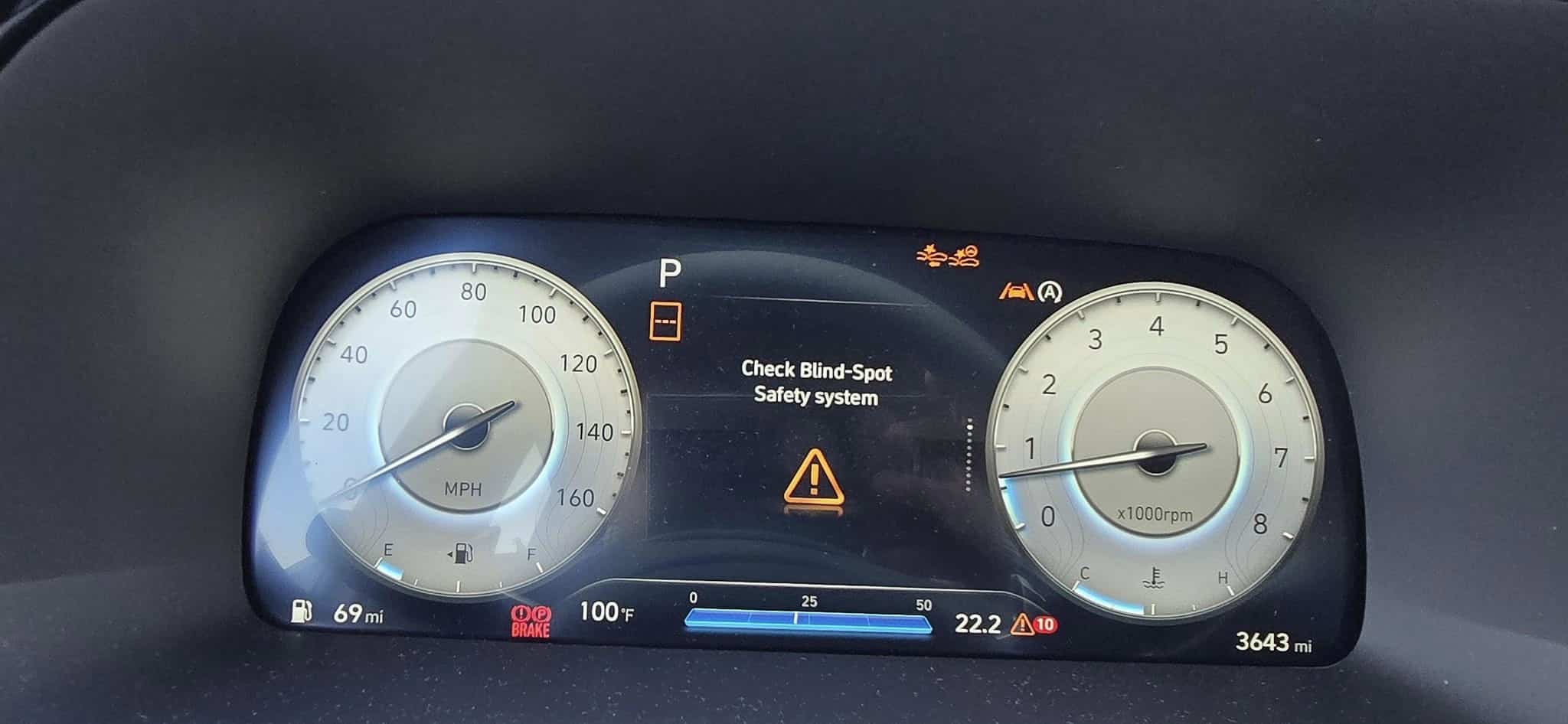
When sensors get covered in crud, radar signals cannot penetrate effectively. The system detects the obstruction and does the safe thing: it shuts down and displays an error message. You might see warnings like Check Blind Spot Detection System” or “BSD Unavailable” on your dashboard.
Winter drivers face this constantly. Road salt mixed with slush creates a cement-like coating on everything. One drive through a winter storm can completely disable your sensors until you clean them.
Heavy rain also causes temporary issues. Water droplets scatter radar signals, creating interference. The system might intermittently fail during downpours and resume working once conditions improve.
Real-world example: Jennifer owns a 2020 Hyundai Palisade in Colorado. Every winter, her blind spot detection would fail within days of the first snowfall. She took it to the dealer three times. They could never find anything wrong because by the time she got there, the sensors had dried and were working again. Finally, a service advisor suggested she check the sensors herself after winter drives. Sure enough, they were caked in road grime. A quick wipe with a damp cloth before each drive solved her problem completely. Zero repair costs, just a minute of maintenance.
Physical Damage From Impacts and Accidents
Radar sensors hide behind your rear bumper, but they are not indestructible. Any impact to the rear corners of your vehicle can damage them. Minor fender benders, backing into poles, shopping cart collisions, and even aggressive snow removal can cause problems.
The sensors themselves are delicate electronic modules. A direct hit can crack the sensor housing, damage internal components, or knock the sensor out of alignment. Even if your bumper looks fine from the outside, the sensor bracket might be bent or the mounting position shifted.
Sensor alignment is critical. These devices need to point in precise directions to monitor the correct zones. If a sensor gets knocked even a few degrees off angle, it might scan the wrong area. Instead of watching the adjacent lane, it could be pointing at the ground or off into space. The system recognizes something is wrong and shuts down.
Bumper repairs and replacements create their own problems. Body shops sometimes reinstall sensors incorrectly or forget to recalibrate them after the repair. A sensor installed at the wrong angle or depth will not function properly.
Even painting the bumper can cause issues if done improperly. Some paints and clear coats block or absorb radar signals. Shops need to use radar-transparent materials on sensor areas. Not all body shops know this or care enough to do it correctly.
Electrical Problems and Wiring Issues
Each blind spot sensor connects to your vehicle’s electrical system and computer network through wiring harnesses. These connections face harsh conditions: extreme temperatures, moisture, road salt, and constant vibration.
Corroded connectors are surprisingly common. Water finds its way into connector housings, especially on vehicles driven in wet or winter climates. Corrosion builds up on connector pins, creating resistance that prevents proper electrical flow and communication.
Wiring harnesses can also suffer physical damage. Rodents are a major culprit here. Mice and rats love to nest in wheel wells and behind bumpers. They chew through wire insulation like it is candy. One hungry mouse can disable your entire blind spot system overnight.
Vibration and age take their toll too. Wires flex and move constantly while you drive. After years of this motion, insulation cracks and wires can break internally. The wire looks fine on the outside but has snapped inside the insulation.
Poor ground connections cause intermittent failures that drive people crazy. The system works sometimes but not others, with no obvious pattern. A loose or corroded ground connection creates exactly this kind of unpredictable behavior.

Failed Sensor Modules
Like any electronic component, radar sensors can simply fail. The electronics inside degrade over time, especially when subjected to temperature extremes and constant vibration. Your car is not a gentle environment for delicate electronics.
Sensor failure usually happens gradually. You might notice the system working intermittently before it quits entirely. Maybe it functions fine in the morning but fails after the car sits in the hot sun all afternoon. Perhaps it works on one side but not the other.
Complete sensor failure typically requires replacement. These are sealed units that cannot be repaired. When they die, they need to be replaced.
Heat accelerates sensor failure. If you live in a hot climate and park outside, your sensors face brutal temperature cycles. They bake in 150-degree heat all day, then cool down at night. This constant expansion and contraction eventually damages solder joints and electronic components inside.
Software Glitches and Module Errors
Your blind spot system relies on a control module (the BSD module) that processes sensor data and makes decisions. Like any computer, it can experience software bugs, corrupted data, or complete failure.
Sometimes a simple module reset fixes the problem. The module gets confused, throws an error, and just needs to be rebooted. Other times, it needs a software update from the dealer. Hyundai releases updates to fix bugs and improve performance.
Battery disconnection or replacement can trigger BSD errors. When the battery loses power, the module loses its calibration data and learned parameters. Usually, the system relearns this information automatically after you drive for a while. But occasionally, it needs a manual reset or recalibration procedure.
In rare cases, the BSD module itself fails and needs replacement. This is expensive but thankfully uncommon. Before replacing a module, proper diagnosis should rule out every other possibility.
Aftermarket Modifications Creating Havoc
Aftermarket accessories and modifications can interfere with blind spot detection in ways you might not anticipate. Tinted taillight covers or vinyl wraps on the rear bumper can block radar signals. What looks like a simple cosmetic change can disable safety systems.
Trailer hitch installations are notorious for causing BSD problems. Drilling into the bumper for hitch mounting can damage sensors or wiring. Even if installation goes perfectly, the hitch itself can block sensor coverage areas.
Aftermarket parking sensors operating on similar frequencies can create interference. Two radar systems fighting for the same frequency range will confuse each other, causing false alerts or complete failure.
Bike racks, cargo carriers, and other rear-mounted accessories can block sensor fields of view. The system sees a constant large object in the detection zone and either ignores everything or throws a malfunction code.
DIY Troubleshooting: What You Can Check Yourself
Before you hand over your wallet to a dealer or repair shop, try these troubleshooting steps. Many blind spot problems can be solved in your driveway with zero cost and minimal effort.
Start With a Thorough Sensor Cleaning
This should be your very first step, every single time. Locate the sensors on your rear bumper. They are typically positioned near the rear corners, often marked with small emblems or visible as circular sensor covers.
On most Hyundai models, the sensors sit low on the bumper, close to where the rear quarter panel meets the bumper. Some models have sensors integrated higher up, near the taillights. Check your owner’s manual if you cannot locate them.
Use warm water and a soft microfiber cloth to clean the sensor areas gently. Avoid harsh chemicals, abrasive cleaners, or rough materials that could scratch sensor covers. Be thorough and get into edges where dirt accumulates.
For stubborn winter salt buildup, mix warm water with a small amount of car wash soap. This cuts through salt residue effectively. Rinse thoroughly with clean water and dry completely.
After cleaning, start your vehicle and drive for several minutes at speeds above 25 mph. Many Hyundai blind spot systems perform automatic self-checks during normal driving. Once the system verifies sensors are clear, it should re-enable automatically.
If the system does not reactivate immediately, do not panic. Some models require driving for 10 to 15 minutes or even turning the vehicle off and restarting before the system resets itself.
Inspect for Physical Damage
Walk around to the back of your Hyundai and inspect the rear bumper carefully. Look for obvious damage like cracks, dents, or deformation near where the sensors live. Check for missing bumper clips or fasteners that might allow the bumper to sit at an incorrect angle.
Get down low and view the bumper from the side. Does it sit flush and aligned properly? A bumper pushed in or pulled out even slightly can throw off sensor alignment enough to cause malfunction.
If you recently had bodywork done, bumper painting, or any repair involving the rear of the vehicle, suspect sensor misalignment or improper reinstallation. Body shops sometimes forget to recalibrate BSD systems after repairs.
Look at the sensor covers themselves if they are visible. Are they cracked, discolored, or damaged? Has someone painted over them? Any of these conditions can block radar signals.
Verify the System is Actually Enabled
This sounds almost insulting to mention, but blind spot detection can be turned off, and sometimes it happens accidentally. Many Hyundai models have a dedicated button to disable BSD, usually located on the dashboard near the steering wheel or on the center console.
The button typically shows an icon matching the blind spot warning symbol. Press it once to toggle the system on or off. An indicator light on the button or a message on the dashboard tells you the current status.
Check your vehicle settings through the information display screen. Navigate to the driver assistance or safety features menu and confirm blind spot detection is enabled. The exact menu structure varies by model year and trim level, so consult your owner’s manual if you cannot locate it.
Some Hyundai models automatically disable BSD when certain conditions exist, like when a trailer is connected. Make sure nothing is plugged into your trailer wiring connector if you are not towing anything.
Perform a System Reset
Sometimes the BSD module just needs a reboot, like your computer when it starts acting strange. The reset procedure varies between Hyundai models, but here is a general approach that works on many:
- Turn off the engine completely and remove the key or press the stop button
- Wait at least three minutes to allow all systems to fully power down
- Restart the vehicle normally
- Drive at speeds above 25 mph for at least 10 minutes on a relatively straight road
- Check if the system reactivates
Some models have a specific reset option in the vehicle settings menu. Look under the blind spot detection or driver assistance settings for a reset or recalibration option.
If you recently disconnected the battery, replaced it, or had any electrical work done, the BSD system might need to complete a relearning process. This typically requires driving straight at steady highway speeds for 10 to 20 minutes. The system watches how the vehicle behaves and recalibrates its reference points.
Check for Error Messages and Codes
Your dashboard and information display might provide clues about what the system thinks is wrong. Look for messages such as:
- “Check Blind Spot Detection System”
- “BSD Unavailable”
- “Blind Spot Detection Malfunction”
- “Radar Blocked”
- “Check Left/Right Sensor”
- A yellow warning light showing a car with waves or detection zones
These messages offer valuable diagnostic information. “Radar Blocked” almost always means dirty sensors or bad weather interference. “Check Left Sensor” tells you which side has the problem, narrowing your troubleshooting focus. “Malfunction” messages usually indicate hardware failure requiring professional diagnosis.
Write down exactly what the message says and when it appears. Does it show up constantly or only in certain conditions? This information helps mechanics diagnose the problem faster, potentially saving you money on diagnostic time.
When Weather Throws Your System Off
Radar sensors work remarkably well in most conditions, but extreme weather can cause temporary malfunctions. Understanding these limitations helps you distinguish between real problems and temporary inconveniences.
Heavy Rain Creates Signal Interference
Torrential downpours can temporarily disable blind spot detection. Heavy raindrops scatter radar signals, creating noise that makes it impossible for the system to distinguish actual vehicles from water spray and splashing.
Most systems will display a “BSD Unavailable” or “Radar Blocked” message during severe rain. This is normal behavior, not a malfunction. The system should automatically resume normal operation once rain intensity decreases.
If your system stays disabled after rain stops, check the sensors. Water might be pooling on sensor covers or moisture could be trapped in sensor cavities. Dry the sensor areas with a cloth and see if function returns.
Winter Weather Brings Multiple Challenges
Winter driving creates perfect conditions for BSD failure. Snow accumulation on sensors blocks radar completely. Ice buildup does the same. Road salt spray coats sensors in a grimy film that prevents proper operation.
Before driving in winter conditions, brush snow off your entire vehicle, paying special attention to the rear bumper area where sensors live. After driving on salted roads, wipe down sensor areas regularly to prevent buildup.
Some Hyundai models include sensor heating elements designed to melt snow and ice, but these only work when the vehicle is running and take time to warm up. Do not rely on them entirely.
Fog Reduces System Effectiveness
Dense fog can reduce blind spot detection range and reliability. Tiny water droplets suspended in fog scatter radar signals similarly to rain. The system might work intermittently or show reduced detection distance in heavy fog.
This is when you need to rely more heavily on mirrors and shoulder checks. Remember that blind spot detection is a supplement to proper driving technique, not a replacement for it.
Professional Diagnosis: What Happens at the Dealer
If your DIY troubleshooting has not solved the problem, professional diagnosis is the logical next step. Understanding the diagnostic process helps you evaluate quotes and avoid paying for unnecessary work.
The Diagnostic Procedure
A Hyundai technician will connect a specialized diagnostic scan tool to your vehicle’s OBD port. This tool communicates with the BSD control module and retrieves stored diagnostic trouble codes (DTCs).
These codes tell the technician which sensor has failed, whether communication errors exist between modules, or if electrical problems affect the system. The codes provide a starting point for diagnosis, not a definitive answer. They point the technician in the right direction.
Next comes functional testing. The technician might test drive the vehicle to verify the problem and see if the system activates properly. They will use a multimeter to test sensor power and ground circuits, checking for proper voltage and continuity.
They may also verify sensor output signals are within specifications. Each sensor should produce specific voltage or resistance readings. Values outside the normal range indicate sensor failure.
For intermittent problems, diagnosis can be frustrating and time-consuming. If the system works normally when the technician tests it, they might not find anything wrong. This is why documenting when and how the problem occurs is so valuable. Patterns help technicians identify elusive issues.
What You Pay for Diagnosis
Most Hyundai dealers charge diagnostic fees ranging from $100 to $175. This covers the technician’s time to connect diagnostic equipment, retrieve fault codes, perform tests, and identify the problem.
Some dealers waive the diagnostic fee if you approve the recommended repairs at their shop. Others apply the diagnostic fee toward total repair costs. Ask about their policy before authorizing diagnosis.
The diagnostic fee does not cover actual repairs. Once diagnosis identifies the failed component, you will receive a separate estimate for parts and labor to fix it. You are free to decline repairs and take your vehicle elsewhere if you choose.
Repair Costs: Budgeting for the Fix
Blind spot detection repairs range from essentially free to painfully expensive. Here is a realistic breakdown of costs for common repairs based on current market rates.
Sensor Replacement Costs
If one or both radar sensors have failed, replacement is the only option. You cannot repair sealed sensor units. When they die, they must be replaced.
| Repair Type | Parts Cost | Labor Cost | Total Cost |
|---|---|---|---|
| Single sensor (OEM Hyundai) | $200 – $400 | $100 – $200 | $300 – $600 |
| Both sensors (OEM Hyundai) | $400 – $800 | $150 – $300 | $550 – $1,100 |
| Single sensor (aftermarket) | $100 – $250 | $100 – $200 | $200 – $450 |
| Sensor calibration (each) | N/A | $75 – $150 | $75 – $150 |
| Diagnostic fee | N/A | $100 – $175 | $100 – $175 |
Labor costs vary based on sensor accessibility. Some Hyundai models allow sensor access through the wheel well, which is relatively quick. Others require partial or complete rear bumper removal, adding significant labor time.
Calibration is often necessary after sensor replacement to ensure the system monitors the correct detection zones. Not all independent shops have calibration equipment. Hyundai dealers always do, but charge accordingly.
BSD Control Module Replacement
If the blind spot detection control module has failed, expect significantly higher costs:
- BSD control module: $500 to $900
- Labor for replacement: $100 to $250
- Programming and calibration: $75 to $200
- Total cost: $675 to $1,350
Control modules require programming to your specific vehicle VIN. This requires dealer-level scan tools in most cases. Some independent shops specializing in Hyundai have the necessary equipment and often charge less than dealers.
Wiring and Connector Repairs
Wiring repairs are labor-intensive. Tracing wires, finding breaks or shorts, and making proper lasting repairs takes time and skill. Expect to pay:
- Minor wiring repair: $150 to $350
- Harness section replacement: $300 to $700
- Connector replacement: $100 to $200
- Rodent damage repair: $200 to $800 depending on extent
Final costs depend on where damage is located and how extensive it is. Rodent damage often requires replacing entire harness sections because mice chew multiple spots.
Ways to Reduce Repair Costs
You have options beyond accepting the first quote you receive from a dealer.
Get multiple estimates. Prices vary dramatically between dealers and independent shops. Call around with your specific fault codes so shops can provide accurate quotes.
Consider quality aftermarket parts. Aftermarket sensors cost significantly less than OEM Hyundai parts and often come with warranties. Verify any aftermarket parts are specifically designed for your model year and trim.
Check warranty coverage first. Some Hyundai models had extended warranty coverage for BSD system issues. Check with a dealer using your VIN to see if any extended coverage or technical service bulletins apply.
Find a Hyundai specialist. Independent shops specializing in Hyundai vehicles often have proper diagnostic equipment but charge 20 to 40 percent lower labor rates than dealers.
Ask about used OEM parts. For expensive components like control modules, quality used OEM parts from salvage vehicles can save hundreds of dollars. Make sure any used parts come with a return policy in case they do not solve your problem.
Can You Drive Safely Without Blind Spot Detection?
Your blind spot detection has failed. Is your Hyundai safe to drive? Yes, but you need to adjust your driving habits immediately.
Millions of vehicles on roads worldwide have zero blind spot detection technology. Drivers manage perfectly fine using mirrors and shoulder checks. Your Hyundai is not suddenly dangerous just because BSD stopped working.
That said, you probably got comfortable relying on those mirror warning lights. Now you need to be more vigilant. Check your mirrors more frequently, especially before any lane change. Always perform a proper shoulder check before changing lanes, no exceptions.
Adjust your mirrors properly. Many drivers set mirrors to see the sides of their own car, which creates huge blind spots. Instead, angle mirrors outward until you barely see your car. This drastically reduces blind spot size.
Increase following distance to give yourself more reaction time. Pay extra attention in situations where BSD helped most: highway merging, multi-lane traffic, and congested city driving.
While you can drive safely without the system, do not delay repairs indefinitely. Blind spot detection exists because it prevents accidents. Studies show these systems reduce lane-change crashes by 14 to 23 percent depending on the study. That is a meaningful safety improvement worth maintaining.
Preventing Future BSD Problems
Prevention costs nothing but saves hundreds or thousands on repairs. These simple habits keep your blind spot detection working reliably for years.
Make Sensor Cleaning a Regular Habit
Incorporate sensor cleaning into your car wash routine. Every time you wash your Hyundai, take an extra minute to wipe down sensor areas on the rear bumper. This prevents buildup that triggers malfunction warnings.
In winter climates or muddy conditions, check and clean sensors weekly. Salt and mud accumulate fast. Weekly cleaning during challenging seasons prevents most weather-related BSD failures.
Park and Back Up Carefully
Many sensor failures result from parking lot accidents. Backing into posts, hitting curbs, or tapping other vehicles during parking damages sensors even when bumper damage appears minor.
Use your backup camera and parking sensors (if equipped) to avoid bumper contact with obstacles. That extra caution protects expensive radar equipment hiding behind your bumper.
Professional Installation of Accessories
If you plan to install trailer hitches, aftermarket bumpers, or other rear modifications, have the work done by professionals familiar with blind spot systems. They know how to avoid damaging sensors and wiring.
Inform installers that your vehicle has BSD before work begins. They can take appropriate precautions and verify system function after completing the installation.
Address Body Damage Promptly and Properly
If you are involved in any rear-end collision or backing accident, have the BSD system checked even if it seems to work fine. Bumper impacts can misalign sensors or damage wiring that fails later.
When getting bumper repairs or painting, specifically ask the body shop to verify blind spot sensor alignment and function after work is complete. Not all shops do this automatically. Some forget entirely.
If possible, choose body shops experienced with Hyundai vehicles and advanced driver assistance systems. They are more likely to have proper calibration equipment and understand BSD requirements.

Model-Specific Issues and Service Bulletins
Some Hyundai models have known BSD issues that Hyundai addressed through Technical Service Bulletins (TSBs) or extended warranty programs.
Known Issues by Model
2017-2019 Elantra: Some vehicles experienced intermittent BSD warnings related to software calibration issues. Hyundai released software updates addressing the problem. If you own an affected vehicle and have not received the update, contact your dealer.
2016-2018 Tucson: Certain early production units had sensor bracket mounting issues allowing sensors to shift position slightly over time. TSBs addressed proper installation procedures and revised mounting hardware.
2019-2020 Santa Fe: Some models experienced false BSD alerts or system failures related to control module software. Software updates resolved most cases.
2020-2021 Palisade: A small number of vehicles had wiring harness routing issues that allowed water intrusion into sensor connectors. Revised harness routing and improved sealing addressed the problem.
Check with your Hyundai dealer service department using your VIN to see if any open TSBs or extended warranty programs apply to your specific vehicle. Some repairs might be covered at no cost even if your standard warranty expired.
Real Stories from Hyundai Owners
Hearing how others solved their BSD problems might help you tackle your own situation.
David’s 2018 Sonata mystery: David’s BSD worked perfectly for two years, then suddenly stopped. No warning messages appeared. The system just quit. He took it to the dealer who quoted $800 for new sensors. David got a second opinion from an independent shop. The technician found a connector behind the bumper had backed out slightly from vibration. Pushing it back in and securing it with a zip tie solved the problem. Total cost: $80 diagnostic fee.
Lisa’s paint shop disaster: Lisa had her 2019 Santa Fe rear bumper repainted after a parking lot scrape. The body shop returned the vehicle with BSD completely non-functional. The shop insisted they did nothing wrong. After three return visits, Hyundai dealer diagnosis found sensors were reinstalled at incorrect angles. Proper sensor calibration fixed the issue, but Lisa had to fight the body shop to cover the $200 calibration cost. The lesson is to verify BSD function immediately after any body work before leaving the shop.
Michael’s winter solution: Michael in Minnesota could not keep his 2020 Tucson BSD working all winter. He cleaned sensors daily but the system still failed constantly. Finally, he discovered that his car wash was coating the entire vehicle in a wax product that was blocking radar signals. He switched to a touchless wash without wax treatments and the problem disappeared completely.
Your Path to Getting BSD Working Again
Your Hyundai blind spot detection stopped working, and now you understand why that happens and what to do about it. Most causes are straightforward. Dirty sensors account for the majority of BSD failures. Simple cleaning fixes them for zero cost.
When cleaning does not solve the problem, you face a decision. Can you diagnose and fix it yourself, or do you need professional help? Be realistic about your skills and available tools. Some repairs are genuinely DIY-friendly. Others require specialized equipment and training you simply cannot replicate at home.
Driving without blind spot detection is not catastrophic, but it is not ideal either. This system prevents accidents and protects you, your passengers, and other drivers. Yes, repairs cost money. But compare that cost to the potential consequences of a preventable collision. The math favors fixing it.
Start with free troubleshooting steps. Clean those sensors thoroughly. Inspect for obvious damage. Verify system settings are correct. Try a reset procedure. If these simple steps restore function, you just saved hundreds of dollars and learned something valuable about your vehicle.
If professional diagnosis and repair become necessary, shop around. Dealers are not your only option. Quality independent shops exist that specialize in Hyundai vehicles. Get multiple quotes. Ask informed questions based on what you learned here. Make decisions based on knowledge rather than fear.
Check for recalls, TSBs, and warranty coverage before spending a dime. You might be entitled to free repairs and not even know it. A five-minute phone call to your dealer could save you hundreds.
Whatever route you choose, address the problem. That blind spot warning
system exists for a reason. It watches areas your eyes cannot cover. It
reacts faster than human reflexes allow. It provides an extra margin of
safety in situations where margins matter most. Get it working again. Your
safety and the safety of everyone sharing the road with you depends on all
your vehicle’s systems functioning as designed.