
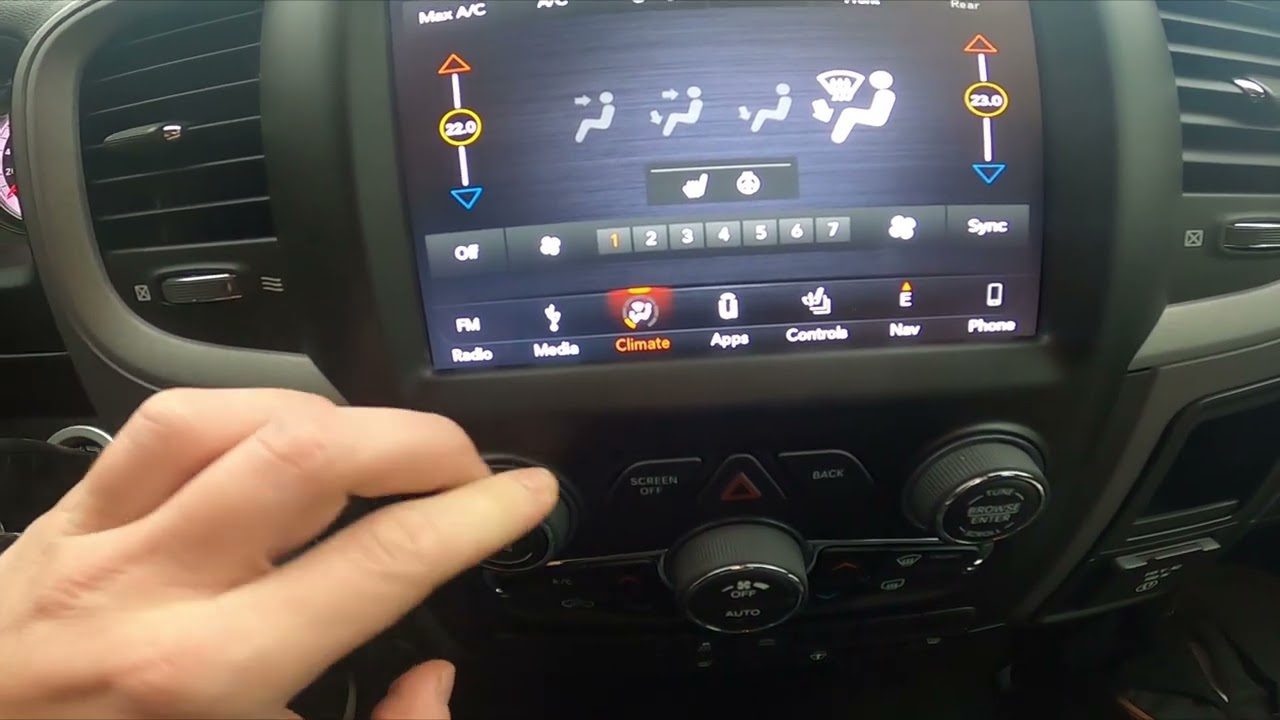
You turn the key, the radio lights up, your favorite station comes through loud and clear, and then you reach for the volume knob to bump it up a little. Nothing happens. You turn it again. Still nothing. Maybe you smack the dash out of frustration, because that has worked on stubborn electronics since the dawn of time, right? Not this time.
If this sounds familiar, you are not alone. A surprising number of Dodge Ram owners run into this exact headache, and the good news is that it rarely means your entire truck is falling apart. In most cases, the fix is simpler than you would expect. In other cases, you are looking at a part that has genuinely worn out and needs replacing.
Let’s walk through why this happens, how to figure out what is actually going wrong, and what your realistic options are for getting your sound system back to normal.
Why Does the Volume Knob Stop Responding in the First Place?
Before jumping into fixes, it helps to understand the usual suspects. A volume knob that refuses to cooperate almost always traces back to one of a handful of causes, and narrowing it down early saves you time and money.
- A physically loose knob that has separated slightly from its shaft.
- Dirt, dust, or spilled coffee that has worked its way into the knob’s mechanism.
- A worn-out potentiometer, which is the small internal component that actually reads how far you have turned the knob.
- A software glitch in the Uconnect system that has nothing to do with the physical knob at all.
- A malfunctioning steering wheel control that is interfering with volume commands.
Even so, do not assume the worst right away. In the real world, a loose knob or a bit of built-up grime causes this problem far more often than a failed head unit does. Start small, then work your way up to bigger fixes only if you need to.
Identifying Exactly Where the Problem Is Hiding
Your Dodge Ram actually gives you three different ways to control volume, and figuring out which one is misbehaving narrows down your troubleshooting considerably.
Check the Steering Wheel Volume Buttons First
Most Ram owners rely on the steering wheel controls more than the actual knob on the dashboard, simply because it is more convenient while driving. If those buttons stop responding, you might mistakenly assume the whole audio system is broken when really it is just that one control cluster acting up.
Here is a quick test. Press the other buttons on your steering wheel, things like the seek button, the phone button, or the mode button. If those work fine but volume specifically does not respond, that tells you something useful. It suggests the issue is isolated to the volume function rather than a total electrical failure in the steering wheel module. On the other hand, if none of the buttons respond at all, you might be dealing with a wiring issue somewhere in the steering column, which is a different repair conversation entirely.
Then Test the Physical Knob on the Head Unit
The knob on your dashboard is the most direct way to control volume, and it is also the piece most likely to fail simply from years of daily use. Think about how many times you have reached for that knob over the life of your truck. Thousands of turns add up, and mechanical parts eventually wear.
One telltale sign of a failing head unit knob is inconsistency. Maybe it works perfectly one morning, then goes completely unresponsive that afternoon, then works again the next day for no clear reason. This kind of on-again, off-again behavior usually points toward a worn potentiometer inside the knob assembly rather than a simple loose connection. If you notice the volume level does not match where the knob is physically turned, that mismatch is another strong clue pointing toward the same internal wear.
Do Not Overlook the Touchscreen Settings
Here is one that trips people up more often than you would think. Sometimes the “problem” is not mechanical or electrical at all. It is a setting buried in your touchscreen menu.
Check these two things before assuming hardware failure:
- Mute status: Somewhere along the way, the mute function might have been accidentally engaged, whether by a passenger fiddling with buttons or an errant elbow bump. Dive into your audio settings and confirm mute is turned off.
- Balance and fade settings: If these settings have drifted toward one side or one axis, you might hear plenty of sound from certain speakers while others stay eerily quiet, making it seem like your whole volume system is broken when really only the settings need adjusting.
A quick real-world example: a Ram owner once spent an entire weekend convinced his head unit needed replacing, only to discover his teenage son had cranked the fade setting fully toward the rear speakers during a road trip. Front speakers went silent, the volume knob seemed “broken,” and the actual fix took thirty seconds once he found the right menu.
Troubleshooting Steps That Actually Solve the Problem
Once you have a general idea of where the issue lives, it is time to get hands-on. These steps go in order from simplest and cheapest to more involved, so work through them in sequence rather than jumping straight to the nuclear option.
Step One: Rule Out an Electrical Connection Problem
Start by physically examining the knob itself. Give it a gentle wiggle. If it feels loose or wobbly compared to other knobs and buttons on the dash, that looseness alone could be interrupting the electrical contact needed for it to function.
- Confirm the knob is seated securely on its shaft. If it feels loose, tighten it carefully with a small screwdriver.
- Inspect for any visible cracks or separation where the knob meets the dashboard.
- If tightening does not help and the knob connection appears damaged beyond a simple fix, replacing the entire stereo unit may become necessary.
Step Two: Run a Sound Quality Check
Sometimes what feels like a volume knob issue is actually a broader sound system problem wearing a disguise. Pay attention to patterns. Does the volume fade in and out only on certain stations, or does it happen across the board regardless of source?
For instance, if your radio volume fluctuates specifically on local AM or FM channels but stays rock solid on satellite radio, the culprit is likely your antenna connection rather than the knob at all. A number of Ram owners have traced this exact symptom back to a loose or corroded antenna connection, which is worth checking before you assume the knob itself is at fault.
While you are at it, glance at your speaker wiring too. Loose or frayed wires near the speaker terminals can create intermittent sound issues that mimic a bad volume control, even though the wiring has nothing to do with the knob directly.
Step Three: Try a Soft Reset Before Anything Drastic
If the physical inspection and sound checks come up empty, a system reset is your next move. This resolves more issues than people expect, mainly because infotainment systems occasionally get stuck in a weird state that a simple reboot clears right up.
- Press and hold both the volume knob and the tuning knob at the same time for roughly 30 seconds.
- Release both knobs and let the Uconnect system reboot on its own.
- Turn your vehicle off completely, then restart it.
- Give the system a minute to fully reload before testing the volume again.
If that soft reset does not do the trick, a hard reset is the next escalation. This means disconnecting your truck’s battery for a few minutes before reconnecting it. Fair warning here: this wipes more than just your audio settings. You will likely need to reenter your radio presets, and other electrical settings throughout the truck may reset to factory defaults as well. It works, but treat it as a somewhat bigger step than the soft reset.
When Replacement Makes More Sense Than Repair
Sometimes you troubleshoot everything correctly, and the knob still does not work. At that point, repair is not really on the table anymore. Replacement or upgrading becomes the more sensible path forward, and honestly, it can be a good excuse to improve your sound system while you are at it.
Replacing the Radio Head Unit
If the volume knob issue traces back to a failing head unit, you have two main routes: a factory replacement from a certified Dodge dealer, or a compatible aftermarket unit. Whichever direction you choose, make sure the replacement matches your Ram’s specific make, model, and year. Getting this wrong leads to compatibility headaches that are far more annoying than the original volume problem.
Installation can go one of two ways. A dealership or professional installer handles the technical details for you, which costs more but removes the guesswork. Or, if you are comfortable with basic tools and wiring harnesses, a DIY installation is possible, though be prepared for potential extras like fitting a new dash bezel or adjusting factory wiring to match the new unit.
Adding or Upgrading an Amplifier
If your actual complaint is more about weak or muddy sound rather than the knob itself failing to turn, an amplifier upgrade might solve more problems than a simple knob fix ever could. Amplifiers give your speakers the extra power they need to produce cleaner, fuller audio, especially useful if you have already upgraded your speakers and they sound underwhelming with the stock power supply.
Before buying one, think through:
- Power requirements that match your specific speaker setup.
- Compatibility with your existing head unit and wiring.
- Installation location, since amplifiers need adequate space and ventilation.
Going All In: A Full Audio System Overhaul
For Ram owners who want to treat this frustrating situation as an opportunity rather than a chore, a complete audio upgrade is worth considering. Here is what that typically involves:
| Upgrade | What It Improves |
|---|---|
| Speaker Replacement | Better clarity and volume range compared to factory speakers |
| Subwoofer Addition | Deeper, richer bass response |
| Sound Deadening Material | Reduces road noise, making audio sound cleaner at lower volumes |
None of this is mandatory, of course. But if you are already elbow-deep in your dashboard troubleshooting a stuck volume knob, it might be the right moment to think bigger picture rather than just patching the immediate problem.
DIY Repair or Call a Professional? Here Is How to Decide
This is the question every Ram owner eventually asks themselves, and honestly, there is no universally right answer. It depends on your comfort level, your budget, and how much time you are willing to spend under the dashboard.
The Case for Doing It Yourself
Basic troubleshooting does not require any special expertise. Most of what has been covered so far, tightening a loose knob, cleaning around it, checking settings, running a soft reset, falls well within reach of anyone with a screwdriver and a bit of patience.
Additional DIY steps worth trying:
- Tighten a loose knob with a small screwdriver.
- Clean the knob and surrounding area to remove dust or grime buildup.
- Apply electronics-safe contact cleaner directly to the potentiometer if you are comfortable opening up that section of the dash.
That said, DIY repair is not without risk. Poking around electronics you are unfamiliar with can occasionally cause more harm than good, especially if you accidentally short a connection or crack a plastic housing that was never designed to be removed casually. Weigh the money you might save against the possibility of turning a small problem into a bigger, more expensive one.
The Case for Calling a Professional
If your DIY attempts go nowhere, or if the idea of taking apart your dashboard makes you nervous, professional help is the sensible next step. A trained technician brings a few clear advantages to the table.
- Safety: Technicians know how to handle sensitive electronics without accidentally damaging other systems in your truck.
- Accuracy: Proper diagnostic tools identify the actual root cause rather than relying on guesswork.
- Time savings: Booking an appointment means you are not spending your Saturday afternoon troubleshooting under the dash.
Yes, professional service costs more upfront. But here’s the thing: paying once to fix the actual problem is often cheaper in the long run than repeatedly guessing and potentially replacing parts that were never the real issue to begin with.
What Should You Expect to Pay?
Repair costs vary quite a bit depending on the actual cause and whether you go the dealership route or an independent shop. Here is a general idea to help you budget appropriately.
| Repair Type | Estimated Cost Range |
|---|---|
| Tightening or cleaning knob (DIY) | Free to under $20 for cleaning supplies |
| Professional diagnostic check | $50 to $120 |
| Potentiometer or knob assembly replacement | $80 to $250 |
| Full head unit replacement | $200 to $700 depending on aftermarket versus factory |
| Amplifier installation | $150 to $500 plus parts |
These figures shift depending on your region, whether you choose a dealership or independent installer, and the specific trim and model year of your Ram. Even so, having rough numbers in mind helps you avoid sticker shock when a quote comes in.
Keeping This From Happening Again
Once your volume knob is working properly again, a little bit of ongoing care goes a long way toward preventing a repeat performance. None of this takes much effort, but skipping it is exactly how these small issues creep back in.
Keep Dust and Debris Away From the Controls
Dirt buildup around your volume knob is one of the sneakiest causes of poor electrical contact. Wipe down your dashboard, console, and knob area regularly with a soft microfiber cloth. This simple habit prevents grime from working its way into the mechanism over time.
Use a Gentle Touch
Cranking the knob with excessive force does not make the volume go up any faster, but it does put unnecessary strain on the internal components. Turn it gently, and if you notice any stickiness or resistance that was not there before, address it right away rather than continuing to force it.
Inspect Periodically for Wear and Damage
Every so often, take a closer look at your audio system’s physical condition. Check for:
- Loose or frayed wiring near the head unit.
- Connections that have worked themselves loose over time.
- Visible cracks or wobbling around the volume knob itself.
Catching these early usually means a cheap fix. Ignoring them tends to mean a more expensive one down the road.
Do Not Skip Software Updates
Your Uconnect system occasionally receives firmware updates that patch bugs and glitches, some of which directly affect volume and audio controls. Checking for and installing these updates when available can prevent software related issues before they ever start.
Frequently Asked Questions
Can I still drive safely if my volume knob is not working?
Absolutely. This issue affects your entertainment system, not your vehicle’s safe operation. It is annoying, not dangerous.
Will a hard reset erase my radio presets?
Yes, disconnecting the battery for a hard reset wipes stored presets and some other electrical settings throughout the truck. Be prepared to reenter them afterward.
Is this covered under warranty?
Depending on your Ram’s age and warranty status, audio system components may still be covered. Check your documentation or call your dealership before paying out of pocket.
How do I know if it is the knob or the whole head unit?
If other functions on the head unit, like tuning, Bluetooth pairing, or navigation, work fine and only volume is affected, the issue is likely isolated to the knob or its connection rather than the entire unit.
A stuck or unresponsive volume knob feels like a small thing until you are stuck driving in silence, or worse, stuck with a radio blasting at full volume with no way to turn it down. Work through the checks in order, start simple, and only escalate to replacement once you have ruled out the easy fixes. Your ears, and your passengers, will thank you.