
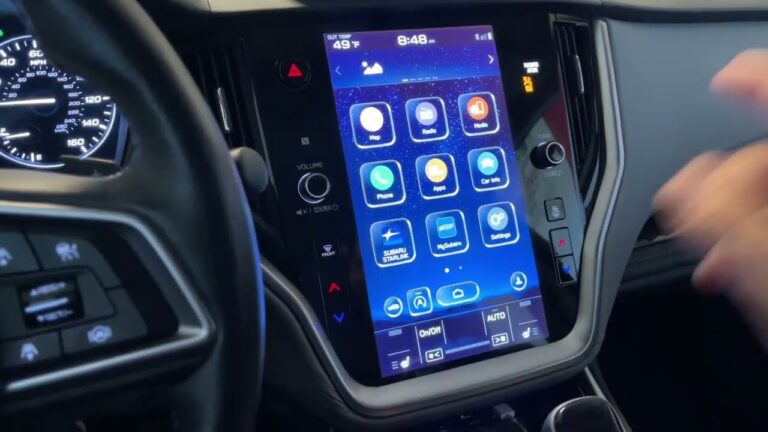
Let us be honest for a second. There is very little that kills the vibe of a morning commute faster than sliding into your Subaru, turning the key, and being greeted by nothing but silence from your dashboard. No music. No talk radio. No podcast. Just the quiet hum of the engine and the sound of your own sigh. If you are dealing with a Subaru radio not working, you are not alone. This is one of the most common complaints we see in the shop, and the good news is that the fix is often a lot simpler than you might think.
Of course, simple does not always mean obvious. A dead head unit can be caused by something as trivial as a tripped fuse or as complex as a failing microprocessor. The key is to stop guessing and start diagnosing. We are going to walk through the most frequent culprits, the exact steps to troubleshoot them, and the specific repairs that will get your sound system back online. Whether you drive an Outback, a Forester, a Crosstrek, or an Impreza, these principles apply across the board.
Before you spend a dime at a dealership, take a deep breath. You have options. You have the ability to fix this yourself in many cases. Let us break down the problem, look at the wiring, check the fuses, and get that display lighting up again. Here is how to approach the issue like a seasoned mechanic rather than a frustrated owner.
Why Is My Subaru Radio Dead? The Usual Suspects
When a radio fails, it rarely does so without a reason. In my years turning wrenches, I have seen the same handful of issues repeat themselves over and over. The trick is to identify which one applies to your specific situation. You would be surprised how often a major failure turns out to be a 50-cent fuse or a loose ground wire.
Let us start with the most obvious and work our way down to the more technical gremlins. The list below covers the vast majority of issues we see with Subaru infotainment systems.
1. The Blown Fuse Scenario
This is the number one cause of a completely unresponsive radio. If your radio is showing zero signs of life, no clock, no backlight, no static, you are almost certainly dealing with a power delivery issue. The first place to look is the fuse box. In most Subaru models, this box is located underneath the passenger side dashboard, but it can also be under the hood depending on the year and trim.
Grab your owner’s manual. Yes, the one in the glovebox. Look for the diagram that labels the interior fuses. You are looking for the one labeled Radio, Audio, or ACC. Sometimes there are two fuses responsible for the radio: one for the main power and one for the memory/backup circuit. If either of these is blown, the unit will either not turn on at all or it will forget all of your presets every time you shut the car off.
Here is the thing about fuses, though. They usually do not blow for no reason. A fuse is a sacrificial device. It blows to protect the wiring from a surge or a short. If you simply replace the fuse and it blows again a day later, you have a deeper issue. You have a short somewhere in the speaker wires or the power line. But for now, start with the replacement. It is a five-minute job that solves the problem about 30% of the time.
2. The No Sound Paradox
This one drives people crazy. The screen lights up. The clock is correct. The menu works perfectly. But when you turn the volume knob, you hear absolutely nothing. Not even a hiss. This is a different beast than a dead unit.
First, check the obvious. Is the mute button active? It sounds silly, but you would be amazed how many times we have fixed a radio by simply pressing the mute button again. If that is not the issue, look at the balance and fader settings. If someone accidentally set the fade all the way to the rear, and the rear speakers are blown, you will hear nothing.
If the settings are correct, you are likely dealing with an amplifier issue. Many Subaru models, particularly those with the upgraded Harmon Kardon systems, have a separate external amplifier. If that amp is not receiving power, or if it has gone into protect mode, the head unit will work but no sound will come out. Check the amp fuse in the under-hood fuse box. If that is good, you may need to check the signal wire going to the amp.
3. The Antenna and Reception Failure
If your radio works but only picks up static, or if you lose stations every time you drive under a bridge, you have an antenna problem. The antenna on a Subaru is often integrated into the rear glass or the roof. These antennas have a small amplifier module that can fail over time. Water ingress is a common killer here.
Check the connection at the back of the head unit first. Sometimes the cable just vibrates loose. If the connection is solid, you have to test the antenna itself. This requires a multimeter to check for continuity. If the antenna is dead, replacement is usually the only option. It is a bit of a pain, but it is cheaper than a new head unit.
4. Software Glitches and Freezing
Modern Subaru radios are essentially tablets. They run on operating systems that can crash, freeze, or just act buggy. If your screen is frozen on the Subaru logo, or if the touchscreen is unresponsive, you are dealing with a software issue, not a hardware failure.
Subaru releases firmware updates periodically to address these exact bugs. You can often download these updates to a USB drive and install them manually. The process varies by model year, but it usually involves downloading a file from the Subaru website, placing it on a formatted flash drive, and plugging it into the USB port in the center console. The system will detect the update and prompt you to install it.
Before you do that, try the soft reset. It fixes the majority of frozen screens. We will cover that in the troubleshooting section below.
5. The Infamous Android Auto and CarPlay Dropouts
If your radio works fine for FM, but your phone connection keeps dropping, the problem is almost never the radio itself. It is the cable. I cannot stress this enough. Cheap USB cables are the bane of modern infotainment systems. They do not have the shielding or the data transfer speed required for video and audio streaming.
Use the original cable that came with your phone, or invest in a high-quality, certified cable. If you are using a wireless adapter, make sure it is updated. Also, check the USB port on the car itself. Lint and debris can build up in there, preventing a solid connection.
Getting Your Hands Dirty: The Troubleshooting Guide
Alright, enough theory. Let us get into the actual repair process. We are going to go step by step, from the easiest fix to the most invasive. You will need a few tools for this. A basic socket set, a trim removal tool (a plastic pry bar), and a multimeter will make this a lot easier. Do not worry if you do not have a multimeter; you can do a lot with just your eyes and your hands.
Step 1: The Soft Reset (The Turn It Off and On Method)
This is the first thing you should try, always. It costs nothing and takes ten seconds. A soft reset does not erase any of your settings. It is simply forcing the computer to reboot.
Here is how you do it:
- Turn the ignition off and remove the key (or push the start button to turn off the engine).
- Open the driver’s door and wait for the dashboard lights to go out completely. This ensures the CAN bus system is fully asleep.
- Wait a full 60 seconds. Seriously, count it out.
- Restart the car and check the radio.
If that does not work, there is a more aggressive soft reset. On most Subaru head units, you can press and hold the volume knob (the power button) for about 10 to 15 seconds. The screen will go black and the Subaru logo will appear. This forces a reboot of the infotainment system without affecting the car’s main computer. It is the equivalent of holding the power button on your phone to force a restart.
Step 2: The Factory Reset (The Nuclear Option)
If a soft reset does not fix the freezing or glitching, you need to wipe the system clean. This is the factory reset. Warning: This will erase all of your saved radio presets, paired Bluetooth phones, and navigation history. It will restore the radio to the same state it was in when it left the factory in Japan or Indiana.
To do this on most models:
- Turn on the display.
- Go to Settings on the home screen.
- Scroll down to the General tab.
- Look for Factory Data Reset or Restore Defaults.
- Confirm the selection and wait for the system to reboot.
This process wipes away any corrupted data that is causing the system to hang. It is remarkably effective for fixing random glitches. Just be prepared to re-pair your phone and re-set your clock afterward.
Step 3: The Fuse Box Deep Dive
We touched on this earlier, but let us get specific. You need to identify the exact fuse. Do not just pull every fuse and look at them; that is a recipe for breaking a tab. Use the diagram on the inside of the fuse box cover. In many Subaru models, the radio fuse is labeled Radio or Audio 1 and Audio 2.
Pull the fuse with a pair of needle-nose pliers or the plastic fuse puller tool that should be stored in the fuse box. Look at the metal strip inside the plastic. If it is broken or melted, the fuse is blown. Replace it with a fuse of the exact same amperage. If you put a 20-amp fuse where a 10-amp fuse belongs, you are asking for a wiring fire. Do not do it.
Here is a quick reference table for common fuse locations:
| Model | Fuse Box Location | Radio Fuse Label |
|---|---|---|
| Outback (2015+) | Under Passenger Dash | Audio (10A) / Radio (20A) |
| Forester (2014+) | Under Passenger Dash | Audio (10A) / Radio (20A) |
| Crosstrek (2018+) | Under Passenger Dash | Audio (10A) / Radio (20A) |
| Impreza (2017+) | Under Passenger Dash | Audio (10A) / Radio (20A) |
Note: Always verify with your owner’s manual. Trim levels vary, and some have amplifiers that require a separate fuse.
Step 4: Visual Inspection of Wiring and Connections
If the fuses are good and the radio has power but is acting erratic, you need to look behind the unit. This requires removing the trim panel. Use a plastic trim tool to pry gently around the edges of the radio bezel. It pops off with a few clips. Once the bezel is off, there are usually four 10mm bolts holding the head unit in place.
Pull the unit out gently. You will see a rat’s nest of wires in the back. Check the following:
- The wiring harness connector: Is it seated fully? Unplug it and plug it back in to ensure a good connection.
- The antenna lead: Is it pushed in all the way? It should click into place.
- Ground wire: Look for a black wire attached to the chassis. Is it tight? A loose ground can cause all sorts of weird behavior, including volume spikes and random shutdowns.
While you are in there, check the back of the unit for any signs of corrosion or burnt smells. If it smells like burning electronics, you have a shorted component and the unit needs to be replaced.
Step 5: Addressing Speaker Issues
If the radio powers on but one speaker is crackling or silent, the problem is usually in the door. Water gets into the door panel and corrodes the speaker terminals. This is extremely common in areas with heavy rain or snow.
To check this, you have to remove the door panel. It is a straightforward job. There are usually two screws hidden behind the door handle and a few clips along the bottom edge. Once the panel is off, you will see the speaker. Inspect the wiring connector for corrosion. If it is green or white, that is your problem. Cut the connector off, strip the wires, and crimp on new spade connectors. It is a permanent fix.
If the speaker cone itself is torn or the foam surround is deteriorated, you need new speakers. This is a great time to upgrade, by the way. A good set of aftermarket speakers will sound better than the stock paper cones.
Advanced Diagnostics: When It Is Not the Simple Stuff
So you have checked the fuses, done the resets, and inspected the wiring. The radio still does not work. Now we are getting into the territory where you need to think like an electrical engineer.
The Overheating Head Unit
Subaru head units have a known issue with overheating. The internal amplifier chip generates a lot of heat, and if the cooling fan (if equipped) fails, or if the vents are clogged with dust, the unit will shut down to protect itself. It might work for 10 minutes and then go dead. After it cools down, it works again.
If you have this symptom, check the ventilation slots on the top or bottom of the unit. Use a can of compressed air to blow out any dust. If the unit still overheats, the thermal paste between the chip and the heat sink has dried out. This requires opening the unit and reapplying thermal paste. It is a delicate job, but it is doable if you are handy with a soldering iron.
Water Damage and Corrosion
We mentioned this earlier, but let us be clear about the symptoms. If your radio acts possessed, changing stations by itself, blinking erratically, or producing garbled audio, water has likely gotten inside the unit. This can happen from a leaky sunroof drain tube that runs down the A-pillar and drips right onto the back of the radio.
If you suspect water damage, pull the unit out and inspect the circuit board. Look for white or green corrosion on the solder joints. You can try cleaning it with isopropyl alcohol and a soft brush. If the corrosion is extensive, the board is toast. Replacement is the only option.
The Subaru Two Fuse Quirk
This is a specific quirk that trips up many owners. On some models, specifically the 2013-2017 generation, the radio requires two separate fuses to be inserted in a specific order. If they are in the wrong order, the radio will not turn on, or it will turn on but the screen will stay black. The owner’s manual does not always mention this.
The order matters because the fuses power different stages of the boot sequence. If the memory fuse is inserted before the main fuse, the microprocessor gets confused. If you have pulled both fuses, make sure you reinsert the Main fuse first, then the Memory fuse. It sounds bizarre, but it is a documented issue.
CAN Bus Communication Errors
In modern vehicles, the radio communicates with the car’s main computer (ECU) over a network called the CAN bus. If the radio cannot communicate with the ECU, it will shut down or refuse to turn on. This is a security feature to prevent the radio from being stolen and used in another vehicle.
If the radio displays Check Owner’s Manual or System Malfunction, you have a CAN bus issue. This is not something you can fix with a fuse. You need a professional diagnostic tool to read the error codes. This is the point where you might want to call a shop unless you have the right equipment.
Upgrade vs. Repair: A Real World Decision
Let us talk about the elephant in the room. You have a radio that is on the fritz. You can spend three hours troubleshooting a 10-year-old head unit, or you can use this as an opportunity to upgrade. In the real world, there comes a point where the repair cost exceeds the value of the unit.
A brand new aftermarket head unit with Apple CarPlay and Android Auto can be had for around $300. It will have a faster processor, a brighter screen, and better sound quality than the factory unit. It will also come with a warranty. If your factory unit is dead and requires a rebuild, you are looking at a $400 to $600 bill to rebuild the board. That is a no-brainer.
If you decide to go the aftermarket route, you will need a wiring harness adapter and a dash kit specific to your Subaru model. This makes the installation plug-and-play. You will not have to cut any factory wires, which means you can always go back to stock if you want to sell the car.
However, if you have a newer Subaru with advanced features like the Harmon Kardon amplifier, an aftermarket install gets complicated. The amp uses a digital signal that is not easily translated. In that case, fixing the factory unit might be the smarter move.
Preventative Maintenance: Keeping It Working
Once you get your radio working again, you want to keep it that way. Here are a few habits that will extend the life of your head unit.
- Do not leave the screen on full brightness all the time. This generates heat, which is the enemy of electronics.
- Keep the vents clear. Do not pile stuff on top of the dashboard where it can block the airflow around the unit.
- Use a surge protector for your phone. A cheap phone charger that spikes can send a surge back through the USB port and fry the radio’s circuit board.
- Clean the touchscreen with a microfiber cloth. Do not use harsh chemicals that can degrade the oleophobic coating.
When to Call a Professional
There is no shame in admitting you are out of your depth. If you have checked the fuses, done the resets, and the radio is still dead, you are dealing with a component-level failure. At that point, you need a technician with a multimeter, a soldering station, and a wiring diagram.
If the radio is physically damaged, or if you smell smoke, do not keep trying to power it on. You risk damaging the car’s electrical system. Unplug the unit and take it to a specialist. A good car audio shop can often repair the circuit board for a fraction of the cost of a new unit.
Also, keep in mind that the dealership is not always the best option for this. They will often just quote you the price of a new factory unit, which can be over $1,000. An independent shop can diagnose the issue for a diagnostic fee and give you a straight answer about whether it is worth fixing.
The Final Verdict on Your Subaru Radio
Dealing with a Subaru radio not working is a test of patience. It is easy to get frustrated and start throwing money at the problem. But the truth is, most issues are rooted in simple failures. A fuse, a loose wire, a bad USB cable, or a software bug that needs a reset. You can handle all of these at home with basic tools and a little bit of time.
Take the diagnosis step by step. Do not skip the simple checks. You will save yourself a lot of money and a lot of headaches. And if the fix turns out to be a replacement, look at it as an opportunity to get a better system than the one that came from the factory. A modern head unit will transform your driving experience, making your daily commute feel more like a first-class experience.