
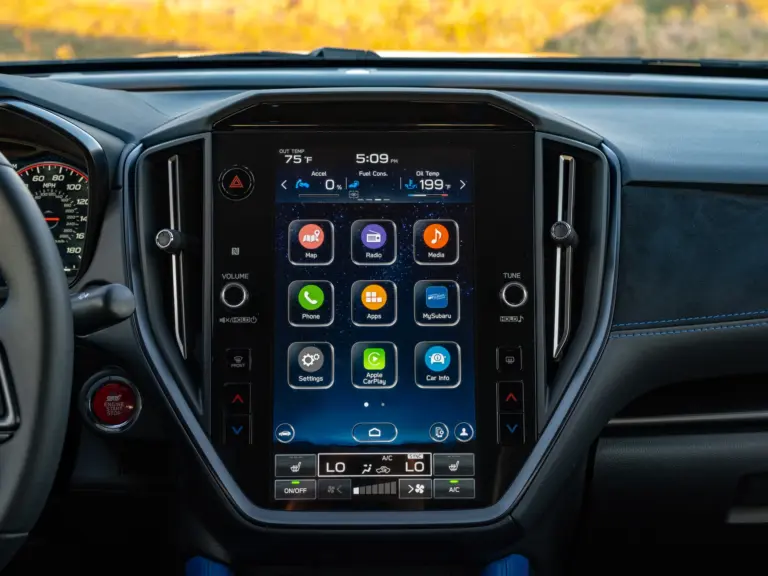
If you own a Subaru built in the last several years, there is a good chance you have run into some kind of problem with the infotainment system. A screen that freezes mid-drive. A touchscreen that ignores your taps. Navigation that gives you directions that make no sense. Bluetooth that refuses to connect to your phone no matter how many times you try. These are not isolated incidents. Subaru infotainment problems have been reported across multiple models and model years, and they have frustrated enough owners to generate lawsuits, recalls, and plenty of angry forum posts.
This guide covers what is actually going wrong with Subaru’s infotainment system, which models are most affected, what Subaru has done about it, and what you can do right now if your system is giving you trouble.
The Most Common Subaru Infotainment Problems Owners Actually Experience
1. Freezing Screens
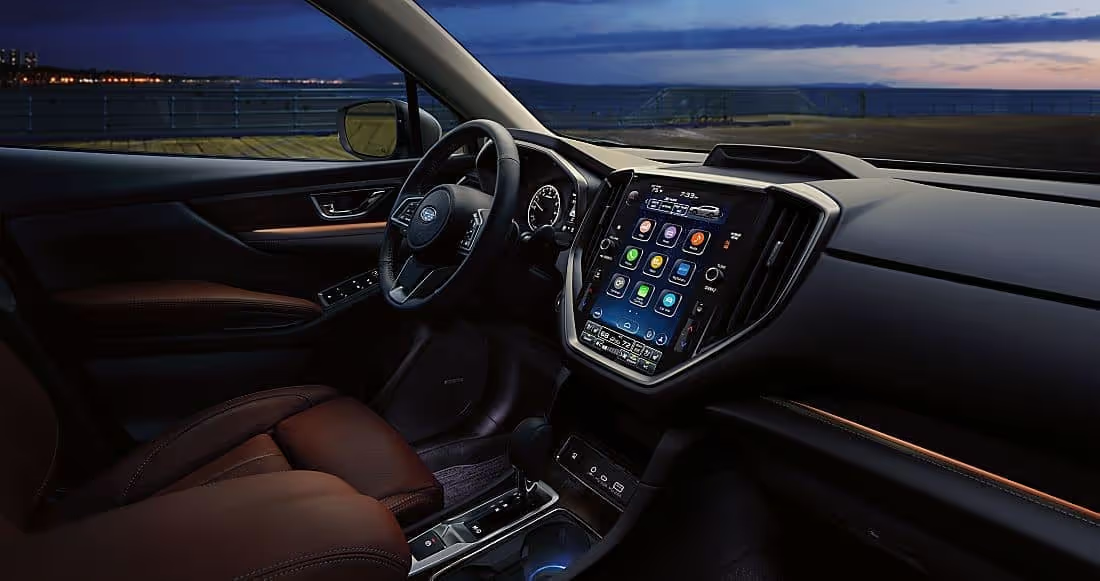
This is probably the complaint you will see most often on Subaru owner forums, and for good reason. The infotainment screen freezes completely, sometimes in the middle of a route, sometimes right after starting the car, and occasionally while switching between apps or audio sources. When it freezes, nothing responds. The touchscreen is locked. The only way out is a forced restart.
Owners of the 2022 Outback Onyx XT and the 2022 Forester have been particularly vocal about this issue. But it is not limited to those models. Reports of screen freezes show up across the 2019 through 2023 model years on multiple Subaru platforms. Some owners describe the freeze happening once every few weeks. Others deal with it almost daily, which makes the system genuinely unreliable for everyday use.
What makes the freezing issue especially aggravating is that it can affect the navigation system while you are actively using it. Imagine being in an unfamiliar area, relying on turn-by-turn directions, and the screen locks up. That is not just an inconvenience. It is a real safety problem.
2. Unresponsive Touchscreen
A frozen screen and an unresponsive touchscreen can look similar from the outside, but they are not always the same thing. A frozen screen is locked in place with an image still displayed. An unresponsive touchscreen may still show normal visuals but simply does not register your taps and swipes at all, or registers them inconsistently.
This issue has been serious enough that Subaru has faced lawsuits and recalls specifically related to it. When a touchscreen stops responding, you lose the ability to adjust climate controls, access navigation, change audio settings, or use any feature that is managed through the screen rather than physical buttons. In vehicles where Subaru moved more functions to the touchscreen and removed dedicated physical knobs and buttons, this creates a much bigger problem.
Reports of unresponsive touchscreens appear frequently on models with the larger 11.6-inch portrait-style screen introduced in the 2020 Legacy and Outback redesign. That screen controls a significant amount of the vehicle’s functions, so when it stops responding, the impact on usability is substantial.
3. Navigation System Failures and Misdirection
Subaru’s built-in navigation system has its own category of complaints. Owners have described incorrect route guidance that takes them in the wrong direction entirely, routes that recalculate constantly without reason, and a general sluggishness where the system lags several seconds behind real-world movement. In some cases, the navigation shuts down mid-trip and has to be restarted.
Slow GPS acquisition is another common complaint. The system can take two to three minutes after startup before it establishes a reliable position fix, which is significantly longer than most standalone navigation devices or phone-based apps. For daily commuters this is tolerable, but for anyone relying on navigation in real time, it is a serious limitation.
Some owners have given up on the built-in navigation entirely and defaulted to running Google Maps or Waze through Apple CarPlay or Android Auto instead, which is functional but defeats the purpose of having a built-in system.
4. Radio and Audio System Problems
Audio issues have also been a point of frustration. Poor radio reception, signal drops, and degraded audio quality have been reported by a number of Subaru owners. Some describe FM reception that is noticeably worse than other vehicles they have owned, with stations dropping out in areas where other cars get a clear signal.
Beyond radio reception, audio settings sometimes fail to save between sessions. You adjust the equalizer or the balance settings, and the next time you start the car, they have reset to default. This is a software behavior issue rather than a hardware failure, but it is annoying enough that it gets its own category of complaints online.
5. Bluetooth and Phone Connectivity Failures
Bluetooth connectivity problems are widespread across Subaru infotainment systems. Common reports include phones failing to pair on the first attempt, paired phones suddenly losing connection during a drive, phone contacts not syncing or taking several minutes to populate after connecting, and calls routing to the car’s speakers rather than the phone even when that is not the user’s preference.
Apple CarPlay and Android Auto connectivity issues layer on top of the Bluetooth problems. Some owners report their CarPlay disconnecting randomly during use, especially on longer drives. Others find that the system does not recognize their phone at all until the car is restarted.
The Subaru Starlink System: What It Is and Why It Has Caused So Many Problems
Subaru markets its infotainment platform under the Starlink name. Do not confuse it with Elon Musk’s satellite internet service. This is Subaru’s branded suite of connected technology that includes the touchscreen interface, navigation, audio system management, smartphone connectivity, and in some trims, connected services like emergency assistance and remote vehicle access.
Starlink has been available in Subaru vehicles since 2016, but the issues that have generated the most complaints and legal action are concentrated in the 2019 to 2023 model years, particularly after the infotainment system was redesigned with a larger screen and more functions consolidated into the touchscreen interface.
Software Updates: Subaru’s Ongoing Response
Subaru has released software updates for the Starlink system since problems were first widely reported, and they continue to push updates as new issues are identified. These updates have addressed some of the freezing and responsiveness complaints, but they have not resolved every problem for every owner.
A 2022 Crosstrek owner on a major Subaru forum reported that a senior Subaru customer service representative confirmed an update was in development to address the reported infotainment issues. That kind of communication from Subaru acknowledges the problems are real and systemic, not just isolated incidents.
Keeping the system software current is one of the most effective things you can do as an owner. Updates are available through the dealership, and in some cases, Subaru has made it possible to update the system via a USB drive downloaded from their website. We will cover how to check for and apply updates in the fixes section below.
The Subaru Starlink Lawsuit: What You Need to Know
The problems with the Starlink system were serious enough to generate legal action. A class-action lawsuit was filed in 2017 on behalf of Subaru owners who experienced defective infotainment systems. The lawsuit alleged that the Starlink system was not functioning as Subaru advertised, leaving drivers without reliable access to features they paid for.
Subaru eventually reached a settlement, agreeing to pay $6.25 million to compensate affected owners. The law firm Ahdoot and Wolfson, PC, represented the plaintiffs in the case. If you believe your vehicle falls within the affected group, checking with current class-action information sources will give you the most up-to-date picture of whether you may be entitled to compensation or repair coverage.
That settlement did not end the complaints. New infotainment-related legal activity has continued as the problems have persisted across newer model years. The ongoing nature of these issues is part of what makes staying informed as a Subaru owner so important.
Which Subaru Models Are Most Affected?
While infotainment complaints have appeared across multiple Subaru models, some vehicles have been more consistently problematic than others. Here is a realistic picture of which vehicles and model years have generated the most significant owner complaints:
| Model | Affected Years | Most Common Issues |
|---|---|---|
| Subaru Outback | 2019 to 2023 | Freezing screen, unresponsive touchscreen, navigation shutting off, phone connectivity |
| Subaru Legacy | 2019 to 2023 | Starlink head unit freezing, unresponsive controls, Bluetooth issues |
| Subaru Forester | 2019 to 2022 | Screen freezes, sluggish response, navigation inaccuracies |
| Subaru Crosstrek | 2019 to 2023 | Freezing, poor Bluetooth connectivity, software bugs |
| Subaru Ascent | 2019 to 2022 | Screen freezing, connectivity drops, navigation issues |
The 2019 to 2023 Outback and Legacy tend to appear most frequently in complaints, largely because those models received the larger 11.6-inch vertical touchscreen that handles a much higher percentage of vehicle functions than the smaller screens in previous generations. When that screen has problems, the impact is broader and more disruptive.
Subaru Outback Infotainment Problems: A Closer Look
The 2019 through 2023 Outback redesign brought a completely overhauled interior with a massive portrait-oriented touchscreen as the centerpiece. Subaru leaned heavily into that screen, routing climate controls, audio management, driver assist settings, and more through it. It was a bold design choice, and it made the reliability of that screen absolutely critical to the vehicle’s usability.
Unfortunately, that screen has been unreliable for a significant number of owners. The touchscreen freezing in the middle of navigation while driving on an unfamiliar highway is a common story on Subaru Outback forums. So is the backup camera feed going dark when reversing, which is both frustrating and a safety concern. Smartphone connections that work fine one morning and refuse to pair the next day have also been widely reported.
Subaru dealers have responded to Outback infotainment complaints with software updates in most cases. Some owners have required multiple visits before the updates addressed their specific issues. In cases where updates could not fix the problem, dealerships have replaced the Starlink head unit entirely under warranty.
Subaru Legacy Infotainment Problems: What Owners Are Saying
The Legacy shares its infotainment platform with the Outback in the 2020 and later redesign, so the problems are largely identical. Legacy owners describe the same freezing Starlink head unit, the same connectivity failures, and the same frustration with a system that should be a premium feature but does not behave like one.
For Legacy owners specifically, the issue is sometimes more acute because the Legacy is positioned as a more refined, upscale sedan. Buyers who paid for that positioning expect a certain level of quality and consistency. When the infotainment system freezes or the navigation goes wrong, it feels more out of place in a vehicle at that price point than it might in a base trim economy car.
The same dealership repair process applies to the Legacy as to the Outback: software update first, factory reset if necessary, head unit replacement if the software-based approaches cannot resolve the problem and the vehicle is within warranty coverage.
How to Fix Subaru Infotainment Problems: What Actually Works
Fix 1: Reboot the System (Soft Reset)
When the screen freezes or the touchscreen stops responding, the first thing to try is a soft reset. Subaru’s recommended method is straightforward:
- Press and hold the power button on the infotainment panel. On most Subaru models, this is the physical button associated with the audio system, often combined with the volume knob.
- Hold it for approximately 10 seconds.
- Release and wait for the system to restart. This can take 30 to 60 seconds.
- If the system does not restart on its own, try pressing the button again briefly.
A soft reset forces the system software to shut down and start fresh. It does not erase any of your settings or paired devices. Think of it like restarting a smartphone. Most minor freezes and glitches clear up immediately after a reboot. If the freeze or unresponsiveness keeps coming back, you need to move beyond the soft reset to address the underlying cause.
Fix 2: Check for and Install Software Updates
Outdated software is one of the most common reasons Subaru infotainment systems behave poorly. Subaru releases updates to fix bugs, improve stability, and add features. Running an old software version means you might be dealing with problems that were already fixed in a newer release.
Here is how to check for updates:
- Note your vehicle’s VIN and your current software version. You can usually find the software version in the infotainment system settings under “System Information” or “About.”
- Visit Subaru’s official website and look for the infotainment update section. Enter your VIN to check whether updates are available for your specific vehicle and software version.
- If an update is available via USB, download the update file to a USB drive formatted to the specifications Subaru requires (typically FAT32 format). Follow Subaru’s instructions for the installation process, which involves inserting the USB into the vehicle’s port with the engine running.
- Alternatively, schedule a service visit at your Subaru dealership and ask them to check for and install any available software updates for the infotainment system. Dealers have diagnostic tools that can apply updates more comprehensively than the USB method in some cases.
Do not skip this step. Owners who have installed the latest software updates frequently report that the freezing and connectivity issues they were experiencing are either significantly reduced or completely resolved.
Fix 3: Perform a Factory Reset
If the soft reset and software update have not resolved the problem, a factory reset is the next step. This wipes the infotainment system back to its original out-of-the-box state, clearing any corrupted data, faulty configurations, or persistent software errors that have built up over time.
Before you do a factory reset, understand what you will lose:
- All paired Bluetooth devices
- Saved navigation locations and home/work addresses
- Preset radio stations
- Personalized audio settings
- Any custom system settings you have configured
To perform a factory reset on most Subaru Starlink systems:
- Go into the Settings menu on the infotainment screen.
- Look for “General Settings” or “System.”
- Find the “Reset” or “Factory Reset” or “Initialize” option.
- Confirm the reset when prompted. The system will restart and load as if it were brand new.
- Re-pair your devices, re-enter your navigation preferences, and reconfigure your settings.
On some Subaru models, the exact menu path varies slightly. If you cannot find the reset option, your owner’s manual has the specific steps for your model year.
Fix 4: Fix Bluetooth Connectivity Issues Specifically
Bluetooth connectivity problems often have a simple fix that does not require a full system reset. Try these steps before going further:
- On your phone, go to Bluetooth settings and “forget” or delete the Subaru connection entirely.
- On the infotainment system, delete your phone from the paired devices list.
- Restart both the phone and the infotainment system.
- Re-pair from scratch by putting the infotainment system into pairing mode and searching for it from your phone’s Bluetooth menu.
This process of completely deleting the pairing and starting fresh resolves the majority of Bluetooth connectivity problems. Old pairing data can become corrupted over time, especially after phone operating system updates, and a clean re-pair is often all it takes.
For CarPlay and Android Auto connectivity issues specifically, also check that the USB cable you are using is in good condition. Worn or damaged cables are a surprisingly common cause of unreliable CarPlay and Android Auto connections.
Fix 5: Address Navigation-Specific Problems
For navigation issues that persist after software updates, check whether your navigation map data needs to be updated separately from the system software. Navigation map databases are updated on a different schedule than the infotainment software, and running outdated maps can cause routing errors and incorrect directions.
Subaru’s website has a map update tool where you can check whether newer map data is available for your vehicle. Map updates are sometimes free during the warranty period and may carry a fee afterward.
If the navigation continues to malfunction after map updates, this is a dealership issue. Bring it in and document the specific problems you are experiencing, including when they happen and what the system does wrong. Detailed documentation helps the technician diagnose the issue more effectively.
Fix 6: Go to the Dealership for Repair or Replacement
If you have worked through every self-service fix and the problems persist, it is time for a professional diagnosis. Here is what to expect when you bring your vehicle to a Subaru dealership for infotainment issues:
- Software update: The first thing most dealers will do is check whether the latest software version is installed and update it if not. Even if you have already done this via USB, the dealer’s tools may apply additional calibrations or module updates that the USB process does not cover.
- Factory reset: If the software update does not resolve the issue, the technician may perform a more thorough factory reset or system initialization using dealer-level diagnostic software.
- Head unit replacement: When software-based repairs cannot fix the problem, and the vehicle is still within its warranty period, the dealership can replace the Starlink head unit entirely. A new unit should not carry the same bugs as the original, especially if it is installed with the latest software version from the start.
Before your dealership visit, document everything. Write down exactly what the system does wrong, how often it happens, under what conditions, and what you have already tried. Photos or short video clips of the malfunction taken safely while parked are even better. The more specific information you give the technician, the faster they can identify and address the real problem.
Watch These Walkthroughs for Extra Help
Sometimes it helps to see the process done visually. This video covers additional troubleshooting steps for Subaru infotainment problems that complement everything explained in this guide:
Quick Reference: Symptoms, Likely Causes, and First Steps
| Symptom | Likely Cause | First Fix to Try |
|---|---|---|
| Screen freezes and will not respond | Software crash or glitch | Soft reset (hold power button 10 seconds) |
| Touchscreen ignores taps | Software bug or outdated firmware | Soft reset, then check for software updates |
| Navigation gives wrong directions | Outdated maps or software bug | Update navigation maps, then system software |
| Bluetooth keeps dropping | Corrupted pairing data | Delete and re-pair device from scratch |
| CarPlay or Android Auto disconnects randomly | Bad USB cable or software bug | Replace USB cable, then update system software |
| Radio reception is poor | Antenna connection or software issue | Check antenna connections, update software |
| Problems persist after all self-fixes | Hardware failure or deep software fault | Dealership visit for professional diagnosis |
Know Your Rights as a Subaru Owner
If your Subaru infotainment system has been persistently malfunctioning and the dealership has not been able to fix it after multiple attempts, you may have options beyond just waiting for another update.
First, check whether your vehicle falls under any active recalls or technical service bulletins (TSBs) related to the infotainment system. TSBs are instructions that Subaru issues to dealers for addressing known problems, and they may cover repairs that are not publicly advertised as recalls. You can search for TSBs using your VIN on the NHTSA website at no cost.
Second, if your vehicle is still under warranty and the infotainment system remains defective despite multiple repair attempts, you may be entitled to a replacement or buyback under your state’s lemon law. Lemon laws vary by state, but most require that the defect substantially impairs the vehicle’s use or safety and that the dealer has made a reasonable number of attempts to fix it without success.
Third, check the status of any current class-action litigation involving Subaru infotainment systems. If you are an affected owner within the class period, you may be entitled to compensation or free repairs under a settlement.
Subaru has acknowledged these infotainment problems, and they have taken steps to address them. But the steps have not always been fast enough or comprehensive enough to satisfy every affected owner. If you are one of those owners, you have more leverage than you might think, and using it starts with documenting your issues thoroughly and communicating persistently with your dealership and Subaru customer service.
Do not accept “we cannot reproduce the problem” as a final answer if the issue is happening regularly in your vehicle. Document it, record it if you can, and keep pushing until it is resolved.