
OBD2 and CAN bus are two names you will hear a lot when people start talking about car diagnostics, engine computers, and aftermarket gadgets. The tricky part is that they often get thrown into the same sentence like they are the same thing. They are not.
Here is the simple way to think about it. OBD2 is how your car communicates diagnostic information so a scanner can read it. CAN bus is how the car’s computers and modules talk to each other behind the scenes. One is mostly about diagnosing and reporting. The other is about communication between electronic units.
If you want the full picture, this guide breaks down what each one is, what information it handles, how they differ, where they overlap, and why you might see converters and adapters that claim to “translate” between the two.
OBD2 vs CAN bus: the differences in plain language
Most car owners meet OBD2 the first time the check engine light comes on. A mechanic then uses an OBD2 scanner, reads error codes, and explains what is going wrong. That is the everyday side.
CAN bus is usually “invisible” to you unless you are using advanced tools or installing telematics, alarms, trackers, or custom electronics. CAN bus is the network that lets multiple control units communicate quickly without everyone needing to talk to one central “host computer.”
But here is the thing. Even if you do not know the details, both systems are part of why your car can diagnose itself and why different modules can coordinate actions while you drive.
What is OBD2?
OBD2, short for On-Board Diagnostics 2, is your car’s built-in self-diagnostic system. It monitors and receives information from the ECU, which stands for Electronic Control Unit. Think of the ECU as one of the main brains in the vehicle, especially for engine-related functions.
If you have ever seen the malfunction indicator on your dashboard, that light is your car telling you that something is wrong somewhere in the vehicle. When you take the car to a mechanic, you will usually see them connect an OBD2 scanner to check what the car detected.
The mechanic plugs the reader into the OBD2 pin connector commonly located near the driver’s area. From there, the scanner reads OBD2 error codes. Those codes help the mechanic understand the problem and move faster toward the right troubleshooting steps.
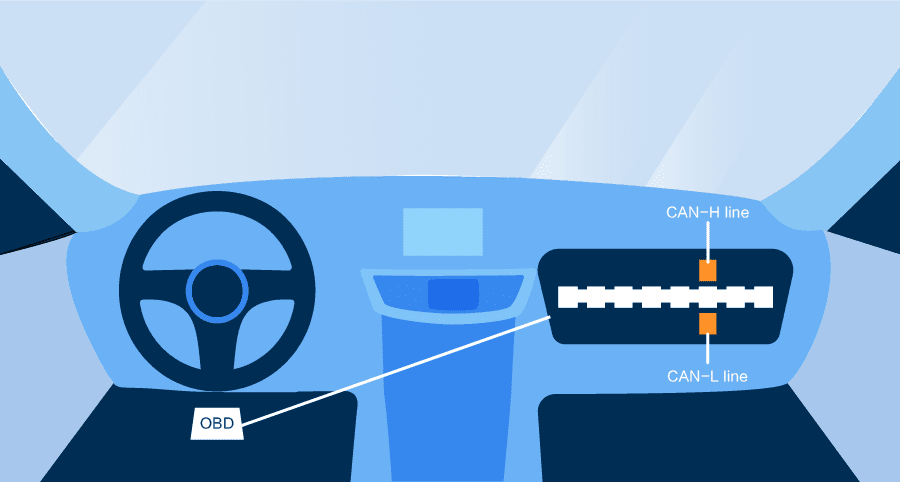
OBD2 is a regulated diagnostic system available in small trucks and vehicles, and it is used for self-diagnostics. It uses a 16-pin port near the driver’s seat. That connector is what makes it possible to access vehicle diagnostic data with a scanner.
What information can OBD2 provide?
OBD2 can provide a mix of sensor data and diagnostic information. Based on what is commonly referenced in OBD2 usage, it can report things like coolant and air temperature, road speed and position, and data related to throttle plus parts of engine operation like crankshaft and camshaft readings.
It can also provide engine rpm, and, most important for repairs, it can point you to the problems the car has detected. Those problems are usually presented through diagnostic trouble codes that help identify what system is acting up.
What is OBD2 used for?
OBD2 is an integral part of how modern cars troubleshoot themselves. It supports early troubleshooting by revealing the car’s state. Instead of guessing, a mechanic can look at the data and the error codes the vehicle stored.
It also helps maintain performance across multiple systems. An OBD2 setup is used to help self-correct abnormalities in things like the fuel mixture and ignition. On top of that, it helps monitor items such as mileage, speed, emissions, and other vehicle information.
Another major role is that it monitors and detects issues in areas that affect engine performance. Common categories include:
- Engine misfires
- Speed control
- Transmission systems
- Fuel systems
OBD2 information also supports telematics devices. Those systems can process vehicle data such as fault codes, engine revolutions, fuel usage, and vehicle speed. That is why OBD2 can matter even if you never open the engine hood.
What is a CAN bus?
CAN bus stands for Controller Area Network. It is a protocol designed to let microcontrollers and control units communicate with each other without relying on a host computer. The original idea is that modules such as the brake and engine controllers can talk directly over the network.
This approach eliminates a traditional point-to-point communication setup. Instead of each module needing its own dedicated wiring path to every other module, CAN bus reduces wiring quantity and overall complexity.
CAN bus is also built for faster communication between modules. It uses a message-based protocol, meaning control units can reliably share information with each other, often using a priority-based method so important messages do not get stuck behind less critical ones.
What is CAN bus used for?
CAN bus is used to enhance communications between electrical control units without using any host computer. That is why you see it in a wide range of real applications, from vehicles to industrial systems.
Applications for CAN bus
- All types of vehicles
- Elevators
- Manufacturing plants
- Dryers, washing machines, and other household appliances
- Ships
- Heavy-duty telematics
That list matters because it shows CAN bus is not “just an engine thing.” It is a general communication network style used anywhere multiple electronic components need to share data efficiently.
Differences between OBD2 and CAN bus
Here is the part that clears up most confusion. People mix them up because both show up in diagnostics and both involve data moving around the car. Still, they handle different jobs.
| Category | CAN bus | OBD2 |
|---|---|---|
| Primary role | Communication mode between modules/parts | Diagnostic functions and diagnostic “language” |
| Speed feel | High-speed communications protocol | Slower way of reading data on a digital screen |
| How data is sent | Broadcasts to the network so other devices can read | Request/response style with limited sources per interaction |
| Data packaging | Can include several data values in one message | Limited to sending and requesting one data source at a time |
Let us translate that table into normal-driver terms. CAN bus is like the internal radio network the car uses so different computers can exchange messages quickly. OBD2 is like the diagnostic form you fill in at the mechanic’s counter. You ask for certain information, and the scanner reads the codes and data you requested.
Similarities between them
Even though they do different jobs, there are also some similarities you will run into in real life.
- Both are protocols used for communication
- They use identical connectors: J196
That connector detail is one reason people get confused. If you are looking at the same physical plug, it feels like the systems must also be the same. The reality is that the connection gives you access, but the “talking method” and purpose are different.
Can they be confused?
Yes, they can be confused, even though they are different. In fact, there are tools that transfer information from OBD2 to CAN bus and vice versa.
These converters are usually described as CAN signal converters. They can fit into an OBD2 socket and then help provide helpful information by extracting and converting engine information from the vehicle’s CAN bus network.
That is also why you might see a scanner app saying it is “reading CAN data” when it actually gets the data through an adapter connected at the OBD2 port. The adapter acts like a translator, turning messages into something a normal diagnostic tool can understand.
How they work together in your car (simple flow)
This is where everything starts to click. Imagine the car as a team. Sensors send signals to control units. Those control units need to share information quickly. That communication happens over CAN bus.
Then, when something is wrong, the diagnostic system needs a way to report it in a standardized format. That is where OBD2 steps in. It monitors ECU information, stores error codes, and lets a scanner access what is happening.
A practical way to visualize it looks like this:
- Sensors detect an issue (for example, an engine-related fault pattern)
- The ECU processes the information
- Control units exchange messages over CAN bus so the network stays coordinated
- OBD2 collects diagnostic information and error codes so a scanner can read it
- A mechanic or scanner retrieves the codes and data through the OBD2 connector
Even if you never see CAN bus directly, OBD2 depends on the ECU and the overall vehicle electronics that communicate over the internal network.
What you actually see when using an OBD2 scanner
If you own a basic scanner or Bluetooth adapter, you will usually see two types of output.
First: error codes. These codes point you to a problem the vehicle detected. The dashboard malfunction indicator light is your first hint that something is recorded.
Second: data values. OBD2 can provide sensor-related information such as coolant and air temperature, road speed, throttle position-related data, engine rpm, and similar readings. That live data helps you confirm whether the problem is still happening.
A real-life example helps. Suppose the check engine light comes on after a rough drive. You scan it at home and get an engine-related error code. Then you start the car and watch live data. If rpm, temperatures, or other values behave oddly, the scanner output becomes a roadmap instead of just a complaint.
That is also why OBD2 helps with early troubleshooting. It is not magic. It is structured information that makes diagnosis faster.
What CAN bus data looks like to advanced tools
When you dig into CAN bus, you are not just reading “codes.” You are often looking at raw or semi-structured network messages between modules. That is why CAN bus analysis tools can feel complicated compared to typical OBD2 scanners.
Instead of a slow, request-and-response style diagnostic view, CAN bus is message-based and faster. Modules can broadcast information so other connected devices can access it without necessarily asking for it every time.
That broadcast and priority-based messaging is one reason CAN bus supports quick coordination across vehicle electronics. It also explains why some advanced telematics setups prefer CAN bus capture, because they can monitor multiple values and interpret them at a higher frequency than basic OBD2 live readings.
Choosing tools: scanners, adapters, and “do I need CAN?”
Here is a practical decision point. Most car owners need OBD2 because it is designed for diagnosis. Mechanics use OBD2 scanners because error codes and ECU-monitored data are accessible through the OBD2 connector.
If you are doing basic maintenance diagnosis, a quality OBD2 scanner is usually enough. If you are adding specialized electronics, building a custom telematics setup, or monitoring a specific set of network messages, then you may encounter CAN bus tools or adapters.
Because you can use converters to move information between OBD2 and CAN bus, some devices claim to provide “CAN access” through the OBD2 port. That can work, but it is worth understanding the goal.
| What you want | Most likely path | Why |
|---|---|---|
| Read check engine codes | OBD2 scanner | OBD2 is built for diagnostic trouble code access |
| Track basic vehicle live data | OBD2 live data | OBD2 can provide sensor and engine values |
| Monitor module-to-module messages | CAN bus interface | CAN bus is the network that carries those messages |
| Use CAN data with an OBD2-based app | OBD2 to CAN converter | Converter extracts and converts engine info from CAN bus |
Common misconceptions (and what is actually true)
Let us clear up the usual misunderstandings you hear from time to time.
Misconception 1: OBD2 and CAN bus are the same thing
They are not. CAN bus is the internal communication network between control units. OBD2 is the diagnostic system that monitors ECU information and provides diagnostic access through an OBD2 scanner.
Misconception 2: Faster CAN bus means OBD2 always fails
Not at all. OBD2 can still give you error codes and important sensor readings. The difference is the “style” of communication. CAN bus is a high-speed, message-based network. OBD2 is a diagnostic protocol intended for troubleshooting and reporting.
Misconception 3: If a scanner shows live data, you are seeing raw CAN
Usually, no. Many scanners present OBD2-style live data from the diagnostic layer. If you want raw message-level detail, you typically need CAN bus monitoring tools or an adapter that translates the internal network messages.
Misconception 4: Adapters are perfect translators
Converters can transfer information between OBD2 and CAN bus, but the adapter cannot rewrite the physics of how the car communicates. You still need to understand what the tool is truly reading and what format it is providing to your app or diagnostic screen.

Frequently asked questions about OBD2 and CAN bus
Why does my mechanic use an OBD2 scanner?
Because OBD2 is designed for self-diagnostics and for reading the ECU’s stored diagnostic information. The scanner connects to the OBD2 connector and retrieves error codes and diagnostic data that help pinpoint what system is failing.
Does CAN bus show error codes?
CAN bus is mainly a communication protocol that carries messages between control units. Error reporting is handled through the diagnostic side, which is what OBD2 focuses on. You can use conversion methods to translate data, but the “error code” concept belongs to the diagnostic layer.
Can I read CAN bus data using an OBD2 port?
Sometimes, yes, but usually through a converter or adapter approach. Converters can extract and convert engine information from the vehicle’s CAN bus network so it becomes accessible through an OBD2 socket interface.
Why do some apps feel slow compared to CAN tools?
This ties back to the difference in how data is read. CAN bus is a high-speed communications protocol, while OBD2 is often described as a slower way of reading data for display and diagnostics.
Your next move
So here is the actionable takeaway: when your check engine light comes on, start with OBD2 because it is built for diagnostic codes and ECU monitoring. When you want deeper, faster module-to-module insight for telematics or custom installs, that is where CAN bus becomes the main story.
Which problem are you trying to solve right now: reading diagnostic codes for repairs, or accessing deeper vehicle network data for upgrades?