
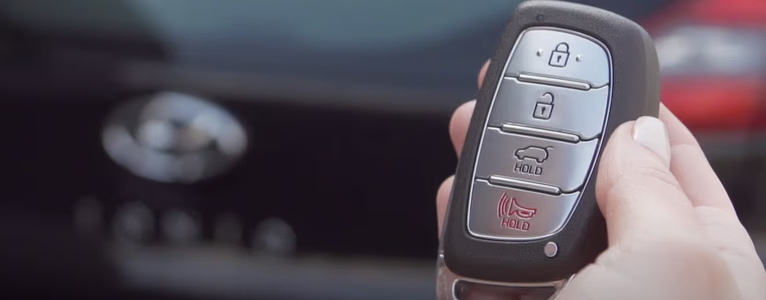
A woman walked up to our shop last Monday morning holding her Hyundai Tucson smart key in one hand and a torn plastic blister pack of CR2032 batteries in the other. Her dashboard had flashed the “Key Battery Low” warning for a week, so she did the responsible thing and swapped the coin battery at her kitchen table before work. As soon as she snapped the plastic shell back together and walked out to the driveway, the fob was stone dead; it wouldn’t unlock the doors, pop the tailgate, or let the push-button ignition see the key.
She figured she had somehow fried the computer chip inside the key and braced herself for a $350 dealership replacement bill. I popped her fob open with a plastic trim pick, flipped the coin battery over so the positive “+” side faced down into the bottom tray where Hyundai molded the tiny plus sign, wiped a layer of factory bitter coating off the metal with an alcohol swab, and snapped it shut. Out in the parking lot, her Tucson chirped and unlocked on the very first press.
Modern cars rely on key fobs and proximity smart keys for almost everything, from unlocking the doors and disarming the alarm to popping the trunk, rolling windows down, and starting the engine. When a Hyundai key fob stops working right after you put a brand-new battery in it, the problem is almost always something simple that happened while the shell was open. Let’s walk through every reason a Hyundai fob goes dead after a battery swap, how to fix each one at home, and how to unlock and start your Hyundai right now if you’re stranded with a non-working fob.
Why your Hyundai key fob is not working after replacing the battery
When a key fob worked (even weakly) five minutes ago and stops responding the instant you change the battery, don’t start by assuming the car’s computer forgot your key. In the shop, we see six specific things go wrong during a routine coin-cell swap, along with a couple of car-side problems that happen to show up at the worst possible time.
- The new coin battery is installed upside down (reversed polarity): Unlike many remotes where the shiny “+” side faces up toward you, most Hyundai smart fobs hold the battery with the positive “+” side facing down into the plastic battery well.
- Invisible bitter coating on the new CR2032 battery is blocking contact: Child-safe coin batteries sold in retail stores often have a clear bitter film around the perimeter that insulates the low-voltage spring prongs inside a Hyundai fob.
- You mishandled the key fob circuit board or bent a contact tab: Prying the old battery out with a metal screwdriver or pocketknife can bend the tiny gold spring fingers flat or knock a micro-component off the green circuit board.
- The key fob buttons or internal rubber pad are worn out or shifted: If the silicone button membrane slips off its plastic guide pins when you snap the shell closed, pressing the outside button won’t touch the switch underneath.
- A broken door lock actuator on the car is fooling you: Sometimes the fob is working fine and flashing the hazard lights, but a worn-out door lock actuator motor inside the Hyundai’s door latch fails to move the lock rod.
- The key fob is spoiled from earlier water damage or lost sync: Moisture, pocket sweat, or cracked solder joints that were barely hanging on can finally break contact when you flex the plastic case open.
| What Your Hyundai Key Fob Is Doing | Most Likely Cause | How to Fix It in 2 Minutes |
|---|---|---|
| Tiny red LED on the fob does NOT blink at all when you press Lock/Unlock | Battery installed upside down (+ facing wrong way), dead new battery, bitter coating, or bent metal contact tab | Open fob, verify “+” stamp direction inside tray, wipe battery with rubbing alcohol, gently lift bent metal prongs |
| Red LED on fob blinks normally, and car hazard lights flash, but one or more doors don’t unlock | Broken door lock actuator inside the door, not a bad key fob | Test the interior power lock switch on the armrest; replace the faulty door latch actuator assembly |
| Unlock button works, but Lock or Panic button feels mushy or does nothing | Worn-out key fob buttons, torn silicone pad, or dirty micro-switch on the circuit board | Re-seat the rubber button pad on its locator pins; swap the circuit board into a $15 replacement outer shell |
| Red LED on fob blinks, spare key fob works fine, but this fob won’t unlock or start the car | Damaged RF transmitter on the circuit board, water corrosion, or lost rolling-code sync on older flip keys | Inspect green board for green/white corrosion or broken solder joints; try ignition resync on older keyed models |
| Neither the main fob nor the spare fob unlocks the car, and interior dome lights are dark | The 12-volt car battery under the Hyundai’s hood is dead, not the key fob battery | Pull the mechanical key blade out of the fob, unlock the driver’s door manually, and jump-start the 12V car battery |
1. Battery polarity, wrong coin cell size, and the bitter-coating trap
Before you blame the electronics, pop your Hyundai key fob back open and look closely at the battery itself. Roughly two out of every three “dead after battery change” fobs that cross my service counter are simply holding the battery upside down or suffering from poor contact.
Why Hyundai battery trays fool so many people
When you split open a typical Hyundai Tucson, Santa Fe, Sonata, Elantra, Kona, or Palisade smart key, the green printed circuit board stays in one half of the clamshell while the round coin battery sits in the other half. Because the metal spring prongs on the circuit board reach down to touch the back of the battery, Hyundai designed the plastic tray so the flat positive (+) face of the CR2032 battery goes face-down into the plastic recess. Look right at the black plastic floor under the battery and you will see a tiny molded + symbol.
If you popped the old battery out without noticing which way it faced, it feels natural to drop the new battery in with the shiny “+” writing facing up toward your eyes. When you do that, polarity is reversed, the LED on the fob won’t blink, and the remote acts completely dead. Flip the battery so the “+” side touches the “+” mark molded into the plastic housing, and test it before you even snap the two halves all the way shut.
CR2032 vs. CR2025 and the child-safe coating problem
Make sure you also bought the exact battery number stamped inside the cover, which is almost always a CR2032 (3 volts, 20mm wide, 3.2mm thick) on modern Hyundai fobs, or occasionally a thinner CR2025 (2.5mm thick) on certain older remotes. If your fob calls for a 3.2mm-thick CR2032 and you accidentally slip a thinner 2.5mm CR2025 or 1.6mm CR2016 in there, the battery rattles around loose inside the shell and loses contact with the metal prongs.
Even with the right CR2032 installed the right way up, watch out for batteries packaged with a bitter child-deterrent coating. That bitter substance is great for safety around toddlers (you can read more about button-battery and vehicle safety standards on the National Highway Traffic Safety Administration (NHTSA) website), but the coating is applied in a ring pattern that frequently blocks tiny low-pressure key fob contacts from drawing current. Dampen a paper towel or cotton swab with 70% or 90% isopropyl rubbing alcohol, scrub both flat faces and the rim of the new coin battery for ten seconds, dry it off, and pop it back in.
2. Mishandled key fob circuit board and bent battery prongs
Inside your Hyundai key fob is a thin fiberglass circuit board packed with miniature resistors, a quartz crystal oscillator, micro-switches, and a tiny radio-frequency transmitter chip. That board is tough enough to survive bouncing around in your pocket for ten years, yet surprisingly fragile when someone attacks it with a metal flathead screwdriver.
When you pry the two halves of the Hyundai fob apart, never shove a wide screwdriver blade deep into the seam where the green circuit board sits. Always use the built-in notch next to the mechanical key slot (In fact, Hyundai shapes the tip of the removable metal emergency key blade specifically so you can twist it in that shallow slot to pop the case open safely!). If a screwdriver slips across the circuit board while you’re prying out a stubborn coin battery, it can scrape through a copper trace or knock a tiny surface-mount capacitor right off the board.
More often, prying out the old battery flattens or bends the delicate gold or silver spring prongs that press against the battery’s positive and negative surfaces. Take a wooden toothpick or the tip of a small precision pick and gently lift those metal contact tabs upward by about 1 millimeter so they press firmly against the new battery when you close the lid. Also wipe your thumbprints off the battery faces, because skin oil left on a coin cell increases electrical resistance over time.
3. Worn-out key fob buttons and shifted rubber pads
Key fob buttons take thousands of thumb presses over the life of a car, and they don’t last forever. Sometimes the rubber button pad or the tiny tactile switches soldered to the circuit board are already worn to the edge, and opening the shell to replace the battery is the final straw that puts them out of commission.
You can spot worn-out or shifted buttons pretty easily if you pay attention to how the fob feels in your hand. Maybe the Unlock button only works when you mash your fingernail straight down at a weird angle, or the Lock and Trunk buttons work fine while Unlock feels flat and mushy with zero “click.” Other times, the outer rubber button skin on an older Hyundai flip key splits open from fingernails, letting pocket lint and dirt pack around the switch.
When you open the remote after a battery swap and find that the buttons won’t press cleanly, check that the flexible silicone membrane inside the case is seated squarely on its tiny plastic locator pegs before you snap the back cover on. If the rubber pad is torn or the outer plastic buttons are cracked, you don’t have to buy a $300 programmed key from the dealer! You can buy an empty replacement Hyundai key fob shell with brand-new buttons online for $10 to $18, move your original green circuit board and metal key blade over into the new plastic shell in five minutes, and keep right on driving without any programming required.
4. Broken door lock actuator (when the car lock is the real culprit)
Every Mechanic has seen coincidences drive a car owner crazy. You change the battery in your key fob on Saturday morning, walk out to your Hyundai Elantra or Santa Fe, press the Unlock button, and the driver’s door stays locked tight. Naturally, you blame the battery swap you just did five minutes ago, even when the car lock might fail to work because the mechanical latch inside the door gave up on the exact same day.
Hyundai and Kia vehicles from the 2010s and early 2020s are famous in our shop for wearing out the tiny electric motor or plastic worm gear inside the power door lock actuator assembly. Before you tear your key fob apart three more times, look and listen for these four telltale signs that point to a bad door lock rather than a bad fob:
- The exterior hazard lights flash and the car beeps when you press the fob, but the door stays locked: If the amber turn signals blink once for Lock and twice for Unlock when you push the key fob button, your key fob and the car’s receiver module are communicating 100% fine! The car heard your fob and sent power to the door lock motor, and the motor failed to move the latch.
- The key fob opens some door locks, but leaves one door stuck: Press Unlock twice on your fob to command all four doors and the tailgate to unlock. If the passenger doors and rear hatches pop open while the driver’s door stays locked, your key fob is completely healthy and the driver’s door lock actuator is dead.
- The interior lock lever moves halfway without engaging or disengaging: Watch the little lock flipper next to the inside door handle while you press the key fob button. If it twitches slightly, buzzes, or moves halfway without clicking all the way to the unlocked position, the internal actuator cable or motor is binding up.
- The lock feels jammed or stiff even when turning the physical metal key or pressing the armrest switch: If the power door lock button on the driver’s interior door panel also fails to lock and unlock that door, or if turning the mechanical key blade in the outside keyhole feels gritty and jammed, the problem is inside the door panel.
5. A spoiled or water-damaged key fob
Car key fobs live a rough life. They get dropped in wet parking lots, soaked in rainwater, left in gym shorts that go through the washing machine, and baked on dashboards in July. Sometimes water or sweat seeps past the rubber gasket days or weeks earlier and starts growing crusty green corrosion on the circuit board while the old battery is slowly dying from the short circuit.
In fact, a sudden “Key Battery Low” warning on your Hyundai dashboard is often the first sign that moisture inside the fob drained your old battery overnight! When you pop the fob open and put a fresh battery in, the corroded circuit board still can’t function. Look for these clear signs to confirm whether your key fob is spoiled beyond a simple battery fix:
- Your spare key fob works every single time: Grab your second Hyundai key fob from the house and test it right next to the car. If the spare fob locks, unlocks, and starts the engine effortlessly while your primary fob does nothing with a tested 3.25-volt battery inside, the fault is isolated to that one spoiled key fob.
- The micro-switches on the circuit board are frozen or broken loose: With the shell open, press the tiny square metal button switches directly on the green board with your fingernail. If a switch doesn’t give a crisp tiny click, or if the solder legs have broken loose from the board after a hard drop onto concrete, the board is physically damaged.
- You see white or green powdery crust around the chip legs: Inspect the green circuit board under a bright light or magnifying glass. If you spot fuzzy green or white mineral deposits bridging the tiny silver pins of the microchip, try scrubbing the bare board gently with 90% isopropyl alcohol and a soft toothbrush and letting it dry for 20 minutes; if the corrosion has eaten through the copper traces, the fob will need to be replaced.
6. Key fob reset and resynchronization after a battery change
Does changing the battery in a Hyundai key fob wipe its memory and force you to reprogram the car? Let’s clear up a massive amount of internet confusion right here so you don’t waste money or stress out over your car’s computer.
On almost all modern Hyundai vehicles equipped with a push-button Smart Key proximity fob, the key’s unique security ID is stored in non-volatile memory inside the car’s Smart Key Control Module and the fob’s transponder chip. Swapping the coin battery in a modern Hyundai Smart Key normally requires zero reprogramming at all. As soon as the new CR2032 makes clean contact, the fob works immediately.
However, on older Hyundai models with a traditional turn-key ignition and a separate remote keyless entry transmitter (or if someone pressed the buttons on a rolling-code remote dozens of times while standing far away from the car, pushing the remote’s rolling counter ahead of the car’s receiver window), the remote lock/unlock function can lose synchronization with the Body Control Module. You can suspect a sync or receiver issue if:
- The red light on the fob blinks brightly when pressed, yet the remote buttons do nothing at the car.
- All remotes fail to trigger the wireless locks after a long battery disconnect or electrical glitch (assuming you already checked that the car’s 12V battery and interior receiver fuse are good).
How the ignition-cycle remote resync works on older turn-key Hyundais
If you drive an older turn-key Hyundai where the remote transmitter lost rolling-code sync after sitting dead for months, you can try the classic in-car resynchronization sequence before calling an automotive locksmith. Keep in mind that on newer push-button Hyundais, adding or pairing a brand-new replacement smart key requires an OBD-II diagnostic programming tool connected to the car’s immobilizer system, so this manual key-turn sequence only applies to older turn-key remote receivers:
- Sit in the driver’s seat and close all doors completely: Having an open door or trunk lid will prevent the Body Control Module from entering remote sync mode.
- Insert the mechanical key into the ignition cylinder and turn to ACC or ON without starting the engine: Turn the key just far enough for the dash accessory/warning lights to wake up, leaving the engine off.
- Press and hold the Lock (or Unlock) button on the key fob while cycling the key: On some older Hyundai receiver modules, holding the Lock button on the fob for a few seconds with the ignition in ACC/ON lets the receiver match its rolling-code window; on others, cycling the ignition from OFF to ON three or four times and pressing the Lock button wakes the receiver up.
- Listen for the door lock actuators to cycle: If your specific model year supports manual onboard remote sync, the power door locks will click once to confirm the remote signal was recognized. Press the Lock button on any second remote within ten seconds so both remotes stay registered.
- Turn the ignition key to OFF and remove the key: Open and close the driver’s door, step outside, and test both the Lock and Unlock buttons to verify operation.
One quick mechanic note to put your mind at ease: pressing buttons on your key fob or turning the ignition key from OFF to ON will not damage your vehicles’ ECU! Engine control units are built to handle thousands of key cycles. What can damage a module is jamming paperclips into under-hood diagnostic connectors or connecting cheap, unverified programming dongles into the OBD-II port under the dash, so stick to safe button checks or let a qualified locksmith or shop connect a proper Hyundai-compatible scan tool.
Does resetting the key fob fix the issue?
Resetting or resyncing the key fob only fixes the problem if the remote actually lost rolling-code synchronization with the car’s receiver while the battery was out. If your fob isn’t working because the new CR2032 coin battery is sitting upside down in the tray, has a layer of bitter coating on it, or has a bent battery contact prong, cycling the ignition key twenty times won’t do a thing.
Always verify that the fob is physically powering up first. On models that have a tiny red LED pinhole light in the top corner of the key fob, press the Lock button in a dim room: if you don’t see that tiny red LED flash, the circuit board inside your hand has zero electrical power, and no amount of car resetting will fix a unpowered fob. On newer Hyundai smart fobs that don’t have an external LED light on the plastic case, hold the fob right against the Start/Stop button or test the battery voltage with a multimeter (a brand-new CR2032 should read 3.20 to 3.30 volts right out of the package; anything at or below 2.95 volts is weak).
Should you reprogram the car after replacing the battery?
People ask this question in two different ways at our shop counter, and mixing them up causes a lot of headaches: are you talking about replacing the tiny coin battery inside the key fob, or replacing the heavy 12-volt battery under the hood of the car?
- After replacing the coin battery inside a Hyundai key fob: No, you do not need to pay a dealership to reprogram your car! Modern Hyundai smart keys keep their immobilizer pairing stored permanently in memory while you swap the CR2032 battery. If a shop tries to charge you $180 for “key reprogramming” just because you put a new $4 battery in your existing original fob, walk out the door.
- After replacing the 12-volt car battery under the hood: When you disconnect and change the main 12-volt car battery under the hood, your key fobs still stay paired to the immobilizer, though disconnecting 12-volt power can reset your clock, radio presets, auto-up driver’s window calibration, and idle throttle adaptations. On newer Hyundais with idle stop-and-go (ISG) and a battery sensor on the negative terminal, letting the car sit locked for at least 4 hours overnight (or resetting the battery value with a scan tool) helps the computer calibrate to the fresh 12-volt battery.
Can you start a Hyundai car without a key fob?
What if your key fob circuit board is genuinely broken, dropped down a storm drain, or locked at home, and you need to drive your Hyundai? Depending on your model year and trim, Hyundai built a smartphone feature called Hyundai Digital Key that lets your phone or smartwatch unlock the doors and start the engine without a physical key fob in your pocket.
When Hyundai first introduced Digital Key (Digital Key 1 on models like the 2020 to 2022 Sonata, Elantra, Tucson, and Santa Fe), it worked through Near Field Communication (NFC) using a dedicated Android smartphone app or a physical Hyundai NFC key card. You simply hold the back of your paired Android phone against the exterior driver’s door handle for two seconds to unlock the door, set the phone flat on the wireless charging pad in the center console, step on the brake, and press the Start/Stop button.
On newer Hyundai models equipped with Hyundai Digital Key 2 or Digital Key 2 Touch (such as newer Palisade, Ioniq 5, Ioniq 6, Kona, Santa Fe, and Sonata trims), Hyundai expanded support to include Apple iPhone (Apple Wallet), Apple Watch, and compatible Samsung Galaxy / Google Pixel devices, using either NFC or hands-free Ultra-Wideband (UWB) proximity detection. You can check whether your specific model and phone support Digital Key setup on the official MyHyundai Owner Portal. The one catch: you must set up and pair Hyundai Digital Key in the vehicle’s infotainment menu while you still have a working key fob, or use your active Hyundai Bluelink app subscription to remotely unlock the doors if you get stuck.
How do you unlock and start a Hyundai with a dead key fob?
Here is the best engineering feature on any push-button Hyundai, and every owner should practice it once in their own driveway before an emergency happens: you can unlock your doors and start your Hyundai engine even if the battery inside your key fob is 100% dead or completely removed from the fob!
Step 1: unlocking the driver’s door with the hidden mechanical key
Look at the back or bottom edge of your Hyundai smart key fob near the keyring loop. You’ll see a small rectangular release button or sliding latch. Press and hold that tiny release button with your thumbnail and pull the metal key ring tab straight out: a machined metal emergency key blade slides right out of the plastic fob body.
On older Hyundais, you’ll see an exposed metal keyhole right on the driver’s exterior door handle. On newer Hyundai Tucson, Santa Fe, Elantra, Sonata, Kona, and Palisade models, the keyhole is hidden underneath a small painted plastic cover at the rear end of the driver’s door handle to keep the styling clean and keep ice out. Look underneath that small plastic end-cap on the driver’s door handle, insert the tip of your metal key blade into the bottom slot, gently pry the plastic cap outward until it pops off, and turn the metal key in the exposed lock cylinder to unlock the door! (Note: the car’s factory alarm horn may honk when you open the door manually; don’t panic, because starting the engine in Step 2 below will immediately silence the alarm.)
Step 2: starting a push-button Hyundai with a dead key fob
Once you are sitting in the driver’s seat, do not press the Start/Stop button with your finger, because the car’s interior antennas won’t hear a dead fob sitting in your cupholder and the dash will say “Key Not Detected.” Instead, use one of these two built-in backup methods depending on your Hyundai’s model year:
- Method A (Almost all 2013 to 2026 push-button Hyundais): Press the Start/Stop button directly with the nose of the dead key fob. Step firmly on the brake pedal, hold the plastic key fob in your hand, and use the rounded top end or flat back of the key fob itself to push the Engine Start/Stop button straight in for 1 to 2 seconds. Built right around the Start/Stop button is a short-range induction coil that powers up the passive RFID transponder chip inside your fob through magnetic induction (just like tapping a contactless credit card at a grocery store), starting the engine immediately without needing a single volt from the coin battery!
- Method B (Certain 2011 to 2015 Sonata, Azera, Genesis, and Equus models with a Smart Key slot): Insert the dead fob into the backup key slot. Look inside the center console armrest storage bin, the lower dashboard cubby ahead of the shifter, or the glovebox for a rectangular key-shaped slot. Slide the dead key fob all the way into that smart key holder slot until it clicks, step on the brake pedal, and press the Start/Stop button with your finger to start the engine.
Step-by-step guide: how to change a Hyundai key fob battery without breaking anything
If your fob failed because something went sideways during your last battery swap, let’s redo the job from start to finish the exact way we do it at the shop counter. All you need is a fresh name-brand CR2032 battery, a small dab of rubbing alcohol on a paper towel, and five quiet minutes at a table where tiny parts can’t fall into the grass.
- Remove the mechanical metal key blade first: Press the small release latch on the side or back of the Hyundai fob and slide the metal emergency key blade out. (On older switchblade flip-key fobs where the blade folds into the side, press the silver button to flip the metal blade open instead.)
- Pop the plastic shell open using the factory pry slot: Look into the recessed area where the metal key blade just came from. You’ll see a shallow rectangular notch molded right between the two halves of the plastic case. Insert the flat tip of your removed metal key blade (or a plastic trim tool wrapped in tape) into that notch and give it a gentle quarter-turn twist until the seam pops open, then work your fingernails around the edge to separate the two halves without touching the green circuit board.
- Check which way the “+” sign is stamped before removing the battery: Look at how the battery sits and locate the tiny + symbol molded into the plastic battery cradle or printed next to the battery clips. On switchblade flip keys with a separate round battery door on the back, the “+” side usually faces up; on two-piece clamshell smart proximity fobs, the “+” side almost always faces down into the plastic floor!
- Prep the new CR2032 battery with rubbing alcohol: Take your new CR2032 coin battery and wipe both flat surfaces and the outer edge firmly with a paper towel dampened with isopropyl rubbing alcohol to strip off any invisible child-safe bitter film or finger grease.
- Check the metal battery prongs and slide the battery in at an angle: Make sure the tiny metal spring fingers on the circuit board or tray aren’t bent flat. Slide the edge of the new battery under the side retaining hook first (matching the “+” polarity mark!), then press it flat into the cradle.
- Verify the rubber button pad and snap the case shut evenly: Check that the silicone button pad hasn’t shifted off its guide pins, line up the two halves of the fob, and squeeze firmly around the entire perimeter until every plastic clip clicks flush with no gaps. Slide the metal emergency key blade back into its slot.
Real-world shop cases: three “broken” Hyundai key fobs that didn’t need replacing
Before you let anyone talk you into spending $300 to $450 on a new smart key and immobilizer programming, take a look at three real Hyundai key fob complaints that rolled through our shop over the past year. None of these three owners actually needed a new key fob.
Case 1: the 2021 Hyundai Santa Fe and the four-pack of bitter batteries
A customer came in with a 2021 Santa Fe calligraphy smart key that went completely dead after he put a brand-new CR2032 battery in it. When the first battery didn’t work, he opened the fob again and tried the second, third, and fourth batteries from the exact same retail four-pack, and even double-checked that the “+” side was facing down into the plastic tray as marked. Still nothing worked, and he could only start the SUV by pushing the Start/Stop button with the nose of the fob.
When I looked at the cardboard package in his passenger seat, it had the big child-safety “Bitter Coating” badge printed right on the front. Because Hyundai’s smart key uses two tiny low-pressure spring contacts that touch the very outer edge of the battery face, that clear bitter ring was acting like an electrical insulator on all four batteries in the pack. I wiped one of his new batteries down for fifteen seconds with rubbing alcohol on a shop towel, popped it back into the Santa Fe fob, and all four buttons worked from eighty feet across the parking lot.
Case 2: the 2018 Hyundai Elantra where the fob “stopped unlocking the driver’s door”
A college student brought in her 2018 Elantra convinced she had broken her key fob while swapping the battery with a butter knife. Whenever she walked up to the car and pressed Unlock once on the fob, the driver’s door stayed locked, forcing her to pull the metal key blade out every time she drove to class. She hadn’t noticed that the orange turn signals on the car were flashing twice every time she pressed the fob button.
I stood next to her car and pressed Unlock twice in a row on her “broken” fob: all three passenger doors unlocked with a crisp click, while the driver’s door stayed locked! Her key fob was working 100% fine. The plastic worm gear inside the driver’s door lock actuator latch assembly had cracked that same week, which is a super common failure on 2017 to 2020 Elantras. Replacing the door latch actuator inside the driver’s door fixed the problem, and we saved her from wasting $250 on a key she didn’t need.
Case 3: the 2016 Hyundai Sonata flip key with the broken solder joint
An owner with a 2016 Sonata SE (which uses the switchblade flip-key remote) stopped by because his remote died two days after he pried the old battery out of the metal battery cage on the back. His spare flip key still unlocked the car fine, and the new CR2032 inside his main key tested at 3.28 volts on my multimeter, yet the little red LED on the front of the fob wouldn’t blink unless you squeezed the middle of the plastic case hard with two fingers.
When I opened the inner shell to inspect the circuit board, I saw what happened: while prying the old battery out of the metal holder clip with a small screwdriver, he had levered upward on the metal battery cage and cracked one of its two tiny lead-free solder feet right off the green circuit board. Ten seconds with a fine-tip soldering iron and a tiny dab of rosin-core solder reattached the battery clip foot to the board, and that fob has worked without a hiccup ever since. (Note: key fob radio transmitters are regulated under federal low-power RF rules, and you can even look up the exact FCC ID printed on the back of your Hyundai fob via the Federal Communications Commission (FCC) equipment database if you ever need to match an exact replacement board frequency.)
What it actually costs if you do need to repair or replace a Hyundai key fob
If your key fob went through the washing machine, got run over in the driveway, or has a dead microchip on the circuit board, knowing your real-world repair options will easily save you $150 to $250 compared to walking cold into a dealership service lane.
| What Actually Failed | Best Repair Option | Typical Cost Range | Does It Need Immobilizer Programming? |
|---|---|---|---|
| Upside-down battery, bitter coating, or bent battery prong | Flip CR2032 to match “+” mark inside tray, clean with rubbing alcohol, lift metal contact tabs | $0 to $6 (DIY in 5 minutes) | No programming needed |
| Cracked plastic case, worn rubber buttons, or broken flip-key hinge (circuit board still works) | Buy an empty replacement Hyundai key shell online and transfer your original green PCB & key blade over | $10 to $20 (DIY in 10 minutes) | No programming needed (keep your original transponder/board!) |
| Cracked solder joint on the battery holder clip inside the fob | Reflow the battery clip solder pad with a fine-tip soldering iron at home or an electronics repair shop | $0 to $40 | No programming needed |
| Dead circuit board on an older turn-key Hyundai flip remote | Have an independent automotive locksmith supply, cut, and program a replacement flip key | $120 to $220 (Locksmith) vs. $250+ (Dealer) | Yes, OBD-II remote & transponder programming required |
| Dead or lost Smart Key proximity fob (push-button start Hyundai) | Use a mobile automotive locksmith or dealer to program an OEM-matched FCC ID smart key | $200 to $320 (Locksmith) vs. $350 to $550+ (Dealer) | Yes, professional OBD-II PIN/immobilizer programming required |
One huge money-saving tip if you ever replace only the outer plastic shell on an older Hyundai flip key: inside the front nose of your original plastic shell (right near the metal key hinge), there is often a tiny black rectangular glass or carbon pill glued into a slot. That tiny pill is the immobilizer transponder chip! If you swap your green remote circuit board into a new $12 plastic shell and accidentally throw your old broken plastic shell in the trash with that tiny black transponder chip still glued inside it, the buttons will unlock your doors, but the engine will refuse to start. Always move both the circuit board and the tiny transponder chip (if separate from the board) into the new case.
A mechanic’s verdict: what to do next and when to call a pro
Having your Hyundai key fob go completely dead five minutes after you put a brand-new battery in it is frustrating, especially when you’re running late and staring at a locked car. Fortunately, a simple battery change does not erase a modern Hyundai smart key’s programming, and it definitely doesn’t damage your car’s engine computer.
Start with the five-minute kitchen-table fix today. Pop the fob back open using the tip of the removable metal key blade in the pry notch, verify whether the tiny “+” symbol is molded into the bottom floor of the plastic battery tray (meaning the “+” side of your CR2032 goes face-down!), scrub the new battery with rubbing alcohol to strip off any invisible child-safe bitter coating, and gently lift the tiny metal battery contact prongs by a millimeter so they press firmly against the cell. While you’re testing, press Unlock twice and watch the car’s turn signals: if the hazard lights blink on the car while one door stays locked, stop blaming the fob and check for a bad door lock actuator inside that door.
And if you are standing in a parking lot right now with a dead fob, don’t pay for a tow truck! Pull the hidden metal key blade out of the fob to unlock your driver’s door manually, step on the brake pedal, and push the Engine Start/Stop button directly with the nose of the dead key fob so the induction ring can start your engine with zero battery power. You only need to call an automotive locksmith or dealership if your spare fob works fine while your main fob’s circuit board is physically corroded, cracked, or missing altogether.