
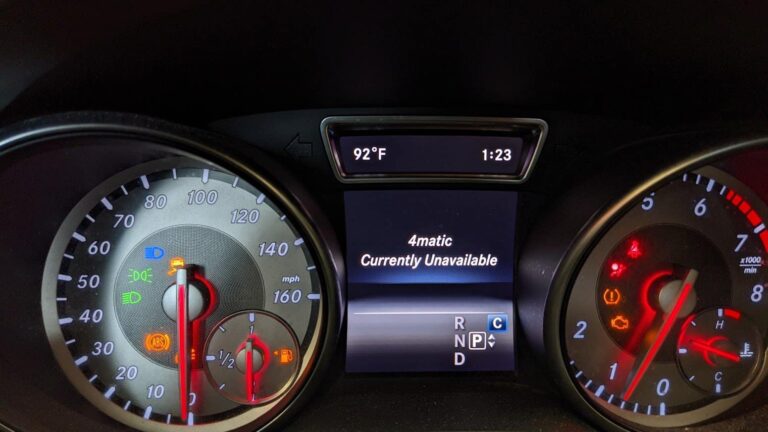
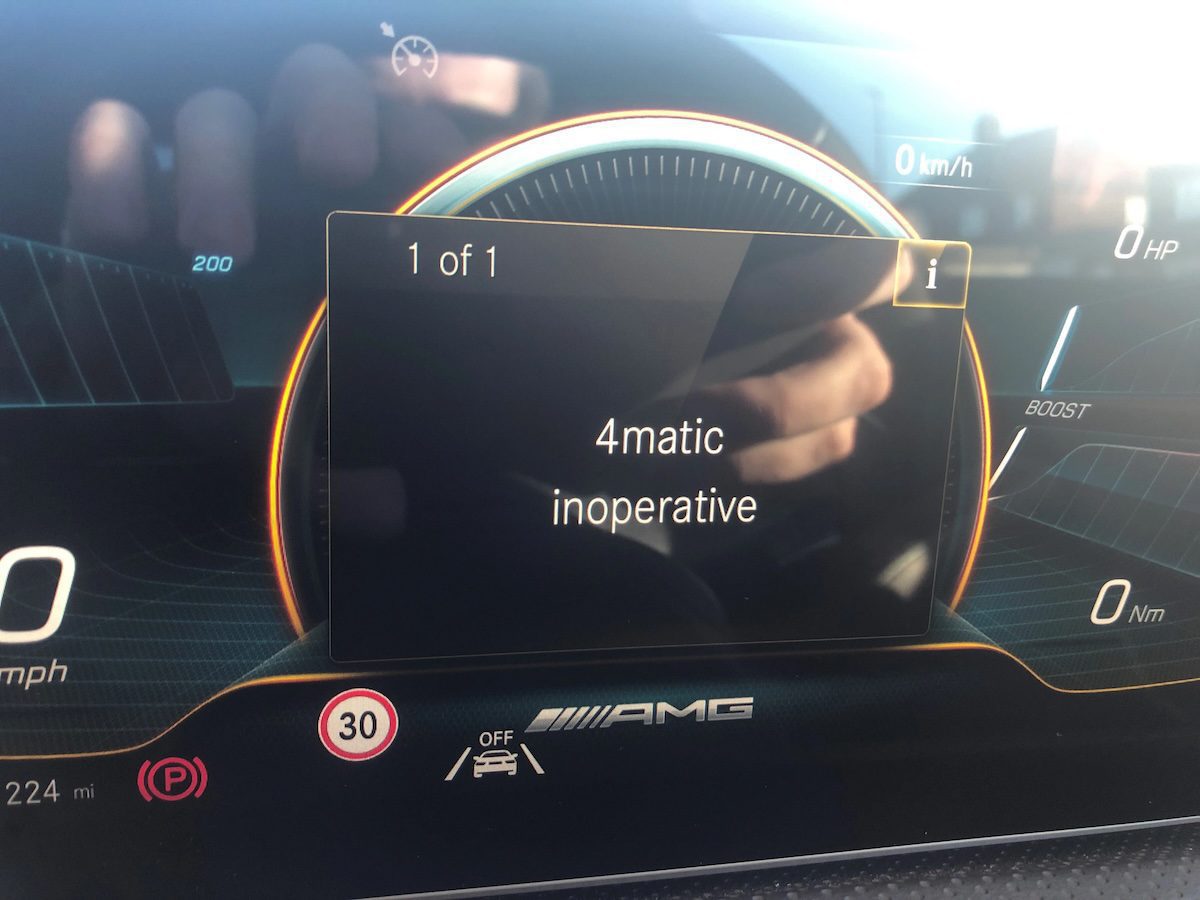
You jump in your Mercedes, fire it up, and there it is on the cluster display: “4Matic Currently Unavailable.” Maybe the car is stuck in neutral and will not shift. Maybe the handling suddenly feels different. Either way, something is clearly wrong, and if you do not know what the 4Matic system actually does, that warning message can feel a lot more alarming than it might need to be.
Here is what you need to know: this warning does not mean your car is about to break down on the side of the road. What it does mean is that your all-wheel-drive system has disabled itself, usually because one of several components is not giving the system the information it needs to operate safely. The car protects itself by shutting the system off rather than running it blind.
This guide covers exactly what causes that warning, how to diagnose it properly, and what to do to get your 4Matic back online.
What Is Mercedes-Benz 4Matic and Why Does It Matter?
Before getting into what goes wrong, it helps to understand what the 4Matic system is actually doing for you while it is working properly.
4Matic is Mercedes-Benz’s all-wheel-drive technology. Instead of sending engine power only to the front wheels or only to the rear wheels, the 4Matic system distributes power across all four wheels simultaneously. The result is better grip, improved stability in corners, and significantly more confidence on slippery roads, wet pavement, snow, or gravel.
What makes it more than just a basic AWD setup is the intelligence behind it. Each wheel has its own dedicated sensor and braking system. The control modules monitor what every wheel is doing in real time and adjust torque distribution on the fly. If one wheel starts to slip, the system detects it almost instantly and redirects power to the wheels that have better grip. You do not have to think about it or do anything. It happens automatically, in the background, every time you drive.
That constant data flow is also exactly why the system is vulnerable. If any part of that sensor network goes down, or if the power supply feeding the system drops below a safe threshold, the 4Matic shuts itself off rather than operating on incomplete or unreliable information. That is where the warning comes from.
What Triggers the “4Matic Currently Unavailable” Warning?
Mercedes-Benz has identified a dirty or damaged ABS wheel speed sensor as the primary cause of this error. But there are several other triggers that can produce the same warning, and knowing which one is affecting your car is the key to fixing it without wasting money on parts you do not need.
Damaged or Dirty ABS Wheel Speed Sensors
This is the most common cause, and Mercedes-Benz themselves point to it as the top culprit. Each wheel on your car has an ABS wheel speed sensor that tracks how fast that wheel is rotating. The ECU uses this data constantly, and so does the 4Matic system, which needs to know the rotational speed of every wheel to calculate how much torque to send where.
If one or more of those sensors is damaged, corroded, or caked in road grime to the point where it cannot read accurately, the 4Matic system loses part of the data it needs. Rather than guess, it shuts down entirely. From a safety standpoint, that is actually the right call. An AWD system distributing torque based on bad data could make handling worse, not better.
The diagnostic code to watch for here is U0428: Implausible data received from the steering angle sensor module. This code shows up when the system is receiving data it does not recognize as valid, which is often a sensor issue.
The good news is that dirty sensors can sometimes be cleaned rather than replaced. If the sensor is physically damaged, replacement is the only option. Either way, this is a relatively affordable repair compared to other potential causes.
A Low or Failing Battery
People underestimate how much a weak battery can affect modern car systems. The 4Matic system is entirely electronically controlled. It needs a stable, adequate voltage supply to function. When battery voltage drops below the required threshold, the system does not have enough power to operate reliably, and it disables itself.
This can happen gradually as a battery ages and loses capacity, or it can happen suddenly if something is draining the battery, like a parasitic draw from a faulty module or accessory left on. Either way, the 4Matic warning is often one of the first signs that your battery is no longer performing as it should.
Diagnostic codes related to this cause include:
- P0882: On-board power supply low
- B210AA: Power supply in the system low
If you scan the car and pull either of these codes, start with the battery before looking at anything else. A battery test at any auto parts store or mechanic takes about five minutes and will tell you whether the battery is still holding a proper charge. Mercedes-Benz batteries are not cheap, but replacing one is far less expensive than chasing the wrong problem for weeks.
A Faulty Steering Angle Sensor
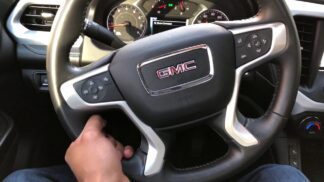
The steering angle sensor tracks the position and movement of your steering wheel and feeds that information to both the ECU and the 4Matic system. Why does the AWD system care about your steering wheel position? Because it factors into how torque is distributed through corners. When you are turning, the system needs to know which direction you are heading to deliver power to the right wheels at the right moment.
If this sensor starts delivering inaccurate readings, the 4Matic system receives conflicting signals. The data coming from the steering angle sensor might not match what the wheel speed sensors or other modules are reporting. When the discrepancy exceeds what the system considers a safe threshold, it disables the 4Matic as a precaution.
Steering angle sensor issues can sometimes be resolved with a recalibration rather than a full replacement. After any wheel alignment, tire rotation, or suspension work, the steering angle sensor typically needs to be recalibrated. If that step was skipped after a recent service, it could be why the warning appeared.
Software Glitches and System Bugs
Modern Mercedes-Benz vehicles run on complex software that controls virtually every system in the car. Like any software, it can develop glitches over time. Owners have reported the 4Matic warning appearing seemingly out of nowhere, with the car even switching into neutral unexpectedly while driving, a disconcerting experience to put it mildly.

In some of these cases, the underlying hardware is perfectly fine. The software that coordinates all the systems has simply hit a bug or gotten into a state it cannot recover from on its own. A system reset or software update resolves the problem without any physical repairs needed.
That said, software glitches are a diagnosis of exclusion. You should rule out hardware causes first before concluding it is purely a software issue. A glitch that clears after a reset but keeps coming back is a sign that there is an underlying hardware problem the software is correctly detecting and responding to.
A Bad Transfer Case
The transfer case is the mechanical component that distributes power between the front and rear axles in an AWD system. If the transfer case develops an internal fault, whether from worn gears, low fluid, or a failing clutch pack inside it, the 4Matic system may disable itself because it cannot reliably transfer power between axles.
Transfer case problems are less common than sensor or battery issues, but they do happen, particularly in higher-mileage vehicles or cars that have not had their transfer case fluid changed on schedule. Transfer case repairs can be more involved and costly, which is another reason why proper diagnosis upfront matters so much.
How to Diagnose the 4Matic Currently Unavailable Warning
Guessing at the cause and replacing parts at random is an expensive way to approach this. A proper scan with the right diagnostic tool takes the guesswork out of it entirely.
What you need: A multi-system OBD-II scanner that is compatible with Mercedes-Benz vehicles. Generic cheap scanners will not cut it here. You need one that can access Mercedes-Benz specific modules, not just generic powertrain codes. The Autel MaxiCOM, iCarsoft MB II, or Launch X431 series are popular choices among Mercedes owners.
Step-by-step diagnostic process:
- Locate the OBD-II port under the driver’s side dashboard and plug in your scanner.
- Turn the ignition to the “On” position without starting the engine, and allow the scanner to power up and connect.
- Select the automatic vehicle search option to identify your specific Mercedes-Benz model and year.
- Navigate to the available system modules and select the drive or drivetrain module.
- Select the All-Wheel Drive option within that module.
- Allow the scanner to communicate with the system fully. This may take a minute.
- Select “Read Codes” to pull any stored or active fault codes from the ECM.
The codes you find will tell you a great deal about what is actually causing the warning. Here is a quick reference for the most common ones:
| Fault Code | What It Means | Where to Look First |
|---|---|---|
| P0882 | On-board power supply low | Battery voltage and charging system |
| B210AA | Power supply in the system low | Battery, fuses, and power supply wiring |
| U0428 | Implausible data from steering angle sensor module | Steering angle sensor, calibration, and ABS sensors |
| C1000 series codes | ABS or wheel speed sensor faults | Individual wheel speed sensors, wiring, and connectors |
| No codes stored | Possible software glitch or intermittent fault | Perform system reset and monitor for recurrence |
Do not just read the codes from the AWD module. Pull codes from every available module while you are in there. Sometimes the root cause shows up in the ABS module, the instrument cluster module, or the battery management system rather than the 4Matic module itself. Having the full picture across all systems gives you a much clearer diagnosis.
How to Fix the 4Matic Currently Unavailable Warning
Once you know what the codes are telling you, here is how to address each cause:
Fix 1: Replace or Recharge a Weak Battery
If your diagnostic codes point to P0882 or B210AA, start with the battery. Have it load-tested, not just a quick voltage check, but a proper load test that reveals how the battery performs under actual electrical demand. A battery can show 12.6 volts sitting at rest and still fail miserably under load.
If the battery is weak, replace it. Mercedes-Benz vehicles use AGM (Absorbent Glass Mat) batteries in most modern models, and you need to replace like-for-like. After fitting a new battery, the car’s battery management system (BMS) needs to be registered to the new battery. This is a step that many shops forget, and skipping it can cause the charging system to treat the new battery like the old one, which shortens its life significantly. A Mercedes-compatible scanner with coding capability can perform this registration.
Fix 2: Clean or Replace the ABS Wheel Speed Sensors
If the codes or symptoms point to a wheel speed sensor issue, the first step is to inspect all four sensors. They are located at each wheel hub, and they are exposed to road grime, brake dust, and debris constantly.
Here is how to approach it:

- Raise and safely support the car so you can access all four wheels.
- Locate the ABS sensor at each wheel hub. It is a small sensor with a wiring connector, bolted into the knuckle or hub area.
- Inspect each sensor and its connector for physical damage, corrosion, or heavy buildup of grime.
- If the sensor is dirty but undamaged, clean it carefully with electrical contact cleaner and a soft brush.
- If the sensor wiring is frayed, the connector is corroded internally, or the sensor itself is cracked, replace the sensor. Use a Mercedes-Benz recommended replacement part for best results.
- After cleaning or replacing, clear the fault codes with your scanner and test drive the car to confirm the warning does not return.
Wheel speed sensors for Mercedes-Benz vehicles typically cost between $30 and $100 per sensor, depending on the model and which wheel it serves. Labor is modest since access is generally straightforward.
Fix 3: Recalibrate or Replace the Steering Angle Sensor
If U0428 is showing up in your codes, start by having the steering angle sensor recalibrated before assuming it needs to be replaced. Recalibration is done with a scanner that supports this function and takes only a few minutes. It is often all that is needed, especially if the code appeared after wheel alignment, suspension work, or even a tire rotation.
If recalibration does not clear the problem, or if the sensor keeps falling out of calibration repeatedly, the sensor itself may be failing and needs to be replaced. A new steering angle sensor will also need to be calibrated after installation.
Fix 4: Perform a System Reset for Software Glitches
If your scan comes back clean with no stored codes, or if the warning appeared without any obvious trigger, a software glitch may be responsible. Here is the reset process:
- Turn the engine off completely.
- Disconnect the negative battery terminal.
- Wait at least five minutes. This gives the capacitors in the control modules time to fully discharge and forces a complete system reset rather than just a sleep cycle.
- Reconnect the battery terminal.
- Start the car and check whether the warning has cleared.
This is worth trying as an early step anyway, even before scanning, because it costs nothing and takes less than ten minutes. If the warning comes back after the reset, something physical is triggering it and you need to dig deeper.
For persistent software issues, check with your authorized Mercedes-Benz dealer about available software updates for your vehicle. Mercedes does release firmware updates that address known bugs in their control systems, and some of these updates specifically address 4Matic-related issues. If your car is still within its warranty period, this service should be covered at no cost.
Fix 5: Address Transfer Case Issues
If your codes point to the transfer case, or if the other fixes above have not resolved the warning, the transfer case needs to be inspected by a professional. Start by checking the transfer case fluid level and condition. Dark, contaminated fluid is a sign of wear and should be replaced. Some owners find that a fluid change resolves minor transfer case issues on its own.
If the fluid is fine but the transfer case itself has internal wear or a failing actuator, that is a more involved repair. Transfer case rebuilds or replacements are not inexpensive, which is why this diagnosis should be confirmed clearly before committing to the repair.
When to Take It to a Professional
Not every fix on this list is a DIY job, and that is perfectly fine. Here is a straightforward breakdown of what most owners can handle themselves versus what is better left to a qualified Mercedes-Benz technician:
| Repair | DIY Friendly? | Notes |
|---|---|---|
| System reset (battery disconnect) | Yes | Simple and costs nothing |
| Battery replacement | Yes, with caution | BMS registration requires a scanner with coding capability |
| ABS wheel speed sensor cleaning | Yes | Basic mechanical ability required |
| ABS wheel speed sensor replacement | Yes, if comfortable with wheel work | Clear codes and test drive after replacement |
| Steering angle sensor recalibration | With the right scanner | Requires a compatible scan tool; otherwise go to a shop |
| Steering angle sensor replacement | Possible, but complex | Requires calibration after fitting; professional recommended |
| Software update | No | Requires dealer-level equipment and access |
| Transfer case repair or replacement | No | Specialist-level job; get a professional diagnosis first |
If you are not comfortable with any of these steps, or if you have tried the accessible fixes and the warning keeps coming back, take the car to a professional. Be specific about what you have already tried and what codes you pulled. A good mechanic will appreciate the groundwork and it will save you diagnostic time.
A Few Things to Keep in Mind While the 4Matic Is Offline
While the 4Matic system is unavailable, your Mercedes-Benz is still drivable in most cases, but it is essentially operating as a rear-wheel-drive vehicle. That changes a few things you should be aware of:
- Wet or slippery roads become significantly more challenging. The AWD system provides a huge grip advantage in poor conditions. Without it, take extra care on rain-soaked or icy surfaces.
- The car may feel different in corners. Without the torque distribution that the 4Matic provides, handling characteristics change, particularly in tighter corners or at higher speeds.
- Do not ignore the warning and drive normally for weeks. The sooner you address what caused the system to disable, the better. Driving on a bad battery or faulty sensor for an extended period can cause other systems to develop problems as well.
The “4Matic Currently Unavailable” warning is your car being honest with you. Something in the system is not right, and rather than operate in a compromised state, it stepped back. That transparency is actually a feature, not a flaw. The question is whether you act on the information it is giving you, or park it in the back of your mind until the problem gets worse.
Grab a compatible scanner, pull the codes, and start with the most likely cause for your situation. In most cases, you will have a clear answer within 30 minutes and a fix that is well within reach.