
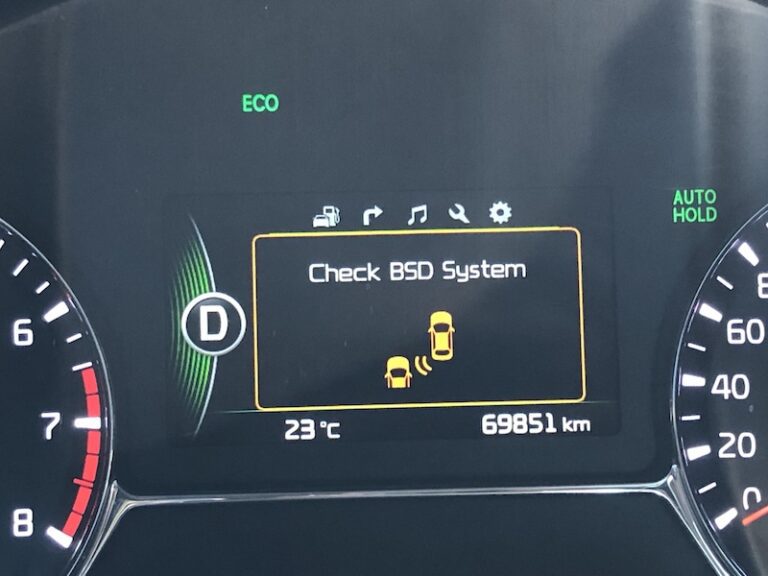
You are cruising down the highway, minding your own business, when suddenly a message pops up on your dashboard that reads “check BSD system.” Your first thought is probably something like “what in the world is a BSD system, and why is it broken?” Do not panic. This is one of the more common warnings on newer Kia models, and in most cases, it is nowhere near as scary as it sounds.
Think of the BSD system as an extra set of eyes watching the lanes next to you, the ones your mirrors cannot fully cover. When that warning shows up, it usually means those extra eyes are temporarily blinded, not permanently broken. In this guide, we are going to break down exactly what triggers this message, walk through five real causes, and give you practical fixes for each one. By the end, you will know whether this is a two-minute fix or something worth a trip to your Kia dealer.
What Exactly Is The Kia BSD System, And Why Should You Care?
Before we get into what causes the warning, let us cover what this system actually does, because understanding the technology makes troubleshooting a lot easier.
Blind Spot Detection, Explained Simply
BSD stands for Blind Spot Detection. It is one of those safety features that most drivers do not think about until it saves them from a nasty side-swipe collision. The system watches the lanes directly beside and slightly behind your Kia, areas your side mirrors typically cannot show you no matter how well you have them adjusted.
Here is how it actually works under the hood, so to speak. Small radar sensors are mounted on both sides of your rear bumper. These sensors constantly send out radio waves and measure how those waves bounce back off nearby objects. Based on the timing and pattern of that bounce-back, the system calculates the speed and position of vehicles approaching from your blind spot.
When the system detects a car creeping up in that dangerous zone, here is what happens:
- A small yellow warning light illuminates on the corresponding side mirror
- If you signal to change lanes into that occupied space, an audible alarm sounds to grab your attention
- The system continues tracking that vehicle until it clears the blind spot zone
It is a genuinely useful piece of technology, especially on multi-lane highways where cars seem to appear out of nowhere right as you are about to merge. But like any sensor-based system, it depends heavily on a clear, unobstructed signal path to work correctly.
What Actually Happens When The Warning Appears
When your dashboard displays “check BSD system,” the vehicle is telling you it cannot trust the readings coming from those bumper-mounted radar sensors anymore. Rather than risk giving you false confidence with unreliable data, the system automatically shuts itself off as a safety precaution.
You will notice a few things happen at once:
- The BSD indicator light on your dashboard switch turns off
- You may see a secondary message reading “BSD canceled”
- The yellow mirror-mounted warning lights stop functioning until the system resets
This is not the car being dramatic. It is a built-in fail-safe. The engineers who designed this system decided that a system giving you no warning at all is safer than one giving you unreliable or inconsistent warnings. That said, it still means you lose that extra layer of protection until the underlying issue gets sorted out, so it is worth addressing rather than ignoring.
The 5 Real Causes Behind This Warning Message
Now for the part you actually came here for. In the vast majority of cases, this warning traces back to one of five root causes. Let us go through each one, starting with the most common.
1. Dirt, Grime, Or Debris Blocking The Radar
This is, by far, the number one reason Kia owners see this warning pop up. The radar sensors live inside your rear bumper, low to the ground, right in the splash zone for mud, road salt, slush, and every bit of grime your tires kick up on a rainy drive.
Here is the technical reason this matters. Radar works by sending out radio waves and reading what bounces back. Think of it like echolocation, similar to how a bat navigates in the dark. If you cover a bat’s ears with something thick, it cannot navigate properly anymore. The same logic applies here. A thick coating of mud or a chunk of road salt sitting directly over the sensor housing distorts or completely blocks that signal from getting out and coming back correctly.
In the real world, this happens constantly during winter months in areas that salt their roads, or after driving through construction zones with loose gravel and dust kicked up everywhere. Even something as simple as a dead leaf stuck to the bumper in just the wrong spot can be enough to trigger this warning.
2. Wiring Problems Behind The Scenes
If dirt is the most common cause, faulty wiring is probably the second. Your BSD system relies on a network of wires carrying both electrical power and data signals between the radar sensors and the vehicle’s central computer.
When that wiring gets damaged, whether from corrosion, a loose connector, or physical wear from age, a few things can go wrong:
- The radar sensor might not receive enough power to function correctly
- Data collected by the sensor might not reach the vehicle’s computer reliably
- Intermittent connections can cause the system to flicker on and off unpredictably
Wiring issues are trickier to diagnose than simple dirt buildup because you cannot always see the problem just by looking. A wire might look perfectly fine on the surface while corrosion eats away at the connection underneath the insulation. This is exactly the kind of problem that benefits from a proper diagnostic scan rather than guesswork.
3. Rough Weather Throwing The Radar Off
Here is one that catches a lot of drivers by surprise. Even with a perfectly clean, undamaged system, extreme weather can still trigger the check BSD warning. Heavy rain, dense fog, and especially snow all interfere with how radio waves travel through the air.
During a heavy downpour, water droplets in the air can scatter the radar signal enough to confuse the system’s readings. Snow is even worse, since it tends to physically accumulate directly on the sensor housing, essentially recreating the dirt and debris problem we covered earlier, except now it is actively falling and building up while you drive.
In the real world, this means Kia owners in places like Michigan, Minnesota, or upstate New York are going to see this warning far more often during winter months than someone driving the same model in Arizona or Southern California. It is simply a byproduct of the environment, not necessarily a sign that something is broken.
4. A Trailer Or Cargo Carrier Blocking The Sensors
If you have ever hitched up a trailer or bolted on a rear cargo carrier for a road trip, you may have noticed the BSD warning appear almost immediately afterward. This makes complete sense once you think about where the sensors are located.
A trailer hitch, cargo box, or bike rack mounted on the back of your Kia sits directly in the path the radar needs to scan behind and beside your vehicle. The sensor essentially becomes blind, not because anything is broken, but because there is now a physical object sitting right where it needs a clear view.
This is actually expected behavior, and manufacturers generally recommend disabling the BSD system entirely whenever towing or using a rear-mounted carrier. Leaving it active in this situation risks something worse than just an annoying dashboard message. The system might generate false alerts constantly, since it is essentially “seeing” your own trailer as a phantom vehicle in your blind spot every few seconds.
5. Extended Periods Without Detecting Another Vehicle
This one is less common but still worth knowing about. If you spend a long stretch driving somewhere remote, think rural highways, back country roads, or long stretches of interstate with barely another car in sight, the BSD system can sometimes flag itself simply because it has gone too long without detecting anything at all.
This happens because the system periodically checks its own performance by confirming it can still detect passing vehicles. If it goes an unusually long time without any detection events, it may interpret that as a possible sensor malfunction rather than simply “there was nobody else on the road.” It is a bit of an overcautious quirk in the system’s programming, but it is good to know this is a possibility rather than assuming the worst.
Quick Reference Table: Cause, Symptom, and Likely Fix
Here is a simple breakdown to help you quickly identify which of the five causes matches your situation.
| Cause | Common Symptom | Likely Fix |
|---|---|---|
| Dirt or debris on radar | Warning appears after driving through mud, snow, or dust | Clean the bumper area around the sensors |
| Wiring problems | Warning appears randomly, sometimes clears on its own | Inspect and repair wiring, or visit a technician |
| Bad weather | Warning appears during heavy rain, fog, or snowfall | Wait for weather to clear, manually disable BSD if needed |
| Trailer or carrier installed | Warning appears immediately after hitching up a trailer | Disable BSD system while towing or using a rear carrier |
| No detected vehicles for a long stretch | Warning appears on remote or empty roads | Usually resolves once traffic picks back up |
Keep this table in mind next time the warning pops up. Matching your specific situation to the right cause saves you time and, in some cases, an unnecessary trip to the dealership.
How To Actually Fix It: Step By Step Solutions
Now that you know the likely cause behind your warning, let us walk through exactly how to address each one. As always, start with the simplest fix first, since there is a good chance you will not need to go any further than that.
Start With The Basics: Restart The System
Before doing anything else, try the automotive equivalent of turning it off and back on again. If the warning appeared right after starting your vehicle, turn the engine off completely, wait about a minute, and restart it.
Modern vehicles run on complex computer systems, and just like your laptop or phone, sometimes these systems experience a minor software hiccup that a simple restart clears up entirely. This costs you nothing and takes less than two minutes, so there is no reason to skip this step.
If the message clears after restarting, great, you are done. If it comes right back, move on to the more targeted fixes below based on what you suspect the actual cause is.
Fix 1: Give The Radar Sensors A Proper Cleaning
Since dirt and debris account for the majority of these warnings, this is where most people should start. Here is how to do it properly.
- Locate the sensors on both sides of your rear bumper. If you are not sure exactly where they sit, check your owner’s manual, which typically includes a diagram showing sensor locations
- Inspect the area closely for mud, ice, snow, road salt residue, or any stuck-on debris
- Use a soft microfiber cloth along with plain water or a mild automotive cleaner to gently wipe the sensor area clean
- Avoid using anything abrasive, like a stiff brush or an aggressive degreaser, since this can scratch the sensor cover and create new problems
- Dry the area completely before starting the vehicle again
This entire process takes maybe ten minutes, even less if the sensors are not caked in anything too stubborn. In the real world, this single fix probably resolves more than half of all check BSD system warnings, especially for drivers dealing with winter road conditions.
Fix 2: Inspect And Repair The Wiring
If cleaning did not solve the problem, or if the warning keeps coming back even on a clean, dry day, wiring is the next thing to investigate. This one requires a bit more mechanical comfort, so if you are not confident working around vehicle wiring, this is a good point to hand things off to a professional.
For those comfortable taking a look themselves:
- Pull up your Kia’s wiring diagram, usually available in the owner’s manual or through a service manual specific to your model year
- Locate the wiring harness connected to the rear bumper sensors
- Check for visible signs of damage, including frayed insulation, corroded connectors, or wires that have come loose from their housing
- If you find corrosion, a contact cleaner spray designed for automotive electrical connectors can sometimes restore the connection
- If wires are physically damaged or broken, replacement is necessary rather than a temporary patch job
Here is an honest piece of advice from someone who has seen plenty of DIY wiring repairs go sideways: if you are not one hundred percent sure what you are looking at, this is worth a trip to a certified technician. Electrical systems in modern vehicles are interconnected in ways that are not always obvious, and a poorly executed wiring repair can create new problems elsewhere in the vehicle’s electronics.
Fix 3: Deal With Weather-Related Warnings The Smart Way
Unfortunately, there is no permanent fix for radar interference caused by heavy rain, fog, or snowfall. This is simply a limitation of radar technology interacting with the physical world. However, there are smart ways to handle it.
- If the warning appears only during active bad weather and clears up once conditions improve, this confirms weather as the cause rather than a genuine malfunction
- During heavy snow, periodically clearing accumulated snow off your rear bumper during longer trips can help, similar to how you would clear snow off your headlights
- If you know you are driving into severe weather, it is reasonable to expect reduced BSD reliability and rely more heavily on your mirrors and a physical head check before changing lanes
This is honestly a good habit regardless of what your BSD system is telling you. No safety technology should replace basic defensive driving habits like checking your mirrors and glancing over your shoulder before merging. Think of BSD as a helpful backup, not a replacement for paying attention.
Fix 4: Disconnect Or Disable For Trailers And Carriers
If you just installed a trailer hitch, roof box, or bike rack and the warning appeared right after, the fix here is straightforward. Either remove the obstruction if you no longer need it, or manually disable the BSD system through your vehicle’s settings menu while it remains installed.
Most Kia models allow you to toggle the BSD system on and off through the dashboard controls or the infotainment settings menu. Check your owner’s manual for the exact steps for your specific model year, since the menu layout can vary slightly between different Kia infotainment systems.
Disabling the system in this scenario is not a workaround or a compromise. It is literally the manufacturer-recommended approach when towing, since leaving it active risks constant false alerts that will do nothing but annoy you and desensitize you to warnings that matter.
Fix 5: Let It Resolve Naturally In Low-Traffic Situations
If you suspect the warning triggered simply because you were driving somewhere remote with little to no traffic around you, the good news is this typically resolves itself once you are back around normal traffic conditions. There is no repair needed here, just patience.
If the warning persists well after returning to a normal traffic environment, that is a sign something else might actually be wrong, and it would be worth working through the other causes listed above rather than assuming it will clear up on its own indefinitely.
Watch This Before You Assume The Worst
Sometimes seeing a real diagnostic walkthrough makes all of this click a lot faster than reading about it. Here is a helpful video covering similar blind spot detection issues and troubleshooting approaches.

When It Is Time To Bring In A Professional
While plenty of check BSD system warnings resolve with a simple cleaning or a quick restart, some situations genuinely call for professional attention. Here is when it makes sense to stop troubleshooting on your own and book an appointment.
- The warning persists after cleaning the sensors thoroughly and confirming clear weather conditions
- You suspect wiring damage but are not comfortable inspecting or repairing it yourself
- The warning appears alongside other unrelated dashboard alerts, which could point to a broader electrical issue
- The system was working fine until a recent bumper repair or repaint, which can sometimes disturb sensor alignment or wiring connections
That last point is worth expanding on. If you recently had bodywork done on your rear bumper, whether from a minor fender bender or just a cosmetic repaint, it is entirely possible the sensors were bumped out of alignment or a wiring connector was not properly reseated during reassembly. Body shops occasionally overlook these small details, especially if they are not a Kia-certified facility familiar with where these sensors live.
A certified Kia technician has access to diagnostic tools that can pull specific error codes from the BSD system’s computer module. This gives a much clearer picture of exactly what triggered the fault, rather than relying on guesswork alone. In cases involving wiring or sensor alignment, this diagnostic step often saves time and money compared to blindly replacing parts.
Does This Warning Mean Your BSD System Is Actually Broken?
Here is something worth clarifying, because a lot of drivers assume the worst the moment this warning appears. In reality, “check BSD system” does not automatically mean a component has failed. Far more often, it means the system has detected a condition, whether that is dirt, weather, or an obstruction, that prevents it from operating reliably at that moment.
Think of it a bit like a smoke detector that starts beeping because you burned toast, not because your house is actually on fire. The system is doing exactly what it was designed to do: erring on the side of caution rather than giving you false confidence in unreliable data.
That said, do not make a habit of ignoring this warning every single time it appears. If cleaning the sensors and waiting out bad weather does not resolve it, and you have ruled out an obvious obstruction like a trailer, that recurring warning deserves a proper diagnostic check. A genuinely faulty sensor or damaged wiring will not fix itself, and driving around long term without a working blind spot detection system means losing a safety net you are paying for as part of your vehicle’s features.
A Few Habits That Keep This Warning From Coming Back
Once you get your BSD system back up and running, a little routine maintenance goes a long way toward preventing repeat warnings.
Make Bumper Cleaning Part Of Your Regular Car Wash Routine
Most people focus their car washing efforts on the hood, roof, and doors, completely neglecting the lower bumper area where these sensors live. Next time you wash your Kia, spend an extra minute specifically wiping down the rear bumper corners where the radar sensors are mounted.
Be Extra Attentive During Winter Months
If you live somewhere that gets regular snow and road salt, check your rear bumper sensors more frequently during winter than you would the rest of the year. A quick wipe-down every few days during heavy snow season can prevent buildup before it becomes thick enough to trigger a warning.
Have Sensors Checked After Any Rear-End Bodywork
If your Kia ever needs bumper repair or replacement due to a collision, make sure whoever performs the work confirms the BSD sensors are properly reinstalled, aligned, and reconnected. This is a small detail that is easy for a general body shop to overlook if they are not specifically trained on your vehicle’s sensor systems.
Do Not Ignore Recurring Warnings
If this warning starts appearing frequently, even after cleaning and checking for obvious causes, treat that as an early sign rather than background noise. Catching a wiring issue early, before it worsens or affects other connected systems, usually means a simpler and cheaper repair.
The Bottom Line On Keeping Your Blind Spots Covered
A blind spot detection system is a genuinely useful piece of safety technology, but it only works when it can actually see what it needs to see. Whether the culprit turns out to be a bit of road grime, a stray wiring issue, a snowstorm, or a trailer blocking the view, the fix is almost always simpler than the warning message makes it sound.
Next time that “check BSD system” message pops up on your Kia’s dashboard, do not just shrug it off and keep driving without a second thought. Take five minutes to check the obvious stuff first: clean the sensors, glance at the weather, and make sure nothing is blocking the rear bumper. More often than not, that is all it takes to get your extra set of eyes back on duty.