
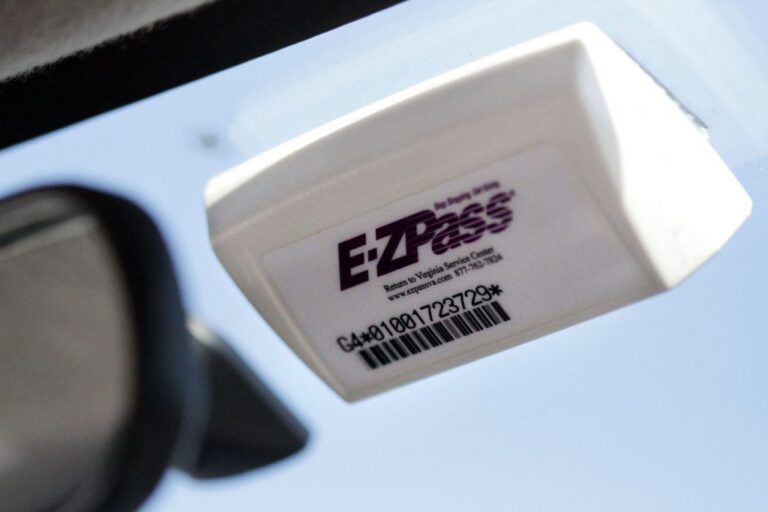
So, you are cruising down the highway, the toll plaza is looming ahead, and you slow down just a touch. You expect that familiar, satisfying beep from your E-ZPass transponder. Instead, you get a flashing red light or a dreaded message telling you to call customer service. Frustrating, right? It happens to the best of us. That little plastic box on your windshield is usually a workhorse, but it can act up at the worst possible moments.
Before you start panicking about fines or holding up a line of angry commuters, take a deep breath. A non-responsive transponder is rarely a permanent problem. More often than not, it is a simple fix that you can handle in a matter of minutes, either right there in the toll lane or from the comfort of your driveway. This guide is your roadmap to diagnosing the hiccup and getting back to breezing through tolls without a second thought.
We are going to walk through every common issue, from dead batteries to sneaky signal blockers. We will cover the proper way to mount the device, what to do when the toll booth gives you the silent treatment, and how to handle the more serious situations like a lost or damaged unit. By the time you finish reading, you will know exactly what to do when your E-ZPass decides to take an unscheduled day off.
Why Skipping Maintenance Will Cost You
Think of your E-ZPass transponder like a tiny, specialized radio. It needs a clear line of sight, a power source, and a properly functioning antenna to do its job. When one of those elements fails, the whole system grinds to a halt. The result? You end up sitting at a toll booth, fumbling for cash or a credit card, and watching your travel time evaporate.
Ignoring the warning signs is never a good idea. A transponder that works intermittently is a ticking time bomb. You might get lucky a few times, but eventually, you will hit a toll plaza that does not read it. That is when the real hassle begins. You could be subject to a violation notice, which often comes with administrative fees that are way more expensive than the toll itself. It is not worth the gamble.
Let us look at the real-world scenario. You are driving a rental car for a business trip, and you toss the transponder on the dash. You drive through the toll, and nothing happens. Now you are on the hook for a toll violation that gets mailed to the rental company, who then charges you a hefty processing fee. That is a costly mistake that could have been avoided with a little bit of foresight and a quick check.
Getting to Know Your Transponder
Before we get into the nitty-gritty of troubleshooting, it helps to understand what you are actually working with. Not all E-ZPass transponders are created equal. Knowing which type you have can save you a lot of confusion down the road, especially when you are trying to figure out why it is not working.
The Standard Issue Transponder
This is the most common type you will see. It is a small, rectangular plastic box with mounting strips on the back. It is designed for passenger cars, SUVs, and light trucks. It does exactly what it needs to do: it communicates with the toll plaza antenna and deducts the fare from your account. Simple, reliable, and effective for the vast majority of drivers.
The Flex Transponder for Carpool Lanes
If you live in a state with High-Occupancy Vehicle (HOV) lanes, you might have a Flex transponder. This is a special device that has a switch on the side. When you are driving solo, you keep the switch in the paid position so you are charged the regular toll. When you have the required number of passengers, you flip the switch to the HOV position, and the toll is waived. If you forget to flip this switch, you are either going to be charged when you should not be, or you will get a violation for using the HOV lane illegally. It is a crucial distinction.
The External Transponder
Some vehicles have windshields that block radio frequencies. This is common in cars with metallic or solar-reflective coatings. If you have one of these vehicles, the standard transponder will not work from inside the car. You will need an external transponder that mounts on your license plate or the front bumper. These are typically more rugged and weatherproof, but they require a different installation process. If you have a smart windshield and you are using a standard transponder, that is likely your problem right there.
Mounting: The Most Common Culprit
Let us be honest. A lot of people just slap the transponder on the windshield in a spot that looks convenient. Maybe it is behind the rearview mirror so it is out of the way. Maybe it is low in the corner. While it might seem logical, improper mounting is the number one reason for read failures. The toll system antenna is positioned to read the transponder in a very specific area of your windshield.
Here is the thing: if the transponder is too low, the signal might not reach the antenna properly. If it is behind a tinted strip or in a shaded area, the signal could be blocked. And if you have it lying flat on your dashboard, you are almost guaranteeing a failed read. The transponder needs to be upright and have a clear, unobstructed view of the sky.
How to Mount It Right the First Time
Getting it right is easy. You just have to follow the rules. Most issuers recommend mounting the transponder in the center of the windshield, just behind or to the side of the rearview mirror. This area is usually darkest and provides the best angle for the overhead antenna.
- Clean the glass: Before you stick anything on, clean the area with glass cleaner and a lint-free cloth. Dirt and grease will prevent the adhesive from sticking properly.
- Prep the strips: Peel the backing off the mounting strips that came with the transponder. Do not use duct tape or super glue; those can damage your windshield and the device.
- Press firmly: Hold the transponder in the designated spot and press it firmly against the glass for about 30 seconds. You want to make sure the adhesive creates a strong bond.
- Check the angle: The transponder should be level and vertical. It should not be tilted sideways. A tilted transponder can scatter the signal.
It is also worth noting that you should not move a standard transponder between vehicles. The mounting strips are a one-time deal. If you have multiple cars, you need a transponder for each one, or you need to invest in a portable mount that is specifically designed for easy transfer. Using the factory adhesive and then peeling it off to put it in another car will damage the device and leave sticky residue everywhere.
Troubleshooting: Dead Battery and Silent Signals
Okay, so you have checked the mounting. It looks fine. You are still getting the red light. What now? Let us get into the actual electronics of the device. There are a few specific failures that are very common, and they are easy to identify.
The Infamous Dead Battery
Here is a hard truth: you cannot replace the battery in most E-ZPass transponders. They are sealed units with a lithium battery that is designed to last for several years, usually around 7 to 10 years. When that battery dies, the transponder is a brick. It will not beep, it will not flash, and it will not communicate with the toll booth.
How do you know if the battery is dead? The most obvious sign is a complete lack of response. You drive under the antenna, and there is no beep. The gate does not open. You get the red light. Sometimes, the transponder will start to fail intermittently before completely dying. It might work in the morning but not in the afternoon. That is a classic sign of a dying battery. It has just enough juice to work sometimes, but not consistently.
There is no DIY fix for this. You cannot crack it open and solder in a new battery. The device is waterproof and tamper-proof. Your only option is to get a replacement. You can usually do this at a customer service center, or you can order one online. Some agencies will charge a small fee for a replacement, while others will waive it if the transponder is under warranty. You will need to provide your account information to get a new one. Once you get it, you will need to activate it online before you use it.
Signal Interference and Obstructions
This is a sneaky one. Your transponder might be perfectly fine, but something is blocking its signal. The E-ZPass system uses a specific radio frequency, and a lot of everyday objects can interfere with it. Your windshield itself could be the issue. Those metallic coatings mentioned earlier are the biggest culprit. They are designed to keep the heat out, but they also keep the radio waves in.
If you have a standard transponder and a smart windshield, you will have issues. The solution is to get the external transponder. But before you do that, check for other obstructions. Do you have a toll pass holder that has a metal mesh? That will block the signal. Do you have a radar detector mounted right next to the transponder? That can cause interference, too.
Even something as simple as a sun visor that is partially down can mess with the signal. And if you have a pile of clutter on your dashboard, like a box of tissues or a GPS unit, it can reflect the signal and prevent it from reaching the antenna. Clear the area around your transponder and try again. It is the cheapest fix you will ever attempt.
Check Your Account Balance
Sometimes, the problem is not with the device at all. It is with your account. If your E-ZPass account balance is too low or zero, the system might not register the transponder. You will get a warning at the toll booth, or the gate might not open. The system is designed to let you through, but it will flag your account for a violation.
This is one of the easiest things to check. You can log into your E-ZPass account online or use the mobile app. Check the balance. If it is low, add funds. You can usually set up automatic replenishment so you never have to worry about this again. It is a small feature that can save you a massive headache. Do not assume the transponder is broken just because you are not beeping. Look at your account first.
What to Do When You Hit a Dead Zone
You are in the toll lane, and you are getting the Call E-ZPass message. This is the moment of panic. Do not pull over and block traffic. Do not try to reverse. The safest thing to do is proceed through the toll. The system will take a photo of your license plate, and you will be sent a bill in the mail. This is called Video Tolls or Pay by Plate.
In the real world, this is not a disaster. You are not going to get a massive fine for a single transponder failure. The toll agency will look up your plate, see that you have an E-ZPass account, and often just deduct the toll from your account. You might see a missed toll on your statement, but as long as it is a rare occurrence, it will not be a problem.
However, if you are a frequent traveler and this becomes a weekly occurrence, they will start to flag your account. You will get violation notices with administrative fees. That is why it is so important to fix the root cause of the problem quickly. Do not just ignore it because you got lucky once. The next time, it might cost you.
Handling a Lost, Stolen, or Damaged Unit
We have covered the technical failures, but what about the physical ones? Life happens. Maybe you got a new car and forgot to transfer the transponder. Maybe it fell off the windshield and got run over. Or, in a worst-case scenario, someone broke into your car and stole it. You need to act fast in all of these scenarios.
Reporting the Loss Immediately
Time is of the essence here. If your transponder is lost or stolen, you are potentially liable for any tolls that someone else racks up with it. You need to report it immediately. Do not wait until the end of the day. Do not wait until the weekend. Call the customer service number for your specific E-ZPass agency or log into your account online.
Here is the process in a nutshell:
- Log in: Go to the website of the agency that issued your transponder (e.g., E-ZPass NY, E-ZPass NJ, etc.).
- Find the report section: Look for a link that says Report Lost or Stolen Transponder.
- Follow the prompts: You will likely need to provide your account number and the serial number of the transponder, which you can find on your old statements.
They will deactivate the old transponder so no one else can use it. This protects you from unauthorized charges. Most agencies will not hold you responsible for charges if you report the theft promptly. This is your best defense against a financial headache.
Getting a Replacement Transponder
Once you have reported the loss or damage, you need to get a new one. You cannot use your account without a transponder, and you do not want to rely on the pay-by-plate system forever because it is less convenient and can be more expensive.
Requesting a replacement is usually a straightforward process.
- Contact the service center: You can do this online or by phone. If you are in a hurry, the phone is often faster.
- Ask about fees: Be upfront and ask if there is a charge for the replacement. Some agencies charge a nominal fee for the physical device, around $10 to $15. Others will waive it if the original was under warranty.
- Activate the new unit: When you receive the new transponder, you cannot just slap it on the windshield and go. You have to activate it. This links the new device’s serial number to your account. You can usually do this online in under a minute.
Once it is activated, you are back in business. It is a minor inconvenience, but it is better than getting a stack of violation notices in the mail.
Best Practices for a Hassle-Free Drive
Now that we have covered all the problems, let us talk about prevention. A little bit of proactive care goes a long way. You want to get into the habit of checking your equipment and your account so that you never have to deal with a failure at the toll booth.
Build a Monthly Check-In Habit
Set a reminder on your phone to do a quick check once a month. It takes two minutes. Here is what you need to do:
- Inspect the unit: Walk around your car and look at the transponder. Is it still securely attached? Are there any cracks in the plastic? Is the adhesive starting to peel?
- Clean the windshield: If there is dirt or grime buildup around the transponder, clean the window. Dirt can potentially interfere with the signal, although it is rare.
- Check your statement: Review your recent trips online. Do you see any missed tolls? If so, that is a huge red flag that your transponder is failing.
This simple routine will catch 90% of potential issues before they become a problem at the toll plaza. It is the same logic as checking your tire pressure before a long trip. It is better to find the issue in your driveway than on the highway.
Know Your Speed Limit
You might be in a hurry, but speed is your enemy at a toll booth. Most E-ZPass lanes have a speed limit of around 15 to 25 miles per hour. There is a reason for this. The antenna needs a fraction of a second to read the transponder. If you are flying through at 50 miles per hour, you are reducing the time the antenna has to read your device. This can result in a failed read.
Slow down. It is not just about your transponder. It is about the safety of the toll workers and other drivers. Obeying the speed limit is the easiest way to ensure a smooth transaction. The few seconds you lose by slowing down are nothing compared to the time you will waste dealing with a violation.
Keep It Out of the Glove Box
We have all done it. We get a new car, and we do not want to stick the transponder on the pristine windshield right away. So we toss it in the glove box or the center console. This will not work. The transponder needs to be in the line of sight of the antenna. It cannot transmit through the metal frame of your car.
If you are worried about the look of the device on your windshield, invest in a toll pass holder that attaches to your windshield with suction cups. This allows you to take it down when you park in a public garage or when you want a clean windshield. But when you are driving, it needs to be in the designated spot. There is no way around that.
Conclusion: Take Control of Your Commute
Your E-ZPass transponder is a reliable piece of tech, but it is not infallible. You now have the knowledge to troubleshoot the most common failures, from dead batteries and bad mounts to account balance issues and signal interference. You do not need to be a mechanic to fix this. You just need to be observant and proactive.
The next time you approach a toll booth and you do not hear that beep, you will know exactly what to check first. Is it the mount? Is it the battery? Is it your account? You can run through the mental checklist in seconds and figure out your next move. Do not let a small plastic box dictate the quality of your drive. Take charge, do the quick checks, and keep moving.
Are you the type of driver who sets a monthly reminder to check their toll account, or do you prefer the set it and forget it method until something goes wrong? Think about it. Your future self, sitting in a toll lane, will thank you for being prepared.