
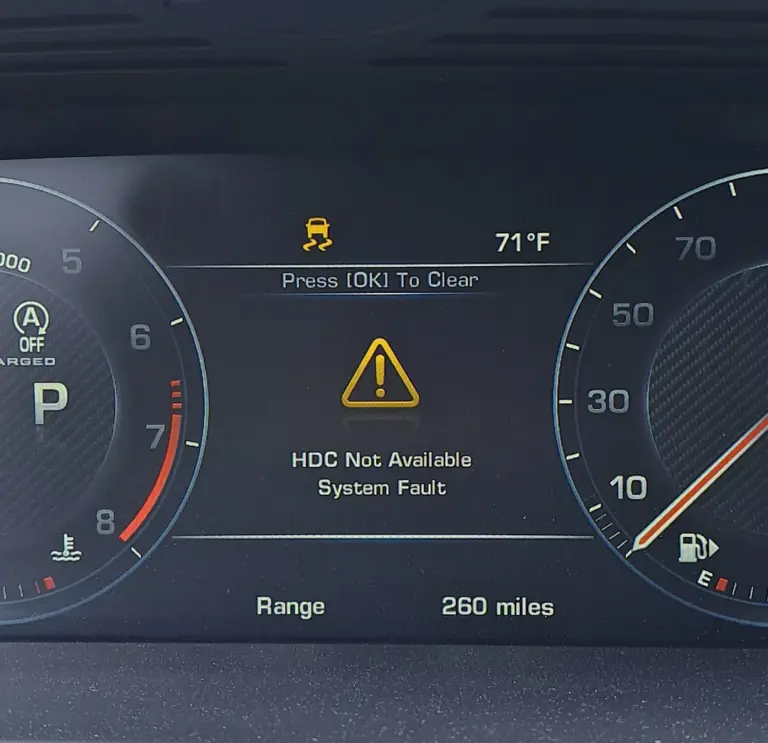
You are heading downhill on a rocky trail, counting on your Land Rover’s Hill Descent Control to keep things smooth and manageable, and then the message appears: “HDC Fault System Not Available.” The system you were relying on has disengaged, and now you are left handling the descent manually. That is not a comfortable situation, especially on steep or loose terrain.
The HDC fault is one of the more common warnings Land Rover owners encounter, and the good news is that most causes are not catastrophic. In many cases, the system has disengaged for a normal operational reason that is easy to correct. In other cases, there is a genuine fault that needs to be properly diagnosed. Knowing which situation you are in is what this guide is about.
What Hill Descent Control Actually Does
Before getting into the causes and fixes, it helps to understand what HDC is actually doing when it works correctly, because that understanding makes the causes of failure much more logical.
Hill Descent Control is a driver assistance system designed specifically for descending steep or slippery gradients. When activated, it takes over braking management so the driver does not need to manually apply the brakes while going downhill. Instead, the system uses the ABS and traction control hardware to apply braking to individual wheels as needed, keeping the vehicle moving at a slow, controlled speed, typically between 3 and 15 miles per hour depending on the selected setting.
The driver keeps their foot off the brake pedal entirely and can use the accelerator to temporarily increase speed within the system’s limits if needed. HDC essentially takes the stress and technique out of controlled descents, which is particularly valuable on steep off-road trails where brake fade, wheel lockup, or loss of steering could have serious consequences.
The system works by communicating with the ABS module, the traction control system, and the ECU. It monitors wheel speeds at all four corners and applies braking precisely to maintain the target descent speed. Because it depends on these systems all functioning correctly and operating within specific parameters, several conditions can cause it to disengage.
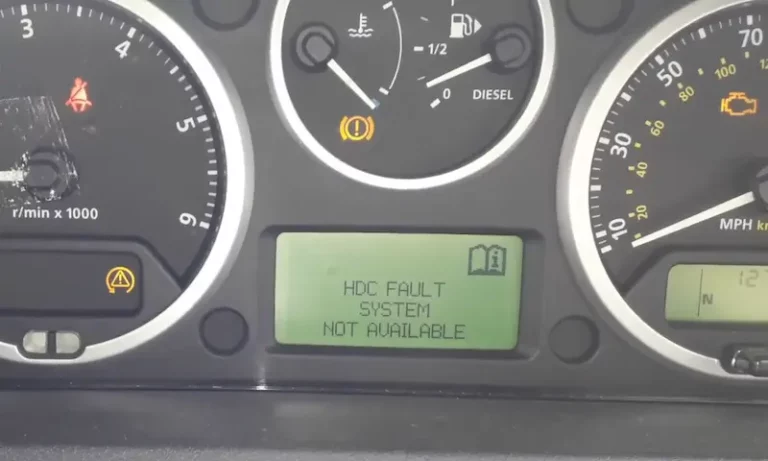
Every Cause of the Land Rover HDC Fault Warning
1. Vehicle Speed Is Too High
This is the most common and most straightforward cause of the HDC fault message, and it is not actually a fault at all. It is the system behaving exactly as designed.
HDC is engineered to operate within a specific speed window, generally below 30 miles per hour. As you approach that threshold, the system will begin to issue warnings. If you push past approximately 30 mph, HDC disengages and the “HDC Not Available: Speed Too High” message appears. If you continue accelerating and the speed reaches around 50 mph, the system goes completely offline and the HDC button will need to be pressed again to reactivate it once you bring the speed back down.
Why is there a speed limit? Because HDC is designed for careful, controlled low-speed descents, not general road driving. At speeds above 30 mph, the system’s intervention would be unnecessary and potentially disruptive to normal driving dynamics.
The fix: Reduce your speed to below 30 mph. If you stayed below 50 mph, the system should reactivate automatically. If you exceeded 50 mph, bring the speed well below 30 mph and press the HDC button to reactivate it manually.
2. Vehicle Is in the Wrong Gear
HDC is designed to work in conjunction with low-range gearing. On Land Rovers equipped with a two-speed transfer case, HDC is intended for use with low range (L or Lo) engaged. When the vehicle is in high range and higher gears, the HDC system may not operate correctly or may disengage, showing the “HDC Not Available in This Gear” warning.
Using high gear for descending steep hills is also mechanically inadvisable regardless of HDC. High gear combined with a steep descent means the engine provides very little braking assistance, putting all the stopping burden on the service brakes and dramatically increasing the risk of brake fade on longer descents.
The fix: Shift into low range and a lower gear before attempting a steep descent. As soon as the gear selection is appropriate, the HDC system should become available again and the warning will clear.
3. Brakes Are Overheating
HDC applies the brakes continuously during a descent. Extended use on long or very steep hills generates significant heat in the brake system. The brake discs, calipers, and fluid all absorb this heat, and if the temperature climbs too high, brake fade sets in, where the brakes become less effective due to heat degradation of the friction material and brake fluid. This is a genuine safety risk.
The Land Rover’s systems monitor brake temperature, and when the temperature exceeds a safe threshold, HDC disengages automatically. The dashboard will typically show a “System Cooling” message alongside the HDC warning, which tells you clearly that heat is the reason for the disengagement. The system will not reactivate until the brakes have cooled to a safe operating temperature.
This protective behavior is the system doing exactly what it should. Forcing the brakes to continue applying under extreme heat conditions could cause brake failure on the descent, which would be far more dangerous than the temporary loss of HDC assistance.
The fix: Stop the vehicle in a safe location on level ground if possible and allow the brakes to cool. Do not apply the handbrake immediately on a severe incline, as the heat can cause the pads to fuse to the discs. Once the brake temperature returns to a safe level, the HDC system will become available again automatically. To reduce the likelihood of this happening in future descents, use lower gears more aggressively to maximize engine braking and reduce the burden on the service brakes.
4. ABS or Traction Control System Fault
Because HDC relies entirely on the ABS and traction control systems to apply its braking interventions, any fault in those underlying systems will prevent HDC from operating. If the ABS module has a fault, a wheel speed sensor is malfunctioning, or the traction control system has logged an error, the HDC system cannot function and will display its warning message alongside ABS or traction control warning lights.
This is an important pattern to recognize: if the HDC warning appears at the same time as ABS or traction control warning lights, the issue is almost certainly in the underlying systems that HDC depends on, not in the HDC system itself. Fixing the ABS or traction control fault will restore HDC functionality.
Common causes of ABS and traction control faults that can trigger a secondary HDC fault include:
- Failed or dirty wheel speed sensors
- Damaged ABS tone rings (the toothed rings on the hub that the wheel speed sensor reads)
- ABS module failure
- Wiring fault in the ABS sensor circuit
The fix: Scan for fault codes using a Land Rover-compatible diagnostic tool. Address any ABS or traction control faults first. Once those are resolved, retest the HDC system.
5. Voltage Fluctuations or Electrical System Issues
The HDC system, like all modern vehicle safety electronics, requires a stable and adequate voltage supply to operate. Voltage fluctuations from a failing battery, a deteriorating alternator, corroded electrical connections, or poor wiring can cause the ECU and related modules to behave erratically. In some cases, this erratic behavior manifests as an HDC fault that appears and disappears intermittently, or that does not clear even after speed and gear corrections are made.
A battery that is at the end of its service life is a particularly common cause of intermittent electronic faults across multiple systems simultaneously. If your HDC fault has appeared alongside other seemingly unrelated electrical warnings, the battery or charging system is worth investigating as the root cause.
The fix: Test the battery voltage and have it load tested. Have the alternator output tested as well. Replace the battery if it is failing, and check battery terminal connections for corrosion. A clean, fully charged battery with good terminal connections resolves a surprising number of intermittent electronic faults on Land Rovers.
6. Wheel Speed Sensor Malfunction
This deserves its own mention because wheel speed sensor faults are among the most frequent causes of HDC warnings that do not have an obvious operational trigger like high speed or high gear. Each wheel has a speed sensor that monitors how fast that wheel is rotating. HDC uses this data to calculate the vehicle’s descent speed and apply braking to individual wheels as needed. If one sensor is providing incorrect data, the system cannot trust its calculations and will disengage rather than risk applying braking incorrectly.
Wheel speed sensors are exposed to road debris, mud, water, and physical impacts. The wiring harness and connector for each sensor is also exposed to moisture and corrosion. On Land Rovers that are used for genuine off-road driving, sensor damage and connector corrosion are more common than on road-only vehicles.
The fix: Scan for fault codes. A wheel speed sensor fault will typically generate an ABS or traction control code pointing to the specific corner affected. Inspect the sensor and its connector at that corner for damage, debris, or corrosion. Clean the sensor and connector if contaminated. Replace the sensor if it is damaged or producing incorrect readings. Verify the ABS tone ring is intact and not caked with debris that could disrupt the sensor reading.
7. ECU Software Fault or Module Issue
In some cases, particularly on vehicles that have not had their software updated, the HDC fault can appear from a software-related issue in the ECU or the relevant control module. Land Rover has released software updates for various models that addressed known issues with HDC fault code generation. If the physical systems all check out correctly and the fault code does not point to a specific sensor or component, a software update at the dealership is worth investigating.
How to Diagnose the Land Rover HDC Fault Properly
Step 1: Note the Exact Warning Message
The specific wording of the warning message on the instrument cluster gives you useful diagnostic information before you even open the hood.
| Warning Message | What It Tells You |
|---|---|
| HDC Not Available: Speed Too High | Speed exceeded the HDC operating range |
| HDC Not Available in This Gear | Gear selection is incompatible with HDC operation |
| System Cooling + HDC Fault | Brake overheating caused disengagement |
| HDC Fault System Not Available (no other message) | Underlying system fault, diagnosis required |
Step 2: Check for Other Warning Lights
Look at the full instrument cluster. If the ABS warning light or the traction control warning light is also illuminated alongside the HDC warning, the problem is almost certainly in one of those foundational systems. If the HDC warning appears in isolation without any other lights, the issue may be specific to the HDC system or an intermittent electrical fault.
Step 3: Read Fault Codes With the Right Tool
A generic OBD-II scanner will not give you the detailed module-level information you need for Land Rover systems. Use a Land Rover-compatible diagnostic tool that can access the ABS module, traction control module, and ECU directly. Read all stored and pending fault codes from all modules. The specific codes will identify which component or circuit has triggered the fault and guide the repair precisely.
Step 4: Inspect the Wheel Speed Sensors
If the fault codes point to a wheel speed sensor, physically inspect that sensor. Remove the relevant wheel to get clear access. Look at:
- The sensor body for any cracks, damage, or heavy accumulation of metallic debris on the sensor tip
- The wiring harness from the sensor to the connector for any chafing, cuts, or damage from debris impacts
- The connector itself for corrosion or pushed-back pins
- The ABS tone ring on the hub for cracks, damage, or mud that could block the sensor from reading correctly
Step 5: Test the Electrical System
With a multimeter, test the battery voltage at rest (should be 12.6 volts or higher) and with the engine running (should be 13.8 to 14.4 volts indicating the alternator is charging correctly). Have the battery load tested if it is more than three years old. Check the main battery terminals for any corrosion that could be creating resistance in the circuit.
Fixing the Land Rover HDC Fault
Fix 1: Speed or Gear-Related Disengagement
Reduce speed to below 30 mph and shift into low range. If the vehicle exceeded 50 mph, reactivate HDC by pressing the button after the speed is back in the acceptable range. No parts replacement is needed. This is normal system behavior.
Fix 2: Brake Overheating
Stop in a safe location on level ground and allow the brakes to cool naturally. Do not spray water on hot brake discs as this can warp them. Plan future descents with more aggressive low-gear use to maximize engine braking and reduce brake heat generation. On extended off-road descents, use brief stops to allow heat to dissipate before continuing.
Fix 3: Wheel Speed Sensor Replacement
If a wheel speed sensor is confirmed faulty, replacement is the correct fix. The process involves:
- Raising the vehicle and removing the affected wheel for clear access to the sensor.
- Disconnecting the sensor’s wiring connector.
- Removing the mounting bolt that secures the sensor to the hub carrier. Note that sensors that have been in service for a long time on a vehicle used off-road may be seized in place. Penetrating oil applied and allowed to soak for 15 to 20 minutes before removal attempts can help.
- Installing the new sensor and torquing the mounting bolt to specification. Over-tightening can damage the sensor.
- Routing the wiring harness correctly and reconnecting the connector firmly.
- Reinstalling the wheel, clearing the fault codes, and road testing to confirm the fault does not return.
Fix 4: Address the Electrical System
Replace a failing battery and check the alternator output. Clean corroded battery terminals with baking soda solution, scrub with a terminal brush, rinse, and dry before reconnecting. After addressing the electrical system, clear the fault codes and verify the HDC warning does not return.
Fix 5: ABS Module or Software Update
If the fault codes point to the ABS module itself rather than a sensor, or if all sensor and electrical checks are clear but the HDC fault persists, a Land Rover dealer visit is the appropriate next step. The dealer can check for available software updates and, if the ABS module has failed, replace and configure it correctly. ABS module replacement requires programming to the vehicle, making this a dealer or specialist repair.

Estimated Repair Costs
| Repair | Estimated Cost |
|---|---|
| Speed or gear correction | Free |
| Brake cooling (no parts needed) | Free |
| Battery replacement | $100 to $250 |
| Wheel speed sensor replacement (single) | $80 to $250 |
| ABS sensor wiring repair | $100 to $300 |
| ECU software update (dealer) | $100 to $200 |
| ABS module replacement and programming | $500 to $1,500+ |
Is It Safe to Drive With the HDC Fault Warning Active?
On normal roads, yes, you can continue driving when the HDC fault warning is active. HDC is not used during regular road driving, so its absence does not affect normal highway or city driving. The vehicle is not in danger and the other driving systems are not affected by the HDC status.
But do not take your Land Rover on an off-road descent that you would normally use HDC for while the warning is active. Without HDC, you are responsible for managing the descent entirely through manual brake and throttle control. On a steep, rough, or loose gradient, that is significantly more difficult and carries real risk, especially for drivers who have come to rely on HDC for challenging descents.
If the HDC fault appeared because of a speed or gear issue, correct those and verify the system is working before heading off-road again. If it is a genuine system fault, get it diagnosed before your next trail. That warning on the dash is telling you something specific about a system you may genuinely need. Take the time to address it properly before the terrain does it for you.