
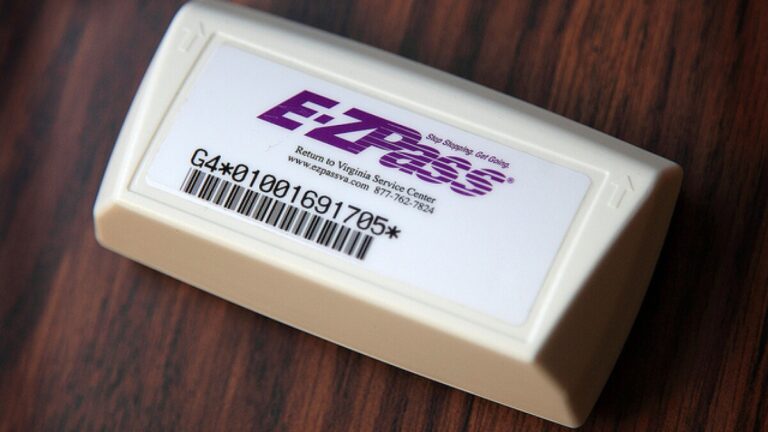
Your car is in the shop, so you grab the keys to your spouse’s SUV for the morning commute. Halfway to work you remember your E-ZPass transponder is still stuck to your windshield back home, sitting in the garage doing absolutely nothing for you right now. Or maybe the opposite happened, you peeled it off and tossed it onto the dashboard of the rental car you picked up at the airport, wondering if that little plastic box will actually work here too.
Good news first: yes, you can use your E-ZPass in another car. This is one of those questions people worry about way more than they need to. The transponder itself does not care what vehicle it is riding in. What matters is whether your account knows about that vehicle, and whether that vehicle fits the same general category as what you originally signed up with.
That said, “yes you can” comes with a few conditions worth understanding before you go swapping your transponder between a sedan, a pickup truck, and a rental SUV without a second thought. Get these details wrong and you could end up with mischarged tolls, unexpected surcharges, or a violation notice you never saw coming.
The Short Answer: Yes, But Your Account Needs to Know
An E-ZPass transponder is really just a small radio device that broadcasts an account number to toll readers as you drive past them. It has no idea what car it is attached to. The toll system, however, cross-references that account number against whatever vehicle information you have on file, and that is where things can get complicated if you have not kept your account updated.
Think of it less like a car-specific device and more like a credit card. Your credit card does not care which store you use it in, but the store’s system still needs to recognize the card as valid. Same idea here. Move your transponder to a different car, and as long as that car is registered on your account, everything works exactly like it should.
Registering Additional Vehicles Is the Key Step Most People Skip
Here’s the thing that trips people up more than anything else: they assume the transponder itself is the only thing that matters, when really, the account behind it does most of the heavy lifting.
Why This Step Cannot Be Skipped
To keep toll payments running smoothly no matter which car you are driving, every vehicle you plan to use your E-ZPass in needs to be registered on your account beforehand. This is usually a quick process handled through the E-ZPass website or by calling customer service directly.
All you typically need is the license plate number and basic details for each additional vehicle. Once added, that vehicle becomes officially linked to your transponder, meaning toll systems will recognize it correctly no matter which of your registered vehicles happens to be carrying the tag on a given day.
What Happens If You Skip This Step
Skip this registration step, and you are rolling the dice every time you switch cars. Some toll systems will still process the transaction correctly since the transponder ID itself is valid, but others may flag the mismatch between the registered vehicle and the actual vehicle photographed at the toll, which can trigger a surcharge or, in worse cases, a violation notice.
Moving a Transponder Between Vehicles: What Actually Matters
Vehicle Class Has to Match
This is probably the single most important rule to understand. Your E-ZPass account assigns each transponder to a specific vehicle class, and that classification affects how much you get charged at every toll.
A tag registered for a standard sedan should not be used on a commercial truck, and here is why that matters practically. Toll rates scale with vehicle size and weight, since larger vehicles cause more wear on roads and bridges. If your transponder is telling the toll system you are driving a small passenger car while you are actually hauling a box truck through the lane, that mismatch does not go unnoticed for long.
| Vehicle Class | Typical Examples |
|---|---|
| Class 1 or 2 | Sedans, standard SUVs, motorcycles, pickup trucks |
| Class 3 and above | Box trucks, RVs, vehicles with multiple axles, commercial trucks |
Moving your transponder between two vehicles within the same class is generally seamless. Moving it between classes is where things get messy, and it is not something you want to discover the hard way through a mailed violation notice weeks later.
Mounting Still Matters, Even If the Car Is Different
A transponder that is not mounted correctly will not read properly at toll booths, regardless of which car it happens to be sitting in. Every time you move your tag to a new vehicle, take an extra moment to mount it properly rather than just tossing it on the dashboard or setting it in a cup holder.
Poor positioning is actually one of the more common reasons transponders fail to read, right alongside dead batteries and expired accounts. If you are curious about what specifically interferes with a proper reading, this breakdown on what can prevent a transponder from being read covers the details worth knowing, even if your intention is the opposite of blocking the signal.
Using E-ZPass in a Rental Car
Renting a car for a business trip or vacation does not mean you have to abandon your E-ZPass convenience. You absolutely can bring your transponder along, but there are a couple of things worth handling before you hit the highway.
Add the Rental to Your Account First
Before you toss your E-ZPass transponder onto the rental’s dashboard, log into your account and add the rental vehicle’s license plate information for the duration of your rental period. This single step prevents most of the headaches associated with using a personal transponder in a temporary vehicle.
Check the Rental Company’s Own Policy Too
Here is a detail plenty of travelers overlook. Many rental companies have their own built-in toll payment systems, sometimes charging a daily fee whether you use it or not, and their policies on outside transponders vary quite a bit.
Some rental agencies are perfectly fine with you using your personal E-ZPass. Others discourage it, or their in-car systems might actually interfere with your transponder’s signal if both are somehow active at once. A quick question at the rental counter saves you from double-paying tolls or dealing with a confusing bill later.
How Toll Booths Actually Identify and Charge Your Account
Understanding what happens on the other end, at the actual toll gantry, helps explain why registration and vehicle class matter so much.
Transponder Reading: The First Line of Detection
When you drive through a toll equipped with electronic scanners, those scanners communicate directly with your transponder, pulling your account information and deducting the appropriate toll automatically. For this to work smoothly, two things need to line up:
- Your transponder needs to be properly mounted according to the manufacturer’s instructions.
- The vehicle you are currently driving needs to be linked to your E-ZPass account, particularly if it differs from your originally registered vehicle.
Simply owning a working transponder is not the whole story. It needs to be tied to the correct license plate and vehicle class on the account side, or you risk discrepancies that lead to fines even when you technically paid the toll.
License Plate Recognition: The Backup System
Even with a transponder mounted and working, many modern toll plazas also photograph your license plate as a secondary verification method. This camera system does a couple of things automatically:
- It attempts to match your plate against a registered transponder account.
- If no transponder signal was detected, it bills the toll directly based on the plate photograph instead.
This is exactly why updating your account matters every time you change vehicles or get new plates. If there is a mismatch between what your transponder reports and what the camera sees on your plate, you might get flagged for a fine even though the toll itself was technically paid through your transponder.
Understanding Your Bill: What Those Charges Actually Mean
E-ZPass billing statements are generally easy to read once you know what to look for. Each entry typically lists the date, time, and location of every toll transaction tied to your account.
| Bill Detail | What It Tells You |
|---|---|
| Date | When the toll transaction occurred |
| Location | Which toll plaza or gantry processed the charge |
| Charge | The toll amount deducted from your account |
Most accounts deliver these statements by email, which makes reviewing your toll history fairly convenient. It is worth actually reading through these entries occasionally rather than letting them pile up unread, since catching a billing error early is far easier than disputing something months after the fact.
When Surcharges Show Up on Your Bill
Here is a detail that catches a lot of people off guard. Using your E-ZPass in a vehicle that is not registered to your account can trigger a surcharge, sometimes around $2 per transaction, which can push the effective toll cost up by as much as 30 percent compared to the standard rate.
If you spot a surcharge you were not expecting, work through these steps:
- Log into your account and confirm every vehicle you regularly drive is properly listed.
- Pull up the specific transaction in question and review exactly why the surcharge was applied.
- Contact customer service promptly if something still does not add up.
Surcharge notices typically include a transaction identifier along with the specific fee breakdown, which makes it much easier to reference the exact charge when speaking with a representative.
What a Violation Notice Actually Involves
If an actual violation occurs, rather than just a surcharge, you should receive formal notice by mail or email outlining exactly what happened and how to resolve it. Acting quickly here genuinely matters, since delaying a response tends to invite additional penalties on top of the original charge.
Smart Travel Habits for E-ZPass Users
Plan Ahead Before Long Trips
Before setting out on a longer drive, particularly one that crosses state lines, confirm your E-ZPass account has sufficient funds loaded and check toll rate compatibility for the states you will be passing through. E-ZPass works across a wide network of states, but rates and specific rules can vary noticeably from one toll authority to the next.
If you know in advance you will be switching vehicles partway through your trip, whether picking up a rental or borrowing a different car, register that vehicle on your account before you leave rather than trying to sort it out from the road.
Understand Cashless Tolling Before You Encounter It
Cashless tolling has become increasingly common, with systems like New York’s Thruway leading the shift away from traditional toll booths entirely. On a cashless system, there is no attendant, no basket to toss coins into, just overhead sensors reading your transponder as you drive through at normal speed.
Your E-ZPass automatically records the toll as you pass beneath these sensors, provided your transponder is mounted correctly on your windshield. If you are driving a rental car through one of these systems, the same registration advice applies. Add the rental to your account beforehand, and you will sail through without a second thought.
Special Situations Worth Knowing About
When Vehicle Classes Do Not Match
It bears repeating because it causes real problems for real people. If your account is set up for a class 2 vehicle, generally meaning a standard car, pickup truck, or motorcycle, using that same transponder in another class 2 vehicle works without issue.
Trouble starts when you use that same transponder in a vehicle from a higher class, like a class 3 truck or larger commercial vehicle. The toll system will likely charge the rate associated with your registered class rather than the actual vehicle you are driving, and that mismatch can result in incorrect charges or penalties once it gets flagged during an audit or review.
What Happens If the Toll Reader Misses Your Transponder
Even with everything set up correctly, transponders occasionally fail to read for one reason or another, whether due to a weak battery, poor mounting, or a glitch on the reader’s end. When this happens, a bill typically gets mailed directly to whoever the license plate is registered to.
This is exactly why keeping accurate plate and registration information on your E-ZPass account matters so much, even for vehicles you only drive occasionally. With accurate information on file, toll authorities can usually match the plate back to your account and bill you correctly, even in the rare event your transponder does not register properly at the plaza itself.
A Quick Checklist Before Switching Vehicles
- Confirm the new vehicle is registered on your E-ZPass account.
- Verify the vehicle falls within the same class as your original registration, or update your account if it does not.
- Mount the transponder properly according to manufacturer instructions.
- Double-check your account balance before a longer trip.
- Review your billing statement afterward to confirm everything processed correctly.
Frequently Asked Questions
Can I use one E-ZPass transponder across several personal vehicles I own?
Yes, as long as each vehicle is registered on your account and falls within the same vehicle class as your transponder’s original setup.
Will I be charged extra just for switching my tag between two of my own cars?
Generally no, provided both vehicles are properly listed on your account beforehand. Surcharges typically apply when a vehicle is not registered at all, not simply for switching between registered vehicles.
What happens if I forget to add a rental car to my account before a trip?
Your transponder may still read correctly at some toll plazas, but there is a real risk of a surcharge or mismatch flag due to the unregistered plate. It is far safer to add the vehicle before you start driving.
Does moving my transponder between cars ever damage it?
Not typically, as long as you handle it carefully during removal and remounting. Repeatedly using adhesive strips can weaken over time, so consider a reusable mounting solution if you switch vehicles often.
Switching your E-ZPass between vehicles is genuinely simple once your account reflects reality. Keep every vehicle you drive properly registered, respect the vehicle class rules, and mount that transponder correctly every single time. Do that, and tolls become the one part of your drive you never have to think twice about.