
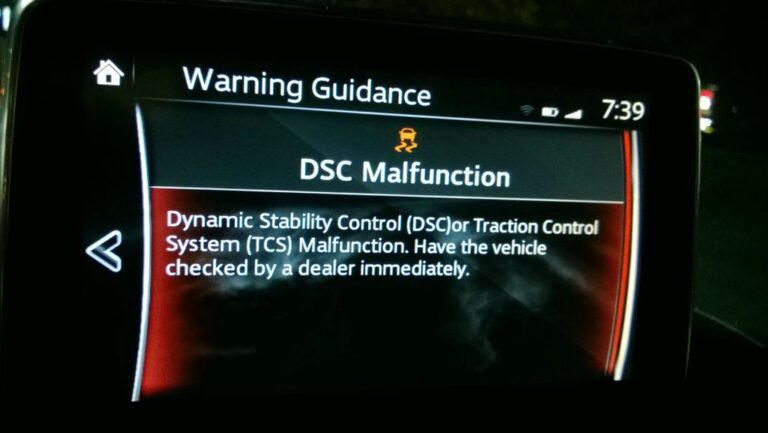
That DSC warning light sitting on your Mazda’s dashboard is not something to park in the back of your mind and deal with “later.” The Dynamic Stability Control system is one of the most important safety features in your vehicle, and when it malfunctions, you are driving with less protection than you think, especially in wet, icy, or emergency situations where that system would normally be the thing keeping you on the road.
The good news is that a DSC malfunction does not always mean something expensive has broken. Sometimes it is a dirty sensor. Sometimes it is a software hiccup. Sometimes it points to something more serious. The key is understanding what you are looking at so you can respond appropriately instead of guessing.
This guide covers everything: what the DSC actually does, why it malfunctions, how to diagnose the cause, how to fix it, and how to reset the warning light once you have sorted out the underlying issue.
What Is Mazda’s Dynamic Stability Control and Why Does It Matter?
Before getting into what goes wrong, it helps to understand what the DSC is actually doing while you drive. Because once you understand its function, the warning light carries a lot more weight.
The Dynamic Stability Control system works alongside your ABS (Anti-lock Braking System) and TCS (Traction Control System) to actively monitor and manage vehicle stability. It is constantly reading data from multiple sensors, comparing what the car is actually doing with what the driver intends to do, and making corrections in real time when those two things do not match.
Think about what happens when you take a corner too fast on a wet road and the rear of the car starts to slide out. Without DSC, that slide either corrects itself or does not, depending entirely on your driving skill and reaction speed. With DSC active, the system detects the deviation within milliseconds, selectively applies braking force to individual wheels, and adjusts engine torque to bring the car back in line, often before the driver has even consciously registered that the slide is happening.
The DSC activates when vehicle speed exceeds 20 km/h. Below that threshold, the system stands down. But above it, in any situation where wheel slip, oversteer, or understeer is detected, the DSC is ready to intervene.
The sensors feeding data to the DSC module include:
- Wheel speed sensors on all four corners, measuring individual wheel rotation rates
- Steering angle sensor, which tells the system what direction the driver intends to go
- Yaw rate sensor, which measures the rotational speed of the vehicle around its vertical axis (essentially detecting spinning or sliding)
- Lateral acceleration sensor, which measures sideways forces on the vehicle
- Brake pressure sensor, which monitors hydraulic pressure in the braking system
By comparing all of this data simultaneously, the DSC module builds a real-time picture of what the vehicle is doing and makes corrections faster than any human driver could react. That is the system you are relying on every time road conditions turn challenging.
The Tire Requirements Most Mazda Owners Overlook
Before diving into electrical and mechanical causes of DSC malfunctions, there is something worth knowing that a lot of Mazda owners never think about: the DSC system has specific tire requirements to function correctly, and violating those requirements can trigger a malfunction all on its own.
For the DSC to operate as designed, all four tires must meet the following conditions:
- The tires must be the correct size as specified by Mazda for your specific model
- All four tires should be from the same brand and have the same tread pattern
- Do not mix new tires with significantly worn ones
Here is why this matters technically. The DSC calculates vehicle stability partly by comparing the rotational speeds of all four wheels against each other. If one tire is a different size, has a different tread depth, or is a different brand with different rolling characteristics, its rotational speed at any given vehicle speed will be slightly different from the others. The DSC may interpret this as a slip or instability event, triggering the system unnecessarily or causing inaccurate corrections.

If you recently had tires replaced, or if someone put mismatched tires on the vehicle at some point, that alone could be the source of intermittent DSC warnings. Check your tires before chasing down electrical faults.
Understanding What the DSC Warning Light Is Actually Telling You
Not all DSC warning light situations are equal. The way the light behaves tells you a lot about what is happening before you even plug in a diagnostic scanner.
Light Comes On Briefly at Startup Then Goes Off
This is completely normal. When you start your Mazda, the instrument cluster runs a self-check of all warning lights. The DSC light, ABS light, and other system indicators all illuminate briefly to confirm the bulbs are working, then they go out. If the DSC light comes on at startup and turns off within a few seconds, there is nothing wrong. The system is doing exactly what it should.
Light Flashes While You Are Driving
A flashing DSC light while driving does not mean something is broken. It means the DSC system is actively working. The light flashes to let you know the system has detected a stability issue and is making corrections. This typically happens on slippery surfaces, in tight corners at speed, or during emergency maneuvers.
If the flashing is happening on dry roads during normal driving, that is more unusual and worth paying attention to. It could indicate that a sensor is giving inaccurate readings and causing the system to think there is a stability problem when there is not one.
Light Stays On Continuously
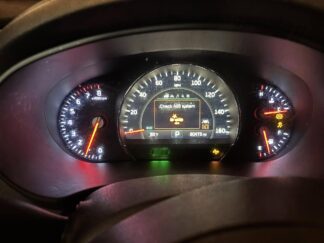
This is the situation that requires action. A DSC warning light that stays on steadily after the initial startup self-check indicates a fault in the DSC system, ABS, or braking system. The system has detected something it cannot resolve on its own and is alerting you that it may not be functioning correctly.
In this state, the DSC may be partially or fully disabled. You are driving without its protection. On a clear, dry road in normal conditions, you probably will not notice any difference. But if you suddenly need to swerve to avoid something, or if the road turns slippery, the absence of that system becomes very real, very fast.
Both DSC and ABS Lights Are On Together
When the DSC and ABS warning lights come on simultaneously, it strongly suggests the fault is in a component shared by both systems. The wheel speed sensors are the most common shared component. Each sensor feeds data to both the ABS and DSC modules, so a single faulty wheel speed sensor will often trigger both warning lights at the same time.
Seeing both lights together is actually useful diagnostic information. It narrows down the search significantly before you even start troubleshooting.
The Real Causes of Mazda DSC Malfunction
There is no single cause that covers every DSC malfunction. But there are clear patterns that show up repeatedly in Mazda vehicles. Here is a thorough look at each one.
1. Faulty Wheel Speed Sensors: The Most Common Culprit
If there is one component to investigate first when your DSC and ABS lights come on, it is the wheel speed sensors. These small sensors sit at each wheel hub and measure how fast the wheel is spinning. They send that data to both the ABS module and the DSC module continuously while the vehicle is moving.
Wheel speed sensors fail for several reasons. The sensor itself can develop an internal electrical fault. The tone ring (the toothed ring the sensor reads) can get damaged or corroded. The wiring harness connecting the sensor to the module can be damaged by road debris, or the connector can corrode. Any of these failures produces inaccurate speed readings that trigger warning lights in both the ABS and DSC systems.
A diagnostic scanner that shows live wheel speed data is invaluable here. If one wheel shows a speed of zero while the other three show the actual vehicle speed, or if one wheel shows an erratic, jumping reading, the sensor at that corner is likely the problem.
Wheel speed sensor replacement is not an especially complicated job on most Mazda models. The sensor is typically held in place by one or two bolts and the main challenge is often just disconnecting a corroded plug or getting past accumulated road dirt. Sensor costs vary by model but are generally reasonable, and labor time at a shop is typically an hour or less per sensor.
2. Steering Angle Sensor Problems
The steering angle sensor is mounted on the steering column and measures the angle and rate at which the steering wheel is being turned. The DSC system uses this data to understand where the driver intends to go, and it compares that intention against what the vehicle is actually doing.
When the steering angle sensor fails or loses calibration, the DSC module receives incorrect information about the driver’s intended direction. This can cause the system to make unnecessary corrections when the car is actually stable, or fail to make corrections when they are needed.
One particularly common situation with the steering angle sensor is a calibration issue rather than an outright failure. If the steering column has been worked on, if an alignment has been performed, or if the battery has been disconnected and reconnected, the steering angle sensor may need to be recalibrated. The sensor’s idea of “straight ahead” may be offset, causing it to continuously report a slight steering input even when the wheel is centered.
Recalibration of the steering angle sensor typically requires a scan tool with the ability to perform the calibration procedure. This is usually a quick process at a shop but is not something you can do with a basic code reader.
3. Yaw Rate Sensor Failure
The yaw rate sensor measures how quickly the vehicle is rotating around its vertical axis. Put simply, it detects when the car is starting to spin. This sensor is central to the DSC’s ability to detect oversteer (rear slides out) and understeer (front pushes wide).
On most Mazdas, the yaw rate sensor is integrated into a combination sensor unit that also includes the lateral acceleration (G-sensor) and sometimes the brake pressure sensor. This unit is typically located in the center of the vehicle, under the center console or near the floor tunnel, because that central position gives it the most accurate readings of the car’s rotational behavior.
A failing yaw rate sensor can cause the DSC to intervene during completely normal driving, or it can prevent the system from responding when it should. Either way, the result is unreliable stability control. Like the steering angle sensor, the yaw rate sensor may sometimes need recalibration rather than full replacement.
4. Brake System Issues Affecting the DSC
The DSC achieves its stability corrections by selectively applying braking force to individual wheels. If the braking system itself has problems, the DSC cannot execute those corrections even if its sensors are all working correctly.
Issues that can trigger a DSC malfunction through the brake system include:
- Worn brake pads. Severely worn pads can affect braking response and cause uneven braking force, which the DSC system may interpret as a wheel speed discrepancy.
- Air in the brake lines. Air bubbles in the hydraulic system cause spongy, inconsistent braking that the DSC cannot reliably use for stability corrections.
- Faulty ABS modulator or hydraulic control unit. The ABS modulator is the component that physically varies brake pressure to individual wheels on command from the ABS and DSC modules. If it develops an internal fault, neither the ABS nor DSC can function correctly.
- Low brake fluid. A low brake fluid level can trigger related warning lights and may indicate a leak in the system that needs attention.
5. ECU or DSC Module Faults
The DSC module is the brain of the system. It receives all the sensor data, runs the calculations, and sends commands to the actuators. When the module itself develops a fault, whether from electrical damage, water intrusion, a power surge, or internal component failure, the entire system goes offline.
Module faults are less common than sensor faults, but they do happen. The important thing is to rule out every other possible cause before concluding the module is the problem. A misdiagnosed module replacement is an expensive mistake. Modules typically cost several hundred dollars plus programming fees, and if the real problem was a $50 wheel speed sensor, that is a painful and unnecessary expense.
One scenario where the module is more likely to be the culprit is when the diagnostic scan shows no specific sensor fault codes, all sensors test within normal parameters, the wiring checks out clean, and yet the DSC malfunction persists. At that point, the module itself comes under suspicion.
6. Software Glitches and the Need for Updates
Modern vehicles are increasingly software-dependent, and Mazda is no exception. The DSC module runs firmware that can sometimes develop glitches, especially after events like a dead battery, a failed software update, or certain types of electrical faults.
In some cases, the DSC warning light appears without any underlying hardware fault. The module is throwing a code not because a sensor has failed but because something in its software has gotten confused. A software update or module reprogram from a certified Mazda technician can resolve these situations without any parts being replaced.

Mazda periodically releases software updates for various control modules. If your vehicle is at the dealer for a DSC diagnosis and the technician mentions that there is a software update available for the DSC module, that is worth considering even if you are not sure it is the direct cause. Updated firmware often addresses known bugs and improves system stability.
7. Extreme Weather and Temporary DSC Engagement
This one is worth understanding because it can cause confusion. Heavy snow, ice, or standing water can create driving conditions where the DSC is working almost continuously. Wheels slip and regain traction repeatedly. The yaw rate sensor detects constant minor instability. The wheel speed sensors see rapid fluctuations.
In extreme conditions, the sheer volume of inputs can occasionally overwhelm the system’s ability to respond consistently, causing the warning light to come on temporarily. In most cases, this is not a system fault. It is the system telling you that conditions are genuinely extreme and traction is compromised.
If the DSC light came on during a particularly bad weather event and then went off once conditions improved, you do not necessarily have a malfunction. But if the light stays on after returning to normal conditions, that warrants a scan to check for stored fault codes.
How to Diagnose a Mazda DSC Malfunction: A Logical Approach
Diagnosis done correctly saves money and time. Jumping straight to replacing parts without knowing what is actually wrong is how repair bills balloon unnecessarily. Here is a logical sequence to follow.
Step 1: Pull the Diagnostic Trouble Codes
An OBD2 scanner is the starting point. Plug it into the diagnostic port under the driver’s side dashboard and read all stored codes. Write down every code you see, not just the most obvious one. Multiple codes together tell a more complete story than any single code on its own.
For DSC-related diagnosis, you ideally want a scanner that can access ABS and chassis control modules, not just the engine module. Basic generic OBD2 scanners only read powertrain codes. A mid-range scanner with ABS and SRS access, or a professional-grade tool, will give you the DSC and ABS fault codes that are most relevant here.
Common DSC and ABS fault code ranges to look for include:
- C1145 to C1155: Wheel speed sensor circuit faults (specific codes identify which corner)
- C1234: Steering angle sensor malfunction
- C1266 to C1278: ABS hydraulic system faults
- C1288: Brake pressure sensor fault
- U codes (communication faults): These indicate communication failures between modules, which can sometimes point to wiring harness damage or a failing module
Step 2: Use Live Data to Verify Sensor Performance
Fault codes tell you where to look. Live data tells you what is actually happening. With a capable scanner in live data mode, you can watch the wheel speed sensors in real time as you drive slowly in a safe area.
All four wheel speeds should read the same value when driving straight. If one sensor reads zero, reads a significantly different speed, or shows erratic jumping values, that corner’s sensor or its wiring is the problem.
Watch the steering angle sensor data while turning the wheel slowly from lock to lock. The reading should change smoothly and consistently as the wheel turns, with zero or close to zero when the wheel is centered. If the “zero” position is significantly offset, or if the reading jumps erratically, calibration or replacement is needed.
Step 3: Visually Inspect the Wheel Speed Sensors and Their Wiring
Before ordering parts, do a physical inspection. Each wheel speed sensor is accessible from underneath the vehicle or through the wheel well. Look for:
- Physical damage to the sensor body
- Damage to the sensor’s wiring harness (look for chafing against suspension components, cuts, or melted insulation)
- Corroded or loose connector plugs
- Damage to the tone ring (the toothed reluctor ring on the hub or axle that the sensor reads)
- Excessive metal debris or corrosion buildup around the sensor tip, which can interfere with the magnetic signal
Sometimes the fix is as simple as cleaning a tone ring that is coated with metallic debris from worn brake pads. Sometimes it is re-securing a wiring harness that has been rubbing against a suspension arm. Do not assume you need a new sensor until you have confirmed the physical components are in acceptable condition.
Step 4: Check the Brake System
Check the brake fluid level in the reservoir under the hood. It should be between the MIN and MAX marks. While you are at it, look at the brake fluid’s condition. Fresh brake fluid is clear to light amber. Dark brown or black fluid is old and contaminated and needs to be changed.
Inspect the brake pads through the wheel spokes if possible. Most wheels allow you to see the pads from the outside without removing the wheel. If the pad material looks thin, that is worth addressing regardless of whether it is directly causing the DSC issue.
Step 5: Consider Software Updates and Calibration Needs
If the physical inspection and sensor tests all come back clean, ask whether there are any pending software updates for the DSC module or associated systems. A Mazda dealer can check this quickly. Also consider whether any recent work on the vehicle, like an alignment, battery replacement, or steering component repair, might have put the steering angle sensor out of calibration. A calibration procedure may be all that is needed to clear the fault.
How to Fix the Mazda DSC Malfunction Based on the Cause
Once you know what is actually wrong, here is how to approach the fix for each cause.
Fixing a Faulty Wheel Speed Sensor
Wheel speed sensor replacement is a straightforward job for someone comfortable with basic mechanical work. The steps are generally:
- Safely lift and support the vehicle on the side where the sensor needs replacement
- Remove the wheel to gain access to the sensor
- Disconnect the sensor’s wiring harness at the connector
- Remove the mounting bolt or bolts holding the sensor to the hub or knuckle
- Pull the old sensor out (apply penetrating oil if it is seized in place and let it soak before forcing it)
- Install the new sensor, tighten the mounting bolt to specification, and reconnect the wiring harness
- Reinstall the wheel, lower the vehicle, and clear the fault codes
- Test drive to confirm the warning lights have cleared and the sensors are reading correctly in live data
Always use quality replacement sensors. Cheap aftermarket wheel speed sensors are a common source of repeat failures. OEM Mazda sensors or sensors from reputable brands like Bosch or Delphi are worth the extra cost for a component this important.
Fixing Steering Angle Sensor Issues
If the sensor needs recalibration rather than replacement, a visit to a shop with the appropriate scan tool is the solution. The calibration procedure typically involves centering the steering wheel, connecting the scan tool, and running the calibration routine, which takes just a few minutes.
If the sensor is physically failed and needs replacement, that is a more involved job as it requires accessing the steering column. After replacement, calibration is always required. A new sensor does not know where “straight” is until it is calibrated.
Addressing Software Issues
Software updates and module reprogramming require dealer-level equipment. This is not a DIY procedure. If a software issue is identified, take the vehicle to a Mazda dealer or a shop with access to Mazda’s factory programming tools. The cost is typically modest compared to parts-based repairs, and it is often the overlooked solution that resolves a stubborn warning light with no obvious hardware cause.
Replacing Faulty ECU or DSC Module Components
If module replacement becomes necessary after exhausting all other possibilities, choose between these options:
- New OEM module from Mazda: Most expensive, guaranteed compatibility, requires programming to your VIN
- Remanufactured module: More affordable, acceptable quality from reputable rebuilders, still requires programming
- Used module from a salvage vehicle: Cheapest upfront cost, but must be from the same model and year, and still requires reprogramming. Quality is uncertain.
In all cases, module replacement requires programming by a dealer or a shop with appropriate equipment. A replacement module that has not been programmed to your vehicle will not function correctly.
How to Turn Off the DSC System When You Actually Want To
There are legitimate situations where turning off the DSC makes sense. Driving in deep snow is the classic example. When you are trying to rock a car out of being stuck, the DSC and traction control will interpret the spinning wheels as a problem and cut engine power, which is exactly the opposite of what you need in that moment.
To disable the DSC on your Mazda:
- Locate the DSC OFF button on the dashboard. On most Mazda models, it is on the center console near the gear selector or on the lower dashboard panel.
- Press and hold the button for approximately 10 seconds.
- The DSC OFF indicator will illuminate on the instrument cluster, confirming the system is disabled.
One important thing to know: the DSC automatically re-enables every time you turn the engine off and back on. So you will need to manually disable it again each time you start the vehicle if you are working in conditions where you need it off. This is intentional. It ensures you never accidentally forget the system is disabled and drive on normal roads without stability control.
Re-enable the DSC by pressing the button again briefly, or simply turn the engine off and restart the vehicle.
How to Reset the DSC Warning Light After Fixing the Problem
Once you have repaired the underlying cause, the warning light needs to be cleared. In some cases, the light clears itself after a few drive cycles once the system confirms the fault is no longer present. But if it persists after the repair is done, here is how to reset it manually.
Method 1: Using a Diagnostic Scanner
The cleanest and most reliable method is using an OBD2 scanner to clear the stored fault codes. Once the codes are cleared, the warning lights should go off. If they return immediately after clearing, the underlying fault has not been resolved and needs further diagnosis.
Method 2: Manual Steering Wheel Reset Procedure
This procedure can sometimes reset the DSC system without a scanner. Here is the process:
- Turn the ignition to the “On” position without starting the engine
- Turn the steering wheel all the way to the left until it reaches the lock
- Turn the steering wheel all the way to the right until it reaches the lock
- Turn the ignition off
- Wait a few seconds, then start the vehicle normally
This procedure helps recalibrate the steering angle sensor by teaching it the full range of steering motion and re-establishing the center point. It can clear a warning light that appeared due to a steering angle calibration issue, but it will not fix a genuine hardware fault. If the light comes back on after this procedure, a hardware problem is the cause and needs to be addressed.
Verify the Fix With a Test Drive
After clearing the codes and performing any reset procedures, take the vehicle for a test drive of at least 15 to 25 minutes. Drive at various speeds, make gentle and moderate turns, and if safe to do so, test braking from low speed to confirm everything feels normal.
Watch the instrument cluster during the drive for any warning light that comes back. If the lights stay off through the entire test drive and the vehicle handles normally, the repair is confirmed successful. If any warning light returns, plug in the scanner again and see what code has been set. That code will tell you whether a new problem has emerged or whether the original fault was not fully resolved.
A Quick Reference: DSC Fault Causes, Symptoms, and Fixes
| Cause | Warning Light Behavior | Common Symptoms | Typical Fix | DIY Friendly? |
|---|---|---|---|---|
| Faulty wheel speed sensor | DSC + ABS on together | ABS activating unnecessarily, speedometer erratic | Replace sensor | Yes |
| Steering angle sensor issue | DSC light on steady | DSC intervening on straight roads | Calibrate or replace sensor | Calibration: shop only |
| Yaw rate sensor failure | DSC light on steady | Unnecessary DSC intervention, instability feel | Replace or recalibrate sensor | No |
| ABS modulator fault | DSC + ABS on together | ABS not functioning, spongy brakes | Repair or replace modulator | No |
| Software glitch | DSC light on, no hardware fault found | No obvious driving symptoms | Software update or reprogram | No (dealer required) |
| Worn or mismatched tires | DSC light intermittent | DSC activating unpredictably | Replace or match tires | Yes |
| DSC module failure | DSC light on, multiple codes | Complete DSC inoperability | Replace and program module | No |
Your Mazda’s DSC system is not optional safety equipment in any meaningful sense. It is one of the most effective active safety technologies in modern vehicles, and it works best when it is functioning exactly as designed. A warning light that has been sitting on your dashboard for weeks while you tell yourself it will probably go away on its own is not protecting you the way a healthy DSC system would. Get it scanned, find the cause, fix it properly, and drive with the confidence that the system has your back when road conditions turn against you.