
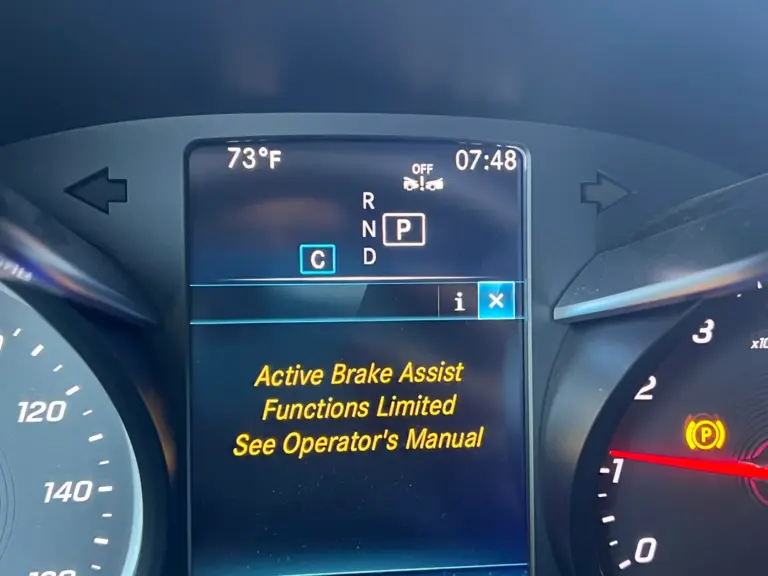
You are driving your Mercedes and suddenly a message pops up on the instrument cluster: “Active Brake Assist Function Limited.” It is not the kind of warning you can scroll past and forget about. This message is telling you that one of the most important safety systems on your vehicle is compromised, and right now, if something jumps out in front of you, the car may not respond the way it is designed to.
That is a serious situation. Not because your brakes have failed, but because the automatic collision mitigation system that backs you up when your reaction time is not fast enough is no longer working. Understanding what that means, what caused it, and how to fix it is exactly what this guide covers.
What Active Brake Assist Actually Does and Why It Matters
Active Brake Assist is a Mercedes-Benz safety feature found across a wide range of their modern lineup, including the C-Class, E-Class, GLC, GLE, S-Class, and others. It is part of the broader suite of driver assistance technology built into these vehicles, and it works in the background every time you drive.
Here is how it works in practice. As you drive, the system continuously monitors the road ahead using a combination of radar sensors, cameras, and in some models, infrared or ultrasonic sensors. These sensors track the distance and speed of vehicles, pedestrians, and other objects in your path.
When the system detects that a collision is possible, it goes through a sequence of responses:
- A visual and audible warning alerts the driver.
- If the driver hits the brakes, Active Brake Assist amplifies that braking force to the maximum level needed to stop the vehicle as quickly as possible.
- If the driver does not respond at all, the system triggers automatic emergency braking on its own.
That third step is the part that can genuinely prevent accidents. Human reaction time averages about 1.5 seconds. A lot can happen in 1.5 seconds at highway speed. The system bridges that gap.
So when the “Active Brake Assist Function Limited” message appears, none of that is available. Your regular brakes still work fine. But the backup system, the one that compensates for delayed reactions or moments of distraction, is offline. That distinction matters a great deal, especially in stop-and-go traffic or at highway speeds.
What “Active Brake Assist Function Limited” Actually Means
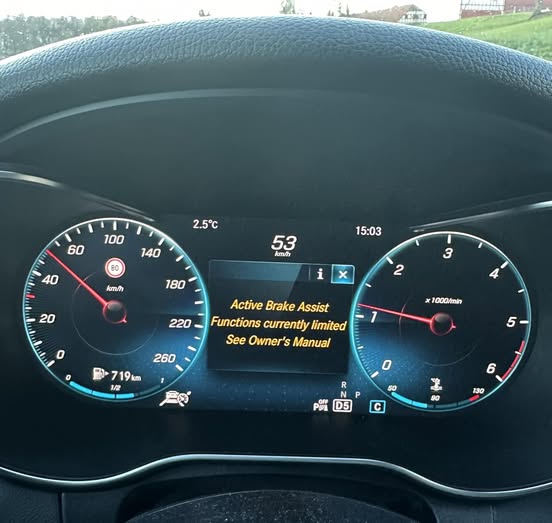
The message does not mean your brakes have failed. Your foot-operated braking system is completely unaffected. What it means is that the Active Brake Assist system has detected a fault or an obstruction that prevents it from operating reliably, and it has disabled itself rather than risk intervening at the wrong moment.
That is actually smart system design. An automatic braking system that activates incorrectly is more dangerous than one that stays off. So when the sensors cannot see clearly or the system detects an internal fault, it removes itself from the equation and warns you that you are now driving without that layer of protection.
The key question is why the system disabled itself. The answer to that determines how complicated the fix is going to be.
Common Causes of the Active Brake Assist Function Limited Warning
Cause 1: Dirty, Blocked, or Obstructed Sensors
This is the most common cause, and it is also the easiest to fix. The radar sensor on a Mercedes is typically mounted behind the front grille or embedded in the front bumper. The forward-facing camera is usually positioned at the top of the windshield, near the rearview mirror. Both of these locations are directly in the line of fire for road debris, bugs, mud, snow, and ice.
When dirt or any other material physically blocks the sensor’s field of view, the system cannot see the road ahead accurately. Rather than operating with compromised data, it shuts down and triggers the warning. This is especially common in winter conditions where slush and road salt build up on the front of the vehicle, or after driving on muddy roads.
Even a thin film of ice on the radar sensor location is enough to trigger the warning. Some Mercedes owners have reported the message appearing after a carwash when residual water temporarily obscured the sensor area.
Cause 2: Damaged Radar Sensors
Physical damage to the radar sensor is another common trigger. The front of a vehicle takes a beating over its lifetime. Minor parking incidents, road debris strikes, car wash brush contact, and even low-speed impacts can damage the sensor housing or misalign the sensor angle.
A radar sensor that is cracked, physically damaged, or knocked out of its calibrated alignment cannot scan the road correctly. It will either report inaccurate data or fail to report anything at all. Either way, the system flags the fault and disables Active Brake Assist.
After any front-end impact, even a minor one, it is worth having the radar sensor inspected and recalibrated. Sensor calibration is particularly important because even a few degrees of misalignment is enough to throw off the system’s object detection accuracy.
Cause 3: Damaged Wiring or Harness Faults
The sensors need to communicate with the vehicle’s central safety modules, and that communication travels through wiring harnesses. These harnesses run through the front of the vehicle, through the firewall, and throughout the interior. Any break, abrasion, corrosion, or loose connector in the wiring between the sensor and the control module can interrupt the data flow and trigger the warning.
Wiring faults are particularly common in the following situations:
- After rodent damage. Rats and mice commonly nest in engine bays and chew through insulation and wiring.
- After front-end repair work where harness connectors may have been disturbed or not fully reseated.
- In high-mileage vehicles where the wiring insulation has become brittle and cracked from heat exposure over many years.
- In vehicles that have been exposed to flooding or significant moisture intrusion in the front bumper area.
Cause 4: Low Battery Voltage
Just like with many other electronic systems on a modern Mercedes, the Active Brake Assist system is sensitive to voltage fluctuations. The radar sensors, cameras, and control modules all require stable power to operate correctly.
When battery voltage drops below the threshold these components need, they can begin sending erratic signals or fail to communicate with each other properly. The system detects the inconsistency and disables itself as a precaution. This type of fault often presents alongside other electronic warning messages on the dashboard, since low voltage affects multiple systems simultaneously.
Symptoms that suggest low battery voltage as the cause:
- Multiple warning lights appearing at the same time
- Slow or sluggish engine cranking on startup
- Dimmer than usual interior or exterior lighting
- The warning message appearing most often during cold morning starts when battery performance is at its lowest
Cause 5: Powertrain Control Module or Software Fault
The Powertrain Control Module, or PCM, acts as the central processing unit for many of the vehicle’s functions. In the context of Active Brake Assist, the PCM coordinates the information coming from the sensors and determines when and how to intervene.
Software glitches can occur in the PCM, particularly after incomplete software updates or power interruptions during an update process. When this happens, the module may misinterpret sensor data or fail to process it correctly, causing the Active Brake Assist system to flag a fault even when all the hardware is perfectly functional.
A fully failed PCM is a more serious situation and typically presents with widespread vehicle malfunctions beyond just the Active Brake Assist warning.
Cause 6: Complex or Unusual Traffic Situations
This one surprises many owners. Sometimes the warning appears temporarily because the sensor system has encountered a traffic scenario it cannot process reliably. Dense construction zones with unusual signage, heavy rain reducing visibility, direct sunlight hitting the windshield camera at an extreme angle, or unusual road markings can all temporarily confuse the system.
In these situations, the system disables itself temporarily and the warning appears. Once the vehicle moves out of the unusual conditions, the system often resets on its own and the warning clears without any action needed.
If the warning only ever appears in specific driving conditions and never sticks around, environmental interference is likely the explanation rather than a hardware fault.
How to Fix the Active Brake Assist Function Limited Warning
Fix 1: Clean the Sensors and Camera Locations
Start here before doing anything else. This fix costs nothing and resolves the problem a significant percentage of the time.
Here is where to focus your cleaning:
- Front bumper and grille area: The radar sensor is positioned behind the grille or embedded in the bumper. Clean the entire front bumper surface, paying particular attention to the center section where the sensor is housed. Use a microfiber cloth and a mild cleaning solution. Avoid high-pressure water directly at the sensor housing.
- Windshield: The forward-facing camera sits at the top of the windshield behind the glass. Clean the inside of the windshield in that area thoroughly using glass cleaner. Even a hazy film from interior condensation can affect camera performance.
- Headlamp and sensor areas: Some models have additional sensors near the headlamps or in the wheel wells. Clean these areas as well.
After cleaning, start the vehicle and drive at a moderate speed. Give the system a few minutes to reinitialize. If the warning was caused by sensor obstruction, it should clear on its own once the sensors can see clearly again.
If the warning returns immediately or does not clear after thorough cleaning, the cause is something other than contamination.
Fix 2: Check and Address Battery Issues
Have your battery load-tested. Most auto parts stores offer free battery testing. You are looking for a resting voltage of 12.6 volts or higher, and the battery needs to hold voltage under load during the cranking test.
If the battery is weak, charge it fully or replace it. After restoring proper battery voltage, try this reset procedure:
- Turn the vehicle completely off.
- Disconnect the negative battery terminal.
- Wait five full minutes.
- Reconnect the terminal and start the vehicle.
- Allow all systems to fully initialize before checking whether the warning has cleared.
Also check the battery terminal connections. Corrosion on the terminals, the white or greenish crusty buildup you sometimes see on battery posts, can cause intermittent voltage drops even when the battery itself tests fine. Clean corroded terminals with a wire brush and apply terminal protector spray.
Fix 3: Inspect and Repair Wiring Faults
If cleaning and battery checks did not resolve the issue, wiring is the next area to investigate. Your vehicle’s service manual contains wiring diagrams that show the complete circuit for the radar and camera systems, including connector locations and wire routing paths.
What to look for:
- Chafed or cut wires where harnesses run near sharp metal edges
- Melted or cracked insulation from heat exposure
- Corroded or loose connectors at sensor junction points
- Any visible rodent damage to wiring in the engine bay
If you find damaged wiring, the correct repair is full wire replacement for the affected section, not a simple cut-and-splice repair. Spliced automotive wiring in a safety-critical system like Active Brake Assist creates the risk of intermittent connection failures that can be very difficult to diagnose later. A compromised safety system wire that sometimes works and sometimes does not is more dangerous than one that is completely replaced.
For significant wiring harness damage, a professional repair is the right call. Automotive electricians can source replacement harness sections and ensure proper waterproofing and protection of the repair.
Fix 4: Replace or Recalibrate the Radar Sensor
If the sensor is physically damaged or confirmed as faulty through diagnostic scanning, it needs to be replaced. Here is what the process involves on most Mercedes models:
- Remove the front bumper cover to access the sensor housing. Depending on your specific model, you may also need to remove grille sections or splash guards.
- Disconnect the electrical connector from the sensor.
- Remove the sensor mounting hardware and extract the old sensor.
- Install the new sensor in the mounting position.
- Reconnect the electrical connector.
- Reinstall all removed trim and bumper components.
- Calibrate the new sensor. This step is not optional.
That last step deserves emphasis. A new radar sensor installed in a Mercedes is not plug-and-play. It needs to be calibrated to the vehicle so the system knows the exact angle and distance parameters it is working with. This calibration requires Mercedes diagnostic software, specifically the XENTRY system, and a properly set-up calibration area with specific target placements.
Skipping calibration after sensor replacement means the system may work but will not work correctly. Object detection accuracy will be off, and in a worst-case scenario the system could intervene at the wrong moment or fail to intervene when it should. Always have the sensor calibrated by a qualified shop after replacement.
Fix 5: Address PCM Software Issues
If the fault codes point to the Powertrain Control Module rather than the sensors or wiring, the repair approach depends on what exactly is wrong with the module.
For software-related faults, the solution is a reflash or reprogramming of the PCM. This process involves connecting a diagnostic tool to the vehicle’s OBD-II port and uploading the latest approved software from Mercedes-Benz to the module. This clears any corrupted data and brings the software up to the current version, which may include fixes for known issues.
If the PCM has a hardware failure that reprogramming cannot fix, the module needs to be replaced. PCM replacement on a Mercedes is not a simple swap. A replacement module needs to be coded and configured to the specific vehicle, including VIN coding and adaptation of all connected systems. This is strictly dealership or high-end independent shop territory. Attempting PCM replacement without the proper tools and software will leave you with a vehicle that cannot complete its startup sequence.

How to Temporarily Disable Active Brake Assist to Avoid Limp Mode
In some cases, when the Active Brake Assist warning is active, the vehicle may enter a reduced performance or limp mode that limits speed to around 40 mph. This is a protective response the system uses when it cannot verify that safety-critical components are functioning.
If you need to drive the vehicle before the underlying issue is repaired and want to avoid limp mode, you can temporarily disable the Active Brake Assist function through the vehicle settings. Note that this removes a safety protection and should only be used as a short-term measure while the problem is being addressed.
Here is how to disable it:
- Navigate to Vehicle Settings using the steering wheel controls or the center console interface.
- Scroll down to Assistance or Driver Assistance.
- Find Active Brake Assist in the list and select it.
- You will see sensitivity options such as High, Medium, Low, and Off.
- Select Off to disable the system temporarily.
With Active Brake Assist disabled, the warning should no longer push the vehicle into limp mode. But understand what you are doing here. You are removing an emergency braking safety net from your vehicle. Drive with extra care, increase following distances, and get the root problem diagnosed and repaired as soon as possible.
Can You Still Drive With This Warning Active?
Technically, yes. The vehicle is drivable. Your standard braking system is completely unaffected by this warning. The engine, transmission, steering, and regular brakes all work normally.
But here is the real answer. You are driving a vehicle with a compromised safety system. If something unexpected happens in front of you and your reaction is slightly delayed, there is no automatic assistance coming. For short trips at low speed to get the vehicle to a shop, driving with this warning is acceptable. For regular highway commuting or long-distance driving, get it fixed first.
The urgency scales with how you drive. City driving at lower speeds with more reaction time available is lower risk than highway driving at 70 mph where a split-second is the difference between a near miss and a collision.
Quick Reference: Causes and Fixes at a Glance
| Cause | Common Signs | Fix | DIY or Professional? |
|---|---|---|---|
| Dirty or blocked sensors | Warning after rain, mud, or carwash | Clean grille, bumper, and windshield | DIY |
| Damaged radar sensor | Warning after front-end impact | Replace and recalibrate sensor | Professional |
| Wiring harness fault | Intermittent warning, no obvious cause | Inspect and replace damaged wiring | Professional |
| Low battery voltage | Multiple warnings, slow crank | Test and replace battery | DIY |
| PCM software glitch | Warning after software update | PCM reflash or reprogramming | Professional |
| PCM hardware failure | Widespread system malfunctions | PCM replacement and coding | Dealer or specialist |
| Complex traffic or weather conditions | Warning only in specific situations | Self-clearing, no action needed | None required |
Why Proper Sensor Calibration After Any Front-End Work Is Non-Negotiable
This point gets missed by a lot of independent repair shops and even some dealerships who are not fully up to speed on ADAS requirements. Any time work is done on the front of your Mercedes, including bumper replacement, grille replacement, front end alignment, windshield replacement, or radar sensor removal for any reason, the safety sensors need to be recalibrated afterward.
This is not a Mercedes-only requirement. Every modern vehicle with forward collision warning and automatic emergency braking has calibration requirements that must be met after certain types of service work. Insurance companies, body shops, and repair facilities are increasingly being held to this standard because an uncalibrated ADAS system on a repaired vehicle can behave unpredictably.
If you have had any front-end work done on your Mercedes and the Active Brake Assist warning appeared shortly afterward, there is a very good chance the sensor was not recalibrated after the repair. Go back to the shop that did the work and ask them specifically whether sensor calibration was performed and documented. If it was not, that is the fix you need.
Frequently Asked Questions
Will the warning clear on its own?
Sometimes. If the cause was temporary sensor obstruction from mud, rain, or ice, the warning often clears once the obstruction is gone and the vehicle has been driven for a few minutes at normal speed. If the cause is a hardware fault, software issue, or damaged sensor, the warning will not clear on its own and requires repair.
How much does it cost to fix an Active Brake Assist fault on a Mercedes?
The cost varies significantly depending on the cause. Cleaning the sensors costs nothing. Battery replacement runs $150 to $300. Radar sensor replacement including calibration typically ranges from $500 to $1,500 depending on the model and the shop. Wiring repairs vary based on the extent of the damage. PCM reflashing usually costs $150 to $300 at a dealership. Full PCM replacement can run $800 to $2,500 including programming. Always get a proper diagnosis before authorizing any part replacement.
Can a regular mechanic fix this or does it have to go to the Mercedes dealership?
For basic fixes like cleaning, battery replacement, and wiring inspection, any competent mechanic can help. For sensor replacement, calibration, and PCM work, you need a shop with Mercedes-specific diagnostic software, either a dealership or a well-equipped independent European vehicle specialist. A generic scan tool cannot perform the sensor calibration or module programming that these repairs require.
Does this warning affect my other safety systems?
It can. The radar sensor and camera system that feeds Active Brake Assist also supports other features like Blind Spot Assist, Lane Keeping Assist, and Adaptive Cruise Control in many Mercedes models. When the sensor system is compromised, multiple assistance features may be limited simultaneously. Check your dashboard for any other warning indicators that appeared at the same time as the Active Brake Assist message.
Do Not Put This One Off
Most dashboard warnings give you some leeway. An oil life warning, a tire pressure indicator, an upcoming service reminder. Those can wait a few days. This one is different. Active Brake Assist exists specifically for the moments when things go wrong faster than you can react. When that system is down, your margin for error while driving is smaller than it should be.
Start with the simple checks. Clean the sensor areas thoroughly and see if the warning clears. Test the battery. If those do not solve it, get it properly diagnosed by a shop with the right tools. The diagnostic cost is worth knowing exactly what you are dealing with before spending money on parts.
Your Mercedes was built with this system specifically because emergencies happen when you least expect them. Getting it back online is not just about clearing a dashboard warning. It is about having the full capability of your vehicle available to protect you when it counts.