
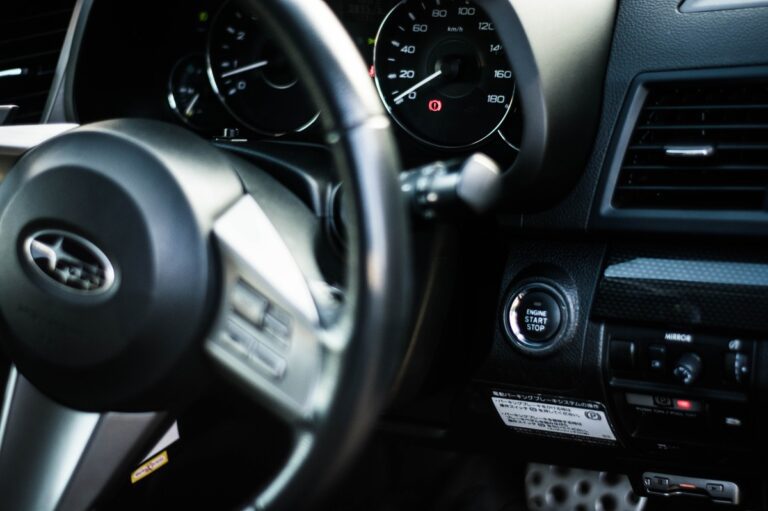
You walk out to your Subaru on a freezing January morning, hit the remote start button, and… nothing. No engine rumble, no lights flickering on, just silence. That moment is genuinely irritating, especially when you were counting on a warm car waiting for you.
Here is the thing though: this happens to Subaru owners more often than you might think. And in most cases, the fix is something you can handle yourself without driving to a dealership or spending a dime on labor. You just need to know where to look.
This guide covers every realistic cause of a Subaru remote start failure, from the five-second fixes to the more involved ones, written in plain language that actually makes sense whether you are a car person or not.
Why Your Subaru Remote Start Stopped Working: The Most Common Culprits
Before jumping into solutions, it helps to understand what you are actually dealing with. Subaru remote start is not a single standalone feature. It is multiple systems working together simultaneously. You have the key fob hardware, the receiver module inside the vehicle, the immobilizer security system, and in newer models, the Subaru Starlink connected services platform.
Think of it like a relay race. Every runner has to do their part. If even one drops the baton, the whole race falls apart. That is exactly how remote start works. One failed link in that chain and you get nothing when you press that button.
The good news? Most failures trace back to just a few common causes. Let’s go through them one by one.
A Dead or Dying Fob Battery Is the Number One Suspect
Start here. Always start here. A weak or dead battery in the key fob is the single most common reason Subaru remote start stops working, and it is also the easiest fix.
When the battery gets low, the fob can no longer send a strong enough radio frequency signal to reach the car’s receiver. What trips people up is that a dying battery does not always kill everything at once. Your door locks might still respond when you are standing right next to the car, but the remote start function, which requires a stronger sustained signal, gives out first.
So do not assume the battery is fine just because the lock button still works. That logic will lead you down the wrong path. The remote start button demands more from the battery, and it is the first to go when power gets low.
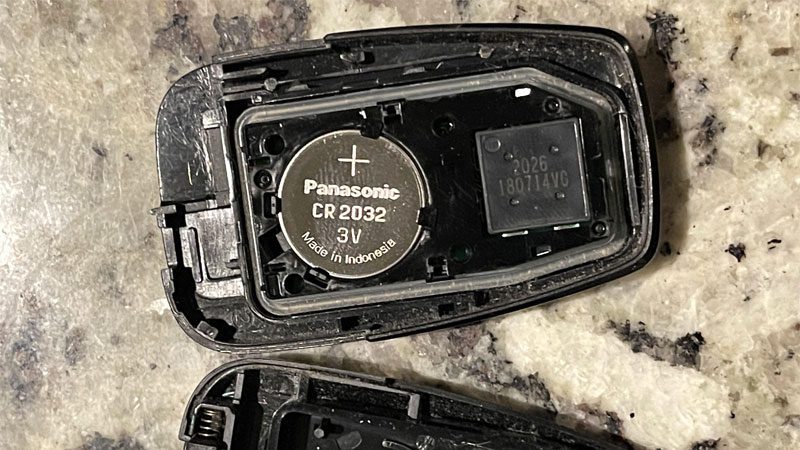
Most Subaru key fobs use a CR2032 coin cell battery. It costs about two to three dollars and is sold at literally every drugstore, grocery store, and big box retailer. Replacing it takes under two minutes. If you have not swapped the battery in the past year, just do it now before troubleshooting anything else.
The Fob Lost Its Pairing With the Vehicle
Here is something a lot of people do not realize: replacing the fob battery can sometimes cause the fob to lose its pairing with the car. It does not happen every time, but it happens enough that it is worth knowing about.
The fob and the car communicate using a coded signal. When that code gets disrupted, whether from a battery swap, water damage, or occasionally just a random glitch, the car stops recognizing the fob. Everything looks fine on the surface. The fob is not cracked or broken. The battery is brand new. But nothing happens when you press the remote start button because the car simply does not know who is talking to it.
This is also something that can happen after the car’s own battery has been disconnected, after a software update, or sometimes after a dealer service visit. Reprogramming the fob re-establishes that connection, and it is something most Subaru owners can do themselves with no tools required.
A Faulty Keyless Entry System That Needs Professional Attention
If you have already replaced the battery and confirmed the fob is paired correctly, but remote start still refuses to work, the problem might be inside the car itself. The keyless entry receiver module is the component that picks up the signal from your fob and processes it. When that module develops a fault, it can stop responding to remote start commands entirely, even if the fob and everything else are working perfectly.
Receiver module issues are less common, but they do happen. Moisture getting into the module, wiring problems, or simple component failure over time can all cause this. Unfortunately, diagnosing a faulty receiver module is not something you can do with a basic code reader. This is a job for a technician with dealer-level diagnostic equipment.
That said, do not jump to this conclusion right away. Work through the simpler fixes first. You would be surprised how many “receiver module problems” turn out to be a three-dollar battery.
How to Actually Fix a Subaru Remote Start That Is Not Working
Now let’s get practical. Here are the actual fixes, listed from simplest to most involved. Work through them in order and you will find the problem faster.
Fix #1: Replace the Fob Battery the Right Way
Even if you think the battery is probably fine, replace it first. Spend the three dollars. It eliminates an entire category of potential problems in two minutes flat.
Here is how to do it properly:
- Look at the edge of your key fob. You will see a small seam running around the perimeter. Use a small flathead screwdriver or even a coin to gently work the two halves apart at that seam. Go slow and work your way around. Do not try to force it from one spot or you will crack the casing.
- Once it pops open, you will see the coin cell battery sitting in a small circular holder. Before you touch anything, note which side of the battery is facing up. On a CR2032, the positive side typically has the brand name or the “+” symbol printed on it.
- Use your fingernail or a small plastic tool to pop the old battery out of the holder. Metal tools can work but be careful not to scratch the contacts inside the fob.
- Drop the new CR2032 in with the same side facing up as the old one. Press it down firmly until it seats flat in the holder.
- Snap the two fob halves back together. Line them up carefully and press around the edges until you hear or feel it click shut.
- Walk outside and test the remote start from a normal distance.
One important note on batteries: buy a name brand. Energizer, Duracell, or Panasonic are all solid choices. Generic no-name coin cells from dollar stores can have inconsistent voltage output, which can actually cause communication errors with the fob even though the battery technically works. It is not worth saving fifty cents on something that might send you back to square one.

Fix #2: Reprogram the Key Fob to Reconnect It With Your Subaru
If the new battery did not solve it, the next step is reprogramming the fob. This re-establishes the coded communication link between the fob and the vehicle. It sounds technical, but the basic process is something you can do from the driver’s seat with no tools.
Here is the general reprogramming procedure that works for most Subaru models:
- Sit in the driver’s seat with all doors closed. The car should be completely off.
- Insert your physical key into the ignition.
- Turn the ignition to the “ON” position. This is the position where the dashboard lights up and the electronics power on, but the engine does not crank. Do not start the car.
- While in the ON position, press and release the remote engine start button on the fob three times in succession. Each press should be followed by a single honk from the car’s horn, confirming the system is recognizing each input.
- After the third press and honk, turn the ignition back to the OFF position and remove the key.
- Step outside the vehicle and test the remote start from a normal distance.
Keep in mind these are general guidelines. The exact steps can vary depending on your Subaru model and year. Always cross-check with your owner’s manual. If you no longer have a physical copy, Subaru’s official website lets you pull up a digital version using your VIN.
On some newer Subaru models with more advanced security systems, the fob may need to be programmed using dealer-level equipment. If the manual reprogramming procedure does not work after two or three clean attempts, an automotive locksmith or Subaru dealership can handle the programming for you.
Security System Problems That Can Kill Your Remote Start
Beyond the fob itself, two specific security-related issues can completely shut down remote start functionality in a way that looks identical to a fob problem from the outside. Knowing about these saves you time and keeps you from chasing the wrong fix.
Immobilizer Errors: When the Car Does Not Recognize Its Own Key
Every modern Subaru has a built-in immobilizer system. Its job is to prevent the engine from starting unless it receives the correct coded signal from an authorized key. This is an anti-theft measure, and it works well. But when the immobilizer develops a fault or stops recognizing the fob’s signal, it will block remote start completely.
What makes immobilizer issues frustrating is that they can look exactly like a dead fob. You press the button, nothing happens, and there is no obvious error message telling you what is actually going on. But here is the difference: if the fob battery is fine, the fob is properly paired, and you still cannot get remote start to work, the immobilizer is a serious suspect.
Here is how to start troubleshooting:
- Check the fob battery first, even in this context. A weak battery can cause the immobilizer transponder inside the fob to send an incomplete signal, which the system rejects as unauthorized.
- Inspect the fob for physical damage. Cracks, signs of water exposure, or impact damage can disrupt the internal transponder chip that the immobilizer reads. If the chip is compromised, the car will not recognize the fob no matter what you do.
- Try your spare key fob if you have one. This is actually one of the fastest ways to isolate the problem. If the spare works and the primary does not, the issue is with the primary fob, not the vehicle’s immobilizer. If neither fob works, the immobilizer system itself likely has a fault.
One visual clue worth looking for: a small car icon with a lock symbol on the dashboard. If that security indicator light is flashing continuously while the car is off, or if it stays illuminated when you try to start the vehicle, that is a strong sign the immobilizer is not happy.
Diagnosing an immobilizer fault properly requires dealer-level diagnostic tools, specifically Subaru’s Select Monitor software. A standard OBD-II scanner from an auto parts store will not get into those systems deeply enough. If you suspect the immobilizer, take the car to a Subaru dealer or a qualified technician who has the right equipment. And do not attempt to bypass the immobilizer on your own. Doing it incorrectly can cause bigger, more expensive problems.
Starlink System Problems: When the Connected Service Lets You Down
If you own a 2020 or newer Subaru, there is a good chance your remote start is connected to Subaru Starlink. Starlink is Subaru’s telematics and connected services platform. It handles app-based remote start through the MySubaru app, along with things like vehicle health reports, emergency assistance, and stolen vehicle tracking.
When Starlink has an issue, it can take your remote start functionality down with it. But here is something that confuses a lot of owners: the key fob remote start and the app-based Starlink remote start are two separate systems operating independently.
The fob uses radio frequency. The app works through a cellular data connection. So one can fail while the other still works. If your fob works but the app does not, the problem is likely Starlink-related. If neither works, you need to look at the underlying vehicle conditions we cover in the next section.
Here are the steps to take when Starlink appears to be the issue:
- Reset the infotainment system. Hold the power button on your infotainment screen down for at least 10 seconds until the display goes dark and restarts. This forces a soft reboot of the Starlink module and can clear minor software glitches that are blocking remote start commands. Many Subaru owners have fixed this issue with nothing more than this simple reset.
- Verify your Starlink subscription is active. App-based remote start requires a valid Safety Plus or Security Plus subscription. Log into your MySubaru account and confirm the subscription has not expired. If the trial period ended and you have not renewed, the app-based remote start will simply stop working.
- Be patient after a new purchase or renewal. This catches a lot of new Subaru owners off guard. After buying a new vehicle or renewing a subscription, it can take up to a full week for all Starlink services to fully activate. During that window, remote start through the app may not respond even though everything looks correct on your account. Give it a few days before assuming something is broken.
If none of those steps work, call Subaru Customer Care directly. Have your VIN ready. They can pull up your vehicle’s connectivity status, check your account on their end, and sometimes send a reset signal directly to the Starlink module in your car. It is worth that phone call before you schedule a dealer appointment.

Other Reasons Your Remote Start Will Not Work (That Have Nothing to Do With the Fob)
Here is where a lot of people get stuck. They replace the battery, reprogram the fob, reset the infotainment, and still nothing happens. And then they assume it must be something expensive. But in many cases, the real answer is one of these built-in safety conditions that the remote start system checks before it allows the engine to start.
Subaru engineered remote start with multiple safety checks. All of them have to come back clean before the system will activate. If even one fails, you get nothing.
The Hood Is Not Fully Latched
This is simpler than it sounds and trips people up regularly. Subaru remote start is programmed to refuse activation if the hood latch sensor detects that the hood is not completely closed. This is a deliberate safety feature. Nobody wants a car to start remotely while someone has their hands in the engine bay.
Close the hood and press down on it firmly to make sure it has fully latched. Sometimes it feels closed but has not clicked into the second latch position. If the hood latch sensor itself is faulty or slightly misaligned, it may read the hood as open even when it is physically down. A technician can inspect and adjust or replace that sensor without much hassle.
A Door, the Trunk, or the Fuel Door Is Open
Same principle as the hood. If any door, the rear hatch, the trunk lid, or even the fuel filler door is not fully closed, the remote start system will refuse to engage. Walk around the entire vehicle and make sure everything is properly shut and latched. This is especially easy to miss on the fuel door, which people forget about entirely.
Someone Has a Foot on the Brake
If someone is sitting inside the car with their foot on the brake pedal while you try to remote start from outside, the system will not activate. The brake pedal sensor is tied directly into the remote start logic. The car interprets a depressed brake as someone being in the vehicle and potentially about to put it in gear, so it shuts down the remote start command as a precaution. Make sure no one is inside the car when you are trying to start it remotely.
The Transmission Was Left in Gear
This one mainly affects manual transmission Subarus, but it matters. If the car was parked with the transmission left in gear rather than in neutral, the remote start system will not allow activation. Starting a car in gear without someone at the wheel would cause it to lurch forward or backward, which is obviously dangerous.
Manual transmission Subarus with factory remote start require a specific arming procedure when you park. You need to follow those steps each time you shut the car off if you want remote start to be available later. Check your owner’s manual for the exact procedure for your model and year, as it varies.
The Fuel Tank Is Nearly Empty
Some Subaru remote start systems are programmed to block activation when the fuel level is critically low. The reasoning is straightforward: you do not want the car idling remotely in your driveway and running out of gas while you are not watching it. If the gauge is sitting near empty, fill up the tank and test again.
An Active Check Engine Light Is Blocking the System
This surprises a lot of people. If your Subaru has an active check engine light, the remote start system may refuse to work until the underlying fault is addressed. Subaru built it this way intentionally. Starting the vehicle remotely when there is already a known engine fault could potentially make the mechanical problem worse.
Get the car scanned for fault codes. Most auto parts stores, like AutoZone, O’Reilly, or Advance Auto Parts, will do this for free. Once you know which code is stored, you can figure out the appropriate repair. After the fault is resolved and the code is cleared, remote start should work normally again.
You Have Hit the Two-Cycle Remote Start Limit
Subaru remote start systems typically allow only two consecutive remote start cycles before they require you to physically enter the vehicle and drive it. After two cycles, the system locks out remote start until the car has been manually started and driven.
This is both a safety and environmental feature. It prevents the car from running unattended indefinitely. If you have been repeatedly remote starting the car to warm it up or cool it down and it suddenly stops responding, this is likely the reason. Just get in the car, start it normally with the key, take it for a short drive, and the counter resets.
You Are Simply Out of Range
Subaru key fob remote start has a limited radio frequency range, typically around 100 feet under ideal outdoor conditions. Walls, concrete, metal structures, and other sources of radio frequency interference can cut that range significantly. If you are trying to start the car from inside a building, from an upper floor, or in a covered parking garage, you may just be too far away or the signal is being physically blocked.
Move closer to the vehicle and try again. If your model has app-based Starlink remote start, that system works over cellular data and does not have the same distance limitation. You can use it from anywhere you have a cell signal.
Fob Remote Start vs. App-Based Remote Start: Understanding the Difference
This is a point of confusion worth clearing up directly, because mixing these two up leads to wasted troubleshooting time.
Subaru offers two completely separate remote start pathways on connected models, and they operate independently of each other.
| Feature | Key Fob Remote Start | App-Based (Starlink) Remote Start |
|---|---|---|
| How it works | Radio frequency signal from fob to car receiver | Cellular data from phone to Subaru servers to car modem |
| Range | Approximately 100 feet under ideal conditions | Works from anywhere with a cell signal |
| Subscription required | No | Yes, active Starlink subscription needed |
| Internet required | No | Yes, both phone and car need connectivity |
| Works if car has no cell signal | Yes | No |
When you are troubleshooting, always identify which system you are actually trying to use. That distinction tells you exactly where to focus your attention.
- Fob works but app does not: look at your Starlink subscription status and the infotainment system reset.
- App works but fob does not: the problem is specific to the fob hardware or its pairing with the vehicle.
- Neither works: you are dealing with an underlying vehicle condition like an active check engine light, an open hood, an immobilizer fault, or one of the other safety lockouts covered above.
When You Have Tried Everything and It Still Will Not Work
You replaced the battery. You reprogrammed the fob. You checked every door, the hood, the fuel level, and the check engine light. You reset the infotainment. You confirmed the Starlink subscription is active. And still nothing.
At that point, it is time to bring in help. But you still have options before going straight to the dealership.
Call Subaru Customer Care first. Have your VIN ready when you dial. They can look up your vehicle’s Starlink connectivity status, check your account in real time, and in some cases push a reset command directly to the Starlink module in your car remotely. That takes about ten minutes on the phone and could save you a trip to the dealer entirely.
If the phone call does not resolve it, an authorized Subaru dealership is the right next step. Bring the car in and explain everything you have already tried in detail. The more specific you are, the faster the technician can skip past the obvious stuff and get to the actual fault. Tell them whether it is the fob, the app, or both that are failing. Mention when it started and whether anything happened around the same time, like a battery disconnect, a software update, or a service visit.
Subaru dealership technicians use the Subaru Select Monitor, which is a proprietary diagnostic platform that goes much deeper than a generic OBD-II scanner. It can pull fault codes from the Starlink module, the immobilizer, and the keyless entry system that no aftermarket tool can access. If there is a fault buried in those systems, the Select Monitor will find it.
Simple Habits That Keep Your Remote Start Working Reliably Long-Term
Once you get remote start working again, a handful of basic maintenance habits will keep it that way. None of these are complicated or expensive. They are just smart practices that prevent the problem from coming back.
Swap the Fob Battery Once a Year
Do not wait for the fob to fail. Make it a habit to replace the CR2032 every twelve months, maybe at the same time you do your oil change or annual inspection. It costs three dollars and eliminates one of the most common failure points before it ever becomes a problem.
Keep Your Starlink Subscription on Auto-Renewal
If you rely on app-based remote start, set your Starlink subscription to auto-renew so it never lapses unexpectedly. Log into your MySubaru account periodically to confirm the status. A lapsed subscription will kill app-based remote start instantly with no warning and no error message that makes the cause obvious.
Update the MySubaru App Regularly
Subaru pushes updates to the MySubaru app on a regular basis. Older versions of the app can develop compatibility issues with Subaru’s backend servers over time, which can cause remote start commands to fail silently. Check the App Store or Google Play Store every few weeks and keep the app current.
Deal With Warning Lights Promptly
Any active check engine light can disable remote start. The best habit is simply not letting warning lights sit ignored for weeks. Get the fault code pulled at any auto parts store for free, understand what it is telling you, and address it before it causes a cascade of other inconveniences including a dead remote start.
Protect the Key Fob Itself
Key fobs are tougher than they look, but they are not indestructible. Dropping them repeatedly on hard surfaces, leaving them in wet pockets, or storing them somewhere with extreme heat can damage the internal transponder chip over time. A basic rubber protective case costs about five dollars and can significantly extend the life of the fob. It is a small investment that pays off.
Subaru Remote Start Troubleshooting: Quick Reference Checklist
Run through this list before concluding that something is seriously wrong. Most remote start failures resolve somewhere in here.
- Replace the fob battery with a fresh name-brand CR2032
- Confirm all doors and the trunk are fully closed and latched
- Confirm the hood is fully latched down
- Confirm the fuel filler door is shut
- Check for any active warning lights, especially the check engine light and the security indicator
- Verify the fuel level is not critically low
- Make sure no one inside the car has their foot on the brake pedal
- If it is a manual transmission, confirm the car was left in neutral with the system properly armed
- Check whether the two-cycle remote start limit has been reached and manually drive the car to reset it
- Move physically closer to the vehicle to eliminate range as a factor
- Hold the infotainment power button for 10 seconds to reset the system
- Verify the Starlink subscription is active in your MySubaru account
- Update the MySubaru app to the latest version
- Reprogram the key fob using the procedure in your owner’s manual
- Try a spare key fob to isolate whether the problem is the fob or the vehicle
- Call Subaru Customer Care with your VIN ready
- Visit an authorized Subaru dealer for professional diagnosis if everything else fails
Most Subaru remote start problems live somewhere in that list. And if your remote start has been failing repeatedly rather than just once as a one-off glitch, that pattern of failure is a signal worth taking seriously. A recurring problem almost always means something needs real attention, not just another round of the same temporary fixes.
Remote start is one of those features you barely think about when it works and cannot stop thinking about when it does not. Start with the cheap and easy stuff, work methodically through the checklist, and if you get stuck, get a professional involved before the problem gets bigger. A three-dollar battery and ten minutes of your time fixes this more often than you would expect.