
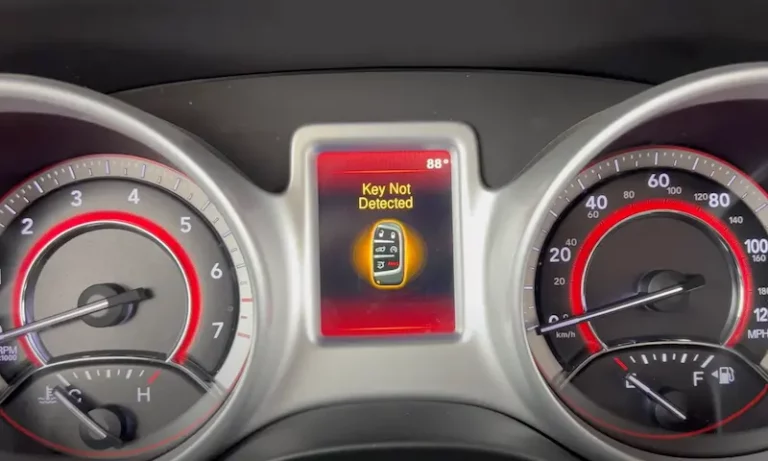
You hop in your Dodge Journey, press the start button, and nothing happens. Instead of the engine firing up, you get a message on the dash that reads “Key Not Detected.” Frustrating? Absolutely. But before you start panicking about towing costs and dealership bills, take a breath. This is actually one of the more common issues Dodge Journey owners run into, and in most cases, it is something you can fix yourself without spending a lot of money.
This warning shows up when the vehicle’s computer system cannot pick up a signal from the key fob. The moment you press that push-start button, the system goes looking for a signal. No signal, no start. It is that simple. But what causes the signal to go missing in the first place? That is where things get a little more interesting.
In this guide, we are going to break down exactly what this warning means, walk through every likely cause, and give you clear, practical steps to fix it. Whether you are a total beginner with cars or someone who likes to handle their own repairs, this is written for you.
What “Key Not Detected” Actually Means on a Dodge Journey
Let’s start with the basics. The “Key Not Detected” warning is the vehicle telling you it cannot find or read the signal from your key fob. Think of it like a conversation that never happened. Your car is waiting for the key fob to check in, the key fob does not respond, and the car refuses to start.
Now, if you are not super familiar with what a key fob actually is, here is a quick rundown. It is that small plastic remote you carry around that locks and unlocks your car, pops the trunk, and in modern vehicles like the Dodge Journey, it also lets you start the engine without inserting a physical key. You just keep it in your pocket or bag, press the start button, and the car recognizes it automatically.
The Dodge Journey uses what is called a low-frequency wireless communication system for this. When you press the push-start button, the vehicle sends out a signal looking for the key fob. The fob responds with a unique code, the Engine Control Module (ECM) verifies it, and if everything checks out, it sends power to the engine and you are on your way.
But here is the thing. If anything interrupts that communication, even something as simple as a weak battery in the fob, the ECM never gets that verification code. And without it, the engine will not start. Period.
So the warning is not necessarily telling you that something is seriously broken. It is telling you that the handshake between your key and your car did not happen. The fix could be as cheap as a two-dollar battery replacement. Or it could point to something bigger. Let’s figure out which one you are dealing with.
Every Possible Cause of the Dodge Journey “Key Not Detected” Warning
There is no single cause for this issue. A handful of different things can trigger the same warning message, which is why the first step is always diagnosis before you start throwing parts and money at the problem. Here is what you need to look at.
1. Dead Key Fob Battery: The Most Common Culprit
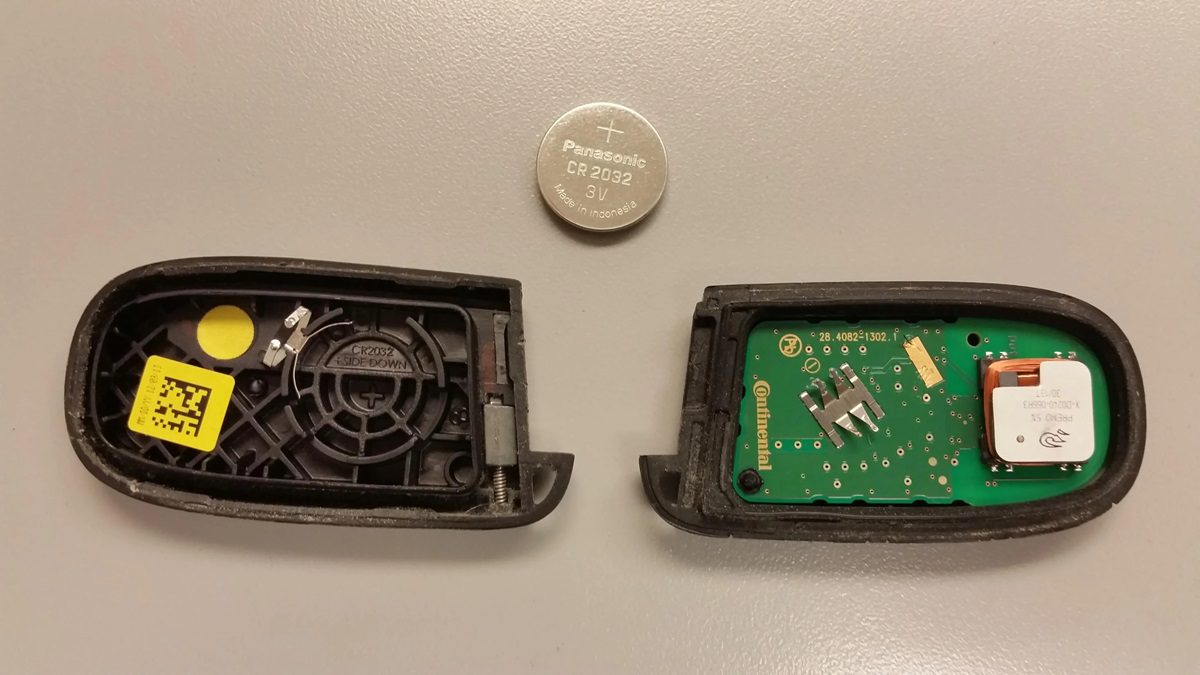
This is the number one cause, and it is the first thing you should check. The key fob runs on a small, coin-shaped battery, usually a CR2032. It is not a heavy-duty battery by any means, and it will not last forever. Most key fob batteries last anywhere from two to four years depending on how often you use the fob.
The battery does not just die overnight. It fades gradually. You will start noticing the signs long before the “Key Not Detected” message appears. Here is what to watch for:
- You have to stand much closer to the vehicle for the fob to work.
- You find yourself pressing the button two or three times before the car responds.
- A “low key fob battery” warning appears on your dashboard.
- The key fob works sometimes and not others, which is a classic sign of a dying battery.
If you have been ignoring those early signs, the battery may have finally given up the ghost, and now you are stuck with the “Key Not Detected” message. The good news? Replacing the battery takes about two minutes and costs next to nothing.
2. A Dead or Weak Car Battery
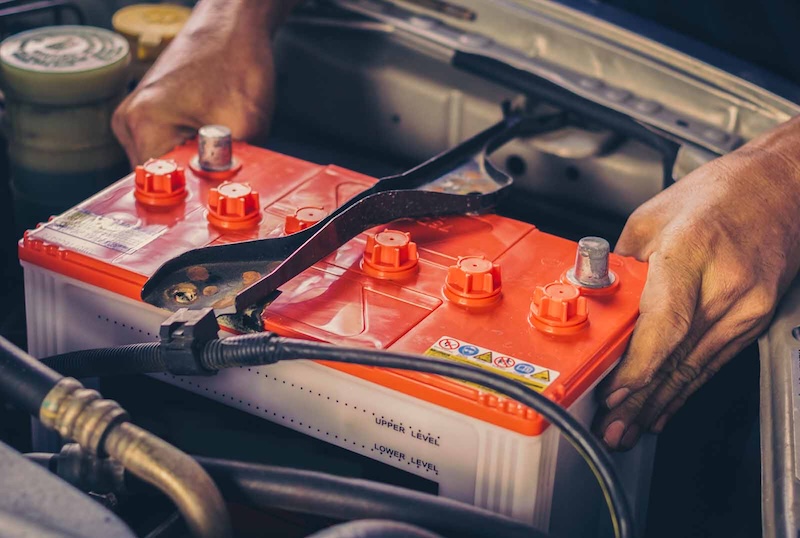
People often overlook this one, but it is more common than you would think. The receiver module inside your Dodge Journey, the component that picks up the signal from the key fob, needs power from the car’s main battery to function. If the car battery is dead or severely drained, the module has no power. No power means it cannot receive anything from the key fob, and the “Key Not Detected” message appears.
Here is a scenario that might sound familiar. You wake up one morning, get in the car, press the start button, and get the key not detected warning. You check your key fob, the battery seems fine. Then you notice the interior lights are dim or the dashboard is doing weird things. That is a strong sign the car battery is the real problem, not the key fob.
Beyond a dead battery, corroded battery terminals can cause the same issue. Corrosion on the terminals acts like a barrier that restricts the flow of power throughout the vehicle, which can affect the receiver module’s ability to do its job.
3. Water Damage to the Key Fob
This one catches a lot of people off guard. Key fobs are electronic devices, and most of them are not waterproof. You might think it survived that rain shower or that time it fell in a puddle, but water can work its way into the internal components and cause corrosion or short circuits that are not immediately obvious.
Maybe the fob worked fine for a day or two after getting wet, but now it has stopped communicating with the car entirely. That delayed failure is actually very common with water-damaged electronics. The damage creeps in slowly as the moisture causes oxidation on the internal contacts.
If you know your key fob has been exposed to water recently, that is likely your answer.
4. A Damaged or Malfunctioning Receiver Module
The receiver module is the piece of equipment inside the vehicle that listens for the key fob’s signal. Think of it like an antenna and decoder rolled into one. When the key fob transmits its code, this module catches it, reads it, and passes the information along to the ECM.
If the module is damaged, whether from a physical impact, a wiring issue, or an electrical fault, it will not pick up the signal no matter how good your key fob battery is. This is a less common cause, but it does happen, and it usually requires a bit more work to diagnose.
There is also the issue of signal interference. The key fob communicates on a specific radio frequency. Strong interference from other electronics nearby, like certain garage door systems, radio transmitters, or even high-traffic wireless environments, can disrupt the signal temporarily. If the “Key Not Detected” message shows up in one specific location but not others, interference might be worth investigating.
5. A Worn-Out Key Fob
Key fobs take a beating. They get tossed in bags, dropped on pavement, sat on, and baked in hot cars year after year. Over time, the physical wear catches up with them. The buttons get stiff or unresponsive, the casing cracks, and the internal components start to degrade.
One specific thing that happens as a key fob ages is that the battery contacts corrode or loosen. Even if you put in a brand-new battery, a corroded contact means that battery is not making a reliable connection. The result is the same as having a dead battery, the fob does not transmit a strong enough signal, and the car cannot detect it.
How do you know if the fob itself is worn out versus just having a dead battery? Swap in a fresh battery. If the problem persists, the fob itself may be done.
6. Programming Issues
This is less common but worth mentioning. If you recently had your battery replaced, disconnected the car battery for any reason, or had any kind of electrical work done on the vehicle, the key fob may have lost its programming. Modern key fobs are paired to a specific vehicle through a programming process. If that pairing gets disrupted, the car will not recognize the fob at all, hence the “Key Not Detected” warning.
This can also happen with aftermarket or replacement key fobs that were not properly programmed to the vehicle.
How to Fix the Dodge Journey “Key Not Detected” Warning
Now that you know what you are dealing with, let’s talk about how to fix it. We will go from the simplest and most likely fix down to the more involved solutions.
Fix 1: Replace the Key Fob Battery (Start Here Every Time)
This is your first move, no question. It is cheap, quick, and solves the problem the majority of the time. Here is how to do it step by step:
- Find the small notch or seam along the side of your key fob. This is where the two halves of the casing meet.
- Slide a flathead screwdriver, a coin, or a small pry tool into the notch and gently twist to pop the two halves apart. Do not force it. It should come apart with minimal effort.
- Remove the old battery. Take note of which way it is facing, positive side up or down. A quick photo with your phone before you remove it is a smart move.
- Insert the new battery in the same orientation as the old one. The most common size for Dodge Journey key fobs is a CR2032, which you can find at any pharmacy, grocery store, or auto parts store for under two dollars.
- Snap the two halves back together until they click, then test the fob by pressing the lock or unlock button from a normal distance.
If the key fob starts working again and the “Key Not Detected” message clears, you are done. That was it.
But if it does not work, move to the next step.
Fix 2: Use the Emergency Start Backup
Here is something a lot of Dodge Journey owners do not know. If your key fob battery is completely dead and you cannot get a replacement right away, there is a backup method to start the vehicle. Dodge built this in for exactly this kind of situation.
Most Dodge Journey key fobs contain a physical hidden key blade inside them. If you pull that blade out, you can use it to unlock the door manually. But for starting the car when the fob battery is dead, try this:
- Hold the key fob directly against the push-start button while pressing it. When the fob battery is nearly dead, the car can sometimes read the fob’s signal at very close range, just enough to verify the code and allow the engine to start.
This is not a permanent fix. It is a get-you-home solution. Replace the battery as soon as you can.
Fix 3: Check and Charge the Car Battery
If you replace the key fob battery and the problem continues, shift your attention to the car battery. A fully dead car battery will prevent any electronic system in the vehicle from working, including the key fob receiver.
Here is how to approach it:
- Check for obvious signs of a dead battery, like dim interior lights, a slow or non-existent crank when you try to start the car, or warning lights that were not there before.
- Use a multimeter to test the battery voltage. A healthy, fully charged car battery should read around 12.6 volts. Anything below 12.0 volts means the battery is weak. Below 11.8 volts and it likely needs a charge or replacement.
- Jump-start the vehicle if the battery is dead. Once the car is running, drive it for at least 20 to 30 minutes to let the alternator recharge the battery.
- Check the battery terminals for corrosion. Look for a white, blue, or greenish powdery buildup on the terminals. If you see it, clean it off. Mix a tablespoon of baking soda with a small amount of water to make a paste, apply it to the corroded terminals, let it fizz, then scrub with an old toothbrush and rinse with a tiny bit of clean water. Dry it off and you are good.
If the battery keeps dying, it might be time for a replacement. Most car batteries last about three to five years. If yours is older than that, it is probably living on borrowed time.
Fix 4: Inspect and Address Water-Damaged Key Fob
If you know the key fob got wet, here is what to do:
- Open the key fob casing as described above.
- Remove the battery immediately to stop any current flow that could worsen the damage.
- Look at the circuit board inside. If you see any white, green, or rusty discoloration, that is corrosion from the water.
- Use a cotton swab lightly dampened with isopropyl alcohol (90% or higher) to gently clean the circuit board. Isopropyl alcohol displaces water and evaporates quickly, making it safe for electronics.
- Let the fob dry completely for at least 24 hours before reassembling. Do not rush this step.
- Put in a fresh battery, reassemble the fob, and test it.
Honestly, if the corrosion is severe, the fob may be beyond saving. In that case, you will need a replacement, which we will cover next.
Fix 5: Replace the Key Fob Entirely
If the fob is physically damaged, heavily corroded, completely worn out, or just does not work after all the above steps, it is time for a new one. You have a couple of options here:
- Authorized Dodge dealership: This is the most straightforward option. Bring your vehicle and proof of ownership, and they will get you a programmed replacement. The downside is cost. Dealership replacement fobs can run anywhere from $150 to $400 or more, including programming.
- Aftermarket key fob: You can find aftermarket options online for much less money. However, these typically need to be programmed to your vehicle, either by a locksmith, the dealership, or in some cases by yourself using a specific programming sequence.
- Automotive locksmith: A good locksmith can source and program a replacement fob for less than the dealership charges. Worth getting a quote before defaulting to the dealer.
Whatever replacement route you choose, make sure the replacement fob is programmed to your specific vehicle. An unprogrammed fob will not do anything, the car still will not recognize it, and you will be right back to square one.
Fix 6: Diagnose and Repair the Receiver Module
This is where things get more involved. If you have ruled out the key fob battery, the car battery, and the condition of the fob itself, the issue might be with the receiver module inside the vehicle.
The receiver module in the Dodge Journey is typically located behind the glove box, under the dashboard on the passenger side. Here is what you can check:
- Access the module by opening the glove box and removing any panels or covers blocking access to the area behind it. On most Dodge Journeys, the glove box can be squeezed inward to drop it down further and give you more access.
- Check the wiring harness connected to the module. Look for any disconnected plugs, frayed wires, or visible damage. Sometimes a connector simply works itself loose over time, especially in vehicles that see a lot of vibration.
- Check the antenna wire. The module uses an antenna to pick up the key fob’s signal. If the antenna wire is damaged, kinked, or disconnected, the module cannot receive the signal properly.
- Look for signs of physical damage to the module itself. A cracked housing or burnt smell can indicate internal damage.
If the wiring looks intact and the module appears physically fine, the issue might be an internal failure of the module or a software glitch. At this point, you are in professional territory. A dealership or a qualified auto electrician can run diagnostic scans to read the fault codes and determine whether the module needs reprogramming or full replacement.
Fix 7: Reprogram the Key Fob
If you recently had your car battery replaced or disconnected, or if you got a replacement key fob that was not properly synced, reprogramming might be the fix you need. On some Dodge models, there is a self-programming sequence you can perform, but many Dodge Journey configurations require dealer-level diagnostic equipment to reprogram the fob.
Your best bet here is to contact your local Dodge dealership or an automotive locksmith who works with Dodge vehicles. Give them your VIN number and let them know what you are experiencing. They should be able to confirm whether reprogramming is possible and what it will cost.
How to Know Which Fix Applies to Your Situation
Sometimes people get overwhelmed trying to figure out where to start. Here is a simple way to think through it:
| Symptom | Most Likely Cause | First Step |
|---|---|---|
| Key not detected when pressing start | Dead key fob battery | Replace fob battery |
| Interior lights dim or car will not crank | Dead car battery | Jump-start or charge battery |
| Fob worked recently, now nothing | Dead fob battery or worn fob | Replace battery, test fob |
| Fob got wet recently | Water damage | Dry out and clean fob |
| Warning happens only in one location | Signal interference | Move to a different area, retest |
| New battery installed, still not detected | Worn fob or receiver module issue | Replace fob or inspect module |
| Works intermittently and unpredictably | Corroded contacts or failing fob | Clean contacts or replace fob |
| Recently replaced car battery or had electrical work done | Programming issue | Reprogram fob at dealer or locksmith |
Work through the table from top to bottom and start with the cheapest and simplest fix before moving on. Nine times out of ten, you will solve it before you even get to the more complex options.
Can You Still Drive With This Warning Showing?
If your car is already running and you see the “Key Not Detected” message appear while you are driving, you can typically continue driving. The vehicle will not shut off while it is in motion just because it lost communication with the key fob.
But here is the catch. Once you turn the car off, you might not be able to get it started again until the issue is resolved. So if you are out and about and the warning pops up while driving, do not ignore it. Head straight to a place where you can address the problem, whether that is home, an auto parts store for a replacement battery, or a repair shop.
Do not turn the car off in a random parking lot and risk being stranded.
How Much Does It Cost to Fix the Dodge Journey “Key Not Detected” Warning?
Cost varies wildly depending on what is actually causing the problem. Here is a realistic breakdown:
| Fix | Estimated Cost |
|---|---|
| Key fob battery (CR2032) | $1 to $5 |
| Car battery (standard) | $80 to $200 |
| Battery terminal cleaning | Free to $20 (DIY) |
| Aftermarket key fob (unprogrammed) | $20 to $60 |
| Key fob programming (locksmith) | $50 to $100 |
| OEM replacement key fob (dealership) | $150 to $400+ |
| Receiver module replacement | $150 to $500+ (parts and labor) |
As you can see, if the culprit is just a dead fob battery, you are looking at pocket change. If it is the receiver module, it gets more expensive. That is why diagnosis matters so much before you start spending money.
Tips to Prevent the “Key Not Detected” Warning From Happening Again
Once you have fixed the issue, a few simple habits can keep it from coming back:
- Replace the key fob battery proactively. Do not wait for it to die completely. If your dashboard gives you a low battery warning or you notice the range getting shorter, swap the battery out right away. It is a two-minute job.
- Keep the key fob away from water. This sounds obvious, but people drop fobs in drinks, leave them in pockets that go through the wash, and forget them outside in the rain. A simple protective silicone key fob cover can save you a lot of headaches.
- Do not store the fob near strong electronic devices. Some people notice their key fob has trouble working when it is placed near certain smartphones or other wireless devices. Keep it separate.
- Maintain your car battery. Have the battery tested annually, especially as it gets past the three-year mark. Most auto parts stores will test it for free.
- Treat the key fob like a small, valuable electronic device. Because that is exactly what it is. Do not toss it around carelessly or leave it where it can get stepped on or damaged.
Watch This: A Helpful Visual Walkthrough
Sometimes it helps to see someone actually working through the problem. This video walks through the key not detected issue and gives you a solid visual guide to go along with everything covered above.
When You Absolutely Need a Professional
Most “Key Not Detected” issues on the Dodge Journey are DIY-friendly. But there are situations where you should stop and call in a professional:
- You have replaced the key fob battery and the car battery, and the problem still exists.
- You suspect the receiver module is faulty and do not have experience working with automotive electronics.
- The key fob needs to be reprogrammed and the DIY method does not apply to your specific year and trim level.
- You are seeing multiple unrelated warning lights alongside the “Key Not Detected” message, which could point to a broader electrical issue.
- The key fob was stolen or lost and you need a replacement that is properly coded to your vehicle’s security system.
In these cases, a dealership or a certified automotive electrician is your best move. Yes, it costs more. But trying to guess your way through a complex electrical problem can cost you even more if you end up damaging something that was not broken in the first place.
A Quick Word on Aftermarket Key Fobs and Why Programming Matters
A lot of people buy aftermarket key fobs online thinking they are getting a deal. And sometimes they are. But the part that catches people off guard is the programming.
A key fob right out of the box is just a blank slate. It has the hardware, the buttons, the transmitter, but it has not been told which vehicle it belongs to. Until it is programmed with your vehicle’s specific code, your car will treat it like a stranger knocking at the door. It will not let it in.
Some Dodge Journey model years allow you to self-program a key fob using a specific sequence of door locks and ignition cycles. Others require dedicated programming equipment. Before you buy an aftermarket fob, check whether your specific year can be self-programmed or if you will need professional help. Factor that programming cost into your budget before you order.
What If You Have a Spare Key Fob? Use It to Narrow Down the Problem
If you have a second key fob for your Dodge Journey, this is a great diagnostic tool. Try starting the car with the spare fob. If it works without any issues, the problem is isolated to the original key fob, not the vehicle’s receiver or electrical system. That simplifies things enormously.
If the spare fob also triggers the “Key Not Detected” warning, the issue is almost certainly in the vehicle itself, either the receiver module, the car battery, or the wiring. That information helps you skip past the key fob diagnosis and focus on the vehicle-side components.
It is a simple test, but it can save you a lot of time and guesswork.
The Dodge Journey Key Not Detected Warning by Model Year: Is Yours More Prone to This Issue?
The Dodge Journey was produced from 2009 through 2020. Across those years, the push-to-start system and the key fob technology were relatively consistent, but there are some model year differences worth knowing:
- 2009 to 2010 models did not have the push-button start as standard. If your Journey from this era has it, it was likely added as an option or through an aftermarket modification.
- 2011 to 2020 models with the push-button ignition are most commonly associated with this warning. The system became more widely available across trim levels during this period.
- Owners of 2014 to 2016 models have reported this issue a bit more frequently online, often tied to key fob battery life and receiver module sensitivity. That said, the fixes are the same regardless of the year.
If you are unsure whether your Journey has the push-to-start feature, look at the ignition area. If there is no traditional key slot and instead a round push button, you have the keyless ignition system and this guide applies directly to you.
Final Thought
The “Key Not Detected” warning on your Dodge Journey is almost always fixable without a major repair bill. Start with the cheap stuff: replace the key fob battery. If that does not do it, work your way through the other causes systematically. The vast majority of owners who see this warning solve it with a two-dollar battery or a simple battery terminal cleaning.
Do not let this warning sit unaddressed. A key fob that barely works today will not work at all tomorrow, and being stranded in a parking lot because your car will not start is not a situation anyone wants to deal with. Take ten minutes this weekend, pick up a CR2032 battery, and handle it now.
If you are still stuck after working through everything in this guide, that is your signal to get a professional involved. But for most people reading this, the fix is already in your hands.