
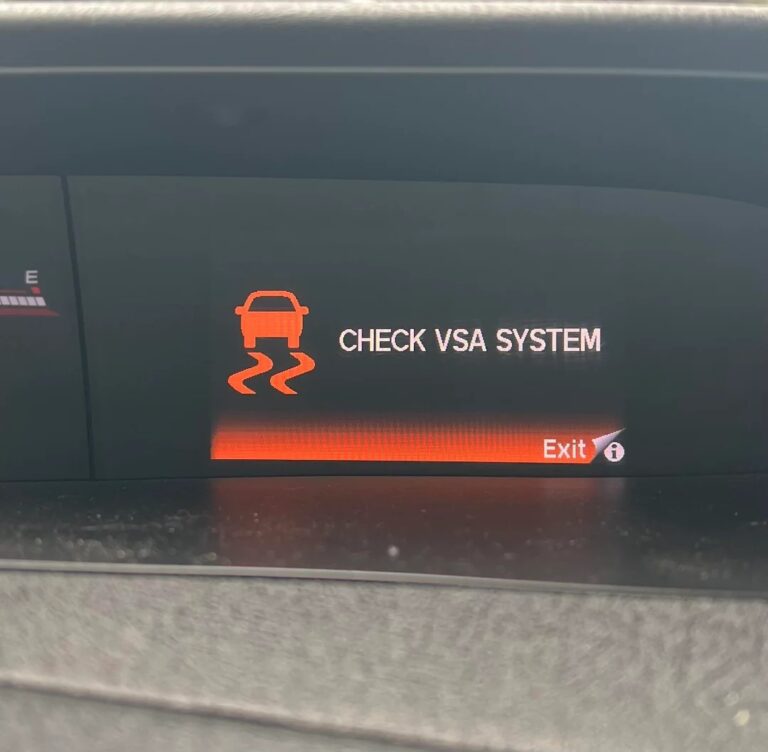
Seeing “Check VSA System” appear on your Honda Civic’s dashboard is one of those warnings that deserves more than a quick glance and a shrug. The VSA system is what keeps your car stable and predictable when conditions get challenging, and when it flags a problem, you are losing a safety layer that works quietly in the background every time you drive.
This guide covers exactly what the VSA system does, what causes this warning to appear, and what you need to do to get the system back online.
What Is the Honda Civic VSA System?
VSA stands for Vehicle Stability Assist. It is Honda’s branded name for their electronic stability control system, which is a computer-controlled safety feature that monitors how the car is moving and intervenes when it detects that the vehicle is starting to behave differently than the driver intends.
Here is a practical example of what VSA does. Say you are navigating a sharp corner on a wet road and the rear of the car starts to slide outward. Your natural reaction might involve steering corrections and braking, but in the fraction of a second it takes your brain to process and react, the car can already be in a dangerous position. The VSA system detects that slide beginning and intervenes almost instantaneously, applying braking force to specific individual wheels and reducing engine power to bring the car back into the line you intended to drive.
VSA also manages traction control, which prevents the driven wheels from spinning on low-traction surfaces. When you accelerate on a slippery surface and a wheel starts to spin, VSA detects the speed discrepancy and either reduces engine power or applies a brief brake pulse to the spinning wheel to restore grip.
To do all of this, the system relies on a network of sensors working together continuously. Each of those sensors is a potential failure point.
The Sensors That Make VSA Work
Understanding what each sensor does helps you understand why a single failed sensor can take the entire system offline.
Wheel Speed Sensors
There is one at each wheel, making four in total. These sensors measure how fast each individual wheel is rotating and send that data to the VSA control module. The module compares the speeds across all four wheels and uses that comparison to detect wheel slip, spinning, or lockup. If one wheel is rotating significantly faster or slower than the others, the VSA system interprets that as a traction or stability event and responds accordingly.
Steering Angle Sensor
This sensor is located in the steering column and measures exactly how much the steering wheel has been turned and how fast it is being turned. The VSA module uses this data to understand where the driver is trying to point the car. When it compares the steering angle to what the vehicle is actually doing based on other sensor inputs, it can identify when the car is understeering (not turning enough) or oversteering (turning too much) and apply the appropriate correction.
Yaw Rate Sensor
The yaw rate sensor measures the vehicle’s rotation around its vertical axis, essentially how much the car is spinning relative to its direction of travel. This is the sensor that most directly detects a vehicle sliding or spinning out. It is usually integrated into a combined inertial measurement unit that also includes a lateral acceleration sensor measuring sideways forces.
Tire Pressure Monitoring Sensors
On Honda Civic models with direct TPMS, the tire pressure sensors also feed into the VSA system’s data inputs. Significantly low tire pressure changes the effective rolling radius of a tire, which affects wheel speed readings. A flat or very underinflated tire can produce speed readings that look like wheel slip to the VSA system.
What Causes the “Check VSA System” Warning on a Honda Civic?
There are several distinct failure points that trigger this warning. Here is each one explained in practical terms.
1. Damaged or Failing Wheel Speed Sensor
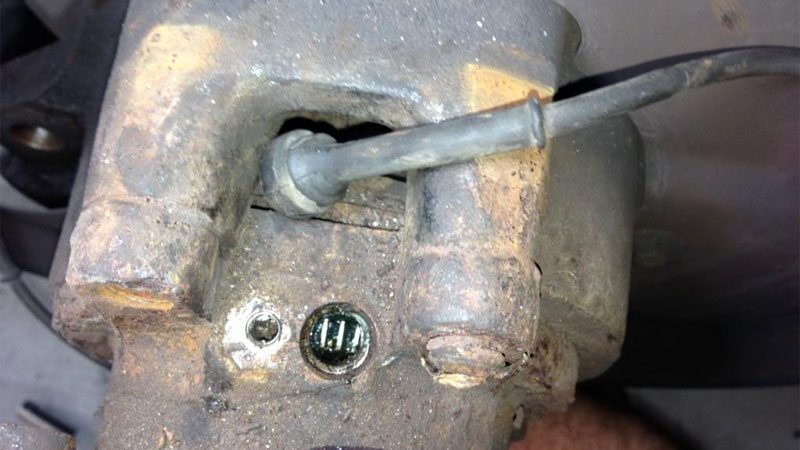
This is the most frequently identified cause of the Check VSA System warning on Honda Civic vehicles, and it is the failure point mechanics consistently flag first in their diagnosis. Wheel speed sensors sit at the wheel hub, which means they are directly exposed to road debris, water, brake dust, road salt, and the physical vibration of driving. Over time or from a specific impact, they can crack, corrode, or fail internally.
When a wheel speed sensor fails, the VSA module stops receiving speed data from that wheel. It cannot compare all four wheel speeds, which means it cannot reliably detect or respond to traction and stability events. The system shuts itself down and flags the warning rather than trying to operate with incomplete data, which could lead to incorrect interventions.
The wiring that connects each wheel speed sensor to the VSA module runs along the suspension and through the wheel well, where it flexes with every suspension movement. Over time, this repeated flexing can crack the wiring insulation or break wires internally, producing the same symptoms as a failed sensor. Inspecting the sensor wiring as thoroughly as the sensor itself is important during diagnosis.
2. Damaged Wiring Harness
Beyond the individual sensor wires, the broader VSA system wiring harness can develop faults that affect the system’s ability to function. The wiring harness supplies power to the sensors and VSA module, and it carries the data signals between all the system components. A broken ground connection, a corroded connector, or a section of harness that has chafed through its insulation from contact with a sharp edge can disrupt communication in any direction.
Wiring harness faults are often intermittent, which makes them particularly frustrating to diagnose. The Check VSA warning may appear and disappear without an obvious pattern, which is the classic behavior of a connection that is breaking down under vibration or thermal cycling rather than one that has completely failed.
3. Faulty VSA Control Module
The VSA control module is the processor that receives all the sensor inputs, runs the stability calculations, and sends commands to the braking and engine management systems when intervention is needed. It is a sophisticated electronic module that can fail from water intrusion, electrical overvoltage, internal component failure, or in rare cases, software corruption.
When the module itself fails, the entire VSA system goes offline regardless of how well the sensors are functioning because there is nothing to process the sensor data. A module fault will typically produce fault codes pointing specifically at the module rather than any individual sensor, which is the diagnostic information that confirms where the problem actually sits.
4. Damaged Steering Angle Sensor
A failed or miscalibrated steering angle sensor takes away one of the VSA system’s critical inputs. Without accurate steering angle data, the module cannot determine where the driver is trying to point the car, which means it cannot correctly identify understeer or oversteer situations. The system detects the loss of reliable steering data and flags the warning.
Steering angle sensor issues also commonly appear after wheel alignment work, suspension component replacement, or steering system repairs. The sensor’s calibration can be disrupted by these procedures if the steering column position was changed, even slightly. An uncalibrated steering angle sensor will send incorrect angle data even if it is physically intact, which can also trigger the VSA warning.
5. Electronic Glitch or Software Error
Not every instance of the Check VSA System warning indicates a hardware failure. Electronic control modules can occasionally develop temporary faults from voltage fluctuations, particularly after a battery replacement or following a significant electrical event like jump-starting. These soft faults can clear themselves when the system reinitializes, which is why the first recommendation when the warning appears is to pull over safely, turn the engine off, wait a moment, and restart.
If the warning appears once, clears after a restart, and does not return over subsequent driving sessions, a temporary electronic glitch is the most likely explanation. If it returns, there is a real fault that needs investigation.
What to Do First When the Check VSA Warning Appears
Before assuming a hardware repair is needed, try this sequence:
- When it is safe to do so, pull over and park the car.
- Turn the engine completely off and remove the key, or press the stop button on push-button start models.
- Wait at least 30 seconds to allow the electronic modules to fully power down.
- Restart the engine and check whether the warning has cleared.
- Take a short drive and observe whether the warning returns.
If the warning clears and does not come back, you can monitor the situation and schedule a diagnostic scan at your next service appointment to check for any stored fault codes that were logged before clearing.
If the warning returns during the test drive or immediately on the next restart, proceed to a proper diagnostic scan before driving further.
How to Diagnose and Fix the Honda Civic Check VSA System Warning
Step 1: Pull Fault Codes With a Diagnostic Scanner
The VSA control module stores specific fault codes when it detects a problem. These codes identify which component or circuit is involved in the fault. A generic OBD-II scanner will read basic engine codes but may not access the VSA module specifically. You need a scanner that can access Honda’s body and chassis control modules, not just the powertrain module.
A Honda dealership diagnostic system provides the deepest access. Professional-grade aftermarket scanners with Honda-specific coverage are also effective. Many independent auto parts stores offer free OBD-II scans, but confirm they can read VSA module codes rather than just engine codes before relying on their results.
Common VSA-related fault codes on the Honda Civic and what they point to:
| Fault Code | What It Typically Indicates |
|---|---|
| C0035, C0040, C0041, C0045, C0051 | Wheel speed sensor circuit fault (specific wheel varies by code) |
| C1101, C1102, C1103, C1104 | Individual wheel speed sensor signal fault |
| C1121 | Steering angle sensor fault |
| C1145 | VSA module internal fault |
| C1155 | Yaw rate sensor fault |
| C1241 | Low voltage fault affecting VSA module |
Note every code present before clearing anything. The combination of codes and their specific descriptions guide the repair directly.
Fix 1: Inspect and Replace the Faulty Wheel Speed Sensor
If the fault code points to a wheel speed sensor, here is the inspection and repair process:
- Raise the vehicle safely and remove the wheel at the affected corner for better access to the sensor.
- Locate the wheel speed sensor at the wheel hub. It is a small electronic component mounted just behind the brake rotor, reading off the teeth of a reluctor ring on the hub or axle.
- Inspect the sensor body for cracks, physical damage, or corrosion.
- Inspect the reluctor ring for damage, rust, or debris accumulation that could interfere with the sensor’s readings.
- Trace the sensor wiring toward the chassis. Look for areas where the insulation has cracked, where the wire might be chafing against a suspension component, or where the connector shows corrosion.
- If the sensor body is damaged or the reluctor ring is compromised, replace the sensor or hub bearing assembly as appropriate.
- If the wiring is damaged at a specific point, repair or replace the affected section of wire. Use proper automotive-grade wire connectors and protect the repair with wiring loom to prevent future chafing.
After replacing the sensor, clear the fault codes and use the scanner’s live data function to confirm the new sensor is producing consistent speed readings while the wheels are rotating before reassembling.
Fix 2: Inspect and Repair the VSA Wiring Harness
Use the owner’s manual wiring diagram to trace the VSA system wiring harness route through the vehicle. Here is the inspection focus:
- Check every connector in the VSA circuit for corrosion at the terminal pins. Corroded pins create high resistance that disrupts signal quality. Clean corroded terminals with electrical contact cleaner and if the damage is severe, replace the connector.
- Look for sections of harness that run near exhaust components, sharp body metal edges, or areas where the harness could be pinched. Heat exposure and chafing are the most common causes of harness damage on higher-mileage Civics.
- Do not try to permanently repair damaged VSA wiring by twisting wires together. Replace the damaged section with the correct gauge wire and use proper heat-shrink connectors to ensure a durable, weather-resistant repair.
Fix 3: Address the VSA Control Module
If the fault codes or the diagnostic process confirms the VSA control module has failed, replacement is necessary. Here is what to know:
- Honda VSA control modules are often located in the engine compartment or under the dashboard depending on the Civic model year. Refer to the service manual for your specific year for the exact location.
- Replacement VSA modules on Honda vehicles typically need to be programmed to the vehicle using Honda’s diagnostic software. A generic replacement module that has not been properly initialized will not work correctly even if it is physically installed correctly.
- This is one repair where a Honda dealership or a shop with Honda-compatible programming tools is the reliable choice rather than a general repair shop.
Fix 4: Replace or Recalibrate the Steering Angle Sensor
The steering angle sensor is located in the steering column, typically at the base near where the column meets the steering rack or intermediate shaft. Here is the approach:
- Use the diagnostic scanner to check the steering angle sensor’s live data. The sensor should read zero degrees when the steering wheel is centered. If it is reading an offset or producing erratic values when the wheel is held steady, the sensor is miscalibrated or failed.
- Before replacing the sensor, check whether a calibration reset through the diagnostic software resolves the fault. A steering angle sensor that is physically intact but miscalibrated after alignment work can often be corrected without replacement through a calibration procedure.
- If the sensor itself is faulty and not responding to calibration, replacement is necessary. After installing a new sensor, it must be calibrated using a diagnostic tool before the VSA system will accept its data as valid.
Can You Drive With the Check VSA Warning Active?
The vehicle will still drive. The engine, transmission, and standard brakes all continue to operate normally. What you lose is the automatic stability and traction assistance that VSA provides in challenging situations.
On a dry road in normal traffic conditions, the absence of VSA is unlikely to create an immediate problem. But in rain, on gravel, or in any situation where the vehicle’s tires start to lose grip, the absence of VSA means you are the only safety net. There will be no automatic braking pulse to correct a developing slide, no engine power reduction to prevent a wheel from spinning on ice.
The Honda Civic also integrates the ABS function with the VSA system. On some model years, a VSA fault may also affect the ABS operation, which directly impacts braking safety. If you see additional warning lights accompanying the Check VSA warning, particularly the brake system warning, treat this with more urgency.
Drive carefully to a shop and get the diagnosis done rather than continuing to drive normally with VSA offline.
Approximate Repair Costs for Honda Civic VSA Issues
| Repair Type | Approximate Parts Cost | Approximate Total Cost (with labor) |
|---|---|---|
| Diagnostic scan | N/A | $80 to $150 |
| Wheel speed sensor replacement | $25 to $90 per sensor | $100 to $300 per sensor |
| Wiring harness repair (minor) | $10 to $40 (materials) | $80 to $250 |
| Steering angle sensor recalibration | N/A | $80 to $150 |
| Steering angle sensor replacement | $80 to $250 | $200 to $500 |
| VSA control module replacement | $300 to $700+ | $500 to $1,100+ |
| Yaw rate sensor replacement | $100 to $300 | $250 to $600 |
Preventing VSA Problems on Your Honda Civic
Include Wheel Speed Sensor Checks in Brake Service
Every time brake pads or rotors are replaced, ask the technician to visually inspect the wheel speed sensors and their wiring at the same corners. The wheels are already off during brake work, so the inspection adds almost no time or cost. Catching a sensor with cracked wiring or a corroded connector before it fails completely avoids an unscheduled VSA warning down the road.
Recalibrate the Steering Angle Sensor After Alignment or Steering Work
If you have wheel alignment done, steering components replaced, or suspension work that changes the geometry of the front end, ask the shop to recalibrate the steering angle sensor before you leave. This is a quick procedure that prevents the VSA system from operating with an offset sensor reference and potentially throwing a false fault code.
Keep Tire Pressures at the Recommended Level
Significantly low tire pressure changes the effective rolling circumference of that tire, which affects its measured wheel speed relative to the others. In some cases, a severely underinflated tire can produce wheel speed readings that the VSA system interprets as a traction anomaly, potentially triggering the warning. Keeping all four tires at the correct pressure listed on the door jamb sticker keeps the wheel speed readings consistent and within expected parameters.
Final Thought
The Check VSA System warning on your Honda Civic is your car telling you that the system responsible for keeping you stable in emergency situations has gone offline. It is not a warning to monitor and revisit next month. Get the fault codes pulled, identify the specific component that has failed, and address it properly. In most cases, this comes down to a wheel speed sensor that needs replacement, a job that is manageable in cost and straightforward in execution once you know which sensor is the problem.