
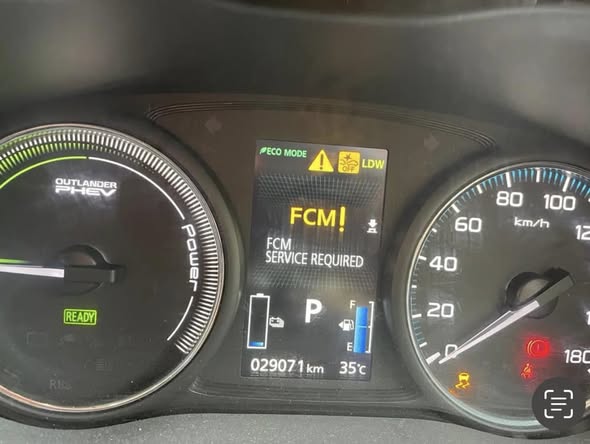
Picture this: you are driving on the highway, traffic ahead slows down suddenly, and your Mitsubishi’s Forward Collision Mitigation system is supposed to alert you and apply the brakes if you do not react in time. Now imagine that system is broken and you have no idea. That is exactly the kind of situation the “FCM Service Required” warning is trying to prevent.
This warning message does not show up for fun. Something inside the Forward Collision Mitigation system has gone wrong, and the car is telling you it can no longer guarantee that the system will work when you need it. That is not a warning you put off until your next oil change.
This guide covers everything you need to know: what the FCM system actually does, why it fails, and how to fix it without wasting money replacing parts you do not need.
What Is the FCM System and What Does It Actually Do?

The Forward Collision Mitigation (FCM) system is a driver assistance technology built into modern Mitsubishi vehicles. Its job is to monitor what is happening in front of your car and step in if it looks like a collision is about to happen.
The system constantly watches the distance between your vehicle and the car, truck, or pedestrian ahead of you. If that gap closes too fast and the system calculates that a collision is likely, it does not just sit there. It acts.
Here is how the FCM system responds in a potential collision situation:
- Detection: The radar sensor and camera built into the windscreen detect an object, vehicle, or pedestrian in the vehicle’s path.
- Warning: The system triggers an audio alert and a visual warning on the dashboard to get the driver’s attention.
- Pre-braking: If the driver does not react, the system applies moderate braking to slow the vehicle and prompt the driver to take action.
- Emergency braking: If the driver still does not respond and a collision is imminent, the system activates emergency braking to either prevent the crash entirely or reduce the impact significantly.
The whole sequence can happen in a matter of seconds. That is the value of the system. In a real emergency, human reaction time is often not fast enough. The FCM system buys you time and, in some cases, acts on your behalf entirely.
Now here is the problem. When the FCM system develops a fault, the car may still drive and feel completely normal. But that safety net is gone. The system will not warn you, will not apply pre-braking, and will not step in with emergency braking if you get into a dangerous situation. You will not know anything is wrong until it is too late, unless you pay attention to that warning message on your dashboard.
What Does “FCM Service Required” Actually Mean?
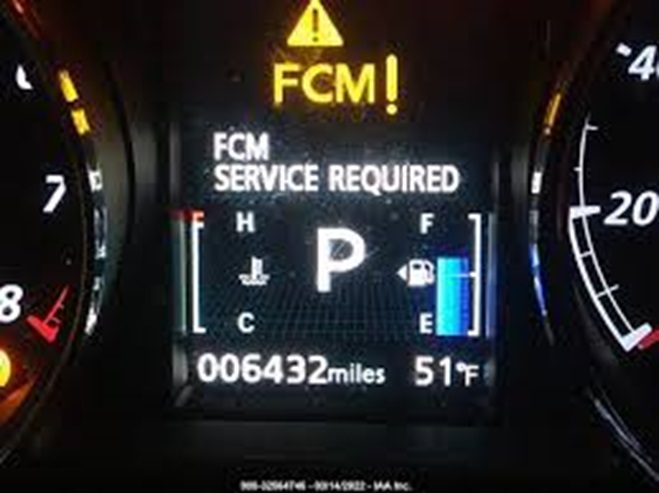
When the “FCM Service Required” message appears on your Mitsubishi’s display, the vehicle’s Engine Control Module (ECM) has detected a fault somewhere in the Forward Collision Mitigation system. The ECM monitors the system continuously, and when something falls outside of normal operating parameters, it logs a fault code and triggers the warning message.
At that point, the FCM system may be operating in a reduced capacity, or it may have shut down entirely. Either way, you cannot rely on it. The message is not a suggestion to get it checked out when convenient. It is telling you the system is compromised right now.
The most common causes are a faulty radar sensor or an electrical issue, but there are several other possibilities worth understanding before you start throwing parts at the problem.
How the FCM System’s Sensors Work Together
To really understand what can go wrong, it helps to know how the system gathers its information in the first place. The FCM system relies on two key detection technologies working in parallel.
The Radar Sensor
The radar sensor is typically located behind the front grille or bumper. It emits radio waves that bounce off objects in front of the vehicle and return to the sensor. By measuring how long that return takes and the frequency shift of the returning signal, the system calculates the distance and relative speed of whatever is ahead of you.
This sensor works even in low-light conditions, which is one of its key advantages. It does not need to “see” an object the way a camera does. It detects mass and movement.
The Camera Sensor
The camera is built into the windscreen, usually mounted near the rearview mirror. It provides visual data about what is in front of the vehicle, identifying lane markings, vehicles, and pedestrians. The camera works alongside the radar to give the system a more complete picture of the driving environment.
When both sensors are working correctly and communicating with the FCM module, the system is reliable and fast. But if either one is compromised, the data the system receives becomes unreliable, and it may shut down rather than operate on bad information.
5 Real Causes of the FCM Service Required Warning
There is no single reason this warning comes on. Multiple components are involved, and any one of them can trigger the message. Here are the most common causes, explained plainly.
1. Radar Interference from Weather Conditions
This is probably the most frustrating cause because there is nothing mechanically wrong with your car. The radar sensor simply cannot do its job in certain extreme weather conditions, and the system knows it.
Heavy snow is the biggest culprit. Snow packs into the front grille or bumper area where the radar sits, physically blocking the sensor. The radar cannot emit or receive signals through a solid wall of snow, so the system flags a fault and the warning message appears.
Extreme rain can cause similar issues, though typically less severe. Dense rainfall scatters the radar signal, making it difficult for the system to get accurate distance and speed readings. When the data quality drops below a certain threshold, the system disables itself rather than risk operating on inaccurate information.
The good news here: if weather interference is the cause, the warning message usually goes away on its own once conditions improve. If you are parked in a snowstorm and you see this warning, clear the snow from around the front grille and bumper area, let the car warm up, and drive normally. In most cases, the system comes back online without any intervention.
But here is the thing: if the warning message persists after the weather clears and you have driven for a while, weather is probably not the only issue. Time to dig deeper.
2. A Damaged or Dirty Radar Sensor
The radar sensor sits in a fairly exposed position at the front of the vehicle. Over time, road debris, insects, dirt buildup, and minor impacts from parking mishaps can all affect the sensor’s ability to function.
Sometimes the fix is as simple as cleaning the sensor and the area around it. A thick coat of road grime on the sensor housing can degrade signal quality enough to trigger the FCM warning. Before assuming you need a new sensor, try cleaning the front bumper area and the grille thoroughly.
If the sensor itself has been physically damaged, perhaps from a low-speed impact with a parking block or another vehicle, cleaning will not help. The sensor will need to be replaced. And when you replace a radar sensor, it also needs to be calibrated to the vehicle. This is not a job for guesswork. Calibration ensures the sensor is aimed correctly and communicating properly with the FCM module.
The wiring connected to the sensor is equally important. A sensor with perfect physical condition but a damaged or corroded wiring connector is useless. Always inspect the connector and the wiring harness when diagnosing a radar sensor fault.
3. A Software Glitch or System Malfunction
Modern vehicles are essentially computers on wheels. Like any computer, the software that runs the FCM system can occasionally glitch. A temporary software error can cause the ECM to log a false fault code and trigger the FCM service required message even when nothing is physically wrong with any component.
These glitches are more common than most people realize. A power fluctuation, a momentary sensor dropout, or even a software bug introduced by a system update can cause a spurious fault code to appear.
In these cases, resetting the system often resolves the issue. More on that in the fixes section below.
That said, not every software issue is a simple glitch. Some vehicles need a full software reprogram if the FCM module’s firmware has become corrupted or is running an outdated version. This type of fix requires a dealer-level scan tool and usually needs to be done at a Mitsubishi dealership or a well-equipped independent shop.
4. A Weak or Failing Battery
This one surprises a lot of people. A bad battery does not just affect starting the car. It affects every electrical system in the vehicle, including the FCM system.
The FCM system needs a stable, adequate voltage supply to power its sensors, process data, and communicate with the ECM. When the battery is weak or failing, voltage across the electrical system drops. The FCM system detects the insufficient power supply and either malfunctions or shuts down entirely.
Here is a telling sign: if the FCM service required warning appears alongside other electrical warning lights, or if you have noticed the car cranking slowly when you start it, the battery is a very likely suspect. Do not overlook the alternator either. A failing alternator that is not properly charging the battery will cause the same kind of voltage drop and trigger the same warnings.
A weak battery is one of the cheapest problems to fix on this list. Testing it takes about five minutes with a multimeter. Do not skip this step before jumping to more expensive diagnoses.
5. Damaged Wiring or Corroded Connectors
The FCM system is held together by wiring. Every sensor, every module, every communication signal passes through the wiring harness. If that wiring is compromised, the signals get lost, and the system stops working.
Wiring problems in the FCM system can include:
- Corroded connectors: Moisture works its way into electrical connectors over time, especially in older vehicles or those exposed to salty or humid environments. Corrosion increases resistance in the circuit and disrupts signal quality.
- Broken or frayed wires: Wires that pass through areas of high vibration or near sharp metal edges can wear through over time, causing intermittent or complete signal loss.
- Rodent damage: If your vehicle sits outdoors or in a garage, rodents chewing through wiring is a genuine concern. Rats and mice are particularly attracted to the soy-based coating used on many modern wiring harnesses.
- Loose connections: A connector that was not fully seated during a previous repair, or one that has vibrated loose over time, can interrupt the circuit without any visible wire damage.
Wiring faults are often intermittent, meaning the warning message may come and go depending on temperature, vibration, or humidity. That inconsistency makes them harder to track down, but it does not make them less serious.
| Cause | Common Trigger | Does It Resolve on Its Own? | Repair Needed? |
|---|---|---|---|
| Radar interference (weather) | Snow, heavy rain, extreme fog | Yes, once weather clears | No (unless persistent) |
| Damaged or dirty radar sensor | Debris, impact, grime buildup | No | Yes |
| Software glitch | Power fluctuation, firmware bug | Sometimes | Usually a reset or reprogram |
| Weak or failing battery | Old battery, failing alternator | No | Yes |
| Damaged wiring or connectors | Corrosion, rodents, wear | No | Yes |
How to Properly Diagnose the FCM Service Required Warning
Before you spend a cent on parts, diagnose the problem properly. Skipping this step is how people end up replacing perfectly good sensors only to find the real issue was a corroded ground wire that cost three dollars to fix.
The best diagnostic tool for this job is a professional-grade scan tool with FCM or ADAS (Advanced Driver Assistance System) module capability. Standard OBD2 code readers from auto parts stores can read engine codes, but most cannot communicate with the FCM module. You need a scanner that can access the FCM system specifically and pull the fault codes stored there.
Once you have the fault codes, you have a starting point. Codes like “radar sensor signal lost,” “FCM camera malfunction,” or “FCM control unit communication error” each point to a different area of the system. That specificity saves time and money.
Even so, a code alone does not always tell the whole story. A “radar sensor fault” code could mean the sensor is bad, or it could mean the wiring to the sensor is broken, or it could mean the sensor connector is corroded. The code points you in the right direction, but you still need to physically inspect the components involved.
Here is a logical diagnostic sequence to follow:
- Pull the FCM-specific fault codes with a capable scan tool.
- Check the weather. If conditions are extreme, clear any snow or debris from the front of the vehicle first and see if the warning clears on its own.
- Visually inspect the radar sensor location for physical damage, heavy dirt buildup, or impact damage.
- Test the battery voltage with a multimeter.
- Inspect the FCM wiring harness and connectors for corrosion, damage, or loose connections.
- Based on the codes and physical inspection, carry out targeted repairs.
- Clear the codes with the scan tool and verify the warning does not return.

How to Fix the FCM Service Required Warning: Step by Step
Once you know what you are dealing with, here is how to address each possible cause.
Fix 1: Repair or Replace the Radar Sensor
Start by confirming the radar sensor is actually the issue. Use the scan tool to test the sensor directly. Most capable scan tools will return a status of “available” or “unavailable” when testing the sensor. An “unavailable” result means the system cannot communicate with the sensor, which points to either a sensor fault or a wiring issue feeding that sensor.
Once you have confirmed the sensor is the problem area, here is how to approach the fix:
- Locate the radar sensor using the owner’s manual or a factory service manual for your specific Mitsubishi model. It is typically behind the front bumper or grille area.
- Inspect the sensor for physical damage: cracks, dents, or deformation from a front-end impact.
- Inspect the wiring connector at the sensor. Look for corrosion on the pins, bent pins, or signs of moisture intrusion.
- If the connector looks dirty or corroded, clean it with electrical contact cleaner and a small brush. Reconnect it firmly.
- If the sensor is physically intact and the connector is clean, try clearing the fault codes and retesting before assuming you need a new sensor.
- If the sensor is damaged, replace it with the correct OEM or OEM-equivalent part for your Mitsubishi model.
- After replacing the sensor, have it calibrated. This step is non-negotiable. An uncalibrated radar sensor will not aim correctly and the FCM system will not function accurately even with a brand-new sensor installed.
Sensor calibration typically requires a scan tool with calibration capability and sometimes a specific target and a flat surface to perform the calibration correctly. Many independent shops can do this now, but if yours cannot, a Mitsubishi dealership service department definitely can.
Fix 2: Reset the System to Clear a Software Glitch
If diagnosis points to a software issue or you suspect a temporary glitch triggered the warning, a system reset is the right first move. There are two ways to do this.
Method 1: Using a Scan Tool
This is the preferred method. Connect the scan tool to the OBD2 port, navigate to the FCM system codes, and clear all stored fault codes. This wipes the ECM’s memory of the fault and forces the system to re-evaluate its status from scratch. If the underlying issue was a genuine glitch, the warning will not return.
Method 2: Disconnecting the Battery
If you do not have access to a scan tool, you can try a battery disconnect reset. Here is how to do it:
- Turn off the vehicle completely.
- Disconnect the negative battery terminal first, then the positive.
- Leave the battery disconnected for 15 to 30 minutes. This allows the vehicle’s electrical systems, including the capacitors, to fully discharge and the ECM memory to reset.
- Reconnect the positive terminal first, then the negative.
- Start the vehicle and see if the FCM service required warning has cleared.
Keep in mind that a battery disconnect reset will also clear your radio presets, your trip meter, and other stored preferences. It is a minor inconvenience, but it is worth it if it solves the problem without a shop visit.
That said, if the warning returns shortly after the reset, a simple glitch is not the cause. Something is genuinely wrong, and you need to dig into the physical components.
For cases where the FCM module itself needs a firmware update or full reprogram, that job belongs at a dealer or a shop with Mitsubishi-specific programming capability. This is not a DIY task.
Fix 3: Test and Replace a Weak Battery
Testing the battery takes about five minutes and costs nothing if you already own a multimeter. Here is the procedure:
- Turn off the engine and all electrical accessories: lights, climate control, radio, everything.
- Set the multimeter to DC voltage (20V setting).
- Place the red probe on the positive battery terminal and the black probe on the negative terminal.
- Read the voltage displayed.
| Voltage Reading | Battery Status | What to Do |
|---|---|---|
| 12.6V or higher | Fully charged, healthy | Battery is fine, look elsewhere |
| 12.4V to 12.5V | Slightly discharged | Charge and retest |
| 12.0V to 12.3V | Significantly low | Charge and perform a load test |
| Below 12.0V | Weak, possibly failing | Replace the battery |
| 9.5V or lower | Dead or internally failed | Replace immediately |
After replacing the battery, test the alternator output. With the engine running, a healthy alternator should push the voltage at the battery terminals to between 13.5V and 14.8V. If the reading is lower than that, the alternator is not keeping up, and you will be back with a dead battery and recurring electrical warnings before long.
Once the battery and charging system are sorted, clear the FCM fault codes and monitor whether the warning returns.
Fix 4: Repair Damaged Wiring and Connectors
Wiring repairs require patience and attention to detail. Start by pulling out the factory service manual or a reliable wiring diagram for your specific Mitsubishi model. That diagram will show you exactly where the FCM system wiring harness runs, which connectors it passes through, and which wire colors correspond to which circuits.
With that in hand, physically trace the harness and inspect every inch you can access. Pay particular attention to:
- The connector at the radar sensor behind the front bumper. This is exposed to road debris, moisture, and temperature extremes.
- Any point where the harness passes through a firewall grommet or a body panel. These are high-wear locations where insulation often wears through.
- The area behind the windscreen near the camera sensor connector. Moisture intrusion through the windscreen seal can reach this connector.
- Any areas with visible rust staining on the body, which can indicate moisture paths that may also be affecting nearby wiring.
If you find corroded connector pins, clean them carefully with electrical contact cleaner. Apply a small amount of dielectric grease to the connector before reassembling it to prevent future moisture intrusion.
If you find broken, frayed, or exposed wires, replace that section of the harness. When making any wiring repair in a safety system, use the correct gauge wire and proper automotive-grade connectors. Do not use household electrical wire or cheap crimp connectors. The FCM system depends on accurate signal transmission, and poor wiring repairs can introduce resistance that corrupts the signal.
Is It Safe to Drive with the FCM Service Required Warning On?
The car will drive. Nothing about the FCM warning prevents the engine from running or the vehicle from moving. But you are driving without one of your key safety systems active, and that matters more depending on how and where you drive.
If you mostly drive on quiet rural roads with light traffic, the risk is lower in the short term. But if you drive in heavy urban traffic, on motorways at speed, or in stop-and-go commuter conditions, you are removing a safety layer that was specifically designed for exactly those situations.
Think about it practically. The FCM system was designed because collisions happen fast, often faster than human reaction time allows. In the real world, a distracted moment, a phone buzzing, a passenger talking, or glancing at a navigation screen for a second too long can be the difference between stopping in time and rear-ending the car ahead. The FCM system covers those moments. Without it, you are on your own.
Get it fixed. Drive carefully in the meantime. Do not treat this as a back-burner issue.
Estimated Repair Costs for FCM Service Required Issues
Repair costs vary depending on the root cause, your specific Mitsubishi model, and where you take it. Here is a realistic ballpark to help you plan:
| Repair Type | DIY Cost (Parts Only) | Shop Cost (Parts and Labor) |
|---|---|---|
| Radar Sensor Replacement and Calibration | $150 to $400 (parts) | $400 to $1,200+ |
| Camera Sensor Replacement and Calibration | $100 to $300 (parts) | $300 to $900+ |
| Battery Replacement | $100 to $200 | $150 to $300 |
| Wiring Harness Repair | $20 to $80 (materials) | $200 to $700+ |
| FCM Module Software Reset or Reprogram | Not typically DIY-possible | $150 to $500 |
| System Reset (fault codes cleared only) | Free with scan tool | $50 to $150 |
The calibration cost after sensor replacement is where a lot of people get surprised. Calibrating a radar or camera sensor for an ADAS system is a specialized process that requires specific equipment and expertise. Do not let any shop skip this step. An uncalibrated sensor is essentially useless and potentially dangerous, because it may be telling the FCM system that the road ahead is clear when it is not.
Simple Habits That Help Prevent FCM System Problems
You cannot prevent every electrical fault or every act of weather, but there are some practical habits that will reduce the likelihood of FCM system problems developing over time.
- Keep the front of the vehicle clean. Regularly washing the front bumper and grille area removes road grime, insects, and mud that can accumulate over the radar sensor. A quick rinse during a regular car wash is enough.
- Clear snow from the front bumper before driving in winter. Do not just wipe the windscreen and assume you are good. Take a minute to clear the grille area where the radar sensor lives.
- Keep the windscreen clean inside and out. The FCM camera is mounted inside the windscreen and looks through the glass. Smearing, fogging, or a heavy buildup of film on the inside of the glass can degrade the camera’s ability to see clearly.
- Maintain your battery. Test it annually after the vehicle is three years old. Replace it proactively before it fails, rather than waiting for it to leave you stranded and damage your electronics in the process.
- After any front-end repair or bodywork, verify FCM calibration. If someone works on your front bumper, even just removing it to access something else, the radar sensor may have been displaced slightly. Always confirm calibration status after any front-end work.
- Use OEM or OEM-equivalent parts when replacing FCM components. Cheap aftermarket sensors may not communicate correctly with the Mitsubishi FCM module. Stick to quality parts to avoid ongoing fault codes and system compatibility issues.
FCM vs. Other Mitsubishi Safety Systems: How They Work Together
The FCM does not operate in isolation. It is part of a broader suite of driver assistance and safety systems in modern Mitsubishi vehicles. Understanding how they interact helps you appreciate why a fault in one system can sometimes trigger warnings in others.
| System | Function | Shared Component with FCM |
|---|---|---|
| Forward Collision Mitigation (FCM) | Detects potential front-end collisions and applies emergency braking | Radar sensor, camera sensor |
| Lane Departure Warning (LDW) | Warns when the vehicle drifts out of its lane unintentionally | Camera sensor |
| Adaptive Cruise Control (ACC) | Maintains a set following distance from the vehicle ahead | Radar sensor |
| Blind Spot Warning (BSW) | Alerts the driver to vehicles in the blind spot | Separate rear radar sensors |
| Automatic High Beam (AHB) | Switches between high and low beam automatically based on traffic | Camera sensor |
Notice that both the radar sensor and the camera sensor feed multiple systems simultaneously. A fault in the front radar sensor can knock out both the FCM and the Adaptive Cruise Control at the same time. A camera fault can affect the FCM, Lane Departure Warning, and Automatic High Beam all at once. If multiple driver assistance warnings appear together, a single shared sensor is often the starting point for diagnosis.
When to Go to a Dealer Versus an Independent Shop
This is a question worth answering directly because it affects how much you spend and how well the job gets done.
For basic diagnosis and wiring repairs, a competent independent shop with a good scan tool can handle the job and save you money compared to dealer rates. Battery replacement, connector cleaning, and basic sensor testing are all within the capability of any decent shop.
But for sensor calibration and FCM module reprogramming, the picture changes. Calibrating ADAS sensors requires specific equipment, a proper calibration environment, and familiarity with Mitsubishi’s calibration procedures. Some independent shops have invested in this equipment and can do it well. Many have not.
Ask the shop directly: “Do you have the equipment to calibrate the Mitsubishi FCM radar sensor after replacement?” If they hesitate or say they will figure it out, take the calibration work to the dealer. Skipping proper calibration is not a money-saving shortcut. It is a safety compromise.
Quick Troubleshooting Reference Guide
| Scenario | Most Likely Cause | First Step |
|---|---|---|
| Warning appeared during heavy snow or rain | Weather-related radar interference | Clear grille area, wait for weather to improve |
| Warning appeared after a front-end bump or repair | Displaced or damaged radar sensor | Inspect sensor and connector, recalibrate |
| Warning appeared with other electrical warnings | Weak battery or failing alternator | Test battery voltage with multimeter |
| Warning appeared after buying used vehicle | Stored fault codes or previous damage | Pull FCM-specific codes with scan tool |
| Warning appeared randomly, no obvious cause | Software glitch or intermittent wiring fault | Reset system, inspect wiring harness |
| Warning appeared with ACC or LDW warnings too | Shared radar or camera sensor fault | Test and inspect the shared sensor |
The Bottom Line on FCM Service Required
The FCM system does not make headlines when it is working. You probably do not even think about it on your daily commute. But it is there, watching the road ahead, every single trip. And the one time you need it, you really need it.
A warning message on your dashboard is not the problem. It is the symptom. The problem is whatever caused the system to flag a fault, and that fault needs to be found and fixed before you rely on this system to protect you in traffic.
Start with a proper diagnosis. Pull the right codes. Inspect the obvious things first. Fix what is broken with quality parts. Get the calibration done correctly. And do not wait on it.
Your reaction time in an emergency is measured in fractions of a second. The FCM system can act in milliseconds. That is an advantage worth keeping.