
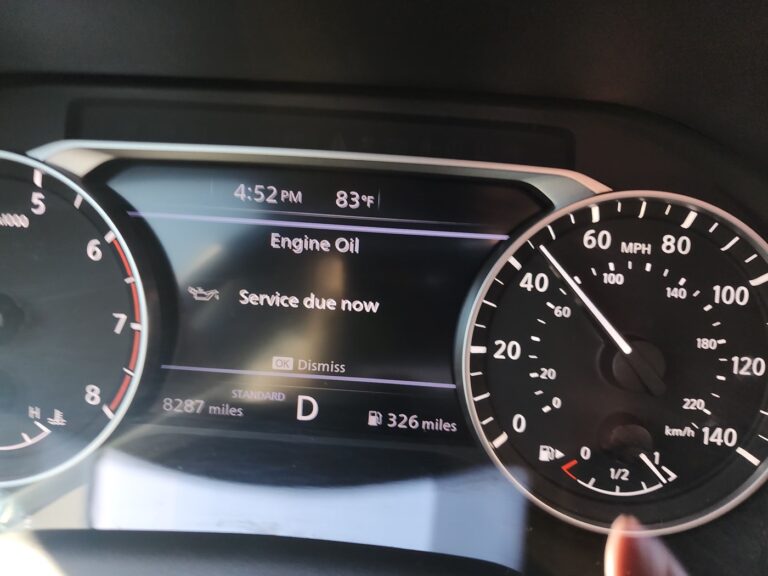
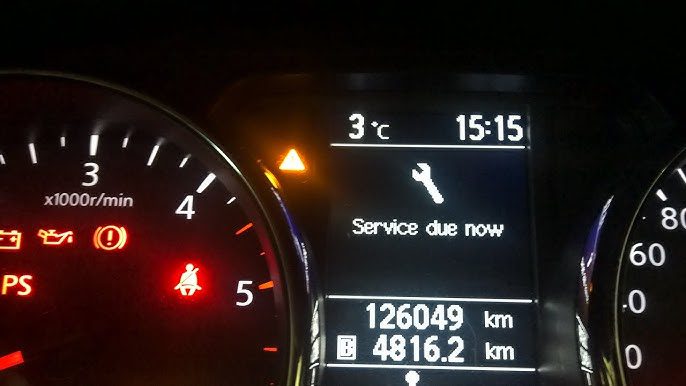
You are driving your Nissan, everything feels fine, and then a yellow warning light appears alongside the words “Service Due Now.” If you have never seen it before, it is easy to assume something has gone wrong with the car. But here is the reality: this message is not your Nissan telling you it is broken. It is telling you it is due for scheduled care, and it wants to make sure you do not forget.
Understanding what triggers this message, what maintenance it is actually pointing to, and how to reset it once the service is done will save you stress and keep your Nissan running at its best for a long time.
What Does “Service Due Now” Actually Mean on a Nissan?
The “Service Due Now” message is a programmed reminder built into your Nissan’s onboard computer system. It activates when the vehicle’s monitoring systems determine that specific maintenance tasks have become due, either based on mileage traveled since the last service, time elapsed, or real-time data from the car’s sensors about fluid condition, tire pressure, and component performance.
This is an important distinction to make early: the Service Due Now message is not the same as the Check Engine light. The Check Engine light signals that the vehicle’s onboard diagnostic system has detected a malfunction in one of the monitored systems, and it stores a specific diagnostic trouble code that a mechanic or scanner can read to identify the problem. The Service Due Now message is not a fault code. It is a maintenance reminder that works on a schedule, not on a malfunction.
That said, ignoring it long enough can turn a simple reminder into a real problem. Skipping scheduled maintenance allows fluids to degrade, filters to clog, and components to wear beyond their ideal service life. What starts as a reminder becomes a repair bill if left unattended.
What Triggers the Nissan “Service Due Now” Warning?
Several specific maintenance needs can trigger this message. Here is what each one means and why it matters.
1. Scheduled Mileage Interval
Nissan builds a maintenance schedule into every vehicle based on mileage milestones. When your odometer reaches one of those predetermined service intervals, the system automatically activates the Service Due Now reminder. These intervals are not arbitrary. They are based on Nissan’s engineering data about when specific components typically need attention based on how many miles they have been in operation.
Nissan’s standard maintenance intervals for most models generally follow this pattern:
| Mileage Milestone | Typical Maintenance Due |
|---|---|
| Every 5,000 miles | Oil and filter change, tire rotation, multi-point inspection |
| Every 15,000 miles | Cabin air filter inspection, brake system inspection |
| Every 30,000 miles | Air filter replacement, fuel system inspection, coolant check |
| Every 60,000 miles | Spark plug replacement, transmission fluid, coolant flush |
| Every 90,000+ miles | Timing belt (where applicable), comprehensive drivetrain service |
Your specific model and year may vary from these general numbers. Always cross-reference with your owner’s manual for the exact schedule Nissan recommends for your vehicle.
2. Engine Oil Life Reaching Its Limit
An oil change reminder is one of the most frequent triggers of the Service Due Now message. Engine oil does not last forever. Over time and miles, it breaks down from heat and mechanical stress, accumulates combustion byproducts, and loses its ability to properly lubricate and protect the engine’s moving parts.
Many Nissan models use an oil life monitoring system that calculates oil condition based on engine operating conditions rather than just mileage alone. A vehicle used primarily for short city trips, where the engine does not fully warm up, will degrade its oil faster than one used mainly for highway driving. The system accounts for this and adjusts the reminder accordingly.
Nissan typically recommends oil changes every 5,000 miles with conventional oil, or every 7,500 to 10,000 miles with full synthetic, depending on the model and driving conditions. When the oil life system determines the oil has reached the end of its useful service life, it triggers the Service Due Now message.
3. Fluid Service or Replacement Due
Your Nissan depends on multiple different fluids to keep its systems working correctly. The Service Due Now message can reflect any of these fluid-related service needs:
- Coolant: Prevents the engine from overheating and protects internal components from corrosion. Nissan recommends flushing and replacing coolant at specific intervals because it degrades over time and loses its corrosion inhibitors.
- Brake fluid: Absorbs moisture from the air over time, which lowers its boiling point and can cause brake fade under hard use. Brake fluid replacement is a service item on Nissan’s maintenance schedule.
- Transmission fluid: Keeps the gears shifting smoothly and protects transmission internal components. Degraded transmission fluid is one of the leading causes of premature transmission wear.
- Power steering fluid: On Nissan models with hydraulic power steering, this fluid needs periodic checking and replacement.
When any of these fluid services are due, the system may include it in the Service Due Now notification depending on your model’s monitoring capabilities.
4. Tire Rotation, Alignment, or Pressure Alert
Some Nissan models integrate tire pressure monitoring and rotation interval tracking into the Service Due Now system. If your tire pressures have dropped outside the acceptable range, or if the mileage since the last rotation has exceeded the recommended interval, the system may include this in the service reminder.
Tire rotation is typically recommended every 5,000 to 7,500 miles to ensure even tread wear across all four tires. Uneven wear reduces tire life, affects handling, and in extreme cases creates safety risks. The reminder helps you stay on top of this easily overlooked service item.
5. Other Scheduled Maintenance Items
The Service Due Now message can also activate for items like:
- Cabin air filter replacement: Keeps the air inside the vehicle clean and maintains HVAC system efficiency. Typically due every 15,000 to 20,000 miles depending on driving environment.
- Engine air filter replacement: Protects the engine from airborne contaminants. A clogged air filter reduces fuel efficiency and power output.
- Spark plug replacement: Worn spark plugs cause misfires, reduced fuel economy, and sluggish performance. Standard plugs typically need replacement every 30,000 miles; iridium plugs can last much longer.
- Timing belt inspection or replacement: On Nissan engines that use a timing belt rather than a timing chain, belt replacement is a critical service item at specific mileage intervals. A timing belt failure can cause catastrophic engine damage.
Why You Should Not Ignore the Service Due Now Message
It is tempting to dismiss a maintenance reminder when the car is running fine and life is busy. But here is the problem with that logic: many of the most expensive car repairs result from maintenance that was delayed too long, and the car often gives no obvious symptoms until the damage is already done.
Consider what happens with engine oil specifically. Old oil that has exceeded its service life becomes thick and sludgy. It stops lubricating effectively, generates more heat, and allows metal components to wear against each other. Engine sludge can clog oil passages and starve critical components of lubrication. By the time you notice symptoms like unusual engine noise or reduced performance, significant internal damage may already have occurred. An oil change costs $50 to $100. An engine repair or replacement costs thousands.
The same principle applies across every maintenance item the Service Due Now message covers. Staying on schedule keeps repair bills manageable and keeps your Nissan reliable.
How to Reset the Nissan “Service Due Now” Message
Once you have had the required maintenance performed, the Service Due Now message needs to be manually reset. The system does not reset itself automatically, which means the reminder will keep appearing even after the service is done until someone clears it.
Before you reset the message, confirm that the service it was reminding you about has actually been completed. Resetting the reminder without performing the maintenance just silences the warning while the underlying service need remains unaddressed.
When the Service Due Now message is active, you will see two things on the dashboard: a yellow triangular service indicator light and the Service Due Now text message on the display. Both should clear after a successful reset.
Here is the reset procedure demonstrated on a 2010 Nissan Rogue Special Edition. The steps are similar across most Nissan models, though specific button labels and menu layouts can vary slightly depending on model and year.
- Make sure the ignition is completely off before starting the process.
- Turn the ignition key to the “On” position without starting the engine. On push-button start models, press the start button once without pressing the brake pedal to put the vehicle in accessory or on mode.
- Locate the trip computer display button on the dashboard. On the Rogue, this button is positioned just to the right of a second trip computer button on the instrument cluster.
- Press the button repeatedly until the display shows “Settings.”
- Once “Settings” is displayed, press and hold the button. A list of menu options will appear.
- Rotate or scroll through the menu options by turning the button clockwise until you find “Maintenance” or “Service.”
- Press the button to select the Maintenance or Service option.
- Select “Service” from the submenu that appears.
- Press “Reset” to clear the Service Due Now message.
- Turn the ignition off and restart the engine. The Service Due Now message and the yellow triangle indicator should no longer be present.
If the reset procedure above does not match what you see on your specific Nissan model, check your owner’s manual for the exact steps for your vehicle. Nissan has used different interface layouts across its lineup over the years, so the button names and menu structure can differ between the Altima, Rogue, Sentra, Maxima, Kicks, Juke, and LEAF, for example.

What If the Message Keeps Coming Back After Reset?
If the Service Due Now message returns immediately or within a very short time after being reset, there are a few possible explanations.
The Reset Was Not Completed Correctly
The most common reason for the message reappearing is that the reset procedure was not completed all the way through, or it was done on a model where the steps differ slightly from the procedure you followed. Try the reset again carefully, making sure you complete every step including the ignition cycle at the end. If you are not sure of the exact procedure for your specific model, look it up in the owner’s manual rather than estimating.
The Vehicle Has Already Passed the Next Service Interval
If a significant amount of time or mileage passed between when the message first appeared and when the service was eventually performed, the vehicle may have already rolled into the next service interval. In that case, the message may return quickly because the vehicle is already past due for the next scheduled service. Getting caught up on any overdue maintenance and then resetting will address this.
A Genuine System Fault Is Present
In rare cases, the service reminder persisting after a reset can indicate a fault in the monitoring system itself, such as a sensor that is providing incorrect data, or a software issue in the instrument cluster or BCM. If the message keeps returning even after confirmed maintenance and a correct reset procedure, and especially if it is accompanied by other warning lights, it is worth having the vehicle scanned at a Nissan dealership or a shop with Nissan-compatible diagnostic software to check for underlying fault codes.
Building a Maintenance Routine That Prevents Surprises
The Service Due Now message is genuinely helpful when you pay attention to it. But the best approach is not to be reactive to the warning when it appears. The better approach is to build a maintenance routine around Nissan’s recommended schedule so that services are handled on time, the warning appears as a confirmation rather than a surprise, and you are never in a position where you are driving around with overdue maintenance and a dashboard reminder you are ignoring.
Keep a Simple Service Log
A small notebook in the glove box where you record every service visit, the date, the mileage, and what was done is one of the simplest and most effective tools for staying on top of maintenance. When you can look at that record and see the last oil change was at 45,000 miles and you are now at 49,500, you know an oil change is coming up before the dashboard has to remind you.
A service log also adds value to the vehicle when you eventually sell it. Buyers are willing to pay more for a vehicle with a documented maintenance history because it reduces their uncertainty about how the car was looked after.
Use the Nissan Service Interval Schedule as Your Reference
Your Nissan’s owner’s manual contains a complete maintenance schedule specific to your model and year. This schedule tells you exactly what needs to be done at each mileage interval, which takes the guesswork out of planning. It also tells you whether Nissan has specific fluid type requirements, such as the CVT fluid specification that differs from standard ATF and must not be substituted.
Set Your Own Reminders Before the System Has To
After each service, set a calendar reminder on your phone for when the next service will be due based on your average monthly mileage. If you drive roughly 1,500 miles per month and your next oil change is due at 5,000 miles, set a reminder three months out. You will arrive at the service interval prepared rather than catching the warning mid-commute.
Model-by-Model Notes on the Service Due Now Reset
The Service Due Now reset procedure is broadly similar across the Nissan lineup, but there are some interface differences worth knowing about.
| Nissan Model | Reset Access Point | Notes |
|---|---|---|
| Nissan Rogue | Trip computer button on instrument cluster | Follow Settings menu navigation as described above |
| Nissan Altima | Steering wheel controls or instrument cluster button | Newer models use the touchscreen to access maintenance settings |
| Nissan Sentra | Instrument cluster button | Similar procedure to Rogue; menu labels may vary by year |
| Nissan Maxima | Steering wheel controls | Navigate through the vehicle information display menu |
| Nissan Kicks | Instrument cluster or infotainment display | Newer trims access maintenance reset through the touchscreen |
| Nissan LEAF | Instrument cluster controls | EV-specific maintenance items differ; no oil change reminder |
| Nissan Juke | Instrument cluster button | Reset procedure similar to Rogue |
For any model not listed, or for a year where the interface looks different from what you expect, the owner’s manual will have the exact reset procedure. Nissan dealerships can also walk you through the reset in a few minutes if needed.
What Happens to Your Nissan When Maintenance Gets Repeatedly Skipped?
Let us be direct about the real-world consequences of ignoring the Service Due Now message over an extended period. These are not hypothetical. They are the kinds of repair situations that mechanics see regularly on vehicles whose owners treated scheduled maintenance as optional.
- Engine sludge and accelerated wear: Old engine oil turns into a thick, gummy deposit inside the engine that restricts oil flow and accelerates wear on camshafts, crankshaft bearings, and cylinder walls. This is expensive to remediate and can shorten engine life significantly.
- CVT failure from old fluid: Nissan CVTs are sensitive to fluid condition. Old or contaminated CVT fluid is one of the primary causes of premature CVT failure, which is one of the most expensive repairs on any Nissan. CVT replacement can run $3,000 to $6,000 or more.
- Overheating from neglected coolant: Coolant that has exceeded its service life loses its corrosion inhibitors and allows internal corrosion to build up in the cooling system. This reduces cooling efficiency and can eventually cause overheating and head gasket damage.
- Brake fade from old fluid: Brake fluid with high moisture content has a lower boiling point. Under repeated hard braking, such as on a long downhill, the fluid can vaporize and cause brake fade. This is a safety issue, not just a maintenance one.
- Premature tire replacement: Skipping tire rotations leads to uneven wear patterns. Front tires on front-wheel-drive Nissans wear much faster than rear tires and will need replacement long before they should if rotations are skipped. Regular rotation extends the full set’s lifespan significantly.
Final Thought
The Service Due Now message on your Nissan is not a crisis. It is your car doing exactly what it was designed to do, reminding you that a scheduled service window has arrived. Treat it that way: get the service done promptly, reset the reminder correctly, and use it as a prompt to stay ahead of your maintenance schedule rather than behind it. A Nissan that is serviced on time is a Nissan that will give you reliable, trouble-free miles for years to come.