
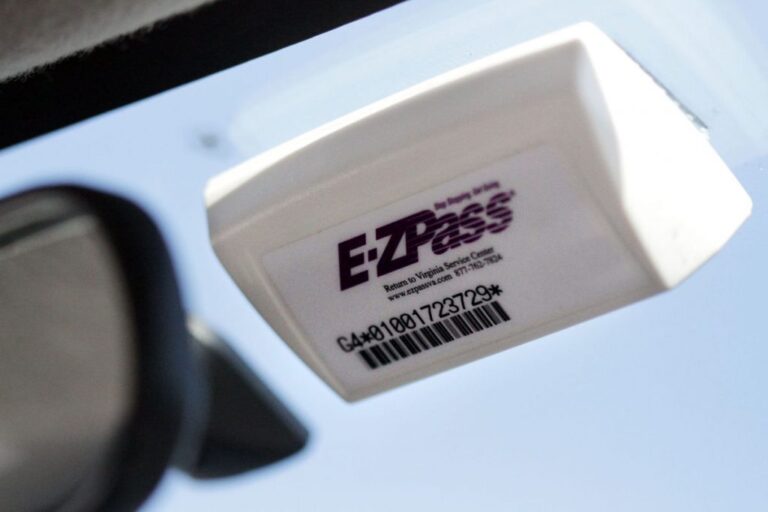
You roll through the E-ZPass lane at a normal speed, and instead of the usual quiet pass you notice a camera flash, a red light, or nothing at all, and you’re not sure which is worse. That sinking feeling is common, and I hear about it in the shop from customers who just had a windshield replaced, bought a different car, or can’t remember the last time they looked at their account.
When your E-ZPass isn’t read at a toll, a photo of your license plate gets captured, and you may have to sort it out with your Customer Service Center. It doesn’t have to turn into a pile of fees. This guide covers what happens at the plaza, why tags fail to read, what a miss can cost you, and how to fix it. I’m a mechanic and not a toll agency, so the exact rules and fees vary by state and agency. Check yours for the final word.
What happens at the toll plaza when your tag doesn’t read
The reader above the lane tries to pick up your transponder as you pass. If it can’t, the system falls back on the camera. Your plate is photographed, and that picture is what the agency uses to figure out who owes the toll.
Whether that turns out to be a non-event or a violation notice depends on what’s behind the plate. If your plate is on a funded account and the details are current, a lot of these missed reads get sorted out without much drama. If the plate isn’t on the account, the balance is empty, or the tag was sitting in the cupholder, you’re more likely to end up with a notice in the mail.
Why you shouldn’t stop or back up
I’ll say this up front because I’ve seen it go badly. Don’t brake hard, stop, or reverse in an electronic lane because you think your tag didn’t register. Cars behind you aren’t expecting it, and a rear-end collision costs far more than any toll.
Keep moving at a safe speed and follow the posted limit. The camera already has your plate, so you can fix everything afterward from your phone or computer.
Your first 24 hours after a suspected miss
You don’t always know a tag didn’t read. Sometimes you only find out when your account shows no charge for a trip you definitely took, or a notice shows up weeks later. If you suspect a problem, here’s the order I’d work in.
- Log in to your E-ZPass account and look at your recent trips and your balance.
- Confirm the license plate and vehicle details on the account match the car you were driving.
- Check where the tag is and how it’s mounted (more on that below).
- If the toll hasn’t posted and the account looks correct, contact customer service with your tag number and trip details.
- If you were driving without your tag at all, pay the toll online using your license plate number as soon as you can.
That whole list takes maybe fifteen minutes. The earlier you act, the less likely a small mix-up turns into multiple notices.
Why E-ZPass tags fail to read
When people tell me their tag “stopped working,” it’s almost never a dead tag. It’s usually where the tag is sitting, how it’s mounted, or the account behind it. Here are the usual suspects, starting with the easiest to fix.
The tag isn’t mounted properly
Incorrect mounting is the number one reason for failed toll readings. The tag needs to be on the windshield as the instructions say, on a clean, flat surface, and away from metalized areas that can interfere with the signal. Those instructions came in the package for a reason, and most people toss them.
Here’s what I see on cars that roll through my bays:
- Tag stuck to the dash, sliding around, sometimes face down
- Tag loose in a cupholder, door pocket, or glovebox
- Tag attached upside down or sideways
- Tag stuck over a dirty or dusty patch of glass, so the adhesive let go
- Tag stuck in a metalized or coated area of the windshield
- Tag blocked by a dash cam, a toll-adjacent sticker, or a sun visor strip
Cleaning the glass before you stick the tag on matters more than most people think. A swipe of glass cleaner and a dry cloth costs nothing, and it helps the adhesive hold on a hot day.
The sealed battery has run out
Another common problem is battery malfunction. The batteries are sealed inside the tag and can’t be replaced. If your tag dies from a battery issue, you need a replacement tag, and there’s no point trying to pry it open or swap a cell.
If your tag is a few years old and starts reading unreliably even though it’s mounted well and your account is fine, battery failure is a reasonable suspect. I can’t tell you exactly how many years a tag lasts, because I don’t have a spec I trust for that, so check with your agency. Occasional checks of your account activity can catch a failing tag before it surprises you.
Wear and tear on the tag
Like anything that lives behind glass in direct sun, a tag takes a beating. Prolonged exposure to sunlight and extreme weather can degrade it over time. A dashboard in July gets hot enough to warp plastic and soften adhesive, and a cold snap isn’t kind to it either.
If your tag is visibly damaged, cracked, discolored, or has been in service for several years, request a new one before it fails at a toll booth. A replacement is cheap insurance compared with a stack of violation notices.
The account side: balance and plate details
Not every unread tag is a hardware problem. If your account has insufficient funds, the toll may not process correctly even when the tag reads fine. Outdated vehicle or plate information can also cause trouble.
This one catches people after a car swap. They move the tag to the new car, forget to update the plate, and the first time the reader misses for any reason, the camera photographs a plate the account has never heard of.
Quick reference: symptom, cause, fix
| What you notice | Likely cause | What to do |
|---|---|---|
| Tag worked for a while, then started missing reads | Loose adhesive or tag no longer flat on the glass | Clean the glass and re-mount the tag per the instructions |
| Misses on a newly replaced windshield | New glass has a metalized area, or the tag was placed in the wrong spot | Re-mount away from metalized areas and follow the installation guidelines |
| Tag mounts fine but reads unreliably, and it’s several years old | Sealed battery weakening, or general wear | Request a replacement through your account or customer service |
| Toll missing from account, notice arrives later | Plate not on the account, or the balance was too low | Update plate details, add funds, and contact customer service about the notice |
| Tag is visibly cracked or faded | Sun and weather damage | Replace the tag |
| Drove through a toll without your tag in the car | Tag left at home or in another vehicle | Pay online with your license plate number as soon as possible |
What a missed read can cost you
An unread tag can lead to a chain of problems if you ignore it. You can get a toll violation notice, administrative fees on top of the toll, and penalties on the account itself. None of this is guaranteed, but it’s the path you’re trying to stay off.
Toll violations
If the toll booth fails to read your E-ZPass tag, you can be issued a toll violation. That can happen even when the miss was an honest mistake or a faulty tag. Each unpaid toll can bring its own separate notice, so several missed tolls on a commute can add up fast if you don’t deal with the cause.
I once helped a customer who commuted the same toll road twice a day. His tag had come loose and slid down the dash, and for about a week it missed reads on most trips. He didn’t notice until a stack of envelopes showed up. The fix was a two-minute re-mount, but sorting out the paperwork took a lot longer than that.
Administrative fees
Each violation often carries an administrative fee on top of the unpaid toll. Those fees cover the cost of processing the violation, and they vary by state and agency. I won’t guess at amounts because they differ so much from one agency to the next.
The simple takeaway is that the fee can cost more than the toll itself. Fix tag problems right away, and pay missed tolls promptly, to keep those extra charges off your statement.
Account penalties
Repeated problems with unread tags can bring penalties on your account. That may include suspension or even revocation of your E-ZPass privileges, plus potential fines for what could be treated as toll evasion. An honest mistake on one trip is usually a different story from a pattern, but the agency may not know which one you are unless you speak up.
Keeping enough money in the account and a tag in good working order protects you here. Contacting customer service early also shows you’re trying to fix the problem, and that tends to help.
Getting ahead of it: account checks and tag installation
The best time to deal with an unread tag is before it happens. Most of the prevention is boring housekeeping, but it works, and it’s cheaper than any repair I do.
Check your E-ZPass account online
Look at your balance and statement regularly. Log in, confirm your account is active and funded, and scan recent trips for anything odd. A missing toll or a charge you don’t recognize is a sign something needs attention.
If you notice a discrepancy, or the transponder isn’t reading properly, you can raise a concern through the account portal. Do it while the trip is fresh in your memory, because details like the date, time, and plaza are easier to recall in the first few days.
Install the tag the right way
For the transponder to work correctly, it must be installed properly on the vehicle. Place the tag at the top of the windshield, facing you, with the label right side up. Incorrect positioning leads to read errors at toll booths, so take the extra minute to get it right.
Read the installation guidelines that came with your transponder, because mounting details can differ between tag types. If you’ve lost them, check your agency’s site. Here’s how I’d handle the job:
- Clean the glass where the tag will go with glass cleaner, and dry it completely.
- Hold the tag at the top of the windshield with the label facing you and right side up, and confirm you’re not on a metalized or coated area.
- Peel the adhesive backing and press the tag flat against the glass.
- Hold it in place for a few seconds so the adhesive grabs.
- Leave it alone. Don’t peel it off and reposition it repeatedly, because the adhesive weakens each time.
Windshield replacement and car swaps
Two situations catch people over and over: a new windshield and a new car. If you’ve had your glass replaced, the old tag isn’t going to be where you left it, and the new glass may have a different layout. Re-mount following the installation guidelines and watch the next few toll trips on your account.
If you’ve changed vehicles, update the vehicle details and license plate number on the account the same day. Don’t leave the old car on the account if it’s gone, and don’t leave the tag in the old windshield. Mechanics see this when customers trade in a car and the tag goes along for the ride to a dealer lot.
Replace a defective tag
If troubleshooting points to a bad tag, request a replacement. A defective transponder that no longer functions should be swapped for a new one. You can typically start that online through your E-ZPass account, or by contacting customer service.
Before you order, make sure it’s really the tag. If the mounting is right, the glass is clean, the account is funded, and the plate details are current, and you still get misses, then I’d consider the tag the problem. I’d rather you spend ten minutes ruling out the easy stuff first.
Handling a read failure: customer service and disputes
If your tag fails to read and you’ve done your basic checks, it’s time to talk to someone. Reaching out promptly can help you avoid unnecessary charges and keep your account in good standing. It doesn’t need to be a fight.
Contact the customer service center
Get in touch with the E-ZPass customer service center soon after you suspect a missed read. Have your tag number and relevant trip details ready for the representative. They can help work out why the tag wasn’t read and walk you through the next steps.
Here’s what I’d have in front of me before dialing or messaging:
- Your tag number
- The date, approximate time, and location of the toll
- The license plate on the vehicle you were driving
- Your account balance and any recent top-ups
- Any notice or reference number you’ve received
Disputing charges
If you find incorrect charges on your account because of a tag read failure, you have the right to dispute them. Keep track of your toll trips and report discrepancies as quickly as you can, because waiting makes everything harder. Provide evidence such as the time, date, and location to support your dispute.
Be specific and stay calm. “I went through the toll on the 14th around 8 a.m. and my tag was mounted on the windshield” gets you further than “your system is broken.” Keep copies of any emails or confirmation numbers, in case you have to follow up.
Keep your personal and vehicle info current
Make sure your account has your current personal information, including vehicle details and license plate number. Errors or outdated information can lead to read failures and billing problems. Review the account from time to time, and update it when anything changes.
If you have more than one vehicle on the account, check each plate against the right car. And if you replaced a plate, say after a move or a renewal that brought a new number, update that too. It’s one of those details people forget until a notice shows up.
The money side: balance, paying without a tag, and topping up
A lot of toll headaches come down to money, not hardware. An empty account can look exactly like a broken tag from the driver’s seat, and the fees that follow are just as annoying.
Insufficient funds in your account
If your account doesn’t have enough money, a toll transaction may not process, and that can result in additional charges. The simplest protection is to keep an eye on your balance and set up automatic replenishment. It saves you from checking every week, and it means you aren’t relying on memory.
I’m a fan of auto top-up for anyone who drives toll roads regularly. If you only use tolls a couple of times a year, a manual check before each trip does the job. Either way, look at the balance before a long drive.
Paying tolls when you forgot your tag
Let’s say you hop in your spouse’s car, drive through a toll, and realize your tag is sitting at home. If you travel through a toll without your tag, pay the toll online using your license plate number as soon as possible to avoid penalties. Waiting can mean extra charges that include the toll plus administrative costs.
It’s a small step that matters. Use the plate number from the vehicle you were driving, and pay the toll before the notice arrives.
Ways to add money to your account
There are several ways to top up an E-ZPass account:
- Cash: visit an E-ZPass customer service center
- Credit card: add funds online or set up auto replenishment for convenience
- Money order: mail one to the specified address
- Bank account: link your bank account for automatic deductions
Mail and in-person options are slower, so they aren’t a good choice when you’re about to hit the road. If you’re out of time, online with a card gets the money there fastest. Keeping the account funded avoids unnecessary toll violations and keeps you in good standing with the E-ZPass system.
Mistakes that turn a small miss into a bigger headache
These are the ones I see most. All of them are avoidable.
- Leaving the tag loose in the car. It’s meant to live on the windshield, not in the cupholder or on the dash.
- Ignoring mail from a toll agency. A notice doesn’t go away on its own, and the fees can grow.
- Forgetting to update the account after a car swap or new plates. The camera reads the plate, and the account has to match it.
- Letting the balance run low. An empty account causes the same trouble as a broken tag.
- Trying to pry open the tag to replace the battery. It’s sealed, so a new tag is the fix.
- Stopping or backing up in an electronic lane. That’s a safety risk, and it doesn’t help the reader.
- Waiting to dispute a charge. The longer you wait, the harder it is to remember details and prove your case.
- Re-sticking a tag again and again. The adhesive wears out, and the tag ends up loose.
My verdict and what to do next
When your E-ZPass tag isn’t read, the camera usually has your plate, and that gives you time to fix it. Don’t panic and don’t stop. Check your account, check the mounting, and contact customer service if something looks wrong.
In my experience, most unread tags come back to four things: poor mounting, a worn or dead tag, an empty balance, or outdated account info. Those are all fixable, and none need a mechanic.
When to DIY and when to call someone
Do it yourself: clean the glass and re-mount the tag, check your balance, update your plate and vehicle details, set up auto top-up, and pay missed tolls online with your plate number. That’s most of the job and it takes a few minutes.
Call customer service: if you got a violation notice, if charges look wrong, if the tag still misses after you’ve fixed the mounting and the account, or if you need a replacement. See a glass shop or your dealer only if the windshield layout is making it hard to find a good mounting spot.
The one takeaway
Spend ten minutes checking your account and where your tag sits before problems start. A clean windshield, a tag facing the right way, current plate details, and a funded account will keep most toll plazas uneventful.