
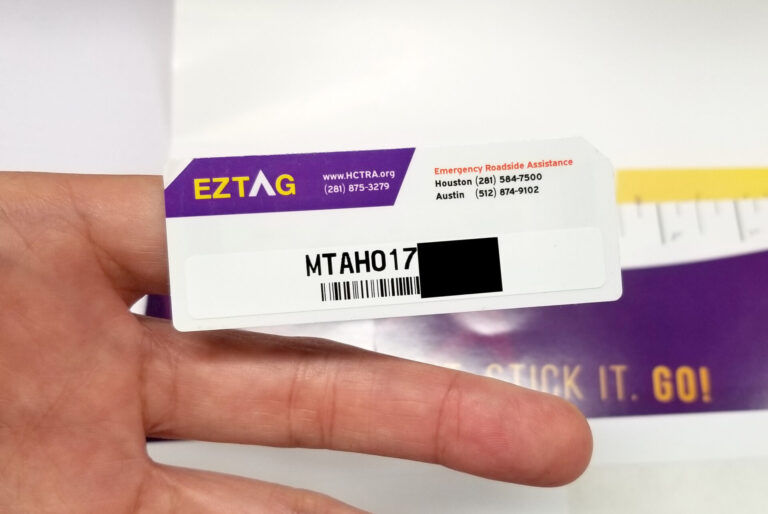
An EZ TAG won’t do anything for you until it’s activated, and that’s the step people skip most often. The tag comes in the mail or from a store, it goes on the windshield, and the driver assumes the rest takes care of itself. It doesn’t, and that’s how people end up with a violation notice for a trip they thought was covered.
The good news is that activation takes a few minutes. This guide walks through what an EZ TAG is, the three ways to activate it, how to set up the account behind it, and what to do when something goes wrong. I’ll also cover the mistakes I see drivers make, because most of them are easy to avoid.
What an EZ TAG is and what it does
An EZ TAG is an electronic toll tag run by the Harris County Toll Road Authority (HCTRA), the agency behind the toll roads around Houston. It’s a small sticker-style transponder that sits on your windshield. When you drive through a toll point, a reader picks up the tag and the toll comes out of your prepaid account. You don’t stop, you don’t dig for change, and nobody hands you a receipt.
The main benefits are simple:
- No cash. You never need loose change or a stop at a booth.
- Less time at the plaza. Traffic keeps moving, which matters on a busy Houston commute.
- Automatic billing. Tolls are charged to your account, so you aren’t paying one trip at a time.
- The lowest toll rate. Tag users generally pay less than drivers billed by mail through their license plate.
The tag is also meant to work beyond Harris County. Texas, Kansas and Oklahoma are the states named for EZ TAG travel, and in Texas it works with other toll systems such as TxTag and TollTag. Some write-ups also say it works with systems that accept E-ZPass. I’d treat that last one carefully and check the current coverage before you count on it for a long trip.
The basic process is the same no matter how you do it. You get a tag, you create an account and put money behind it, and you activate and mount the tag. Do those in the right order and it all works.
What to have ready before you start
Activation goes faster when everything is on the table before you sit down. I treat it like a brake job: pull the parts and tools first, then start. Here’s what you want within reach.
- The tag itself, still in its packaging if you haven’t mounted it yet
- Your order receipt, which has the TAG REQUEST ACTIVATION NUMBER
- A valid driver’s license
- Your vehicle registration information
- Your license plate number
- A bank account or credit card to fund the account
The activation number is the one people lose. It’s on the order receipt, so don’t toss the paperwork that came with the tag. If you can’t find it, a visit to an EZ TAG store or a call to customer service is the faster fix than guessing.
Check that the details on your documents match your vehicle. If you’ve changed plates, moved, or bought a different car recently, update those details now instead of after the first toll. The system matches your plate to your account, so a typo in the plate number can cause trouble later.
How to activate your EZ TAG
You have three ways to activate: online, through the app, or in person. All three get you to the same place. Pick the one that fits how you like to handle this kind of thing.
Online activation
This is the route most people take. Go to the HCTRA website and enter the TAG REQUEST ACTIVATION NUMBER from your order receipt. Do this before you stick the tag on the windshield.
That order matters for a practical reason. Once the adhesive touches glass, you don’t get a clean second try, so you want to know the tag is going to work before it’s stuck on. Activate first, then mount.
Activation through the app
You can also download the EZ TAG app on your phone and enter your credentials to activate the tag. The app walks you through each step, and it’s handy if you already plan to manage your balance from your phone. If you like checking your account from the driveway or a parking lot, this is the one.
The app does need your account credentials. If you haven’t created the account yet, do that first (more on that in the next section) and then come back to the app.
In-person activation
If you’d rather talk to a person, go to an EZ TAG store. Customer service staff can help you activate the tag. Bring the tag and any account information you have, and take your receipt along if you still have it.
In person is a good choice if you’re not comfortable with websites, if you’ve lost your activation number, or if the account has something odd going on. It’s also the right call if you have several vehicles or questions about how to set things up. A few minutes at the counter beats an hour of frustration online.
Which activation method fits you
| Method | What you need | Best for |
|---|---|---|
| Online | Tag request activation number from the order receipt | Most drivers who want to do it at home, any time of day |
| App | Phone, app download and your account credentials | Drivers who also want to manage their balance from a phone |
| In person | The tag and your account information | Anyone who has lost paperwork, has questions, or wants help in person |
Whichever route you choose, finish it before you drive onto a toll road. A tag that’s mounted but not activated is the same as having no tag at all.
Setting up your EZ TAG account
The tag is only half the system. The other half is the account that pays for your tolls, and a bad setup here causes more headaches than a bad tag does. Take your time with it.
Creating the account
Go to the Harris County Toll Road Authority website and look for the option to sign up as a new user. If you’d like to see it done first, there’s a video on creating an account that walks through it. You’ll be guided through a series of steps, and it usually includes choosing a username and password.
Write down the username and password somewhere safe, or save them in a password manager. You’ll need them for the app, for reloading your balance, and for fixing problems later. Nothing is more annoying than being locked out of an account when a violation notice shows up.
Documents you’ll need
Setup asks for some basic information about you and your vehicle:
- A valid driver’s license
- Vehicle registration information
- License plate number
Make sure everything is current and matches the vehicle you’re registering. An expired registration or a plate number with a swapped letter can cause problems that look like a tag failure. I’ve seen drivers blame the tag when the real problem was a plate typed in wrong.
If you have more than one vehicle, add each one to the account. A tag is tied to your account and plate information, so a second car that isn’t listed can still produce a violation even though you own a tag.
Linking a bank account or credit card
The last step is payment. You can link a bank account and keep a prepaid balance that is automatically replenished when it falls below a set minimum. You can also link a credit card for automatic payments.
Either option is better than a manual top-up you have to remember. A low or empty balance is one of the most common reasons drivers get a violation, and automatic replenishment takes that off your plate. Keep the payment information up to date, too. An expired card on file is the same as no money in the account.
Mounting the tag correctly
A properly activated tag still needs to be read, and that comes down to where it sits on the glass. The tag goes on the inside of the windshield. Placement matters, so follow the mounting instructions that came with it or the guidelines from the toll agency.
Here’s how I’d do it:
- Activate the tag first, as covered above.
- Clean the spot on the inside of the windshield so it’s free of dust, oil and film.
- Peel off the adhesive backing and keep your fingers off the sticky part as much as you can.
- Place the tag in the position shown in the mounting instructions.
- Press it firmly against the glass so it seals evenly.
Glass cleaner is fine, but let the glass dry fully before you apply anything. A damp or greasy surface is the number one reason a sticker lets go in a hot Houston summer. If the tag keeps falling off, the surface wasn’t clean enough, and that’s something to fix before you replace anything.
Some windshields have coatings or built-in elements that can interfere with how well a tag reads. If your car has anything like that near the mirror, check your owner’s manual and the mounting guidance from the agency before you pick a spot. Don’t just stick the tag wherever it looks neat.
Don’t move a tag after it’s mounted and don’t try to peel it off and reuse it on another car. If you change vehicles, contact customer service and handle it through your account instead.
Where you can use your EZ TAG
Your tag is built for travel across Texas, not only around Houston. It works on the Harris County system and is interoperable with other Texas toll collection systems like TxTag and TollTag. That’s useful if you drive from Houston to Dallas or Austin, where the toll roads belong to different agencies.
It’s also described as interoperable in Kansas and Oklahoma, which helps if you’re driving north. Road trips are where a tag really earns its keep, because you won’t need to figure out a new payment process at each state line. Interoperability can change over time, so a quick check of the current coverage before a long trip is a smart habit.
If you plan to drive somewhere you haven’t been, look up how that toll road handles tags before you go. Most of the time it just works. When it doesn’t, the cost is a mailed bill at a higher rate, which is the exact thing the tag is meant to avoid.
How tolls are calculated
With an EZ TAG, the toll depends on your trip, meaning where you enter and where you exit the toll roads. The amount comes out of your prepaid account balance automatically. You aren’t billed each time, and you don’t have to do anything at the plaza.
The tag rate is often lower than the pay-by-mail rate, which is why drivers who use toll roads regularly tend to prefer it. If you’re curious about the exact numbers for a route, check the current rates on the HCTRA site, since I won’t guess at them here. Rates can change, and the official site is the only place to get today’s figure.
Keep an eye on your account history now and then. The transaction list shows each toll you’ve paid, and a quick look once a month can catch a charge that doesn’t match your driving. It takes two minutes and can save you a long call later.
Using an EZ TAG with a rental car
You can use your EZ TAG in a rental car, but you have to do it right. Add the rental car’s information to your account before you drive it. The system needs to know which plate belongs with your account for that trip.
Then comes the part people forget. Remove the rental from your account when the rental period ends. If you leave it on, you may end up paying tolls for whoever drives that car next, and you won’t know about it until you read your statement.
A good habit is to set a reminder on your phone for the day you return the car. Add the plate when you pick it up, take it off when you drop it off. It’s the same kind of discipline as writing down the mileage at an oil change. It keeps the paperwork from becoming a problem.
Also check whether the rental company has its own toll program turned on in the car. If it does, you may be charged twice for the same toll, once by the rental company and once through your account. Ask at the counter before you leave the lot.
Troubleshooting common EZ TAG problems
When a tag doesn’t behave, work through the cause in order. Start with the account, then the tag’s position, then the tag itself. Most of the time the problem is simpler than it looks. (A quick note: the source text for this guide briefly mixed E-ZPass into this section, but everything here applies to your EZ TAG account and tag.)
Lost or stolen tags
If your tag is lost or stolen, report it to customer support right away. That keeps someone else from using it, and the staff can deactivate the old tag and send you a replacement. Don’t wait to see whether it turns up.
While you’re on the phone, check that your plate number is in the system correctly. A current plate on file helps you avoid violations and penalties while you wait for the new tag. Once the replacement arrives, activate it before you mount it, the same way you did the first one.
Incorrect charges
If a charge doesn’t match your travel, start by reviewing the transactions in your account. Sometimes it’s a trip you forgot, or a family member driving a car that’s on your account. Rule that out first.
If the charge still looks wrong, contact customer support with your transponder number and specific details about the charge. Have the date, the time and the toll location ready. Do it quickly, because small errors tend to snowball if you leave them alone, and a clear, calm explanation gets you further than a vague complaint.
Tag reader errors
When a reader at a toll point doesn’t pick up your tag, the cause is usually one of two things: the tag is mounted badly, or the battery is weak. Here’s how I’d check.
- Check the tag’s position on the windshield. Compare it with the mounting guidelines from your issuing agency, and make sure the tag is stuck firmly and hasn’t slipped or curled at the edges.
- Look at the battery. If placement is fine and problems continue, the tag’s battery may be the issue, and you should get a replacement.
Before you blame the hardware, though, look at the account. A low balance, a lapsed card or a missing plate can all look like a “reader error” from the driver’s seat. I’d check the account first, since that’s free and takes a minute. A tag that’s been stuck on a windshield for a long time is also more likely to be the culprit than a new one, so think about how old yours is.
Mistakes to avoid
After years around cars and the people who drive them, I notice the same slip-ups come up again and again. These are the ones that cost drivers money.
- Mounting before activating. Activate first so you know it works before the tag is stuck to the glass.
- Letting the balance run low. Use automatic replenishment so you don’t have to remember.
- Forgetting to update the plate. A new car or new plates need to go into the account right away.
- Leaving a rental on the account. Remove it when the rental ends.
- Ignoring an expired card. Payment information has to stay current or the account can’t pay.
- Tossing the receipt. The activation number is on it, and you may need it again.
- Waiting on a problem. A small account error is easy to fix, and a pile of violations isn’t.
One example from my own shop stands out. A customer came in sure her tag was dead because she kept getting notices. The tag was fine. She had bought a new car, moved the tag over, and never added the new plate to the account. The fix took five minutes, and the lesson was that the plate and the account have to agree.
A quick activation checklist
If you want the short version, here’s the order I’d follow with a new tag in hand:
- Find your order receipt and the TAG REQUEST ACTIVATION NUMBER.
- Create your HCTRA account and add your vehicle and plate details.
- Link a bank account or credit card and set up automatic replenishment.
- Activate the tag online, through the app, or at an EZ TAG store.
- Clean the windshield and mount the tag following the instructions.
- Check your account after your first few trips to confirm the tolls are posting.
Keep that list handy. It works for a first-time setup and for a replacement tag.
The expert verdict
Activating an EZ TAG is a job almost anyone can do at home. The steps are short, the paperwork is basic, and the work is done on a computer or phone, not under a hood. If you have your receipt and your documents handy, you can finish the whole process in one sitting.
DIY makes sense for activation, account setup, mounting and routine checks. That includes updating your plate, adding a rental, and reviewing your transaction history. Those are all tasks you can handle yourself, and doing them yourself keeps your account in good shape.
Contact customer service or visit an EZ TAG store when something doesn’t add up. That means a lost activation number, a lost or stolen tag, charges you can’t explain, or a tag that fails even though the account and placement look right. Staff can see your account, and that’s something you can’t do by guessing at home. If a tag battery is the issue, get a replacement through the agency instead of trying to fix it yourself.
Do the setup carefully, keep the balance and payment details current, and check your account once in a while. That’s all it takes to enjoy the benefits the tag promises on Texas toll roads, and in Kansas and Oklahoma too.
One clear takeaway: activate your EZ TAG before you mount it, keep your account funded and your plate information current, and you’ll avoid nearly every problem drivers run into.