
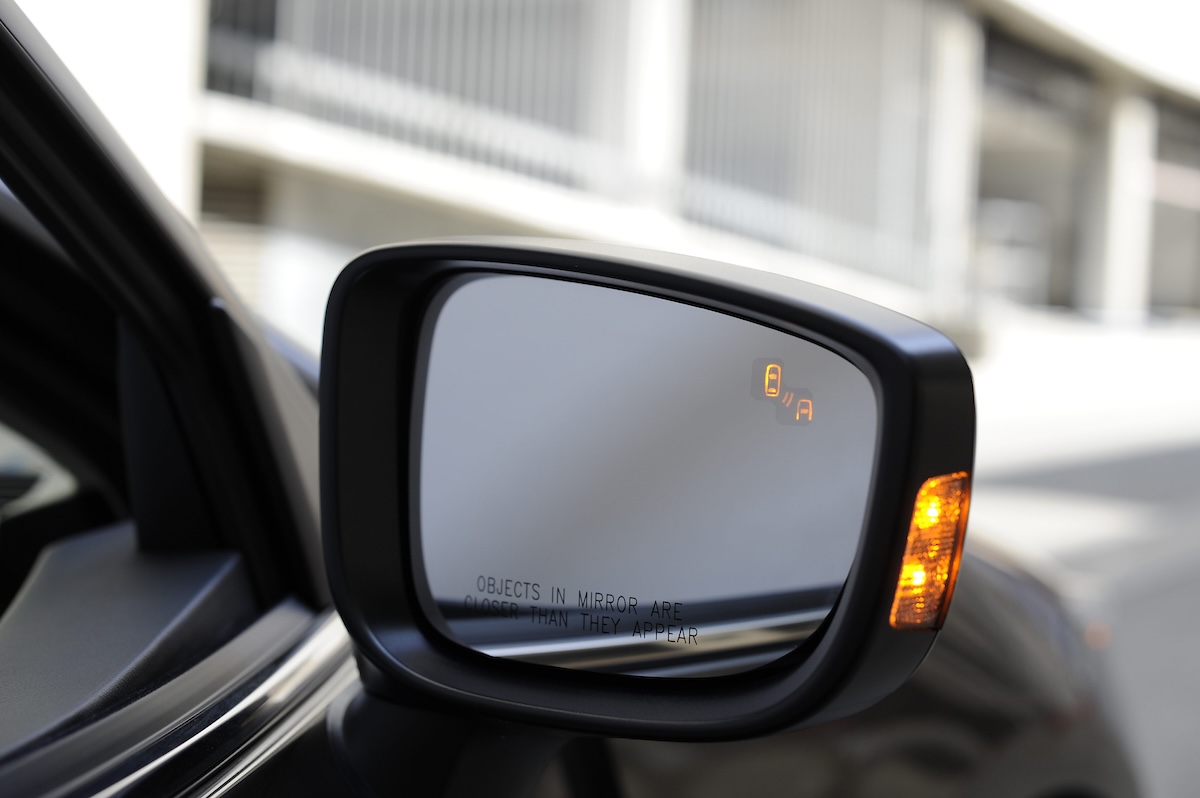
You are changing lanes in your Mazda, glance at the mirror, and notice the blind spot warning light never comes on. Then the dashboard shows a BSM malfunction message, or the BSM OFF light stays on after you start the engine. That is the point where most drivers ask whether the system needs a reset or whether a sensor has failed.
Mazda’s Blind Spot Monitoring, usually called BSM, uses radar sensors to watch areas alongside and behind the vehicle. When it detects a vehicle in a monitored area, it can illuminate a warning in the door mirror and, depending on the model, sound or display an alert when you signal a lane change. If BSM stops working, treat the car as if it has no blind spot warning until the system is confirmed operational.
A reset can clear a temporary electronic glitch, but it can’t repair a cracked bumper, blocked sensor, damaged wiring, low battery voltage, or a radar module that has lost calibration. Start with the simple checks, then move to a proper scan if the warning remains. Mazda uses different BSM hardware and menus across model years, so the owner’s manual for your exact car matters more than a generic reset video.
What Mazda BSM does, and what it does not do
BSM is a driver-assistance system. Radar sensors monitor a defined area near the rear corners of the Mazda and look for vehicles traveling alongside or approaching from behind. The system then sends information to the vehicle electronics, which control the mirror indicators and any audible or dashboard warnings fitted to that model.
It is meant to help during lane changes, not to steer the car or replace a mirror check. It may not identify every object, every road user, or every situation in time. A motorcycle, bicycle, small object, fast-approaching vehicle, or vehicle entering at an unusual angle can fall outside the system’s useful detection conditions.
BSM is also different from rear cross traffic alert, even though the systems may share radar hardware or appear in the same menu. Rear cross traffic alert watches for traffic approaching while you back out. BSM watches the neighboring area during forward travel. A fault in one feature may affect the other, depending on the Mazda’s design.
The Mazda owner’s manual resource is the right place to confirm the warning-light meanings, sensor locations, operating conditions, and switch layout for your model. I would check that before disconnecting the battery. A five-minute look at the correct manual can prevent an hour of chasing a feature that was simply switched off.
Why the warning light is not a promise that the lane is clear
The BSM lamp only reports what the system detects under its operating conditions. It is not a substitute for checking the side mirror, rear-view mirror, and shoulder. If the BSM warning is unavailable, keep driving with normal mirror and shoulder checks and allow extra space before changing lanes.
In the shop, I tell customers to think of BSM as a second set of eyes, not as permission to stop looking. Radar has blind spots of its own. Dirty sensor covers, heavy rain, snow, a trailer, or a repaired bumper can all change what the system sees.
What the BSM lights and messages mean
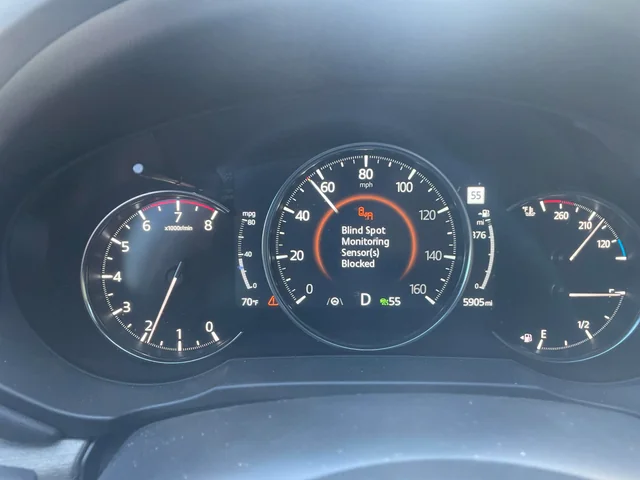
Mazda models use different symbols and messages, but there is a useful difference between a normal warning and a system fault. A mirror indicator that illuminates when a vehicle is beside you is normal operation. A BSM OFF light or a message saying the system is unavailable means you need to find out why the feature is disabled.
| What you see | What it may mean | First check |
|---|---|---|
| Mirror warning appears beside another vehicle | Normal BSM detection. | Keep checking mirrors and surroundings before moving over. |
| BSM OFF indicator remains on | The system was switched off or the vehicle has detected a fault. | Check the BSM switch or infotainment setting, then read the owner’s manual. |
| BSM malfunction or unavailable message | The system may have a sensor, wiring, voltage, calibration, or communication fault. | Inspect the rear bumper area and scan the vehicle if the message remains. |
| Warning appears after snow, ice, or road grime | The sensor area may be blocked or the system may be protecting itself. | Clean and dry the sensor areas, then restart and road-test safely. |
| Warnings flash without a nearby vehicle | The system may be seeing a guardrail, large object, road curve, or an abnormal sensor reading. | Note the road and weather conditions and check for sensor damage. |
Do not confuse a BSM warning in the mirror with the BSM OFF indicator in the instrument cluster. The mirror lamp is intended to alert you to a detected vehicle. The OFF or malfunction warning concerns system status. If the message wording is unclear, photograph it when parked and look up that exact wording in the vehicle manual.
Common reasons Mazda BSM stops working
Dirt, ice, or road film on the rear bumper
The radar sensors are normally mounted near the rear corners of the vehicle, behind or near the rear bumper. Mud, salt, wax residue, snow, and ice can interfere with the radar’s view. A winter road can cover the sensor area before the rest of the vehicle looks dirty enough to concern you.
Clean the bumper area gently with water and a soft cloth. Do not attack it with a scraper, stiff brush, abrasive pad, or aggressive solvent. The sensor may be behind a plastic cover, and damaging or repainting that area can create a more expensive problem than the original dirt.
A damaged or poorly repaired bumper
A small parking-lot impact can move a radar sensor or damage its bracket even when the bumper cover looks acceptable. A bumper replacement, body filler, thick paint, decorative trim, or aftermarket accessory near the radar area can also interfere with operation. If BSM stopped working after body repair, put that repair high on the suspect list.
This is a common shop discovery. The customer comes in after a rear bumper replacement and says BSM has been dead ever since. The fuse is fine, the battery is good, and the sensor connector is plugged in, but the radar unit needs the correct mounting position or calibration. Clearing the code does not correct a sensor that is physically pointed the wrong way.
The system was switched off
Some Mazda vehicles have a BSM OFF button, while others place the setting in the vehicle personalization or infotainment menu. A passenger may press a button while cleaning the dash, or the setting may be changed while exploring the menus. Check the indicator and the manual before assuming an expensive failure.
Make sure you are checking the correct button. Mazda has several driver-assistance controls, and a lane departure or parking sensor switch may not control BSM. If the OFF indicator returns after you switch the system on, the computer may be disabling it because it found a fault.
Low battery voltage or a recent battery replacement
Radar modules and body-control electronics are sensitive to unstable power. A weak battery, poor terminal connection, discharged battery, jump-start, or battery replacement can create temporary warnings in several systems at once. BSM may be one of the features that complains first, but it may not be the root problem.
Check the battery terminals for looseness or heavy corrosion, and look for other warning lights. If the engine cranks slowly, the clock resets, the power windows behave oddly, or several driver-assistance messages appear together, test the battery and charging system rather than replacing a BSM sensor immediately.
A fuse, connector, or wiring fault
BSM power and communication circuits are protected by fuses, but the correct fuse depends on the Mazda model and year. Use the fuse chart for your car and never replace a fuse with a higher rating. A fuse that blows again points to a short, damaged module, or wiring fault that needs diagnosis.
Wiring near the rear bumper can be pulled, pinched, corroded, or damaged by an impact. A connector can look plugged in while a terminal inside is pushed back and not making contact. A technician may need a wiring diagram, a digital multimeter, and a scan tool that can communicate with the BSM or rear radar modules.
A sensor communication or calibration fault
The BSM module communicates with other vehicle computers over the Mazda’s network. If a module stops talking, loses its calibration, or reports an internal fault, the system may switch itself off. The warning could be caused by the sensor, its power supply, the communication network, or another control unit.
That is where a basic code reader often reaches its limit. A generic OBD reader may read engine codes but not show manufacturer-specific body or radar faults. A shop with Mazda-capable diagnostic equipment can identify which module set the code and whether the fault is current or stored.
Start with these checks before trying a reset
Park safely and switch the ignition off before inspecting anything. You don’t want to clean a bumper while the car is moving or test a warning by drifting toward another vehicle. The following checks are simple, and they solve the easy cases without disturbing the car’s stored settings.
- Read the exact message. Write down the wording, warning color, and whether the light stays on after the engine starts.
- Check the BSM setting. Confirm the feature was not switched off through a button or vehicle menu.
- Inspect both rear corners. Look for snow, ice, mud, road salt, stickers, thick wrap, a loose bumper cover, or signs of impact.
- Clean the sensor areas. Use clean water and a soft cloth. Let the area dry before retesting.
- Look for other warnings. ABS, traction-control, battery, steering, or network messages may point to a broader electrical problem.
- Check the battery condition. Loose terminals or a recent low-voltage event can create temporary electronic faults.
Do not spray a pressure washer directly into a bumper seam, sensor cover, or connector. High-pressure water can force moisture into places that normally stay dry. I have seen a customer clean a bumper so aggressively that the original dirt was gone but the connector afterward needed attention.
Test the system without taking unnecessary risks
After cleaning and confirming the setting, start the Mazda and watch the warning lamps. If the malfunction message remains, do not drive close to another vehicle just to see whether the mirror lamp reacts. A road test can be performed normally, with plenty of distance and ordinary mirror checks, but the BSM system should be treated as unavailable until the warning clears.
BSM may not show a warning while the car is stationary or moving at very low speed. The exact operating speed and conditions vary by model. Check the manual instead of assuming a lack of a warning at a driveway speed means the radar has failed.
How to reset Mazda BSM safely
There is no universal reset sequence for every Mazda. In some cases, switching the vehicle off, locking it, waiting, and restarting allows a temporary module fault to clear. If the problem was caused by snow or a short low-voltage event, the warning may disappear after the underlying condition is gone.
A battery disconnect is sometimes suggested as a reset. It can remove power from the modules, but it is not a repair and it may reset clock, audio, window, steering, idle, or other learned settings depending on the vehicle. Some Mazda models may also require initialization procedures after battery power is disconnected.
A cautious power-cycle procedure
- Park on a level surface, select Park or the correct manual-transmission position, and apply the parking brake.
- Turn off the engine and all electrical accessories.
- Close the doors and allow the vehicle to enter its normal shutdown state.
- Wait several minutes, then restart the vehicle and check the BSM indicator.
- If the warning remains, stop trying random resets and arrange a scan.
If you decide to disconnect the battery, consult the owner’s manual first. Know whether the Mazda has an alarm, power liftgate, powered windows, or other features that need a relearn procedure. Disconnect the negative cable only after the ignition is off and the vehicle is safely parked, and don’t let a metal tool bridge the battery terminal to body metal.
Use eye protection and keep sparks away from the battery. If you are not comfortable working around the battery, skip this step. A diagnostic scan is safer and more informative than disconnecting the cable and hoping the warning stays away.
Why a battery reset may not fix the problem
A control module can store a fault for a reason. If a radar sensor is blocked, misaligned, unplugged, or internally failed, removing battery power does not change that condition. The warning will return as soon as the module runs its self-check.
Battery resets can also erase useful diagnostic information. If the fault is intermittent, clearing the stored data may make the problem harder to reproduce. When a BSM warning first appears, I prefer to scan the car before clearing anything, especially if the warning came after body work or an electrical event.
If the warning disappears after a power cycle and does not return, keep an eye on it. If it returns after rain, washing, highway driving, or a particular temperature, write down those conditions. Intermittent details often tell a technician more than a generic message.
How a shop diagnoses a Mazda BSM fault
A proper diagnosis starts with the vehicle identification, model year, exact warning, recent repairs, and conditions that trigger the fault. The technician then scans all relevant modules, not only the engine computer. BSM faults may be stored in a radar, body, instrument, or network module depending on the system design.
The scan tool may show current codes, history codes, freeze-frame information, communication status, sensor data, and calibration status. Code numbers vary by system, so I would not trust a generic internet list that claims one code always means one specific sensor. The technician needs the Mazda’s diagnostic procedure for that vehicle.
Electrical tests that matter
- Battery voltage and charging-system output
- Power and ground at the BSM or radar module
- Fuse condition under load, not only a visual inspection
- Connector condition, terminal tension, and water intrusion
- Communication between the radar module and other vehicle computers
- Wiring continuity and short-to-ground checks where required
A fuse can look intact and still have a poor connection at its socket. Likewise, a multimeter may show continuity through a wire that fails when it is flexed or loaded. Good diagnosis uses the meter, wiring diagram, and physical inspection together.
When calibration is required
Radar sensors need a known position and a clear field of view. A collision, bumper replacement, suspension change, or incorrect mounting bracket can move the sensor enough to affect its detection area. Some repairs require a calibration procedure with special equipment, a level surface, targets, or manufacturer-specific software.
Calibration is different from clearing a code. A code can be erased while the sensor remains misaligned. If the vehicle has had rear-end damage or bumper work, tell the repair shop before it starts testing. That history can save time and prevent the technician from replacing a sensor that is actually mounted incorrectly.
Weather and road conditions can temporarily disable BSM
Heavy snow and ice are obvious causes, but wet road grime can be just as troublesome. Salt spray can coat the rear bumper during a winter drive, while mud can collect around the sensor area after a wet road or unpaved trip. The system may display an unavailable message until the obstruction is removed.
Heavy rain, fog, and spray can change the radar environment. A temporary warning during a storm may clear once the bumper is clean and dry. If the system remains unavailable after conditions return to normal, treat it as a fault rather than waiting for every warning to disappear on its own.
Cold temperatures can also expose a weak battery or a marginal connector. If BSM works after a warm restart but fails on cold mornings, record that pattern. It may point to voltage drop, moisture, or an electronic component that is sensitive to temperature.
What to do after washing the car
Use a normal wash method around the rear bumper and dry the sensor areas with a soft towel. Avoid holding a pressure-washer nozzle close to sensor covers, seams, or wiring. If the warning appears immediately after a wash, let the area dry and restart the vehicle before assuming the radar unit has failed.
Wax, ceramic coating, vinyl, and paint repair near the radar cover should follow Mazda’s guidance. A thin product may be harmless in one location and a problem in another. If a body shop applies material around the rear corners, ask whether the BSM sensor area was left within the required condition.
Trailer, cargo, and accessory limitations
A trailer can block or confuse the radar area behind the Mazda. Cargo that extends beyond the vehicle’s width can do the same. The system may be unable to monitor adjacent lanes correctly when the vehicle’s shape has been changed.
Aftermarket bumper guards, tow-hitch accessories, bike racks, decorative covers, and other add-ons can interfere with sensors if they sit near the rear corners. The fact that an accessory is small does not guarantee that the radar can ignore it. Check the vehicle manual and accessory instructions before installing anything close to the sensor area.
If BSM works normally without a rack but becomes unavailable with the rack installed, the rack or its load may be the explanation. Remove the accessory only when safely parked, then retest under normal driving conditions. Do not carry a loose rack or cargo simply to keep a warning light off.
BSM limitations you should understand
Even a healthy BSM system has a defined detection area. A vehicle may approach too quickly, enter from an angle, or remain outside the radar’s monitored zone. A small motorcycle can be harder to detect than a large car, and a road curve or guardrail can create a situation that looks different from a straight lane change.
The system may not warn about every object beside the vehicle. A parked car, pedestrian, bicycle, barrier, or vehicle traveling at a very different speed may not produce the alert you expect. The warning strategy depends on the Mazda’s model, software, speed, and the object’s position.
BSM may also operate only in certain speed ranges. The original speed range is not the same for every Mazda, so use the manual for your exact year. If you are creeping through a parking lot and the mirror light does not react, that may be normal rather than a fault.
Blind spots still require normal driving checks
Use the mirror, turn your head to check the shoulder, and signal before moving over. Keep a safe gap so you have time to react if the warning is late or absent. The National Highway Traffic Safety Administration’s vehicle safety resources are a useful general reminder that driver-assistance systems support the driver rather than replace attention.
Do not test BSM by cutting in front of another vehicle. If you want to confirm operation after repair, ask the technician to perform the road test or drive in ordinary traffic without creating a dangerous situation. A working light is never worth an unsafe maneuver.
Maintenance that helps BSM keep working
There is no daily service item for the radar module, but the surrounding bumper deserves a quick look when weather is bad or the car has been hit. Remove mud, snow, and ice with gentle washing. Keep stickers, thick coatings, and accessories away from sensor covers unless the manufacturer approves them.
During routine service, mention any BSM message even if it disappeared. A stored fault can point to a loose connector or intermittent voltage problem. The earlier the pattern is documented, the easier it is to diagnose before the system fails permanently.
Keep the battery and charging system healthy. A battery that starts the engine today may still have enough internal resistance to cause electronic problems during a cold start. If several warning lamps appear together, test battery voltage, charging voltage, terminal connections, and grounds before replacing individual sensors.
After body or glass work
Ask the body shop whether the rear bumper was removed, whether a radar sensor was moved, and whether BSM calibration was required. Keep the repair paperwork. If the warning began immediately after the work, return to the shop promptly while the repair details are fresh.
Do the same after a rear impact that seems minor. A bumper cover can spring back into place while a bracket, sensor, or connector remains damaged. If the BSM warning appears after the impact, don’t assume it will reset itself after a few drives.
Costs and repair choices
There is no single Mazda BSM repair price. A warning caused by dirt may cost nothing beyond careful cleaning. A battery, connector, wiring repair, radar module, bumper bracket, calibration, or diagnostic appointment has a different price depending on the model, part availability, labor rate, and damage.
Ask for the diagnosis and estimate to be separated. You want to know the scan or inspection charge, the suspected failed part, any calibration requirement, and whether programming is included. A radar module may need setup after replacement, so a parts-only quote can leave out part of the work.
A body shop or dealer may be the better choice after collision damage because the repair requires model-specific calibration equipment. An independent shop with Mazda-capable scan tools may be able to diagnose the fault and handle wiring or battery problems. I would choose the shop based on its equipment and experience, not only the cheapest initial quote.
When a cheap reset becomes an expensive detour
Paying for repeated code clearing does not fix a sensor. Nor does replacing a radar module without checking its power, ground, wiring, bracket, and calibration. If the warning returns immediately, stop paying for resets and ask for a complete diagnostic path.
Take photos of the bumper and message before visiting the shop. Write down whether the issue began after snow, washing, a battery replacement, a rear impact, or body work. Those details help the technician decide whether to start with cleaning, voltage testing, wiring, or calibration.
Common mistakes Mazda owners make with BSM
Assuming the mirror light is broken
The mirror indicator may be fine even when the system is off or unavailable. Check the BSM status message and switch before removing the door trim. If the system is not detecting anything, replacing a mirror lamp will not restore radar operation.
Cleaning with a scraper or harsh solvent
Ice and salt can tempt you to use a scraper. Avoid it near sensor covers. A scratched cover, damaged paint, or solvent residue can create another problem, so use warm water and a soft cloth instead.
Disconnecting the battery first
A battery reset can erase information that would help diagnosis and may create new initialization tasks. Scan first when possible. If you already disconnected the battery, tell the technician, because the original stored information may no longer be available.
Ignoring a recent bumper repair
Timing matters. If BSM stopped working the day after a bumper replacement, mention that immediately. The sensor may be uncalibrated, blocked by repair material, mounted incorrectly, or connected to a damaged harness.
Trusting a generic code reader
Some inexpensive readers only access the engine computer. A BSM fault can live in another module and remain invisible to that tool. Use equipment that supports Mazda body and driver-assistance systems.
When you can handle the problem yourself
DIY checks are reasonable when the issue is a visible layer of snow, mud, or ice, or when the BSM setting was accidentally switched off. You can clean the rear bumper gently, confirm the setting, inspect for obvious impact damage, and check whether the battery terminals are loose. Take a photo of the warning before clearing anything.
Leave radar wiring, bumper removal, module replacement, programming, and calibration to a technician unless you have the service information and proper equipment. The system is part of a safety network, and a sensor that is physically installed but not calibrated is not a successful repair.
Do not work behind the bumper with the ignition on or probe connectors carelessly. If an airbag, ABS, or battery warning appears with BSM, stop treating it as a simple BSM reset. Several systems may share a low-voltage or communication problem.
What I would do if this were my Mazda
I would first record the exact warning, check the BSM setting, and inspect both rear bumper corners. If there was snow, ice, mud, or road salt, I would clean the area gently and perform a normal restart. I would not drive aggressively to test the warning.
If the message stayed on, I would scan the vehicle before disconnecting the battery. I would check battery voltage, charging output, fuses, sensor connectors, and the history of any rear bumper or body repair. If the scan pointed to calibration or the bumper had been disturbed, I would use a shop with the right Mazda diagnostic and calibration equipment.
I would not buy a radar sensor from an online listing just because it matched the picture. Part numbers, software, mounting, and calibration can matter. A proper test may show that the original sensor is good and the real problem is a connector or bracket.

How to explain the fault to the repair shop
Give the technician more than “BSM stopped working.” Say whether the warning appeared at startup, after a car wash, following snow, after a battery change, or after body work. Mention whether both mirror indicators are dark, whether the OFF light is on, and whether rear cross traffic alert or other driver-assistance features are also affected.
Bring the model year and trim information, the dashboard photo, and any repair invoice connected to the bumper or battery. If the fault disappears and returns, write down the conditions instead of clearing it every time. A clear history can shorten diagnosis and prevent a parts-swapping exercise.
Ask the shop whether the stored code is current, whether the sensor has power and communication, and whether calibration is required. Those questions won’t replace testing, but they help you understand what you’re paying for and whether the recommended repair addresses the cause.
The mechanic’s verdict on a Mazda BSM reset
A Mazda BSM warning can come from a switched-off setting, blocked sensor, weather, low voltage, blown fuse, damaged wiring, bumper repair, communication fault, or calibration problem. Cleaning the rear sensor areas and restarting the vehicle is a sensible first step. A battery disconnect may clear a temporary glitch, but it is not a substitute for testing.
If the warning remains, the safest next move is a Mazda-capable scan and inspection. DIY is fine for cleaning, checking the setting, and looking for obvious damage. Sensor replacement, wiring diagnosis, programming, and calibration are jobs for a technician with the right tools.
Until BSM is working normally, drive as if the feature is unavailable. Check your mirrors and shoulder every time you change lanes, and don’t use a reset as proof that the system is healthy. The clear takeaway is simple: clean and restart first, but if the warning returns, diagnose the cause instead of repeatedly clearing the message.