
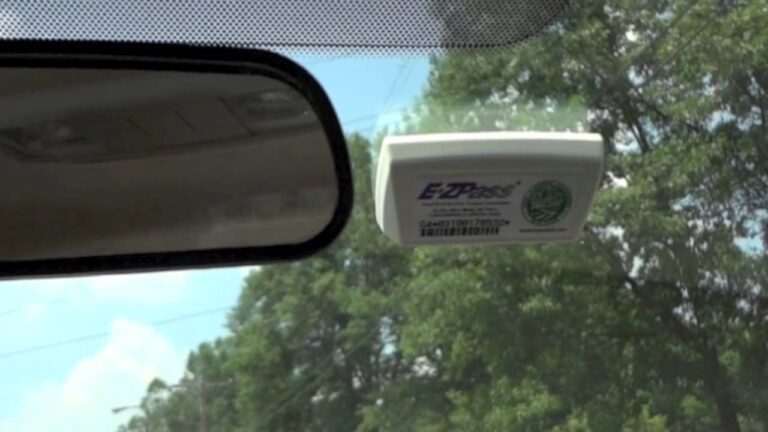
Closing an E-ZPass account sounds like a five-minute job, and sometimes it is. Other times it turns into a month of back and forth because the tag never got returned, a violation was still open, or the form went to the wrong address. Most of those problems are avoidable if you do things in the right order.
This guide covers how to prepare, the three ways to cancel (online, phone and mail), what’s different for Massachusetts and New York accounts, and what happens afterward with your refund and your transponder. I’ll also share the mistakes I see people make, since a toll tag left behind in a sold car can cause real headaches.
Why people cancel and what to think about first
The usual reasons are simple. You’re moving out of state, you’ve stopped driving toll roads, you’re selling or trading a vehicle, or you just don’t want the account anymore. All of those are fine reasons to close it.
Before you do, take a minute to ask whether closing is really the right move. If you’re relocating, your state’s E-ZPass customer service can tell you what makes sense for your situation, and I wouldn’t guess at it here. If you’re only getting rid of one car, you may not need to close the whole account at all, just remove that vehicle. That’s a question for customer service, and it’s worth asking before you cancel something you might want back.
If you’re sure you’re done, good. The rest of this guide is the order I’d follow.
What to do before you cancel
Preparation is most of the job here. I treat it like a repair: gather what you need first, so you aren’t stuck halfway through with the car on the lift and a missing part.
Gather your account information
Have your account number and password handy before you start. Whether you cancel online, by phone or by mail, you’ll be asked to prove the account is yours. If you’ve forgotten the password, reset it before you sit down to cancel, since that’s easier than doing it in the middle of a phone call.
It also helps to know how many tags are on the account. If you’ve got more than one transponder, you’ll need to deal with each of them when you close. Check the glove box, the other car, and the drawer where odd gadgets end up.
Check for violations and outstanding balances
Look for unresolved violations or an outstanding balance, and take care of them first. A violation is what you get when a toll isn’t paid or a tag isn’t read properly, and it can show up on an account even when you think everything is squared away. Closing the account doesn’t make a violation disappear, so you want it settled before you cancel.
Log in and look at your recent activity. If there’s anything you don’t recognize, contact customer service and sort it out now. Doing it while the account is still open gives you more tools to work with, and a clear history makes the whole cancellation go smoother.
Pick your method
You can cancel online, by phone or by mail. Which one fits depends on how comfortable you are with websites, how fast you need it done, and whether you want a paper trail. I’ll go through each one, then compare them side by side.
A short pre-cancellation checklist
- Account number and password in front of you
- All tags located, whether in cars or around the house
- No unresolved violations or outstanding balances
- A pen and paper, or a notes app, for recording confirmation numbers
- Your state’s customer service number, in case you need to call
Three ways to cancel your E-ZPass account
Cancel online
For most people this is the fastest route. You log in to the E-ZPass website for your state with your account credentials, and the process takes a few minutes. Here are the steps:
- Log in to the E-ZPass website with your account credentials.
- Go to the “Account Overview” or “Manage Account” section and select the option to Close Account.
- Follow the instructions on screen to submit your request.
Menu names vary a bit between states, so don’t panic if the wording is different from what I’ve listed. Look for anything that says account profile, account maintenance, or something close. If you can’t find it, a quick call to customer service will point you to the right spot.
When you finish, save the confirmation. Take a screenshot, or write down any confirmation number you’re given. You may need it later if there’s a question about whether and when you closed the account.
Cancel by phone
If you’d rather talk to a person, call the E-ZPass customer service number for your state. It has to be your state’s agency, since each one runs its own account system. Have your account information ready, because they’ll verify who you are before they close anything.
Phone calls work well when you have questions, such as what to do with a damaged tag or how a refund will be handled. Write down the date, the time and the name of the person you spoke with. I know that sounds like overkill, but it’s the cheapest insurance you can buy if a dispute comes up later.
Ask them to tell you exactly what happens next. Do they expect the tag back? Where does it go? How will the refund reach you? Those answers will save you from guessing, and the representative can tell you what applies to your account.
Cancel by mail
Mail is the slowest option, but it leaves a paper record and some people prefer it. Download the Close Account Form, fill it out with the requested details, and mail it along with your E-ZPass tag or tags to the address provided. For New York, the address given is:
E-ZPass
P.O. BOX 149001
Staten Island, NY 10314-9001
Use certified or registered mail. That gives you proof that your tag was delivered, which matters if the agency later says it never arrived. Keep the receipt with your other records.
One more thing about the address. That P.O. box belongs to the New York service center, and it applies to New York accounts. If your account is with another state’s agency, don’t mail your tag to Staten Island. Use the address printed on your own state’s form or given to you by customer service.
The three methods compared
| Method | What you need | Good for | Watch out for |
|---|---|---|---|
| Online | Account login and password | Fast requests and instant confirmation | Menu names differ by state, and tags still need to be handled |
| Phone | Account information for verification | Questions, odd situations, damaged tags | Must call your own state’s number, and notes are up to you |
| Completed Close Account Form and your tag(s) | A paper trail, and people who prefer not to use websites | Slowest option, and the address depends on your state |
Pick whichever one you’ll actually finish. A cancellation you put off is the same as no cancellation, and the account stays open the whole time.
State-specific cancellation steps
E-ZPass isn’t one national agency. It’s a group of toll agencies, and each state runs its own accounts, so the steps change depending on where yours is registered. Here are the two states the source covers.
Canceling E-ZPass in Massachusetts
To cancel an E-ZPass MA account, log in on the Massachusetts E-ZPass website. Once you’re signed in, go to the “Account Maintenance” section and choose the option to close your account. You’ll need to complete and submit the required form.
Make sure you read each screen before you click through. Closing an account is the kind of action where you want to confirm the details, including the tags and any refund information. If something looks unclear, stop and call customer service instead of guessing.
Canceling E-ZPass in New York
For a New York account, visit the E-ZPass New York website and sign in. After you log in, look for the “Account Profile” option on the left-hand side. There you’ll find the “Close Account” link, and you complete the provided form to end your service.
If you’d rather speak with someone, you can call E-ZPass New York at 1-800-333-TOLL (8655). For tag returns, the New York address is:
E-ZPass New York Service Center
Attn: Close Account Processing
PO BOX 149001
Staten Island, New York 10314
If your state isn’t listed
Check your own state’s E-ZPass website or call its customer service line. The general pattern of log in, find the close account option, complete the form and return the tag tends to hold up. The exact menu names, forms and return addresses are where states differ, and I won’t guess at those for you.
What happens after you cancel
Submitting the request isn’t the end of the job. A few things still need to happen on your side, and a couple of them have a deadline or a cost attached.
Refunds and remaining balances
After you cancel, you may be eligible for a refund of any remaining prepaid toll balance. The refund could take a few weeks to process, so don’t expect the money the next day. If you don’t see it after a reasonable wait, contact customer service with your confirmation number.
Two small habits help here. Make sure the account’s payment information and mailing address are current before you close it, since that’s likely how the refund gets to you. Then watch your bank or card statements for it, and keep your records until it shows up.
If your balance is low and you were about to top it up, hold off. Adding money to an account you’re about to close only gives you a bigger refund to chase.
Returning your transponder
Returning the transponder promptly is crucial. If it isn’t returned within the specified period, or if it comes back damaged, there might be fees. The exact period and amounts depend on your state’s agency, so confirm them before you cancel.
Aim to return it in the silver Read Preventive Bag provided by E-ZPass, sent to the address specified on the form you complete when you close the account. The bag is there to keep the tag from being read in transit, and it’s worth using. If you don’t have the bag, call customer service and ask how they want it packaged.
Take the tag off the windshield with some care. Don’t pry at it with a metal tool that could scratch the glass, and don’t crack the housing. Peeling slowly and warming the area a bit can help if the adhesive is stubborn, but follow any instructions your agency gives you.
Keep records of everything
Hold on to every record connected to the closure. That includes forms you sent, confirmation numbers, certified mail receipts, and notes from phone calls. If a question comes up later, those papers are your proof.
I keep mine in one envelope, or a single folder on my phone. It’s boring, but nobody has ever regretted having it. When there’s a dispute about whether you returned a tag, “I think I mailed it” gets you nowhere and a mailing receipt gets you everywhere.
A cancellation timeline you can follow
If you want a plain order of operations, this is the one I’d use.
- Before anything else: gather your account number, password and every tag on the account.
- Check the account: clear any violations or outstanding balances.
- Choose a method: online, phone or mail, based on what you’ll actually complete.
- Submit the request: save the confirmation, screenshot or note the date and time.
- Return the tag(s): use the silver Read Preventive Bag and the address on your form, preferably with certified or registered mail.
- Watch for your refund: expect it to take a few weeks, and follow up if it doesn’t show.
- File your records: keep every form, receipt and confirmation until everything is settled.
Mistakes to avoid when closing an E-ZPass account
These are the slip-ups I see most often, and nearly every one of them costs the driver time or money.
- Cancelling with violations still open. Closing the account doesn’t erase them, so settle them first.
- Forgetting the tag. Cancelling online doesn’t mean you’re done. The transponder still has to go back.
- Mailing to the wrong address. The Staten Island address is for New York. Other states have their own.
- Skipping certified mail. Without proof of delivery, a lost tag is your problem.
- Waiting too long to return the tag. A late or damaged tag can mean fees.
- Leaving the tag in a car you’ve sold. It’s easy to forget until the toll notices start arriving.
- Not saving confirmations. No record means no proof if there’s a question later.
- Calling the wrong state’s number. Use the customer service line for the agency that holds your account.
- Letting the refund slip. If a few weeks pass, follow up with your confirmation number in hand.
A customer came into the shop a while back after selling his truck. He’d cancelled his account online, felt good about it, and tossed the tag in a junk drawer. A month later he got a notice about a tag that was never returned, and it turned a clean closure into a phone-call marathon. The tag wasn’t even expensive, but the hassle was out of proportion to the fix.
Another common one is the car sale. People remove their plates, hand over the keys, and forget there’s a transponder stuck to the windshield. If the buyer drives through a toll point, the tag can still be read. Take it off before the car leaves your driveway, and deal with the account the same day.
What if something goes wrong
Even with good preparation, problems happen. Here’s how I’d handle the most common ones.
You can’t find the close account option
Menu names differ by state. Look under account overview, manage account, account profile or account maintenance. If none of those lead anywhere, call your state’s customer service and ask them to walk you to it.
You can’t find the tag
Check the cars on the account first, including any you’ve sold or parked. Then look in glove boxes, door pockets, and the places things get tossed. If it’s truly gone, call customer service before you cancel and ask what the process and any fees look like. Don’t just close the account and hope nobody notices.
The tag is damaged
The source says damaged transponders may lead to fees. If yours is cracked, broken or partly peeled apart, tell customer service up front. Hiding it doesn’t make it better, and being honest from the start usually goes over better than a surprise on their end.
Your refund hasn’t arrived
A few weeks is normal, according to the source. After that, contact customer service and give them your account number, the date you closed it, and your confirmation number. If you kept your records, this is the point where they pay off.
You get a notice after you’ve closed
Compare the date on the notice to your closure date and your tag return date. If it’s for a trip after you cancelled, gather your confirmation and your certified mail receipt and contact customer service. If the tag was still in a car, the notice may be legitimate, so check before you argue.
Questions drivers ask about closing an account
Can I cancel E-ZPass online?
Yes. Log in with your account credentials, go to the account overview or manage account section, select the option to close the account, and follow the instructions. The wording differs by state, and in New York it’s under “Account Profile.”
Do I have to send the tag back?
You should. The source says promptly returning the transponder is crucial, and that late or damaged tags might mean fees. Use the silver Read Preventive Bag and the address from your form.
Where do I mail the form and tag?
For New York, the address is P.O. Box 149001, Staten Island, NY 10314-9001. If your account is with another state, use the address on your own agency’s form or the one customer service gives you.
How long does a refund take?
It could take a few weeks to process, per the source. If it’s been longer than that, contact customer service with your confirmation number.
What number do I call?
Call the E-ZPass customer service number for your state. For New York, that’s 1-800-333-TOLL (8655).
Should I use certified mail?
I would. Certified or registered mail gives you proof that your tag was delivered, and that proof is worth a few extra dollars at the post office.
The expert verdict
Cancelling an E-ZPass account is something almost any driver can do at home. Gather your account details, clear any violations, submit the request online, by phone or by mail, and send the tag back the right way. The work is more about paperwork than skill, and a bit of organization carries you the whole way.
DIY is reasonable when the account is in good standing, you have all your tags, and your state’s website gives you a clear close account option. It’s also fine if you’re comfortable keeping a folder of confirmations and receipts. Those habits are the difference between a clean closure and a month of follow-up.
Call customer service when something doesn’t line up. That means open violations you don’t understand, a lost or damaged tag, a refund that never arrives, or a notice that shows up after you’ve closed. Staff can see your account and tell you what applies, which is worth more than trying to work it out yourself.
One clear takeaway: clear any violations first, return your tag with proof of delivery, and keep every confirmation until your refund lands.